
AN-3DG10A - TV Accessories SHARP - Free user manual and instructions
Find the device manual for free AN-3DG10A SHARP in PDF.


| Product Type | LCD Shutter 3D Glasses |
| Brand | SHARP |
| Model | AN-3DG10A (also AN-3DG10-S, AN-3DG10-R) |
| Compatibility | SHARP AQUOS 3D TVs |
| Dimensions (W x H x D) | 172.7 x 47.5 x 170.0 mm |
| Weight | 65.0 g (battery included) |
| Power Supply | CR2032 lithium coin cell battery (3 V DC) |
| Battery Life | Approximately 75 hours of continuous use |
| Operating Temperature | 10 °C to 40 °C |
| Lens Type | Liquid crystal shutter |
| Main Functions | 3D viewing, 2D/3D switching, auto power off after 3 minutes without signal |
| LED Indicator | Power on: 3 blinks; 2D mode: 2 blinks; 3D mode: 3 blinks; low battery: 6 blinks; power off: lit 2 seconds |
| Infrared Receiver | Yes, receives signal from TV |
| Included Accessories | 3D glasses, head strap, nose pads (large and small), case, cleaning cloth, precision screwdrivers (Phillips and flat), user manual |
| Care and Cleaning | Use only the provided cloth; do not use solvents; avoid contact with water |
| Safety | Do not disassemble, do not expose to excessive heat, keep out of reach of children (battery ingestion risk), do not use if cracked |
| Battery Replacement | Use a Maxell brand CR2032 battery; observe polarity |
| Warranty | 1 year parts and labor (USA, Canada, Australia, New Zealand) |
Frequently Asked Questions - AN-3DG10A SHARP
User questions about AN-3DG10A SHARP
0 question about this device. Answer the ones you know or ask your own.
Ask a new question about this device
Download the instructions for your TV Accessories in PDF format for free! Find your manual AN-3DG10A - SHARP and take your electronic device back in hand. On this page are published all the documents necessary for the use of your device. AN-3DG10A by SHARP.
USER MANUAL AN-3DG10A SHARP
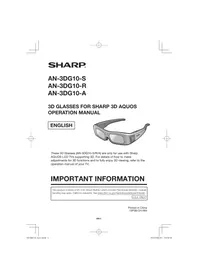
These 3D Glasses (AN-3DG10-S/R/A) are only for use with Sharp AQUOS LCD TVs supporting 3D. For details of how to make adjustments for 3D functions and to fully enjoy 3D viewing, refer to the operation manual of your TV.
IMPORTANT INFORMATION
This product contains a CR Coin Lithium Battery which contains Perchlorate Material - special handling may apply, California residents, See www.dtsc.ca.gov/hazardouswaste/perchlorate/
U.S.A. ONLY
Printed in China
10P08-CH-NM
Thank you for your purchase of the 3D Glasses for Sharp 3D AQUOS. To ensure safety and many years of trouble-free operation of your product, please read the Important Safety Instructions carefully before using this product.
IMPORTANT SAFETY INSTRUCTIONS
3D Glasses
Prevention of accidental ingestion
- Keep the batteries and band accessory out of the reach of small children. Small children can accidentally swallow these parts.
- If a child accidentally swallows any of these parts, seek immediate medical attention.
Do not disassemble
- Do not disassemble or modify the 3D Glasses.
Caution for lithium battery
- Batteries must not be exposed to excessive heat such as direct sunlight or fire.
- Replace only with the same or equivalent type of battery. The battery may explode if improperly replaced.
- Take care not to reverse the battery poles (+ and -) when loading the battery. Follow the correct procedure when loading the battery. Loading the battery incorrectly may damage the battery or cause it to leak battery fluid, which could result in a fire, injury or damage.
Handling the 3D Glasses
- Do not drop, exert pressure on, or step on the 3D Glasses. Doing so may damage the glass section, which may result in injury.
- Be careful not to trap your finger in the hinge section of the 3D Glasses. Doing so may result in injury.
- Pay special attention when children are using this product.
Using the 3D Glasses
- Parents/guardians should monitor children's viewing habits to avoid their prolonged use without rest periods.
- Use the 3D Glasses only for the specified purpose.
- Do not move around while wearing the 3D Glasses. The surrounding area appears dark, which may result in falling or other accidents that may cause injury.
Caring for the 3D Glasses
- Use only the cloth provided with the 3D Glasses to clean the lenses. Remove dust and soil from the cloth. Any dust or other soiling on the cloth may result in scratches on the product. Do not use solvents such as benzene or thinners as doing so may cause the coating to peel off.
- When cleaning the 3D Glasses, take care not to allow water or other fluids to come into contact with the glasses. Always store the 3D Glasses in the case provided when not in use.
- When storing the 3D Glasses, avoid very humid or hot locations.
Viewing 3D images
If you experience dizziness, nausea, or other discomfort while viewing 3D images, discontinue use and rest your eyes. - Do not use the 3D Glasses if they are cracked or broken.

CAUTION
- Not all consumers can experience and enjoy 3D TV. Some people suffer from stereo blindness which prevents them from perceiving the intended depth of 3D entertainment. Also, some people who watch 3D programming may experience initial feelings of motion sickness as they adjust to the picture. Others may experience headaches, eye fatigue or continued motion sickness. Like a roller coaster, the experience is not for everyone.
- The 3D Glasses are precision equipment. Handle them with care.
- Improper use of the 3D Glasses or failure to follow these instructions can result in eye strain.
- If you experience dizziness, nausea, or other discomfort while viewing 3D images, immediately discontinue use of the 3D Glasses. Using the binocular disparity 3D system of the TV with incompatible 3D broadcasts or software can make images appear with a cross talk blur or create overlapping images.
- When viewing 3D images continuously, be sure to take a break periodically to prevent eye strain.
- If you are nearsighted or farsighted or have astigmatism or a different level of eyesight between the left and right eyes, you should take the necessary steps, such as wearing eyeglasses, to correct your eyesight before viewing 3D images. The 3D Glasses can be worn over eyeglasses.
- When viewing 3D images, keep the 3D Glasses horizontally level with the TV screen. If you tilt the 3D Glasses with respect to the TV screen, the images viewed by the left and right eyes may appear significantly different or images may appear overlapping. View 3D images at the appropriate distance from the TV screen. The recommended distance is three times the effective height of the TV screen.
- Be careful of your surroundings when viewing 3D images. When you view 3D images, objects may appear at a distance closer or farther than the actual TV screen. This may cause you to misjudge the distance to the TV screen and possibly result in injury if you accidentally hit the screen or surrounding objects.
- The 3D Glasses are only recommended for people ages 5 and older.
- When children are viewing 3D images, be sure a parent or guardian is present. Monitor children viewing 3D images, and if they show signs of discomfort, immediately discontinue use of the 3D Glasses.
- People with a known history of photosensitivity and people with heart problems or poor health should not use the 3D Glasses. This can worsen existing health conditions.
- Do not use the 3D Glasses for other purposes (such as general eyeglasses, sunglasses, or protective goggles).
- Do not use the 3D function or 3D Glasses while walking or moving around. This may result in injuries due to running into objects, tripping, and/or falling.
- When using the 3D Glasses, take care not to accidentally strike the TV screen or other people. Viewing 3D images may cause you to misjudge the distance to the TV screen and accidentally strike the screen, resulting in possible injury.
Supplied Accessories
Make sure the following accessories are provided with the 3D Glasses.
3D Glasses (x1)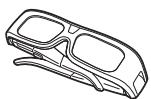
3D Glasses band * (x1)
Nose pad * (Large x1, small x1)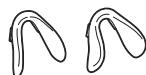
Glasses case (x1)
Cleaning cloth (x1)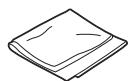
Precision screwdriver (Phillips x1, slotted x1)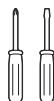
Operation Manual
- Use the 3D Glasses band and nose pad as needed.
NOTE
The illustrations above are for explanation purposes and may vary slightly from the actual accessories.
Part Names
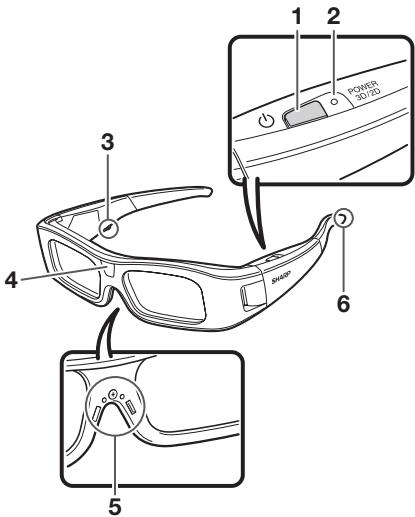
Attaching the Nose Pad
Attach either of the supplied nose pads as needed (such as when the glasses do not fit properly). The glasses come with a large and small nose pad.
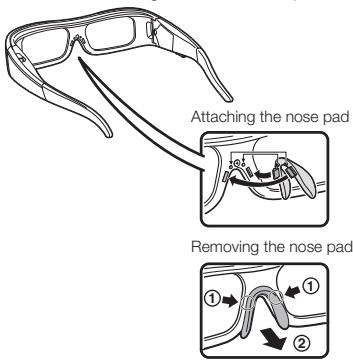
1 Power button
- Press for at least 2 seconds to turn on and off the 3D Glasses.
- When the 3D Glasses are turned on, pressing this button switches between 2D and 3D modes.
2 LED light
- Blinks 3 times when the power is turned on.
- Blinks 2 times when 2D mode is selected.
- Blinks 3 times when 3D mode is selected.
- Blinks 6 times when the battery power is low.
- Lights for 2 seconds when the power is turned off.
3 Service terminal
This terminal is for service use only.
Please do not connect any other device to this terminal.
4 Infrared receiver
Receives an infrared signal sent from the TV. The 3D Glasses turn off automatically after 3 minutes if no signal is received from the TV.
5 Nose pad mount
The dedicated nose pad can be mounted here.
6 3D Glasses band mount
The dedicated 3D Glasses band can be mounted here.
NOTE
- Do not soil or apply stickers or other obstacles to the infrared receiver. Doing so may block signals from the TV and prevent the 3D Glasses from working correctly.
- Interference from other infrared communications equipment may prevent you from viewing 3D images correctly.
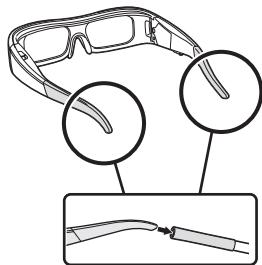
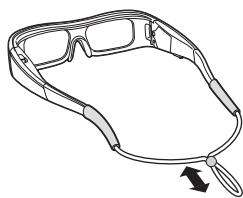
Attaching the 3D Glasses Band
Attach the supplied 3D Glasses band strap as needed (such as when the glasses do not fit properly). Insert the ends of the 3D Glasses into the 3D Glasses band until they are secure.
- Pull the cord stopper on the strap to adjust the strap length.
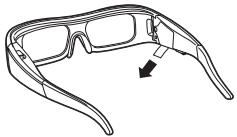
Before Using the 3D Glasses
Before using the 3D Glasses for the first time, remove the insulating sheet attached to them.
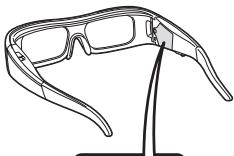
Replacing the Battery
The battery has an expected service life of approximately 75 hours.
- When the battery power is low, the LED light blinks 6 times after the power is turned on.
- When replacing the button battery, use only the designated battery (Maxell branded CR2032 lithium button battery).
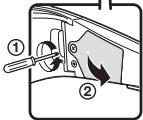
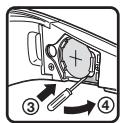
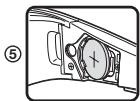
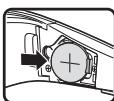
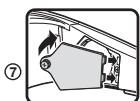
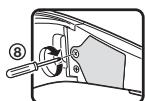
① Loosen the screw used to secure the battery cover. ② Remove the battery cover. ③ Place the tip of the slotted precision screwdriver into the opening between the battery and the socket. ④ Lift up the battery while taking care not to get the screwdriver caught on the metal latch. When the battery comes loose from the socket, pick it out with your fingers. ⑥ Hook a new battery to the metal latch and insert it into the socket. ⑦ Close the battery cover. ⑧ Insert the screw to secure the battery cover.
(6)
NOTE
- Take care not to reverse the battery poles (+ and -) when loading the battery.
- Used batteries should be disposed of strictly in accordance with the applicable local laws and regulations.
Using the 3D Glasses
Turning On/Off the Power
Turn on the power of the 3D Glasses.
- Press the power button for at least 2 seconds. The LED light blinks 3 times.
Turn off the power on the 3D Glasses.
- Press the power button for at least 2 seconds. The LED light lights for 2 seconds.
NOTE
When the battery power is low, the LED light blinks 6 times after the power is turned on.
Switching to 3D and 2D Mode
When viewing 3D images, you can press the power button to switch between 2D and 3D modes. This is useful when several people are viewing 3D images on the same TV with some people wanting to watch in 3D and some people wanting to watch in 2D.
Viewing 2D images
When you press the power button twice while viewing 3D images, the LED light blinks 2 times and the 3D images switch to 2D images.
Viewing 3D images
When you press the power button twice while viewing 2D images, the LED light blinks 3 times and the 2D images switch to 3D images.
Usage Range of the 3D Glasses
The 3D Glasses can be used by receiving an infrared signal sent from the TV. The 3D Glasses turn off automatically after 3 minutes if no signal is received from the TV.
NOTE
- These 3D Glasses are only for use with Sharp LCD TVs supporting 3D.
3D Glasses lenses
- Do not apply pressure to the lenses of the 3D Glasses. Also, do not drop or bend the 3D Glasses.
- Do not scratch the surface of the lenses of the 3D Glasses with a pointed instrument or other object. Doing so may damage the 3D Glasses and reduce the quality of the 3D image.
- Use only the cloth provided with the 3D Glasses to clean the lenses.
3D Glasses infrared receiver
- Do not allow the infrared receiver to become dirty, and do not attach stickers to or otherwise cover the infrared receiver. Doing so may prevent the receiver from operating normally.
- If the 3D Glasses are affected by other infrared data communication equipment, the 3D images may not be displayed correctly.
Caution during viewing
- Do not use devices that emit strong electromagnetic waves (such as cellular phones or wireless transceivers) near the 3D Glasses. Doing so may cause the 3D Glasses to malfunction.
- The 3D Glasses cannot operate fully at extreme high or low temperatures. Please use them within the specified usage temperature range.
- If the 3D Glasses are used in a room with fluorescent lighting (50/60 Hz), the light within the room may appear to flicker. In this case, either darken or turn off the fluorescent lights when using the 3D Glasses.
- Wear the 3D Glasses correctly. 3D images will not be correctly visible if the 3D Glasses are worn upside down or back-to-front.
- Other displays (such as computer screens, digital clocks, and calculators) may appear dark and difficult to view while wearing the 3D Glasses. Do not wear the 3D Glasses when watching anything other than 3D images. If you lie on your side while watching the TV with 3D Glasses, the picture may look dark or may not be visible.
- Be sure to stay within the viewing angle and optimum TV viewing distance when watching 3D images. Otherwise, you may not be able to enjoy the full 3D effect.
- The 3D Glasses may not work properly if there is any other 3D product or electronic devices turned on near the glasses or TV. If this occurs, turn off the other 3D product or electronic devices or keep the devices as far away as possible from the 3D Glasses.
- Stop using this product in any of the following situations:
- When images consistently appear doubled while you are wearing the 3D Glasses
- When you have difficulty perceiving the 3D effect
- If the 3D Glasses are faulty or damaged, stop using them immediately. Continued use of the 3D Glasses may cause eye fatigue, headaches and illness.
- If you have any abnormal skin reaction, stop using the 3D Glasses. In very rare instances, such reactions may be due to an allergic reaction to the coating or materials used.
- If your nose or temples become red or you experience any pain or itchiness, stop using the 3D Glasses. Pressure caused by long periods of use may lead to such reactions and may result in skin irritation.
Troubleshooting
| Problem | Possible Solution |
| · Images displayed in 3D mode appear doubled while you are wearing the 3D Glasses. | · Is the power of the 3D Glasses turned on? Press the power button for at least 2 seconds to turn on the 3D Glasses. |
| · Images displayed in 3D mode appear 2D while you are wearing the 3D Glasses. | · Are the 3D Glasses set to 2D mode? Press the power button twice while viewing 2D images, the LED light blinks 3 times and the 2D images switch to 3D images. |
Specifications
| Product | 3D Glasses |
| Model number | AN-3DG10-S/AN-3DG10-R/AN-3DG10-A |
| Lens type | Liquid crystal shutter |
| Power supply | 3 V DC |
| Battery | Lithium button battery (CR2032 x 1) |
| Battery life | Approx. 75 hours of continuous use |
| Dimension (W x H x D) | 172.7 x 47.5 x 170.0 mm 613/16 x 17/8 x 645/64 inch |
| Weight | 65.0 g/0.2 lbs. (including the lithium button battery) |
| Operating temperature | 10°C to 40°C/50°F to 104°F (The 3D Glasses cannot operate fully at extreme high or low temperatures. Please use them within the specified usage temperature range.) |
These symbols displayed on the product and the individual carton package of the product are symbols about the environment in Japan, China and the EU.


EU only
For Japan only
For China only
For China only
For the EU only
NOTE
- Please contact your local authority for the correct method of disposal of this product and/or packaging.
SHARP®
SHARP CORPORATION
For location of the nearest Sharp Authorized Service, or to obtain product literature, accessories, supplies, or customer assistance, please call 1-800-BE-SHARP.
LIMITED WARRANTY
For USA customers only
CONSUMER LIMITED WARRANTY
SHARP ELECTRONICS CORPORATION warrants to the first consumer purchaser that this Sharp brand product (the "Product"), when shipped in its original container, will be free from defective workmanship and materials, and agrees that it will, at its option, either repair the defect or replace the defective Product or part thereof with a new or remanufactured equivalent at no charge to the purchaser for parts or labor for the period(s) set forth below.
This warranty does not apply to any appearance items of the Product or if the serial number or model number affixed to the Product has been removed, defaced, changed, altered or tampered with. This warranty does not cover installation or signal reception problems. This limited warranty will not apply if the Product has been or is being used in a commercial setting or application; this warranty is meant solely for the non-commercial, household use of the Product by consumers in the United States and Canada. The product may be subject to changes in technology, or in other settings, there are warranties available to cover your use of this Product, the terms of which may vary. Please contact 1-888-GO-SHARP for further information.
In order to enforce your rights under this limited warranty, you should follow the steps set forth below. You must be able to provide proof of purchase to the servicer, which proof must include the date of purchase.
To the extent permitted by applicable state law, the warranties set forth are in lieu of, and exclusive of, all other warranties, express or implied. Specifically, ALL OTHER WARRANTIES OTHER THAN THOSE SET FORTH HERE ARE EXCLUDED, INCLUDING ALL EXPRESS AND IMPLIED WARRANTIES, INCLUDING THE WARRANTIES OF MERCHANTABILITY, FITNESS FOR USE, AND FITNESS FOR A PARTICULAR PURPOSE ARE SPECIFICALLY EXCLUDED. IF, UNDER APPLICABLE STATE LAW, IMPLIED WARRANTIES MAY NOT VALIDLY BE DISCLAIMED OR EXCLUDED, THE DURATION OF SUCH IMPLIED WARRANTIES IS LIMITED TO THE PERIOD(S) FROM THE DATE OF PURCHASE SET FORTH BELOW. THIS WARRANTY GIVES YOU SPECIFIC LEGAL RIGHTS. YOU MAY ALSO HAVE OTHER RIGHTS WHICH VARY FROM STATE TO STATE.
The warranties given herein shall be the sole and exclusive warranties granted by Sharp and shall be the sole and exclusive remedy available to the purchaser and only for the time periods set forth herein. No other representations or promises made by anyone are permitted. Correction of defects, in the manner and for the period of time described herein, shall constitute complete fulfillment of all liabilities and responsibilities of Sharp to the purchaser with respect to the Product, and shall constitute full satisfaction of all claims, whether based on contract, negligence, strict liability or otherwise. Sharp does not warrant nor shall Sharp be liable, or in any way responsible, for Products which have been subject to abuse (including, but not limited to, improper voltage), accident, misuse, negligence, lack of reasonable care, alteration, modification, tampering, misuse, improper operation or maintenance or any damages or defects in the Product which were caused by repairs or attempted repairs performed by anyone other than a Sharp authorized servicer. Nor shall Sharp be liable or in any way responsible for any incidental or consequential economic or property damage. Some states do not allow limits on warranties or on remedies for breach in certain transactions; in such states, the limits herein may not apply.
THIS LIMITED WARRANTY IS VALID ONLY IN THE FIFTY (50) UNITED STATES, THE DISTRICT OF COLUMBIA. AND PUERTO RICO.
Model Specific Section
Your Product Model Number & Description:
AN-3DG10-S/AN-3DG10-R/AN-3DG10-A 3D Glasses
(Be sure to have this information and Proof of Purchase available when you need service for your Product.)
Warranty Period for this Product:
One (1) year parts and labor from date of purchase.
Additional Exclusions:
User replaceable batteries are not covered by this Limited Warranty.
What to do to Obtain Service:
Warranty service is available from a Sharp Authorized Service Center located in the United States.
To receive repair handling instructions, please contact Sharp toll free at 1-800-BE-SHARP (1-800-237-4277).
If it is necessary to ship the Product for servicing, please ensure it is shipped prepaid, insured and packaged securely. Sharp shall not be responsible for lost, stolen or misdirected mail or for damage to the product incurred during shipping. Please have proof of purchase available when requesting warranty service.
TO OBTAIN PRODUCT INFORMATION OR PURCHASE ACCESSORIES, CALL 1-800-BE-SHARP OR VISIT www.SharpUSA.com
LIMITED WARRANTY
Consumer Electronics Products
Congratulations on your purchase!
Sharp Electronics of Canada Ltd. (hereinafter called "Sharp") gives the following express warranty to the first consumer purchaser for this Sharp brand product, when shipped in its original container and sold or distributed in Canada by Sharp or by an Authorized Sharp Dealer:
Sharp warrants that this product is free, under normal use and maintenance, from any defects in material and workmanship. If any such defects should be found in this product within the applicable warranty period, Sharp shall, at its option, repair or replace the product as specified herein.
This warranty shall not apply to:
(a) Any defects caused or repairs required as a result of abusive operation, negligence, accident, improper installation or inappropriate use as outlined in the owner's manual. (b) Any Sharp product tampered with, modified, adjusted or repaired by any party other than Sharp, Sharp's Authorized Service Centres or Sharp's Authorized Servicing Dealers. (c) Damage caused or repairs required as a result of the use with items not specified or approved by Sharp, including but not limited to head cleaning tapes and chemical cleaning agents. (d) Any replacement of accessories, glassware, consumable or peripheral items required through normal use of the product including but not limited to earphones, remote controls, AC adapters, batteries, temperature probe, stylus, trays, filters, belts, ribbons, cables and paper. (e) Any cosmetic damage to the surface or exterior that has been defaced or caused by normal wear and tear. (f) Any damage caused by external or environmental conditions, including but not limited to transmission line/power line voltage or liquid spillage. (g) Any product received without appropriate model, serial number and CSA/cUL markings. (h) Any products used for rental or commercial purposes. (i) Any installation, setup and/or programming charges.
Should this Sharp product fail to operate during the warranty period, warranty service may be obtained upon delivery of the Sharp product together with proof of purchase and a copy of this LIMITED WARRANTY statement to an Authorized Sharp Service Centre or an Authorized Sharp Servicing Dealer. In home warranty service may be provided at Sharp's discretion on any Sharp television with the screen size of 27" or larger and on any Sharp Over-the-Range Microwave Oven.
This warranty constitutes the entire express warranty granted by Sharp and no other dealer, service centre or their agent or employee is authorized to extend, enlarge or transfer this warranty on behalf of Sharp. To the extent the law permits, Sharp disclaims any and all liability for direct or indirect damages or losses or for any incidental, special or consequential damages or loss of profits resulting from a defect in material or workmanship relating to the product, including damages for the loss of time or use of this Sharp product or the loss of information. The purchaser will be responsible for any removal, reinstallation, transportation and insurance costs incurred. Correction of defects, in the manner and period of time described herein, constitute complete fulfillment of all obligations and responsibilities of Sharp to the purchaser with respect to the product and shall constitute full satisfaction of all claims, whether based on contract, negligence, strict liability or otherwise.
WARRANTY PERIODS:
Audio Product
BD/DVD Product
Projection
LCD TV
3D Glasses
Microwave Oven
Air Purifier
Portable Air Conditioner
Parts & Labour (exceeds noted)
1 year 1 year 1 year (lamp 90 days) 1 year 1 year 1 year (magnetron component-4 additional years) 1 year 1 year
To obtain the name and address of the nearest Authorized Sharp Service Centre or Dealer, please contact:
SHARP ELECTRONICS OF CANADA LTD. 335 Britannia Road East, Mississauga, Ontario L4Z 1W9
For more information on this Warranty, Sharp Extended Warranty Offers, Sharp Canada Products, Accessory Sales, Dealer or Service
Locations, please call (905) 568-7140
Visit our Web site: www.sharp.ca



SHARP
FOR LOCATION ENQUIRIES WITHIN
AUSTRALIA
SHARP APPROVED SERVICE CENTRE
(LOCAL CALL COST APPLY WITHIN AUSTRALIA)
SHARP CORPORATION OF AUSTRALIA PTY LTD
SHARP
FOR LOCATION ENQUIRIES WITHIN
NEW ZEALAND
SHARP APPROVED SERVICE CENTRE
Consumer Electronic Products
Congratulations on Your Purchase!
This Sharp product is warranted against faults in materials and manufacture for a period of twelve (12) months from the date of original purchase.
If service is required during the warranty period, please contact your nearest Sharp Approved Service Centre. These repairs would be carried out at no charge to the owner, subject to the conditions specified herein.
The owner is responsible for any transportation and insurance costs if the product has to be returned for repair.
This warranty does not extend to accessories or defects or injuries caused by or resulting from causes not attributable to faulty parts or the manufacture of the product, including but not limited to, defect or injury caused by or resulting from misuse, abuse, neglect, accidental damage, improper voltage, liquid spillage, vermin infestation, software, or any alterations made to the product which are not authorised by Sharp.
Please retain your sales documentation, as this should be produced to validate a warranty claim.
This warranty is in addition to and in no way limits, varies or excludes any express and implied rights and remedies under any relevant legislation in the country of sale.
IMPORTANT DO NOT RETURN THIS DOCUMENT TO SHARP
For your reference, please enter the particulars of your purchase below and retain, with your purchase documentation.
Model No.
Serial No.
Date of Purchase
Retailer
SHARP
P 1
IMPORTANT NOTICE: This warranty applies only to products sold in Australia & New Zealand.
- IMPORTANT INFORMATION
- IMPORTANT SAFETY INSTRUCTIONS
- D GLASSES
- PREVENTION OF ACCIDENTAL INGESTION
- DO NOT DISASSEMBLE
- CAUTION FOR LITHIUM BATTERY
- HANDLING THE 3D GLASSES
- USING THE 3D GLASSES
- CARING FOR THE 3D GLASSES
- VIEWING 3D IMAGES
- CAUTION
- SUPPLIED ACCESSORIES
- OPERATION MANUAL
- NOTE
- PART NAMES
- ATTACHING THE NOSE PAD
- POWER BUTTON
- LED LIGHT
- SERVICE TERMINAL
- INFRARED RECEIVER
- NOSE PAD MOUNT
- D GLASSES BAND MOUNT
- ATTACHING THE 3D GLASSES BAND
- BEFORE USING THE 3D GLASSES
- REPLACING THE BATTERY
- TURNING ON/OFF THE POWER
- SWITCHING TO 3D AND 2D MODE
- VIEWING 2D IMAGES
- USAGE RANGE OF THE 3D GLASSES
- D GLASSES LENSES
- D GLASSES INFRARED RECEIVER
- CAUTION DURING VIEWING
- SHARP®
- LIMITED WARRANTY
- CONSUMER LIMITED WARRANTY
- THIS LIMITED WARRANTY IS VALID ONLY IN THE FIFTY (50) UNITED STATES, THE DISTRICT OF COLUMBIA. AND PUERTO RICO
- MODEL SPECIFIC SECTION
- CONSUMER ELECTRONICS PRODUCTS
- CONGRATULATIONS ON YOUR PURCHASE
- WARRANTY PERIODS
- SHARP
- AUSTRALIA
- CONSUMER ELECTRONIC PRODUCTS
- IMPORTANT DO NOT RETURN THIS DOCUMENT TO SHARP
Brand : SHARP
Model : AN-3DG10A
Category : TV Accessories