Slate Queen - Lit médicalisé Dawn House - Free user manual and instructions
Find the device manual for free Slate Queen Dawn House in PDF.


User questions about Slate Queen Dawn House
0 question about this device. Answer the ones you know or ask your own.
Ask a new question about this device
Download the instructions for your Lit médicalisé in PDF format for free! Find your manual Slate Queen - Dawn House and take your electronic device back in hand. On this page are published all the documents necessary for the use of your device. Slate Queen by Dawn House.
USER MANUAL Slate Queen Dawn House
text_image
DAWN HOUSE APP MANUAL VERSION 2.0.0TABLE OF CONTENTS
App Installation 3
New User Registration 4
Set Up Your Dawn House Bed 10
In-App Remote 15
Health Home Screen 17
Health Data 22
Routines 25
Sharing: Dawn House Bed Users 30
Sharing: Family Accounts 35
Sign In & FaceID 39
Reset Your Password 43
Account & App Settings 45
APP
INSTALLATION

ON IOS
In the iOS App Store, search for "Dawn House"
or select the link below:
https://apps.apple.com/us/app/dawn-house/id1580189611

ON ANDROID
In the Google Play App Store, search for
"Dawn House" or select the link below:
https://androidapk-s.com/app/1580189611/dawn-house
NEW USER REGISTRATION
THERE ARE FOUR WAYS TO REGISTER:
- Register by email
- Register with Facebook
- Register with Gmail
- Register with Apple (iOS Users only)
After you will proceed to set up your Dawn House bed or set up a family sharing report-only account.
REGISTER BY
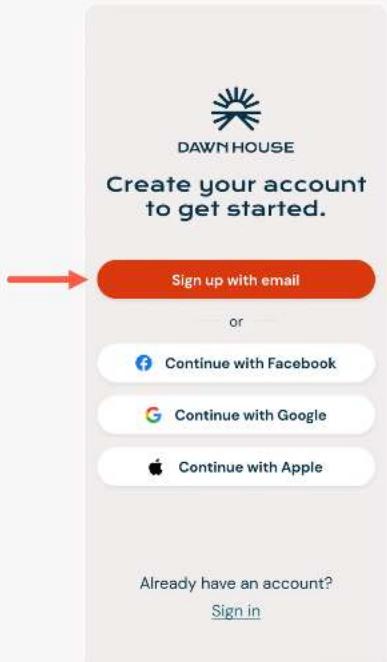
- To register with your email address, select the button "Sign up with email."
- On the next screen, enter your email and create a password. Your password must be at least 8 characters and include any special character (ex. !@#\$%).
- You must enter the same password twice then select the button for "Create my account."
text_image
DAWN HOUSE Create your account to get started. Sign up with email or Continue with Facebook Continue with Google Continue with Apple Already have an account? Sign in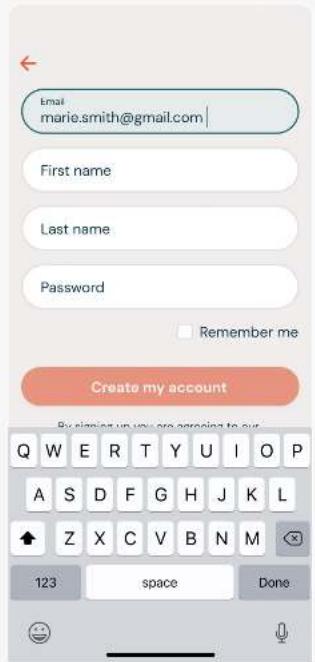
text_image
Email marie.smith@gmail.com First name Last name Password Remember me Create my account By signing up you are ongoing to our Q W E R T Y U I O P A S D F G H J K L Z X C V B N M 123 space Done
text_image
Email marie.smith@gmail.com First name Marie Last name Smith Password Repeat password Remember me Create my account By signing up you are agreeing to our Terms of Service and Privacy PolicyNEW USER REGISTRATION
REGISTER WITH
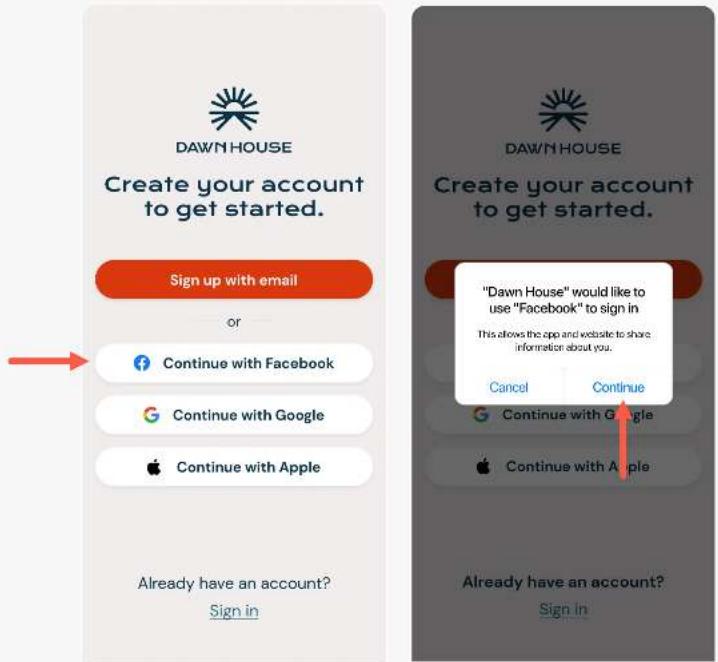
- To register with your Facebook account, select "Continue with Facebook".
- You will see the pop up modal asking permission to open Facebook. Select "Continue".
- You will be prompted to log into your Facebook account and grant permission to Dawn House.
text_image
DAWN HOUSE Create your account to get started. Sign up with email or Continue with Facebook Continue with Google Continue with Apple Already have an account? Sign in "Dawn House" would like to use "Facebook" to sign in This allows the app and website to share information about you. Cancel Continue Continue with Google Continue with Apple Already have an account? Sign InNEW USER REGISTRATION
REGISTER WITH
- To register with your Facebook account, select "Continue with Google".
- You will see the pop up modal asking permission to open Gmail. Select "Continue".
- You will be prompted to log into your Gmail account and grant permission to Dawn House.

text_image
DAWN HOUSE Create your account to get started. Sign up with email or Continue with Facebook Continue with Google Continue with Apple Already have an account? Sign in "Dawn House" would like to use "Google" to sign in This allows the app and website to share information about you. Cancel Continue Continue with Google Continue with Apple Already have an account? Sign InNEW USER REGISTRATION
REGISTER WITH
APPLE (iOS Users Only)
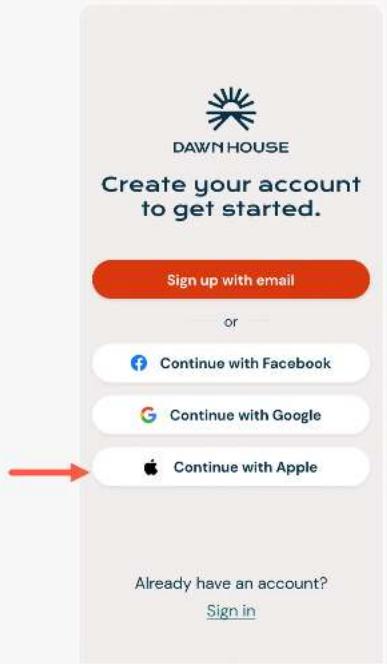
- To register with your Apple ID, select "Continue with Apple".
- You will see the Apple menu expansion. You can choose to register with your Apple ID or with a hidden email that will forward to your Apple ID email.
- Make your selection then press "Continue".
text_image
DAWN HOUSE Create your account to get started. Sign up with email or Continue with Facebook Continue with Google Continue with Apple Already have an account? Sign in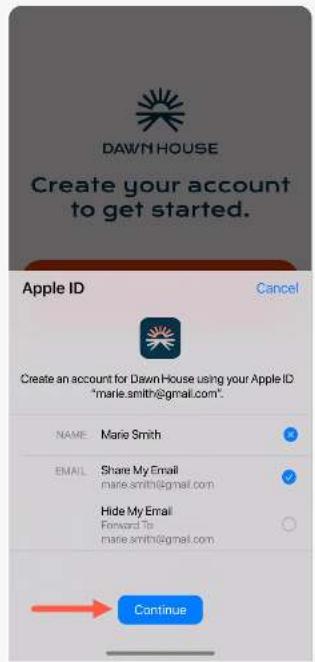
text_image
DAWN HOUSE Create your account to get started. Apple ID Cancel Create an account for DawnHouse using your Apple ID "marie.smith@gmail.com". NAME: Marie Smith EMAIL: Share My Email marie.smith@gmail.com Hide My Email Forward To marie.smith@gmail.com ContinueNEW USER REGISTRATION
SELECT APP
USE INTENT
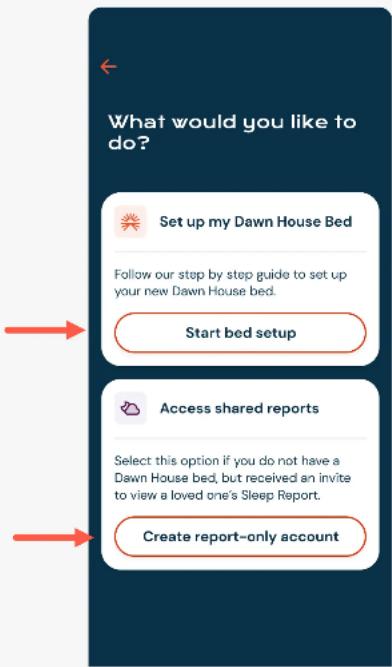
If you have received your Dawn House bed or want to reconnect your existing bed, select the button for "Start bed setup". Proceed to Page 10 of the manual.
If you received an invitation to set up a Dawn House account to view a loved one's sleep report, select the button for "Create report-only account." Proceed to Page 35 of the manual.
text_image
What would you like to do? Set up my Dawn House Bed Follow our step by step guide to set up your new Dawn House bed. Start bed setup Access shared reports Select this option if you do not have a Dawn House bed, but received an invite to view a loved one's Sleep Report. Create report-only accountSET UP YOUR DAWN HOUSE BED
TO SET UP YOUR DAWN HOUSE BED:
- Answer the profile questions
- Scan the QR code on your bed
- Connect to your WiFi
SET UP YOUR DAWN HOUSE BED
ANSWER
PROFILE
QUESTIONS
After you register your account, you will be asked a few questions to calibrate your bed.

text_image
When were you born? September 1952 October 1953 November 1954 December 1955 January 1956 February 1957 March 1958 Continue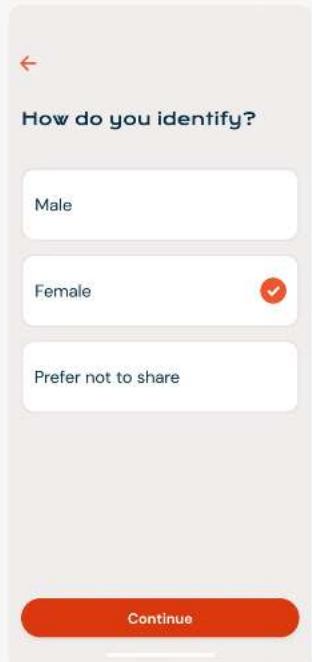
text_image
How do you identify? Male Female Prefer not to share Continue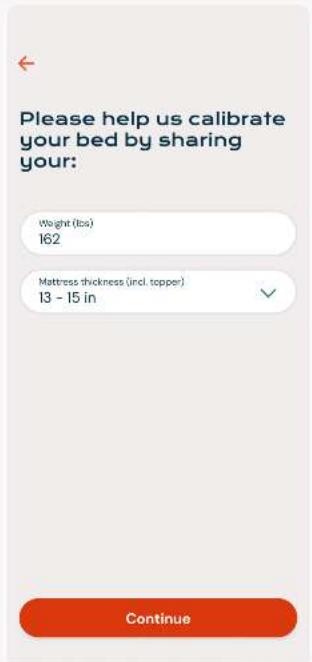
text_image
Please help us calibrate your bed by sharing your: Weight (lbs) 162 Mattress thickness (incl. topper) 13 - 15 in ContinueSET UP YOUR DAWN HOUSE BED
FIND YOUR
QR CODE
You will need to find the QR code to scan and connect to the Dawn House app.
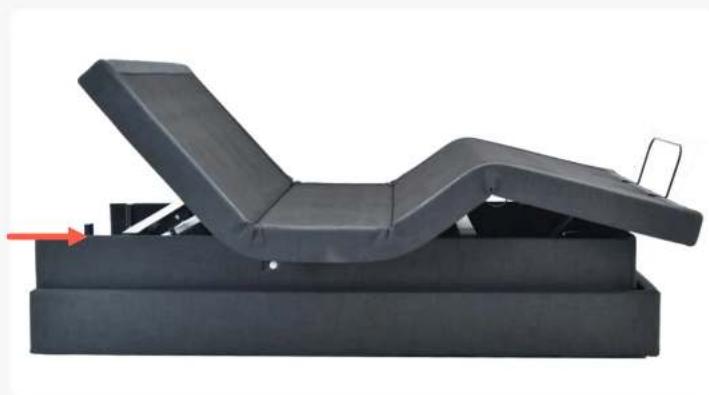
- Shift your bed to a head raised position
- Look behind the headboard on the bed base to find the QR code
- The QR code will look like the image below, with a large symbol and a 16-digit character code beneath it:
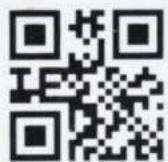
KSWF04S000003289
natural_image
Black adjustable massage chair with open lid and base, no visible text or symbols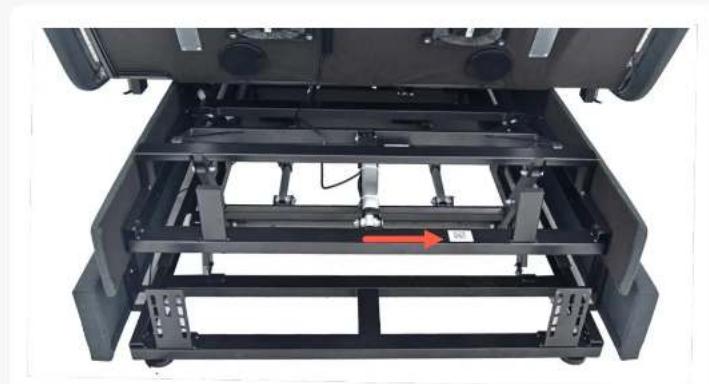
natural_image
Interior view of a vehicle chassis frame with visible structural components and a red arrow indicating a motion direction (no text or symbols)SET UP YOUR DAWN HOUSE BED
SCAN THE
QR CODE
Next you will be prompted to connect to your bed by scanning the QR code located on your bed base.
You will first see a prompt to allow access to your phone's Bluetooth and Location settings. This is needed to bind your connection to the bed.
After, scan with your camera or manually enter the QR code located on your Dawn House bed base.

text_image
Step 1 of 3 To connect your bed, scan the QR code. The QR code is located on your bed base and looks like the image above. Scan QR code with camera or Manually type in QR code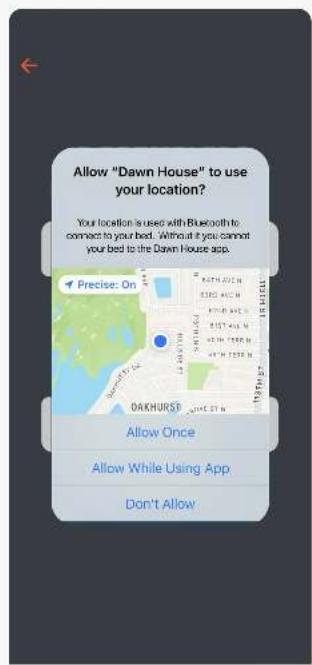
text_image
Allow "Dawn House" to use your location? Your location is used with Bluetooth to connect to your bed. Without it you cannot your bed to the Dawn House asp. Precise: On Allow Once Allow While Using App Don't Allow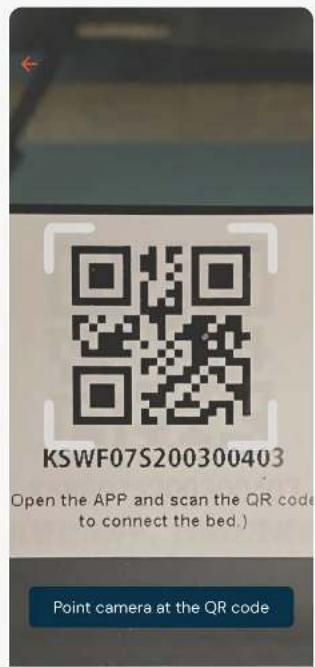
text_image
KSWF07S200300403 Open the APP and scan the QR code to connect the bed.) Point camera at the QR codeSET UP YOUR DAWN HOUSE BED
CONNECT TO
YOUR WIFI
After you scan the QR code you must enter your Wi-Fi password to complete the connection to your Dawn House bed.
The app will ask for the Wi-Fi password that you are currently connected to.
Please make sure to connect to the Wi-Fi network with the strongest signal in your bedroom. To change the network, tap the "Select another network" link to choose another.

text_image
Step 2 of 3 Enter the wifi password for your home network. HomeWifi413 Wifi Password Or select another network Q W E R T Y U I O P A S D F G H J K L Z X C V B N M 123 space Done
text_image
Step 2 of 3 Select your wifi network: HomeWifi413 HomeWifi413_5G MikesHouse_WifiIN—APP REMOTE
You can operate your Dawn House bed with the physical remote or the in-app remote.
Please note: You must use your physical remote to set bed presets.
IN-APP REMOTE
ACCESS YOUR
REMOTE
Tap the blue circle button in the bottom navigation to open the in-app remote. This will enable you to control your bed from your phone.
Here you can use the in-app remote to operate your bed. To close the remote, select the "Close" button in the top right.
For more help, you can open the in-app remote tutorial from the link "View remote tutorial →"
Or if you prefer, you can reference the One Page Remote Cheat Sheet that came with your bed, or access the full Remote User Guide below:
https://dawnhouseliving.com/pages/manuals-and-instructions

text_image
Hi Marie Feeling rested? Looks like you had more deep sleep than normal. Total Sleep 7 hr 42 min 10:03 PM - 5:45 AM Deep Sleep 2 hr 15 min 29% of your evening rest Light Sleep 4 hr 42 min 61% of your evening rest Health Remote Sharing Routine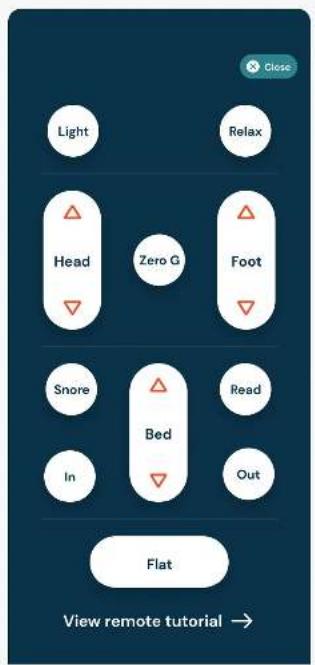
flowchart
graph TD
    A["Light"] --> B["Head"]
    B --> C["Zero G"]
    C --> D["Foot"]
    D --> E["Bed"]
    E --> F["In"]
    F --> G["Out"]
    G --> H["Flat"]
    H --> I["View remote tutorial"]
HEALTH HOME SCREEN
Once you into log into the Dawn House app, you will be automatically redirected to the Health Home Screen. Your view here will change with each night of rest.
HEALTH HOME SCREEN
YOUR HEALTH
HOME SCREEN:
FIRST VISIT
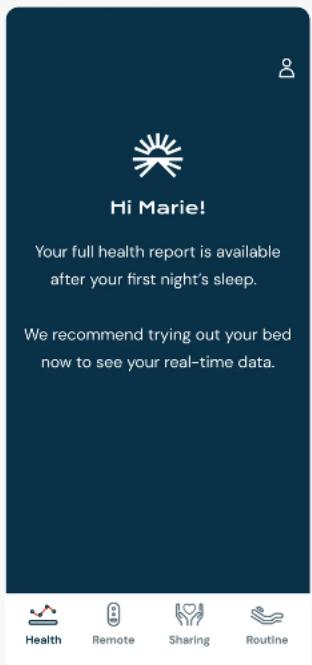
When you first set up the Dawn House app you can lay down and test out your bed and see the real-time data metrics for your heart and respiratory rate.
Your health dashboard will grow and change as additional data points are collected.
text_image
Hi Marie! Your full health report is available after your first night's sleep. We recommend trying out your bed now to see your real-time data.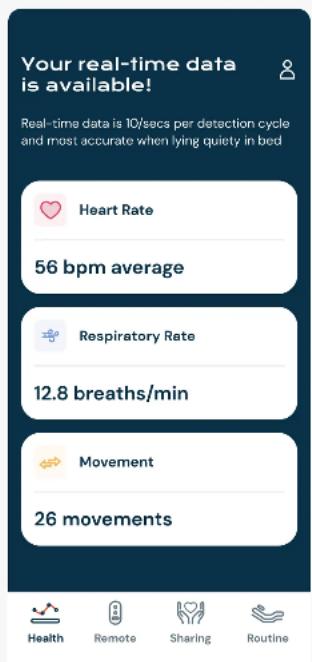
text_image
Your real-time data is available! Real-time data is 10/sec per detection cycle and most accurate when lying quietly in bed Heart Rate 56 bpm average Respiratory Rate 12.8 breaths/min Movement 26 movements Health Remote Sharing RoutineHEALTH HOME SCREEN
YOUR HEALTH
HOME SCREEN:
SLEEP REPORT
Your Dawn House bed includes state-of-the-art in-home wellness monitoring that measures key aspects of your sleep cycle and other important health metrics.
After your first evening's rest, your sleep report will be generated. With time, you will be able to identify patterns and help manage your health.
Click on any health card to see more details about this specific health metric.

text_image
Hi Marie Feeling rested? Looks like you had more deep sleep than normal. Total Sleep 7 hr 42 min 10:03 PM - 5:45 AM Deep Sleep 2 hr 15 min 29% of your evening rest Light Sleep 4 hr 42 min 61% of your evening rest Health Remote Sharing Routine 12.8 breaths/min 11.6 average Snoring 2 times, 35 minutes Movement 26 movements 21 average View More Health Stats View real-time data Health Remote Sharing RoutineHEALTH HOME SCREEN
YOUR HEALTH
HOME SCREEN:
REAL-TIME DATA
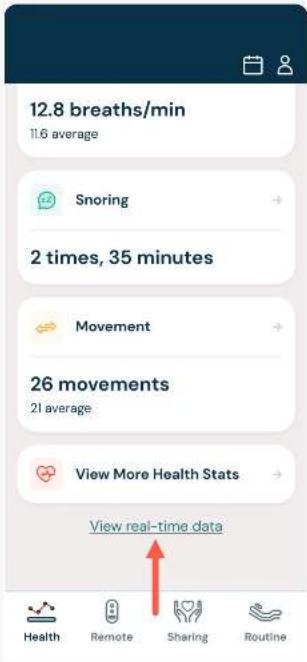
Scroll to the bottom of your sleep report and select the link for "View Real-Time Data."
If you are seated on your bed, you will see the real-time metrics for your heart and respiratory rate.
If your bed has only been authorized to you, you will only see your real-time metrics. If your bed has been authorized to your partner, you will see real-time data for both of you.
text_image
12.8 breaths/min 11.6 average Snoring 2 times, 35 minutes Movement 26 movements 21 average View More Health Stats View real-time data Health Remote Sharing Routine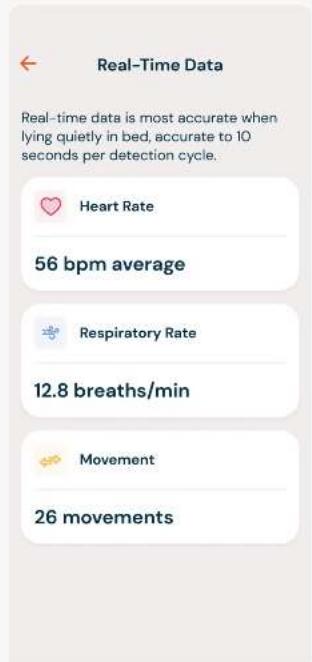
text_image
Real-Time Data Real-time data is most accurate when lying quietly in bed, accurate to 10 seconds per detection cycle. Heart Rate 56 bpm average Respiratory Rate 12.8 breaths/min Movement 26 movements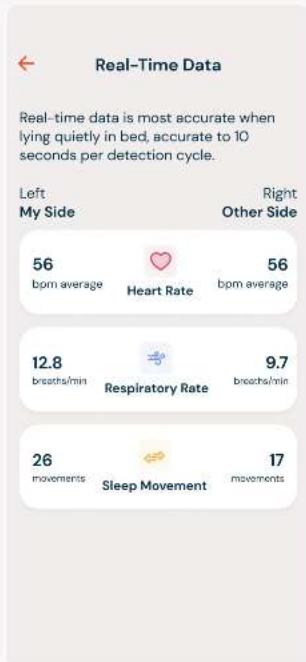
text_image
Real-Time Data Real-time data is most accurate when lying quietly in bed, accurate to 10 seconds per detection cycle. Left My Side 56 bpm average Heart Rate 56 bpm average Right Other Side 12.8 breaths/min Respiratory Rate 9.7 breaths/min 26 movements Sleep Movement 17 movementsHEALTH HOME SCREEN
CALENDAR: VIEW
PAST HEALTH
METRICS
To view historical Sleep Reports, click the Calendar icon in the top right of the main Health Home screen.
This will open the calendar view. Use the < > arrows to navigate through the dates to select another date you would like to view data for. Then select "View Health Data."

text_image
Hi Marie Feeling rested? Looks like you had more deep sleep than normal. Total Sleep 7 hr 42 min 10:03 PM - 5:45 AM Deep Sleep 2 hr 15 min 29% of your evening rest Light Sleep 4 hr 42 min 61% of your evening rest Health Remote Sharing Routine Hi Marie April 13, 2022 SUN MON TUES WED THU FRI SAT 1 2 3 4 5 6 7 8 9 10 11 12 13 14 15 16 17 18 19 20 21 22 23 24 25 26 27 28 29 30 31 Reset View Health Data 2 hr 15 min 28% of your evening rest Light Sleep 4 hr 42 min 61% of your evening rest Health Remote Sharing RoutineHEALTH DATA
The Dawn House app gives you access to vital health indicators generated while you rest. Each morning you will be able to access a Sleep Report sharing information about your sleep quality and duration, heart rate, respiratory rate, and more.
To access, tap on any of the white cards from the main Health Home Screen.
HEALTH
DATA POINTS
Your health data includes:
• Total, Deep & Light Sleep
- Heart Rate
- Respiratory Rate
- Snoring
- Movement
• More Health Stats
To navigate between your health data, swipe the screen left or right.
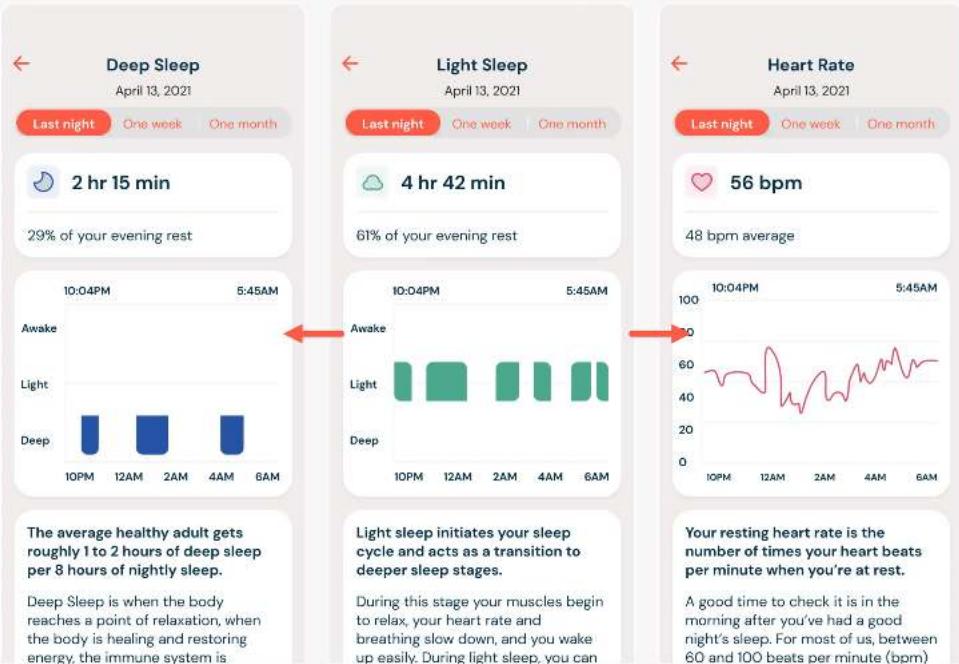
The average healthy adult gets roughly 1 to 2 hours of deep sleep per 8 hours of nightly sleep.
Deep Sleep is when the body reaches a point of relaxation, when the body is healing and restoring energy, the immune system is
Light sleep initiates your sleep cycle and acts as a transition to deeper sleep stages.
During this stage your muscles begin to relax, your heart rate and breathing slow down, and you wake up easily. During light sleep, you can
Your resting heart rate is the number of times your heart beats per minute when you're at rest.
A good time to check it is in the morning after you've had a good night's sleep. For most of us, between 60 and 100 beats per minute (bpm)
HEALTH DATA
DAILY, WEEKLY
& MONTHLY
VIEWS
All of your important Sleep Report metrics are organized into weekly and monthly charts to make it easy to see trends and make adjustments as needed.
By default, you will see the Sleep Report metrics collected from the previous evening.
To view your weekly data trends, select "One Week."
To view your monthly trends, select "One Month."

bar
| Time | Activity | Deep (min) | Light (min) | Awake (min) | | :--- | :--- | :--- | :--- | :--- | | 10:04PM | Awake | 10 | 15 | 55 | | 10:04PM | Light | 10 | 42 | 55 | | 10:04PM | Awake | 10 | 15 | 55 | | 12AM | Awake | 10 | 15 | 55 | | 12AM | Light | 10 | 42 | 55 | | 12AM | Awake | 10 | 15 | 55 | | 2AM | Awake | 10 | 15 | 55 | | 2AM | Light | 10 | 42 | 55 | | 2AM | Awake | 10 | 15 | 55 | | 4AM | Awake | 10 | 15 | 55 | | 4AM | Light | 10 | 42 | 55 | | 4AM | Awake | 10 | 15 | 55 | | 6AM | Awake | 10 | 15 | 55 | | 6AM | Light | 10 | 42 | 55 | | 6AM | Awake | 10 | 15 | 55 | | 6AM | Awake | 10 | 42 | 55 | | 6AM | Light | 10 | 42 | 55 | | 6AM | Awake | 10 | 15 | 55 | The cycles include, Light Sleep, which is crucial to your health and well-being.
bar
| Time | Sleep Duration | Total Hours | | :--- | :--- | :--- | | 4/13 | Deep | 27 hr 11 min | | 4/13 | Light | 16 hr 42 min | | 4/13 | Awake | 3 hr 55 min | | 4/15 | Deep | 27 hr 11 min | | 4/15 | Light | 16 hr 42 min | | 4/15 | Awake | 3 hr 55 min | | 4/17 | Deep | 27 hr 11 min | | 4/17 | Light | 16 hr 42 min | | 4/17 | Awake | 3 hr 55 min | | 4/19 | Deep | 27 hr 11 min | | 4/19 | Light | 16 hr 42 min | | 4/19 | Awake | 3 hr 55 min | The chart displays 'Total Sleep' with annotations: 'Last night', 'One week', and 'One month'. The 'Nightly average' indicates the average sleep duration for each stage. Below it, the text below states 'Reaching all of the stages of the sleep cycle is crucial to your health and well-being.'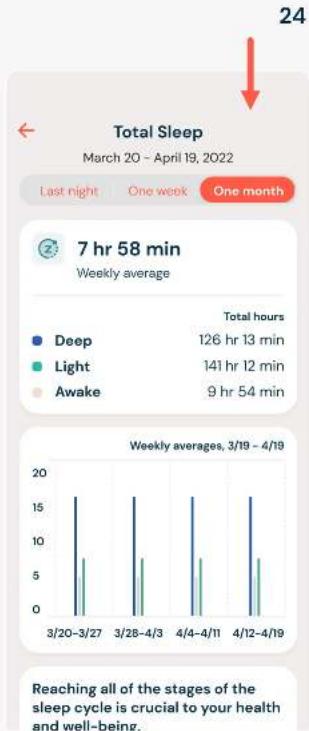
bar
| Time Period | Deep (hours) | Light (hours) | Awake (hours) | | :--- | :--- | :--- | :--- | | 3/20-3/27 | 16 | 8 | 7 | | 3/28-4/3 | 16 | 8 | 7 | | 4/4-4/11 | 16 | 8 | 7 | | 4/12-4/19 | 16 | 8 | 7 | The chart displays 'Total Sleep' with annotations: 'Last night', 'One week', and 'One month'. The 'Weekly average' indicates the average of the sleep duration for each phase. Below it, 'Weekly averages, 3/19 - 4/19' is highlighted.ROUTINES
It's easy to set alarm routines that activate specific functions of the bed and can be customized daily or set to repeat with any frequency.
ROUTINES
YOUR ROUTINE
HOME SCREEN
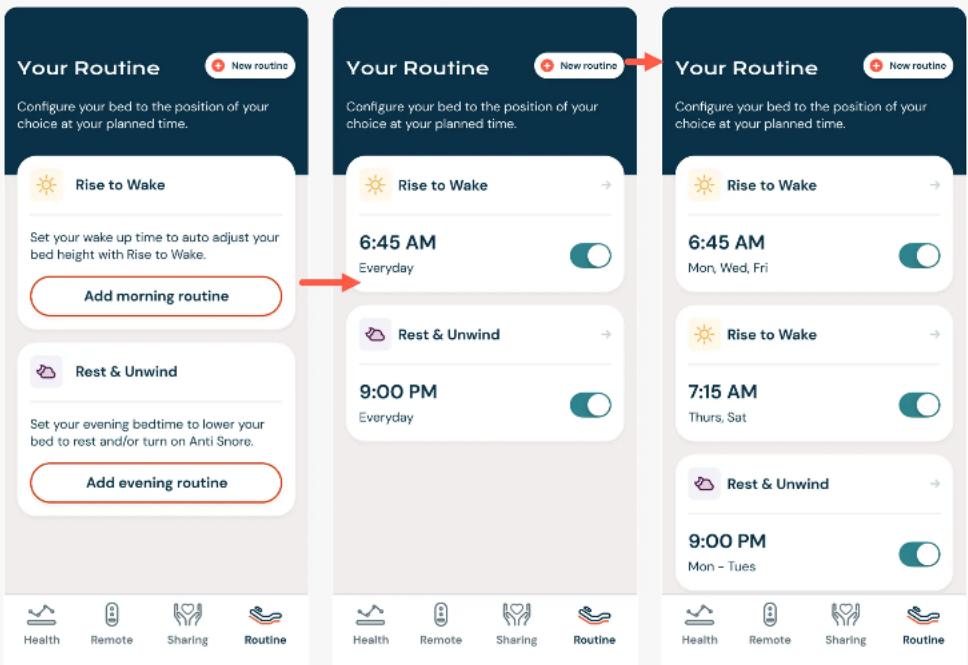
The Routine screen is accessed by selecting the clock icon in the bottom right of the navigation bar.
Here you can set up morning or evening routines for your Dawn House bed to automatically shift into the position of your choice at the time you schedule.
You can also turn on or off your underbed lighting at the scheduled time and auto correct your position when snoring is detected during sleep.
text_image
Your Routine Configure your bed to the position of your choice at your planned time. Rise to Wake Set your wake up time to auto adjust your bed height with Rise to Wake. Add morning routine Rest & Unwind Set your evening bedtime to lower your bed to rest and/or turn on Anti Snore. Add evening routine Your Routine Configure your bed to the position of your choice at your planned time. Rise to Wake 6:45 AM Everyday Rest & Unwind 9:00 PM Everyday Your Routine Configure your bed to the position of your choice at your planned time. Rise to Wake 6:45 AM Mon, Wed, Fri Rise to Wake 7:15 AM Thurs, Sat Rest & Unwind 9:00 PM Mon – Tues Health Remote Sharing RoutineROUTINES
RISE TO WAKE
Whether you're up with the sun or like to sleep in, the Dawn House bed can gently elevate your head at an appointed hour, easing you into your new day with "Rise to Wake". To set your routine:
- Set Your Wake Up Time: Use the timer wheel to select.
- Set the Routine Frequency: Tap the "Repeat Routine" card to open and select how often you want to repeat this routine.
- Turn Underbed Lighting On/Off: If you wish you can turn your underbed lighting on or off at the time of your routine. Select "No change" if you do not want to adjust the underbed lighting.

text_image
Rise to Wake Set your wake up time to auto adjust your bed height with Rise to Wake. 3 57 4 58 5 59 6 00 AM 7 01 PM 8 02 9 03 Repeat routine Everyday Underbed lighting No change Cancel routine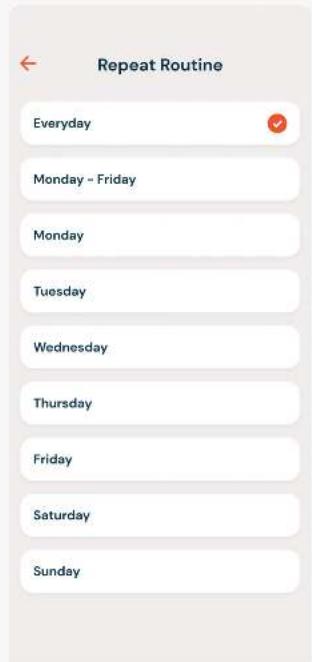
text_image
Repeat Routine Everyday Monday - Friday Monday Tuesday Wednesday Thursday Friday Saturday Sunday
text_image
Underbed Lighting Turn lights on at wake up time Your underbed lights will turn on at your scheduled morning time. You can turn them off at any time from your remote. Turn lights off at wake up time Your underbed lights will turn off at your scheduled morning time. No changeROUTINES
REST & UNWIND
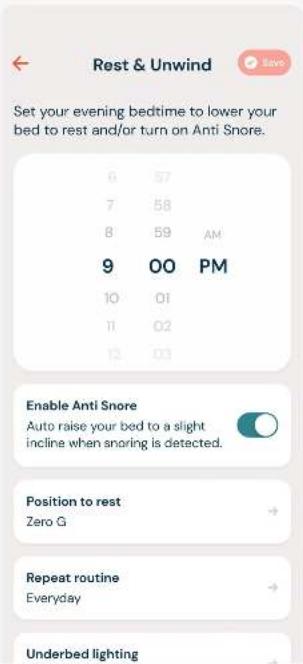
Establish an evening routine with "Rest & Unwind." To set your routine:
- Set Your Bedtime: Use the timer wheel to select.
- Set Your Bed Position: Tap the "Position to Rest" card to set your bed position
- Set the Routine Frequency: Tap the "Repeat Routine" card to open and select how often you want to repeat this routine.
- Turn Underbed Lighting On/Off: Turn your underbed lighting on or off at the time of your routine. Select "No change" if you do not want to adjust the underbed lighting.
- Enable Anti-Snore: Turn anti-snore on or off. When on, sophisticated sensors detect the onset of snoring and gently raise the head to promote more restful sleep.
text_image
Rest & Unwind Set your evening bedtime to lower your bed to rest and/or turn on Anti Snore. 6 57 7 58 8 59 AM 9 00 PM 10 01 11 02 12 03 Enable Anti Snore Auto raise your bed to a slight incline when snoring is detected. Position to rest Zero G Repeat routine Everyday Underbed lighting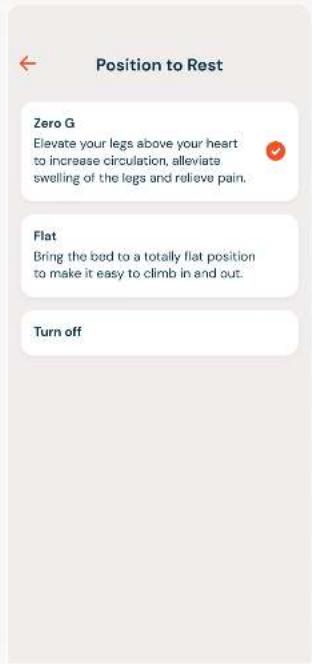
text_image
Position to Rest Zero G Elevate your legs above your heart to increase circulation, alleviate swelling of the legs and relieve pain. Flat Bring the bed to a totally flat position to make it easy to climb in and out. Turn offROUTINES
EDIT OR DELETE
A ROUTINE
If you want to make changes or delete one of your routines, tap the routine card on the main page to open to the details.
Here you can make changes then select the "Save" button.
To delete a routine, tap on the button for "Delete Routine."

text_image
Your Routine Now routine Configure your bed to the position of your choice at your planned time. Rise to Wake 6:45 AM Everyday Rest & Unwind 9:00 PM Everyday Health Remote Sharing Routine Rise to Wake Set your wake up time to auto adjust your bed height with Rise to Wake. 3 57 4 58 5 59 6 00 AM 7 01 PM 8 02 9 03 Repeat routine Everyday Underbed lighting No change Delete RoutineSHARING: DAWN HOUSE BED USERS
Your informative Dawn House Sleep Reports can be shared with your loved ones from the Sharing tab. Here you can also view Sleep Reports shared with you.
SHARING: DAWN HOUSE BED USERS
SHARING:
FIRST ACCESS
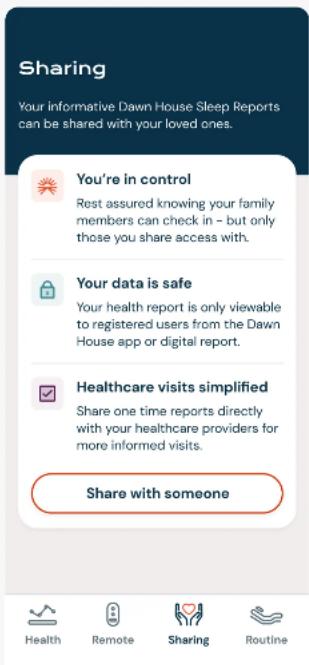
As a Dawn House bed user, when you first access the Sharing tab you will be able to learn more about the benefits of sharing your health data.
You can then proceed to add a loved one to your share list, or send a one-time health report, but only if you so wish to.
text_image
Sharing Your informative Dawn House Sleep Reports can be shared with your loved ones. You're in control Rest assured knowing your family members can check in - but only those you share access with. Your data is safe Your health report is only viewable to registered users from the Dawn House app or digital report. Healthcare visits simplified Share one time reports directly with your healthcare providers for more informed visits. Share with someone Health Remote Sharing RoutineSHARING: DAWN HOUSE BED USERS
SHARING:
ADD TO MY
SHARE LIST
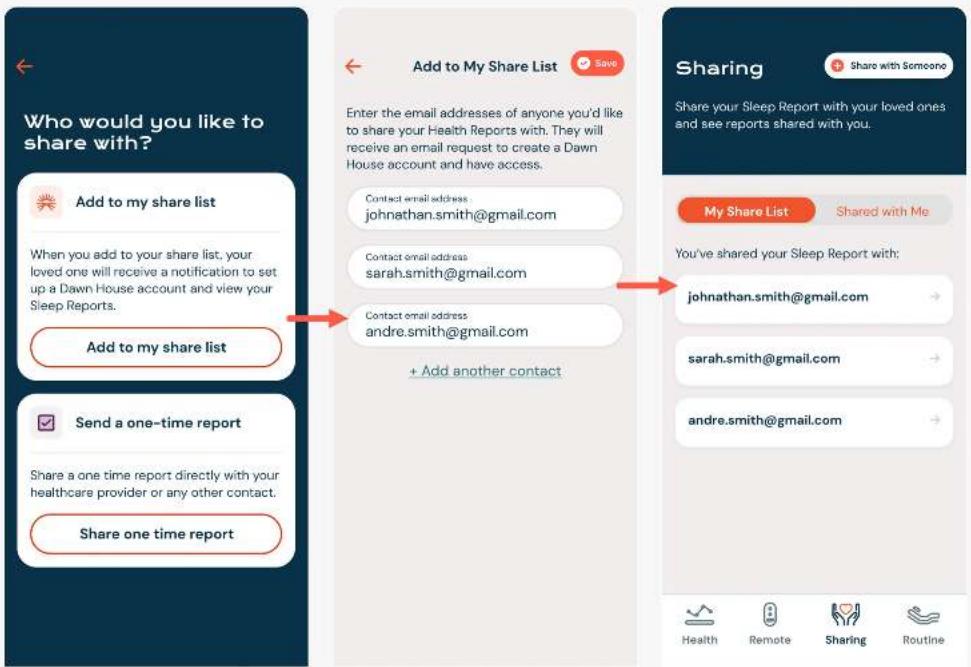
When you add to your share list, your loved one will receive an invite to access your sleep reports. They will have their own Dawn House account login and be able to view your daily, weekly and monthly metrics.
To add someone to your share list select the button for "Add to my share list" and enter their email address(es).
You will see the emails of anyone you have invited to view your report on the default My Share List toggle view on the Sharing tab.
text_image
Who would you like to share with? Add to my share list When you add to your share list, your loved one will receive a notification to set up a Dawn House account and view your Sleep Reports. Add to my share list Send a one-time report Share a one time report directly with your healthcare provider or any other contact. Share one time report Add to My Share List Enter the email addresses of anyone you'd like to share your Health Reports with. They will receive an email request to create a Dawn House account and have access. Contact email address: johnathan.smith@gmail.com Contact email address: sarah.smith@gmail.com Contact email address: andre.smith@gmail.com + Add another contact Sharing Share your Sleep Report with your loved ones and see reports shared with you. My Share List Shared with Me You've shared your Sleep Report with: johnathan.smith@gmail.com sarah.smith@gmail.com andre.smith@gmail.com Health Remote Sharing RoutineSHARING: DAWN HOUSE BED USERS
SHARING:
SEND A ONE-TIME
HEALTH REPORT
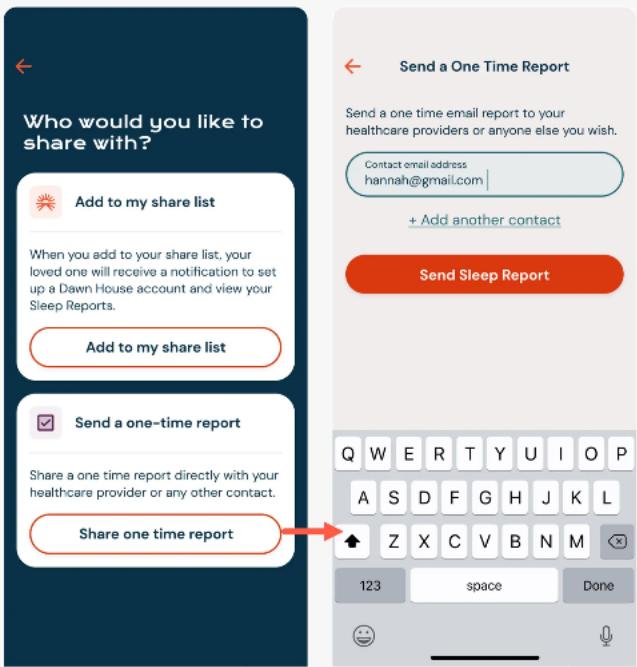
You can share a one-time health report via email to your healthcare providers or any other contact you wish.
Select the button for "Share one time report" then enter the email address of the person you'd like to share with.
text_image
Who would you like to share with? Add to my share list When you add to your share list, your loved one will receive a notification to set up a Dawn House account and view your Sleep Reports. Add to my share list Send a one-time report Share a one time report directly with your healthcare provider or any other contact. Share one time report Send a One Time Report Send a one time email report to your healthcare providers or anyone else you wish. Contact email address hannah@gmail.com + Add another contact Send Sleep Report Q W E R T Y U I O P A S D F G H J K L Z X C V B N M 123 space DoneSHARING: DAWN HOUSE BED USERS
SHARING:
MY SHARE LIST &
SHARED WITH ME
When you've added someone to your Share List or a Sleep Report has been shared with you, you will see the tab display.
To update a contact on your Share List, select the email address and proceed to edit or remove the contact on the next page.
When you tap "Shared with Me" you will see the Dawn House sleep reports shared with you.
At any time you can select the top right button "Share with Someone" to add a loved one to your share list or to send a one-time health report.

text_image
Sharing Share with Someone Share your Sleep Report with your loved ones and see reports shared with you. Edit Contact Contact email address johnathan.smith@gmail.com My Share List Shared with Me You've shared your Sleep Report with: johnathan.smith@gmail.com sarah.smith@gmail.com andre.smith@gmail.com Remove report contact Share with Someone Share your Sleep Report with your loved ones and see reports shared with you. My Share List Shared with Me Any Dawn House sleep reports shared with you will be displayed here. Sarah Smith Total Sleep 7 hr 42 min Heart Rate 56 bpm avg Respiratory Rate 12.8 breaths/min Michael Smith Total Sleep 7 hr 42 min Heart Rate 56 bpm avg Respiratory Rate 12.8 breaths/min Health Remote Sharing RoutineSHARING:
FAMILY
ACCOUNTS
When you create a Dawn House account to view your loved one's Sleep Report, your viewing experience will be simplified as compared to a Dawn House bed user. Sharing will be your default home screen.
SHARING:
HOME SCREEN
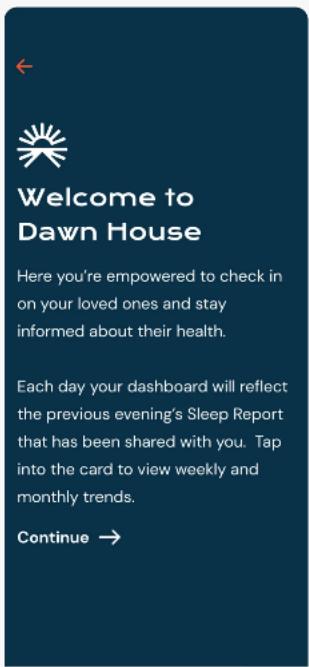
Once you create your account, if a loved one has already shared their Sleep Report your home screen will reflect their high level metrics. Tap the card to view the full Sleep Report.
If there haven't been any Sleep Reports shared with you, you will see a prompt to help your loved one initiate sharing from their Dawn House app.
To see your App Settings, select the top right icon from the main Sharing screen.
text_image
Welcome to Dawn House Here you're empowered to check in on your loved ones and stay informed about their health. Each day your dashboard will reflect the previous evening's Sleep Report that has been shared with you. Tap into the card to view weekly and monthly trends. Continue →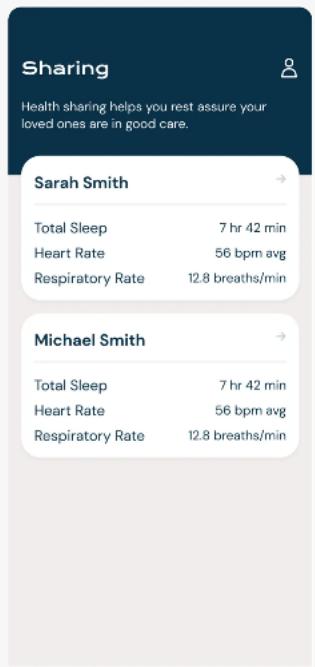
text_image
Sharing Health sharing helps you rest assure your loved ones are in good care. Sarah Smith Total Sleep 7 hr 42 min Heart Rate 56 bpm avg Respiratory Rate 12.8 breaths/min Michael Smith Total Sleep 7 hr 42 min Heart Rate 56 bpm avg Respiratory Rate 12.8 breaths/min
text_image
There haven't been any Sleep Reports shared with you. Sharing must be initiated from an account associated with a Dawn House bed.SHARING: FAMILY ACCOUNTS
VIEWING A
SLEEP REPORT
When you open a Sleep Report, you will see your loved one's name prominently displayed.
Tap the calendar icon to change the date you are viewing health metrics for.
Tap into any card to view the detailed metrics based on the previous evening, week and month.

text_image
Sarah's Sleep Report Total Sleep 7 hr 42 min 10:03 PM - 5:45 AM Deep Sleep 2 hr 15 min 29% of your evening rest Light Sleep 4 hr 42 min 61% of your evening rest Heart Rate 56 bpm average Sarah's Sleep Report Total Sleep April 13, 2022 Last night One week One month 7 hr 42 min Deep 2 hr 15 min Light 4 hr 42 min Awake 0 hr 55 min 10:04PM 5:45AM Awake Light Deep 10PM 12AM 2AM 4AM 6AM Reaching all of the stages of the sleep cycle is crucial to your healthSHARING: FAMILY ACCOUNTS
APP SETTINGS
As a Dawn House user with a Family Account, your App Settings will be simplified.
To change your password, follow the instructions on Page 47 of this manual.
To update your profile settings, see Page 49.
To change your FaceID settings, see Page 54.
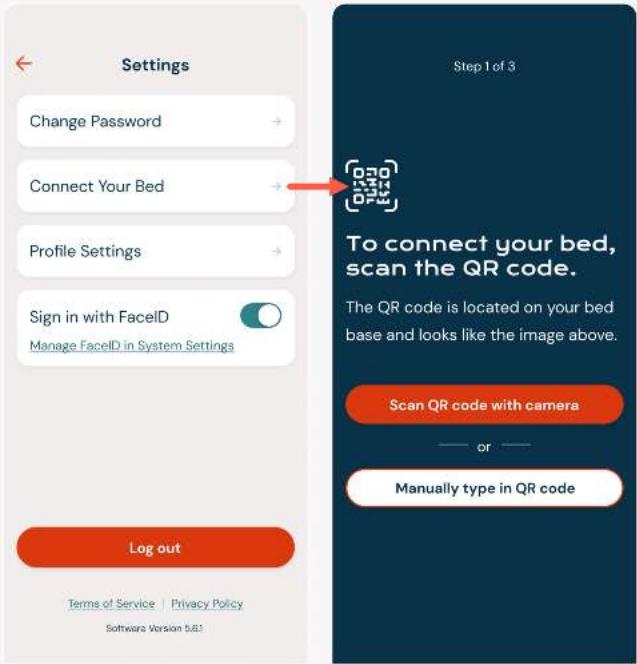
If you purchase your own Dawn House bed, you can proceed to connect your bed from the App Settings page. See page 10 for bed connection details.
text_image
Settings Change Password Connect Your Bed Profile Settings Sign in with FaceID Manage FaceID in System Settings Log out Terms of Service | Privacy Policy Software Version 5.8.1 Step 1 of 3 To connect your bed, scan the QR code. The QR code is located on your bed base and looks like the image above. Scan QR code with camera or Manually type in QR codeSIGN IN
& FACEID
THERE ARE SEVERAL WAYS TO SIGN IN:
- Email and password
- Facebook, Google or Apple
- FaceID (iOS users only)
SIGN IN & FACEID
SIGN IN WITH
EMAIL ADDRESS
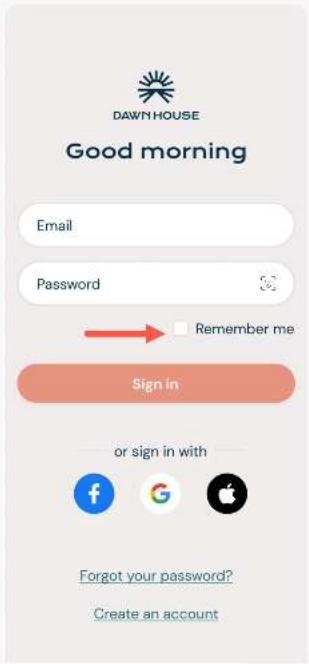
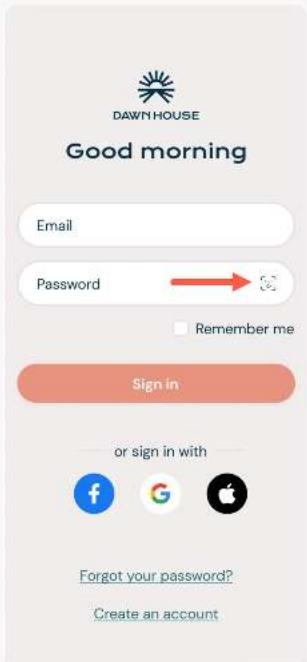
When you open the Dawn House app, use your email and password to sign in.
If you check the box for "Remember Me" you will stay logged in for your future visits and skip the sign in process.
If you have recently updated your app, you may see the Create Account screen. Click the link "Already have an account? Sign In" to be taken to the main Sign In screen.
text_image
DAWN HOUSE Good morning Email Password Remember me Sign in or sign in with Forgot your password? Create an account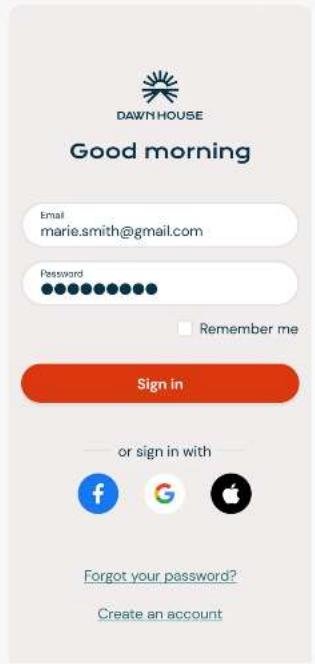
text_image
DAWN HOUSE Good morning Email marie.smith@gmail.com Password Remember me Sign in or sign in with Forgot your password? Create an account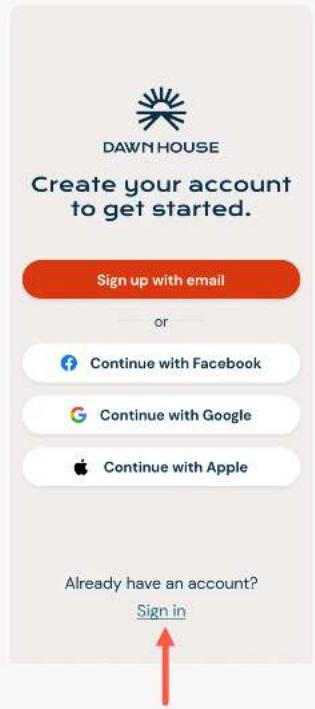
text_image
DAWN HOUSE Create your account to get started. Sign up with email or Continue with Facebook Continue with Google Continue with Apple Already have an account? Sign inSIGN IN & FACEID
SIGN IN WITH
GOOGLE, FACEBOOK
OR APPLE
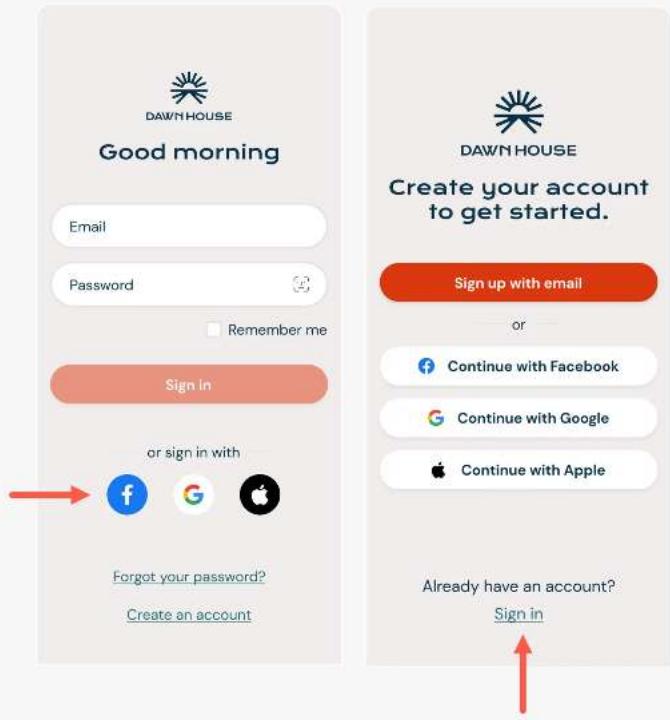
When you open the Dawn House app, you can select the icon to sign in with Facebook, Google or Apple.
You will be automatically directed to your home page after your account has been authenticated.
If you have recently updated your app, you may see the Create Account screen. Click the link "Already have an account? Sign in" to be taken to the main Sign In screen.
text_image
DAWN HOUSE Good morning Email Password Remember me Sign in or sign in with Forgot your password? Create an account DAWN HOUSE Create your account to get started. Sign up with email or Continue with Facebook Continue with Google Continue with Apple Already have an account? Sign inSIGN IN & FACEID
SIGN IN
WITH FACEID
You can also choose to sign in with FaceID. Select the link "Use FaceID to Sign In."
It will open the FaceID prompt where you can grant permission and sign in.
On future visits when you have enabled FaceID, you will be automatically logged in.
text_image
DAWN HOUSE Good morning Email Password → Remember me Sign in or sign in with Forgot your password? Create an account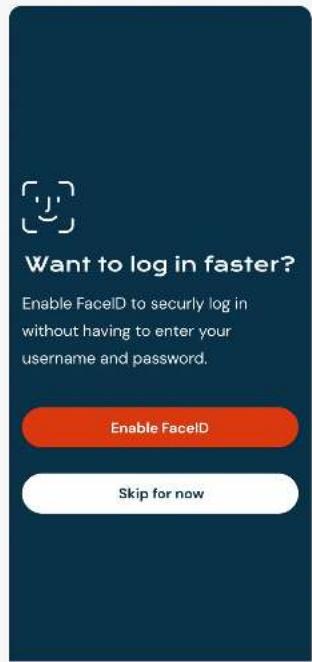
text_image
Want to log in faster? Enable FaceID to securely log in without having to enter your username and password. Enable FaceID Skip for now
text_image
Do you want to allow "Dawn House" to use Face ID? FaceID provides an easy to sign in to your account. Don't Allow OK Enable FaceID Skip for nowRESET YOUR PASSWORD
Your password is reset through your email address. If you are having trouble, please contact info@dawnhouseliving.com.
RESET YOUR PASSWORD
RESET YOUR
PASSWORD
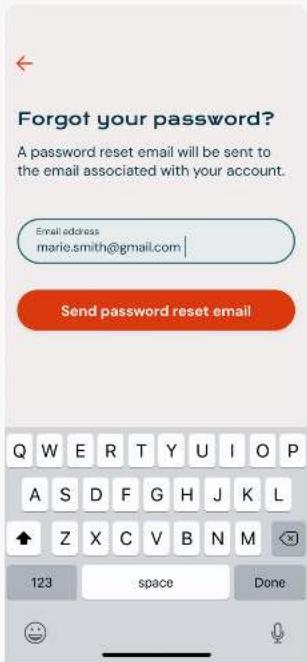
- Click the "Forgot your password?" link to open to start the forgot password process.
- Enter your email address and Dawn House will send a verification code to your email.
- Enter the verification code and you will be prompted to create a new password. Your new password must be at least 8 characters and include any special character (ex. !@#\$%).
text_image
Forgot your password? A password reset email will be sent to the email associated with your account. Email address marie.smith@gmail.com | Send password reset email Q W E R T Y U I O P A S D F G H J K L Z X C V B N M 123 space Done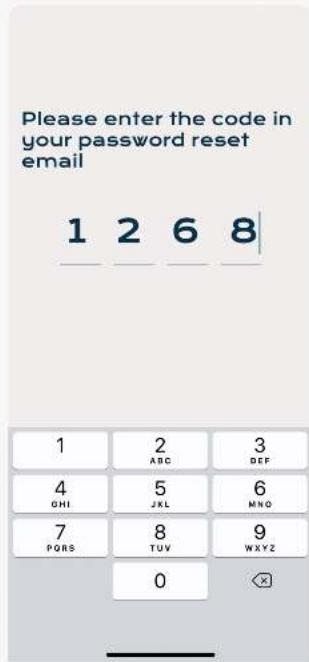
text_image
Please enter the code in your password reset email 1 2 6 8 1 2 3 ABC DEF 4 5 6 GHI JKL MNO 7 8 9 PQRS TUV WXYZ 0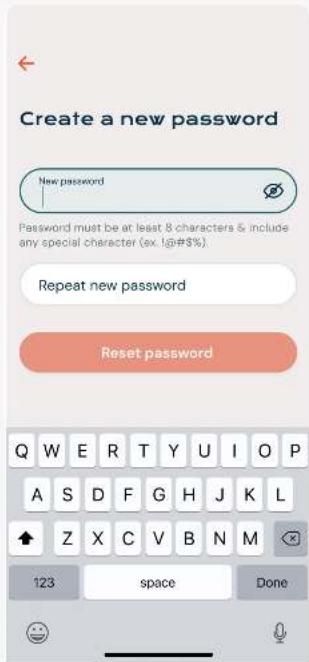
text_image
Create a new password New password Password must be at least 8 characters & include any special character (ex. lg#$%). Repeat new password Reset password Q W E R T Y U I O P A S D F G H J K L Z X C V B N M 123 space DoneACCOUNT & APP SETTINGS
You can make changes to your profile, review your bed connection and share your Sleep Report all from the Account Settings screen.
ACCOUNT & APP SETTINGS
OPEN YOUR
APP SETTINGS
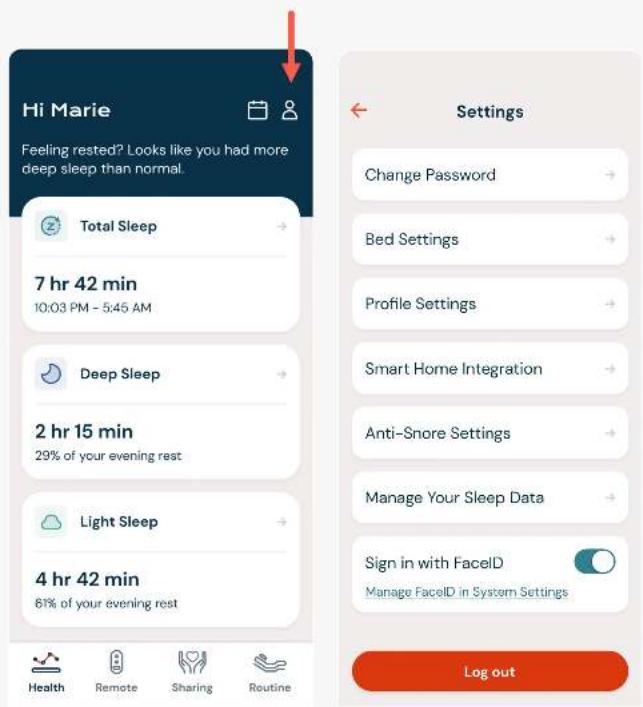
Click the Settings gear icon on the home page to open the App Settings.
When your Dawn House bed is connected, you will see the full list of Settings. When your bed has not been connected, you will see a simplified list.
text_image
Hi Marie Feeling rested? Looks like you had more deep sleep than normal. Total Sleep 7 hr 42 min 10:03 PM - 5:45 AM Deep Sleep 2 hr 15 min 29% of your evening rest Light Sleep 4 hr 42 min 61% of your evening rest Health Remote Sharing Routine Settings Change Password Bed Settings Profile Settings Smart Home Integration Anti-Snore Settings Manage Your Sleep Data Sign in with FaceID Manage FaceID in System Settings Log outACCOUNT & APP SETTINGS
CHANGE YOUR
PASSWORD
To change your password, tap the "Change Password" tile.
You will be prompted to enter your current password then provide a new password.
Your new password must be at least 8 characters and include any special character (ex. !@#\$%).
If you are having trouble remembering your password, select the "Change with a reset email link."

text_image
Settings Change Password Bed Settings Profile Settings Smart Home Integration Anti-Snore Settings Manage Your Sleep Data Sign in with FaceID Manage FaceID in System Settings Log out Change Your Password Current password New password Repeat new password Change password Can't remember your password? Change with a reset email Change Your Password Current password New password Password must be at least B characters & include any special character (ex. 10@48%) Repeat new password Change password Q W E R T Y U I O P A S D F G H J K L Z X C V B N M 123 space DoneACCOUNT & APP SETTINGS
YOUR BED
SETTINGS
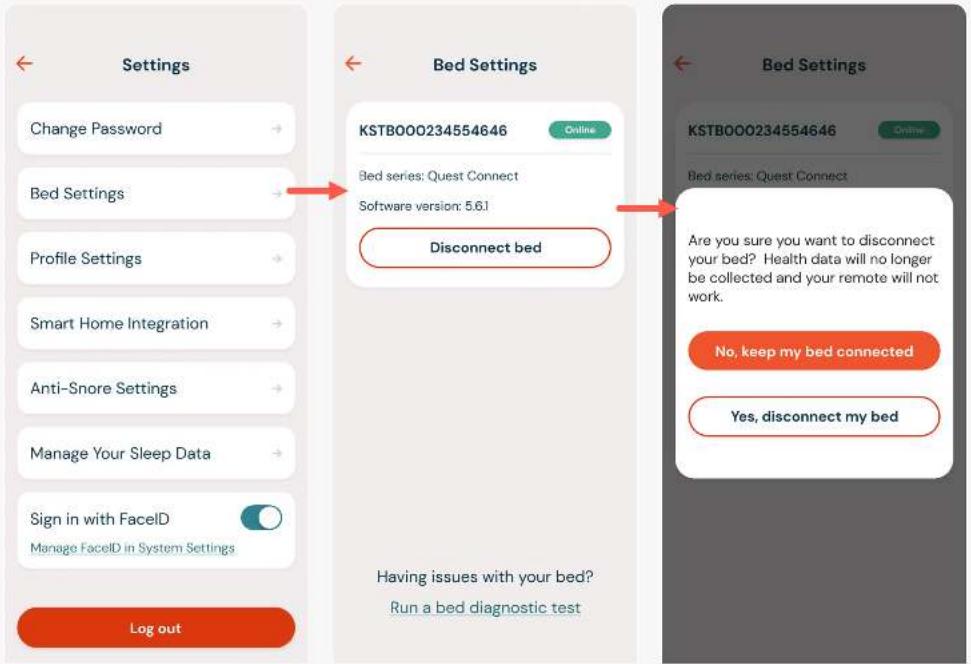
The Bed Settings page displays details about the Dawn House bed your account is connected to.
Here you will find the device number, online or offline status and the bed type.
If you want to disconnect your bed from the app, select the link "Disconnect Bed." You will see a confirmation.
You will be able to see historical data but you must reconnect your bed to see any new health data.
text_image
Settings Change Password Bed Settings Profile Settings Smart Home Integration Anti-Snore Settings Manage Your Sleep Data Sign in with FaceID Manage FaceID in System Settings Log out Bed Settings KSTB000234554646 Online Bed series: Quest Connect Software version: 5.6.1 Disconnect bed Having issues with your bed? Run a bed diagnostic test Bed Settings KSTB000234554646 Online Bed series: Quest Connect Are you sure you want to disconnect your bed? Health data will no longer be collected and your remote will not work. No, keep my bed connected Yes, disconnect my bedACCOUNT & APP SETTINGS
YOUR PROFILE
SETTINGS
Your Profile Settings includes your basic personal information. You can update your name, mattress thickness and weight.
If you have a queen size Dawn House bed it is essential that the app reflects the side of the bed you currently sleep on. Select the form field for "Bed Side" to open the dropdown and change your side. If you have any other size bed, you will not see this menu option.
If you tap "Delete Your Account", you will be redirected to the Dawn House website to remove your account.

text_image
Settings Change Password Bed Settings Profile Settings Smart Home Integration Anti-Snore Settings Manage Your Sleep Data Sign in with FaceID Manage FaceID in System Settings Log out Profile Settings First name Marie Last name Smith marie.smith@gmail.com Bad side Left Mattress thickness (incl. topper) 8 in Weight (lbs) 156 Delete your account Profile Settings 200 code 33780 Bed side Left Mattress thickness (incl. topper) 8 in Weight (lbs) 156 Bed Side Save Left side ✓ Right side I sleep aloneACCOUNT & APP SETTINGS
SMART HOME
INTEGRATION
The Smart Home interface provides a way to connect smart home devices. You will be asked to create an IFTTT account.
Download the IFTTT app for more integrations:
iOS Devices
Android Devices

text_image
Settings Change Password Bed Settings Profile Settings Smart Home Integration Anti-Snore Settings Manage Your Sleep Data Sign in with FaceID Manage FaceID in System Settings Log out Smart Home Integration With our IFTTT integration, you can automatically connect your smart home devices to your Dawn House bed. Enable Smart Home Integrations Smart Home Integration With our IFTTT integration, you can automatically connect your smart home devices to your Dawn House bed. Enable Smart Home Integrations "Dawn House Powered By Ergomotion" wants to open "IFTTT" to connect your smart home devices. Cancel OpenACCOUNT & APP SETTINGS
ANTI-SNORE
SETTINGS
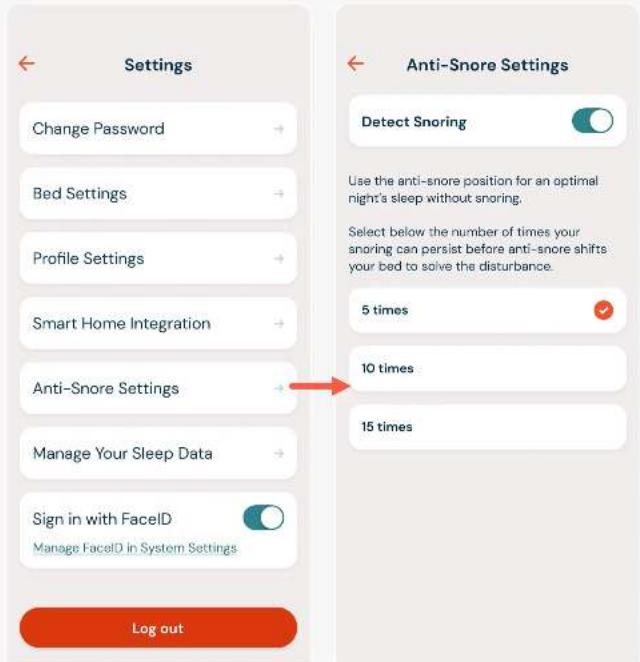
Choose for your Dawn House bed to be auto adjusted when snoring is detected.
- 5 times: Bed adjustment will be triggered when the snoring frequency reaches 5 times
- 10 times: Triggered when the snoring frequency reaches 10 times
- 15 times: Triggered when the snoring frequency reaches 15 times
text_image
Settings Change Password Bed Settings Profile Settings Smart Home Integration Anti-Snore Settings Manage Your Sleep Data Sign in with FaceID Manage FaceID in System Settings Log out Anti-Snore Settings Detect Snoring Use the anti-snore position for an optimal night's sleep without snoring. Select below the number of times your snoring can persist before anti-snore shifts your bed to solve the disturbance. 5 times 10 times 15 timesACCOUNT & APP SETTINGS
DELETE SLEEP
DATA
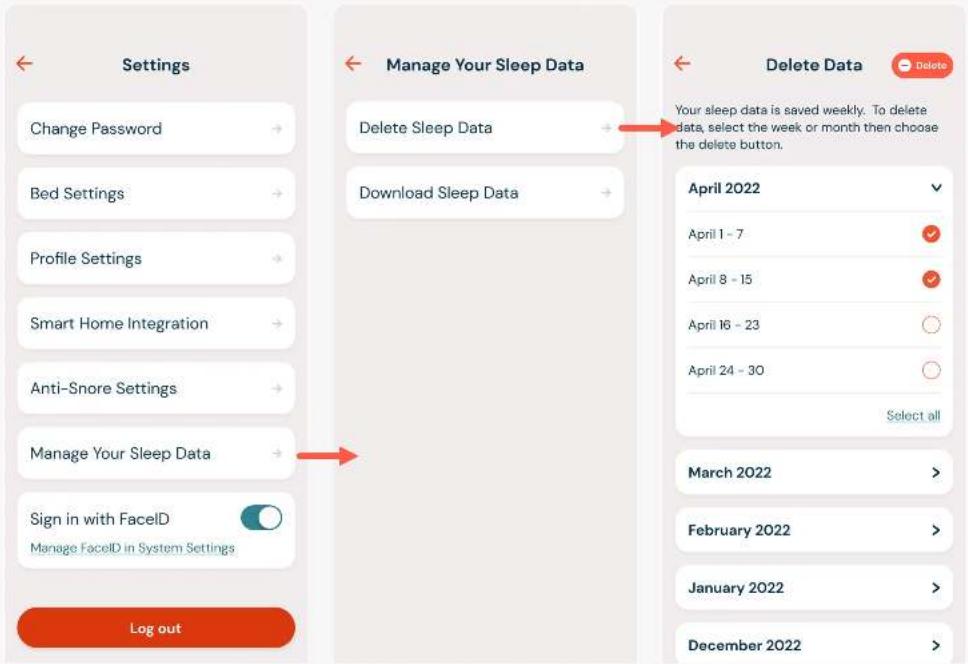
To delete sleep data, select the button for "Delete Sleep Data". Next, select the orange icon for all data you'd like to delete. After, select the "Delete" button. You will see a confirmation modal to confirm your action.
text_image
Settings Change Password Bed Settings Profile Settings Smart Home Integration Anti-Snore Settings Manage Your Sleep Data Sign in with FaceID Manage FaceID in System Settings Log out Manage Your Sleep Data Delete Sleep Data Download Sleep Data Log out Delete Data Delete Your sleep data is saved weekly. To delete data, select the week or month then choose the delete button. April 2022 April 1 - 7 April 8 - 15 April 16 - 23 April 24 - 30 Select all March 2022 > February 2022 > January 2022 > December 2022 >ACCOUNT & APP SETTINGS
DOWNLOAD YOUR
SLEEP DATA
To receive a copy of your sleep data, select the button for "Download Sleep Data". A copy of your sleep data will be sent to your email.

text_image
Settings Change Password → Bed Settings → Profile Settings → Smart Home Integration → Anti-Snore Settings → Manage Your Sleep Data → Sign in with FaceID Manage FaceID in System Settings Log out Manage Your Sleep Data Delete Sleep Data → Download Sleep Data → Would you like to receive a copy of your sleep data? Your sleep data will be collected and sent to your email address on your account, marie.smith@gmail.com. Request my sleep dataACCOUNT & APP SETTINGS
FACEID
SETTINGS
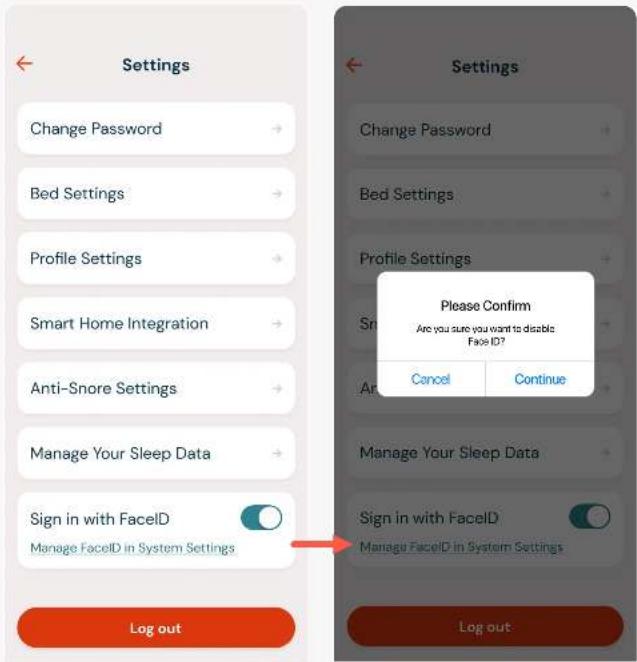
You can log into the Dawn House app by using FaceID. This is authorized from the main Log In screen, but you can also turn FaceID on or off from the main App Settings screen.
If the toggle is in blue, FaceID is enabled. If the toggle is in grey, tap to enable FaceID. You will be prompted to enable the authorization and if needed, you will be linked to your Phone settings to confirm.
text_image
Settings Change Password Bed Settings Profile Settings Smart Home Integration Anti-Snore Settings Manage Your Sleep Data Sign in with FaceID Manage FaceID in System Settings Log out Settings Change Password Bed Settings Profile Settings Sri Cancel Continue Please Confirm Are you sure you want to disable Face ID? Manage Your Sleep Data Sign in with FaceID Manage FaceID in System Settings Log out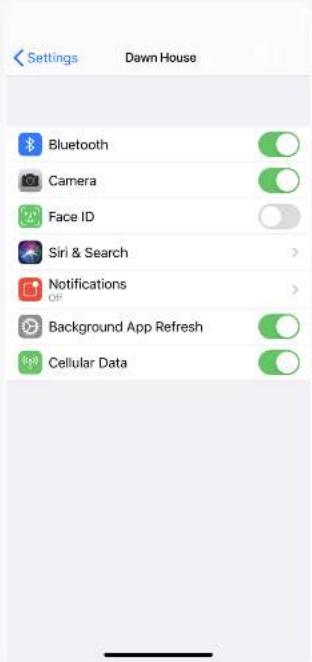
text_image
Settings Dawn House Bluetooth Camera Face ID Siri & Search > Notifications Off Background App Refresh Cellular DataACCOUNT & APP SETTINGS
LOG OUT OF
DAWN HOUSE
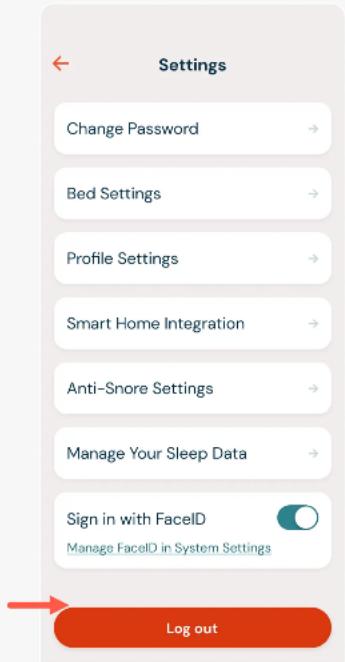
Click "Log Out" to log out of your Dawn House account.
You will need to re-enter your credentials or login in via FaceID to log back into the app.