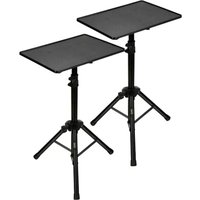
PSTND2X2 - Tripod Pyle - Free user manual and instructions
Find the device manual for free PSTND2X2 Pyle in PDF.


| Product Type | Universal Device Stand (Pair) |
| Model | PSTND2X2 |
| Brand | Pyle |
| Quantity | 2 Stands |
| Height Adjustment Range | 22.0 - 35.0 inches |
| Shelf Dimensions (L x W) | 14.0 x 11.0 inches |
| Construction Material | Metal Stand, Engineered ABS Shelf |
| Color | Black |
| Design | Tripod Floor-Standing |
| Adjustability | Quick height adjustment with clamp knobs; angle adjustable device tray |
| Portability | Disassembles for travel; lightweight |
| Compatibility | Laptops, notebooks, mixers, DJ equipment, amplifiers, audio/video devices |
| Intended Use | Musicians, DJs, performers, engineers |
| Assembly Required | Yes, some assembly required |
| Included Accessories | 2 Device Resting Plates, 2 Extension Arms, 2 Folding Tripod Bases, 8 Washers, 4 Mounting Clamps, 8 Wing Nuts, 8 Plate Bolts |
| Safety Feature | Height safety pin for backup |
| California Proposition 65 Warning | Contains lead and cadmium - known to cause cancer and reproductive harm |
| Weight (per stand) | Approximately 3.5 lbs (1.6 kg) |
| Maintenance | Wipe clean with a dry cloth |
| Mounting Type | Tripod base with folding legs |
Frequently Asked Questions - PSTND2X2 Pyle
The upper clamp knob adjusts height by raising or lowering the extension arm.
User questions about PSTND2X2 Pyle
0 question about this device. Answer the ones you know or ask your own.
Ask a new question about this device
Download the instructions for your Tripod in PDF format for free! Find your manual PSTND2X2 - Pyle and take your electronic device back in hand. On this page are published all the documents necessary for the use of your device. PSTND2X2 by Pyle.
USER MANUAL PSTND2X2 Pyle
natural_image
Two black adjustable table devices with tripod legs, no visible text or symbolsPLPTS2X2
Universal Device Stand
Height Adjustable Tripod Mount For Laptop, Notebook, Mixer, DJ Equipment, (Pair)
USER MANUAL

natural_image
Three black mechanical components and five circular washers arranged on a white background (no text or symbols visible)2 Device Resting Plate 2 Extension Arm 2 Folding Tripod Base 8 Washers

natural_image
Collection of mechanical fasteners and screws (no text or symbols visible)4 Mounting Clamps 8 Wing Nuts 8 Plate Bolts

natural_image
Close-up of a black mechanical bracket with mounting flanges (no text or symbols visible)Slide the metal mounting clamps onto both ends of the extension arm. Each side is fitted with rubber grips that the clamps use for holding support. Be sure as to, at least partially, slide the metal mounting clamps to lay over the rubber grips. Use the dual clamp-style knobs on both sides on each of the mounting clamps to secure the angle and placement of the device resting plate.

natural_image
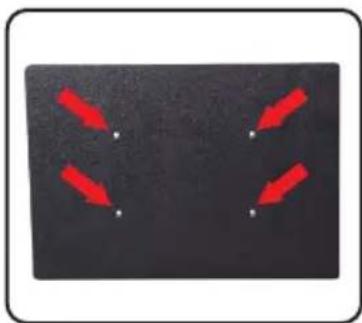
Close-up of a black mechanical clamp or bracket mounted on a dark surface, with no visible text or symbols.Use the included hardware to secure the device resting plate with the metal mounting clamps. The holes in the mounting clamp brackets should align with the holes protruding through the base plate. Be sure to use a washer between the wing nut and the metal mounting clamp when securing.
natural_image
Black rectangular object with four red arrows pointing inward toward white dots, no text or symbols present.The plate bolts are to be inserted from the top of the unit, going downward through the device resting plate, and out of the other end to meet the metal mounting brackets. The metal mounting bracket clamps can be adjusted or loosened accordingly to allow for angle/tilt adjustment.
natural_image
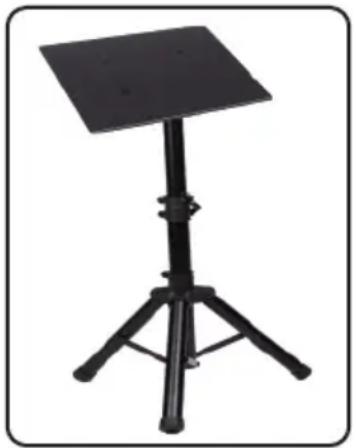
Black adjustable stand with tripod base and top panel (no text or symbols visible)Slide the assembled extension arm and device resting plate into the assembled folding tripod base with the inserted extension arm fitting insert. The top clamp style knob allow for height adjustment by raising or lowering the unit's extension arm. The lower clamp style knob allows for securing the stand's stability when the tripod legs are extended. The unit also features a safety pin that acts as a backup for the stand's height adjustment safety.
Features:
• Universal Device Stand
- Quick & Easy Setup
- Tripod Floor-Standing Design
• Lightweight, Portable & Reliable
- Quick & Convenient Height Adjustment
- Angle Adjustable Device Tray
• Rugged & Durable Metal Construction
• Disassembles for Travel & Storage
- For On-Stage or In-Studio Use
- Works with Audio/Video Devices, DJ Sound Equipment (Laptops, Notebooks, Mixers, Amplifiers, etc.)
• Used by Musicians, DJs, Performers, Engineers, etc.
What's in the Box:
• (2) Universal Device Stand
Technical Specs:
- *Some Assembly Required
• Height Adjustable: 22.0" - 35.0" - inches - Construction Material: Metal Stand, Engineered ABS Shelf
- Shelf / Device Tray Size (L x W): 14.0" x 11.0" -inches

WARNING:
This products can expose you to a chemical or group of chemicals, which may include "Lead And Cadmium" which is known in the state of California to cause cancer, birth defects, or other reproductive harm. For more info, go to https://www.p65warnings.ca.gov/.
PYLE
PyleUSA.com

natural_image
Illustration of a laptop with a red checkmark on the screen (no text or symbols)VISIT US ONLINE:
Have a question?
Need service or repair?
Want to leave a comment?
PyleUSA.com/ContactUs
PYLE


Brand : Pyle
Model : PSTND2X2
Category : Tripod