
Omicron 3 - USB Drive QUANTUM - Free user manual and instructions
Find the device manual for free Omicron 3 QUANTUM in PDF.


| Product Type | Flash/Video Ring Light |
| Brand | Quantum |
| Model | Omicron 3 |
| Power Source | Quantum Turbo battery pack |
| Light Source | 80 color-balanced LEDs (white + colored) |
| Flash Modes | TTL and Manual controlled by Quantum CoPilot |
| Video Light | Continuous video light with intensity control |
| Automatic Lighting Track (ALT) | Yes, maintains constant illumination as distance changes |
| Connection to Camera | FW31 cable to CoPilot; CQ2 cable to battery |
| Compatible Cameras | Nikon and Canon (via CoPilot QF91N/QF91C) |
| Accessories Included | Removable lens for color gels, sync cord (FW20), Din cable (FW31), flash cable (CQ2) |
| Mounting Options | Under camera (QF29) or twin rail (OM42) |
| Wireless Capability | Compatible with Quantum FreeXWire radio system via CoPilot |
| Safety Warning | Contains dangerous high voltages. For professional use only. Do not disassemble. |
| Maintenance | Clean with dry cloth; avoid moisture; do not attempt internal repairs |
| Warranty | 1 year limited warranty |
| Customer Service | Quantum Instruments, 10 Commerce Drive, Hauppauge, NY 11788; www.qtm.com |
Frequently Asked Questions - Omicron 3 QUANTUM
User questions about Omicron 3 QUANTUM
0 question about this device. Answer the ones you know or ask your own.
Ask a new question about this device
Download the instructions for your USB Drive in PDF format for free! Find your manual Omicron 3 - QUANTUM and take your electronic device back in hand. On this page are published all the documents necessary for the use of your device. Omicron 3 by QUANTUM.
USER MANUAL Omicron 3 QUANTUM
Flash / Video Operation
•TTL or Manual flash controlled by CoPilot
• Video light for cameras with video capture
The Omicron Flash/Video Ring light contains dangerous high voltages within. For professional use only. Do not disassemble this equipment. In the event of physical damage immediately disconnect power and return the unit to Quantum for repair.
1.0 Introduction
Omicron3 Flash/Video Ring Light provides both flash and continuous video lighting for ideal illumination. Designed specifically for 35mm SLR type still and video cameras, it is also adaptable to other camera types.
Omicron3's "chromatically correct" light spectrum emanates from 80 critically color-balanced LEDs. Colored LEDs mixed with white LEDs fill in the spectral gaps characteristic of white-only LED lights.
Omicron3 interfaces with Quantum CoPliot full coordination with Nikon or Canon camera systems, in TTL or manual modes.
Important : The firmware updates below may be required for Flash / Video Simultaneous Operation:
CoPilot:
Canon cameras
CoPilot QF91C Version 1.06 or later, no update required.
Nikon cameras
CoPilot QF91N Version 1.06 or later, no update required.
Visit www.qtm.com to download the latest CoPilot firmware and click Support, Updates and Conversions
2.0 Overview
The Quantum Omicron 3 (OM3) Flash/Video Ring Light for flash/video operation consists of:
OM3 - Ring Light with removable lens for holding color gels
CQ2 - Flash cable for connecting OM3 to Quantum Turbo battery pack. OM3 can be powered by all Quantum Turbo batteries.
CQ8, CCQ8 cables may also be used with OM3
FW20 - Sync Cord manual flash trigger from camera.
FW31 - Din cable for connecting to Quantum CoPilot QF91 for TTL/Man Operation.
2.1 Additional Accessories
Qf91N - For TTL control of Omicron by Nikon cameras.
Qf91C - For TTL control of Omicron by Canon cameras.
QF51 - 20 ft. extension cable.
Extension cable connects the CoPilot to the OM3 for off camera TTL lighting.
434 / 435 Sync Cords
The CoPIlot has an internal radio that is compatible with the Quantum FreeXWire radio system.
To use another radio system connect the 434/435 sync cords to the camera PC, or use a hot shoe adapter from your camera manufacturer that includes a PC nipple.
3.0 Mounting & Power Accessories
3.1 Mounting
QF29 – for under camera mounting
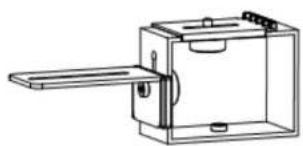
OM42 – for twin rail mounting

3.2 Power
Any TURBO battery
4.0 Flash operation
4.1 Connections
Connect the OM3 to a Quantum CoPilot using a FW31 cable.
Note : The CoPilot does not require a battery when connected to the OM3
Connect the flash cable from Turbo battery pack to OM3.
Turn on the power of Turbo battery pack.

The "ON" indicator on OM3 should blink once per second. The OM3 is ready to operate.
If the "ON" indicator blinks three times per second, it indicates the High Voltage is not available. Check the Turbo battery pack operation.
4.2 Flash Modes
Two modes of flash operation are available, TTL and manual. Flash output can be adjusted in both modes using the Local switch located on top of the CoPilot.
Choose AF for Auto Focus assist. The OM3 will turn on in video mode during low light situations when the camera requires assistance in focusing.
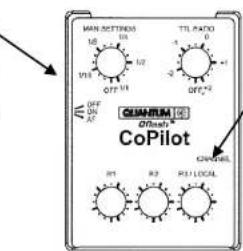
Exposure Adjustment
TTL
The exposure can be adjusted from -27 stops to +2 stops.
Manual
Exposure can be adjusted from 1/32+ of the shutter speed to 1/1(full shutter speed).
When the CoPilot is set to Manual mode, exposure is determined using the shutter speed.

When the CoPilot is set to TTL mode, the camera uses its own internal metering system to determine the proper exposure.
5.0 Video Operation
5.1 Connections
Connect the flash cable from Turbo battery pack to OM3.
Turn on the power of Turbo battery pack.

The "ON" indicator on OM3 should blink once per second. The OM3 is ready to operate.
If the "ON" indicator blink three times per second, it indicates the High Voltage is not available. Check the Turbo battery pack operation.
5.2 Video ON / OFF
Video On Press the push button once and the ON light will stay on steady.
Video Off Press and hold the push button for 2 seconds. The ON light will turn off and the OM3 light will gradually dim.
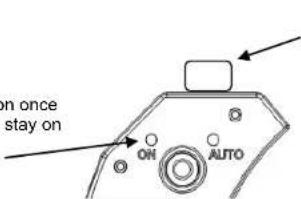
Adjust the light intensity Turn the intensity knob clockwise to increase the light intensity, count-clockwise to decrease the light intensity.
5.3 Automatic Lighting Track (ALT) Operation
Automatic Lighting Track (ALT) Operation will keep the illumination on the subject constant when the distance between the subject and OM3 Ring Light changes. It will automatically decrease the light output level when the OM3 Ring Light is close to the subject. It will automatically increase the light output level when moving the OM3 Ring Light away from the subject.
Turn OM3 ON
Press the push button once and the ON light will stay on steady. Aim the OM3 at your subject.

Set light output level
Stand at the maximum distance you intend to shoot at and set the intensity knob to 100%. Your minimum shooting distance will be one half of your maximum.
Turn ON ATL
While aiming at your subject, push the power button once. The "AUTO" indicator lights.
Turn OFF the ATL
Push the push button once or adjust the light intensity knob, the "AUTO" indicator will turn off and "ON" indicator is on.
Indications
If the "AUTO" indicator is blinking fast, you are too lose to your subject and you need to move away.
If the "AUTO" indicator is blinking slowly, you are too far from your subject and you need to move closer.
6.0 Customer service
Having any trouble I using your Quantum product? We are here to help. Mail, call, fax, or email our Service Department:
Service department
Quantum Instruments
10 Commerce Drive
Hauppauge, NY 11788
Tel: (631) 656-7400 Fax: (631) 656-7410
Website: www.qtm.com
Troubleshooting tips are available at www.qtm.com, Support, Customer Support, FAQ. If you suspect a malfunction or require adjustment, return the unit to us with an accurate description of the problem. Please be sure your problem is not caused by improper operating procedure or malfunctions in your other equipment. Send all equipment carefully packaged and insured to our address above.
An estimate of repair cost on out-of-warranty merchandise may be forwarded if you desire.
Normal repair time is 10 – 15 days. Paying by check will delay the repair until the check clears (up to 15 days). For expedited service, contact our Service Department.
Summary:
- Ship via UPS, Parcel Post, or other carrier, insured.
- Give a clear, detailed description of the problem.
- Give your mailing address and daytime phone number, fax #, and/or email.
- For warranty repairs include a copy of the receipt.
Note: Please do not e-mail your credit card information.
Limited Warranty
Quantum products have a 1 year limited warranty. Please refer to the Limited Warranty card for complete details, conditions, and terms.

Quantum Instruments Inc.
10 Commerce Drive, Hauppauge NY 11788-3968 USA
Tel: 1-631-656-7400 Fax: 1-631-656-7410
www.qtm.com

- FLASH / VIDEO OPERATION
- 1.0 INTRODUCTION
- 2.0 OVERVIEW
- 2.1 ADDITIONAL ACCESSORIES
- 3.0 MOUNTING & POWER ACCESSORIES
- 4.0 FLASH OPERATION
- 4.1 CONNECTIONS
- 4.2 FLASH MODES
- EXPOSURE ADJUSTMENT
- 5.0 VIDEO OPERATION
- 5.1 CONNECTIONS
- 5.2 VIDEO ON / OFF
- 5.3 AUTOMATIC LIGHTING TRACK (ALT) OPERATION
- TURN OM3 ON
- SET LIGHT OUTPUT LEVEL
- TURN ON ATL
- TURN OFF THE ATL
- INDICATIONS
- 6.0 CUSTOMER SERVICE
- SUMMARY
- LIMITED WARRANTY
Brand : QUANTUM
Model : Omicron 3
Category : USB Drive