
FD2-40 - Microwave Oven Becken - Free user manual and instructions
Find the device manual for free FD2-40 Becken in PDF.


| Product Type | Refrigerator-Freezer |
| Model | FD2-40 |
| Brand | Becken |
| Total Storage Volume | 293 L |
| Refrigerator Volume | 221 L |
| Freezer Volume | 72 L |
| Star Rating | 4 stars (food freezer compartment) |
| Frost-Free | Yes |
| Freezing Capacity | 3.5 kg / 24 h |
| Temperature Rise Time | 12 h |
| Energy Efficiency Class | A+ |
| Annual Energy Consumption | 281 kWh / year |
| Climatic Class | ST (16°C - 38°C) |
| Noise Level | 43 dB(A) |
| Construction | Free-standing |
| Door Reversible | Yes (right or left hinge) |
| Adjustable Thermostat | Yes (positions 1-6) |
| Interior Light | Yes (included) |
| Power Supply | 220-240 V ~ 50 Hz |
| Gross Weight (approx.) | 55 kg |
| Dimensions (H x W x D, approx.) | 170 x 60 x 65 cm |
Frequently Asked Questions - FD2-40 Becken
User questions about FD2-40 Becken
0 question about this device. Answer the ones you know or ask your own.
Ask a new question about this device
Download the instructions for your Microwave Oven in PDF format for free! Find your manual FD2-40 - Becken and take your electronic device back in hand. On this page are published all the documents necessary for the use of your device. FD2-40 by Becken.
USER MANUAL FD2-40 Becken
natural_image
Exterior view of a white refrigerator with a horizontal handle (no visible text or symbols)Refrigerator
Model: FD2-40
Instruction Manual
Dear client,
We thank you for purchasing this product.
This appliance was submitted to several laboratorial tests, which certify its quality. To simplify the use of this appliance, this instruction manual has been provided. The instructions must ensure a quick and safe use.
Please read carefully the instructions and safety measures described in this manual.
We wish our clients great satisfaction in using their new appliance.
Index
1. Safety Instructions....5
1.1. Power Energy 6
1.2. Power Cord and Other Cables....6
1.3. Humidity and Water 6
1.4. Cleaning....6
1.5. General Precautions ...... 7
2. Utilization and Functioning .... 8
2.1. Product Description .... 8
2.2. Installation....8
2.2.1. Location....8
2.2.2. Reversing the Door Swing....9
2.2.3. Proper Installation 9
2.2.4. Rear Spacer 13
2.2.5. Door Space Requirements 13
2.2.6. Leveling the Unit.... 13
2.2.7. Before Using the Unit 13
2.2.8. Interior Accessories.... 14
2.3. Operation....14
2.3.1. Switching On Your Unit 14
2.3.2. Adjusting the Temperature 15
2.3.3. Noises Inside the Unit 15
2.3.4. Shopping for Chilled Foods 16
2.3.5. Tips for Keeping Food in the Unit 16
- Maintenance....17
- Technical Specifications....19
- Aftermarket....21
- Environment Conservation 22
1. Safety Instructions
 | ATTENTION |  |
| Risk of Electric ShockDo Not Open | ||
| Attention: to avoid the risk of electric shock, do no remove the cover. The interior does not contain any parts that may be repaired by the user. Ask for assistance to qualified personnel. | ||
Important Warnings
Before using your appliance, read carefully this instruction manual and keep it in a safe place, as you may need it for future consultations.
Before you start your appliance, and to ensure a correct use, do not use it if:
- It has fallen on the ground;
- You notice any evidence of damage;
- Any anomaly occurs during its operation;
To avoid hazards and deterioration of your appliance by an incorrect use, it is advisable to read the instructions carefully and attentively.
Your appliance must not be used to other ends than the ones foreseen in the instructions manual. Your safety is only guaranteed in a household use and not for commercial use. The incorrect use will not be covered and automatically cancels the right to warranty.
Assistance
Be sure that, in case of malfunction, you take your appliance to a qualified technician for assistance.
This appliance can be used by children from 8 years old and above and persons with reduced physical, sensory or mental capabilities or lack of experience and knowledge if they have been given instruction concerning use of the appliance in a safe way and understand the hazards involved. Children shall not play with the appliance. Cleaning and maintenance shall not be made by children without supervision.
These instructions are also available on www.suporteworten.pt
1.1. Power Energy
Make sure the voltage of the electric network is compatible with the one of the appliance. If it does not match, consult the vendor or Customer Support Service.
1.2. Power Cord and Other Cables
Do not roll up or pull the cord to disconnect the appliance, and do not use to twine the appliance. Keep the cord far from warm surfaces.
Never use the appliance if it has a damaged cable or socket, or if it is not working properly.
In case of damage of the power cord, do not use your appliance. Take it to technical assistance for its replacement.
1.3. Humidity and Water
Do not use your appliance in humid places. Do not let your appliance to catch water under any circumstance, as it may be dangerous. TO AVOID FIRE HAZARD OR ELECTRIC SHOCK DO NOT EXPOSE YOUR APPLIANCE TO HUMIDITY OR WATER. Do not place your appliance under water (for example for washing).
1.4. Cleaning
Be sure to switch off power supply before cleaning. Wipe the inside of the unit with a weak solution of bicarbonate of soda. Then rinse with warm water using a damp sponge or cloth. Wipe completely dry before replacing the shelves and drawers. Clean the exterior of the unit with a damp cloth.
1.5. General Precautions
- Please follow the instructions of the user manual, which helps properly installing and operating this product and enjoying its advanced features. Please keep the instructions for future reference.
- Read all instructions before using the appliance.
- Keep ventilation openings in the appliance enclosure clear of obstructions.
- Do not use mechanical devices or other means to accelerate the defrosting process, other than those recommended by the manufacturer.
- Do not use electrical appliances inside the food storage compartments of the unit, unless they are of the type recommended by the manufacturer.
- If the mains cable is damaged, it must be replaced by the manufacturer, its service agent or a qualified technician in order to avoid a hazard.
- Choose a location for your unit away from heat sources such as radiators or fires as refrigerant and vesicant are burnable.
- Young children should be supervised to ensure that they do not play with the unit.
- Do not damage the refrigerant circuit (applicable only for appliances with refrigeration circuits which are accessible to the user).
- The unit must be maneuvered by a minimum of 2 persons.
- If your unit is fitted with a lock to prevent children being trapped inside, keep the key out of reach and not in the vicinity of the unit.
- Do not store volatile or flammable substances in the unit.
2. Utilization and Functioning
2.1. Product Description
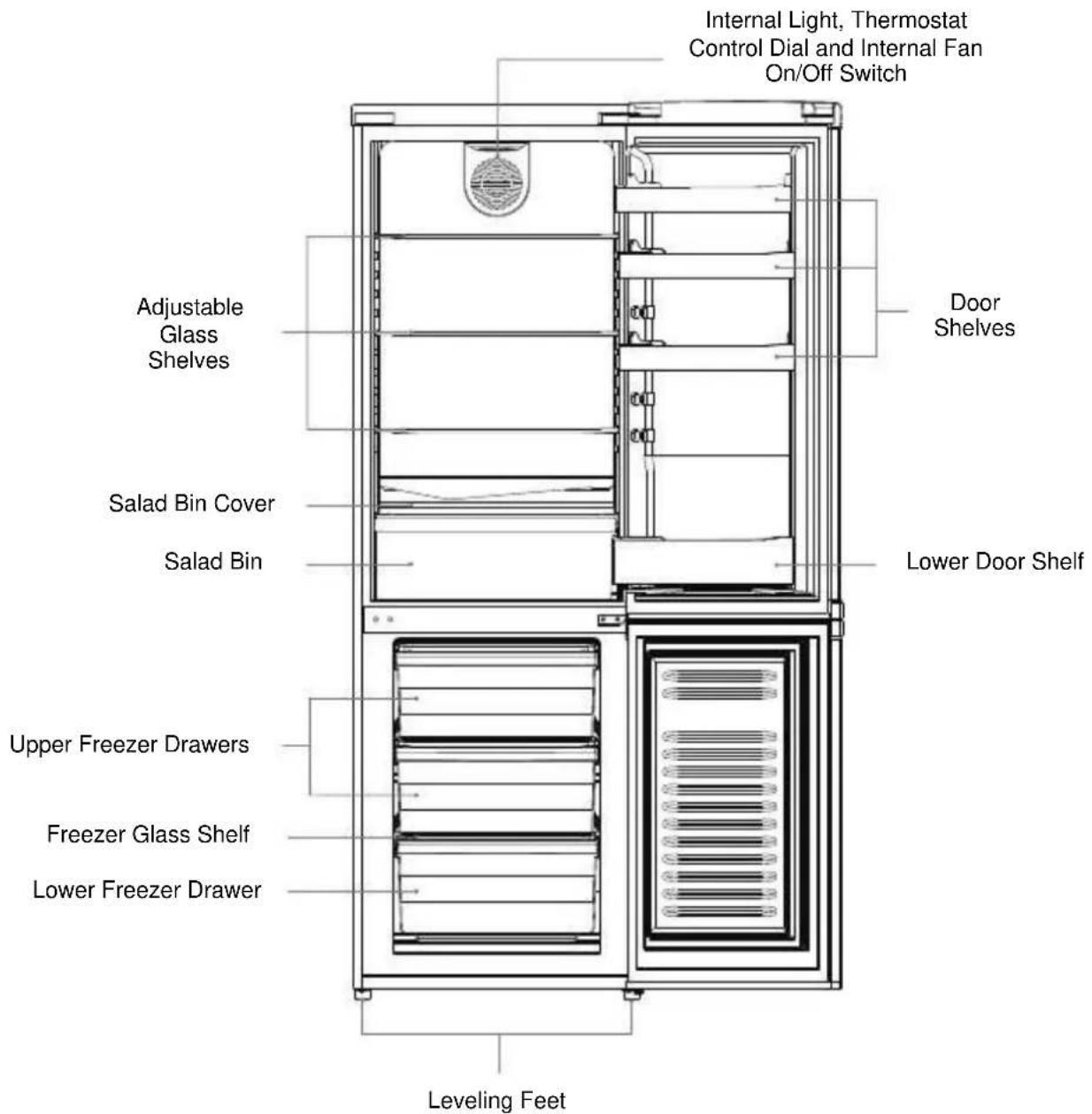
2.2. Installation
2.2.1. Location
When selecting a position for your unit you should make sure the floor is flat and firm, and the room is well ventilated with an average room temperature of between 16^ C and 38^ C. Avoid locating your unit near a heat source, e.g.
cooker, boiler or radiator. Also avoid direct sunlight as it may increase the electrical consumption.
Extreme cold ambient temperatures may also cause the unit not to perform properly. This unit is not designed for use in a garage or outdoor installation. Do not drape the unit with any covering.
When installing the unit, ensure that 40 mm of free space is left at both sides, 50 mm at the rear and 20 mm at the top of the unit. This will allow cold air to circulate around the unit and improve the efficiency of the cooling process. The door can be opened to the right or the left, depending on what better suits the location.
Please ensure there is adequate space for the door to fully open.
2.2.2. Reversing the Door Swing
If you want to have the door swing reversed, we recommend that you contact a qualified technician. You should only try to reverse the door yourself if you believe that you are qualified to do so.
- Ensure the unit is unplugged and empty.
- Adjust the two leveling feet to their highest position.
- To take the door off it is necessary to tilt the unit backwards. You should rest the unit on something solid so that it will not slip during the door reversing process.
- All parts removed must be saved to do the reinstallation of the door.
- Do not lay the unit flat as this may damage the coolant system.
- We recommend that 2 people handle the unit during assembly.
Note: The required tools are: Phillips style screwdriver/Flat bladed screwdriver/Hexagonal spanner.
2.2.3. Proper Installation
- Tilt the unit slightly towards the rear and prop it securely. Two people are required to tilt the unit during the door reversal process.

natural_image
Illustration of two workers carrying a large box, no text or symbols present- Remove the screw covers first.

natural_image
Technical line drawing of a mechanical assembly with a cylindrical component and an arrow indicating direction (no text or symbols)- Remove the screws and then remove the upper hinge that holds the door in place. Lift the upper door and place it on a padded surface to prevent it from scratching.
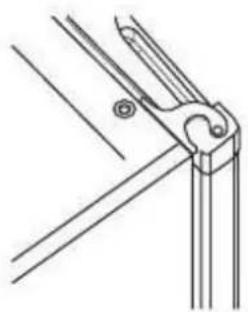
natural_image
Technical line drawing of a mechanical clamp or bracket assembly (no text or symbols)- On the top panel move the blanking plate to the side opposite of the hinge.

natural_image
Pure technical line drawing of a mechanical joint or bracket (no text or symbols)- Take off the middle hinge by removing the screws. Lift the lower door and place it on a padded surface to prevent it from scratching.
Remove the screws' covers and place them on the opposite side.

natural_image
Technical diagram showing mechanical assembly with zoomed-in detail (no text or symbols)- Remove the lower screws, hinge bracket and adjustable foot from the unit bottom. Keep the matching bracket and foot together.
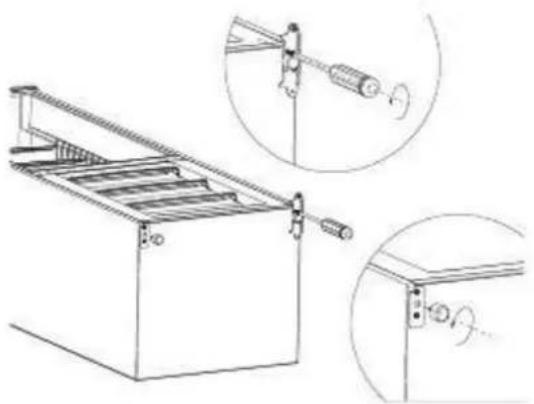
natural_image
Technical line drawing of a mechanical device with two views showing internal components (no text or symbols)- Remove the remaining screw-type adjustable foot from the other side of the unit bottom and then reverse the position of the hinge. Transfer it to the corresponding position on the opposite side of the unit bottom.

flowchart
graph LR
    A["Unscrew"] --> B["180° Rotation"]
    B --> C["Screw"]
    style A fill:#f9f,stroke:#333
    style B fill:#ccf,stroke:#333
    style C fill:#cfc,stroke:#333
- Reattach the bottom door hinge, screws and foot to the opposite side.
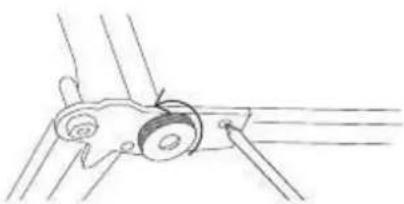
natural_image
Simple line drawing of a mechanical component with motion lines (no text or symbols)- After replacing the lower door, screw the middle hinge back onto the opposite side of the unit.

natural_image
Pure technical line drawing of a mechanical clamp or bracket assembly without any text, numbers, or symbolsNote: Ensure the freezer door is aligned horizontally and vertically, so that the seals are closed on all sides before finally tightening the hinge.
- Carefully set the upper door back into place. Fix the other, separately supplied upper door hinge into place. Ensure the fridge door is aligned horizontally and vertically so that the seals are closed on all sides before finally tightening the top hinge.

natural_image
Technical line drawing of a mechanical clamp or bracket assembly (no text or symbols)- Insert the hinge bracket.
- With the door closed, check that the door is aligned horizontally and vertically and that the seals are closed on all sides before finally tightening the bottom hinge. Re-adjust the leveling feet as needed.
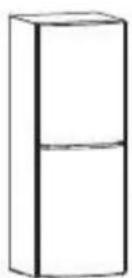
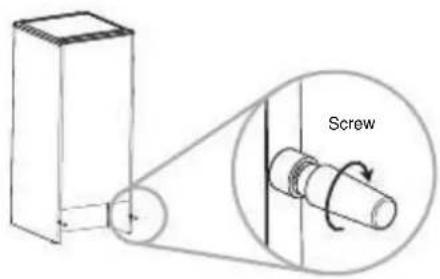
2.2.4. Rear Spacer
Screw the rear spacers at the rear of the unit.
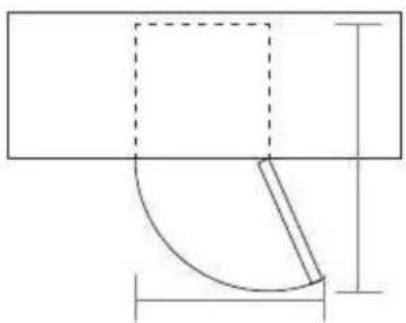
2.2.5. Door Space Requirements
The unit's door must be able to open fully as shown.
natural_image
Pure geometric diagram showing a rectangle with a dashed square and a curved line, no text or symbols present.2.2.6. Leveling the Unit
To level the unit, adjust the two leveling feet at the front of the unit.
If the unit is not leveled, the doors and magnetic seal alignments will not be covered properly.

2.2.7. Before Using the Unit
Before plugging in you must check that you have a socket which is compatible with the plug supplied with the unit.
Before Turning On!
Do not turn on until two hours after moving the unit. The coolant fluid needs time to settle. You may damage the cooling circuit if the unit is turned on too soon.
Before placing any food in your unit, turn it on and wait for 24 hours, to make sure it is working properly and to allow it time to fall to the correct temperature.
Your unit should not be overfilled.
2.2.8. Interior Accessories
Various glass or plastic storage shelves are included with your appliance – different models have different combinations.
You should always slide one of the full size glass storage shelves into the lowest set of guides, above the fruit and vegetable containers, and keep it in this position. To do this, pull the storage shelf forward until it can be swiveled upwards or downwards and removed.
Please do the same in reverse to insert the shelf at a different height.
Note: In order to make the most of the volume of the fresh food storage compartment and frozen-food storage compartment, the user can remove one or more shelves, drawers, out of the appliance, according to your daily use.
2.3. Operation
2.3.1. Switching On Your Unit
- Before connecting the unit to the mains supply, adjust the thermostat control dial to the desired position. Bear in mind that the higher the number, the lower the temperature.
Position 3 is the recommended setting when operating at normal room temperature (between 16^ C and 38^ C). This is located on the top of the cabinet.
Connect the mains cable to the mains socket.

natural_image
Simple line drawing of a bowl with a handle (no text or symbols)- Switch on the fan after placing fresh food in the fridge. The fan circulates the cold air, so food is chilled quickly. Remember to turn off the fan after 1-2 hours.

natural_image
Simple line drawing of a lid with a triangular top (no text or symbols)-
The unit may not operate at the correct temperature if it is in a particularly hot or a particularly cold room, or if you open the door often.
-
To ensure that the unit is cool enough to sufficiently chill your food, wait 24 hours before filling it with food.
-
If you are concerned that your unit is not being kept cold enough and wish to check the temperature, you will need a special fridge/freezer thermometer. These are available from most supermarkets and hardware shops.
Place the thermometer in the centre of the unit, where it can be read easily. Leave overnight, the temperature in the unit should be an average of 5^ C.

2.3.2. Adjusting the Temperature
The internal temperature of the unit is controlled by a thermostat. The recommended position is between 1 and 4 for colder working environments (i.e. during winter) and between 5 and 6 for hotter environments. Please adjust according to the environment.
2.3.3. Noises Inside the Unit
You may notice that your unit makes some unusual noises. Most of these are perfectly normal, but you should be aware of them!
These noises are caused by the circulation of the refrigerant liquid in the cooling system. It has become more pronounced since the introduction of CFC free
gases. This is not a fault and will not affect the performance of your unit. This is the compressor motor working, as it pumps the refrigerant around the system.
2.3.4. Shopping for Chilled Foods
- Take a quick look at the chilled food package and make sure it is in perfect condition.
- Try to keep chilled food together whilst shopping and on the journey home as this will help to keep the food cold.
- Do not buy chilled food unless you can chill it straight away. Specially insulated bags can be bought from most supermarkets and hardware shops. These bags can keep chilled food cold for longer while transporting.
- Food that has been left in a car or at room temperature for a prolonged period of time could raise the food temperature to a dangerous level, which allows harmful bacteria to grow.
- Always unpack and place chilled food in the unit before storing dry food.
2.3.5. Tips for Keeping Food in the Unit
- Cooked meats/fishes should always be stored on a shelf above raw meats/fishes to avoid bacterial transfer.
- Keep raw meats/fishes in a container which is large enough to collect juices and cover it properly. Place the container on the lowest shelf.
- Leave space around your food, to allow air to circulate inside the unit. Ensure all parts of the unit are kept cool.
- To prevent transfer of flavors and drying out, pack or cover the food separately. Fruit and vegetables do not need to be wrapped.
- Always let pre-cooked food cool down before you put in the unit. This will help to maintain the internal temperature of the unit.
- To prevent cold air escaping from the unit, try to limit the number of times you open the door. We recommend that you only open the door when you need to put food in or take food out.
3. Maintenance
Defrosting
Frost may accumulate on the inner rear surface of the appliance which will automatically defrost during the off cycle of the compressor.
Water is channeled via the drain hole to the collection tray above the compressor where it will evaporate.
Please ensure the drain hole is checked and cleaned on a regular basis so water can exit the storage compartment.
The freezer compartment of this unit is frost-free. With proper use, there should not be any frost accumulated.
However, in case of improper use of the freezer compartment, frost might build up in the freezer compartment after the unit has been used for a period of time.
Scrape away the frost using a plastic scraper (not included).

natural_image
Diagram showing a hand holding a circular object with an arrow, inside a container-like structure (no text or symbols)Note: Do not use a metal or sharp instrument to scrape away the frost, nor should you use any electrical appliances to aid defrosting.
We recommend that defrosting should be carried out when the frost layer builds up to 10mm. Choose a time when the stock of frozen food is low, follow these procedures:
-
Take out the food, turn the unit off at the mains supply and leave the door open. Ideally, the frozen food should be put into another freezer. If this is not possible, wrap the food in several sheets of newspaper or large towels and then a thick blanket to keep to keep it cool.
-
Place a shallow bowl or pan below the freezer compartment. Scrape away the frost using the plastic scraper. Defrosting the remaining frost can be
speeded up by placing a bowl of hot water inside the freezer compartment cabinet and closing the door. As the solid frost loosens, scrape it away with the plastic scraper and remove.
- When defrosting is complete, clean your unit's interior and exterior.
Cleaning the Interior and the Exterior of the Unit
- Remove all the shelves and the salad bin. To remove the salad bin first remove the lower door shelf.
- Wipe the inside of the unit with a weak solution of bicarbonate soda and then rinse with warm water using a ‘wrung-out’ sponge or cloth. Wipe completely dry before replacing the shelves and salad bin.
- Use a damp cloth to clean the exterior, and then wipe with a standard furniture polish. Make sure that the door is closed to avoid the polish getting on the magnetic door seal or inside the unit.
- The grille of the condenser at the back of the unit and the adjacent components can be vacuumed using a soft brush attachment.
Cleaning Tips
Condensation may appear on the outside of the unit. This may be due to a change in room temperature. Wipe off any moisture residue. If the problem continues, please contact a qualified technician for assistance.
Care When Handling / Moving Your Unit
Hold the unit around its sides or base when moving it. Under no circumstances should it be lifted by holding the edges of the top surface.
Servicing
The unit should be serviced by an authorized engineer and only genuine spare parts should be used. Under no circumstances should you attempt to repair the unit yourself. Repairs carried out by inexperienced persons may cause injury or serious malfunction. Contact a qualified technician.
Switching Off for Long Periods of Time
When the unit is not in use for a long period of time, disconnect it from the mains supply, empty all food and clean the appliance, leaving the door ajar to prevent unpleasant smells.
4. Technical Specifications
Regulation (EU) 1060/2010:
| Trade mark | Becken | |
| Model | FD2-40 | |
| Category1) | 7 | |
| Energy efficiency class2) | A+ | |
| Annual energy consumption3) | kWh/annum | 281 |
| Total storage volume | L | 293 |
| Storage volume cooling | L | 221 |
| Storage volume freezing | L | 72 |
| Star rating4) | 4 | |
| Frost-free | Yes | |
| Temperature rise time | H | 12 |
| Freezing capacity | Kg/24h | 3.5 |
| Climatic class5) | ST | |
| Airborne acoustical noise emission | dB (A) re1pW | 43 |
| Construction | Free-standing |
1) 1 = Refrigerator with one or more fresh-food storage compartments.
2 = Refrigerator-cellar, Cellar and Wine storage appliances.
3 = Refrigerator-chiller and Refrigerator with a 0-star compartment.
4 = Refrigerator with a one-star compartment.
5 = Refrigerator with a two-star compartment.
6 = Refrigerator with a three-star compartment.
7 = Refrigerator-freezer.
8 = Upright freezer.
9 = Chest freezer.
10 = Multi-use and other refrigerating appliances.
^2) A+++ (most efficient) to D (least efficient).
^3) Annual energy consumption (AEC) in kWh per year based on standard test results for 24 hours.
Actual energy consumption will depend on how the appliance is used and where it is located.
4)

One-star compartment with nominal temperature of -6^ C.
Two-star compartment with nominal temperature of -12^ C.
Three-star compartment with nominal temperature of -18^ C.
Food freezer compartment (four-star compartment) with nominal temperature of -18^ C.
^5) Climate class: This appliance is intended to be used at an ambient temperature between lowest and highest temperature: SN = 10° C-32° C, N = 16° C-32° C, ST = 16° C-38° C, T = 16° C-43° C
5. Aftermarket
Becken has designed this appliance in order to guarantee the maximum reliability. However, if a problem occurs, by following the procedures suggested in this section you may be able to determine its cause.
Do not attempt to open the appliance – there is a risk of electrical shock.
If you are not able to solve the problem, please contact your seller or manufacturer.
All users must be familiarized with this section. Knowing what could go wrong can help you avoid the occurrence of problems.
WARNING: any attempt of fixing the appliance without contacting the manufacturer will nullify the warranty.
In case the problem persists, take your appliance to an aftermarket section of any Worten, Modelo or Continente store in order to solve the problem.
Worten Equipamentos para o Lar ensures for a period of 2 years, counting from the date of purchase of this appliance, a warranty against any found manufacturing defect. The warranty supposes a correct use and maintenance of the appliance, namely according to the instructions expressed in this manual. In case otherwise identified, the malfunctions will not be under the warranty.
The repairing of electrical appliances must only be made by qualified technicians, as otherwise there may occur future complications on the appliances.
To avoid unnecessary risks, in case there are any malfunctions on the wires or on another type of components, repairing must be made on the specialized locations of technical assistance, as appropriate tools are needed.
6. Environment Conservation
Aiming to protect the environment, we try to reduce to a maximum the volume of the packages which are confined to three easy separation materials: cardboard, paper and plastic.
The appliance is made of recyclable material, once disassembled by a specialized company. Follow the local legislation concerning recycling of all materials.

natural_image
Symbol of a trash bin crossed with a diagonal line, no text or numbers present
natural_image
Exterior view of a white refrigerator with a horizontal handle (no visible text or symbols)Frigorí fico
Modelo: FD2-40
natural_image
Illustration of two workers carrying a large box, no text or symbols presentnatural_image
Technical line drawing of a mechanical assembly with a directional arrow indicating motion (no text or symbols)natural_image
Technical line drawing of a mechanical clamp or bracket assembly (no text or symbols)natural_image
Pure technical line drawing of a mechanical joint or bracket (no text or symbols)natural_image
Technical diagram showing mechanical assembly with zoomed-in detail (no text or symbols)natural_image
Technical line drawing of a ladder-mounted industrial machine with two inset views showing mechanical components (no text or symbols)natural_image
Simple line drawing of a mechanical linkage or pulley system (no text or symbols)natural_image
Technical line drawing of a mechanical clamp or bracket assembly (no text or symbols)natural_image
Technical line drawing of a mechanical clamp or bracket assembly (no text or symbols)natural_image
Pure geometric diagram with lines and shapes, no text or symbols presentnatural_image
Simple line drawing of a bowl with a handle and lid (no text or symbols)natural_image
Simple line drawing of a bowl-like object with a lid (no text or symbols)natural_image
Diagram showing a hand holding a circular object with an arrow, inside a vehicle or container frame (no text or symbols)natural_image
Symbol of a trash bin crossed with no text or numbers, representing environmental restriction (no text present)
natural_image
Exterior view of a white refrigerator with a horizontal handle (no visible text or symbols)Frigorí fico
Modelo: FD2-40
natural_image
Two people pulling a large box together (no text or symbols visible)natural_image
Technical line drawing of a mechanical assembly with a black arrow indicating direction (no text or symbols)natural_image
Technical line drawing of a mechanical clamp or bracket assembly (no text or symbols)natural_image
Pure technical line drawing of a mechanical joint or bracket (no text or symbols)natural_image
Technical line drawing of a mechanical assembly with two views (top and side), no text or symbols present.natural_image
Technical line drawing of a mechanical device with two inset views showing internal components (no text or symbols)natural_image
Simple line drawing of a mechanical linkage or mounting bracket with no text or symbolsnatural_image
Pure technical line drawing of a mechanical clamp or bracket assembly without any text, numbers, or symbolsnatural_image
Technical line drawing of a mechanical clamp or bracket assembly (no text or symbols)natural_image
Pure geometric diagram showing a rectangle with a dashed square and a curved line, no text or symbols present.natural_image
Simple line drawing of a bowl-like object with a handle (no text or symbols)natural_image
Simple line drawing of a bowl-like object with a lid (no text or symbols)natural_image
Diagram showing a hand holding a tool inside a device frame, with an arrow indicating direction (no text or symbols present)natural_image
Symbol of a trash bin crossed with diagonal lines, no text or numbers present- Refrigerator
- Instruction Manual
- Index
- Safety Instructions....5
- Utilization and Functioning .... 8
- Operation....14
- Safety Instructions
- Important Warnings
- Assistance
- Power Energy
- Power Cord and Other Cables
- Humidity and Water
- Cleaning
- General Precautions
- Utilization and Functioning
- Product Description
- Installation
- Location
- Reversing the Door Swing
- Proper Installation
- Rear Spacer
- Door Space Requirements
- Leveling the Unit
- Before Using the Unit
- Before Turning On!
- Interior Accessories
- Operation
- Switching On Your Unit
- Adjusting the Temperature
- Noises Inside the Unit
- Shopping for Chilled Foods
- Tips for Keeping Food in the Unit
- Maintenance
- Defrosting
- Cleaning the Interior and the Exterior of the Unit
- Cleaning Tips
- Care When Handling / Moving Your Unit
- Servicing
- Switching Off for Long Periods of Time
- Technical Specifications
- Aftermarket
- Environment Conservation
- Frigorí fico
- Modelo: FD2-40
Brand : Becken
Model : FD2-40
Category : Microwave Oven