
C155 - Loudspeaker CAMBRIDGE - Free user manual and instructions
Find the device manual for free C155 CAMBRIDGE in PDF.


| Product Type | Ceiling Speaker (In-Wall/In-Ceiling) |
| Brand | Cambridge Audio |
| Model | C155 |
| Quantity in Package | 2 speakers |
| Driver Configuration | 1 x 6.5" (165mm) Woofer |
| Frequency Response | 60Hz - 20kHz (±2dB) |
| Sensitivity | 90dB (2.83Vrms input) |
| Impedance | 4 Ohms |
| Speaker Dimensions (H x Diameter) | 75mm x 240mm (3" x 9.4") |
| Weight (per speaker) | 1.1kg (2.4lbs) |
| Mounting Hole Diameter | Cutout size per included template (approx. 200-220mm) |
| Required Ceiling Thickness | 10 - 30mm (0.39 - 1.18") |
| Required Clearance Behind Ceiling | At least 80mm (3.15") |
| Recommended Speaker Cable | 16 gauge minimum, polarity marked |
| Grille Attachment | Magnetic, removable for painting |
| Paintable Grille and Frame | Yes, includes painting mask for cone protection |
| Mounting System | Dog-leg rotating clamps (screw-adjustable) |
| Fire Hood Compatibility | Check with builder/installer if required |
| Low Smoke/Zero Halogen Cable | May be required for certain installations |
| Compliance | RoHS, CE (implied) |
| Warranty | Standard Cambridge Audio warranty (register online) |
| Registration | Register at cambridgeaudio.com/register for updates |
| Color | White (paintable grille and frame) |
Frequently Asked Questions - C155 CAMBRIDGE
User questions about C155 CAMBRIDGE
0 question about this device. Answer the ones you know or ask your own.
Ask a new question about this device
Download the instructions for your Loudspeaker in PDF format for free! Find your manual C155 - CAMBRIDGE and take your electronic device back in hand. On this page are published all the documents necessary for the use of your device. C155 by CAMBRIDGE.
USER MANUAL C155 CAMBRIDGE
C155 Ceiling Speaker
Manual Generated: 15/03/2023 - 01:36
Table of Contents
C155 Ceiling Speaker 3
Introduction 4
What's included with the C155? 5
Installation Instructions 6
Painting the speaker grille and frame 8
Technical Specifications 9
C155 Ceiling Speaker
Last updated: December 6, 2022 03:50. Revision #8134

Users Manual
Introduction
Last updated: January 19, 2023 01:54. Revision #8391
This guide is designed to make installing and using this product as easy as possible. Information in this document has been carefully checked for accuracy at the time of printing; however, Cambridge Audio's policy is one of continuous improvement, therefore design and specifications are subject to change without prior notice.
This document contains proprietary information protected by copyright. All rights are reserved. No part of this manual may be reproduced by any mechanical, electronic or other means, in any form, without prior written permission of the manufacturer. All trademarks and registered trademarks are the property of their respective owners.
© Copyright Cambridge Audio Ltd.
For upcoming news on future products, software updates and exclusive offers, make sure you register your product at
http://www.cambridgeaudio.com/register
What's included with the C155?
Last updated: January 19, 2023 01:54. Revision #8392
- 2 x C155 Ceiling Speakers.
Installation Instructions
Last updated: January 19, 2023 01:54. Revision #8393
- Firstly, remove the cardboard pad from inside the supplied template to mark the position for the mounting hole at the selected location.

- Before cutting ceiling speaker holes, it is suggested that the area is tested for clearance by making an L-shaped probe from strong wire (see illustration below), drilling a small hole in the target area, inserting the probe and slowly turning. Any obstructions will be immediately obvious, and the target area can be moved to a more suitable position.

- Cut the mounting hole with a drywall, or keyhole saw. Be sure the mounting surface is between 10 and 30mm (0.39 - 1.18") thick, and that there is at least 80mm(3.15") of clearance behind the mounting surface.
- Use 16 gauge minimum speaker cable to connect between your amplifier and your speakers. Ensure that speaker cables are routed away from any electrical cables and that any amplifiers/sources are switched off during installation.
- Use a wire stripper to strip 10mm of insulation from the end of each speaker cable and twist the strands together.
- When connecting speakers pay extra attention to polarity ensuring that red (+) terminals on your amplifier are connected to the red (+) terminals on your speakers, and that the black (-) terminals on your amplifier are connected to the black (-) terminals on your speakers.
![graph TD A["Panel 1: + and -"] --> B["Panel 2: + and -"] C["Panel 3: + and -"] --> D["Panel 2: + and -"] style A fill:#f9f,stroke:#333 style C fill:#f9f,stroke:#333 style B fill:#ccf,stroke:#333 style D fill:#ccf,stroke:#333](/content/2026/06/1218558/images/33b81536cab1d530b485b9b6b772082c736e3c0d4567179e261ee5de801baffb.jpg)
-
Ensure that the four fixing screws on the speaker are slackened off allowing the mounting dog-legs to move freely. Move each dog-leg foot to the LEFT into its holding slot and then line the speaker up in the mounting hole.
-
With the speaker in the mounting hole use a cross-head screwdriver to slowly turn each fixing screw clockwise, moving the dog-legs out of their slots. Tighten these screws until the dog-legs grip the ceiling.
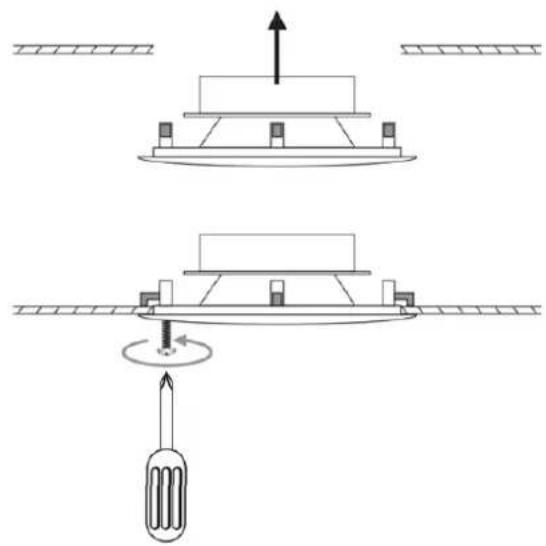
Note: Please check with your builder/installer whether you need to install a fire hood with this product. "Low smoke/zero halogen" specification Speaker cable may also be required.
Painting the speaker grille and frame
Last updated: January 19, 2023 01:54. Revision #8394
The C155 speaker grille is attached by a magnet, allowing it to be easily removed for painting.
- Carefully remove the grille ensuring not to damage the speaker cone.
- Paint the grille using your chosen paint.

- If you wish to paint the speaker surround, please use the included clear plastic painting mask to cover the speaker cone and avoid causing damage.
Technical Specifications
Last updated: January 19, 2023 01:54. Revision #8395
Sensitivity (SPL)
90dB (2.83 Vrms input)
Frequency Response
60Hz - 20kHz (+/- 2dB
Impedance
4 Ohms
Drivers
1 x 6.5" (165mm) woofer.
Speaker Dimensions (H x W x D)
75 x ∅ 240mm (3 x ∅ 9.4")
Weight
1.1kg (2.4lbs)
Brand : CAMBRIDGE
Model : C155
Category : Loudspeaker