
PTVSP30SL - Hearing aid Pyle - Free user manual and instructions
Find the device manual for free PTVSP30SL Pyle in PDF.


| Product Type | 2.4GHz Wireless TV Speaker (Hearing Aid System) |
| Brand | Pyle |
| Model | PTVSP30SL |
| Transmission Technology | Frequency Hopping Spread Spectrum (FHSS) |
| Wireless Range | Up to 30 meters (100 feet) without obstacles |
| Audio Inputs | Digital Optical, RCA (Red/White), 3.5mm AUX |
| Speaker Output Power | 2 x 5 Watts (stereo) |
| Frequency Response | 20Hz – 20kHz |
| Signal-to-Noise Ratio | >80 dB |
| Total Harmonic Distortion | <0.5% |
| Battery Type | Rechargeable Ni-MH (built-in) |
| Battery Charging Time | Approx. 2-3 hours |
| Battery Operating Time | Up to 8 hours (typical usage) |
| Power Supply | Two AC/DC adapters (input 100-240V, output 5V/9V depending on unit) |
| Controls | Volume knob (ON/OFF), 3-level tone control (High/Mid/Low) |
| Automatic Power-Off | After 3-5 minutes without signal |
| Audio Output | 3.5mm headphone jack on receiver |
| Additional Features | Built-in optical converter, short-circuit protection, one-to-many pairing, wired speaker mode |
| Dimensions (Receiver) | Approx. 6.3 x 4.5 x 3.1 inches (160 x 115 x 80 mm) |
| Weight (Receiver) | Approx. 1.5 lbs (680 g) |
| Maintenance | Wipe with dry, soft cloth; do not use liquids or abrasive cleaners |
| Safety | Built-in short-circuit protection circuit; auto power-off for energy saving |
| Compatibility | Works with any TV having Digital Optical, RCA, or 3.5mm output |
Frequently Asked Questions - PTVSP30SL Pyle
User questions about PTVSP30SL Pyle
0 question about this device. Answer the ones you know or ask your own.
Ask a new question about this device
Download the instructions for your Hearing aid in PDF format for free! Find your manual PTVSP30SL - Pyle and take your electronic device back in hand. On this page are published all the documents necessary for the use of your device. PTVSP30SL by Pyle.
USER MANUAL PTVSP30SL Pyle
Need service or repair?
Want to leave a comment?
PyleUSA.com/ContactUs

PYLE
PyleUSA.com
natural_image
Exterior view of a Pyle USA mobile phone with a circular cover and speaker grille (no visible text or symbols on body)

2.4GHz Bed-Side TV Comfort Hearing System
USER MANUAL
PTVSP30SL 2.4GHz Wireless TV Speaker adopts Frequency Hopping Spread Spectrum technology (FHSS) with strong anti-interference ability. It can bring the clear and crisp TV sound, creating comfortable individual listening environment. It provides more freedom to enjoy TV programs or other audio devices indoor or out doors. No need to turn up volume aloud, there is no lip-sync delay and no need to use heavy headphones.
Features:
- As a wireless speaker, compatible with any brand of TVs that have Digital Optical or RCA (Red and White) or 3.5mm AUDIO OUTPUT.
- 2.4GHz digital stereo wireless speaker adopts advanced Frequency Hopping Spread Spectrum technology (FHSS), with strong anti-interference ability; wireless transmission distance is more than 30 meters without obstacles.
- Built-in optical digital converter function, compatible with TV's digital audio out, helps you to enjoy top quality audio experience without spending extra expensive cost on the digital converter.
- Two power adapters available: one for transmitter base power supply; another for speaker to be plugged in the wall outlet, no need taking the speaker back into the basement to charge.
- With volume adjustment and 3 levels of tones control enhance clarity of TV speech.
-
This product can be used in one to one (one transmitter to one wireless speaker) or one to many (one transmitter to multiple wireless speakers at the same time).
-
Built-in short-circuit protection circuit in the transmitter for safety.
8. Automatic power OFF function:
Power saving design that turns OFF automatically when no signal is received for 3-5 minutes.
-
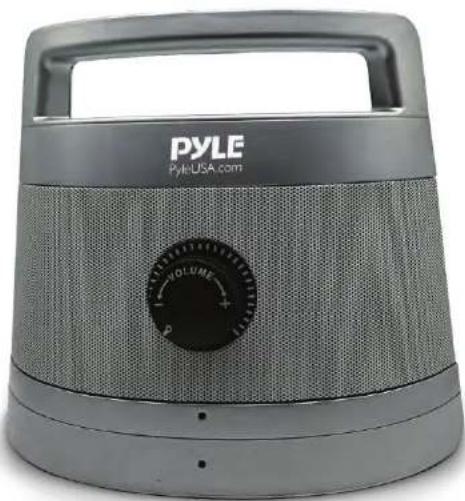
The big knob with one dial operation of ON/OFF and volume control in the center area of the receiver, makes you turn up / down or turn off the volume by your fingertips easily.
-
Rechargeable and portable wireless speaker with handle, convenient to take anywhere.
-
Big size acoustic chamber with powerful loudspeakers (2 x 5 Watt)
-
Audio signal automatic level control function: transmitter will reduce the intensity of the input audio signal when it is too strong, avoid excessive sound that may damage your hearing
-
Wired stereo speaker function: speaker receiver with audio IN jack is a wired speaker for MP3, PC, Mobile Phone, iPAD, etc
-
Speaker receiver has a audio out jack to connect with a headset that makes it great for you to watch TV quietly even the TV is at mute condition.
Charging your TV speaker before first use
Place the RECEIVER on the TRANSMITTER and charge for 2\~3 hours until the charging indicator of the RECEIVER is OFF which means the battery is full.
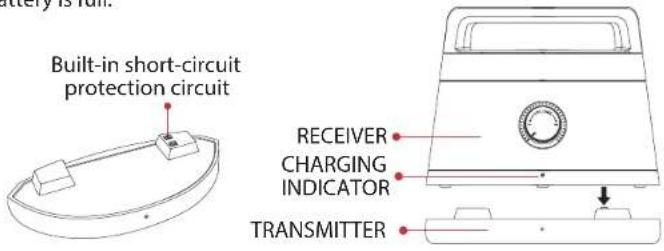
Connect the power adaptor to the RECEIVER to charge the battery.

Low Battery and Recharging:
The red and green LED blink alternately and an alert sound occurs when the receiver is in wireless state, or the red LED blinks when the receiver is in the wired state. The battery power is lower at this moment. Recharge the battery until full.
Operation
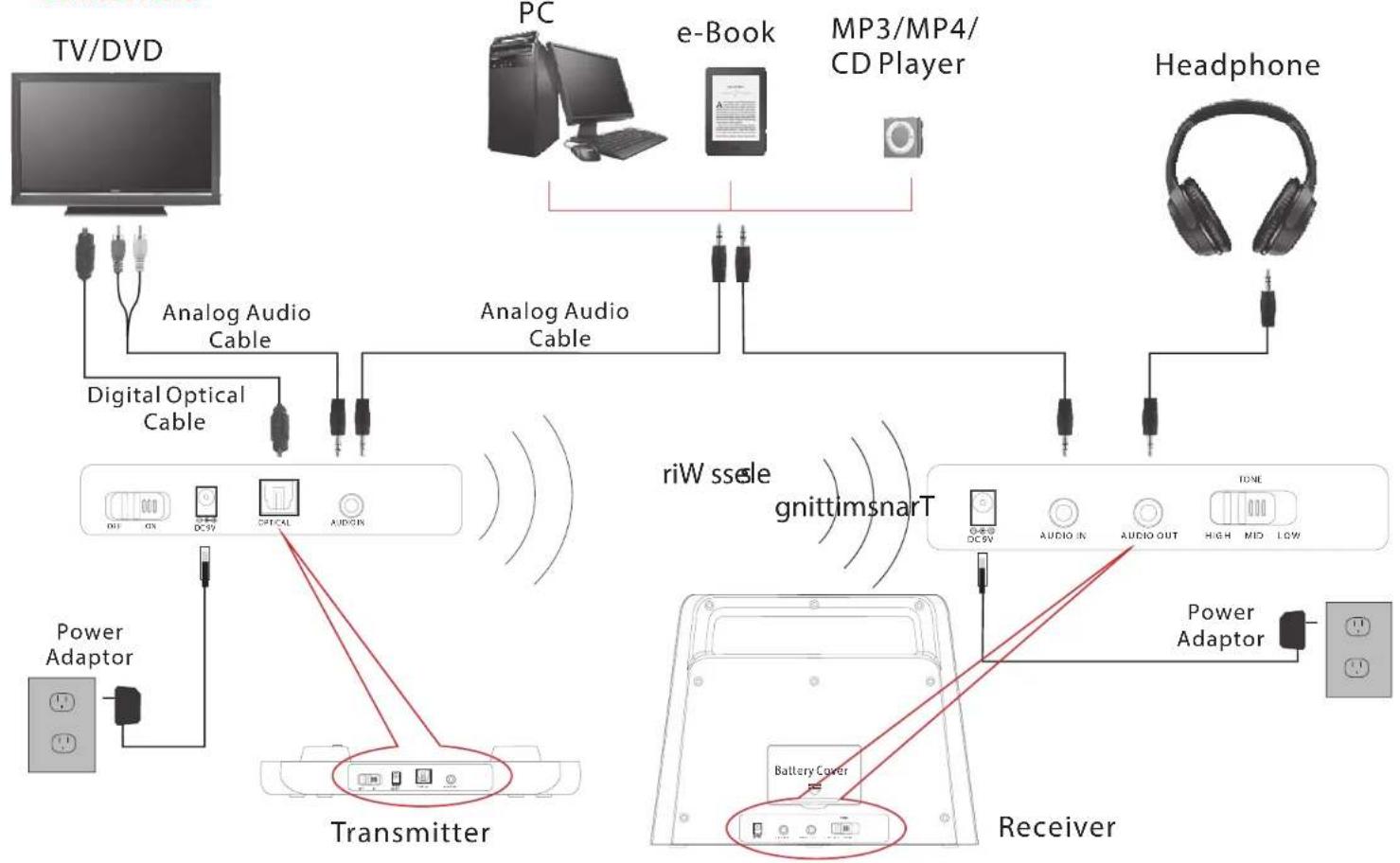
After connecting the TRANSMITTER to your TV, or other audio device:
- Turn ON your TV, or other audio device, and set the volume properly. Then switch ON the TRANSMITTER.

- Turn ON the RECEIVER, and set the volume and tone (HIGH/MID/LOW) to your required level.

- After using, turn OFF the RECEIVER and switch OFF the TRANSMITTER.
CONNECTION:
flowchart
graph TD
    A["TV/DVD"] -->|Analog Audio Cable| B["Transmitter"]
    C["PC"] -->|e-Book| D["MP3/MP4/CD Player"]
    E["Headphone"] -->|Analog Audio Cable| F["Receiver"]
    G["Power Adaptor"] --> H["Transmitter"]
    I["Digital Optical Cable"] --> B
    J["riW sense"] --> F
    K["giottimsnarT"] --> F
    L["Power Adaptor"] --> M["Receiver"]
    N["DC9V"] --> B
    O["DC5V"] --> B
    P["CITICAL"] --> B
    Q["AUDIN"] --> B
    R["Battery Cover"] --> M
    S["DC9V"] --> F
    T["AUDIO IN"] --> F
    U["AUDIO OUT"] --> F
    V["HIGH MID LOW"] --> M
    W["Power Adaptor"] --> M
Built-in optical digital converter function, compatible with any brand of digital TV. Helps you enjoy top quality audio experience without spending extra cost on digital converter.


Brand : Pyle
Model : PTVSP30SL
Category : Hearing aid