IDE3510U2GB - Computer accessory StarTech.com - Free user manual and instructions
Find the device manual for free IDE3510U2GB StarTech.com in PDF.


User questions about IDE3510U2GB StarTech.com
0 question about this device. Answer the ones you know or ask your own.
Ask a new question about this device
Download the instructions for your Computer accessory in PDF format for free! Find your manual IDE3510U2GB - StarTech.com and take your electronic device back in hand. On this page are published all the documents necessary for the use of your device. IDE3510U2GB by StarTech.com.
USER MANUAL IDE3510U2GB StarTech.com
IDE Hard Drive Enclosure
3.5" Black External USB 2.0 IDE Hard Drive Enclosure
FCC Compliance Statement
This equipment has been tested and found to comply with the limits for a Class B digital device, pursuant to part 15 of the FCC Rules. These limits are designed to provide reasonable protection against harmful interference in a residential installation. This equipment generates, uses and can radiate radio frequency energy and, if not installed and used in accordance with the instructions, may cause harmful interference to radio communications. However, there is no guarantee that interference will not occur in a particular installation. If this equipment does cause harmful interference to radio or television reception, which can be determined by turning the equipment off and on, the user is encouraged to try to correct the interference by one or more of the following measures:
Reorient or relocate the receiving antenna.
Increase the separation between the equipment and receiver.
Connect the equipment into an outlet on a circuit different from that to which the receiver is connected.
Consult the dealer or an experienced radio/TV technician for help.
Use of Trademarks, Registered Trademarks, and other Protected Names and Symbols
This manual may make reference to trademarks, registered trademarks, and other protected names and/or symbols of third-party companies not related in any way to StarTech.com. Where they occur these references are for illustrative purposes only and do not represent an endorsement of a product or service by StarTech.com, or an endorsement of the product(s) to which this manual applies by the third-party company in question. Regardless of any direct acknowledgement elsewhere in the body of this document, StarTech.com hereby acknowledges that all trademarks, registered trademarks, service marks, and other protected names and/or symbols contained in this manual and related documents are the property of their respective holders.
Table of Contents
Introduction ...... 1
Packaging Contents....1
System Requirements ....1
Front View 2
Rear View 2
Installation 3
Hardware Installation ....3
Driver Installation ....4
Verifying Installation ....4
How to Use 4
Specifications 6
Technical Support 7
Warranty Information 7
Introduction
The IDE3510U2/GB USB 2.0 IDE Hard Drive Enclosure provides cost-effective external storage, letting you connect a 3.5" IDE hard drive to a computer through USB 2.0, perfect for extending the useful life of older IDE (ATA) hard drives.
Packaging Contents
1 x IDE3510U2/GB hard drive enclosure•
1 x USB cable•
1 x Enclosure Stand•
1 x Power Adapter•
1 x Instruction Manual•
System Requirements
3.5" ATA/66/100/133 hard drive•
Microsoft Windows 2000/XP/Vista/7, Mac OS X, or Linux•
Front View
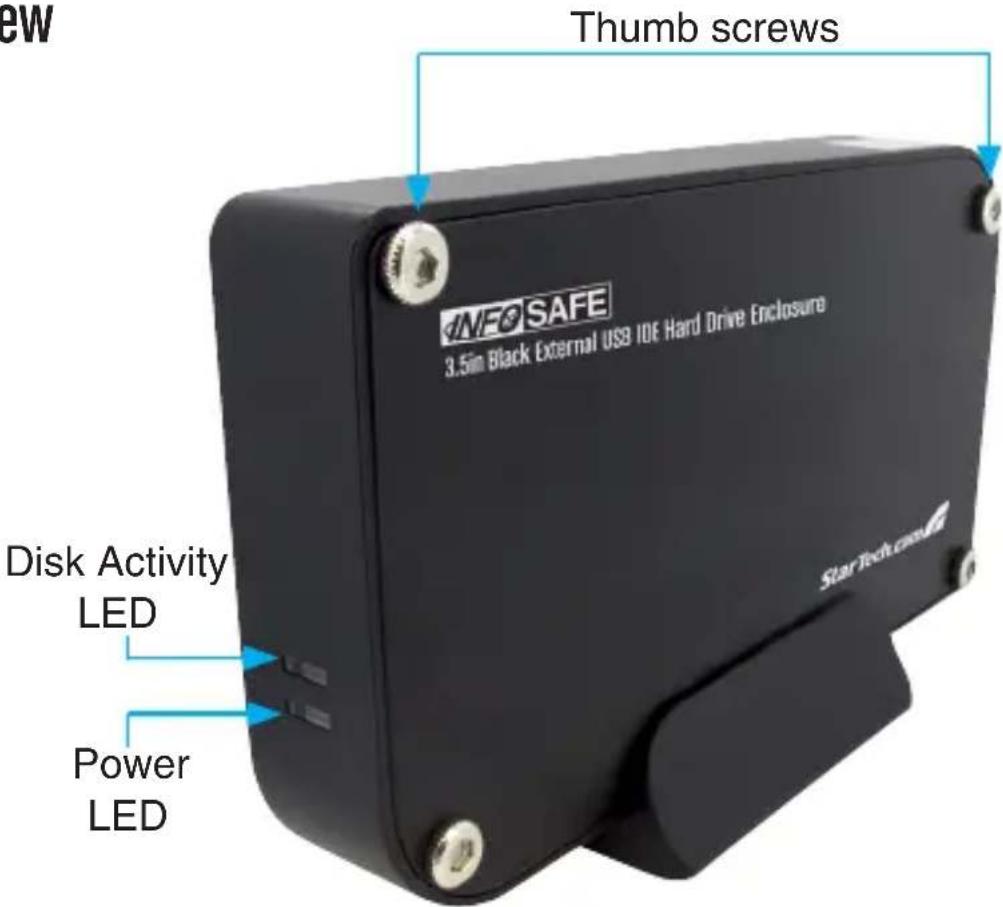
text_image
NEW Thumb screws NEOSAFE 3.5in Black External USB I/OE Hard Drive Enclosure Disk Activity LED Power LED Star Tech crewRear View

text_image
Power connector USB connector Power SwitchInstallation
WARNING: Hard drives require careful handling, especially when being transported. If you are not careful with your hard disk, lost data may result. Always handle your hard drive and storage device with caution.
Hardware Installation
Remove the 4 thumb screws from both sides of the enclosure (8 1. thumb screws in total) and remove the side panels.
Lay the hard drive into the drive tray and connect the IDE ribbon 2. cable and LP4 molex power connectors to the hard drive.

text_image
IDC Connector Power ConnectorTurn the enclosure over, or onto it's side and use the 4 small drive 3. screws (included) to secure the hard drive from below.
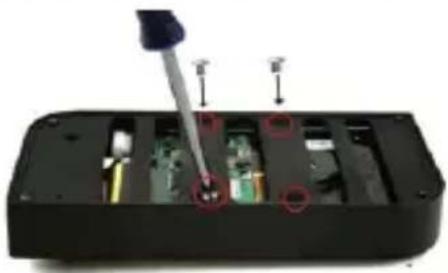
natural_image
Close-up of a black electronic device showing internal components with a screwdriver inserted (no text or symbols visible)Once the drive is securely mounted, replace the side panels with the 4. thumb screws.
Connect the power cable a power outlet and into the rear of the 5. enclosure. Switch the enclosure on, by setting the switch to '1'.
Connect the USB cable from rear of the enclosure to the computer.6.
Driver Installation
Windows 2000/XP/Vista/7, Mac OS X, Linux
No driver installation is required for these operating systems, as this enclosure is natively supported, so the drivers are already installed.
Verifying Installation
Windows 2000/XP/Server 2003/Vista
From the main desktop, right-click on “My Computer” (“Computer” in Vista), then select Manage. In the new Computer Management window, select Device Manager from the left window panel.

text_image
Open Explore Search... Manage Map Network Drive... Disconnect Network Drive... Create Shortcut Delete Rename PropertiesDouble-click on the “Disk Drives” option. A new disk drive should be listed under this category. It will typically contain the make/model of the hard drive you have installed in the enclosure.
How to Use
Windows 2000/XP/Server 2003/Vista
If a new hard drive does not show up in My Computer, right-click on 1. My Computer, and select Manage.
Select Disk Management, in the left pane. In the right pane, you 2. should notice the new hard drive:

text_image
Storage Removable Storage Disk Defragmenter Disk Management Services and Applications Disk 0 Basic: 76.69 GB Online N 6.47 GB FAT3; Healthy (Unk) Disk 1 Basic: 111.79 GB Online 111.79 GB UnallocatedRight-click on the Unallocated block, and select New Partition.3.
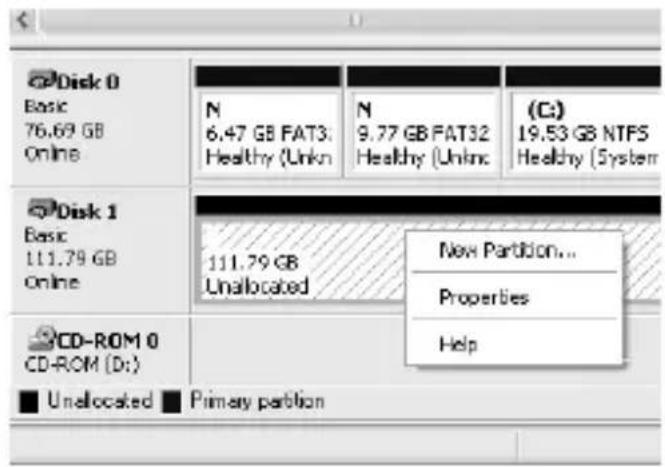
text_image
Disk 0 Basic 76.69 GB Online N 6.47 GB FAT3: Healthy (Unkn) N 9.77 GB FAT32 Healthy (Unkn) (C:) 19.53 GB NTFS Healthy (System) Disk 1 Basic 111.79 GB Online 111.79 GB Unallocated Now Partition... Properties Help CD-ROM 0 CD-ROM (D:) Unallocated Primary partitionThis will launch the New Partition Wizard. Please follow the 4. instruction provided by the Wizard, to partition the drive for use.
Once the partition has been created, the drive installed within the 5. hard drive enclosure will be recognized as a New Volume in Disk Management, as well as in My Computer:
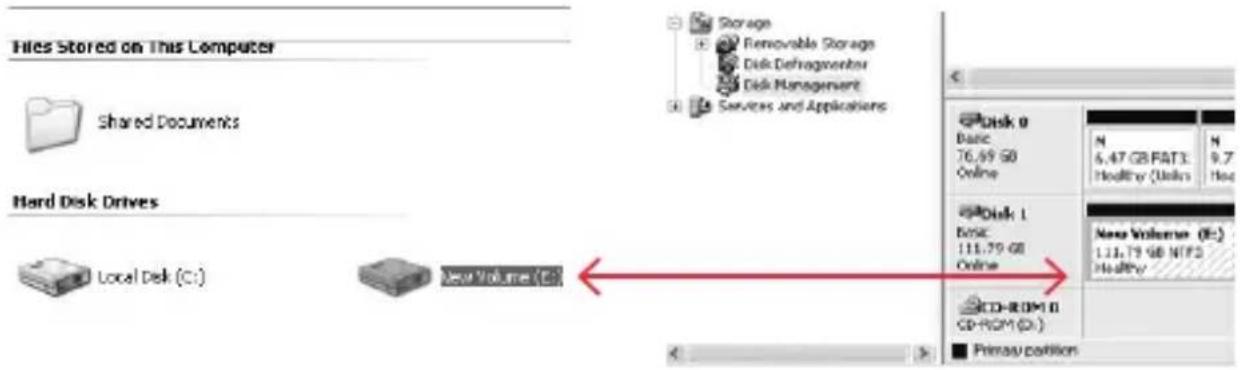
text_image
Files Stored on This Computer Shared Documents Hard Disk Drives Local Disk (C:) New Volume (E:) Storage Removable Storage Disk Defragmenter Disk Management Services and Applications Disk 0 Basic 76.69 GB Online N 6.47 GB FAT3 Healthy (Utils) N 9.7 Hoc Disk 1 Basic 111.79 GB Online New Volume (E:) 1.11.79 GB NTFS Healthy CD-ROM 0 CD-ROM (D:) Primary portionSpecifications
| Bus Interface | USB 2.0 |
| External Connectors | 1 x USB type B1 x Power Connector |
| Chipset | Initio INIC-151 |
| LEDs | Power, Activity |
| Maximum Data Transfer Rate | USB: 480Mb/s |
| Hard Drive Compatibility | 3.5” ATA/66/100/133 hard drive up to 750GB in capacity |
| Power Adapter | 12VDC, 2A, center positive |
| Dimensions | 222.0mm x 33.0mm x 124.0mm |
| Weight | 499g |
| Compatible Operating Systems | Windows 2000/XP/Vista/7, Mac OS X, Linux |
Technical Support
StarTech.com's lifetime technical support is an integral part of our commitment to provide industry-leading solutions. If you ever need help with your product, visit www.startech.com/support and access our comprehensive selection of online tools, documentation, and downloads.
Warranty Information
This product is backed by a one year warranty.
In addition, StarTech.com warrants its products against defects in materials and workmanship for the periods noted, following the initial date of purchase. During this period, the products may be returned for repair, or replacement with equivalent products at our discretion. The warranty covers parts and labor costs only. StarTech.com does not warrant its products from defects or damages arising from misuse, abuse, alteration, or normal wear and tear.
Limitation of Liability
In no event shall the liability of StarTech.com Ltd. and StarTech.com USA LLP (or their officers, directors, employees or agents) for any damages (whether direct or indirect, special, punitive, incidental, consequential, or otherwise), loss of profits, loss of business, or any pecuniary loss, arising out of or related to the use of the product exceed the actual price paid for the product. Some states do not allow the exclusion or limitation of incidental or consequential damages. If such laws apply, the limitations or exclusions contained in this statement may not apply to you.
StarTech.com Making hard-to-find easy!®
StarTech.com has been making “hard-to-find easy” since 1985, providing high quality solutions to a diverse IT and A/V customer base that spans many channels, including government, education and industrial facilities to name just a few. We offer an unmatched selection of computer parts, cables, A/V products, KVM and Server Management solutions, serving a worldwide market through our locations in the United States, Canada, the United Kingdom and Taiwan.
Visit www.startech.com today for complete information about all our products and to access exclusive interactive tools such as the Cable Finder, Parts Finder and the KVM Reference Guide.