FAN939775HP - Fan StarTech.com - Free user manual and instructions
Find the device manual for free FAN939775HP StarTech.com in PDF.


User questions about FAN939775HP StarTech.com
0 question about this device. Answer the ones you know or ask your own.
Ask a new question about this device
Download the instructions for your Fan in PDF format for free! Find your manual FAN939775HP - StarTech.com and take your electronic device back in hand. On this page are published all the documents necessary for the use of your device. FAN939775HP by StarTech.com.
USER MANUAL FAN939775HP StarTech.com
Universal AMD/Intel CPU Cooler
Universal Intel/AMD Heatpipe CPU Cooler
FAN939775HP
Instruction Manual

natural_image
Close-up of a CPU cooler with visible fan blades and cooling fins (no text or symbols)Actual product may vary from photo
StarTech.com
The Professionals' Source for Hard-to-Find Computer Parts
FCC Compliance Statement
This equipment has been tested and found to comply with the limits for a Class B digital device, pursuant to part 15 of the FCC Rules. These limits are designed to provide reasonable protection against harmful interference in a residential installation. This equipment generates, uses and can radiate radio frequency energy and, if not installed and used in accordance with the instructions, may cause harmful interference to radio communications. However, there is no guarantee that interference will not occur in a particular installation. If this equipment does cause harmful interference to radio or television reception, which can be determined by turning the equipment off and on, the user is encouraged to try to correct the interference by one or more of the following measures:
- Reorient or relocate the receiving antenna.
- Increase the separation between the equipment and receiver.
- Connect the equipment into an outlet on a circuit different from that to which the receiver is connected.
- Consult the dealer or an experienced radio/TV technician for help.
Use of Trademarks, Registered Trademarks, and other Protected Names and Symbols
This manual may make reference to trademarks, registered trademarks, and other protected names and/or symbols of third-party companies not related in any way to StarTech.com. Where they occur these references are for illustrative purposes only and do not represent an endorsement of a product or service by StarTech.com, or an endorsement of the product(s) to which this manual applies by the third-party company in question. Regardless of any direct acknowledgement elsewhere in the body of this document, StarTech.com hereby acknowledges that all trademarks, registered trademarks, service marks, and other protected names and/or symbols contained in this manual and related documents are the property of their respective holders.
Instruction Manual
Table of Contents
Introduction ....1
Features ....1
Before You Begin....1
System Requirements ....1 Contents ....1
Parts List 2
Installation ....3
Specifications 4
Technical Support 4
Warranty Information ....4
Instruction Manual
Introduction
Thank you for purchasing a Universal Intel P4/AMD Athlon Heatsink with fan. Designed to fit a wide range of Intel and AMD processors, this extra-large heat sink and fan provides maximum heat dissipation for your hard-working CPU. The fan is capable of moving up to 65 CFM and includes an External Speed Controller that allows you to customize the fan speed, and in turn the air flow and noise level of the fan.
Features
- Universal design: Compatible with Intel P4, LGA775 and AMD K7, K8
- Nickel plated Heat Pipe and special welding techniques enable seamless connection between fins and pipes, for maximum heat dissipation
- Three sets of heat pipes provide high thermal-conductive efficiency
- Easy installation
- Adjustable fan speeds enable control of noise and fan performance
Before You Begin
System Requirements
- Intel P4, LGA775 (Socket T) or AMD K7, K8, Opteron processor
• 1 available TX3 power connector - ATX Form Factor case
Contents
This package should contain:
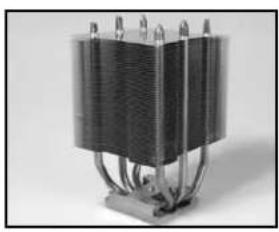
- Heat Pipe Main Unit (1)
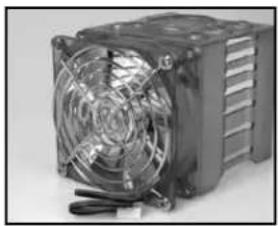
- Frame with Fan (1)
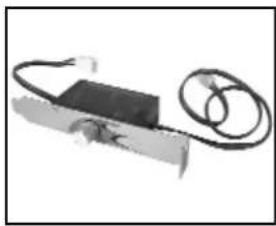
• External Speed Controller (1) - Screw kit (1)
• CPU Fixing bracket kit (1) - Heatsink Paste (1)
- Instruction Manual (1)
Instruction Manual
Parts List
natural_image
Close-up of a heat exchanger or cooling unit with multiple cooling fins and coiled tubing (no visible text or symbols)Heat Pipe Main Unit
natural_image
Close-up of a CPU fan with cooling effect and heatsink (no visible text or symbols)Frame with Fan External Speed Controller
natural_image
Close-up of a handheld electronic device with a black rectangular body and coiled cable (no visible text or symbols)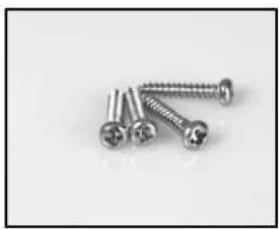
natural_image
Close-up of four metallic screws arranged diagonally (no text or symbols visible)Screw kit

natural_image
Black plastic mechanical component with four protruding pins (no text or symbols visible)Base/Retention Clip for Intel P4 Socket 478

natural_image
Black four-pronged mechanical component with four metallic pins (no text or symbols visible)Base/Retention Clip for Intel LGA775 (Socket T)

natural_image
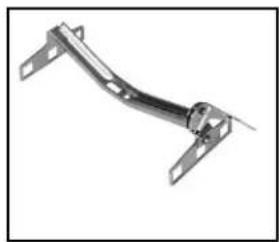
Metal bracket component with flanged ends and mounting holes (no text or symbols visible)Retention Clip for AMD Opteron & K8
natural_image
Metal mechanical bracket with flanged ends and a central pin (no text or symbols visible)Retention Clip for AMD K7 & Intel P3
CAUTION: Computers contain sensitive electronic components that are easily damaged by static electricity and excessive shock. When handling the mainboard and other components, ensure you are properly grounded using an anti-static mat or similar device. If anti-static equipment is not available, ground yourself by touching the exterior of the computer case or another large metal surface before handling any peripherals.
Installing FAN939775HP requires that you open your computer case to disconnect and reconnect wires. If you are unfamiliar with this kind of work, consider bringing your computer to your local computer store for help.
Instruction Manual
Installation
Note: Although FAN939775HP supports a variety of different CPUs, the illustrations below depict installation on an Intel chipset. Installation steps are identical for both AMD and Intel chipsets, with the exception of the parts used. When installing FAN939775 on a Socket AM2 system, please ensure that the motherboard already has the AM2 retention module (mounting bracket), and use the K8 clip.
natural_image
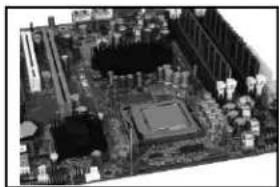
Close-up of a computer motherboard with CPU socket and surrounding circuitry (no visible text or symbols)- Remove the original CPU cooler and any devices used to retain the CPU within the socket.

natural_image
Close-up of a microchip mounted on a circuit board (no visible text or symbols)- Place the base clip backing onto the backside of the motherboard
natural_image
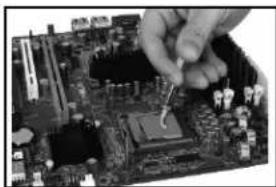
Close-up of a hand using tweezers to adjust the circuit board with a CPU socket (no visible text or symbols)- Apply enough thermal paste to the top of the CPU to cover the entire top surface.
natural_image
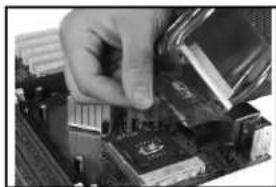
Close-up of a hand inserting a CPU into a motherboard (no visible text or symbols)- Remove the protective film from the base on the heat pipe main unit. Place the main unit on the CPU, aligning the holes of the P4 clip with the posts.
natural_image
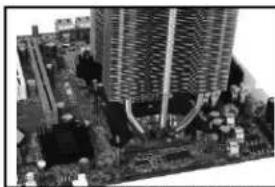
Close-up of a computer motherboard with visible circuitry and connectors (no text or symbols)- Place the retention clip inside the frame of the heatpipe base, then install the main unit onto the CPU, being sure to line the clip up with the posts.
natural_image
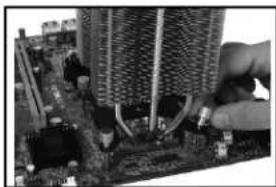
Close-up of hands installing or adjusting a circuit board with a tower component (no visible text or symbols)- Tighten the posts to secure the heatpipe unit onto the mainboard.
natural_image
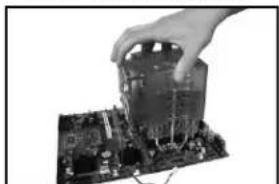
Hand placing a component into a circuit board (no visible text or symbols)- Put the transparent frame onto the main unit, directing the fan as required by the structure of your computer contents.
natural_image
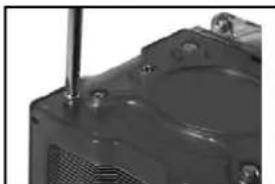
Close-up of a mechanical component with a cylindrical rod inserted, showing no visible text or symbols.- Using the screw kit, screw the frame into the main unit.
natural_image
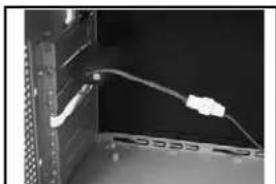
Close-up of a computer monitor with a cable inserted into the case (no visible text or symbols)- Connect the power cord from the fan speed controller to the main unit/frame.

natural_image
Aerial view of a large electronic circuit board with integrated circuits and components (no visible text or symbols)- Connect the remaining power cable to the motherboard.
natural_image
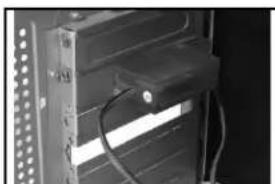
Close-up of a server rack with visible network lines and cables (no text or symbols)- Secure the fan speed controller into an open slot on the back of the computer.
natural_image
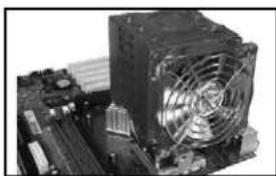
Close-up of a computer motherboard with a CPU fan and heatsink (no visible text or symbols)- Check to make sure the main unit is securely positioned on the mainboard.
Instruction Manual
Specifications
| Heatsink Dimension 93 x 93 x 98.5 mm | |
| DC Fan Size 92 x 92 x 25 mm | |
| Base Material | Heat Pipe |
| Bearing Type | One Ball |
| Speed | 1500 ~ 2800 RPM |
| Noise Level | 18 ~ 28 dBA |
| Max Air flow | 30 ~ 60 CFM |
| Rated Voltage | 12 V.DC |
| Weight | 950 g |
| Regulatory Certifications | FCC, CE |
Technical Support
StarTech.com's lifetime technical support is an integral part of our commitment to provide industry-leading solutions. If you ever need help with your product, visit www.startech.com/support and access our comprehensive selection of online tools, documentation, and downloads.
Warranty Information
This product is backed by a one-year warranty. In addition, StarTech.com warrants its products against defects in materials and workmanship for the periods noted, following the initial date of purchase. During this period, the products may be returned for repair, or replacement with equivalent products at our discretion. The warranty covers parts and labor costs only. StarTech.com does not warrant its products from defects or damages arising from misuse, abuse, alteration, or normal wear and tear.
Limitation of Liability
In no event shall the liability of StarTech.com Ltd. and StarTech.com USA LLP (or their officers, directors, employees or agents) for any damages (whether direct or indirect, special, punitive, incidental, consequential, or otherwise), loss of profits, loss of business, or any pecuniary loss, arising out of or related to the use of the product exceed the actual price paid for the product.
Some states do not allow the exclusion or limitation of incidental or consequential damages. If such laws apply, the limitations or exclusions contained in this statement may not apply to you.
About StarTech.com
StarTech.com is “The Professionals’ Source for Hard-to-Find Computer Parts”. Since 1985, we have been providing IT professionals with the quality products they need to complete their solutions. We offer an unmatched selection of computer parts, cables, server management solutions and A/V products and serve a worldwide market through our locations in the United States, Canada, the United Kingdom and Taiwan.
Visit www.startech.com for complete information about all our products and to access exclusive interactive tools such as the Parts Finder and the KVM Reference Guide. StarTech.com makes it easy to complete almost any IT solution. Find out for yourself why our products lead the industry in performance, support, and value.