
USLPAC10 - Air conditioner SereneLife - Free user manual and instructions
Find the device manual for free USLPAC10 SereneLife in PDF.


| Product Type | Portable Air Conditioner |
| Brand | SereneLife |
| Model | USLPAC10 |
| Color | White and Black |
| Cooling Modes | Cooling, Fan, Dehumidification, Auto |
| Temperature Control | 16°C – 30°C (60°F – 86°F) |
| Fan Speeds | High, Mid, Low |
| Timer | 1 – 24 hours (ON/OFF) |
| Air Swing | Automatic wind guide bar |
| Remote Control | Included |
| Display | LED with temperature and time |
| Voltage | 250V AC |
| Current Rating | 3.15A |
| Fuse Rating | 250VAC, 3.15A |
| Filter Type | Washable, mesh |
| Filter Cleaning | Every 2 weeks; vacuum or warm water with neutral detergent |
| Drainage | Automatic evaporation; manual drain when code “FL” displays |
| Exhaust Duct | Included, max length 1500mm (use original only) |
| Window Sealing Plate | Included (adjustable length) |
| Installation | Upright position; at least 50cm clearance from objects |
| Safety Features | Overheat protection, anti-freeze protection (E4), auto restart delay |
Frequently Asked Questions - USLPAC10 SereneLife
User questions about USLPAC10 SereneLife
0 question about this device. Answer the ones you know or ask your own.
Ask a new question about this device
Download the instructions for your Air conditioner in PDF format for free! Find your manual USLPAC10 - SereneLife and take your electronic device back in hand. On this page are published all the documents necessary for the use of your device. USLPAC10 by SereneLife.
USER MANUAL USLPAC10 SereneLife
* ★ ★ ★ ★ ★

USER MANUAL
CONTENT
Important Safety Tips
Precautions....3
Product Introduction
Main Parts and Components....4
Control Panel and Remote Controller....6
Product Operation
Placement and Installation....7
Operation Method....9
Clean and Maintenance
Drainage Method....10
Maintenance....11
Common Failures and Diagnosis
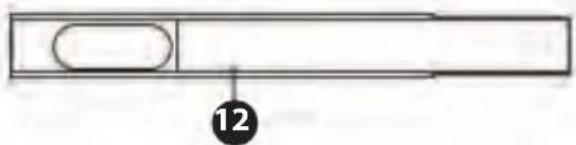
Intelligent Error Detection....12
Fuse Parameters....12
Troubleshooting....13
Important Safety Tips
Precautions
Please read the Manual carefully before operating the machine:
• This machine is for household use only.
• This machine is for indoor use only. Please place it in dry environment.
- Check power cord frequently. If power cord, plug or A/C is damaged, please don’t operate. If the power cord is not long enough, power extension cable can be used. Cable should not scatter at places where power cord may be pulled out or people may be stumbled.
• The A/C should be away from heat source and avoid direct sunlight.
- Turn off the A/C before unplugging.
- Turn off and unplug the A/C before removing or cleaning it, or replacing its parts or when it is not used.
- Clean the A/C according to the Manual.
- Voltage of the A/C should meet requirements. Any damage incurred by incorrect power isn't included in the warranty.
• Children are not allowed to play with the A/C.
This appliance is not intended for use by children, unless they have been given supervision or instruction concerning use of the appliance by a person responsible for their safety.
- Don't insert your fingers or any hard object to wind guide bar of the air outlet.
- Don't place the A/C at any place with water or other liquid. Prevent water or liquid from entering the A/C.
- Don’t repair the A/C by yourself. Any possible hazard incurred by maintenance of laypeople will violate the warranty. If the supply cord is damaged, it must be replaced by professional maintenance personnel.
- Please use the accessories provided by the A/C manufacturer; otherwise, the A/C may be damaged.
- Cleaning and user maintenance shall not be made by children without supervision.
Special Warning:
- Place the A/C on even ground and install it vertically, so as to ensure normal operation of the compressor.
- The A/C should be at least 50cm away from surrounding objects. Keep air inlet and outlet smooth.
- Don't use the A/C beside gasoline or any other inflammable liquid.
- Don’t use spraying agent and other solvent or flammable substances near the A/C; otherwise, its plastic may deform and electric parts may be damaged.
Power
- The plug should be in good condition and can't be damaged. Don't replace the plug with power plug.
- In order to run the A/C, plug the power cord first, and then press the power key.
- Place unit in upright position for 2 hours before turning on for first time.
Product Introduction
MAIN PARTS AND COMPONENTS
- Handle
- Air inlet (L)
- Control panel
- Wind guide vent
- Caster
- Remote controller
- Air inlet (R)
- Air outlet
-
Air inlet grille
-
Dehumidification drainage nozzle
-
Exhaust duct assembly
-
Window sealing plate assembly


Control Panel and Remote Controller
Cooling Model
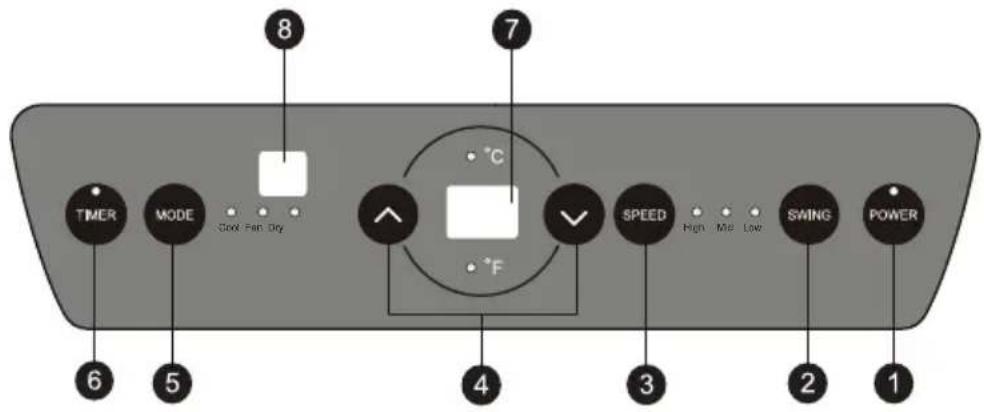
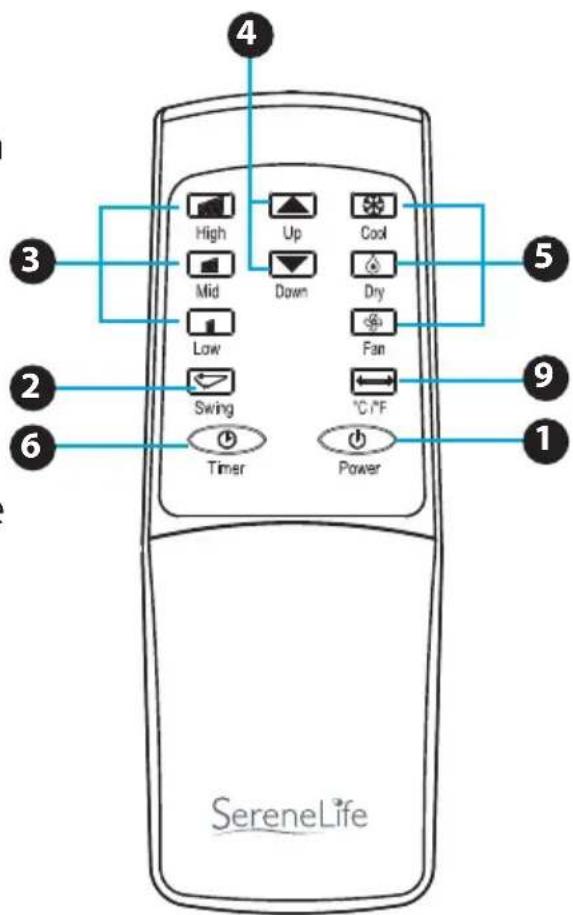
1. Power key
Press the key to turn ON/OFF the A/C.
2. Swing key
Press this key at any time after turning on the A/C to swing the wind guide bar automatically.
3. Speed key
Press the key to choose high/ low gear wind speed.
4. Temperature/ Time Adjusting key
Press the key at cooling mode to increase /reduce the setting temperature; press it at timing mode to adjust timing ON/OFF time; press Up and Down keys simultaneously to switch Fahrenheit and Centigrade degree temperature.
5. Mode key
Press the key to choose cooling, fan, dehumidification
6. Timer key
Press the key at standby mode to set ON time. Press this key at ON mode to set OFF time.
7. Temperature/ Time Display Window
This window displays the adjusted temperature and time.
8. Remote controller receiving window
This window is used to receive signal of the remote controller.
9. °C/°F switching key: Press the key to switch °C and °F
Product Operation
Placement and Installation
Placement
- Place it at even and dry place, and keep it at least 50cm away from its surrounding object.

Installation
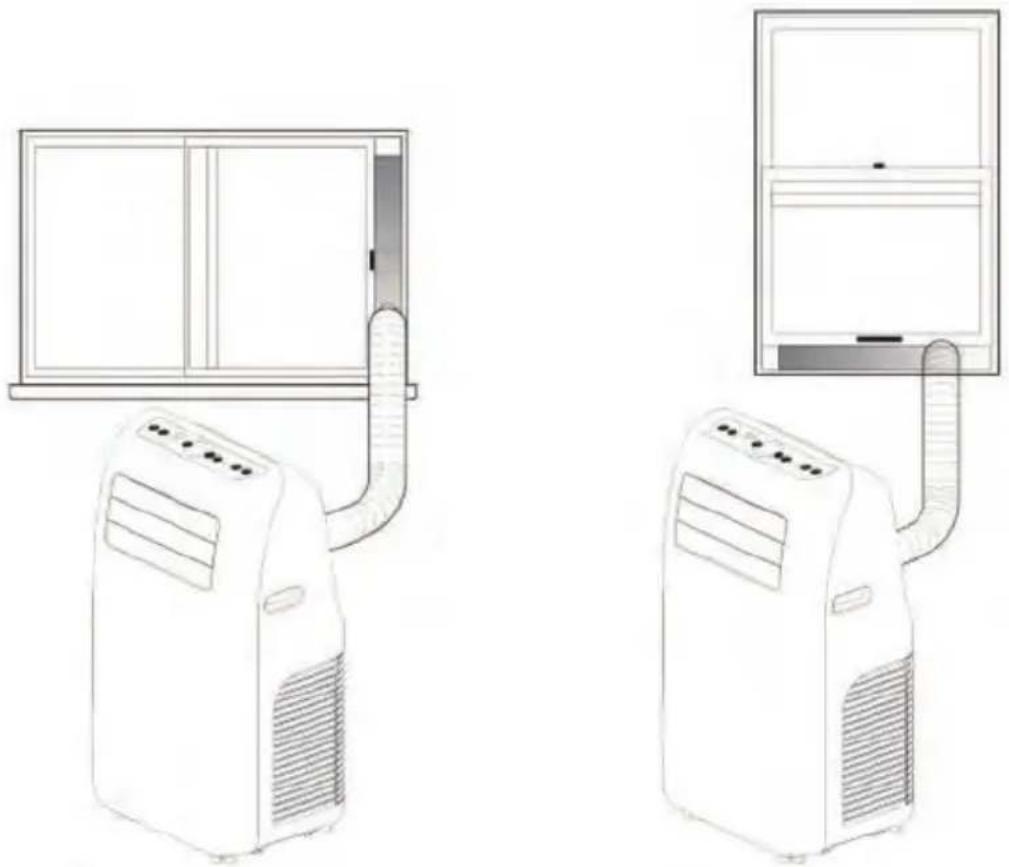
- Screw the exhaust duct assembly in the air outlet behind the panel (counterclockwise).

- Insert the air exhaust hose into the window sealing plate, adjust opening width of window so that the window can match with the sealing plate properly; length of the sealing plate is adjustable.
Incorrect Installation
- It's important to keep the exhaust duct smooth. Incorrect installation will affect work of the A/C.
- Prevent the exhaust duct from sharp bending.
- Ensure air can flow smoothly in the duct.
Warning:
The exhaust duct is designed especially for this model. Don't replace or lengthen it; otherwise, it will result in failure.

Notice:
Max. developed length of the exhaust duct is 1,500mm. It's better to shorten it while use
OPERATION METHOD
Cooling Mode
- When the A/C enters cooling mode automatically or cooling mode is selected after power ON, the cooling indicator lamp lights up.
- Press Up/Down key to adjust setting temperature (16°C\~30°C)(60°F\~86°F).
- Press Speed key to choose High/Mid/Low speed.
Fan Mode
- When pressing mode key or choosing Fan mode by pressing the remote controller, the wind indicator lamp lights up.
- Press Speed key to choose High/Mid/Low speed.
• Temperature can't be set.
Dehumidification Mode
- When pressing mode key or choosing dehumidification mode by pressing the remote controller, the dehumidification indicator lamp lights up.
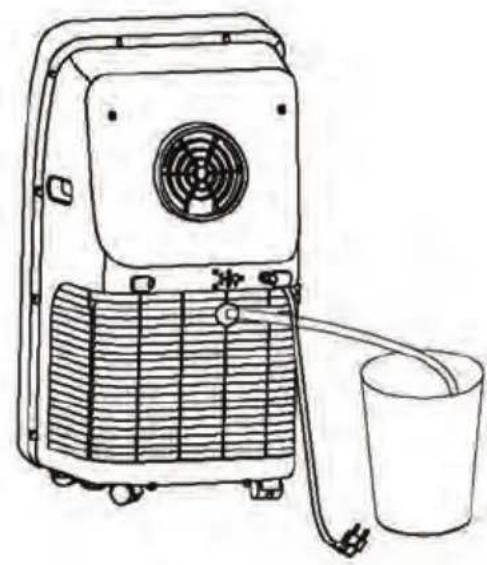
- Remove the dehumidification water wedge, insert water manifold, place the other end of the water manifold into the water vessel or drainage passage, as shown in the right figure.
• After entering the dehumidification mode, if room tempearture≥17°C (62°F), the compressor is ON. Then control as follows: when room temperature ≤15°C (59°F), the compressor is OFF; when temperature increases to room temperature≥17°C (62°F), the compressor will start again (in order to protect the compressor, it will be restarted 3min. later).
- In dehumidification mode, the fan is defaulted to run at low speed, and wind speed can't be adjusted.
- Temperature can't be set.
Auto mode (for cooling model only)
- When pressing mode key or choosing auto mode by pressing the remote controller, the auto indicator lamp lights up.
• After choosing Auto mode, operation state is determined by environmental temperature: when environmental temperature is higher than 25° C ( 77° F), the operation state is the same as that of cooling mode; when environmental temperature is lower than 25° C ( 77° F), the operation state is the same as that of fan mode.
Timer Mode
- In standby state, press the Timer key to set ON time. Press Up and Down keys to set ON time (1\~24H), and the timer indicator lamp lights up.
- In ON state, pressure the timer key to set OFF time. Press Up and Down keys to set OFF time (1\~24H), and the timer indicator lamp lights up.
Clean and Maintenance
DRAINAGE METHOD
This product is equipped with automatic water vaporization system.
The condenser is cooled with the circulating of condensing water, so as to improve cooling efficiency and save energy.
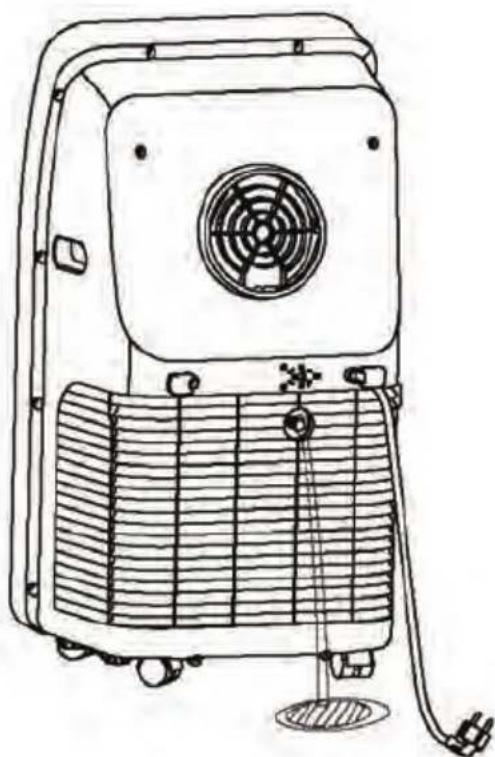
- If the internal vessel is full of water, the display screen will display "FL", and the compressor stops working automatically. After power off, unscrew the water cover, pull out the water plug to drain off water, and it will become normal after being restarted.
MAINTENANCE
Notice: In order to avoid electric shock, please turn off the A/C and unplug before maintenance or repair.
CLEANING
• Unplug before cleaning.
- Wipe with soft semi-dry cloth. Don't use chemical reagent, such as benzene, alcohol and gasoline etc; otherwise surface of the A/C and even the whole A/C will be damaged.
• Prevent water from spattering in the A/C.
FILTER SCREEN
• Vacuum the filter screen once every two weeks. If it is blocked by dust, efficiency of the A/C will be reduced.
• Take out the air inlet grille and pull out the filter screen at both sides according to the direction shown in the following figures. Use vacuum to remove lint from filters.
- Put the filter screen into the warm water (about 40° C or 104° F ) added with neutral detergent, dry it at a shady place after cleaning.
SEASONAL CLEANING
If the A/C will not be used for a long time:
• Pull out the water plug to drain.
- Run the A/C in fan mode for 2H till the inside is dry.
- Turn off the A/C and unplug.
- Wash the filter screen and reassemble it.
• Dismantle the exhaust duct and keep it properly.
• Cover the A/C with a plastic bag and place it at a dry place.
Common Failures and Diagnosis Intelligent Error Detection
| Error-detecting code | Multi-functional defection |
| E1 Error of the | coil's temperature sensor |
| E2 Error of indoor | door temperature sensor |
| E4 | Anti-freezing protection: temperature of the coil is too low and the whole A/C is off. When temperature exceeds 8°C or 46.4°F, the protection is released and previous working state is recovered. |
FUSE PARAMETERS
- Voltage: 250VAC
- Current: 3.15A
Troubleshooting
In case of any of the following trouble, please contact professional maintenance personnel in time.
| TROUBLE CAUSE SOLUTION | ||
| The A/C doesn’t work | No display | Reset circuit breaker on AC cord |
| The display panel displays “FL” | Restart the A/C after power off and draining, then it will become normal | |
| Time OFF function is started | The A/C can be restarted 3 minutes after being turning off. | |
| The A/C starts frequently | Direct sunlight | Draw the curtain |
| Doors and windows keep open; there are lots of people or heat source in room | Close doors and windows, remove heat source | |
| Filter screen is very dirty | Clean orreplace it | |
| Air inlet orair outlet is blocked | Remove the stem | |
| Big noise of the A/C | The A/Cis placed unevenly | Place it at even and firm ground, avoid shaking |
| The compressor doesn’t work | Its delay protection is started | Wait for 3min., turn on after temperature decreases |
Notice: When there is any abnormal to the A/C, turn it off and unplug, and then contact professional maintenance personnel.
The above technical parameters are subject to change without notice.
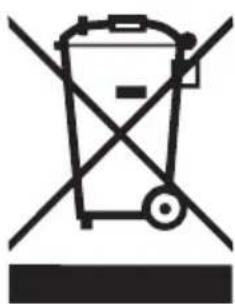
Do not dispose of electrical appliances as unsorted municipal waste, use separate collection facilities.
Contact you local government for information regarding the collection systems available.
If electrical appliances are disposed of in landfills or dumps, hazardous substances can leak into the groundwater and get into the food chain, damaging your health and well-being. When replacing old appliances with new ones, the retailer is legally obligated to take back your old appliance for disposals at least free of charge.
SereneLife

VISIT US ONLINE:
Have a question?
Need service or repair?
Want to leave a comment?
PyleUSA.com/ContactUs
PYLE


- CONTENT
- IMPORTANT SAFETY TIPS
- PRODUCT INTRODUCTION
- PRODUCT OPERATION
- CLEAN AND MAINTENANCE
- COMMON FAILURES AND DIAGNOSIS
- PRECAUTIONS
- PLEASE READ THE MANUAL CAREFULLY BEFORE OPERATING THE MACHINE
- SPECIAL WARNING
- POWER
- MAIN PARTS AND COMPONENTS
- CONTROL PANEL AND REMOTE CONTROLLER
- POWER KEY
- SWING KEY
- SPEED KEY
- TEMPERATURE/ TIME ADJUSTING KEY
- MODE KEY
- TIMER KEY
- TEMPERATURE/ TIME DISPLAY WINDOW
- REMOTE CONTROLLER RECEIVING WINDOW
- °C/°F SWITCHING KEY: PRESS THE KEY TO SWITCH °C AND °F
- PLACEMENT AND INSTALLATION
- PLACEMENT
- INSTALLATION
- INCORRECT INSTALLATION
- WARNING
- NOTICE
- OPERATION METHOD
- COOLING MODE
- FAN MODE
- DEHUMIDIFICATION MODE
- AUTO MODE (FOR COOLING MODEL ONLY)
- TIMER MODE
- DRAINAGE METHOD
- MAINTENANCE
- CLEANING
- FILTER SCREEN
- SEASONAL CLEANING
- COMMON FAILURES AND DIAGNOSIS INTELLIGENT ERROR DETECTION
- FUSE PARAMETERS
- TROUBLESHOOTING
- THE ABOVE TECHNICAL PARAMETERS ARE SUBJECT TO CHANGE WITHOUT NOTICE
- SERENELIFE
Brand : SereneLife
Model : USLPAC10
Category : Air conditioner