EVB-USB3503 - Development board Microchip - Free user manual and instructions
Find the device manual for free EVB-USB3503 Microchip in PDF.


User questions about EVB-USB3503 Microchip
0 question about this device. Answer the ones you know or ask your own.
Ask a new question about this device
Download the instructions for your Development board in PDF format for free! Find your manual EVB-USB3503 - Microchip and take your electronic device back in hand. On this page are published all the documents necessary for the use of your device. EVB-USB3503 by Microchip.
USER MANUAL EVB-USB3503 Microchip
USB3503 Evaluation Board User Manual
natural_image
Close-up of a green printed circuit board with various electronic components and connectors (no readable text or symbols)Copyright © 2013 SMSC or its subsidiaries. All rights reserved.
Circuit diagrams and other information relating to SMSC products are included as a means of illustrating typical applications. Consequently, complete information sufficient for construction purposes is not necessarily given. Although the information has been checked and is believed to be accurate, no responsibility is assumed for inaccuracies. SMSC reserves the right to make changes to specifications and product descriptions at any time without notice. Contact your local SMSC sales office to obtain the latest specifications before placing your product order. The provision of this information does not convey to the purchaser of the described semiconductor devices any licenses under any patent rights or other intellectual property rights of SMSC or others. All sales are expressly conditional on your agreement to the terms and conditions of the most recently dated version of SMSC's standard Terms of Sale Agreement dated before the date of your order (the "Terms of Sale Agreement"). The product may contain design defects or errors known as anomalies which may cause the product's functions to deviate from published specifications. Anomaly sheets are available upon request. SMSC products are not designed, intended, authorized or warranted for use in any life support or other application where product failure could cause or contribute to personal injury or severe property damage. Any and all such uses without prior written approval of an Officer of SMSC and further testing and/or modification will be fully at the risk of the customer. Copies of this document or other SMSC literature, as well as the Terms of Sale Agreement, may be obtained by visiting SMSC's website at http://www.smsc.com. SMSC is a registered trademark of Standard Microsystems Corporation ("SMSC"). Product names and company names are the trademarks of their respective holders.
The Microchip name and logo, and the Microchip logo are registered trademarks of Microchip Technology Incorporated in the U.S.A. and other countries.
SMSC DISCLAIMS AND EXCLUDES ANY AND ALL WARRANTIES, INCLUDING WITHOUT LIMITATION ANY AND ALL IMPLIED WARRANTIES OF MERCHANTABILITY, FITNESS FOR A PARTICULAR PURPOSE, TITLE, AND AGAINST INFRINGEMENT AND THE LIKE, AND ANY AND ALL WARRANTIES ARISING FROM ANY COURSE OF DEALING OR USAGE OF TRADE. IN NO EVENT SHALL SMSC BE LIABLE FOR ANY DIRECT, INCIDENTAL, INDIRECT, SPECIAL, PUNITIVE, OR CONSEQUENTIAL DAMAGES; OR FOR LOST DATA, PROFITS, SAVINGS OR REVENUES OF ANY KIND; REGARDLESS OF THE FORM OF ACTION, WHETHER BASED ON CONTRACT; TORT; NEGLIGENCE OF SMSC OR OTHERS; STRICT LIABILITY; BREACH OF WARRANTY; OR OTHERWISE; WHETHER OR NOT ANY REMEDY OF BUYER IS HELD TO HAVE FAILED OF ITS ESSENTIAL PURPOSE, AND WHETHER OR NOT SMSC HAS BEEN ADVISED OF THE POSSIBILITY OF SUCH DAMAGES.
1 Introduction
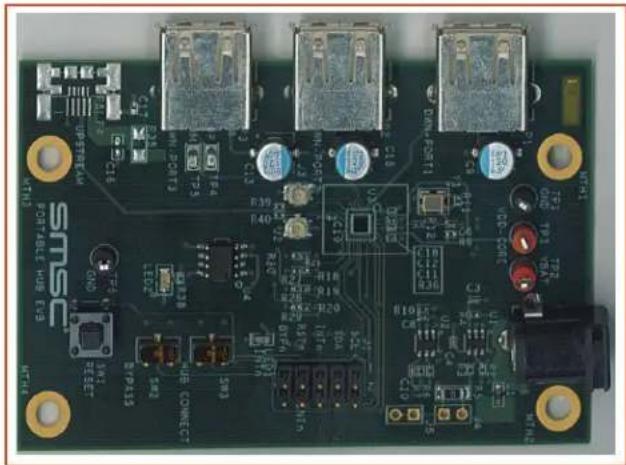
This user manual is for the USB3503 Evaluation board. This board can be used to test and evaluate the functionality of the USB3503 and is ideal for early system integration and software development. The USB3503 EVB provides access to the HSIC upstream and USB downstream ports, as well as the I²C communication pins.
SMSC also has evaluation software that can be used with the USB3503 EVB connected to a Total Phase Aardvark adaptor. This software allows the user to configure the USB3503 in different ways before enumeration as well as monitor and manipulate select status registers during enumeration. The software can be used to prototype microprocessor software, evaluate the different configurations, and test how the desired configuration fits into the entire system.
2 Operation
2.1 Contents of the Kit
The USB3503 EVB includes the basic equipment necessary to evaluate the USB3503. The items included in the kit are:
- USB3503 EVB
- 5V DC Power Supply
- Documentation and Software CD
The kit does not include any downstream USB devices, I²C master hardware, or other components for board customization.
2.2 Initial Bring Up
The USB3503 EVB has a default configuration that allows it to operate as a stand alone hub. To begin, connect the U.FL connectors to the HSIC host. Then, plug the evaluation board into the 5V power supply. The USB3503 EVB will enumerate as a Generic USB Hub, with the VID and PID equal to the default values found in the USB3503 Datasheet.
The default configuration of the USB3503 is to enumerate as a Self Powered Hub. This means that, according to the USB 2.0 specification, the downstream ports are only allowed to provide 500mA of current to the downstream device.
Refer to the next chapters to see the customization options associated with the evaluation kit.
3 Hardware
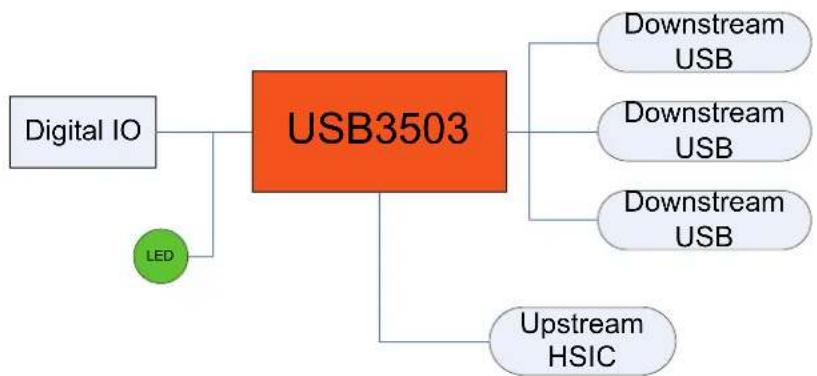
The USB3503 EVB is a board that demonstrates the capabilities of the USB3503. The board consists of the HSIC upstream and USB downstream ports, a INT_N LED for visual confirmation of the
interrupts configured, a header exposing the I²C pins, and additional circuitry that is used for I²C communication.
flowchart
graph TD
    A["Digital IO"] --> B["USB3503"]
    C["LED"] --> B
    B --> D["Downstream USB"]
    B --> E["Downstream USB"]
    B --> F["Downstream USB"]
    B --> G["Upstream HSIC"]
Figure 3.1 Block Diagram of the USB3503 EVB
3.1 HSIC and USB Ports
The downstream USB ports are mounted on the edges of the USB3503 EVB. The downstream ports use the standard USB Type A receptacle. The label for the port is located near the receptacle. The HSIC upstream port uses U.FL connectors for Data and Strobe.

text_image
Downstream3 Downstream2 Downstream1 J3: Strabe J2: Data MTH3 PORTABLE HUB EVB SMEC GND UPSTREAM C16 R35 WN-PORT3 C17 M TP4 TP5 R40 R30 R21 R27 R19 R28 R20 R29 INTn LED25 U4 R40 R30 R29 INTn LED1 INTn SW3 HUB CONNECT SW2 BYPASS SW1 RESET MTH4 R10 C8 U2 C4 R10 C10 J5 VDD-CORE C3 R11 C12 C11 R36 R27 R18 R19 SDA INTn INTn INTnFigure 3.2 Upstream and Downstream Ports
3.2 Test Points, Switches and LEDs
There are multiple test points to confirm that the USB3503 EVB is powered properly. TP1 and TP6 connect to GND, TP2 connects to the VBAT pin, and TP3 connects to the VDD_CORE_REG pin.
The USB3503 EVB also has three switches to manually control the RESET_N and HUB_CONNECT inputs to the part. Figure 3.3 shows the location of the test points (Red) and switches (Yellow).
The USB3503 SCL, SDA, RESET_N, HUB_CONNECT and INT_B pins are also exposed on the J1 header. These pins are compatible with the Total Phase Aardvark pinout, where pin 1 of the Aardvark connector connects to pin 1 of header J1 (Refer to Figure 4.1 for the proper way to connect the Aardvark). The INT_N pin is also connected to LED1 to indicate that an interrupt has occurred. The LED remains lit until the interrupt is cleared, as described in the USB3503 datasheet.

text_image
UPSTREAM C17 R35 MTH3 PORTABLE HUB EVB RESET SW1 RESET BIPASS C16 R40 LED20 R38 U4 R30 R27 R28 R19 R20 R18 R19 R10 C8 HUB_CONNECT LED1 NOT USED SW3 C10 J1 DWN_PORT1 C9 TP1 DD TP2 RE TP3 C18 C12 R36 SCL SDA INTP R20 R19 R18 R17 R16 R15 R14 R13 R12 R11 R10 R9 R8 R7 R6 R5 R4 R3 R2 R1 J2 J1Figure 3.3 Test points, Switches, Header and LED
3.3 Configuration Resistors
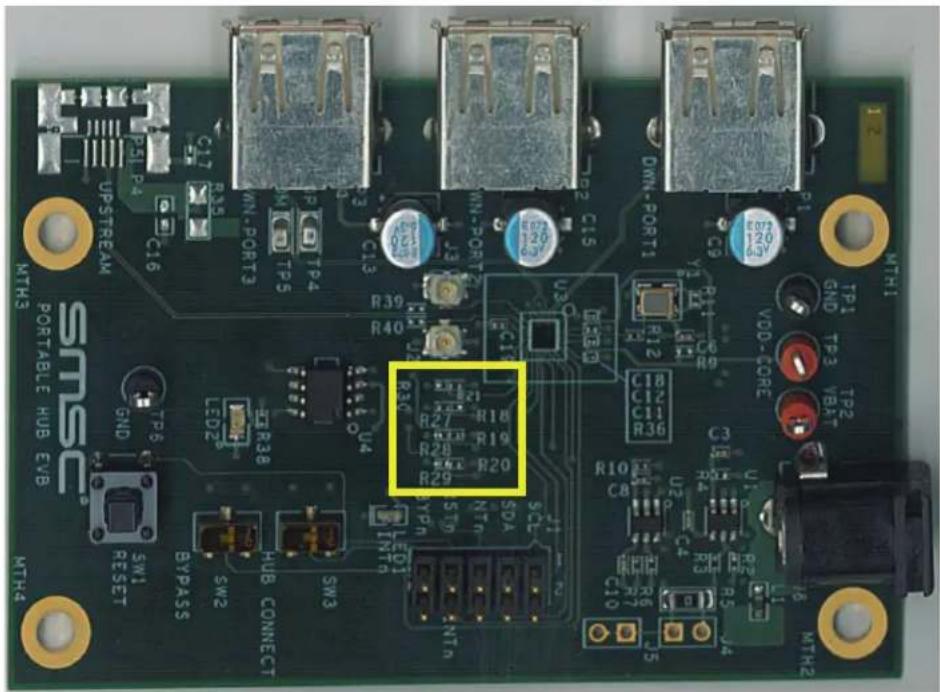
There are eight different resistors used to configure the part when the RESET_N pin transitions from Low (0V) to High(>1.25V). These resistors are used for the REF_SEL pins. Because these resistors and pads pull up to the 1.8V regulator, any changes to these resistors will need to be done with the board unpowered. The resistor pads are laid out in a manner that prevents the pull-up resistors from being populated at the same time as the pull-down resistors, as shown in Figure 3.4. The following tables show the proper configuration resistor population requirements for the desired results, the resistor values should match those found in Section 6, "USB3503 EVB Bill of Materials".
Note: The Y1 Oscillator will need to be replaced with the proper frequency if the REF_SEL pins are altered. Refer to Section 6, "USB3503 EVB Bill of Materials" for recommended oscillator specifications.
Table 3.1 REF_SEL Options
| R | 1 | 8 | R | 2 | 1 | R |
| EMPTY EMPTY INSTALL INSTALL 38.4 | ||||||
| EMPTY INSTALL INSTALL EMPTY | 26.0 (Default) | |||||
| INSTALL EMPTY INSTALL 19.2 | ||||||
| INSTALL INSTALL EMPTY EMPTY 12.0 | ||||||
text_image
UPSTREAM C16 C17 R24 M-PORT3 TP5 TP4 C13 R39 R40 U4 LED2# R38 R30 R27 R18 R19 R28 R20 R29 SCL SDA NTH INTH LED1 TYP SW3 SW2 BYPASS SW1 RESET HUB CONNECT MTH3 MTH4 MTH1 TP1 GND TP3 TP2 VBAT VDD-CORE C9 C18 C12 C11 R36 C3 R10 C8 U2 D4T C4 R5 J4 C10 5 R6 R7 R8 R9 R10 R12 R13-D R14-B R15-B R16-B R17-B R18-B R19-B R20-B R21-B R22-B R23-B R24-B R25-B R26-B R27-BFigure 3.4 Configuration Resistors
3.4 Additional Circuitry
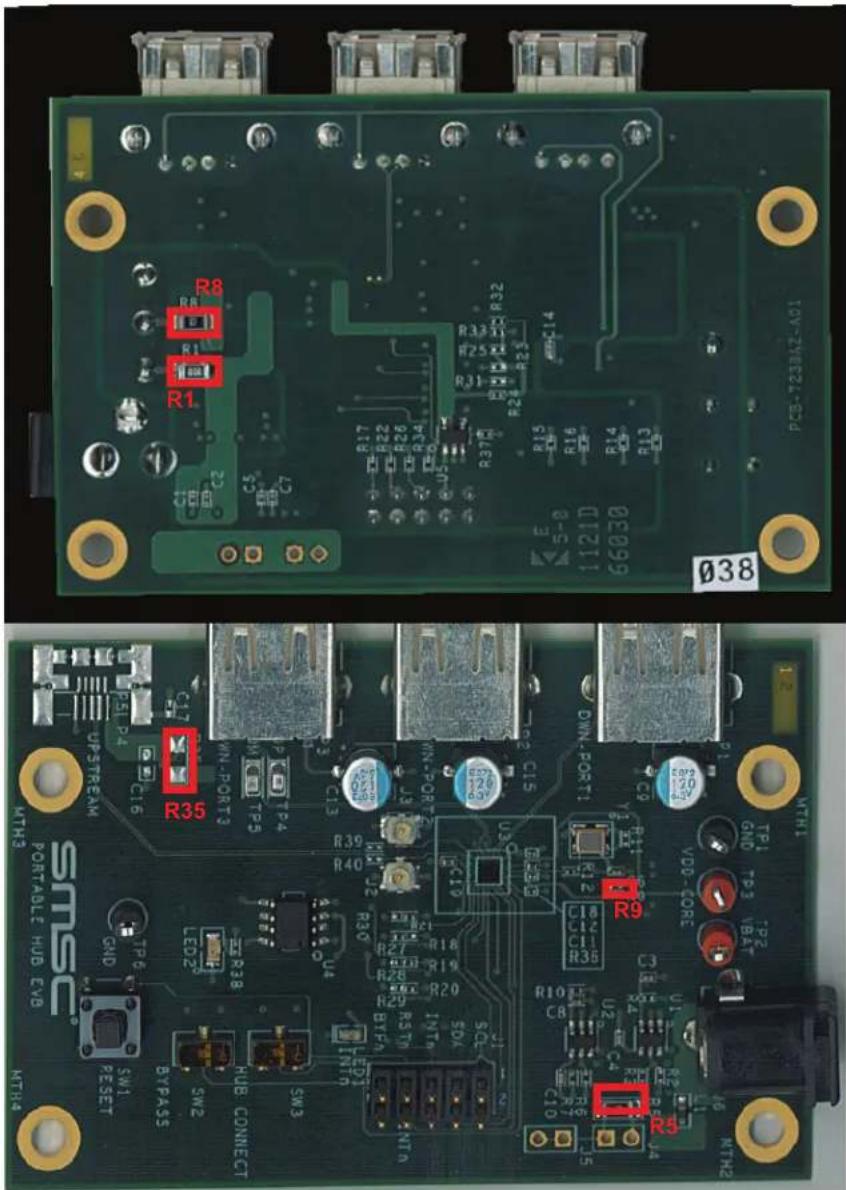
The U1 Regulator provides 3.3V to the VBAT pin, and also supplies power to the 26MHz clock oscillator. If a higher VBAT voltage is desired, remove R1 and supply the power through TP2.
The U2 Regulator provides 1.8V to the VDD_CORE_REG pin as well as providing the pull up voltage for the digital control pins. To provide external power to the VDD_CORE_REG pin remove R8 and supply the power through TP3.
The USB3503 can function with a single power supply; to do this remove R8 and place a 0Ohm resistor on R9. This connects the VDD_CORE_REG pin to the VDD33_BYP pin allowing the USB3503's internal 3.3V regulator to supply the VDD_CORE_REG voltage.
Below is a summary of the different power options and what resistors need to be populated to support these options:
Table 3.2 VBAT and VDD_CORE_REG Source Control
| R1 R8 R9 | VBAT SOURCE | VDD_CORE_REG SOURCE | |
| INSTALL INSTALL | EMPTY ONboard Regulator | Onboard Regulator | |
| EMPTY INSTALL | EMPTY External (TP2) Onboard Regulator | ||
| EMPTY EMPTY | EMPTY External (TP2) External (TP3) | ||
| INSTALL EMPTY | INSTALL ONboard Regulator | VDD33_BYP | |
| EMPTY EMPTY | INSTALL External (TP2) VDD33_BYP |
Below are the locations of the resistors on the back side of the board:
text_image
R8 R1 R1 R1 R33 R25 R31 R37 R14 R15 R16 R17 R18 R20 R21 R22 R23 R24 R25 R26 R27 R28 R29 R30 R31 R32 R33 R34 R35 R36 R37 R38 R39 R40 R41 R42 R43 R44 R45 R46 R47 R48 R49 R50 R51 R52 R53 R54 R55 R56 R57 R58 R59 R60 R61 R62 R63 R64 R65 R66 R67 R68 R69 R70 R71 R72 R73 R74 R75 R76 R77 R78 R79 R80 R81 R82 R83 R84 R85 R86 R87 R88 R89 R90 MTH1 MTH2 SMEC PORTABLE HUB EVB PTP TREAM UPS P4 C16 C15 C14 C13 C12 C11 C10 C9 C8 C7 C6 C5 C4 C3 C2 C1 U2 U1 U0 U- U- U- U- U- U- U- U- U- U- U- U- U- U- U- U- U- U- U- U- U- U- U- U- U- U- U- U- U- U- U- U- U- U- TMN3 MTN2 PTP TREAM SMTLPTTPTTPTTPTTPTTPTTPTTPTTPTTPTTPTTPTTPTTPTTPTTPTTPTTPTTPTTPTTPTTPTTPTTPTTPTTPTTPTTPTTPTTPTTPTTPTTPTTPTTPTTPTTPTTPTTPTTPTTPTTPTTPTTPTTPTTPTTPTTPTTPTTPTTPTTTRTNTRTNTRTNTRTNTRTNTRTNTRTNTRTNTRTNTRTNTRTNTRTNTRTNTRTNTRTNTRTNTRTNTRTNTRTNTRTNTRTNTRTNTRTNTRTNTRTNTRTNTRTNTRTNTRTNTRTNTRTNTRTNTRTNTRTNTRTNTRTNTRTNTRTNTRTNTRTNTRTNTRTNTRTNTRTNTRTNTRTNTRTNTRTNTRTNTRTNTRTNTRNTRTNTRNTRTNTRNTRTNTRNTRTNTRNTRTNTRNTRTNTRNTRTNTRNTRTNTRNTRTNTRNTRTNTRNTRTNTRNTRTNTRNTRTNTRNTRTNTRNTRTNTRNTRTNTRNTRTNTRNTRTNTRNTRTNTRNTRTNTRNTRTNTRNTRTNTRNTRTNTRNTRTNTRNTRTNTCNTRNTRTNTCNTRNTRTNTCNTRNTRTNTCNTRNTRTNTCNTRNTRTNTCNTRNTRTNTCNTRNTRTNTCNTRNTRTNTCNTRNTRTNTCNTRNTRTNTCNTRNTRTNTCNTRNTRTNTCNTRNTRTNTCNTRNTRTNTCNTRNTRTNTCNTRNTRTNTCNTRNTVTCNTRNTVTCNTRNTVTCNTRNTVTCNTRNTVTCNTRNTVTCNTRNTVTCNTRNTVTCNTRNTVTCNTRNTVTCNTRNTVTCNTRNTVTCNTRNTVTCNTRNTVTCNTRNTVTCNTRNTVTCNTRNTVTCNTRNTVTCNTRNTVTCNTRNTVTCNTRNTGTCNTRNTGTCNTRNTGTCNTRNTGTCNTRNTGTCNTRNTGTCNTRNTGTCNTRNTGTCNTRNTGTCNTRNTGTCNTRNTGTCNTRNTGTCNTRNTGTCNTRNTGTCNTRNTGTCNTRNTGTCNTRNTGTCNTRNTGTCNTRNTGTCNTRNTGTCNTRNTFCC NTERINTGTC NTERINTGTC NTERINTGTC NTERINTGTC NTERINTGTC NTERINTGTC NTERINTGTC NTERINTGTC NTERINTGTC NTERINTGTC NTERINTGTC NTERINTGTC NTERINTGTC NTERINTGTC NTERINTGTC NTERINTGTC NTERINTGTC NTERINTGTC NTERINTGTC NTERINTGTC NTERINTGCA NTERINTGCA NTERINTGCA NTERINTGCA NTERINTGCA NTERINTGCA NTERINTGCA NTERINTGCA NTERINTGCA NTERINTGCA NTERINTGCA NTERINTGCA NTERINTGCA NTERINTGCA NTERINTGCA NTERINTGCA NTERINTGCA NTERINTGCA NTERINTGCA NTERINTGCA NTERINTGAC NTERINTGAC NTERINTGAC NTERINTGAC NTERINTGAC NTERINTGAC NTERINTGAC NTERINTGAC NTERINTGAC NTERINTGAC NTERINTGAC NTERINTGAC NTERINTGAC NTERINTGAC NTERINTGAC NTERINTGAC NTERINTGAC NTERINTGAC NTERINTGAC NTERINTGAC NTERINTGAG NTERINTGAG NTERINTGAG NTERINTGAG NTERINTGAG NTERINTGAG NTERINTGAG NTERINTGAG NTERINTGAG NTERINTGAG NTERINTGAG NTERINTGAG NTERINTGAG NTERINTGAG NTERINTGAG NTERINTGAG NTERINTGAG NTERINTGAG NTERINTGAG NTERINTGAG NTERINTGAC NTERINTGAC NTERINTGAC NTERINTGAC NTERINTGAC NTERINTGAC NTERINTGAC NTERINTGAC NTERINTGAC NTERINTGAC NTERINTGAC NTERINTGAC NTERINTGAC NTERINTGAC NTERINTGAC NTERINTGAC NTERINTGAC NTERINTGAC NTERINTGAC NTERINTGACT A B C D E F G H I J K L M L M L M L M L M L M L M L M L M L M L M L M L M L M L M L M L M L M L M L M L M L M L M L M L M L M L M L M L M L M L M L M L M L M L M L M L M L M L M L M L M L M L M L M L M L M L M L M L M L M LM M M M M M M M M M M M M M M M M M M M M M M M M M M M M M M M M M M M M M M M M M M M M M M M M M M M M M M M M M M M M M M M M M M M M M M M M M M M M M M M M M M M M M M M M M M M M M M m m m m m m m m m m m m m m m m m m m m m m m m m m m m m m m m m m m m m m m m m m m m m m m m m m m m m m m m m m m m m m m m m m m m m m m m m m m m m m m m m m m m m m m m m m m m m m m m m m m m n t h a l e r e s t i o n t h a l e r e s t i o n t h a l e r e s t i o n t h a l e r e s t i o n t h a l e r e s t i o n t h a l e r e s t i o n t h a l e r e s t i o n t h a l e r e s t i o n t h a l e r e s t i o n t h h a l e r e s t i o n t h a l e r e s t i o n t h a l e r e s t i o n t h a l e r e s t i o n t h a l e r e s t i o n t h a l e r e s t i o n t h a l e r e s t i o n t h a l e r e s t i o n t h a l u c k d d d d d d d d d d d d d d d d d d d d d d d d d d d d d d d d d d d d d d d d d d d d d d d d d d d d d d d d d d d d d d d d d d d d d d d d d d d d d d d d d d d d d d d d d d d d d d d d d d d d c c c c c c c c c c c c c c c c c c c c c c c c c c c c c c c c c c c c c c c c c c c c c c c c c c c c c c c c c c c c c c c c c c c c c c c c c c c c c c c c c c c c c c c c c c c c c c c c c c c c/c / / / / / / / / / / / / / / / / / / / / / / / / / / / / / / / / / / / / / / / / / / / / / / / / / / / / / / / / / / / / / / / / / / / / / / / / / / / / / / / / / / / / / / / / / / / / / / / / / / / / | OHTMSTMSTMSTMSTMSTMSTMSTMSTMSTMSTMSTMSTMSTMSTMSTMSTMSTMSTMSTMSTMSTMSTMSTMSTMSTMSTMSTMSTMSTMSTMSTMSTMSTMSTMSTMSTMSTMSTMSTMSTMSTMSTMSTMSTMSTMSTMSTMSTMSTMSTM STMBSETBYPASSBYPASSBYPASSBYPASSBYPASSBYPASSBYPASSBYPASSBYPASSBYPASSBYPASSBYPASSBYPASSBYPASSBYPASSBYPASSBYPASSBYPASSBYPASSBYPASSBYPASSBYPASSBYPASSBYPASSBYPASSBYPASSBYPASSBYPASSBYPASSBYPASSBYPASSBYPASSBYPASSBYPASSA BYPASSA BYPASSA BYPASSA BYPASSA BYPASSA BYPASSA BYPASSA BYPASSA BYPASSA BYPASSA BYPASSA BYPASSA BYPASSA BYPASSA BYPASSA BYPASSA BYPASSA BYPASSA BYPASSA BYPASSA BYPASSA BYPASSA BYPASSA BYPASSA BYPASSAFigure 3.5 Regulator Resistors
4 Software
The USB3503 EVB comes with a CD that contains evaluation software that can be used with the Total Phase Aardvark USB-I²C adaptor (not included with the Evaluation Kit). To install the software, run Setup.exe, found on the CD. This will install the USB3503 Evaluation Software, the LabVIEW Runtime engine (to run the executable), and the Total Phase drivers to communicate with the Aardvark. Once the software has been installed, locate and run the USB3503 Evaluation.exe program on the computer. Connect the Aardvark to the USB3503 EVB with the red wire facing the power port, as in Figure 4.1.

natural_image
Close-up of a green electronic circuit board with a flexible ribbon, attached to a black connector (no visible text or symbols)Figure 4.1 Aardvark Connection
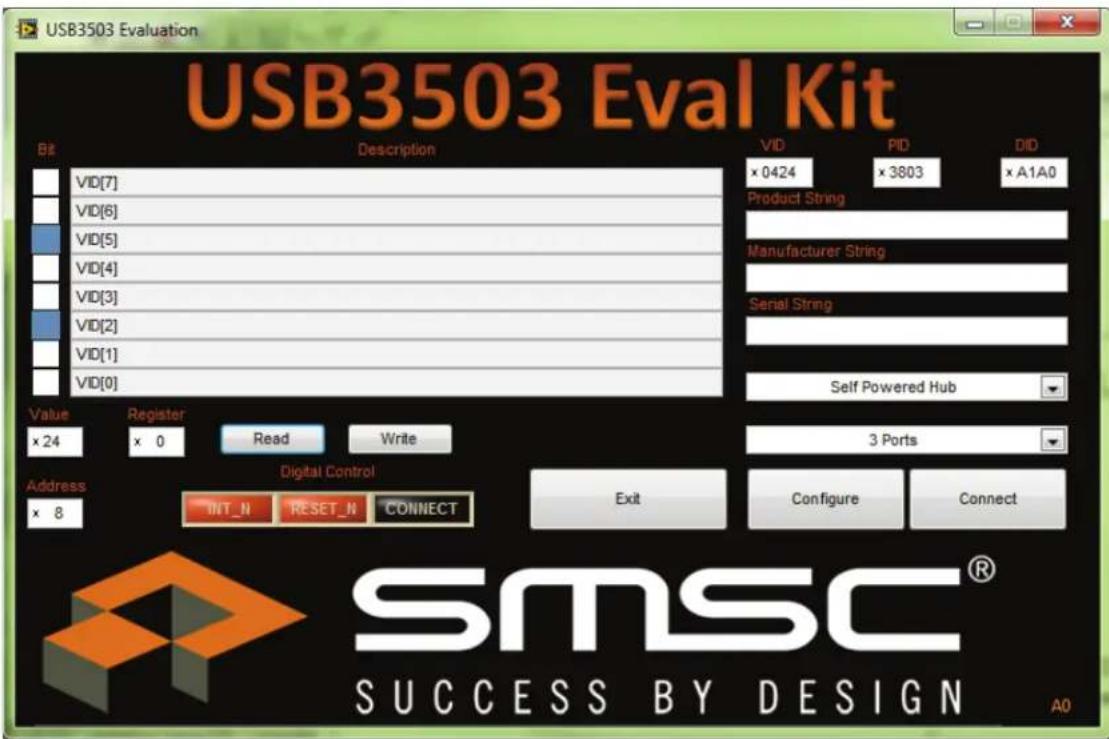
The software allows the user to control the digital input pins RESET_N and CONNECT. It also can monitor the INT_N pin for interrupts. There is a section to communicate with the I^2C serial port, as well as some quick configuration and customization options.
text_image
USB3503 Eval Kit Bit Description VID PID DID × 0424 × 3803 × A1A0 Product String Manufacturer String Serial String Self Powered Hub Value Register Read Write × 24 × 0 3 Ports Address × 8 Digital Control INT_N RESET_N CONNECT Exit Configure Connect SMSC® SUCCESS BY DESIGN A0Figure 4.2 USB3503 Evaluation Screen
4.1 Digital Control
The RESET_N and HUB_CONNECT pins can be controlled in real time with the Digital Control array. Each button in the array corresponds to the pin with the matching name. When the button is orange, the pin is at logic level High. When the button is black the voltage is a logic level Low. Refer to the green box in Figure 4.3 for the digital control array location.
Set the RESET_N pin low to reset the part and place it into the lowest power state. If the CONNECT pin is low when the RESET pin transitions from low to high, the USB3503 will remain in a state that allows the serial interface registers to be manipulated. To enumerate the hub, either write 00h to register E7h, or drive the CONNECT pin high by pressing the CONNECT button in the Digital Control. Once the USB3503 has enumerated, the serial interface registers should not be modified.
Notes: To prevent the Aardvark from driving against another voltage, the Aardvark is running in an Open/Drain mode, therefore it is important that all switches on the board pull the pins up to the Vcc value.

text_image
USB3503 Eval Kit Bit Description VID[7] VID[6] VID[5] VID[4] VID[3] VID[2] VID[1] VID[0] Value Register x 24 x 0 Read Write VID PID DID x 0424 x 3803 xA1A0 Product String Manufacturer String Serial String Self Powered Hub 3 Ports Address x 8 Digital Control INT_N RESET_N CONNECT Exit Configure Connect SMSC® SUCCESS BY DESIGN A0Figure 4.3 Digital Control (Green) and I²C (Yellow) Sections
4.2 I ^2 C Communication
The application also contains a general I²C register read/write section. The Bit and Description display the serial interface register descriptions found in the USB3503 datasheet. The Register display can be used to select the proper serial interface register to manipulate. Click on the Value or Bit box above to change the value of the register. Once the desired value and register are selected, press the Write button to change the value on the part. Click on the Read button and the Value and Bit boxes will update the current value on the part. Refer to the USB3503 datasheet for a detailed description of each register and operation of the device
4.3 Quick Configuration and Customization
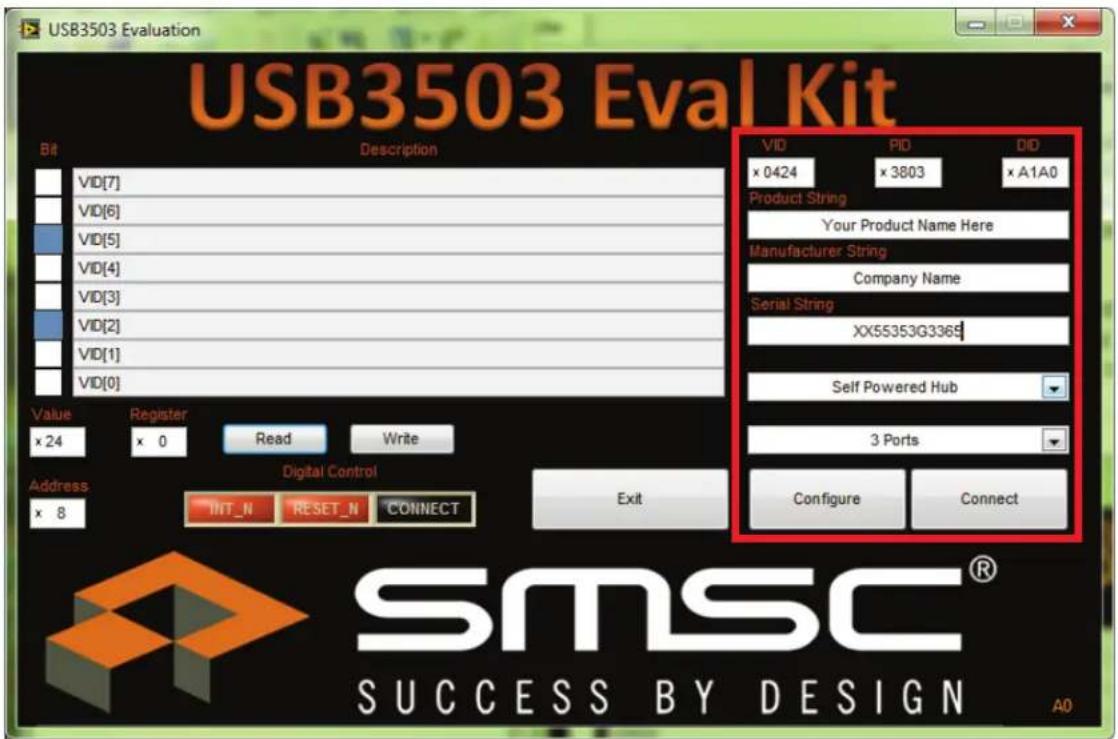
The USB3503 Evaluation program also contains some quick configuration and customization options that automatically update the registers to match the desired configuration. The USB3503 can enumerate as a Self Powered or Bus Powered Hub with 1, 2 or 3 downstream ports. The VID, PID, DID and enumeration strings can also be customized to allow the USB3503 to enumerate with whatever identification is desired.
To change these values; update the configuration section to the desired options, then press the Configure button. The part will then reset, pull the CONNECT pin low and update the registers as specified. To go with these options either raise the CONNECT pin, or press the Connect button.
text_image
USB3503 Eval Kit Bit Description VID [7] VID [6] VID [5] VID [4] VID [3] VID [2] VID [1] VID [0] Value Register x 24 x 0 Read Write Address x 8 Digital Control INT_N RESET_N CONNECT Exit VID PID DID x 0424 x 3803 x A1A0 Product String Your Product Name Here Manufacturer String Company Name Serial String XX55353G3369 Self Powered Hub 3 Ports Configure Connect SMSC® SUCCESS BY DESIGN A0Figure 4.4 Quick Configuration Options
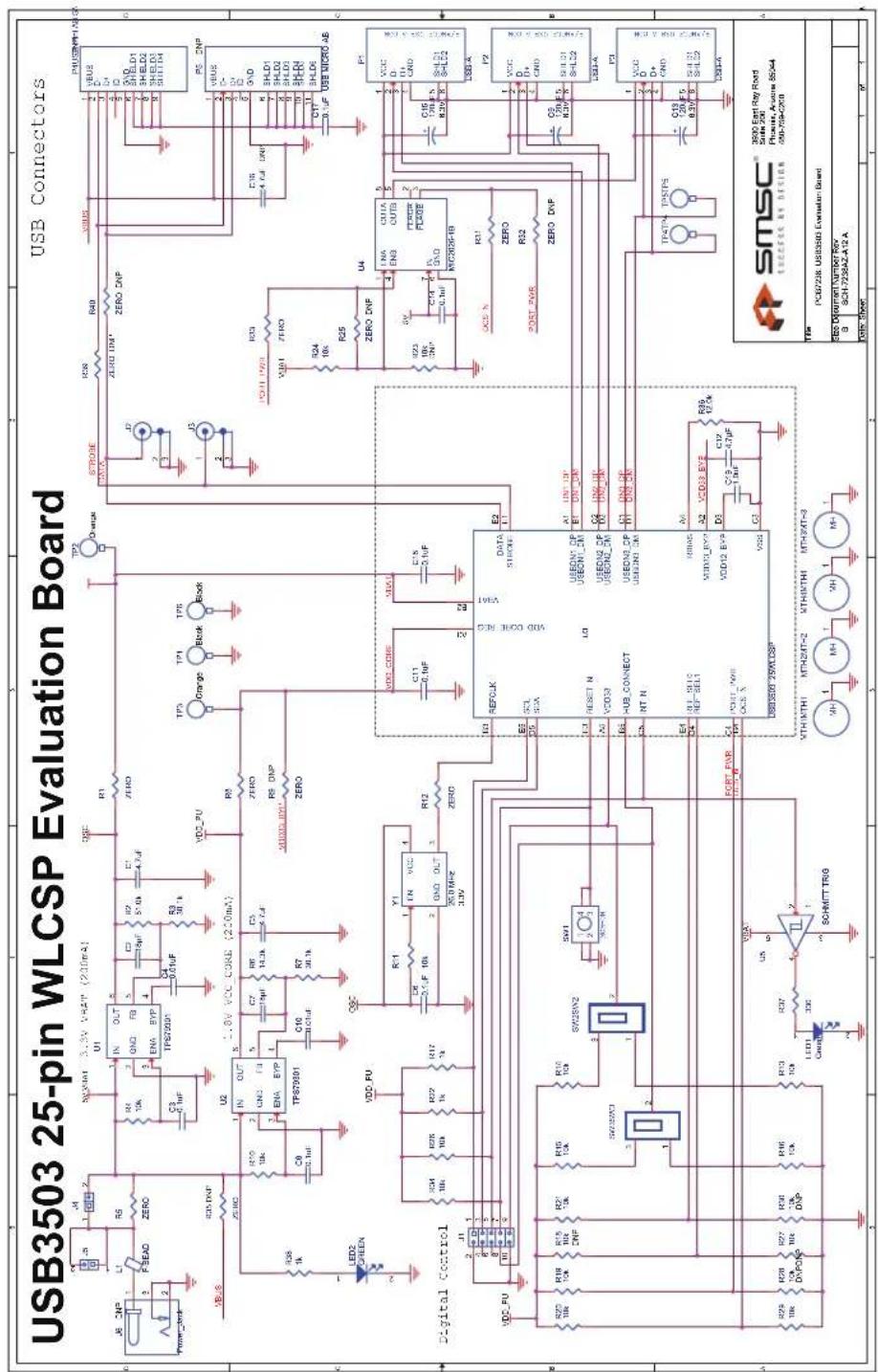
5 USB3503 EVB Schematic
text_image
USB3503 25-pin WLCSP Evaluation Board USB Connectors J6 CNP L1 R5 SCSNAT 3.3V VCC (200mA) FSEAD ZERO R1 IN OUT GND FB ENA BYP TPS70901 C2 5.1uF R2 51.0k E1 4.7uF R3 30.1k RDS DNP ZEROC U2 1.8V VCC CORE (200mA) LED2 SCREEN VDD_FU R10 2 IN OUT GND FB ENA BYP TPS70901 C10 14.0k R7 4.7k R8 DNP ZERO R9 ZERO R10 R11 EN VCC GND OUT 200MHz 3.3V R12 ZERO VDD_GNEE VDD_CONE REG DATA STRIKE E2 F1 A1 UNI DP B1 UNI DM C2 UNI DP D2 UNI DM D3 UNI DP D4 UNI DM D5 UNI DP D6 UNI DP D7 UNI DP D8 UNI DP D9 UNI DP D10 UNI DP D11 UNI DP D12 UNI DP D13 UNI DP D14 UNI DP D15 UNI DP D16 UNI DP D17 UNI DP D18 UNI DP D19 UNI DP D20 UNI DP D21 UNI DP D22 UNI DP D23 UNI DP D24 UNI DP D25 UNI DP D26 UNI DP D27 UNI DP D28 UNI DP D29 UNI DP D30 UNI DP D31 UNI DP D32 UNI DP D33 UNI DP D34 UNI DP D35 UNI DP D36 UNI DP D37 UNI DP D38 UNI DP D39 UNI DP D40 UNI DP D41 UNI DP D42 UNI DP D43 UNI DP D44 UNI DP D45 UNI DP D46 UNI DP D47 UNI DP D48 UNI DP D49 UNI DP D50 UNI DP D51 UNI DP D52 UNI DP D53 UNI DP D54 UNI DP D55 UNI DP D56 UNI DP D57 UNI DP D58 UNI DP D59 UNI DP D60 UNI DP D61 UNI DP D62 UNI DP D63 UNI DP D64 UNI DP D65 UNI DP D66 UNI DP D67 UNI DP D68 UNI DP D69 UNI DP D70 UNI DP D71 UNI DP D72 UNI DP D73 UNI DP D74 UNI DP D75 UNI DP D76 UNI DP D77 UNI DP D78 UNI DP D79 UNI DP D80 UNI DP D81 UNI DP D82 UNI DP D83 UNI DP D84 UNI DP D85 UNI DP D86 UNI DP D87 UNI DP D88 UNI DP D89 UNI DP D90 UNI DP D91 UNI DP D92 UNI DP D93 UNI DP D94 UNI DP D95 UNI DP D96 UNI DP D97 UNI DP D98 UNI DP D99 UNI DP D100 UNI DP D101 UNI DP D102 UNI DP D103 UNI DP D104 UNI DP D105 UNI DP D106 UNI DP D107 UNI DP D108 UNI DP D109 UNI DP D110 UNI DP D111 UNI DP D112 UNI DP D113 UNI DP D114 UNI DP D115 UNI DP D116 UNI DP D117 UNI DP D118 UNI DP D119 UNI DP D120 UNI DP D121 UNI DP D122 UNI DP D123 UNI DP D124 UNI DP D125 UNI DP D126 UNI DP D127 UNI DP D128 UNI DP D129 UNI DP D130 UNI DP D131 UNI DP D132 UNI DP D133 UNI DP D134 UNI DP D135 UNI DP D136 UNI DP D137 UNI DP D138 UNI DP D139 UNI DP D140 UNiD NDC VDD_FU R1 R2 R3 R4 R5 R6 R7 R8 R9 R10 R11 R12 R13 R14 R15 R16 R17 R18 R19 R20 R21 R22 R23 R24 R25 R26 R27 R28 R29 R30 R31 R32 R33 R34 R35 R36 R37 R38 R39 R40 R41 R42 R43 R44 R45 R46 R47 R48 R49 R50 R51 R52 R53 R54 R55 R56 R57 R58 R59 R60 R61 R62 R63 R64 R65 R66 R67 R68 R69 R70 R71 R72 R73 R74 R75 R76 R77 R78 R79 R80 R81 R82 R83 R84 R85 R86 R87 R88 R89 R90 Digital Control REFOLK SCL SXX RESET N A0 VDDGND UP USEONL CP USEONL CM USED UP USEONL CM USED UP USEONL CM USED UP USEONL CM USED UP USEONL CM USED UP USEONL CM USED UP USEONL CM USED UP USEONL CM USED UP USEONL CM USED UP USEONL CM USED UP USEONL CM USED UP USEONL CM USED UP USEONL CM USED UP USEONL CM USED UP USEONL CM USED UP USEONL CM USED UP USEONL CM USED UP USEONL C SWISSWCH SWISSWCH SWISSWCH SWISSWCH SWISSWCH SWISSWCH SWISSWCH SWISSWCH SWISSWCH SWISSWCH SWISSWCH SWISSWCH SWISSWCH SWISSWCH SWISSWCH SWISSWCH SWISSWCH SWISSWCH SWISSWCH SWISSWCH SWISSWCH SWISSWCH SWISSWCH SWISSWCH SWISSWCH SWISSWCH RDS 10k RD 2 RD 3 RD 4 RD 5 RD 6 RD 7 RD 8 RD 9 RD 10 RD 11 RD 12 RD 13 RD 14 RD 15 RD 16 RD 17 RD 18 RD 19 RD 20 RD 21 RD 22 RD 23 RD 24 RD 25 RD 26 RD 27 RD 28 RD 29 RD 30 RD 31 RD 32 RD 33 RD 34 RD 35 RD 36 RD 37 RD 38 RD 39 RD 40 RD 41 RD 42 RD 43 RD 44 RD 45 RD 46 RD 47 RD 48 RD 49 RD 50 RD 51 RD 52 RD 53 RD 54 RD 55 RD 56 RD 57 RD 58 RD 59 RD 60 RD 61 RD 62 RD 63 RD 64 RD 65 RD 66 RD 67 RD 68 RD 69 RD 70 RD 71 RD 72 RD 73 RD 74 RD 75 RD 76 RD 77 RD 78 RD 79 RD SMSC® SMC® ESCEER BY DESIGN CPU6723B USB3SBD Elevation Board SSC-72SRAZ-A-ALA Data Document Number Rev SCH-72SRAZ-A-ALA Data Cover USB SMC® SMC® ESCEER BY DESIGN CPU6723B USB3SBD Elevation Board SSC-72SRAZ-A-ALA Data Document Number Rev SCH-72SRAZ-A-ALA Data CoverFigure 5.1 USB3503 EVB Schematic
6 USB3503 EVB Bill of Materials
| Part ID | Quantity | Part Reference | Description Digkey Number Manuf Manuf PN RoHS | DNP | ||||
| 1 | 2 C1 C5 | CAPACITOR CERAMIC 4.7UF 10V X5R 0603 587-1441-1-ND TAIYO YUDEN LMK107BJ47 | 5KA-T Yes | |||||
| 2 | 2 C2 C7 | CAPACITOR CERAMIC 18PF 50V 0402 SMD PCC180CQCT-ND PANASONIC ECJ-0EC1H | 180J Yes | |||||
| 3 | 7 | C3 C6 C8 C14 C17 | CAPACITOR CERAMIC 0.1UF 10V X5R 0402 | PCC2146CT-ND | PANASONIC | ECJ-0EB1A104K | Yes | C17 |
| 4 | 2 | C4 C10 | CAPACITOR CERAMIC 0.01UF 16V 10% X7R 060 | PCC1750CT-ND | PANASONIC | ECJ-1VB1C103K | Yes | |
| 5 | 2 | C11 C18 | CAPACITOR CERAMIC 0.1UF 10V X5R 0201 | PCC2424CT-ND | PANASONIC | ECJ-ZEB1A104M | Yes | |
| 6 | 3 | C9 C13 C15 | CAP 120UF 6.3V ELECT POLY SMD | 565-3188-1-ND | United Chemi-Con | APXE6R3ARA121ME61G | Yes | |
| 7 | 1 | C12 | CAPACITOR CERAMIC 4.7UF 6.3V X5R 0402 | 490-5408-1-ND | MURATA ERIE | GRM155R60J475ME87D | Yes | |
| 8 | 1 | C16 | CAPACITOR CERAMIC 4.7UF 6.3V X5R 20% 0603 | 445-1417-1-ND | TDK | C1608X5R0J475M | Yes | C16 |
| 9 | 1 | C19 | CAPACITOR CERAMIC 1.0UF 6.3V 20% X5R 0402 | 490-1319-1-ND | MURATA ERIE | GRM155R60J105ME19D | Yes | |
| 10 | 1 | J1 | HEADER, 2 X 5, 0.1 INCH, VERTICAL | SAM1030-05-ND | SAMTEC | TSW-105-07-L-D | Yes | |
| 11 | J2 J3 | CONN RECPT U.FL | H9161CT-ND | HIROSE | U.FL-R-SMT (10) | Yes | ||
| 12 | 2 | J4 J5 | HEADER, 1 X 2, 0.1 INCH, VERTICAL | WM6402-ND | MOLEX | 22-28-4020 | Yes | J4 J5 |
| 13 | 1 | J6 | CONNECTOR POWER JACK 2.1X5.5MM HIGH CURR | CP-002AH-ND | CUI STACK | PJ-002AH | Yes | |
| 14 | 1 | L1 | FERRITE BEAD, 120 OHM, 0.5A, 0.1DCR, 0603 | P10750CT-ND | PANASONIC | EXC-3BP121H | Yes | |
| 15 | 1 | LED1 | LED GREEN SMT | 404-1005-1-ND | STANLEY | BG1111C-TR | Yes | |
| 16 | 1 | LED2 | LED GREEN 2X1.2MM 568NM GN WTR CLR SMD | 754-1131-1-ND | Kingbright | APT2012SGC | Yes | |
| 17 | 4 MTH1 | MTH2 MTH3 MTH4 MOUNTING PAD MTG250C140D | ||||||
| 18 | 3 | P1 P2 P3 | RECEPTACLE, USB, STYLE B, RIGHT ANGLE | 609-1045-ND | FCI | 87520-0010BLF | Yes | |
| 19 | 1 | P4 | CONNECTOR RECEPT USB MINI AB 5POS RT ANG | WM17122CT-ND | MOLEX | 56579-0576 | Yes | P4 |
| 20 | 0 | P5 | CONNECTOR RECEPT MICRO USB TYPE AB SMT | A97799CT-ND | TYCO ELECTRONICS | 1981584-1 | Yes | P5 |
| 21 | 2 | R1 R5 R8 R35 | RESISTOR ZERO OHM 1/4W 5% 1206 | 311-0.0ERCT-ND | YAGEO | RC1206JR-070RL | Yes | R35 |
| 22 | 1 | R2 | RES 51.0K OHM 1/10W 1% 0402 SMD | P51.0KLCT-ND | Panasonic - ECG | ERJ-2RKF5102X | Yes | |
| 23 | 2 | R3 R7 | RES 30.1K OHM 1/10W 1% 0402 SMD | P30.1KLCT-ND | Panasonic - ECG | ERJ-2RKF3012X | Yes | |
| 24 | 15 | R4 R10 R11 R13 R14 R15 R16 R18 R19 R20 R21 R23 R24 R26 R27 R28 R29 R30 R34 | RESISTOR 10K OHM 1/16W 5% 0402 SMD | P10KJCT-ND | PANASONIC | ERJ-2GEJ103X | Yes | R18 R23 R28 R29 R30 |
| 25 | 1 | R6 | RES 14.3K OHM 1/10W 1% 0402 SMD | P14.3KLCT-ND | Panasonic - ECG | ERJ-2RKF1432X | Yes | |
| 26 | 4 | R9 R12 R25 R31 R32 R33 R39 R40 | RESISTOR ZERO OHM 1/16W 5% 0402 SMD | 311-0.0JRCT-ND | YAGEO | RC0402JR-070RL | Yes | R9 R25 R32 R39 R40 |
| 27 | 3 | R17 R22 R38 | RESISTOR 1.0K OHM 1/16W 5% 0402 SMD | P1.0KJCT-ND | PANASONIC | ERJ-2GEJ102X | Yes | |
| 28 | 1 | R36 | RESISTOR 12.0K OHM 1/20W 1% 0201 SMD | P12.0KABCT-ND | PANASONIC | ERJ-1GEF1202C | Yes | |
| 29 | 1 | R37 | RESISTOR 330 OHM 1/16W 1% 0402 SMD | 311-330LRCT-ND | YAGEO | RC0402FR-07330RL | Yes | |
| 30 | 1 | SW1 | SWITCH TACTILE 6MM EXTEND ACT 160GF | EG1861-ND | E-SWITCH | TL1105SPF160Q | Yes | |
| 31 | 2 | SW2 SW3 | SWITCH SLIDE SPDT SMD GULL | 563-1022-1-ND | COPAL ELECTRONICS | CJS-1200TB | Yes | |
| 32 | 2 | TP1 TP6 | TEST POINT LOOP COMPACT BLACK | 5006K-ND | KEYSTONE | 5006 Yes | ||
| 33 | 2 | TP2 TP3 | TEST POINT LOOP COMPACT ORANGE | 5008K-ND | KEYSTONE | 5008 Yes | ||
| 34 | 2 | TP4 TP5 | TEST POINT | 5015KCT-ND | KEYSTONE | 5015 Yes | ||
| 35 | 2 | U1 U2 | IC 200MA LDO LINEAR REG SOT23-6 | 296-15305-1-ND | TEXAS INSTRUMENTS | TPS79301DBVRQ1 | Yes | |
| 36 | 1 | U3 | USB3503_25WLCSP | SMSC | USB3503 | Yes | ||
| 37 | 1 | U4 | POWER SWITCH USB MIC2026-1B | 576-2137-ND | MICREL | MIC2026-1YM | Yes | |
| 38 | 1 | U5 | IC SCHMITT-TRG INV GATE SOT23-5 | 296-1092-1-ND | TEXAS INSTRUMENTS | SN74AHC1G14DBVR | Yes | |
| 39 | 1 | Y1 | OSCILLATOR PROG 3.3V +50PPM SMD | AP3S3EC-ND | ABRACON | AP3S-26.0MHz | Yes |
Figure 6.1 USB3503 EVB Bill of Materials
7 User Manual Revision History
Table 7.1 Customer Revision History
| REVISION LEVEL & DATE SE | SECTION/FIGURE/ENTRY CORRECTION | |
| Rev. 1.0 (05-06-13) Co-branded document | ||
| Rev. 1.0 (09-12-11) Document release | ||