CA-PPHD210 - Speaker Pyle - Free user manual and instructions
Find the device manual for free CA-PPHD210 Pyle in PDF.


User questions about CA-PPHD210 Pyle
0 question about this device. Answer the ones you know or ask your own.
Ask a new question about this device
Download the instructions for your Speaker in PDF format for free! Find your manual CA-PPHD210 - Pyle and take your electronic device back in hand. On this page are published all the documents necessary for the use of your device. CA-PPHD210 by Pyle.
USER MANUAL CA-PPHD210 Pyle
VISIT US ONLINE: Have a question? Need service or repair? Want to leave a comment? PyleUSA.com/ContactUs
PYLE
Questions? Issues?
We are here to help!
Phone:(1)718-535-1800
Email: support@pyleusa.com
PYLE
PyleUSA.com
natural_image
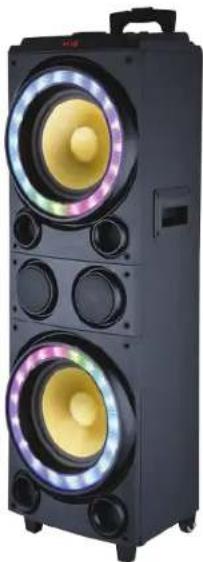
Black electronic device with two stacked speakers emitting colorful waves (no text or symbols visible)☆☆☆☆☆☆
★☆□▼★★★□*▲+★☆ *□**□*▲*○
Karaoke Speaker with LED Lights, USB/Micro SD/FM/BT/Aux/Remote Control/Mic & Guitar Inputs, Built-in Rechargeable Battery, w/ Wheels and Handle Bar (1200 Watt)
USER MANUAL
PLEASE READ THE INSTRUCTION MANUAL CAREFULLY AND KEEP IT FOR FUTURE REFERENCE
WARNING

- DO NOT place objects on top of the device, as objects may scratch the device.

- DO NOT expose the device to dirty or dusty environments.

- DO NOT insert any foreign objects into the device.

- DO NOT expose the device to strong magnetic or electrical field.

- DO NOT use the device in the rain

- Please check with your Local Authority or retailer for proper disposal of electronic products.

- DO NOT disassemble the device. Only a certified service technician should perform repair.

- The device has apertures to disperse heat. DO NOT block the device ventilation, the device may become hot and malfunction as a result.
Illegal operation may cause personal injury, which could be fatal and may cause damage to property.
REMOTE CONTROL Functions
-
POWER OFF ONLY
-
CHOOSE SIGNAL INPUT
-
INCREASE MUSIC VOLUME
-
MENU
-
PREVIOUS LED MODE
-
DECREASE MUSIC VOLUME
-
NEXT LED MODE
-
MUTE
-
REPEAT
-
PLAY/PAUSE KEY
-
PREVIOUS SONG/CHANNEL
-
NEXT SONG/CHANNEL

text_image
① ③ ④ ⑤ ⑧ ⑪ ② ⑦ ⑥ ⑨ ⑩ ⑫For MENU:
30 N(0--30) Microphone volume adjustment
E 00 E(0--30) Microphone echo volume adjustment
d 00 d(0--12) Microphone delay volume adjustment
9 00 9(0--30) Guitar volume adjustment
LED (LED(0--1) LED OFF/ON
TWS-TRUE WIRELESS STEREO SETUP
- Turn on two same PA speaker that you're attempting to pair together and switch both units to Wireless BT mode.
- Choose one of units to begin to pairing process.
- Press down on the NEXT▶ button for 3 seconds until you hear a chiming sound; This means the unit is ready to pair with another unit.
- Move onto the second unit and repeat step 3.
- Now begin playing your music through Wireless BT enabled mobile device. The speakers will begin to play your music simultaneously.
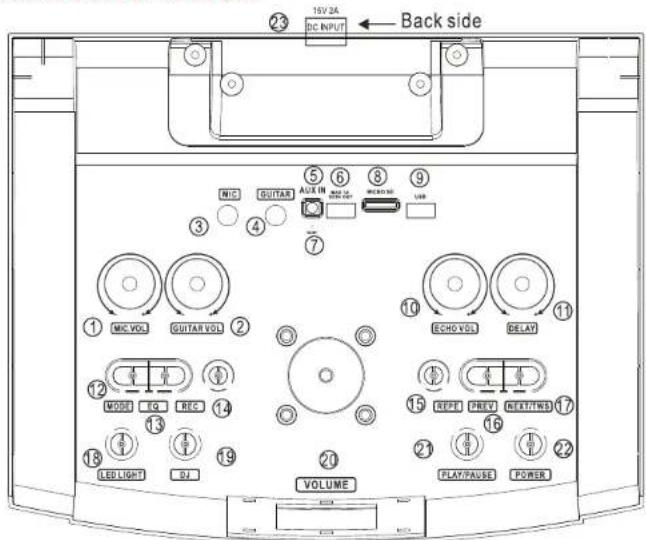
Control Board Functions
text_image
19V 2A DC INPUT Back side ② ③ ④ ⑤ ⑥ ⑧ ⑨ AUX IN MCC GUITAR MCC VOLT GUITAR VOLT ECHO VOLT DELAY ① MIC VOL ② MODE TO ③ REC ④ LED LIGHT ⑤ DJ ⑥ VOLUME ⑦ ⑧ ⑨ ⑩ ⑪ ⑫ ⑬ ⑭ ⑮ ⑯ ⑰ ⑱ ⑲ ⑳ ㉑ ㉒ ㉓ ㉔ ㉕ ㉖ ㉗ ㉘ ㉙ ㉚ ㉛ ㉜ ㉝ ㉞ ㉟ ㉟A PAUSE POWER-
Microphone volume knob
-
Guitar volume knob
-
6.5 MM microphone input jack
-
6.5MM guitar input jack
-
3.5MM audio input jack
-
USB jack for DC 5V/1A output
-
Reset button
-
Micro SD jack
-
USB jack for Mp3 play
-
Echo volume knob for microphone
-
Delay volume knob for microphone
-
Input signal choosing
-
3 kinds of EQ function
-
Record function on USB/Micro SD mode
-
Repeat song function
-
Last song on USB/Wireless BT mode, last channel for FM mode
-
Short press for next song on USB/Wireless BT mode, next channel for FM mode, press and hold for TWS -connection
-
LED light swift
-
Different DJ effect choose
-
Master volume control for music
-
Stop/Play song on USB/Wireless BT mode, automatically scan channel for FM mode
-
Power ON/OFF button
-
15V/2A DC charge and LED indicator phone volume knob
Troubleshooting and Warning
| Fault | Possible Cause | Solution |
| No sound | 1. No input sound source2. Volume is too low | 1. Use a better music signal2. Adjust volume |
| Distortion of sound | 1. Volume too high2. Speaker may be damaged | 1. Turn down the volume2. If speaker is damaged, Repair or replace it |
| Karaoke does not work | 1. Microphone plug is not fully inserted.2. Microphone switch is not on3. Microphone volume knob is at the lowest position | 1. Plug microphone properly into the socket2. Turn on microphone switch3. Adjust microphone volume properly |
| MP3 does not play | 1. The song format in the U disc is incorrect2. Improper operation has caused a process disorder3. USB disc is disconnected | 1. Transform song format into Mp3 format2. Reboot the machine3. Insert USB disc properly |
PPHD210
10" Portable Wireless BT PA Speaker System
Karaoke Speaker with LED Lights, USB/Micro SD/FM/BT/Aux/Remote Control/Mic & Guitar Inputs, Built-in Rechargeable Battery, w/ Wheels & Handle Bar (1200 Watt)
Features:
• True Wireless Stereo Function
• Simple DJ Sound Effect and EQ Adjustable
• USB Charging Power Function
- Portable PA Speaker System
• High-Powered Loudspeaker Design
• Master Volume, Mic Volume, and Mic Echo Adjustable
• (2) 1/4" -inch (6.5mm) Microphone/Guitar Instrument Inputs
• ON/OFF Switch to Control LED Lights
• Wireless BT Music Streaming Ability
• Multi-Color Flashing LED Party Lights
natural_image
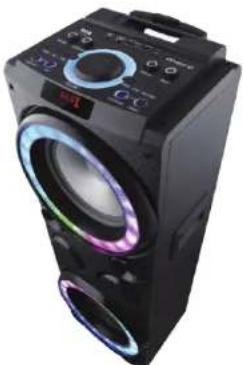
Black multi-tiered electronic device with glowing purple and black lenses (no visible text or symbols)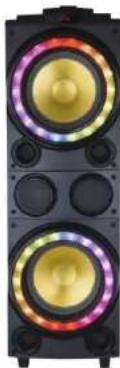
natural_image
Close-up of a black speaker tower with dual speakers and colorful ambient lighting (no text or symbols visible)
WARNING:
This products can expose you to a chemical or group of chemicals, which may include "Lead and lead compounds" which is known in the state of California to cause cancer, birth defects, or other reproductive harm. For more info, go to https://www.p65warnings.ca.gov/.