750CHSSDX - Oven Cres Cor - Free user manual and instructions
Find the device manual for free 750CHSSDX Cres Cor in PDF.


User questions about 750CHSSDX Cres Cor
0 question about this device. Answer the ones you know or ask your own.
Ask a new question about this device
Download the instructions for your Oven in PDF format for free! Find your manual 750CHSSDX - Cres Cor and take your electronic device back in hand. On this page are published all the documents necessary for the use of your device. 750CHSSDX by Cres Cor.
USER MANUAL 750CHSSDX Cres Cor
| Ovens | FL-2374-D |
| Rev. 3 (2/15) Page 1 of 13 | |
INSTALLATION, OPERATION and MAINTENANCE MANUAL for Cres Cor RADIANT OVENS

natural_image
Exterior view of a laboratory instrument with control panel and wheels (no visible text or symbols)500-CH-SS-DE
500-CH-SS-DX
500-CH-AL-DE
500-CH-AL-DX
750-CH-SS-DE
750-CH-SS-DX
1000-CH-SS-SPLIT-DE
1000-CH-SS-SPLIT-DX
Cabinet model number:
Cabinet serial number:
Authorized Service Agency:
Ph: Fax:
Keep this manual for future reference.
| Ovens | FL-2374-D |
| Rev. 3 (2/15) Page 2 of 13 | |
CRES COR®
5925 Heisley Road • Mentor, OH 44060-1833
TABLE OF CONTENTS
SUBJECT
INSTALLATION INSTRUCTIONS ......3, 4
OPERATING INSTRUCTIONS
First Time Operation....4
How to Use Control for Cooking & Holding:
For “-DE” Series Ovens .... 5
For “-DX” Series Ovens....6
"Recipes" for "-DX" Series Ovens....7
MAINTENANCE INSTRUCTIONS
How to Clean the Unit 8
Trouble Shooting Guide 9
Oven Illustration 10
Oven Replacement Parts ...... 11
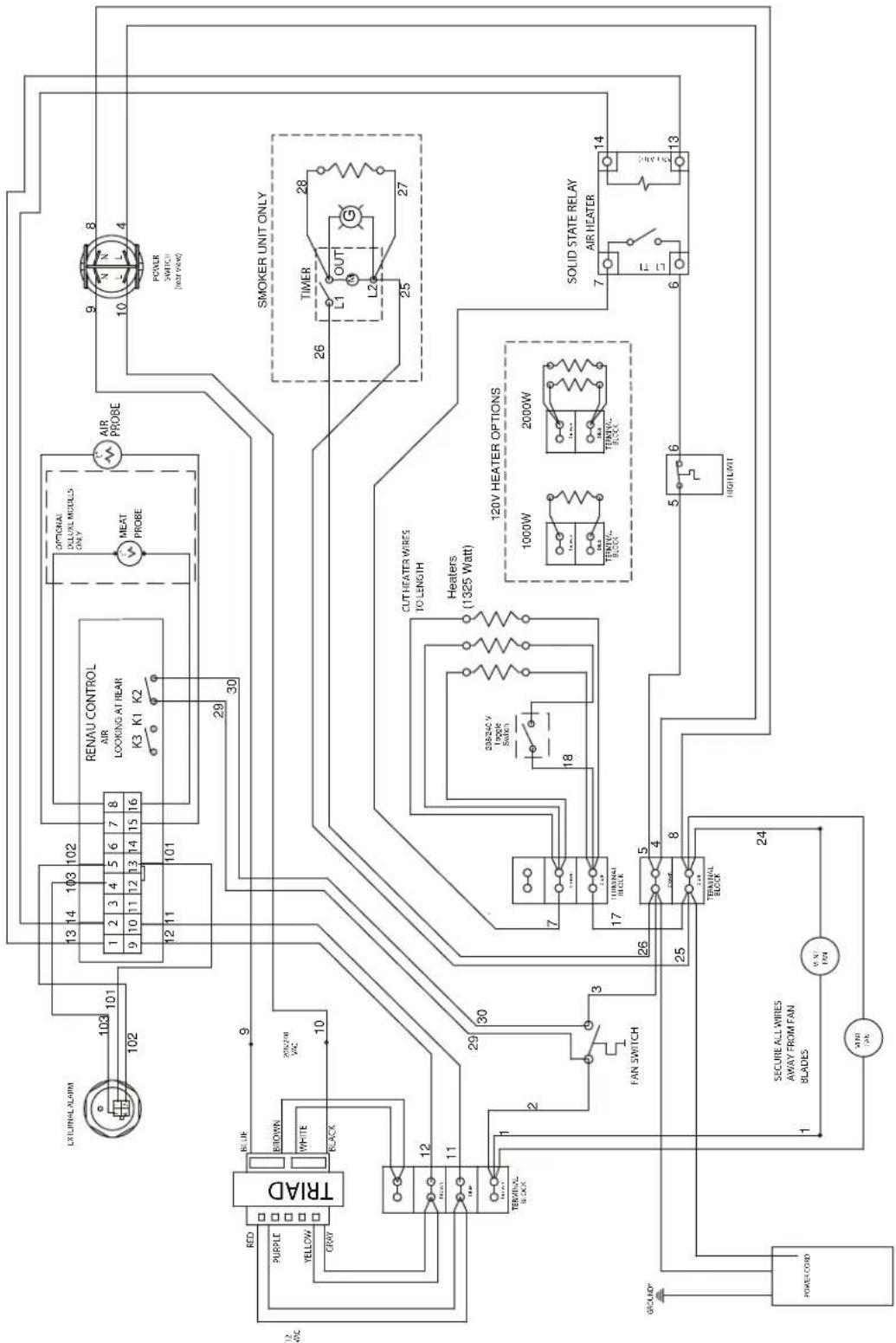
Wiring Diagram For 120/208/240 Volt, 1 Phase .....12
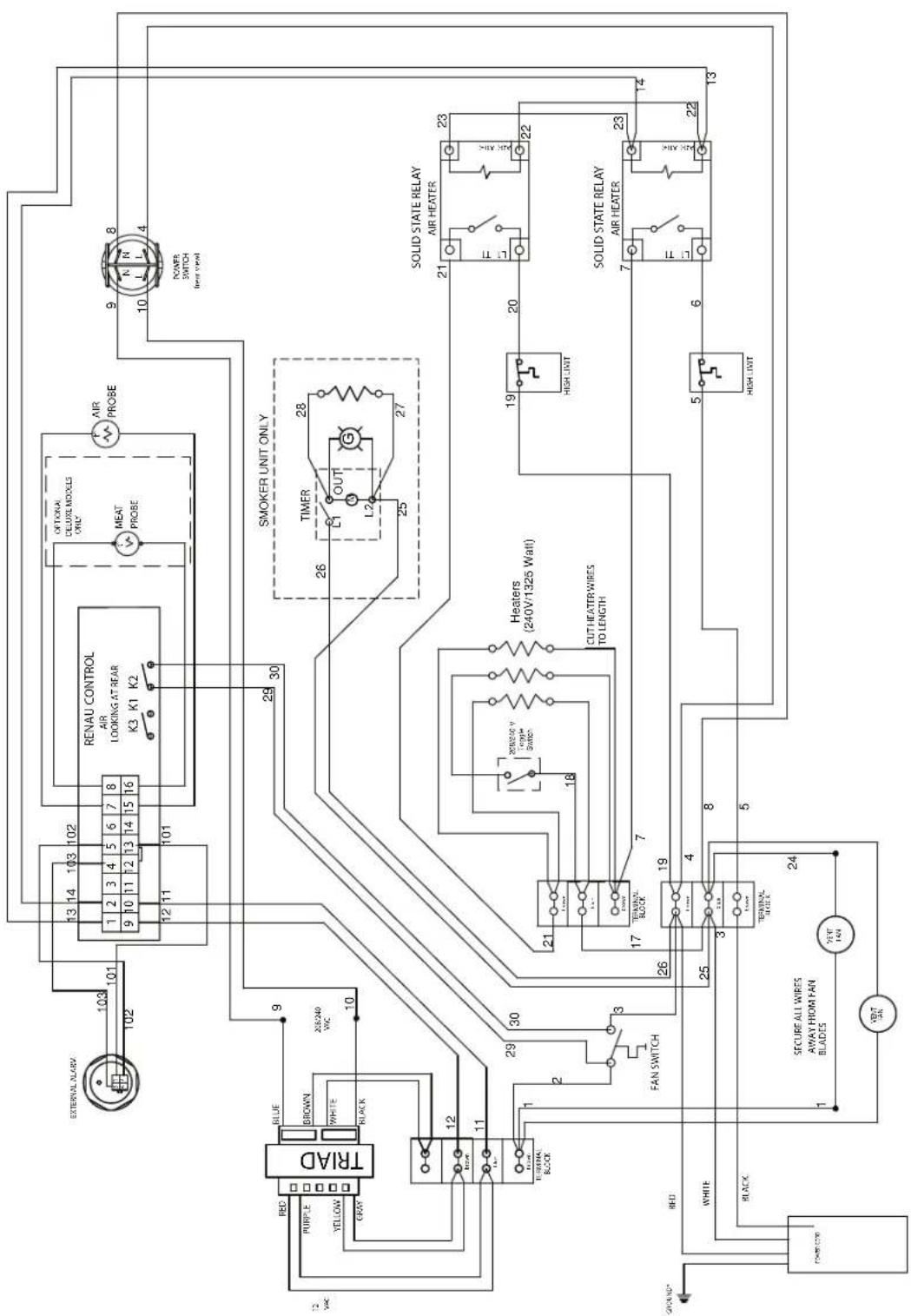
Wiring Diagram for 208/240 Volt, 3 Phase .....13
SERVICE POLICY and AGENCY LIST ....FL-1400
REGISTERING YOUR EQUIPMENT AT www.crescor.com/service/register COMPLETING A SURVEY EARNS AN EXTRA 90-DAY LABOR WARRANTY!
If the equipment will not go into service immediately, please indicate that on the warranty registration. Scan QR code to register your equipment today! If you need a QR reader, visit your App Store on your Smartphone or Tablet.


text_image
WARNING RISK OF FIRE OR ELECTRIC SHOCK DO NOT OPEN WARNING: TO REDUCE THE RISK OF FIRE OR ELECTRIC SHOCK, DO NOT REMOVE COVER (OR BACK) NO USER-SERVICEABLE PARTS INSIDE REPAIR SHOULD BE DONE BY AUTHORIZED SERVICE PERSONNEL ONLY| Ovens | FL-2374-D |
| Rev. 3 (2/15) Page 3 of 13 | |
INSTALLATION INSTRUCTIONS
VENTING YOUR OVEN:
-
This cabinet passes the EPA 202 test and complies with section 59 of UL710B for emission of grease-laden air.
-
According to UL, this cabinet does not need to be placed under a ventilation hood.
-
Installation must conform with local codes. The authority having jurisdiction of enforcement of the codes will have the responsibility for making interpretations of the rules.
SPECIFICATIONS: All units are rated 3000 watts/2650 watts at 208 Volts/240 Volts
| CMP MODEL NOS. | ELECTRICAL SPECS (AC SERVICE) | ELEC. LOAD POWER SUPPLY REQUIREMENT | ||||||||
| SINGLE OVENS Volts Ph Hz. Amps | Volts | Amps | Ph Wire Volts | NEMA | ||||||
| 500CHSSDE | 208 | 1 | 60 | 14 | 208 | 20 | 1 | 2 | 208 | 6-20P |
| 500CHALDE | 240 | 1 | 60 | 11 | 240 | 20 | 1 | 2 | 240 | 6-20P |
| 750CHSSDE | 208 | 1 | 60 | 14 | 208 | 20 | 1 | 2 | 208 | 6-20P |
| 1000CHSSSPLITDE | 240 | 1 | 60 | 13 | 240 | 20 | 1 | 2 | 240 | 6-20P |
| 500CHSSDE3 | 208 | 3 | 60 | 8 | 208 | 20 | 3 | 3 | 208 | L15-20P |
| 500CHALDE3 | 240 | 3 | 60 | 7 | 240 | 20 | 3 | 3 | 240 | L15-20P |
| 750CHSSDE3 | 208 | 3 | 60 | 8 | 208 | 20 | 3 | 3 | 208 | L15-20P |
| 1000CHSSSPLITDE3 | 240 | 3 | 60 | 7 | 240 | 20 | 3 | 3 | 240 | L15-20P |
SPECIFICATIONS: All units are rated 2000 watts.
| CMP MODEL NOS. | ELECTRICAL SPECS (AC SERVICE) | ELEC. LOAD PO | WER SUPPLY REQUIREMENT | |||||||
| SINGLE OVENS Volts Ph Hz. Amps | Volts Amps Ph W | Wire Volts | NEMA | |||||||
| 500CHSSDE120750CHSSDE1201000CHSSSPLITDE120 | 120 | 1 | 60 | 16.6 | 120 | 20 | 1 | 2 | 120 | 5-20P |
Model number "AL" is aluminum outer body with stainless steel doors and interior.
"DE" in model number will be substituted with "DX" for "Deluxe" Ovens.
All models designed for AC Service. Model number may include a variety of informational suffix letters.
NOTE: OVENS NEED TO BE INSTALLED BY A QUALIFIED PERSON.
For models rated at 208/240 Volts:
Check the voltage selector switch which is under an access cover on the back of the oven near the power cord.
* Flip the switch "UP" for 208 Volts
* Flip the switch "DOWN" for 240 Volts
MAKE SURE THE SWITCH POSITION MATCHES YOUR POWER SOURCE.
| Ovens | FL-2374-D |
| Rev. 3 (2/15) P | Page 4 of 13 |
INSTALLATION INSTRUCTIONS (continued)
IDENTIFYING YOUR CABINET:
Look for this label on the back of your cabinet. This information is needed when calling for questions or service.

natural_image
Technical line drawing of a mechanical fan assembly with mounting bracket (no text or symbols)UPPER RIGHT CABINET CORNER

text_image
CRES COR® 5025 HEISLEY RD. MENTOR. OHIO 4406D MOD. 1000CH SER. FAA-K56450-001 AMPS 2 VOLT 203/240 WATTS 3000 Hz. 60 PH. 1 COMPLITICAL COOKING APPLIANCE MADE IN USA CSA certified to UL 197 Rev. 9HOW TO INSTALL CABINETS:
- Remove all packing material from the inside and all vinyl from the outside of oven.
- Place the oven in a well ventilated area on level floor. Clearance requirements: 3" (76mm) at the back, 2" (51mm) at the top, 1" (25mm) at both sides.
- Install the pan slide racks on the sidewalls, if necessary.
- Slide drip pan(s) onto the bottom of the compartment(s).
HOW TO REVERSE THE DOOR OPENINGS, IF NEEDED:
- Unscrew and remove the latch from the door and magnetic strike from the cabinet.
- Unscrew the hinges from the cabinet body and remove door.
- Remove the screws plugging the mating hinge, latch and strike holes on the opposite sides of the cabinet body and door.
- Re-mount the hinges to the opposite side of the cabinet and door.
- Remount the latch and strike to the opposite side
DOOR VENT ADJUSTMENT:
Open the door(s) and move the vent tabs on the inner door(s) as needed to release humidity.
HOW TO CHANGE FROM °F TO °C (if needed)
- Push the switch on; the light will come on.
- Push and hold the "SET" button and the button in the lower left hand corner together for 5 seconds. You have now entered into the menu.
- Scroll over the "Unit" and change it to "C", then scroll to the "END".
NOTE: A new oven needs to “burn off” factory oils and glue before its first use. Do NOT load food into oven until this has been done!
- Push switch to "ON"; the light will come on.
NOTE: The letters “LOtPr” (low temperature) will show on the control panel until it reaches 140^ F ( 60^ C).
- Press the "COOK" button.
- Turn the control knob to show 350^ F. Push the knob 3 times to heat the unit. Run the unit like this for one (1) hour.
- Turn the unit off and let cool.
- Wipe the inside clean with detergent and hot water.
WARNING
Air is VERY HOT when door is opened.
| Ovens | FL-2374-D |
| Rev. 3 (2/15) Page 5 of 13 | |
OPERATING INSTRUCTIONS

text_image
CRES COR. 350F⁵ Cook-N-Hold PULSE TO SET COOK HOLD TIME DISPLAY START CARGESHOW TO USE THE COOK-N-HOLD CONTROL:
*Push the lighted switch on the control panel; the oven will start heating and stay in HOLD mode.
*The display will read "LOTPR" (low temperature) below 140°F. (60°C.).
NOTES: Preheat for one (1) hour after start up before loading the food for best results when retherming or cooking heavy loads.
If a power outage occurs or the cabinet is shut off during a cook cycle, when it is turned on again all lights on the control will flash to indicate a disruption. Control will resume the last cook cycle used. Press any button to stop the blinking.
If your model does not have a food probe, continue to section "-DE OVENS" below.
If your model has a food probe, skip to section "-DX OVENS" on page 5.
-DE OVENS:
Cooking:
- Press the COOK button.
- Turn the control knob to the desired cooking temperature between 180°F (82°C) and 350°F (176°C).
- Push the knob to set the temperature.
- The control automatically switches to allow you to set HOLD temp. (Continue to step 1 below).
Holding:
(To use as holding cabinet only, skip steps 1-4 above and press HOLD button. Complete steps 1-3 below.)
- Turn the control knob to the desired holding temperature between 135^ F ( 57^ C) and 220^ F ( 104^ C).
- Push the knob to set the temperature.
- The control automatically switches to allow you to set cook time.
Setting the Timer:
- Turn the control knob to the desired hours/minutes.
- Push the knob to set the time.
- The control automatically switches to PREHEAT mode and will display "PrEHt"
Running the Cycle:
- The control will flash "PUSH StArt" after the cabinet has preheated to the set temp and the alarm will sound.
NOTE: A short beep will occur every 90 seconds as a reminder. This can be turned off in the user menu by holding the knob and the TIME buttons together for 5 seconds, then scrolling to "PSrE", changing "y" to "n", scrolling to "End", and pushing the knob to set.
-
Load foods into oven and close the door.
-
Push the START button to begin the Cooking process. Display will change between the setpoint temperature and the countdown of the timer.
-
The alarm will sound after the time is done and the oven will switch back into HOLD mode. The timer will now count up, showing how long the food has been holding.
| Ovens | FL-2374-D |
| Rev. 3 (2/15) P | Page 6 of 13 |
OPERATING INSTRUCTIONS (continued)

text_image
CRES COR. Cook 350F⁵ HOLD Cook-N-Hold TIME PRESS ECOPE DISPLAY START CANCEL-DX OVENS
Cooking:
- Press the COOK button.
- Turn the control knob to the desired cooking temperature between 180°F (82°C) and 350°F (176°C).
- Push the knob to set the temperature.
- The control automatically switches to allow you to set HOLD temp. (Continue to step 1 below).
Holding:
(To use as holding cabinet only, skip steps 1-4 above and press HOLD button. Complete steps 1-3 below.)
- Turn the control knob to the desired holding temperature between 135^ ( 57^ C) and 220^ F ( 104^ C).
- Push the knob to set the temperature.
- The control automatically switches to allow you to set cook time.
If cooking with timer, continue to step 1 below. If cooking with food probe, skip to section "Cooking with Food Probe".
Cooking with Timer:
- Turn the control knob to the desired hours/minutes. Oven will switch from COOK to HOLD mode when this time is done.
- Push the knob to set the time.
- Oven will switch to PREHEAT mode and control will display "PrEHt".
Cooking with Food Probe:
NOTE: Make sure probe was plugged in after step 1 of Holding above. If not, press the PROBE button and continue to next step below.
- Turn the control knob to the desired temperature. The oven will switch from COOK to HOLD mode when the probe reaches this temp.
-
Push the knob to set the temperature.
-
Oven will switch to PREHEAT mode and control will display "PrEHt".
Running the Cycle:
- The control will flash "PUSH StArt" after the cabinet has preheated to the set temp and the alarm will sound.
NOTE: A short beep will occur every 90 seconds as a reminder. This can be turned off in the user menu by holding the knob and the TIME buttons together for 5 seconds, then scrolling to "PSrE", changing "y" to "n", scrolling to "End", and pushing the knob to set.
-
Load foods into oven, insert probe (if applicable) and close the door.
-
Push the START button to begin the Retherm/Cook process.
a. If cooking with timer, display will alternate between the setpoint temperature and the countdown of the timer.
b. If cooking with probe, display will show the probe temp.
- The alarm will sound after the time is done and the oven will switch back into HOLD mode. The timer will now count up, showing how long the food has been holding.
NOTE: At any time, the CANCEL button can be pushed to return the oven back to HOLD mode at the previous set temperature.
The DISPLAY button shows (cycles through) all the values when in each mode:
- “PrEHt” or “PUSH StArt”: Momentarily shows actual oven temperature.
- "COOK (timed)": Shows home screen, set point, count down time, actual oven temperature.
- "COOK (probe)": Shows home screen, set point, count up time, actual oven temperature.
- "HOLD": Shows home screen, set point, count up time, actual oven temperature.
| Ovens | FL-2374-D |
| Rev. 3 (2/15) Page 7 of 13 | |
OPERATING INSTRUCTIONS (continued)

text_image
CRES COR Cook 350F⁵ HOLB Cook-N-Hold TIME PROBE REEPE DISPLAY START CANCEL-DX OVENS, continued
RECIPES:
The -DX control can hold up to 18 saved recipes.
To save a recipe:
- Press the RECIPE button.
- Turn the knob through the menu until you get to "Edit" and press the knob.
- Turn the knob to reach the recipe you want to edit. There are 18 blank recipes to customize and save.
- Press the knob and enter the cook, hold and time values.
- After the entering the final value, "Edt" will show again, allowing you to edit another recipe.
- Press the knob to edit more recipes or turn to "End" to exit the menu.
To use one of the recipes:
- Push the RECIPE button.
- Turn the knob to the desired recipe; "rcP01", "rcP02", "rcP03", etc.
- Push the set button to select and start the preset process. Unit will begin to preheat.
- Run the cycle as described above by pressing START button after oven has preheated.
Note: The display button will cycle through all the values as before, but will include the recipe number, if using a saved recipe.
Additional Menu Settings:
Press and hold both the TIME button and the knob for 5 seconds to get into the menu.
Here you can set the recipes, temperature units (°C or °F), PUSH START reminder and the datalog settings (USB connection required):
"RECE" allows you to enable or disable the data record feature.
"RECF" allows you set how often (in minutes) a datapoint will be recorded.
“RECD” allows you to set how long (in days) you would like the data to be stored in memory.
| Ovens | FL-2374-D |
| Rev. 3 (2/15) P | Page 8 of 13 |
HOW TO CLEAN THE UNIT:
WARNING
BEFORE cleaning the cabinet:
- Unplug cord from wall. Allow cabinet to cool.
- Do NOT hose cabinet with water.
- Do NOT get water on controls.
- Do NOT use abrasives or harsh chemicals.
■ Wipe up spills as soon as possible.
■ Clean regularly to avoid heavy dirt build-up.
Cleaning Hints:
- Use the mildest cleaning procedure that will do the job.
- Always rub in the direction of polish lines to avoid scratching the surface.
- Use only a soft cloth, sponge, fibrous brushes, plastic or stainless steel pads for cleaning and scouring.
- Rinse thoroughly with fresh water after every cleaning operation.
- Always wipe dry to avoid water marks.
MODELS: 500-CH-SS-D, 750-CH-SS-D & 1000-CH-SS-SPLIT-D SERIES
| SOIL CLEANER METHOD | |||
| STAINLESS STEEL CABINETInside and Outside | Routine Cleaning | Soap or mild detergent* and water. | 1. Sponge on with cloth2. Rinse |
| Stubborn Spots, Stains | Mild abrasive made for Stainless Steel. | 1. Apply with damp sponge or cloth.2. Rub lightly. | |
| Burnt on Foods or Grease | Chemical oven cleaner made for Stainless Steel. | Follow oven cleaner manufacturer's directions. | |
| Hard Water Spots & Scale Vinegar | 1. Swab or wipe with cloth.2. Rinse and dry. | ||
MODEL: 500-CH-AL-D SERIES (Aluminum cabinet outside only with stainless steel door and pan slides)
| SOIL CLEANER METHOD | |||
| ALUMINUM CABINETOuter body ONLY | Dirt | Mild detergent* and hot water, or mild abrasive cleaner. | 1. Use soft, damp cloth.2. Rinse with hot water.3. Wipe dry. |
| Steam (no strong alkaline additive). | 1. Rinse after steam cleaning.2. Wipe dry. | ||
| Fingerprints, Grease, Oil | Detergent* and hot water. | 1. Wipe with soft, damp cloth.2. Rinse with hot water.3. Wipe dry. | |
| Chemical oven cleaner made for aluminum. | Follow oven cleaner manufacturer's directions | ||
| Mild abrasive cleaner.Oily or waxy cleaner. | Apply with soft, clean cloth. | ||
| Water Spots Mild abrasive cleaner. Wipe with damp cloth. | |||
*Mild detergents include soaps and non-abrasive cleaners.
| Ovens | FL-2374-D |
| Rev. 3 (2/15) Page 9 of 13 | |
MAINTENANCE INSTRUCTIONS
TROUBLE-SHOOTING GUIDE
WARNING
IF UNIT GETS TOO HOT OR WON'T SHUT OFF, DISCONNECT POWER AT BRANCH PANEL. DO NOT UNPLUG CORD!
If hot unit is NOT working, first check the following causes:
-
Cord is unplugged from wall outlet.
-
Switch(es) are turned off.
-
Circuit breaker/fuse to wall outlet is blown.
-
Thermostat(s) are turned off, or are set too low.
IF THE OVEN TURNS ON:
| PROBLEM POSSIBLE CAUSE SOLUTION | ||
| Oven does not heat, or doesn't heat properly | 1. Sensor2. Heater relay3. Loose connection4. Oven control5. High Limit | 1. Replace2. Replace3. Replace4. Replace5. Replace |
| Heater will not shut off | 1. Control defective2. Heater relay | 1. Replace2. Replace |
| Vent fans do not shut off | 1. Vent fan switch defective2. Control compartment is still hot. | 1. Replace2. Wait until it coolsCheck “Heater will not shut off” |
| Vent fans do not operate (See Note) | 1. Vent fan switch defective2. Vent fan defective | 1. Replace2. Replace |
| Control will not switch from “COOK” to “HOLD” (timed mode) | 1. Oven is in “PROBE” mode (“DX” ovens).2. Oven control defective | 1. Cancel recipe and switch to “TIMED” mode2. Replace |
| Control will not switch from “COOK” to “HOLD” (probe mode in “DX” ovens only) | 1. Oven is in the “TIMED” mode2. Probe not plugged in3. Probe defective4. Oven control defective | 1. Cancel recipe and switch to “PROBE” mode2. Plug in probe3. Replace4. Replace |
| Control will not switch to “COOK” (probe mode in “DX” ovens only) | 1. Oven in “TIMED” mode2. Probe temperature setting lower than probe temperature3. Probe not plugged in4. Oven control defective | 1. Switch to “PROBE” mode2. Set probe temperature to desired temperature3. Plug in probe4. Replace |
ERROR CODES:
| CODE DISPLAYED CAUSE SOLUTION | ||
| no p No meat probe Plug in probe | ||
| Err0 Temp probe bad Replace |
NOTE: Vent fans will not operate until the control compartment requires ventilation to limit temperatures. Replacement of electrical components must be done by a qualified electrician.
Refer to our Service Agency list, FL-1400 (found in the back of this manual), of authorized service centers.
Instructions for replacing parts are included in replacement parts list.
| Ovens | FL-2374-D |
| Rev. 3 (2/15) Page 10 of 13 | |
CRES COR®
5925 Heisley Road • Mentor, OH 44060-1833
REPLACEMENT PARTS
Include all information on nameplate when ordering parts

text_image
INSULATION HEATER WIRE COVER SIDE PANEL
2A "DE" COOK-N-HOLD CONTROL

2B "DX" COOK-N-HOLD CONTROL
| Ovens | FL-2374-D |
| Rev. 3 (2/15) Page 11 of 13 | |
REPLACEMENT PARTS
Include all information on nameplate when ordering parts
ELECTRICAL REPLACEMENT PARTS
| ITEM DESCRIPTION | CMP Part No. | ITEM DESCRIPTION | CMP Part No. |
| 1. Switch (On/Off) 0808-125 | 10. Heater Kit 240V, 1325W | 0811-296-K | |
| 2A. “DE” Digital Control | 0848-092-24-K | Heater Kit 120V, 1000W | 0811-295-K |
| 2B. “DX” Digital Control | 0848-092-08-K | 11. Hi-Limit | 0848-033 |
| 3. Switch, Fan | 0848-034 | 12. Power Cord (3000W, 1Ph) | 0810-173-01-K |
| 4. Relay | 0857-136 | Power Cord (3000W, 3Ph) | 0810-164-01-K |
| 5. Terminal Block (Input) | 0852-109 | Power Cord (2000W, 1Ph) | 0810-065-1 |
| 6. Terminal Block | 0852-091 | 13. Strain Relief | 0818-050 |
| 7. Switch, toggle | 0808-020 | 14. Transformer | 0769-197 |
| 8. Vent Fan (240V) | 0769-174 | 15. Audible Alarm | 0908-009-01 |
| Vent Fan (120V) | 0769-165 | ||
| 9. Fan Guard | 0769-167 |
CABINET REPLACEMENT PARTS
| ITEM DESCRIPTION 500-CH-SS-D 750-CH-SS-D 1000-CH-SS-SPLIT-D | |||
| 16. Casters, Rigid 0569-288 0569-288 0569-306-R | |||
| 17. Casters w/ Brake 0569-287-B 0569-287-B 0569-306-B | |||
| 18. Door Assembly 1221-570-K 1221-576-K 1221-573-K | |||
| 19. Door Gasket 0861-270 0861-269 0861-267 | |||
| 20. Hinge Kit (2) | 0519-109-K 0519-109-K 0519-109-K | ||
| 21. Door Latch Kit 1006-122-01-K | 1006-122-01-K | 1006-122-01-K | |
| 22. Latch Strike Kit | 1006-122-02-K | 1006-122-02-K | 1006-122-02-K |
| 23. Pan Slides | 0692-202 0692-203 | 0692-200 | |
| 24. Drip Pan | 1017-109 1017-117 | 1017-115 | |
| 25. Drip Tray | 1017-107 1017-118 | 1017-111 | |
| 26. Wire Shelf | 1170-030-SS | 1170-217 | 1170-212 |
| 27. Clear Drip Pan | 1017-058 1017-058 | 1017-058 | |
| 28. Strainer | 1052-094 1052-094 | 1052-094 | |
| FOR “DX” OVENS ONLY (not shown): | |||
| Probe, Food | 0848-112 | 0848-112 | 0848-112 |
| Probe Connector | 0848-106-02 | 0848-106-02 | 0848-106-02 |
| Ovens | FL-2374-D |
| Rev. 3 (2/15) P | Page 12 of 13 |
CRES COR®
5925 Heisley Road • Mentor, OH 44060-1833
WIRING DIAGRAM
120/208/240 Volt, Single Phase
text_image
LX TUNAL DESM 103 101 102 13 14 103 102 1 2 3 4 5 6 7 8 9 10 11 12 13 14 15 16 RENAU CONTROL AIR LOOKING AT REAR K3 K1 K2 29 30 101 12 11 RED BIROWN WHITE BLACK TRIAD RED PURPLE YELLOW GREEN AIR PROBE OPTIONAL DUAL MODELS ONLY MEAT PROBE SMOKER UNIT ONLY 28 TIMER OUT L1 L2 26 27 SOLID STATE RELAY AIR HEATER 14 7 E G 13 5 HIGILWATT 30 29 30 CUT HEATER WIRESTO LENGTH Heaters (1325 Watt) 300kV V DOCK SHORT 18 17 TURBONI HOCK 2000W 1000W TURBONI HOCK 24 FAN SWITCH TERMINAL BLOCK SECURE ALL WIRESWAWAY FROM FAN BLADES VAN FAN POWER SWITCH POLES COLDCall Toll-free: 877-CRES COR (273-7267) • Fax: 800-822-0393 • www.crescor.com
| Ovens | FL-2374-D |
| Rev. 3 (2/15) Page 13 of 13 | |
WIRING DIAGRAM
208/240 Volt, Three Phase
text_image
OUTORAL DELUXE MODEL ONE K3 K1 K2 RENAU CONTROL AIR LOOKING AT REAR 1 2 3 4 5 6 7 8 9 10 11 12 13 14 15 16 12 11 13 14 103 102 103 102 9 8 10 4 AIR PROBE MEAT PROBE SMOKER UNIT ONLY 28 27 26 25 23 22 21 20 19 18 17 16 15 14 13 12 11 101 SOLID STATE RELAY AIR HEATER AIR HEATER SOLID STATE RELAY AIR HEATER 23 22 21 20 19 18 17 16 15 14 13 12 11 9 30 BLUE BROWN WHITE BLACK RED PURE YELLOW GWW TRAD XR240 WC FAN SWITCH FAN SWITCH RED WHITE BLACK RED PURE YELLOW GWW TRAD SECURE ALL WIRESE AWAY FROM FAN BLADES VENT ON VENT ONCall Toll-free: 877-CRES COR (273-7267) • Fax: 800-822-0393 • www.crescor.com