TSNC186KBA3 - Fridge LG - Free user manual and instructions
Find the device manual for free TSNC186KBA3 LG in PDF.


User questions about TSNC186KBA3 LG
0 question about this device. Answer the ones you know or ask your own.
Ask a new question about this device
Download the instructions for your Fridge in PDF format for free! Find your manual TSNC186KBA3 - LG and take your electronic device back in hand. On this page are published all the documents necessary for the use of your device. TSNC186KBA3 by LG.
USER MANUAL TSNC186KBA3 LG
Prior to Installation, this air-conditioning unit must be submitted for approval by the utility service which provides electricity (EN 61000-2, EN 61000-3 Norm).
Dear Owner
Thank you for installing LG air conditioner.
Your best choice guarantees you a great performance and service to make your life comfortable & pleasant.
Room Air Conditioner Owner's Manual
TABLE OF CONTENTS
A. Safety Precautions ....3
B. Electrical Safety 6
Temporary Use of an Adapter 5
Temporary Use of an Extension Cord ....6
Symbols used in this Manual ....6
C. Product Introduction 7
Indoor Units 7
Operation Indication Lamps 7
Outdoor Unit 7
D. Operating instructions 8
How to insert the Batteries 8
Wireless Remote Controller
Maintenance 8
Operating Method 8
Wireless Remote Controller ....8
Operation Mode
Operation Procedure 9
Healing Operation 12
Timer Control Rating 12
Jet Cool Operation 13
Energy Saving Cooling Mode(Optional) ....13
Vertical/Horizontal Airflow Direction
Conel(Options) 14
Forced operation 14
Auto Result Function 15
E. Maintenance and Service 16

FOR YOUR RECORDS
Write the model and serial numbers here:
Model #
Senal#
You can find them on a label on the side of each unit.
Dealer's Name
Date Purchased
■ Staple your receipt to this page in the event you need
it to prove date of purchase or for warranty issues.

READ THIS MANUAL
Inside you will find many helpful hints on how to use and maintain your air conditioner properly. Just a little preventive care on your part can save you a great deal of time and money over the life of your air conditioner.
You'll find many answers to common problems in the
chart of troubleshooting tips. If you review our chart o
Troubleshooting Tips first. you may not need to call for service at all

PRECAUTION
• Contact the authorized service technician for
repair or maintenance of this unit.
- Contact the installer for installation of this unit. - The six conditions is not intended for use by
young children or infants will not supervision
- Young children should be supervised to ensure
that they do not play with the air conditioner.
- When the power cord is to be replaced,
replacement work shall be performed by
utilized personnel only using only genuine replacement parts.

Safety Precautions
To prevent injury to the user or other people and property damage, the following instructions must be followed.
■ Incorrect operation due to ignoring instruction will cause harm or damage. The seriousness is classified by the following indications.

WARNING
This symbol indicates the possibility of death or serious injury.

CAUTION
This symbol indicates the possibility of injury or damage.
■ Meanings of symbols used in this manual are as shown below.


Be sure not to do.
Be sure to follow the instruction.

WARNING
Always use a power plug and socket with a ground terminal.
• There is a risk of electric shock.
For electrical work, contact the dealer, seller, a qualified electrician, or an Authorized Service Center. Do not disassemble or repair the product by yourself.
• There is risk of fire or electric shock.
Use the correctly rated breaker or fuse.
• There is risk of fire or electric shock.
Do not install the product on a defective installation stand. Be sure that the installation area does not deteriorate with age.
- It may cause product to fall.
In outdoor unit the step-up capacitor supplies high voltage electricity to the electrical components. Be sure to discharge the capacitor completely before conducting the repair work.
- An charged capacitor can cause electrical shock.
Do not use a defective or underrated circuit breaker. Use the correctly rated breaker and fuse.
• There is risk of fire or electric shock.
Always ground the product as per the wiring diagram. Do not connect the ground wire to gas or water pipes lightening rod or telephone ground wire.
- There is risk of fire or electric shock.
Do not modify or extend the power cable. If the power cable or cord has scrathes or skin peeled off or deteriorated then it must be replaced.
- There is risk of fire or electric shock.
Never install the outdoor unit on a moving base or a place from where it can fall down.
- The falling outdoor unit can cause damage or injury or even death of a person.
When installing the unit, use the installation kit provided with the product.
- Otherwise the unit may fall and cause severe injury.
Do not use a multi consent. Always use this appliance on a dedicated circuit and breaker.
- Otherwise it can cause electric shock or fire.
Install the panel and the cover of control box securely.
- There is risk of fire or electric shock due to dust, water etc.
For installation, removal or reinstall, always contact the dealer or an Authorized Service Center.
- There is risk of fire, electric shock, explosion, or injury.
When the product is soaked (flooded or submerged) in water, contact an Authorized Service Center for repair before using it again.
- There is risk of fire or eletric shock.
Be sure to use only those parts which are listed in the svc parts list. Never attempt to modify the equipment.
- The use of inappropriate parts can cause an electrical shock, excessive heat generation or fire.
| Indoor/outdoor wiring connections must be secured tightly and the cable should be routed properly so that there is no force pulling the cable from the connection terminals. | Safely dispose off the packing materials. Like screws, nails, batteries, broken things etc after installation or svc and then tear away and throw away the plastic packaging bags. | Make sure to check that the power cable plug is not dirty, loose or broken and then only insert the plug completely. |
| Improper or loose connections can cause heat generation or fire. | Children may play with them and cause injury. | Dirty, loose or broken power plug can cause electric shock or fire. |
| Be sure to check the refrigerant to the used. Please read the label on the product. | Don't use a power cord, a plug or a loose socket which is damaged. | Do not touch , operate, or repair the product with wet hands. Hold the plug by hand when taking out |
| Incorrect refrigerant used can prevent the normal operation of the unit. | Otherwise it may cause a fire or electrical shock. | There is risk of electric shock or fire. |
| Do not place a heater or other heating appliances near the power cable. | Do not allow water to run into electric parts. Install the unit away from water sources. | Do not store or use or even allow flammable gas or combustibles near the product. |
| There is risk of fire and electric shock. | There is risk of fire, failure of the product, or electric shock. | There is risk of fire. |
| Do not use the product in a tightly closed space for a long time. Perform ventilation regularly. | Do not open the front grille of the product during operation. (Do not touch the electrostatic filter, if the unit is so equipped.) | If strange sounds, smell or smoke comes from product.Immediately turn the breaker off or disconnect the power supply cable. |
| Oxygen deficiency could occur and hence harm your health. | There is risk of physical injury, electric shock, or product failure. | There is risk of electric shock or fire. |
| Ventilate the product room from time to time when operating it together with a stove, or heating element etc. | Turn the main power off and unplug the unit when cleaning or repairing the product. | When the product is not to be used for a long time, disconnect the power supply plug or turn off the breaker. |
| Oxygen deficiency can occur and hence harm your health. | There is risk of electric shock. | There is risk of product damage or failure, or unintended operation. |
| Take care to ensure that nobody especially kids could step on or fall onto the outdoor unit. | Take care to ensure that power cable could not be pulled out or damaged during operation. | Do not place ANYTHING on the power cable. |
| This could result in personal injury and product damage. | There is risk of fire or electric shock. | There is risk of fire or electric shock. |
Do not plug or unplug the power supply plug to turn the unit ON/OFF.
• There is risk of fire or electric shock.
When flammable gas leaks, turn off the gas and open a window for ventilation before turn the product on.
- Do not use the telephone or turn switches on or off. There is risk of explosion or fire.
CAUTION
Two or more people must lift and transport the product.
- Avoid personal injury.
Keep level even when installing the product.
- To avoid vibration or noise.
Do not install the product where it will be exposed to sea wind (salt spray) directly.
- It may cause corrosion on the product.
Do not install the product where the noise or hot air from the outdoor unit could damage or disturb the neighborhoods.
- It may cause a problem for your neighbors and hence dispute.
Install the drain hose to ensure that the condensed water is drained away properly.
- A bad connection may cause water leakage.
Always check for gas (refrigerant) leakage after installation or repair of product.
- Low refrigerant levels may cause failure of product.
Do not use the product for special purposes, such as preserving foods, works of art, etc. It is a consumer air conditioner, not a precision refrigeration system.
- There is risk of damage or loss of property.
Do not touch the metal parts of the product when removing the air filter.
- There is risk of personal injury.
Do not insert hands or other objects through the air inlet or outlet while the product is operating.
- There are sharp and moving parts that could cause personal injury.
Do not tilt the unit when removing or uninstalling it.
• The condensed water inside can spill.
Dismantling the unit, treatment of the refrigerant oil and eventual parts should be done in accordance with local and national standards.
If the liquid from the batteries gets onto your skin or clothes, wash it well with clean water. Do not use the remote if the batteries have leaked.
- The chemicals in batteries could cause burns or other health hazards.
Do not block the inlet or outlet of air flow.
- It may cause product failure.
Do not step on or put anything on the product. (outdoor units)
- There is risk of personal injury and failure of product.
Be cautious when unpacking and installing the product.
- Sharp edges could cause injury.
Do not mix air or gas other than the specified refrigerant used in the system.
- If air enters the refrigerant system, an excessively high pressure results, causing equipment damage or injury.
Replace the all batteries in the remote control with new ones of the same type. Do not mix old and new batteries or different types of batteries.
- There is risk of fire or product failure.
Do not let the air conditioner run for a long time when the humidity is very high and a door or a window is left open.
- Moisture may condense and wet or damage furniture.
Use a soft cloth to clean. Do not use harsh detergents, solvents or splashing water etc.
- There is risk of fire, electric shock, or damage to the plastic parts of the product.
Always insert the filter securely after cleaning. Clean the filter every two weeks or more often if necessary.
- A dirty filter reduces the efficiency.
If the refrigerant gas leaks during the repair, do not touch the leaking refrigerant gas.
- The refrigerat gas can cause frostbite (cold burn)
If the refrigerant gas leaks during the installation, ventilate the area immediately.
- Otherwise it can be harmful for your health.
Do not recharge or disassemble the batteries. Do not dispose off batteries in a fire.
• They may burn or explode.
Do not expose your skin or kids or plants to the cool or hot air draft.
• This could harm to your health.
Do not drink the water drained from the product.
- It is not sanitary and could cause serious health issues.
Use a firm stool or ladder when cleaning, maintaining or repairing the product at an height.
- Be careful and avoid personal injury.
Electrical Safety
▲ WARNING
• This appliance must be properly grounded.
To minimize the risk of electric shock, you must alway plug into a grounded outlet.
- Do not cut or remove the grounding prong from the power plug.
- Attaching the adapter ground terminal to the wall receptacle cover screw does not ground the appliance unless the cover screw is metal and not insulated, and the wall receptacle is grounded through the house wiring.
- If you have any doubt whether the air conditioner is properly grounded, have the wall receptacle and circuit checked by a qualified electrician.
Temporary Use of an Adapter
We strongly discourage the use of an adapter due to potential safety hazards. For temporary connections, use only a genuine adapter, available from most local hardware stores. Ensure that the large slot in the adapter is aligned with the large slot in the receptacle for a proper polarity connection.
To disconnect the power cord from the adapter, use one hand on each to avoid damaging the ground terminal. Avoid frequently unplugging the power cord as this can lead to eventual ground terminal damage.
▲ WARNING
- Never use the appliance with a broken adapter.
Temporary Use of an Extension Cord
We strongly discourage the use of an extension cord due to potential safety hazards. For temporary situations, use only CSA certified and UL listed 3-wire grounded extension cords, rated 15 A, 125 V.
▲ WARNING
This appliance should be installed in accordance with national wiring regulations. This guide acts as a guide to help to explain product features.
Symbols used in this Manual

This symbol alerts you to the risk of electric shock.

This symbol alerts you to hazards that may cause harm to the air conditioner.
NOTE
This symbol indicates special notes.
Product Introduction
Here is a brief introduction of the indoor and outdoor units. Please see the information specific to your indoor unit type.
Indoor Units
Standard Split Type
Display panel LED indicators

text_image
d Split Type panel LED indicators Air inlet Grille tab Front grille Air filter Louvers (Vertical blades) Signal receiver Flap (Horizontal blade) Air outletOperation Indication Lamps

On/Off : Lights up during the system operation, error code and auto restart setting.

Sleep mode : Lights up during sleep mode auto operation.(non-Inverter Model)

Defrost mode : Lights up during defrost mode or *hot start operation (Heat pump model only)

Outdoor unit : Lights up during outdoor unit operation. (Cooling model only) operation

Power Display : Indicates the setting temperature and operation mode.
Outdoor Unit

text_image
Air intake vents Connecting wires Refrigerant pipes Air outlet vents Base plate Drain hoseOperating Instructions
How to insert the Batteries
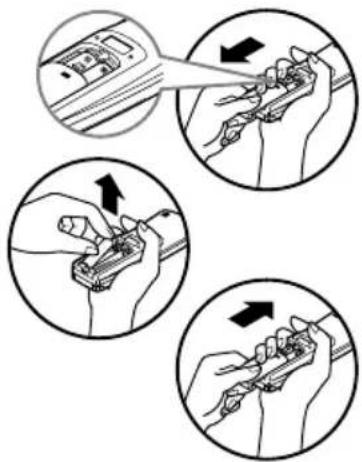
- Remove the battery cover by pulling it according to the arrow direction.
- Insert new batteries making sure that the (+) and (-) of battery are installed correctly.
- Reattach the cover by sliding it back into position.
NOTE
- Always use/replace both batteries of same type.
- If the system is not to be used for a long time, remove the batteries to save their working life.
- If the display screen of remote controller starts, fading replace both of the batteries.
text_image
Illustration showing three steps of a hand tool application: cutting, holding, and adjusting a tool.Wireless Remote Controller Maintenance
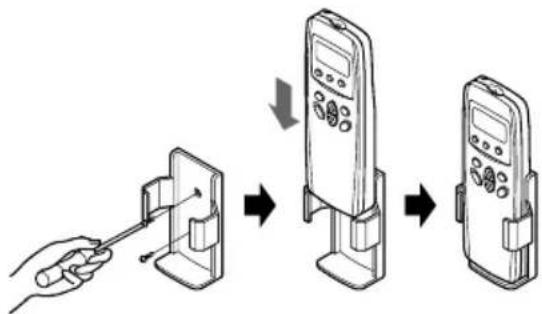
- Choose a suitable place where its safe & easy to reach.
- Fix the holder to wall etc with the supplied screws firmly.
- Slide the remote controller inside the holder.
NOTE
- Remote controller should never be exposed to direct sunlight.
- Signal transmitter & receiver should always be clean for proper communication. Use a soft cloth to clean them.
- In case some other appliances also get operated with remote control, change their position or consult your serviceman.
flowchart
graph TD
    A["Hand holding cable"] --> B["Device with cable"]
    B --> C["Device with screen"]
    C --> D["Device with screen"]
Operating Method
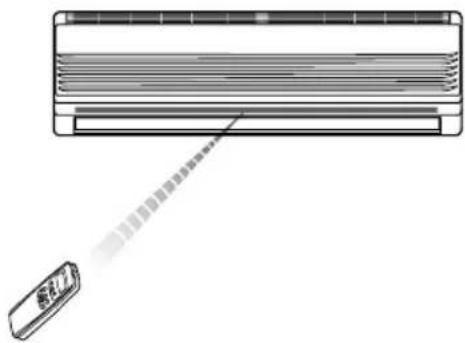
- The signal receiver is inside the unit.
- Aim the remote controller towards the unit to operate it. There should not be any blockage in between.
natural_image
Diagram of a car air conditioner unit with a sensor emitting a beam (no text or symbols)Remote Control Operation
The remote control transmits the signals to the system.

text_image
TEMP. OFF TIME8 hr 88 °C 1 2 3 4 5 6 7 8 9(1) Operation Mode
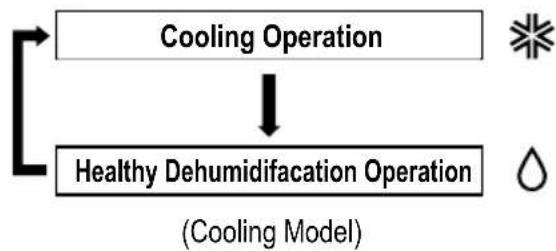
flowchart
graph TD
    A["Cooling Operation"] --> B["Healthy Dehumidification Operation"]
    B --> C["(Cooling Model)"]
1 OPERATION DISPLAY
Displays the operation conditions.
CHAOS SWING BUTTON
2 Used to stop or start louver movement and set the desired up/down airflow direction.
3 OPERATION MODE SELECTION BUTTON
Used to select the operation mode.
4 OFF TIMER BUTTON
Used to set the time of stopping operation.
5 START/STOP BUTTON
Operation starts when this button is pressed, and stops when the button is pressed again.
6 ROOM TEMPERATURE SETTING BUTTONS
7 INDOOR FAN SPEED SELECTION BUTTON
JET COOL
Used to start or stop the speed cooling. (Speed cooling operates super high fan speed in cooling mode.)
ENERGY SAVING
Energy-saving cooling mode can save energy in cooling

flowchart
graph TD
    A["Cooling Operation"] --> B["Healthy Dehumidification Operation"]
    B --> C["Heating Operation"]
    style A fill:#f9f,stroke:#333
    style B fill:#ccf,stroke:#333
    style C fill:#cfc,stroke:#333
(2) Operation PROCEDURE

text_image
1st Start/Stop Button 2nd Operation Mode Selection Button 3rd Room Temperature Setting Button 4th Indoor Fan Speed Selection Button
text_image
TEMP. 18°C ② ④ ① ③
Cooling Operation

flowchart
graph TD
    A["1 Press the Start/Stop Button."] --> B["2 Select Cooling Operation. Press the Operation Mode Selection Button. Each time the button is pressed, the operation mode is shifted in the arrow direction."]
    B --> C["3 Set the temperature lower than the room temperature. The temperature can be set within a range of 18°C ~ 30°C by 1°C."]
    C --> D["4 Set the fan speed. Select the fan speed in four steps-low, medium, high or CHAOS. Each time the button is pressed, the fan speed mode is shifted. The display shows high fan speed."]
Natural wind by the CHAOS logic
☐ For more fresh feeling than other fan speed, press the Indoor Fan Speed Selector and set to CHAOS mode. In this mode, the wind blows like natural breeze by automatically changing fan speed according to the CHAOS logic.

Healthy Dehumidification Operation Mode
This mode dehumidifies without overcooling.

flowchart
graph TD
    A["1 Press the Start/Stop Button."] --> B["2 Select Healthy Dehumidification Operation. Press the operation Mode Selection Button. Each time the button is pressed, the operation mode is shifted in the arrow direction."]
    B --> C["3 You can select the fan speed in four steps-low, medium, high, or CHAOS. Each time the button is pressed, the fan speed mode is shifted."]
During Healthy Dehumidification Operation:
☐ If you select the dehumidification mode on the operation selection button, the airconditioner starts to run the dehumidification function, automatically setting the room temp. and airflow volume to the best condition for dehumidification based on the sensed current room temp.
In this case, however, the setting temp. is not displayed in the remote control and you are not able to control the room temp. either.
During the healthy dehumidification function, the airflow volume is automatically set according to the optimization algorithm responding to the current room temp. status and makes the room condition healthy and comfortable even in the high humidity season.

Heating Operation(Heat pump model only)

flowchart
graph TD
    A["1: Press the Start/Stop button.<br>The unit will respond with a beep."] --> B["2: To select Heating Operation, press the Operation Mode Selection button.<br>Each time the button is pressed, the operation mode is shifted in the direction of the arrow."]
    B --> C["3: Set the temperature higher than the room temperature.<br>The temperature can be set within a range of 16°C~30°C in 1°C increments."]
    C --> D["4: Set the fan speed again with the door of the remote control still closed. You can select the fan speed in four steps-low, medium, high, or CHAOS. Each time the button is pressed, the fan speed mode is shifted."]

Timer control Setting
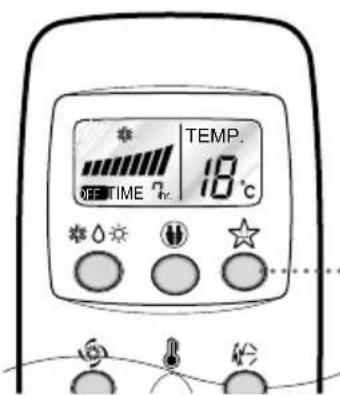
OFF TIMER CONTROL SETTING
text_image
TEMP. 18°C SEETIME ηcPress the OFF Time Button.


text_image
Beep Beep- Press the OFF Time Button.
- Check the OFF Time LED of the room air conditioner.
- The Timer is programmed by 1 hour each pressing the OFF Time button from 1 hour to 7 hours.

Jet Cool Operation
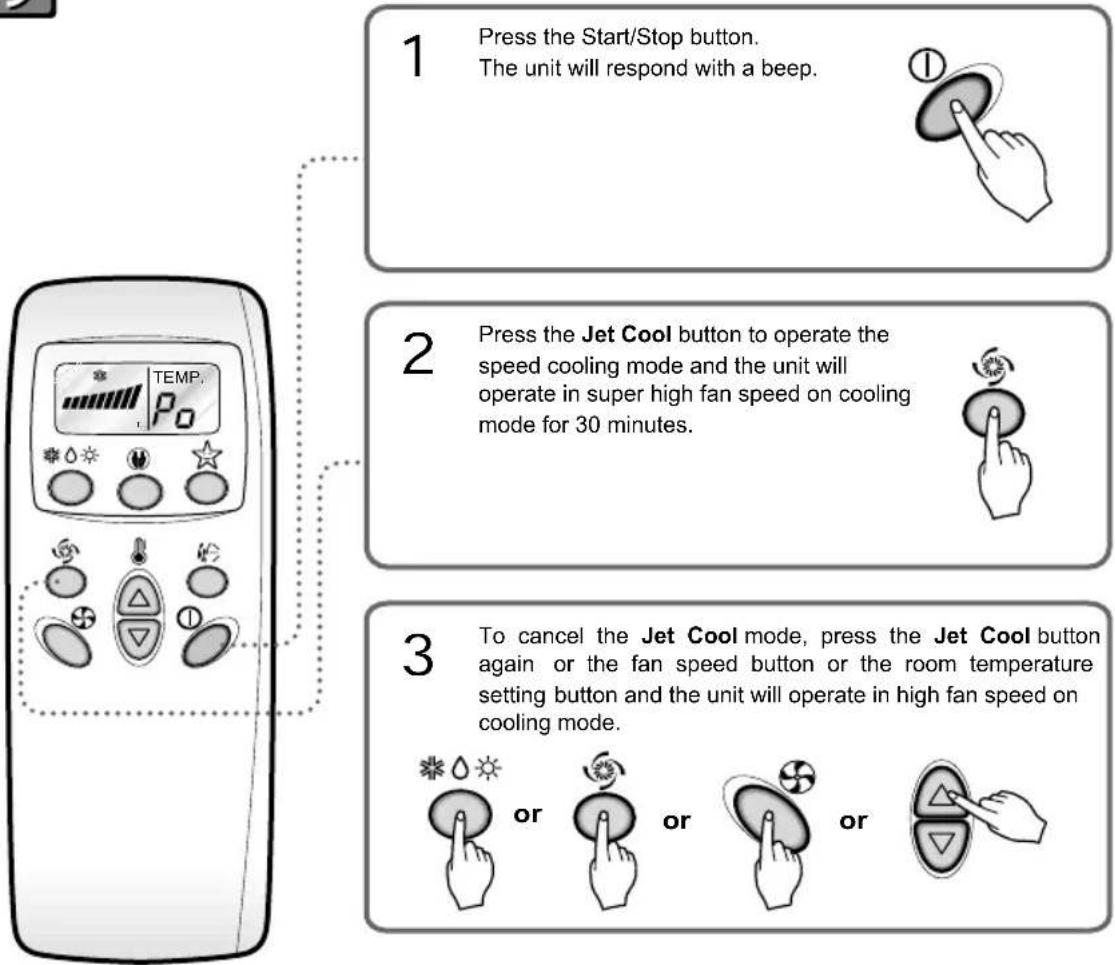
flowchart
graph TD
    A["1 Press the Start/Stop button.<br>The unit will respond with a beep."] --> B["2 Press the Jet Cool button to operate the speed cooling mode and the unit will operate in super high fan speed on cooling mode for 30 minutes."]
    B --> C["3 To cancel the Jet Cool mode, press the Jet Cool button again or the fan speed button or the room temperature setting button and the unit will operate in high fan speed on cooling mode."]
NOTICE
☐ During the JET COOL function at any moment, the A/C starts to blow the cool air at extremely high speed for 30 minutes setting the room temp. automatically to 18°C. It is especially used to cool the room temp. in the shortest time in a hot summer.
In heat pump mode the JET COOL function is not available.
☐ In order to return to the normal cooling mode from the JET COOL mode, you just press either the operation mode selection button, airflow volume selection or temp. setting button or the JET COOL button again.
Energy-Saving Cooling Mode (Optional)
Energy-saving cooling mode can save energy in cooling and healthy dehumidification operation, because it can operate efficiently by setting body-adaptation time according to the change of time and temperature and adjusting automatically desired temperature.
- Press the START/STOP BUTTON to start the unit.
- Open the door on the remote controller. Select cooling operation or healthy dehumidification operation.
- Press the ENERGY-SAVING COOLING MODE BUTTON.
- To cancel the energy-saving cooling mode, press the ENERGY-SAVING COOLING MODEL BUTTON again and unit will operate in previous mode(Cooling or healthy dehumidification mode).

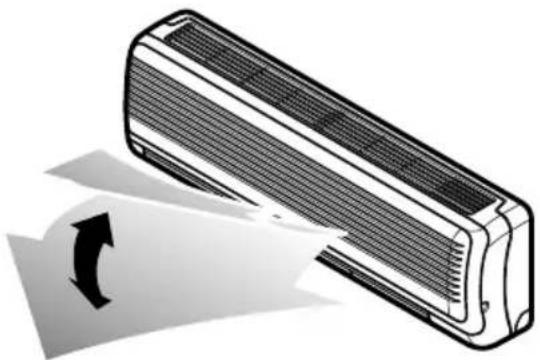
Vertical Airflow Direction Control
The up/down airflow (Vertical Airflow) can be adjusted by using the remote control.
natural_image
Illustration of a car air conditioner unit with airflow direction arrow (no text or symbols)1 Press the Start/Stop button to start the unit.
2 Press Chaos Swing button and the louvers will swing up and down. Press the Chaos Swing button again to set the vertical louver at the desired airflow direction.
NOTICE
☐ If you press the CHAOS swing button, the horizontal airflow direction is changed automatically based on the CHAOS algorithm to distribute the air in the room evenly and at the same time to make the human body feel most comfortable, as if enjoying a natural breeze.
□ Always use the remote control to adjust the up/down airflow direction. Manually moving the vertical airflow direction louver by hand, could damage the air conditioner.
☐ When the unit is shut off, the up/down airflow direction louver will close the air outlet vent of the system.

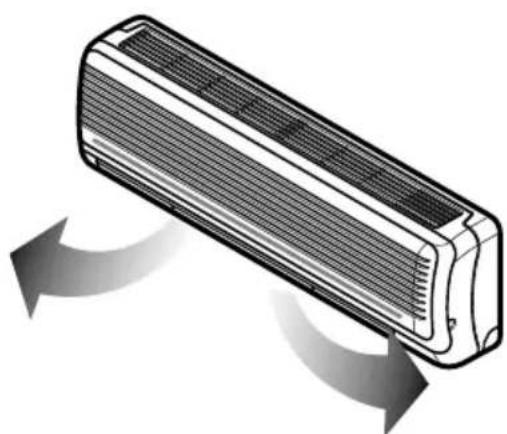
Horizontal Airflow Direction Control
- Adjust the horizontal airflow direction by manually moving the horizontal airflow direction louver by hand.
natural_image
Illustration of a rectangular air conditioner unit with airflow arrows indicating direction (no text or symbols)Caution
- Ensure that the unit is turned off before adjusting the horizontal airflow direction control. Carefully open vertical louver to allow access to the horizontal airflow direction. Adjust the left/right airflow direction by hand.

Forced Operation
Operation procedures when the remote control can't be used.
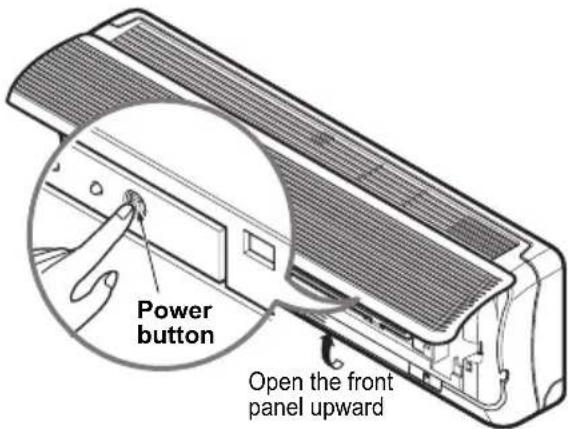
The operation will be started if the power button is pressed.
If you want to stop operation, re-press the button.
text_image
Power button Open the front panel upward| Cooling Model | Heat pump Model | |||
| Room Temp.≥24°C | 21°C ≤ Room Temp. < 24°C | Room Temp. < 21°C | ||
| Operating mode | Cooling Cooling | Healthy Dehumidification Heating | ||
| Indoor FAN Speed | High High | High High | ||
| Setting Temperature | 22°C 22°C | 23°C 24°C | ||
Test operation
During the TEST OPERATION, the unit operates in cooling mode at high speed fan, regardless of room temperature and resets in 18 minutes.
During test operation, if remote controller signal is received, the unit operates as remote controller sets. If you want to use this operation, open the front panel upward and Press the power button let it be pressed for about 3 seconds.
If you want to stop the operation, re-press the button.

Auto restart
In case the power comes on again after a power failure, Auto Restarting Operation is the function to operate procedures automatically to the previous operating conditions.
So there is no need of activating this function by pressing any key or button.
In the initial mode, the fan operates at a low speed and the compressor starts 2.5\~3 minutes later.
As the compressor starts, the fan speed also resumes its previous setting mode.
Helpful information
Fan speed and cooling capacity.
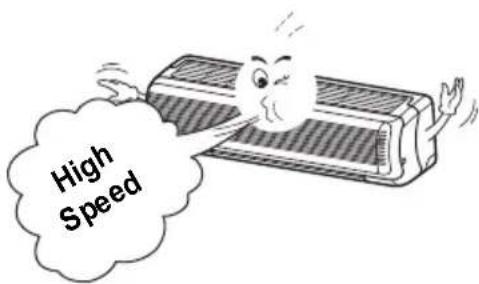
The cooling capacity indicated in the specification is the value when the fan speed is set to high, and the capacity will be lower at low or medium fan speed.
High fan speed is recommended when you wish to cool the room quickly.
text_image
High SpeedMaintenance and Service
▲ CAUTION
Before performing any maintenance, turn off the main power to the system, disconnect the circuit breaker and unplug the power cord.
Indoor Unit
Clean the unit with a soft dry cloth. Do not use bleach or abrasives.
▲ CAUTION
Never use any of these
- Water hotter than 40^ . It may cause deformation and discoloration.
- Volatile substances. They may damage the surface of the air conditioner.

Air Filters
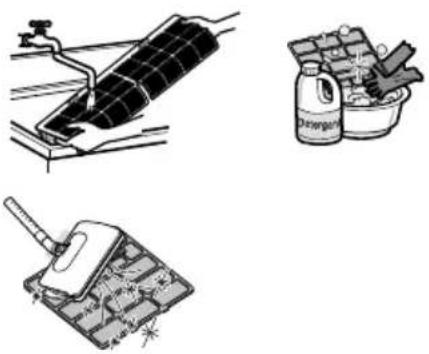
The air filters behind the front panel / grill should be checked and cleaned once in every 2 weeks or more often if necessary. To remove the filters see the self explanatory diagrams for each model type. Clean the filters with a vacuum cleaner or warm soapy water. If dirt is not easily removed, wash with a solution of detergent in luke warm water. Dry well in shade after washing and reinstall the filters back in place.
natural_image
Illustration of three different cleaning or cleaning methods: a solar panel being cleaned, a container filled with granular material, and a cleaning tool (no text or symbols present)Removal of Filters
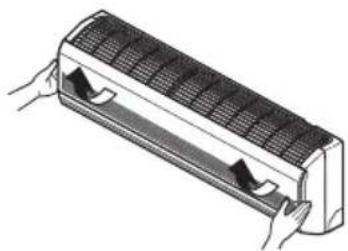
Open the front panel as shown.
Then pull the filter tab slightly forward to remove the air filter.

natural_image
Diagram showing airflow change from a rectangular air conditioner to a multi-panel air conditioner, with arrows indicating direction of movement (no text or symbols present)Outdoor Unit
The heat exchanger coils and panel vents of the outdoor unit should be checked regularly.
If clogged with dirt or soot, the heat exchanger
and panel vents may be professionally steam cleaned.
NOTE
Dirty or clogged coils will reduce the operating efficiency of the system and cause higher open
Operation Tips!
Do not overcool the room.
Keep blinds or curtains closed.
Keep the room temperature uniform.
This is not good for the health and let direct sunshine ente Adjust the vertical and horizontal wastes electricity. the room when the air condition flow direction to ensure a is in operation. uniform temperature in the room.
Make sure that the doors and windows are shut thight.
Clean the air filter regularly.
Ventilate the room occasionally.
Use high fan speed for effective and fast cooling.
Avoid opening doors and Blockages in the air filter Since windows are kept. The unit gives its rated windows as much as reduce the airflow and closed, it is a good idealizing capacity when the possible to keep the colder cooling and to open them and fan speed is high. air in the room. dehumidifying effects. ventilate the room now
Clean at least once ever and ten. two weeks.
Troubleshooting Tips! Save time and money!
The air conditioner may be operating abnormally when:
| Problem | What To DoPossible | |
| Air conditioner does not start | ■ The air conditioner is unplugged. | Make sure the air conditioner plug is pushed completely into the outlet. |
| ■ The fuse is blown/circuit breaker is tripped. | Check the house fuse/circuit breaker box and replace the fuse or reset the breake | |
| ■ Power failure. | If power failure occurs, turn the mode control to OFF.When power is restored, wait 3 minutes restart the air conditioner to prevent tripping of the compressor overload. | |
| ■ High voltage. | If the voltage is unusually very high or the circuit Breaker will trip. | |
| Air conditioner does not cool as it should | ■ Airflow is restricted. | Make sure there are no curtains, blinds, furniture blocking the front of the air conditioner. |
| ■ The air filter is dirty. | Clean the filter at least every 2 weeks.See the Maintenance and Service section. | |
| ■ The room may have been | When the air conditioner is first turned you need to allow time for the room to down. | |
| ■ Cold air is escaping. | Check for open furnace floor registers a cold air returns. | |
| ■ Check the temperature settings. | Make sure they are correct. | |
| ■ There might be any heating source in the room. | Check and remove such source or turn off while using the air conditioner. |
Call the service immediately in the following situations
- Anything abnormal such as burning smell, loud noise etc. happen. Stop the turn the breaker off. Never try to repair by yourself or restart the system
- Main power cord is too hot or damaged.
- Error code is generated by self diagnosis.
- Water leaks from indoor unit even if the humidity is low.
- Any switch, breaker (safety, earth) or fuse fails to work properly
User must carry routine checkup & cleaning to avoid unit's poor performance. In case of special situation, the job must be carried out by service person c
LG
مكيف هواء الغرفة
دليل المالك
natural_image
Simple line drawing of people relaxing at a table with sun and palm trees in the background (no text or symbols)


.除非關心關關關關關關關關關關關關關關關關關關關關關關關關關關關關關關關關關關關關關關關關關關關關關關關關關關關關關關關關關關關關關關關關關關關關關關關關關關關關關關關關關關關關關關關關關關關關關關關關關關關關屬
تنبیه!
text_image
Illustration showing four steps of tool application: screen capture, tool grip, tool tip, and tool press.flowchart
graph TD
    A["Handheld device"] --> B["Inserted device"]
    B --> C["Mobile phone with screen and keypad"]
    C --> D["Mobile phone with display and keypad"]
natural_image
Diagram of a airflow or heat transfer system inside an air conditioner unit (no text or symbols)-
مستقبل الإشرارات داخل الوحدة.
-
Combined, he was a thinking about to go in the world. I just always know that it is going by the world.
natural_image
Illustration of a heat exchanger or air conditioner unit with a handle (no text or symbols visible)natural_image
Line drawing of a remote control device with various function buttons (no text or symbols)natural_image
Illustration of a rectangular electronic device with ventilation grille and a handle (no text or symbols)-
ا Compact زر وضع التبريد الموفر للطاقة.
-
dental issues should be addressed to the Ministry of the United States, including the Ministry of the United Kingdom and the United States.
natural_image
Illustration of a car air conditioner with airflow direction arrow (no text or symbols)natural_image
Diagram of a rectangular air conditioner with airflow arrows indicating direction (no text or symbols)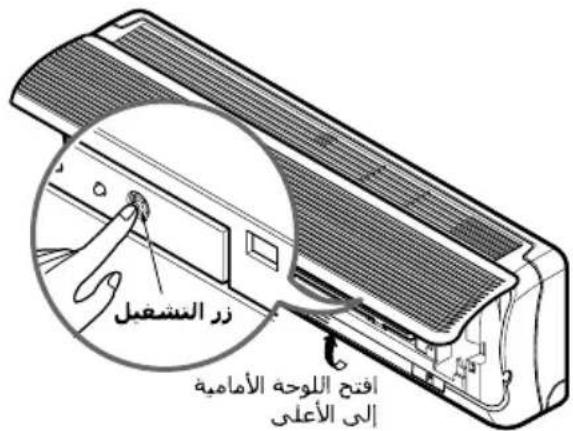
natural_image
Diagram of a solar panel installation with a water tap and wiring (no text or labels)natural_image
Diagram of a car air conditioner unit with cooling fins and airflow arrows (no text or symbols)