Hoodini BLCT-101E-H - Oven Blodgett - Free user manual and instructions
Find the device manual for free Hoodini BLCT-101E-H Blodgett in PDF.


User questions about Hoodini BLCT-101E-H Blodgett
0 question about this device. Answer the ones you know or ask your own.
Ask a new question about this device
Download the instructions for your Oven in PDF format for free! Find your manual Hoodini BLCT-101E-H - Blodgett and take your electronic device back in hand. On this page are published all the documents necessary for the use of your device. Hoodini BLCT-101E-H by Blodgett.
USER MANUAL Hoodini BLCT-101E-H Blodgett
BLODGETT BLODGETT BLODGETT BLODGETT
BLODGETT BLODGETT BLODGETT
BLODGETT BLODGETT BLODGETT BLODGETT

text_image
HOODINI by BLODGETTBLCT-6E-H, BLCT-10E-H,
BLCT-61E-H, BLCT-62E-H,
BLCT-101E-H & BLCT-102E-H
COMBI OVEN WITH HOODINI VENTLESS HOOD
Your Service Agency's Address:
Model

natural_image
Blank white image with a thin border (no text, symbols, or markings)Serial number
Oven installed by
Installation checked by
IMPORTANT
WARNING: Improper installation, adjustment, alteration, service or maintenance can cause property damage, injury or death. Read the installation, operation and maintenance instructions thoroughly before installing or servicing this equipment.
WARNING: This unit is not for use with the Blodgett Flavor Smoke Smoker
FOR YOUR SAFETY
Do not store or use gasoline or other flammable vapors or liquids in the vicinity of this or any other appliance.
The information contained in this manual is important for the proper installation, use, and maintenance of this oven. Adherence to these procedures and instructions will result in satisfactory baking results and long, trouble free service. Please read this manual carefully and retain it for future reference.
TABLE OF CONTENTS
INSTALLATION
Utility Connections - Standards and Codes 2
The Blodgett Combi-Oven/Steamer....3
Description of the Combi-Oven/Steamer 4
Oven Location and Leveling....5
Oven Assembly to Stand for Floor Models 6
Plumbing Connections....7
Electrical Connection 8
Final Check Lists....9
OPERATION
Safety Information....10
BCT Touchscreen Control Description.... 11
Main Menu 12
Hot Air Mode 13
Steam Mode....15
Retherm Mode....16
CombiSmart Mode 17
Using the Core Probe 18
SmartChef Automatic Cooking 20
Using Rack Timing 22
Using Advanced Rack Timing 23
PreHeat, Cool Down and Proofing 26
Cook to Perfection 28
Programmed Cooking 29
Addition: Main Decision Processes 20

Installation
Utility Connections - Standards and Codes
THE INSTALLATION INSTRUCTIONS CONTAINED HEREIN ARE FOR THE USE OF QUALIFIED INSTALLATION AND SERVICE PERSONNEL ONLY. INSTALLATION OR SERVICE BY OTHER THAN QUALIFIED PERSONNEL MAY RESULT IN DAMAGE TO THE OVEN AND/OR INJURY TO THE OPERATOR.
Qualified installation personnel are individuals, a firm, a corporation, or a company which either in person or through a representative are engaged in, and responsible for:
- the installation of electrical wiring from the electric meter, main control box or service outlet to the electric appliance.
Qualified installation personnel must be experienced in such work, familiar with all precautions required, and have complied with all requirements of state or local authorities having jurisdiction.
EPA 202 Test Method
BLCT-6E-H - Using EPA test method 202, emissions of grease laden vapors were measured at 1.12mg / m^3 for bone-in, skin-on, quartered roasting chickens, and 0.16 mg / m^3 for bacon. Both results being less than the established 5mg / m^3 standard.
BLCT-10E-H - Using EPA test method 202, emissions of grease laden vapors were measured at 2.62mg / m^3 for bone-in, skin-on, quartered roasting chickens, and 0.49 mg / m^3 for bacon. Both results being less than the established 5mg / m^3 standard.
BLCT-61E-H, BLCT-62E-H, BLCT-101E-H & BLCT-102E-H - Using EPA test method 202, emissions of grease
U.S. and Canadian installations
Installation must conform with local codes, or in the absence of local codes, with the National Electrical Code, ANSI/NFPA 70-Latest Edition and/or Canadian National Electric Code C22.1 as applicable.
Appliance is to be installed with backflow prevention in accordance with applicable federal, province and local codes.
Australia and general export installations
Instillation must conform with Local and National installation standards. Local installation codes and/or requirements may vary. If you have any questions regarding the proper installation and/or operation of your Blodgett oven, please contact your local distributor. If you do not have a local distributor, please call the Blodgett Oven Company at 0011-802-658-6600.

Intertek


Installation

The Blodgett Combi-Oven/Steamer
The Blodgett Combi-Oven/Steamer offers a completely new method of cooking. With the Oven/Steamer you have the choice of two cooking processes: Steam and Hot Air, either...
- Separately
- Combined, or
- In Sequence
And for easy operation you can choose from three modes: In the Steam mode you can:
| steam | reheat | reconstitute |
| stew | thaw | simmer |
| blanche | preserve | braise |
poach
In the Hot Air mode you can:
| roast | bake | grill | |
| gratinate | broil |
In the Combination Steam and Hot Air mode you can:
defrost roast rethermalize reheat bake forced steam
We suggest utilizing combi mode and switching to hot air mode with the vent open for the final 1-3 minutes depending on the product.
There are four additional specialized modes to help you:
Retherm - for perfect reheating
Proofing - Proof and bake all in the same oven
Preheat - in this mode the oven will preheat to 575°F (300°C) for 15 minutes. The oven will then automatically
You can also use two or three functions in sequence during one cooking process. We call this:
- combi-steaming
- combi-roasting
- combi-baking
The combination of circulating hot air and steam in the space saving, high performance Combi-Oven/Steamer leads to improvements in the following areas:
• increased productivity in the kitchen - a reduction in capital expenditures for multiple equipment replacement
• a wider range of menu choices
• a simplified cleaning process
The work process is simplified since products are prepared on or in steam table pans and trays. Food can be cooked, stored, and transported with the same pans. Small amounts of product can be processed efficiently; pre-cooked and convenience foods can be reheated within minutes. Many frozen foods can be processed without pre-thawing. This flexibility in preparation reduces the need for kettles and steam tables since there is no need for large amounts of food to be kept warm for long periods of time.
Today the improvement of food quality is more important than ever. Vegetables are cooked in the Blodgett Combi-Oven/Steamer without water at the optimal temperature of just under 212°F (100°C), maintaining valuable vitamins, minerals, nutrients and trace elements. Cooking

Installation
Description of the Combi-Oven/Steamer
ABOUT THE OVEN/STEAMER
Blodgett Combi-Oven/Steamers are quality produced using high-grade stainless steel with first class workmanship.
The multiple speed fan, which is guarded against accidental finger contact, is driven by a quiet and powerful motor. The condenser draws out excess steam from the appliance. Condensation and waste water, which result during steaming and cleaning, are continuously drained.
The use of high quality insulation impedes excessive heat radiation and saves energy.
The BLCT-6E-H, BLCT-10E-H, BLCT-61E-H, BLCT-62E-H and BLCT-101E-H make it possible to enjoy all of the advantages of a high quality steamer at the flick of a switch. Fresh steam enters the oven cavity without pressure and is circulated at high speed. This process enables quick and gentle cooking and ensures high quality food while providing convenient working methods.
The practical oven door, with a viewing window, has a wide swing radius and handle which can be operated easily, even with wet or greasy hands.
Ease of operation is guaranteed through the simple to use control. With graphical symbols and recipe storage the ovens are easy for even inexperienced kitchen staff to operate.
Cleaning is kept to a minimum thanks to the automatic Combi Wash system.
ELECTRICAL RATINGS
| Model Voltage kW Hz Phase Max Load (amps) Hood | |||||
| BLCT-6E-H | 208 6.9 50/60 1 35 | 115V, 50/60 Hz,1 phase, 15 amp | |||
| 240 9.2 50/60 1 39 | |||||
| 208 6.9 50/60 3 20 | |||||
| 240 9.2 50/60 3 24 | |||||
| BLCT-10E-H | 208/230/240 | 10.4/12.7/13.8 50/60 3AC 34 | 115V, 50/60 Hz,1 phase, 15 amp | ||
| 10.4/12.7/13.8 50/60 3NAC 34 | |||||
| 400/415 | 12.7/13.8 50/60 3NAC | 20 | |||
| 12.7/13.8 50/60 3AC 30 | |||||
Installation

Oven Location and Leveling
The well planned and proper placement of your oven will result in long term operator convenience and satisfactory performance.
Certain minimum clearances must be maintained between the oven and any combustible or non-combustible construction.
| MINIMUM REQUIRED CLEARANCES | ||
| Sides Back | Top | |
| 2.75"(70mm) | 2.75"(70mm) | 0"(0mm) |
In addition, the following clearances are recommended for servicing.
- Oven body sides - 12" (30cm)
- Oven body back - 12" (30cm)
-
Oven body top - 12" (30cm)
-
Do not place strong sources of heat such as open flame ranges, griddles, or charbroilers near the oven. If such an instance exists, it is highly recommended to purchase a heat shield, available from Blodgett.
- Note that if temperatures are too high, a safety shutdown may occur.
- Failure to comply may invalidate the oven warranty.
To ensure that the oven functions correctly when installed, it should be placed upright and level (horizontally). This is measured at the front and side edge of the roof. The oven can be levelled using the adjusting screws on the stand or on the legs of table models.

Installation
Oven Assembly to Stand for Floor Models
BLCT-61E-H, BLCT-62E-H, BLCT-101E-H & BLCT-102E-H
Your Blodgett COMBI oven has been shipped with black plastic caps on the corners of its base. In order to mount your oven to its stand, please do the following:
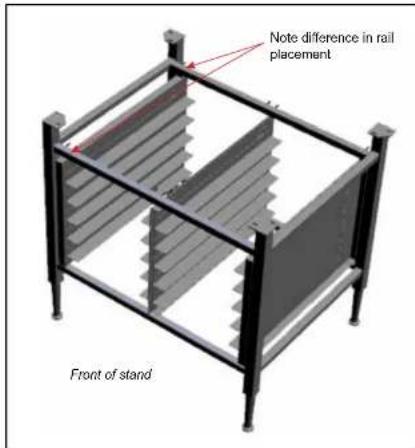
- Remove the stand from the packaging. Install the casters or feet into the base of the stand. If inserting casters ensure that the locking casters are at the front of the stand, see figure. Place the stand upright in an area readily available.
- Remove all packaging from the oven, so that the oven can be picked up.
- Remove the black plastic caps on each corner by removing the two screws holding them on. Do NOT discard these screws; they will be used to mount the oven to the stand.
- Position the oven over the stand and align the corner brackets on the stand with the holes on the oven.
- Use the screws from the plastics caps to mount the oven to the stand.
- The oven has now been properly fastened to the stand.
text_image
Note difference in rail placement Front of standFigure 1
Installation

Plumbing Connections
WATER CONNECTION
- Must meet the requirements applying to water supplied to household appliances.
text_image
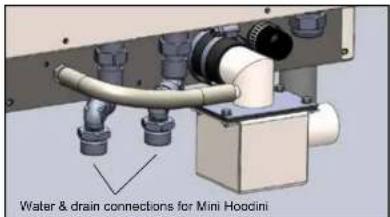
Water & drain connections for Mini HoodiniFigure 2
BLCT-61, 62, 101 & 102 models
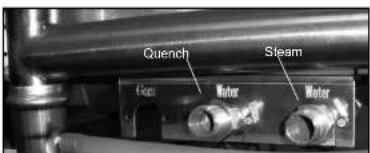
- 1 connection for raw water for the quench jet. - 1 connection for steam generation and the Combi Wash jet in the oven chamber. Must meet the requirements applying to water supplied to household appliances.
text_image
Quench Steam Motor MotorDRAIN CONNECTION
Blodgett ovens are equipped with a drain system that removes surplus water from the oven chamber. This may be condensed water from the products, or it may occur when the oven chamber is cooled down with cold water, or when the oven chamber is cleaned.
NOTE: The drain piping must consist of temperature resistant material, greater than 160^ F, and be of adequate diameter not to cause flow restriction. Improper materials may deform and cause restrictions, thus affecting performance.
External Trap
The oven is provided with an external drain trap. It is crucial that this part is installed on the oven. If not, the oven will not function as intended.
WARNING!!
Connection must be carried out by a licensed plumber, to an open or closed drain. The drain must never end directly beneath the equipment. The drain should not be located on the same side the equipment controls are located.
The drain must be of stainless steel or an equally temperature-resistant material, have a diameter of at least 1.5" (38 mm) and a fall of at least 3° or 5%.
CLEANING CHEMICAL
- Connect the supplied detergent tubes (red and blue) to the underside of the oven near the rear. Connect the blue hose to the fitting with the blue sticker and the red hose to the fitting with the red sticker.

Installation
Electrical Connection
ELECTRICAL CONNECTION
NOTE: Electrical connections must be performed by a qualified installer only.
Before making any electrical connections to these appliances, check that the power supply is adequate for the voltage, amperage, and phase requirements stated on the rating name plate mounted on the appliance.
- The rating plate is located on the right side of the oven.
An approved plug outlet or a safety cutout must be located close to the oven so that the oven can be disconnected during installation and repair. The safety cutout must be able to cut off all poles with a total distance of break of at least 3 mm.
All appliances must be installed in accordance with Local or National Electrical codes.
The wiring diagram is located in the motor compartment.
NOTE: Disconnect the power supply to the appliance before servicing.

WARNING!!
Improper installation may invalidate your warranty.
A strain relief for the power supply cord is provided. The installer must supply a cord that meets all Local and National installation standards.

WARNING!!
If the supply cord is damaged, it must be replaced by a special cord or assembly available from the manufacturer or its service agent.
Installation

Final Check Lists

WARNING!!
Final check list must be performed by a qualified installer only.
OVEN EXTERIOR
- Check that the oven has not been damaged in transit (dents, scratches, etc.)
- Check/adjust the height and check that the oven is placed level (horizontally)
- Check/adjust oven door
CONNECTIONS
- Check for correct water connection
- Turn on water supply
- Check for leaks
- Turn off water supply
- Check and clean dirt filter
- Turn on water supply again
- Check hand shower
- Check for correct electrical connection
- Check connection to drip tray
- Check for correct mounting of drip tray
- Check for correct fall of hose from drip tray, and check for leaks
OVEN INTERIOR
-
Check interior light
-
Clean the oven
CONTROL
- Check and adjust, if necessary, each of the preset values
- Heat up the oven at 480^ F ( 249^ C) for approximately 5 minutes.

Operation
Safety Information
The information contained in this section is provided for the use of qualified operating personnel. Qualified operating personnel are those who have carefully read the information contained in this manual, are familiar with the functions of the oven and/or have had previous experience with the operation of the equipment described. Adherence to the procedures recommended herein will assure the achievement of optimum performance and long, trouble-free service.
Please take the time to read the following safety and operating instructions. They are the key to the successful operation of your Blodgett oven.
What to do in the event of a power failure:
- Turn all switches to off.
- DO NOT attempt to operate the oven until the power is restored.
NOTE: In the event of a shut-down of any kind, allow a five (5) minute shut off period before attempting to restart the oven.
General safety tips:
- DO NOT remove the control panel cover unless the oven is unplugged.

WARNING!!
This unit is not for use with the Blodgett Flavor Smoke Smoker or any smoker device.
It is possible to overwhelm the catalytic system with extremely greasy products. For instance, we do not recommend cooking a full load of raw hamburgers as it may be
OVERVIEW OF SAFETY FEATURES
This oven has a number of safety features which ensure proper operation. The oven will automatically run the following process when the power button is activated.
- Oven is turned on by pressing the Power Key.
- The controller verifies, via a pressure sensor, that the water is connected and flowing.
- The blower in the hood section turns on.
- The oven verifies, via a pressure switch, that the blower is running.
- Once the pressure switch verifies the blower is running, the heating element for the catalyst turns on.
- The temperature probe verifies the catalyst is hot.
- Once all of the above steps have been completed by the control, the oven is ready for cooking. This process takes approximately 5 minutes.
Operation

BCT Touchscreen Control Description
The ovens include the versatile Blodgett Combi Touch-screen control. The control features:
- Multiple cooking modes include Hot Air, CombiSmart, Retherm, Steam, Proofing, Cool Down, and PreHeat.
- Easy to use touch panel display
- Stores up to 1000 recipe programs with multiple cooking stages. Recipes can be grouped into categories (beef, chicken, cookies, etc.) for easy retrieval. Includes a favorites category for the recipes you use the most.
- Internal core temperature probe with 3 measuring points.
- Low temperature roast & hold and Delta-T cooking
• Reversible 9 speed fan for optimum baking and roasting results - The Rack Timer function enables you to set timers for each individual rack.
- Advanced Rack Timer allows you to create groups of recipes with similar characteristics (cook temperature, humidity level, etc.) then manage multiple recipes of the same group simultaneously on separate oven racks.
• USB port for data, software and recipe transfer - HACCP quality control enables you to control and document production. Includes production time, production duration, preparation temperature, and
BASIC OPERATIONS
• To select an item, touch the button on the screen
- To scroll through a list, drag your finger up or down. The item centered on the "wheel" will be selected.
- To return to the previous display, push the left arrow key ◀ in the upper left corner of the screen.
- To change the cook function while the oven is operating, push the down arrow key ▼ in the upper right corner of the screen.
- To save the current settings and move on to the next step, push the right arrow key ▶ in the upper right corner of the screen.

Operation
Main Menu
MAIN MENU DESCRIPTION
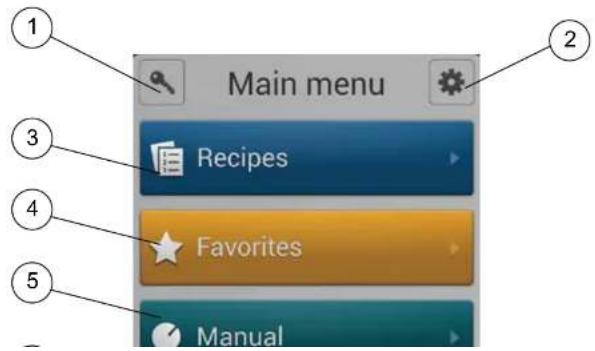
- KEY ICON - Press this key, then enter the code to change type of user. Choices include user, super user or technician. The super user code is 87 64 12.
- GEAR ICON - Press to access the service and super user menus.
- RECIPES - Press to cook using programmed recipes or to create a new recipe.
- FAVORITES - Press to access the favorites category. This category can be used to store the recipes you use the most. The favorites category can store both
factory programmed and your own recipes.
- MANUAL - Press to cook manually using Steam, Hot Air, CombiSmart, CombiOptima, or Retherm modes. Also press to access CombiWash.
- ADVANCED - Press to access Preheat, Cool Down, Advanced Rack Timer and Proofing modes. Also provides access to USB, HAACP and timed cook start.
text_image
Main menu Recipes Favorites ManualOperation

Hot Air Mode
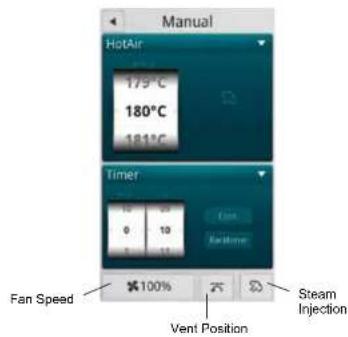
Entering the Hot Air Mode
- From the MAIN MENU, press the MANUAL key.
- Select the HOT AIR mode.
Setting the Cook Time and Temperature
- In the TEMPERATURE list, drag your finger up or down to select the desired cook temperature.
To switch to keypad entry - Swipe your finger from right to left across the upper portion of TEMPERATURE scroll dial. Select the keypad icon from the center of the box to bring up the keypad. Enter the desired temperature. Press OK at the bottom of the screen to set the temperature.
NOTE: To return to the scroll wheel, swipe the upper portion of keypad icon box from left to right. The control defaults to the last entry method used.
- In the HOUR & MINUTES lists, drag your finger up or down to set the desired cook time.
To switch to keypad entry - Swipe you finger from right to left across the upper portion of TIMER scroll dial. Select the keypad icon from the center of the box to bring up the keypad. Enter the desired cook time in hours and minutes. Press OK at the bottom of the screen to set the timer. - When the cook time expires, the oven automatically shuts off. Press the CONT. key if you want the oven to continue operating after the set time has elapsed.
- The oven starts automatically three seconds after the
For instant steam injection:
- Press and hold the STEAM key to distribute humidity throughout the oven cabinet. The steam stops when the steam key is released.
Setting the Fan Speed
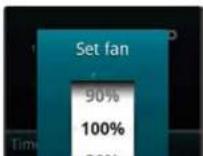
The BCT has 9 fan speeds to choose from. You can set the fan speed before or during the cook cycle.
- To set the fan speed, press the FAN SPEED key in the lower right corner of the screen.
- Drag your finger up or down to set the fan speed in increments of 10% (From 20-100%).
- Press OK to save the fan speed.
Vent Position
In manual hot air cook mode, the vent positon is automatically adjusted for optimal performance with the Hoodini system. In recipe cook modes, the vent may be opened or closed as defined by the recipe steps Press the VENT key at the bottom of the screen to open or close the vent. Blodgett recommends setting the vent to open for bread, pastry, roasting meat or grilling.
At the End of the Cook Cycle
- When the cook time expires, an alarm sounds and the display reads *Recipe Done!.
Press EXIT to end the cook cycle.
Press RESTART to continue the cook cycle.

Operation
Hot Air Mode
text_image
Manual HotAir 175°C 180°C 181°C Timer Fan Speed 0 10 5 11 400% Vent Position Steam Injection


Operation

Steam Mode
Steaming is the ideal cooking mode for foods that can be cooked in water.
Tips for Using the Steam Mode
- Prior to steaming, cool the oven to 175°F (80°C). To lower the temperature quickly, use the Cool Down mode and open the door.
• We recommend that you start the steaming process 8 minutes before loading the oven.
Entering the Steam Mode
- From the MAIN MENU, press the MANUAL key.
- Select the STEAM mode.
Setting the Cook Time and Temperature
- In the TEMPERATURE list, drag your finger up or down to select the desired cook temperature. Refer to table below for steaming temperature recommendations.
To switch to keypad entry - Swipe your finger from right to left across the upper portion of TEMPERATURE scroll dial. Select the keypad icon from the center of the box to bring up the keypad. Enter the desired temperature. Press OK at the bottom of the screen to set the temperature.
NOTE: To return to the scroll wheel, swipe the upper portion of keypad icon box from left to right. The control defaults to the last entry method used.
- In the HOUR & MINUTES lists, drag your finger up or down to set the desired cook time.
shuts off. Press the CONT. key if you want the oven to continue operating after the set time has elapsed.
- The oven starts automatically three seconds after the cook time and temperature have been selected.
Setting the Fan Speed
The BCT has 9 fan speeds to choose from. You can set the fan before or during the cook cycle.
- To set the fan speed, press the FAN SPEED key in the lower right corner of the screen.
- Drag your finger up or down to set the fan speed in increments of 10% (From 20-100%).
- Press OK to save the fan speed.
Vent Position
The vent position is set automatically in the steam mode.
At the End of the Cook Cycle
- When the cook time expires, an alarm sounds and the display reads Recipe Done!.
Press EXIT to end the cook cycle. Press RESTART to continue the cook cycle.


Operation
Retherm Mode
Retherm allows you to gently reheat previously prepared products. During operation a carefully calculated amount of humidity is added. This process helps maintain the appearance and flavor of the product.
Tips for Successful Retherming
- For faster retherming, leave the product uncovered during the reheating process.
- To reach the perfect end temperature, use the core temperature probe. Refer to page 18 for information on using the core probe.
- For retherm of sous-vide or similar products, follow the supplier's recommendations.
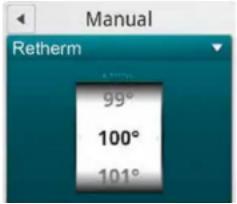
Entering the Retherm Mode
- From the MAIN MENU, press the MANUAL key.
- Select the RETHERM mode.
Setting the Retherm Time and Temperature
- In the TEMPERATURE list, drag your finger up or down to select the desired cook temperature.
To switch to keypad entry - Swipe your finger from right to left across the upper portion of TEMPERATURE scroll dial. Select the keypad icon from the center of the box to bring up the keypad. Enter the desired temperature. Press OK at the bottom of the screen to set the temperature.
NOTE: To return to the scroll wheel, swipe the upper portion of keypad icon box from left to right. The control defaults to the last entry method used.
- The oven starts automatically three seconds after the cook time and temperature have been selected.
Setting the Fan Speed
The BCT has 9 fan speeds to choose from. You can set the fan before or during the cook cycle.
- To set the fan speed, press the FAN SPEED key in the lower right corner of the screen.
-
Drag your finger up or down to set the fan speed in increments of 10% (From 20-100%).
-
Press OK to save the fan speed.
Vent Position
The vent position is set automatically in the retherm mode.
At the End of the Cook Cycle
- When the cook time expires, an alarm sounds and the display reads *Recipe Done!.
Press EXIT to end the cook cycle.
Press RESTART to continue the cook cycle.
text_image
Manual Retherm 99° 100° 101°Operation

CombiSmart Mode
The CombiSmart mode allows you to set an oven temperature and select a preset humidity level. The oven produces a consistent level of humidity. There is no compensation for the moisture naturally found in the product.
Entering the CombiSmart Mode
- From the MAIN MENU, press the MANUAL key.
- Select the COMBI SMART mode.
Setting the Cook Time, Temperature and Humidity
NOTE: To ensure that the oven has reached the correct humidity level, preheat the oven for 5 minutes at the preferred humidity level.
1. In the TEMPERATURE list, drag your finger up or down to select the desired cook temperature.
To switch to keypad entry - Swipe your finger from right to left across the upper portion of TEMPERATURE scroll dial. Select the keypad icon from the center of the box to bring up the keypad. Enter the desired temperature. Press OK at the bottom of the screen to set the temperature.
NOTE: To return to the scroll wheel, swipe the upper portion of keypad icon box from left to right. The control defaults to the last entry method used.
2. In the STEAM list, drag your finger up or down to select the desired level of humidity. CombiSmart provides 10 different humidity levels. Refer to table below for humidity level recommendations.
To switch to keypad entry - Swipe your finger from right to left across the upper portion of STEAM scroll
in hours and minutes. Press OK at the bottom of the screen to set the timer.
- When the cook time expires, the oven automatically shuts off. Press the CONT. key if you want the oven to continue operating after the set time has elapsed.
- The oven starts automatically three seconds after the cook time, temperature and humidity have been selected.
Setting the Fan Speed
The BCT has 9 fan speeds to choose from. You can set the fan before or during the cook cycle.
- To set the fan speed, press the FAN SPEED key in the lower right corner of the screen.
- Drag your finger up or down to set the fan speed in increments of 10% (From 20-100%).
- Press OK to save the fan speed.
Vent Position
The vent position is set automatically in the CombiSmart mode.
At the End of the Cook Cycle
- When the cook time expires, an alarm sounds and the display reads Recipe Done!.
Press EXIT to end the cook cycle.
Press RESTART to continue the cook cycle.


Operation
Using the Core Probe
All Blodgett BLCT-6E-H ovens come standard with one core temperature probe.
The core temperature sensor offers three cooking modes.
- Normal
- Delta-T
• Cook & Hold
CORE PROBE MODES
Follow this procedure for all three core probe cooking modes.
NOTE: The core probe must be set up prior to activating a cook cycle.
- Select the desired cooking mode. Refer to instructions on setting the cooking mode.
- Set the desired fan speed if applicable. Refer to instructions on setting the fan speed.
-
Set the vent position if applicable. Refer to instructions on setting the vent position.
-
Insert the core probe into the center of the product. Then plug the probe into the oven at the connector located in the upper corner of the right side panel.
NOTE: Meat probes on mini combi models are internal and do not need to be plugged into the oven. - Press the ▼ key at the top of the timer list to display the probe selection list.
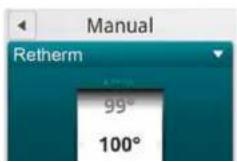
- Drag your finger up or down the Temp list to select the desired core probe temperature.
- Drag your finger up or down the Status list to select the desired mode.
- The oven starts automatically three seconds after the core probe temperature and mode have been selected.

text_image
Manual Retherm 159° 160°Operation

Using the Core Probe
NORMAL CORE PROBE COOKING
In the normal mode, the core probe will notify you when the product has reached the desired pull temperature. The cook temperature is constant in the normal mode.
-
Follow steps 1-8 on page 18 to start a normal core probe cook cycle.
-
The oven sounds an alarm, and turns off when the specified core temperature has been reached.
Unplug the core probe and remove the product.
DELTA T
When you use Delta-T, the oven maintains a constant difference in temperature between the core temperature and the oven temperature. The temperature of the oven rises slowly as the core temperature rises. Delta-T provides gentle cooking resulting in a tender, juicy product. Cooking with Delta-T reduces shrinkage by up to 20% compared to traditional modes of cooking.
-
Follow steps 1-8 on page 18 to start a Delta T cook cycle.
-
The oven sounds an alarm, and turns off when the specified core temperature has been reached.
-
Remove the core probe and the product.
Tips for Delta-T Cooking
- For best results start with an oven temperature of 85-100°F (30-40°C).
- HOT AIR mode is recommended for very fatty and
COOK & HOLD
Cook & Hold is an extension of Delta-T cooking. The oven temperature adjusts relative to the actual core temperature of the product. When the desired core temperature is reached, the oven adjusts the cavity to maintain the core temperature, acting as a warming mode. Cook & hold is suitable for roasting over night when the staff is off duty.
- Follow steps 1-8 on page 18 to start a Cook & Hold cycle.
- When the product has reached the desired core temperature the display will read HOLD??? and the oven will adjust the cavity temperature to maintain the core probe temperature.
- Remove the core probe and the product when ready to serve.
Tips for Using Cook & Hold
- Recommended holding temperature is 140-150°F (60-65°C). At higher temperatures a gradual dehydration of proteins takes place, the weight of the meat is reduced and the meat becomes less juicy.
- With a hold temperature of 140-150°F (60-65°C), the meat can be taken out immediately before carving.
• After being held for 5-6 hours shrinkage increases.

Operation
SmartChef Automatic Cooking
The SmartChef function provides a number of preset cooking functions for a variety of products.
Entering the SmartChef Mode
- From the MAIN MENU, press the MANUAL key.
- Select the SMART CHEF mode.
Using the SmartChef Mode
- Press the name of the type of product you are going to cook.

text_image
SmartChef Beef Pork Poultry Lamb Venison Fish BreadFigure 11
-
The control displays the cooking modes programmed for your product. Press the mode you want to use. See table for list of available cooking modes.
-
The control displays COOKING ADJUSTMENT SLIDERS. Make any adjustments you wish to achieve the desired results.
a. Grilling - Slide the button to the left for rare meat and to the right for well-done meat.
Slide the button to the left for a lighter result and to the right for a darker result.
b. Steaming - Slide the button to the left for rare meat and to the right for well-done meat.
Slide the button to the left for steaming at low temperature
Slide the button to the right for forced steaming.
c. Braising - Slide the button to the left for rare meat and to the right for well-done meat. Slide the button to the left for a slow result and to the right for a fast result. Touch the Tender box if you want the oven to keep the core temperature for 2 hours.
d. Browning - Slide the button to the left for shorter cooking time and to the right for longer cooking time.
Slide the button to the left for a lighter result and to the right for a darker result.
e. Breaded - Slide the button to the left for rare meat and to the right for well-done meat.
Slide the button to the left for thick breaded products and to the right for thin breaded products.
Operation

SmartChef Automatic Cooking

text_image
SmartChef Adjust cooking result Cold temperature at 10°C Rare Medium Wall Done Adjust surface result Light Dark Start Preheating - wait to load the oven CancelFigure 13
| AVAILABLEADJUSTMENTS | BEEF PORK POULTRY LAMB VENISON FISH BREAD | ||||||
| GrillingRoastingSteamingBreadedBrowningBraising | GrillingRoastingSteamingBreadedBrowningBraisingCrispy Skin | GrillingRoastingSteamingBreadedBrowning - Small PiecesBraising | GrillingRoastingSteamingBreadedBrowningBraising | GrillingRoastingSteamingBreadedBrowningBraising | GrillingRoastingSteamingBreaded | BakingBaking Small SizeBaking with SteamPuff Pastry | |

Operation
Using Rack Timing
The rack timing function enables you to set one or more timers for each individual rack. This way you can cook different products on the same rack or on different racks as long as they can use the same cooking mode. The rack timer can be used in Hot Air, Combi, CombiOptima, Retherm and Steam modes.
TO COOK USING RACK TIMING
- From the MAIN MENU, press the MANUAL key.
- Select the desired cooking mode. Set the cook temperature and humidity level if applicable.
- Press the RACK TIMER key.
- In the RACK SETUP list, drag your finger up or down to select the number of racks you want to associate with the timer. You can choose between 1-10 racks.
- In the TIMERS PER RACK list, drag your finger up or down to select the number of timers you want to associate with the rack(s).
- Push the arrow button in the upper right corner to continue.
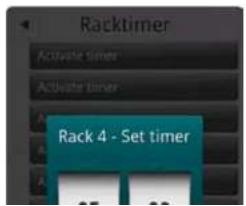
- Push the ACTIVATE TIMER key for the rack timer you wish to start.
- In the HOUR & MINUTES lists, drag your finger up or down to set the desired cook time.
- Push the RIGHT ARROW key ▶ in the upper right corner to start the timer.
Blue buttons display the active timer settings and the

text_image
Racktimer HotAir 179°C 180°C 181°C Rack setup 8 1 timer 2 timers ×100%Figure 14
text_image
Racktimer Activate timer Activate timer Rack 4 - Set timerOperation

Using Advanced Rack Timing
The Advanced Rack Timer allows you to create groups of recipes with similar characteristics (cook temperature, humidity level, etc.). The advance rack timer cook screen lets you manage multiple recipes of the same group simultaneously on separate racks of the oven.
Entering rack timer menus
- From the MAIN MENU, press ADVANCED.
- Select RACK TIMER.
SETTING UP GROUPS & RECIPES
Creating a Recipe Group
NOTE: Up to 18 recipes can be assigned to a single group. In order for recipes to be grouped together they must have the same cook mode, and similar temperature settings.
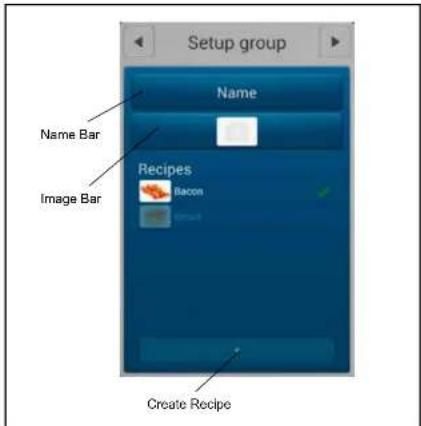
- To create a recipe group select the + key at the bottom of the screen. This will bring you to the SETUP GROUP screen.
- Select NAME BAR to edit the group name. Use the keypad to enter a group name. Press the right arrow ▶ key in the upper right hand corner of the screen to save and return to the SETUP GROUP screen.
- Select the camera icon in the IMAGE BAR to associate a picture with the group. Press OK to save the selection and return to the SETUP GROUP screen.
- Under RECIPES you can select existing recipes to add to the group. Once a recipe has been selected a green check mark will appear to the right indicating it is part of the group. To remove a recipe, select it again
text_image
Setup group Name Name Bar Recipes Image Bar Bacon Create RecipeFigure 16
Editing a Group
- In RACK TIMER MENU screen, press and hold the group's icon. A box will appear allowing you to edit or delete the group.

Operation
Using Advanced Rack Timing
Creating a Recipe
- Select the + key from the bottom of the SETUP GROUP screen.
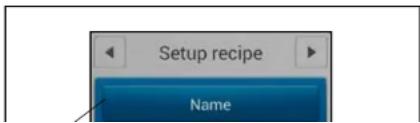
- Select the NAME BAR to edit the group name. Use the keypad to enter a recipe name. Press the right arrow ▶ key in the upper right hand corner of the screen to save and return to the SETUP RECIPE screen.
- Select the COLOR BAR to associate a color with the recipe. Press OK to save the selection and return to the SETUP RECIPE screen.
- Select the camera icon in the IMAGE BAR to associate a picture with the recip. Press OK to save the selection and return to the SETUP RECIPE screen.
Select the SETTINGS BAR below the image bar to edit the temperature, cook mode, fan speed, vent state, and cook time of the recipe. Press the right arrow ▶ key in the upper right hand corner of the screen to save the recipe settings and return to the SETUP RECIPE screen.
Editing a Recipe
In SETUP GROUP screen, press and hold the recipes' icon. A box will appear allowing you to edit or delete the recipe.
text_image
Setup recipe NameSelecting a Group
-
From the RACK TIMER MENU screen, select the number of racks you'd like to use and the group with recipes you wish to use. Then select the right arrow ▶ key in the upper right hand corner to enter the RACK TIMER COOK screen.
-
To select a new group, return to the RACK TIMER MENU screen from the RACK TIMER COOK screen by selecting the left arrow ◀ key in the top left of the screen.
Operation

Using Advanced Rack Timing
COOKING WITH RACK TIMER
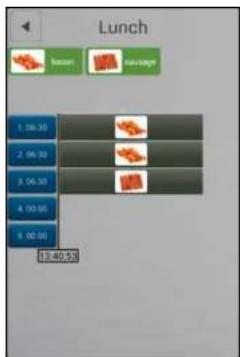
NOTE: The top portion of the RACK TIMER COOK screen contains the recipes in your group. If there are more than 6 recipes in your group you can browse the other recipes by swiping the screen from right to left in this portion of the screen. To return to the previous 6 recipes simply swipe in the reverse direction. The highlighted circle below the recipes indicates what page (of up to 3) you are currently on.
Assigning a Recipe - Click
- Select the blue timer box associated with the rack number you'd like to place a recipe on, it will become highlighted.
- Select the recipe icon from the top of the screen associated with the recipe you'd like to place on the selected rack, it will become highlighted.
- Reselect the highlighted timer box to assign the recipe to the rack.
Assigning a Recipe – Drag and Drop
- Press and hold the desired recipes' icon for approximately 2 seconds.
- Drag recipe to desired rack location.
Starting a recipe
- Once a recipe has been added to a rack the unit will begin preheating to the required temperature. Preheating is indicated by a red thermometer icon to the right side of the screen. Once preheated the icon will
Remove Recipes – Drag and drop
- Press and hold the recipe bar on a rack until a trash can appears to the right.
- Drag the recipe to the trash can.
text_image
Lunch bottom pageage 1.06:30 2.06:30 3.06:30 4.06:50 5.06:50 13:40:50Figure 18

Operation
PreHeat, Cool Down and Proofing
The Advanced Menu gives you access to the PreHeat, CoolDown and Proofing functions.
PREHEAT
Use PreHeat to preheat the oven prior to cooking.
- From the MAIN MENU, press the ADVANCED key.
- Select the PREHEAT mode.
- The PreHeat temperature list is displayed. Drag your finger up or down to set the desired temperature.
To switch to keypad entry - Swipe your finger from right to left across the upper portion of TEMPERATURE scroll dial. Select the keypad icon from the center of the box to bring up the keypad. Enter the desired temperature. Press OK at the bottom of the screen to set the temperature.
NOTE: To return to the scroll wheel, swipe the upper portion of keypad icon box from left to right. The control defaults to the last entry method used.
- The oven begins preheating automatically three seconds after the temperature has been selected.
COOL DOWN
Use this function to quickly cool the oven cavity. For the best results, set the cool down temperature 68^ F ( 20^ C) lower than the desired cooking temperature.
- From the MAIN MENU, press the ADVANCED key.
- Select the COOL DOWN mode.
- The Cool Down temperature list is displayed. Drag your finger up or down to set the desired cool down temperature.
To switch to keypad entry - Swipe your finger from right to left across the upper portion of TEMPERATURE scroll dial. Select the keypad icon from the center of the box to bring up the keypad. Enter the desired temperature. Press OK at the bottom of the screen to set the temperature.
- The oven begins cooling down automatically three seconds after the temperature has been selected.

text_image
Manual CoolDown 250° 30° 31°Figure 19
Operation

PreHeat, Cool Down and Proofing
PROOFING
NOTE: Prebaked products do not need proofing.
- From the MAIN MENU, press the Advanced key.
- Select the PROOFING mode.
- The PROOFING TEMPERATURE list and timer are displayed. Drag your finger up or down to set the desired proofing temperature.
To switch to keypad entry - Swipe your finger from right to left across the upper portion of TEMPERATURE scroll dial. Select the keypad icon from the center of the box to bring up the keypad. Enter the desired temperature. Press OK at the bottom of the screen to set the temperature.
- In the HOUR & MINUTES lists, drag your finger up or down to set the proofing time.
To switch to keypad entry - Swipe your finger from right to left across the upper portion of TIMER scroll dial. Select the keypad icon from the center of the box to bring up the keypad. Enter the desired cook time in hours and minutes. Press OK at the bottom of the screen to set the timer. - When the cook time expires, the oven automatically shuts off. Press the CONT. key if you want the oven to continue operating after the set time has elapsed.
- The oven starts automatically three seconds after the cook time, temperature and humidity have been selected.

text_image
Manual Proofing 35° 36° 37° Timer 10 09 0 10 1 11 Cont. *50%Figure 20
Setting the Fan Speed
The BCT has 9 fan speeds to choose from. You can set the fan before or during the cook cycle.
- To set the fan speed, press the FAN SPEED key in the lower right corner of the screen.
- Drag your finger up or down to set the fan speed in increments of 10% (From 20-100%).
- Press OK to save the fan speed.

Operation
Cook to Perfection
The cook to perfection function helps recipes compensate for temperature fluctuations. These can occur when transitioning between recipes with different temperatures, opening the door, or adding frozen products. The system makes real time adjustments to cook time ensuring quality cooking.
CTP threshold (%)
CTP threshold accounts for when the cavity temperature is below the recipe set temperature. Time will be added to the recipe as long as the cavity temperature remains below the CTP threshold percent of temperature.
EXAMPLE: The oven preheats to a recipe's set temperature of 350^ F and a frozen product is loaded. The temperature of the frozen product and opening the door causes the cavity temperature to drop to 230^ F. The CTP will begin extending the total recipe time as long as the cavity temperature remains below the programmed threshold value, at 80% this equates to 285^ F. This compensates for the time it takes the oven to recover to the 350^ F called for in the recipe.
CTP tolerance (°)
The CTP tolerance value is a temperature range. If the oven's measured temperature is outside the range of desire temperature, the unit will adjust cook times. Unlike the threshold value, the tolerance compensates when the oven is too high above set point as well as below set point by adding or subtracting time as needed.
EXAMPLE: Using the same example of 350^ F, a 15^ tolerance means that time will be added to the recipe as long as the cavity is lower than 335^ F and subtract if cavity achieves temperatures above 365^ F. This may be the
To set up Cook To Perfection (CTP)
- From the MAIN MENU select the GEAR ICON.
- Select SUPER USER from the SETTINGS MENU.
- Select SETTINGS from the SUPER USER MENU.
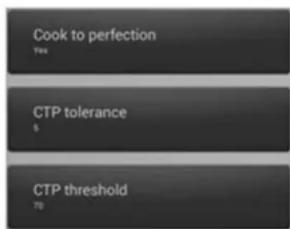
- Select COOK TO PERFECTION and set to YES to enable.
- Select CTP THRESHOLD. Enter the percentage of set temperature you would like CTP to use for a temperature threshold.
- Select CTP TOLERANCE. Enter the temperature you would like CTP to use for a temperature tolerance.
text_image
Cook to perfection Yes CTP tolerance $ CTP threshold NoFigure 21
Operation

Programmed Cooking
Programmed cooking is simple in the Blodgett BCT Combi. Choose from one of a wide variety of pre-programmed recipes or create your own.
Use an Existing Program Recipe
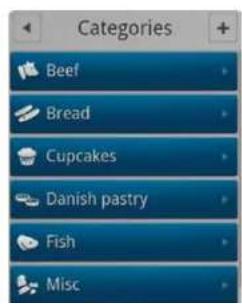
- From the MAIN MENU, press the RECIPES key. The CATEGORIES menu is displayed.
- Press the desired product category.
- Press the desired product. The programming details for the selected product are listed. If you want to adjust the recipe, press the gear wheel icon in the top right corner of the screen. Follow the steps described in Adding New Recipe Program (page 30).
- Press START to initiate the cook cycle.
text_image
Categories Beef Bread Cupcakes Danish pastry Fish MiscAt the End of the Cook Cycle
- When the cook time expires, an alarm sounds and the display reads "Recipe Done!.
Press EXIT to end the cook cycle.
Press RESTART to continue the cook cycle.

text_image
Beef Braising / Well done Braised / Shoulder Lassagna / 65mm tray Minced meat dishes Use special for and trash Moussaka / 65mm tray Night roasting / Well ... armless / Shoulder
Operation
Adding a New Recipe Program
- From the MAIN MENU, press the RECIPES key. The CATEGORIES menu is displayed.
- To add a new recipe, press the + in the upper right corner of the screen.
- The CHOOSE CATEGORY screen is displayed. Drag your finger up or down to select the desired product category. Press the right arrow key ▶ to save and advance to the next screen.
- To name the new recipe, press right arrow key ▶ in the TITLE/DESCRIPTION BOX. Use the keyboard to enter a name and a description of the new recipe. Press the right arrow key ▶ to save and advance to the next screen.
- Touch the FAVORITE key if you want to add the recipe to your list of favorites.
- Press the ADD STEP key to add the first step of the cooking process.
-
In the SELECT STEP TYPE list drag your finger up or down to select the desired cooking mode. Press the right arrow key ▶ to save and advance to the next screen.
-
Choose the desired cook settings for the step. Press the right arrow key ▶ to save your settings.
- Add as many steps as needed.
More Functions
- If you want to change the recipe category, press the MORE FUNCTION key at the bottom of the screen. Then press CHANGE CATEGORY. You can then choose a different category.
• To make a copy of the recipe, press the MORE FUNCTION key at the bottom of the screen. Then press DUPLICATE RECIPE. The Copying Recipe message appears. You can then edit the copy. - To delete the recipe, , press the MORE FUNCTION key at the bottom of the screen. Then press DELETE RECIPE. Press Yes to delete the recipe.

Operation

Favorites
Using Favorites
- From the MAIN MENU, press the FAVORITES key.
- Press the desired recipe. The recipes are listed in alphabetical order. All the steps of the recipe, and the total cooking time are displayed.
- Touch the START key, to start the oven. The oven starts the preheating process, and displays "load the oven", when the oven is ready.
Adding a Recipe to Favorites
- From the MAIN MENU, press the RECIPES key.
- Select the category for the recipe you wish to add to the favorites list.
- Press the name of the recipe you wish to add to the favorites list.
- Press the gear wheel icon in the upper right corner of the screen.
-
Press the FAVORITE key so that it changes to YES.
-
Press the right arrow ▶ key in the upper right corner to save your recipe to the favorites list.

text_image
Recipe ★bread Baking 1. +210° 0:02 2. read the swine 3. +180° +100% -8s 0:19 Total time 0:12 Start Favorite YESFigure 24

Operation
USB
The Blodgett BLCT-6E-H and BLCT-10E-H come standard with a USB port located on the control compartment. The USB will enable upload and download of product recipes as well as HACCP data.
TO ACCESS USB MENU
- Insert the USB card into the slot on the control compartment.
- From the MAIN MENU, press the ADVANCED key.
- Press the USB key. The control displays the following options:
- Import Recipes - from USB to Oven
• Export Recipes - from Oven to USB
RECIPES
To Import Recipes from the USB to the Oven
- Press Import Recipes.
- All recipe files currently on the USB drive will be displayed. Select the desired recipe file.
- Select either All Recipes or the appropriate product category. Select the recipes you wish to upload to the oven.
If All Recipes is selected, you may choose any or all of the recipes on the USB drive.
If a category is selected, you may choose any or all of the recipes in that category. - Press the USB icon in the upper right corner of the
To Export Recipes from the Oven to the USB
- Press Export Recipes.
- Select either All Recipes or the appropriate product category. Select the recipes you wish to upload to the oven.
If All Recipes is selected, you may choose any or all of the recipes on the USB drive. If a category is selected, you may choose any or all of the recipes in that category. - Press the USB icon in the upper right corner of the screen.
- The Enter Filename screen is displayed. Use the keyboard to name the file. Press the Done key at the bottom of the keyboard to save the filename.
- Press the right arrow key ▶ in the top right corner. The upload begins automatically.
- The green success box is displayed. Press Finish.
- The control returns to the USB screen.
Operation

USB
RACK TIMER
To Import and Export Groups and Recipe Files in Advance Rack Timer
NOTE: Importing - you will be given the option to select the desired recipe file on the USB drive. Once a recipe sel has been selected you will be given the option to overwrite the existing recipe file with those on the USB or append them to the current recipe library. Exporting - you will be prompted to name the recipe library being exported.
- From the MAIN MENU, press ADVANCED.
-
Select RACK TIMER.
-
In the RACK TIMER MENU screen select the BACK-UP key from the bottom left hand corner of the screen.
- Insert the USB drive you wish to copy the files to or from into the port located at the front of the unit.
- Select whether you would like to import or export the recipes.
NOTE: Importing will overwrite any existing groups and recipes.
- Follow onscreen prompts to complete import or export of recipe files.
- A notification will appear when file transfer is complete. Select "Finish" to exit the pop-up screen.

text_image
USB Import recipes FROM 12345 MB Export recipes FROM 12345 MB
text_image
Import recipes All recipes Beef Bread Cupcakes Danish pastry Fish Misc
text_image
Backup Backup Import Import groups and recipes from USB Export Export groups and recipes to USB
Operation
Timed Start
Timed Start makes it possible to start the oven using any programmed recipe before staff arrives. This way, the oven will be hot when you come in in the morning.
- From the MAIN MENU, press the ADVANCED key.
- Press the TIMED START key. The control displays the current timed start.
- Press the TIMED START box.
- Drag your finger up or down to select the desired timed start. Choose from:
• Non-Active - no timed start - Single Timer - use for a single occurrence timed start
• Weekly Timer - use to set a timed start for each day of the week.
Programming a Single Timed Start
- Select Single Timer and press OK.
- Enter the desired start time. Press OK.
-
The control displays the category list. Select the appropriate product category.
-
Select the desired product recipe.
- The display shows Single Timer with the recipe name in the top box and the start time in the second box. You may edit either start time or recipe by touching either box.
- Push the left arrow key ◀ to return to the advanced menu.
Programming a Weekly Timed Start
- Select Weekly Timer and press OK.
- Enter the desired start time. Press OK.
- The control displays the category list. Select the appropriate product category.
- Select the desired product recipe.
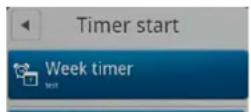
- The display shows Week Timer with the recipe name in the top box, followed by seven boxes, one for each day of the week with the start time. You may edit the start time for each day individually by touching the box for that day.
- Push the left arrow key ◀ to return to the advanced menu.


Operation

HACCP Library
The ovens comes standard with HACCP data recording. HACCP enables you to control and document production. Data recorded includes production time. production duration, preparation temperature and core temperature.
The HACCP library can hold approximately 1000 log files. You will be notified when the memory is full so that you can empty the memory with the USB. If nothing is done, the computer will automatically start to overwrite the oldest files.
To Activate HACCP Data Recording
NOTE: HACCP data is stored under product recipe names. Therefore, HACCP is not available for manual cooking.
HACCP must be activated to record data.
- From the MAIN MENU, press the GEAR key.
- Press the SUPER USER key.
- Press the SETTINGS key.
- Press the HACCP LOGGING key.
- Drag your finger up or down to select YES. Press OK to enable HACCP recording.
To View HACCP Data
- From the MAIN MENU, press the ADVANCED key.
- Press the HACCP key.
- From the HACCP menu, press the key labelled either Show HACCP from Oven or Show HACCP from USB.
- A list of HACCP log files is displayed. The files are
To Backup HACCP Data
- From the HACCP menu, press the key labelled Archive on USB.
- The display reads SAVING HACCP.
- When the data is saved to the USB the control returns to the HACCP screen.
NOTE: The HACCP data on the USB can be located in the folder with the serial number.
To Delete HACCP Data from the Oven
- From the HACCP menu, press the key labelled Delete HACCP Data from Oven.
- The screen will ask you to confirm that you want to delete all HACCP files. Press the key next to Accept to delete the files. Press the key next to Regret to cancel.
- The control returns to the HACCP screen.

Maintenance
Cleaning & Preventative Maintenance
DAILY CLEANING
Daily cleaning of your Combi oven is essential for sanitation, and to ensure against operational difficulties.
Cleaning the Exterior
- The exterior of the appliance may be cleaned and kept in good condition with a light oil. Saturate a cloth and wipe the appliance when it is cold; wipe dry with a clean cloth.

WARNING!!
DO NOT spray the outside of the appliance with water or clean with a water jet. Cleaning with a water jet can impregnate chlorides into the stainless steel, causing the onset of corrosion.
Cleaning the Interior
NOTE: DO NOT use corrosive cleaners not intended for oven cleaning on your Combi oven.
Blodgett recommends the following products for cleaning and rinsing of your Blodgett Combi oven. If you choose to use products other than what Blodgett recommends, please have your supplier send us the MSDS sheet on the proposed alternate so we can ensure it meets our standards. Non approved products can cause harm to your unit and can potentially void your warranty.
- Open the oven door.
- Use the attached spray hose, located beneath the control, to clean the front drip tray. Water will run to the drain in the oven cavity.
RECOMMENDED OVEN CLEANERS
| VENDOR PRODUCT NAME | |
| 1st AYD Corporation Kombi-Klean Oven, Grill & Fryer Cleaner | |
| Alco Chemical 350 Ultra Cycle | |
| Daley International Oven & Grill Cleaner | |
| Ecolab Keystone Oven Cleaner | |
| Oven Cleaner Power | |
| Grease Cutter Plus | |
| Specialty Oven Cleaner | |
| Ecotemp Ultra Kleene | |
| Roof, Roof, Roof, Roof | |
RECOMMENDED RINSE AIDS
| VENDOR PRODUCT NAME | |
| Alco Chemical | 320 Rapid Rinse |
| Ecolab | Keystone Liquid Rinse Additive |
| Oven Rinse Power | |
| Esteem Dry-All | |
| Eco Temp Ultra Dry | |
| Specialty Oven Rinse RTU | |
| Specialty Oven Rinse | |
| Johnson Diversey Suma Maro A8.8 | |
Maintenance

Cleaning & Preventative Maintenance
Run the CombiWash automatic cleaning cycle as follows:
- Check the level of detergent and rinse aid in the containers. The red tube is for detergent and the blue tube is for rinse aid.
Check that the oven temperature is below 80^ C. If the oven is too hot, use the CoolDown function (see page page 26). - On the MAIN MENU press the MANUAL key.
- Press the COMBI WASH key.
-
Touch the desired cleaning mode. You can choose between the following cleaning cycles.
-
Flush: Use this before starting the other cleaning programs.
• Light: Use this after steaming and roasting at low temperatures.
• Medium: Use this after steaming and roasting at medium temperatures. - Heavy: Use this after roasting at temperatures higher than 180°C.
-
Intensive: Use this after roasting very greasy products.
-
Press Start to initiate CombiWash.
Note: If the cleaning cycle is interrupted before it has been completed, for example because of a power outage, the oven automatically performs a
WEEKLY CLEANING
In addition to the daily cleaning it is necessary to clean the air intakes on a weekly basis. Air intakes provide necessary cooling air to the internal components. They are generally located on the rear and sides of the equipment.
It is also important to clean the control filter and behind the fan guard on a weekly basis. This is necessary for proper functioning of the oven. Scale will build up on the fan and heat source leading to a less efficient oven.
- Remove the front grill section and clean the fan guards once a week on BLCT-61E-H, BLCT-62E-H, BLCT-101E-H & BLCT-102E-H, models
Cleaning Control Filter
- Lift and remove filter in housing at rear of unit.

natural_image
Illustration of a mechanical device with ventilation duct and control panel (no text or symbols)
Maintenance
Cleaning & Preventative Maintenance
Cleaning Behind the Fan Guard
- Using a flathead screw driver adjust each retaining clip so the slots are on the bottom of their respective cutouts.
- Lift up from the bottom of the fan guard and pull the top forward to move the fan guard above the retaining bar and over the placement pins on the bottom of the liner.
- Thoroughly spray cleaner onto the fan and heat source. Place the oven in the steam mode for approximately 10 minutes.
- After ten minutes, rinse the cleaner off. Place the fan guard back over the retaining bar and placement pins. Adjust each retaining clip so the slots are at the top of each cutout. If there is resistance ensure the baffle is properly seated over the retaining bar and placement pins.
Door Gasket
It is imperative that the door gasket is properly maintained. Wiping any grease from the gasket will lengthen its life.
Front Air Intake Cleaning
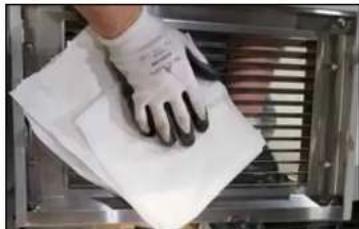
- When the oven and hoodini are both off you may take the opportunity to clean the front air intake, it may take up to 10 minutes for the hoodini portion of the unit to shut down after the oven has been shut down.

natural_image
Person wearing gloves handling a white sheet of paper on a metal tray (no visible text or symbols)Figure 29
- Once removed wipe down each side to remove any accumulated grease and/or particulate.
natural_image
Close-up of a kitchen oven with a cloth wrapped around it, flanked by two circular fans (no visible text or symbols)Figure 30
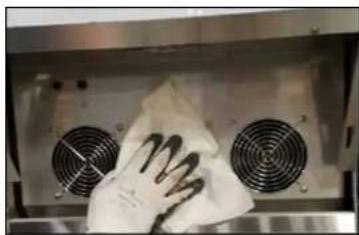
- With the grill remove, wipe down each of the grates over the three fans at the front of the unit. When