
OLED77G2RLA - Television LG - Free user manual and instructions
Find the device manual for free OLED77G2RLA LG in PDF.


| Product Type | OLED TV |
| Screen Size | 77 inches (class) |
| Display Technology | OLED |
| Resolution | 3840 x 2160 (4K Ultra HD) |
| Refresh Rate | 100 Hz / 120 Hz |
| Smart Platform | LG webOS 22 |
| Processor | α9 Gen5 AI Processor 4K |
| HDR Support | Dolby Vision, HDR10, HLG |
| Audio System | 2.2 channel, 60W (down-firing) |
| HDMI Ports | 4 x HDMI (2.1, eARC, ALLM, VRR) |
| USB Ports | 3 x USB (2.0) |
| Wi-Fi | IEEE 802.11a/b/g/n/ac (2.4/5 GHz) |
| Bluetooth | Bluetooth 5.0 |
| IR Blaster | Yes (external cable included) |
| Magic Remote | Supported (included) |
| VESA Mount Pattern | 300 x 300 mm |
| Power Supply | AC 100-240V ~ 50/60Hz |
| Typical Power Consumption | Approx. 250 W (estimated) |
| Standby Power Consumption | < 0.5 W |
| Dimensions (without stand) | 1723 x 1042 x 27 mm (estimated) |
| Weight (without stand) | 30.5 kg (estimated) |
| Operating Temperature | 0°C to 40°C |
| Operating Humidity | Less than 90% |
Frequently Asked Questions - OLED77G2RLA LG
User questions about OLED77G2RLA LG
0 question about this device. Answer the ones you know or ask your own.
Ask a new question about this device
Download the instructions for your Television in PDF format for free! Find your manual OLED77G2RLA - LG and take your electronic device back in hand. On this page are published all the documents necessary for the use of your device. OLED77G2RLA by LG.
USER MANUAL OLED77G2RLA LG
Copyright © 2022 LG Electronics Inc.
All Rights Reserved.
LG OLED TV
OWNER'S MANUAL
Safety and Reference
Please read this manual carefully before operating your set and retain it for future reference.
The model and serial number of the product are located on the back and on one side of the product. Record them below in case you ever need service.
5.10
Before reading this manual
- Read this manual thoroughly before operating your TV, and keep it for future reference.
- On the website you can download the manual including installation, using, troubleshooting, specifications, license etc and view its contents on your PC or mobile device.
- User Guide: For more information about this TV, read the USER GUIDE embedded in the product. (Depending on model)
IDC ⑥→ Ⓔ → [Support] → [User Guide]
Separate Purchase
- Separate purchase items can be changed or modified for quality improvement without any notification. Contact your dealer to buy these items. These devices only work with certain models.
- The model name or design may be changed depending on the upgrade of product functions, manufacturer's circumstances or policies.
- A cable to connect antennas and external devices must be purchased separately.
Note
- Product specifications or contents of this manual may be changed without prior notice due to upgrade of product functions.
• The items supplied with your product may vary depending on the model.
• Image shown may differ from your TV.
Warning! Safety instructions

CAUTION
RISK OF ELECTRIC SHOCK
DO NOT OPEN

CAUTION: TO REDUCE THE RISK OF ELECTRIC SHOCK, DO NOT REMOVE COVER (OR BACK). NO USER-SERVICEABLE PARTS INSIDE. REFER TO QUALIFIED SERVICE PERSONNEL.
This symbol is intended to alert the user to the presence of uninsulated "dangerous voltage" within the product's enclosure that may be of sufficient magnitude to constitute a risk of electric shock to persons.
This symbol is intended to alert the user to the presence of important operating and maintenance (servicing) instructions in the literature accompanying the appliance.
WARNING: TO REDUCE THE RISK OF TIRE AND ELECTRIC SHOCK, DO NOT EXPOSE THIS PRODUCT TO RAIN OR MOISTURE.
- TO PREVENT THE SPREAD OF FIRE, KEEP CANDLES OR OTHER ITEMS WITH OPEN FLAMES AWAY FROM THIS PRODUCT AT ALL TIMES.
- Do not place the TV and/or remote control in the following environments:
- Keep the product away from direct sunlight.
- An area with high humidity such as a bathroom.
- Near any heat source such as stoves and other devices that produce
heat.
Near kitchen counters or humidifiers where they can easily be exposed to steam or oil.
- Near flammable objects such as gasoline or candles, or expose the TV
to direct air conditioning. - Do not install in excessively dusty places.
Otherwise, this may result in fire, electric shock, combustion/explosion,
malfunction or product deformation.
Ventilation
- Install your TV where there is proper ventilation. Do not install in a
confined space such as a bookcase. - Do not install the product on a carpet or cushion.
- Do not block or cover the product with cloth or other materials while
- Protect the power cord from physical or mechanical abuse, such as being twisted, linked, pinched, closed in a door, or walked upon. Pay particular attention to plugs, wall outlets, and the point where the cord exits the device.
- Do not move the TV whilst the Power cord is plugged in.
- Do not use a damaged or loosely fitting power cord.
- Be sure to grasp the plug when unplugging the power cord. Do not pull on the power cord to unplug the TV.
- Do not connect too many devices to the same AC power outlet as this could result in fire or electric shock.
• Disconnecting the Device from the Main Power
- The power plug is the disconnecting device. In case of an emergency,
the power plug must remain readily accessible.
- Do not let your children climb or cling onto the TV. Otherwise, the TV may
fall over, which may cause serious injury.
- Outdoor Antenna Grounding (Can differ by country):
- If an outdoor antenna is installed, follow the precautions below. An outdoor antenna system should not be located in the vicinity of overhead power lines or other electric light or power circuits, or with it can come in contact with such power lines or circuits as death or serious injury can occur.
- Never touch this apparatus or antenna during a lightning storm. You may be electrocuted.
- Make sure the power cord is connected securely to the TV and wall socket if not secured damage to the Plug and socket may occur and in extreme cases a fire may break out.
- Do not insert metallic or inflammable objects into the product. If a foreign object is dropped into the product, unplug the power cord and contact the customer service.
- Do not touch the end of the power cord while it is plugged in. You may be electrocuted.
- If any of the following occur, unplug the product immediately and contact your local customer service. - The product has been damaged.
- If water or another substance enters the product (like an AC adapter, power cord, or TV). - If you smell smoke or other odors coming from the TV. - When lightning storms or when unused for long periods of time. Even the TV is turned off by remote control or button. AC power source is connected to the unit if not unplugged in.
- Do not use high voltage electrical equipment near the TV (e.g., a bug zapper). This may result in product malfunction.
- Do not attempt to modify this product in any way without written authorization from LG Electronics. Accidental fire or electric shock can occur. Contact your local customer service for service or repair. Unauthorized modification could void the user's authority to operate this product.
• Use only an authorized attachments / accessories approved by LG Electronics. Otherwise, this may result in fire, electric shock, malfunction, or product damage.
- Never disassemble the AC adapter or power cord. This may result in fire or electric shock.
- Handle the adapter carefully to avoid dropping or striking it. An impact could damage the adapter.
- To reduce the risk of fire or electrical shock, do not touch the TV with wet hands. If the power cord prongs are wet or covered with dust, dry the power plug completely or wipe dust off.
- Batteries
- Store the accessories (battery, etc.) in a safe location out of the reach of children.
- Do not short circuit, disassemble, or allow the batteries to overheat. Do not dispose of batteries in a fire. Batteries should not be exposed to excessive heat.
- Caution: Risk of fire or explosion if the battery is replaced by an incorrect type.
- Moving
- When moving, make sure the product is turned off, unplugged, and all cables have been removed. It may take 2 or more people to carry larger TVs. Do not press or put stress on the front panel of the TV. Otherwise, this may result in product damage, fire hazard or injury.
- Keep the packing anti-moisture material or vinyl packing out of the reach of children.
- Do not allow an impact shock, any objects to fall into the product, and do not drop anything onto the screen.
- Do not press strongly upon the panel with a hand or a sharp object such as a nail, pencil, or pen, or make a scratch on it. It may cause damage to screen.
- Cleaning
- When cleaning, unplug the power cord and wipe gently with a soft dry cloth. Do not spray water or other liquids directly on the TV. Do not clean your TV with chemicals including glass cleaner, any type of air freshener, insecticide, lubricants, wax (car, industrial, abrasive, thinner, benzene, alcohol etc., which can damage the product and/or its panel. Otherwise, this may result in electric shock or product damage.
Installation
Lifting and moving the TV
Please note the following advice to prevent the TV from being scratched or damaged and for sale transportation regardless of its type and size.
- It is recommended to move the TV in the box or packing material that the TV originally came in.
- Before moving or lifting the TV, disconnect the power cord and all cables.
- 'When holding the TV, the screen should face away from you to avoid damage.
- Hold the top and bottom of the TV frame firmly. Make sure not to hold the transparent part, speaker, or speaker grill area.
• When transporting a large TV, there should be at least 2 people. - When transporting the TV, do not expose the TV to jolls or excessive vibration.
- When transporting the TV, keep the TV upright, never turn the TV on its side or tilt towards the left or right.
- Do not apply excessive pressure to cause flexing / bending of frame chassis as it may damage screen.
- When handling the TV, be careful not to damage the protruding buttons.

- Avoid touching the screen at all times, as this may result in damage to the screen.
- When attaching the stand to the TV set, plate the screen facing down on a cushioned table or flat surface to protect the screen from scratches.
Mounting on the Table
1 Lift and tilt the TV into its upright position on a table.
- Leave a 10 cm (minimum) space from the wall for proper ventilation. (Depending on model)
2 Connect the power cord to a wall outlet.

- Do not apply foreign substances (oils, lubricants, etc.) to the screw parts when assembling the product. (Doing so may damage the product.)
- If you install the TV on a stand, you need to take actions to prevent the product from overturning. Otherwise, the product may fall over, which may cause injury.
- Do not use any unapproved items to ensure the safety and product life span.
- Any damage or injuries caused by using unapproved items are not covered by the warranty.
- Make sure that the screws are inserted correctly and fastened securely. (If they are not fastened securely enough, the TV may tilt forward after being installed.) Do not use too much force and over tighten the screws; otherwise screw may be damaged and not tighten correctly.
- When installing on a cabinet or a shelf using a stand, make sure its width is greater than that of the TV. (Depending on model)
- If the TV is placed on the stand, its screen may be tilted back slightly. If the stand is not level because an object is placed under the stand or it is not on a flat surface, the product may fall and cause injury or product damage. (Depending on model)
Securing TV to the Wall
1 Insert and tighten the eye-bolts, or TV brackets and bolts on the back of the TV.
• If there are bolts inserted at the eye-bolts position, remove the bolts first.
2 Mount the wall brackets with the bolts to the wall. Match the location of the wall bracket and the eye-bolts on the rear of the TV.
Connect the eye-bolts and wall brackets tightly with a sturdy rope. Make sure to keep the rope horizontal with the flat surface.
- Use a platform or cabinet that is strong and large enough to support the TV securely.
- Brackets, bolts and ropes are not provided. You can obtain additional accessories from your local dealer.
Stand (Separate Purchase)
(Depending on model)
Stand Model
SQ-G2ST55 OLEDS5G2 ^a
SQ-G2ST65 OLED65G2*
Mounting to the Wall
Attach an optional wall mount bracket, at the rear of the TV carefully and install the wall mount bracket on a solid wall perpendicular to the floor. When you attach the TV to other building materials, please contact qualified personnel. LG recommends that wall mounting be performed by a qualified professional installer. We recommend the use of LG's wall mount bracket. LG's wall mount bracket is easy to move with cables connected. When you do not use LG's wall mount bracket, please use a wall mount bracket where the device is adequately secured to the wall with enough space to allow connectivity to external devices. It is advised to connect all the cables before installing fixed wall mounts.
△
- Remove the stand before installing the TV on a wall mount by
performing the stand attachment in reverse. - For more information of screws and wall mount bracket, refer to the Separate Purchase.
- If you intend to mount the product to a wall, attach VESA standard mounting interface (optional parts) to the back of the product. When you install the set to use the wall mounting bracket (optional parts), fix it carefully so as not to dmp.
- When mounting a TV on the wall, make sure not to install the TV by hanging the power and signal cables on the back of the TV.
- Do not install this product on a wall if it could be exposed to oil or oil
mist. This may damage the product and cause it to fall. - When installing the Full Contact Wall Mount, the TV may not be contacted firmly against the wall due to some wall conditions.
Precautions for Safety
(Except for OLYW490B, LSW440B)
• Professional installers should read this manual carefully to ensure proper installation.
• Professional installers should forward this manual to customers after installation and encourage them to read and store it in a convenient place for future reference.
After reading the installation manual, keep it in a convenient place for future reference.
A
- Ask a professional installer appointed by the store for installation of the product.
Installation by someone other than a professional installer is extremely dangerous and may result in personal injury. - Do not install the product in an unstable site that cannot withstand its weight.
+ Contact a professional installer appointed by the store prior to moving or replacing the product after installation.
Installation is a technical task and safety issues may arise if an individual attempts to install or move the product personally.
- Do not hang on the product or subject it to severe impact after installation.
Doing so may cause the product to fall and cause personal injury.
- When installing the product on a wall, do not hang the power line or signal miles from the head of the TII.
This can damage the conds, resulting in a fire, electrical shock or malfunction of the product.
• Be sure to wear work gloves when installing the product.
- Installing with unprotected hands may result in injury.
- Install the product according to the instructions in the installation manual.
Failure to install the product according to the instructions in the installation manual can result in serious personal injury or produce damage.
- Be sure to have at least two people when installing the product or adjusting the product's height.
Attempting to perform installation or adjustments personally may result in personal injury or damage to the product.
• Make sure a wall is available prior to proceeding with installation. Make use of the anchors and screws provided with the product.
Use of any unauthorized anchors or screws may not support the product's weight, which poses safety risks.
- When drilling in the wall for installation, be sure to use drill bits and drills of the specified diameter. Follow the instructions for the hole depth.
Drilling and installing the product in ways other than specified in the installation manual may result in an unstable installation and potential safety issues.
- Do not wipe the product with a wet towel or use any heating equipment or humidifier under the place where the product is installed. Liquid water or vapor may enter the product and excessive heat may cause fire, electric shock, or malfunction.
- Do not install the product near a fire sprinkler or detector, a place where vibration or shock may occur or near a high-voltage wire or power source.
- Unplug the product's power cord from the wall outlet before installing. Installing the product while the power cord is plugged in may result in electric shock or fire.
- Do not install the product with bare hands. Be sure to wear work gloves. Attempting installation without work gloves may cause personal injury.
- Connect the product with the supplied cable. Use of an unauthorized cable may result in damage by friction with the wall. Make sure to use the supplied cable number (This may be a model 1).
Before Installation
(Except for OLN450B, LSW440B)
- Do not use the product for any purpose other than installing the TV on a wall.
- Avoid product damage and safety accidents caused by careless installation or use of improvement to unauthorized and well mount.
- Follow the instructions in the installation manual for a convenient
Installation of the wall mount. - Immediately discontinue installation and contact the service centre if you cannot fully understand the installation process.
Use a professional installer if any installation issues remain after the inquiry. - Installation of this product on a concrete wall or wood stud is recommended. Installation of this product on other surfaces (Dry wall, plywood, bricks, etc.) is not recommended. Improper installation may result in the product falling.
• Install the product only on a vertical wall.
Do not install on a tilted wall that exceeds building standards or on the heavily tilted wall or ceiling.
LG is not responsible for problems caused by improper installation of the product, e.g., heavily tilted walls and ceilings. - Check the enclosed accessories before installation. We are not responsible for any lost or damaged accessories after the inner packaging is opened.
- When an infant or small child swallows the enclosed accessories, various safety accidents such as choking may occur. Keep the enclosed accessories out of the reach of infants and children.
- When tightening screws, tighten until fully snug. Hand using excessive force when tightening the screws. Doing so may damage the wall and product or reduce the rigidity or performance of the product.
- Avoid installing a TV that exceeds the specified tensile load, and do not allow any external force to be applied to the product.
- Avoid accidents by using work tools with care during installation.
Tools for installation
- “+” shaped screwdriver (manual or electric) / level / drill / 0.8 mm drill bit for concrete or 0.4 mm drill bit for steel
Securing TV to the Wall
(Except for OLM4806, LSW440B)

• Please use the TV close to the wall after installation.
How to fix anchors and screws
(Except for OIV/4306, L5W440B)
Please make sure that:
- Check that the material and thickness of the wall and finishing material comply with the installation manual. Before beginning the mounting process, you must be sure the wall is able to support the weight of the TV.
- Should use the enclosed anchors and screws on crack-free concrete walls.
- Never install the product on a plasterboard or wall made of paper or medium-density fiberboard (MDF). When it is necessary to install the product on such wall, anchor screws must be fastened to retaining walls (concrete) or wood Stud inside the finishing material.
- The wall mount should be attached to a stud. This usually will not be a problem, but depending on individual circumstances, there may be cases when the ability to mount into a stud is not possible. In this case, there are a variety of drywall anchors, such as loggie bolts, which may provide a solution. If using drywall anchors, please be sure the anchors and the wall have the ability to support the weight of your TV. Please note that the supplied anchors may not be the correct ones for your individual situation, so you should check with a local professional.
- Other unspecified walls must be capable of supporting pullout loads of over 70 kgf (686 N) and shear loads of over 100 kgf (980 K) per fastener.
- Use an 6.8 mm drill bit for concrete and a hammer (impact) drill or 4 mm drill bit for wood stud to drill holes.
For installation on concrete wall
①
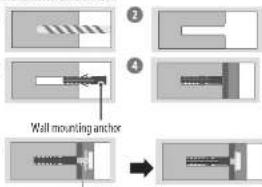
Wall mounting screw
1 Drill holes in anchor locations with a drill bit of 0.8 mm to a depth of 30 mm to 100 mm.
2 Clean the drilled holes.
3 Insert the enclosed anchors for fixing the wall mount into the holes. (Use a hammer when inserting anchors.)
4 Push the wall mount support closely toward the wall to match the hole locations.
5 Tighten screws for fixing the wall mount to the holes. At this time, tighten the screws to a torque of between 45 kgf/cm to 60 kgf/cm.
For installation on wood stud

Use the 0.4 mm drill bit for wood to drill holes with the depth of 76 mm (Clean the drilled hole.)
Without using the wall mounting anchor, fasten the wall mounting screw directly to the wood stud.
After Installation
- When connecting additional cables from the sides, we recommend holding the centre of the TV horizontally or vertically and pulling the product to make sure there is sufficient distance from the wall before connecting.
When the following table from the bottom are announced

natural_image
Diagram of a monitor setup with a magnified view showing a cylindrical object inside (no text or symbols)(for example)
- Use cable management systems to arrange the cables at the bottom of the TV as shown below. Cable managements are not provided with the product, so purchase them separately.
- After installing the product, be sure to use it adhered to the wall.
- Using the product while it is not adhered to the wall may damage or shake the product.
- Do not use a sharp object when you detached the cable cover. This could damage the cable or the cabinet. It may also cause personal harm. (Depending on model)
Antenna/Cable
Connect the TV to a wall antenna socket with an RF cable (75 Ω).
• Use a signal splitter to use more than 2 TVs
- If the image quality is poor, install a signal amplifier properly to improve the image quality.
- If the image quality is poor with an antenna connected, try to realign the antenna in the correct direction.
• An antenna cable and converter are not supplied.
- For a location that is not supported with Ultra HD broadcasting, this TV cannot receive Ultra HD broadcasts directly.
Satellite dish
Connect the TV to a satellite dish to a satellite socket with a satellite RF cable (75 QI. (Depending on model)
Starting TV
Turning on the TV
You can simply operate the TV handlines, using the button.

Power On (Press)
Power Off (Press and Hold)
Menu Control (Press ^2 )
Menu Selection | Press and Held 0
1) All running apps will close, and any recording in progress will stop.
(Depending on country)
2) You can access and adjust the menu by pressing the button when TV is on.
3) You can use the function when you access menu control.
Note
- If the IV is turned on for the first time after it was shipped from the factory, Initialization of the IV may take a few minutes.
- Your TV's OSD (On Screen Display) may differ slightly from that shown in this manual.
- The device must be easily accessed to a location outlet near the access. Some devices are not made by turning on / off button, turning off the device and unplugging the power cord.
Connections
Connect various external devices to the TV and switch input modes to select an external device. For more information of external device's connection, refer to the manual provided with each device.
HDMI
- When connecting the HDMI cable, the product and external devices should be turned off and unplugged.
• Supported HDMI Audio format (Depending on model):
True HD [48.3Hz].
Dolby Digital / Dolby Digital Plus (52 kHz, 44.1 kHz, 48 kHz), PCM (37 kHz, 44.1 kHz, 48 kHz, 95 kHz, 192 kHz)
Note
- If the device connected to Input Port also supports HDMI Deep Colour, your picture may be clearer. However, if the device doesn't support it, it may not work properly. In that case, change the TV's [HDMI Deep Colour] setting to all.
- ⑥ → ⚠ → |General| → |Devices| → |HDMI Settings| → |HDMI
Deep Colour
• Use a certified cable with the HDMI logo attached. - If you do not use a certified HDMI cable, the screen may not display or a connection error may occur.
- Recommended HDMI Cable Types
- Ultra High Speed HDMI™ cable (13 m or less)
IR Blaster
Control the set-top box (cable/satellite/P/OTT). Blu-ray/DVD player, soundbar, game consoles, etc., using the IR Blaster. (Depending on country)
Note
- Connect the IR Blaster cable to the TV's IR Blaster port.
• Use universal control settings to control the device. - Secure the IR Blaster with the 3M tape provided.
External Devices
Available external devices are Blu-ray player, HD receivers, DVD players, VCRs, audio systems, USB storage devices, PC, gaming devices, and other external devices.
Note
- The external device connection may differ from the model.
- In PC mode, there may be noise associated with the resolution, vertical pattern, contrast or brightness. If noise is present, change the PC output to another resolution, change the refresh rate to another rate or adjust the brightness and contrast on the [Picture] menu until the picture is clear.
- In PC mode, some resolution settings may not work properly depending on the graphics card.
- If Ultra HD content is played on your PC, video or audio may become disrupted intermittently depending on your PC's performance. (Depending on model)
HED
Specifications
(Depending on country)
| Broadcasting Specifications | |||
| Digital TV Analoguer TV | |||
| Television system DVD-T/T2, DVD-C, DVD-S/S2 | PAL, BW, PAL, BG, PAL,DAX, PAL-1,SECAM/BG, SECAM-DAX,NTEC-M | ||
| Programme coverage | DVB S/S2 DVB C DVB T/T2 | 46 ~ 862 MHz | |
| 950 ~ 2,150 MHz 46 ~ 850 MHz | VH III : 174 ~ 230 MHzUHF IV: 4/0 ~ 606 MHzUHT 0: 606 ~ 862 MHzS Band II: 230 ~ 300 MHzS Band III: 300 ~ 470 MHz | ||
| Maximum number of storable programmes | 6,000 3,000 | ||
| External antenna impedance | 75.0 | ||
- Certain SK input/decoding standards may not be supported. An additional device may be necessary to support certain SK standards. Upscaled and enhanced SK images will vary depending on the source content. (Depending on model)
| Environment condition | |
| Operating Temperature 0 °C to 40 °C | |
| Operating Humidity Less than 90 % | |
| Storage Temperature -20 °C to 60 °C | |
| Storage Humidity Less than 85 % | |
- For information of the power supply and power consumption, refer to the label attached to the product.
- The typical power consumption is measured in accordance with IEC 62057 or each country's energy regulations.
^3 On some models, the label is inside the external device connection terminal cover.
* Depending on the model or country, the typical power consumption may not be on label.
Product Information
Wireless module\LGSBWAX12|Specifications
Wireless LAN IEEE 302.1 (a/b/g/n/ac/m)
Frequency range Output Power (Max.)
2,400 to 2,483.5 MHz 17 dBm
S,150 to S,725 MHz 15 dB=
5,725 to 5,850 MHz 13 dBm
5,945 to 6,425 MHz (Only UK, EU) 11 dBm
Bluetooth
Frequency range Output Power (Max.)
2.4201c 2.483.5MHz 9dBm
As hand channels can vary per country, the user cannot change or adjust the operating frequency. This product is configured for the regional frequency table.
For consideration of the user, this device should be installed and operated with a minimum distance of 20 cm between the device and the body.
Open Source Software Notice Information
To obtain the source code that is contained in this product, under CPL, LGPL, MPL, and other open source licenses that have the obligation to disclose source code, and to access all referred licere terms, copyright notices and other relevant documents please visit https://opensource.dge.com. 16 Electronics will also provide open source code to you on CD-ROM for a charge covering the cost of performing such distribution (such as the cost of media, shipping, and handling) upon email request to opensource.org. This offer is valid to anyone in receipt of this information for a period of three years after our last shipment of this product.
Licenses

HIGH-DEFINITION MULTIMEDIA INTERFACE
QUICKSET
(Magic Remote supported models only)

Advance™
Covered by patents at parentist accessadvance.com
Troubleshooting
| Cannot control the TV with the remote control. | Check the remote control sensor on the product and try again.Check if there is any obstacle between the product and the remote contact.Check if the batteries are still working and properly installed to to to to to. |
| No image display and no sound is produced. | Check if the product is turned on.Check if the power cord is connected to a wall outlet.Check if there is a problem in the wall outlet by connecting other products. |
| The TV turns off suddenly. | Check the power control settings. The power supply may be interrupted.Check if the auto-off function is activated on the settings related time.If there is no signal while the TV is on, the TV will turn off automatically after 15 minutes of inactivity. |
| When connecting to the PC (HDMI), no signal is detected. | Turn the TV off/on using the remote control.Reconnect the HDMI cable.Restant the PC with the TV on. |
| Abnormal Display | If the product feels cold in the touch, there may be a small "licker" when it is turned on. This is normal, there is nothing wrong with product.This panel is an advanced product that contains millions of pixels. You may see tiny black dots and/or brightly coloured dots [red, blue or green] at a size of 1 pm on the panel. This does not indicate a malfunction and does not affect the performance and reliability of the product. This phenomenon also occurs in third-party products and is not subject to exchange or refund.You may find different brightness and colour of the panel depending on your viewing position(left/right/top/down).This phenomenon occurs due to the characteristic of the panel.It is not related with the product performance, and it is not malfunction.Displaying a still image for a prolonged period of time may crust image stocking. Avoid displaying a fixed image on the TV screen for a long period of time. |
| Generated Sound | "Cracking" noise: A cracking noise that occurs when watching or turning off the TV is generated by plastic thermal contraction due to temperature and humidity. This noise is common for products where thermal deformation is required.Telectrical circuit humming panel buzzing: A low level noise is generated from a high speed switching circuit, which supplies a large amount of current to operate a product. It varies depending on the product. This generated sound does not affect the performance and reliability of the product. |
| The TV does not turn on continuously due to Always Ready mode operation or does not automatically turn on by sensor. | The motion sensor is located on the bottom centre of the TV.The motion sensor is only supported by some models.If there is a foreign substance on the motion sensor, it may not work properly.If the environment around the TV is too bright or too dark; the motion sensor may not work properly.Obstacles in front of the TV may affect the detection function of the motion sensor.It can operate by recognising changes in lighting around the TV or movement of objects (pets/robot vacuum cleaners, etc.).To stop using the Always Ready mode in to → → → [All Settings] → [General] → [Always Ready] → [Enable the function], or to use only the General Always Ready mode function, you can select Enable Always |
Precautions for Protecting the OLED TV Screen
Unlike regular LED/LCDs, OLED TVs produce images that emit light for each pixel, achieving a perfect black colour and delivering clear images without blurring.
Due to the nature of the organic materials used to achieve high-resolution image quality, OLED displays generally experience image retention on the screen, which can be a persistent phenomenon. This phenomenon is observed in all OLED panels, and although recommended picture modes can minimise image retention, current technology cannot completely prevent this from occurring.
Displaying the same image for a long time or repeatedly displaying the same image can cause image retention on the screen, which is a common phenomenon in OLED panel products due to the nature of the product. This product has a built-in screen protection feature. Avoid displaying images that are likely to cause image retention, and follow the recommendations.
Images that are likely to cause image retention
- Images with black areas on the top and bottom and/or the left and right sides of the screen.
• Images whose aspect ratio is 4:3 or 21:9. - Images that are fixed for a long time, such as program number, station logo, game console icon, set-top box menu, etc.
• Other fixed screen images or repeatedly displayed images.
Running [Pixel Cleaning] to Protect the OLED TV Screen
The OLED TV is equipped with a pixel deaming feature to check the status of the screen by itself and prevent image retention that leaves an image on a screen. This feature automatically calculates the optimal execution time based on the accumulated viewing time and is automatically executed when the
17 is called on. While this feature is thinning, the built line's may appear at the top and bottom of the screen. The pixel cleaning feature works when the product is connected to the power card and main power.
- To run this function manually, press the button on the remote control, go to [General] → [OLED Care] → OLED Panel Care and press [Pixel Cleaning].
Recommendations for Minimising Image Retention
When watching the TV for a long time, press the button on the remote control, go to ⚠ → [Picture] → [Select Mode] and set the mode to [Eco], go to [Advanced Settings] → [Brightness] and set [OLED Pixel Brightness] to a lower level. In addition, press the button on the remote control, go to
① [General] [OLED Care] [OLED Panel Care] and set the [Adjust Logn Brightness] value to [High].
When showing images with black bars at the top/bottom/left/right side of the screen, press the button on the remote control, press and go to [Picture] → [Aspect Ratio] → [User Selection] → [Vertical Zoom] or [4-Way Zoom] to remove the black bars.
Turn all the menus for setting up devices such as set-top boxes so that they are not displayed on the screen for a long time.
Note
- When the screen is showing one fixed image for a long time, the screen brightness will be automatically reduced and then restored once the screen content changes. This is a normal function to minimise image retention.


www.lg.com
Авторское право © LG Electronics Inc., 2022.
Все права защящены.
LG OLED TV
natural_image
Diagram of a simple electrical component with a magnified inset showing a cylindrical component (no text or symbols)Пример.
Covered by patents at patent:ist.accessadvance.com
natural_image
Diagram of a mechanical assembly with a cylindrical component and a rectangular base, no text or symbols present(Мысалы)
Covered by patents at patentist accessadvance.com
Акауларды жою
(OLW480B, LSW440B apoxry)
(OLW480B, LSW440B opexn)
(OLW480B, LSW440B opax7yR)


• Суулгазы дарка ТВ-ханатай сйрхон ашилана уу.
natural_image
Diagram of a cylindrical object mounted on a base with an inset showing its magnified view (no text or symbols)(Жишеа нь)
Covered by patents at patentist accessadvance.com
- LG OLED TV
- OWNER'S MANUAL
- Before reading this manual
- Separate Purchase
- Note
- Warning! Safety instructions
- CAUTION
- RISK OF ELECTRIC SHOCK
- DO NOT OPEN
- - Batteries
- - Moving
- - Cleaning
- Installation
- Lifting and moving the TV
- Mounting on the Table
- Securing TV to the Wall
- Stand (Separate Purchase)
- Mounting to the Wall
- △
- Precautions for Safety
- A
- Before Installation
- Tools for installation
- How to fix anchors and screws
- For installation on concrete wall
- After Installation
- Antenna/Cable
- Satellite dish
- Starting TV
- Turning on the TV
- Connections
- HDMI
- IR Blaster
- External Devices
- Product Information
- Open Source Software Notice Information
- Licenses
- Precautions for Protecting the OLED TV Screen
- Images that are likely to cause image retention
- Running [Pixel Cleaning] to Protect the OLED TV Screen
- Recommendations for Minimising Image Retention
- Акауларды жою
Brand : LG
Model : OLED77G2RLA
Category : Television