
JAG003447 - Bar Stool Jocel - Free user manual and instructions
Find the device manual for free JAG003447 Jocel in PDF.


| Product Type | Beverage Cooler |
| Brand | Jocel |
| Model | JAG003447 |
| Power Supply | 230V~50Hz |
| Refrigerant | R600a or R290 (Hydrocarbon gas) |
| Climate Class | CC1 (25°C, 60% RH) / CC2 (32°C, 65% RH) |
| Temperature Control | Digital thermostat with multiple programs (eco, night mode) |
| Display | LCD display (pre-set images, not user-changeable) |
| Defrost | Automatic defrost function |
| Cooling Performance | Automatic, maintains temperature based on thermostat setting |
| Installation Clearance | Minimum 150 mm (15 cm) from back wall for ventilation |
| Electrical Protection | Must be connected to grounded outlet; circuit breaker recommended |
| Interior Material | Metal (corrosion-resistant) and plastic parts |
| Cleaning | Use soft cotton cloth and warm soapy water; avoid abrasives |
| Safety Warnings | Do not block ventilation; avoid flammable substances; use only authorized service |
| Warranty | Standard Jocel warranty; parts covered for manufacturing defects |
| Spare Parts | Use only genuine Jocel parts; contact authorized service |
| Repair | Only authorized technicians; do not attempt self-repair |
Frequently Asked Questions - JAG003447 Jocel
User questions about JAG003447 Jocel
0 question about this device. Answer the ones you know or ask your own.
Ask a new question about this device
Download the instructions for your Bar Stool in PDF format for free! Find your manual JAG003447 - Jocel and take your electronic device back in hand. On this page are published all the documents necessary for the use of your device. JAG003447 by Jocel.
USER MANUAL JAG003447 Jocel
natural_image
Black refrigerator with open shelves and ventilation grilles (no visible text or symbols)Caro cliente,
natural_image
Illustration of a server rack with no visible text or symbols on the rack or background (no readable text or symbols)FIGURA 1

natural_image
Exterior view of a modern refrigerant cabinet with two safety symbols (no text or labels on the cabinet itself)FIGURA 2

natural_image
Black server rack with two circular and red prohibition signs, set against a blue background (no readable text or symbols)FIGURA 3

AVISO!
POSICIONAMENTO
natural_image
Illustration of a computer monitor with a red arrow pointing to it, against a blue background (no text or symbols)FIGURA 9
natural_image
Diagram of a cable being inserted into a block with a red 'X' mark indicating no text or symbolsFIGURA 11

FIGURA 12
UTILIZAÇÃO

AVISO!
FIGURA 16
natural_image
Illustration of a person using a power switch to clean electrical wiring (no text or symbols)FIGURA 17

CUIDADO!
ARMAZENAMENTO
natural_image
Illustration of a server rack with no visible text or symbols on the rack or background (no readable text or symbols)FIGURA 1

natural_image
Exterior view of a modern refrigerant cabinet with two safety symbols (no text or labels on the cabinet itself)FIGURA 2

natural_image
Black server rack with two circular and red prohibition signs, set against a blue background (no readable text or symbols)FIGURA 3

¡AVISO!
POSICIONAMIENTO
natural_image
Illustration of a computer monitor with a red arrow indicating rotation or motion (no text or symbols)natural_image
Diagram of a cable being inserted into a socket, with a red 'X' symbol indicating no text or labels.FIGURA 11

natural_image
Illustration of a person standing beside a refrigerator with a cable, no text or symbols presentFIGURA 12
UTILIZACIÓN

¡AVISO!
natural_image
Top-down view of a vehicle's front wheel with red and white buttons, no visible text or symbolsFIGURA 16
natural_image
Illustration of a person using a wall-mounted electrical socket with a red downward arrow, labeled 'FIGURA 17' (no text on diagram itself)
¡CUIDADO!
ALMACENAMIENTO
Telef. 00 34 914 879 573
JOCEL®
Rua Alto do Curro, n.º 280
4770-569 S. COSME DO VALE
V.N. de FAMALICÃO
Telef: 252 910 350/2
Fax: 252 910 368/9
email: jocel@jocel.pt
http://www.jocel.pt
Your product was manufactured with the most care and quality. For a correct and efficient use of your product, we ask that you read this manual carefully and completely, before starting to use it. Please keep this manual for future reference in order to use your product in accordance with the terms in this manual.
If you do not use your product in accordance with the rules and instructions contained in this manual and/or in case of any use error, JOCEL will not be in any way responsible for the malfunction of your product.
- Aspects to consider in this manual are indicated under the headings: WARNING, CAUTION, NOTES and TIP.
• These titles were defined according to the degree of importance and we ask you to read each one carefully. - The information indicated in the headings: WARNING, CAUTION, NOTES and TIP of this instruction manual, apply to all phases of the period of use of your product, including transport and installation.

WARNING
Contains information for preventing serious damages, which may lead the product out of use, to injury and loss of life, while the product is in use.
NOTE
In case of any failure or breakdown, please contact Technical Assistance.
It is up to the consumer to take measures related to the food inside his appliance, JOCEL is not responsible for the deterioration of food, due to any failure or error of use.
The appliances were manufactured for the storage and refrigeration of food products. JOCEL is not responsible for any damage that may occur to the devices when used for any other purpose.
INDEX
Introduction....39
Advice before use and safety warnings ....42
Product and technical specifications 46
Installation 46
Product Use....49
Cleaning, maintenance and transport ....52
Troubleshooting....53
General Warranty Conditions ....55
Conformity Declaration ....56

WARNING!
- Do not place your product to a place exposed to direct sunlight or influence area of the heat sources such as stove, radiator core, oven, cooker, radiant and infrared. Otherwise, this may cause performance decrease, damage of your product or make it become dysfunctional. (Picture 1)
- Your product is set for operating at mains power of 230V\~50 Hz. Using your product with a different voltage may cause it become dysfunctional and fire. (Picture 2)
- JOCEL is not responsible for the failures and material damages that may occur in case of using without grounding.
• Electrical installation must conform to national regulations. (Picture 3) - There must absolutely have a circuit breaker in the electrical installation for preventing the risks of electrical shock and fire.
- Place the device in a damp-free place with unobstructed air circulation.
- You must clean inside your product before the first use.
• After placing your device to its place, wait for one (1) hour without moving it before starting using. - If your device is installed under very cold weather conditions, then the waiting period must be at least two (2) hours before starting to operate it.
- In case of prolonged blackouts, do not open the door of your products for preventing heat loss.
- If you do not use your device or leave it empty for a short time, do not unplug it for saving energy. Otherwise, more energy will be consumed for re-cooling your product.
- In products, the doors of which are left opened or opened and closed continuously, frost deposit will increase and no cooling operation will be carried out. Thus open the doors of your product only when needed. Make sure that the doors are closed if not required.
- Unplug your product in case of sudden blackouts. For starting again, plug in your product 20 minutes after the electricity is supplied. High voltage occurring at the moment of electricity supply may cause damage of your product and fire.
- Do not allow wild animals and pets to enter into your product or walk around it. It may damage your product or cause death and injury of the animals. Furthermore, wild animals and pets may cause fire by giving harm to the electrical installation.
- Your device does not have any sterilizing effect on the microorganisms. Therefore, it is

WARNING!
- When you place packages, which are not packed, properly packed and cause leakages to your device, liquid leaks from the foodstuff may cause corrosion on the metal parts of your storage cabinet, gas leakage at the pipes, yellowing on the plastic parts, cracks and disappearance of the hygiene conditions, odor formation and reproduction of the microorganisms that may pose a threat for your health.
- Place the foodstuff to be placed into your device after checking their expiry dates.
- Do not use drinks in your product until their expiry dates. Defrost and use foodstuff with close expiry dates. Otherwise, expired food may cause poisoning.
- Never place hot drinks into your device for cooling or freezing purposes.
- If you use sharp, pointed and metal objects, you may damage internal wall of your storage cabinet. Furthermore, this situation may lead to gas leakage.
- Do not ever pour water or any other liquid for defrosting in your device; never clean with steam cleaning devices. It may cause damage on your device or electric shock.
- Do not ever use a thermal source (electric heater, heater etc.) for accelerating defrosting in your device. These heaters may damage plastic parts of your device.
- The product you've purchased is designed and manufactured for storing and drinks only. Please do not use for other purposes. Our company shall not be responsible from the damage on the products that are used for purposes other than these.
- Your device is designed for using at indoor places. Do not use your product at outdoor places.
- Do not place materials that must not be cooled down into your device.
- Device installation, placement, maintenance and cleaning must be done as stated in the manual. Do not apply anything contrary to the manual. In case of any damage that may happen in your product as the result of such use, warranty conditions will be invalid.
- Care must be taken for the products with glass doors as hitting them with a sharp, pointed object or contacting them with a very hot substance may cause them broken.
- Place your device onto a flat surface with no slope in order to prevent sliding or tilting of your device.
- Operate your device only in usage position.
- Do not expose your device to direct sunlight.
-
Carry and store your device at normal using position only in order to protect it from damages. Actions in contrary may cause loss of the warranty rights.
-
When you intend to throw your product to garbage or to allocate is as scrap, please contact to Authorized Services for learning necessary information. Your device must be definitely delivered to local WEEE disposal institutions in such cases.
- The pictures shown in this manual are representative only and may vary depending on the model. Since the specifications stated in this manual include all options, some of them may not be present at your product.

WARNING!
- The products mentioned in this manual are designed and manufactured under control according to national and international security norms.
- Following rules must be followed for a safe and secure use.
- Check that your outlet is suitable for the operation of your product. Always use your product with grounded socket. Make sure that electrical installation of your building is convenient. Do not use displaced and loose outlets.
- Do not ever use your product with extension cord or power strip.
- Always follow the instructions in this manual while replacing the bulb. The power of the bulb to be replaced is indicated on the product declaration name label, on the label just under the lamp and in this manual. Canopy lamps must only be replaced by Authorized Service.
- Lamp replacement for the lightings must only be made by Authorized Service.
• If power cable is damaged, its replacement must only be made by Authorized Service. - Please call Authorized Service if you have any doubt about the electrical connection while your product is running.
• Always pull the plug of your product by holding it from the plug-head. Never pull the power cord. - Do not remove any external protective cover that is not stated in this manual. You may access electrical parts posing threat to life if the external protective covers are removed.
- Never use pressurized water for cleaning. Pressurized water may cause damage in live parts.
- Do not handle the electrical issues by yourself. Do not forget that safety comes first.
- Never plug and operate a damaged (such as transportation damage) product. Always call an Authorized Service.
- Always consider maximum loading capacity while loading your product whit beverages. Do not exceed the loading line indicated inside your product.
SAFETY WARNINGS

CAUTION!
- Please check the refrigerant gas written on your product label.
• Following 5 clauses cover the products containing R600a and R290 Hydrocarbon gas. - Installation of this device must be only made by Authorized Service for reducing flammability dangers.
- Do not obstruct the ventilation holes on the device cover or body.
- Mechanical tools and other apparatus, other than the ones recommended by the manufacturers, must not be used:
– Cooling circuit must not be damaged. - Electrical devices must not be used inside the food storage section of the device unless the models recommended by the manufacturer.
- Substances such as aerosol cans with flammable propellant must not be stored in this product.
- Always abide positioning rules of your product. Not abiding the product layout rules stated in the manual may cause fire danger.

WARNING!
- If your product is damaged or does not work properly, please unplug it from the outlet. Transfer the food inside to a convenient location and call Technical Assistance.
PRODUCT AND TECHNICAL SPECIFICATIONS
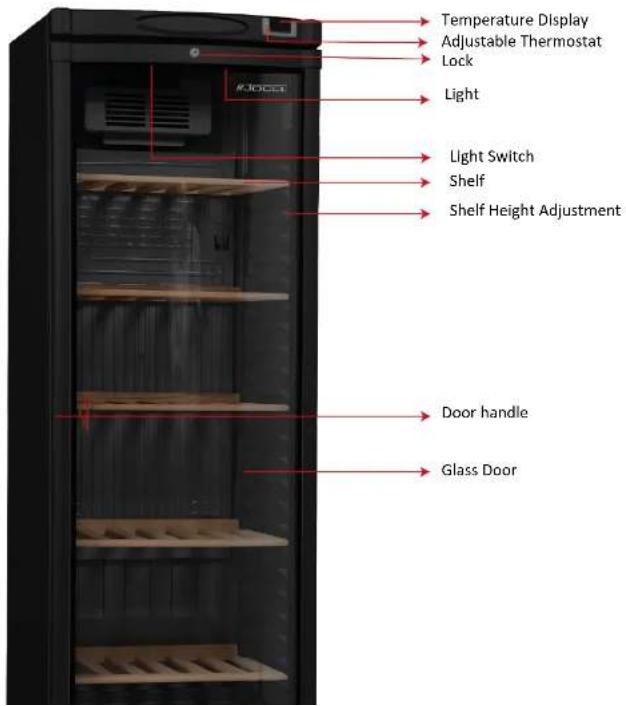
BEFORE INSTALLATION
- Place the product at least one (1) meter away from heat resources (stove, radiator, electric heater etc.). (Picture 5)
- Do not place it opposite to the air conditioner chutes, under fans and direct door and window openings. (Picture 6)
- Do not expose to direct sunlight. Operation ratio will increase if sunlight comes to your product's glass. That means an increase in the energy consumption.
- Air intake and outlet must absolutely be fluent and free for proper operation of the compressor section of your product.
- While approaching your product to the wall, be careful that there is a gap of 150 ~mm (15 ~cm) between the wall and back of your device.

WARNING!
- In very humid environments, ensure that floor and wall of the place where your product is located, is not affected by water; against discharge water overflow danger.
- In installations performed by an authorized person, they can inform the consumer on the suitable place for installation and make suggestion, but the consumer shall give the final decision on where the installation will be made. This above-mentioned process shall also be stated on the relevant installation form by Authorized Service. In case of any loss arising from the place of installation of the product according to the final decision given by the consumer, all responsibility related to such loss shall belong to the consumer.
- Your product gives the best cooling performance according to the climate condition under the conditions given below.
- Therefore, be careful that the temperature of the environment where your product will operate is at these levels.
| Climate Class | Temperature Range | Humidity |
| CC1 | 25°C | 60% Rh |
| CC2 | 32°C | 65% Rh |

POSITIONING
Possible placement positions:
- In a way that the back side alone is opposite to the wall; be careful that there is a gap of 150 mm (15 cm) between the wall and your device. (Picture 7)
-
In a way that is place to a corner; when you place it to a corner, leave a gap of 150 mm (15 cm) behind. You can lean the side, corresponding to the corner, to the wall.
-
The most important point to be considered in all cases of product placement is not to obstruct ventilation of the compressor assembly.
- Without exposing your product to any slope, place and operate it in a manner that it is on its feet or wheels. (Picture 8)
The freer the compressor assembly ventilation is, the better the device will run.

natural_image
Black server rack cabinet with 15 cm height dimension, shown against a blue and gray background (no text or symbols on the cabinet itself)PICTURE 7

natural_image
Black refrigerator with shelves against a blue background, marked with a red 'X' symbol (no text or symbols on the refrigerator itself)PICTURE 8
INSTALLATION
- Before positioning, remove and disassemble all packaging materials and bottom wooden pallet of the product. (It may be necessary to lift your device for removing the bottom pallet).
- Insert the replacement parts inside your product according to the installation instructions. Only use genuine spare parts. Please consult to salesperson for minimum period during which spare
ELECTRIC CONNECTION RULES
The product will start when you insert the plug into the outlet as shown in picture 10 or 13.

WARNING!
- It is forbidden to insert the plug into multiple sockets and to use extension cord. (Picture 10)
• There is no separate on-off switch on your product.
- Do not contact the cables of your product, which are connected to the mains, to hot surfaces.
• The outlet you will use must be grounded.
- Mains voltage and frequency must be same with the value written on the label inside your product. If your mains voltage is extremely below or above the value indicated, definitely supply demanded voltage by using a voltage regulator. You can get assistance from an expert electrician with this regard.
- Do not place your product's cord onto passageways. This may cause you to get injured and damage your product (Picture 11).
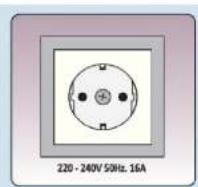
PICTURE 10

natural_image
Diagram of a cable being inserted into a socket, with a red 'X' symbol indicating no text or labels.PICTURE 11

PICTURE 12
PRODUCT USE

WARNING!
- This operating manual applies for various device models. Hardware scopes of the models may
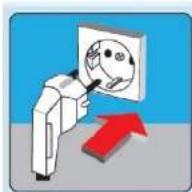
PICTURE 13
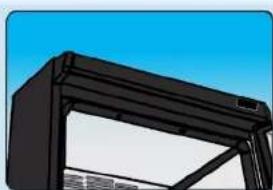
natural_image
Exterior view of a black structural frame with triangular supports against a blue sky (no text or symbols)PICTURE 14

natural_image
3D rendered object with a rectangular frame and two labeled faces (labeled 0 and 1), no text or symbols present.PICTURE 15
LCD DISPLAY
• The bottle cooler has a LCD display on top of the product. You do not need to take any action to activate these units. When you plug in your product, the unit will be activated automatically.
- Cannot change the images on the display. These images can only be changed by Technical Assistance.
• The door of your product is specially produced in our factory. Never interfere in any door or display in case of malfunction and call Technical Assistance immediately.
USE OF THE THERMOSTAT
If the cooler you've purchased is equipped with a digital thermostat, please pay attention to the following matters:
- Digital thermostats contain many programs (such as eco mode, night mode). If you believe that there is a problem with your cooler related to the operation or the cooling, consult Technical Support.
- When you encounter error codes, stop the thermostat alarm and call technical support.

DEFROSTING
The cooler has automatic defrost function. Your cooler will melt frost automatically when it is necessary to defrosted while running.
Although the cooler automatically prevents frost deposit, frost deposit ratio may increase due to high temperature and humidity, as well as frequent use of the cooler. Running period increases as the frost deposit increases. That also increases the energy consumption. in such cases, stop your product and ensure melting of the frost.

WARNING!
An evaporator without ice, will always work at high efficiency.
Water from the evaporator falls onto the drip tray in the compressor section. Although the hot gas evaporates water, it is recommended to check and clean it once a month.

CAUTION!
If your product is stored indoors after it has been turned off:
- Do not cover it with plastic material. Plastic will cause odor and moisture retention in your product as it prevents ventilation. Lack of ventilation can result in corrosion.
TURN OFF
• Transfer the foodstuff inside your product to a convenient place.
• Unplug your product. (Picture 15)
- If your product will not be used for a long time, apply following considerations:
- Clean your product. Otherwise, the humidity on the wall may cause darkening of the internal surface.
CLEANING, MAINTENANCE AND TRANSPORT
- Cleaning of your device is composed of two stages, which are the internal cleaning and external cleaning.
- Following warnings must certainly be abided before start cleaning.

CAUTION!
- Unplug your product before every cleaning.
- Always wear protective gloves during cleaning and maintenance. This will protect you from injuries.
- Never use domestic cleaning agents, abrasive and scratching substances (surface cleaners, detergent, flammable and sparkling, solvent like gasoline, thinner, acid) as cleaning agents. Otherwise loosening may occur in the plastic parts of your product.
- Never use flowing and pressurized water for cleaning.
INTERNAL CLEANING
• Transfer the bottles inside your product to a convenient place.
- Before the internal cleaning, wait until the temperatures of the internal parts of your product reaches to the ambient temperature.
• Always wear protective gloves during cleaning and maintenance. This will protect you from injuries.
- Remove the accessories from inside.
- Perform cleaning with a soft cotton cloth and warm soapy water or by using the cleaning agents recommended.
- Dry with a dry cotton cloth. Products, which are not dried, may darken in time.
• Make sure that no wet or humid area is left in the internal section after cleaning.
- You can reload your product three hours after running your product as stated in this manual.
EXTERNAL CLEANING
- Clean with a cotton cloth and warm soapy water.
TRANSPORTATION OF YOUR PRODUCT
NOTE
Pay attention to the following considerations if you do not use your product for several reasons (such as vacation, trip etc):
If you do not use it for a short time:
- Leave your product in operating state.
If you do not use it for long time and want to shut it down:
- Consume the products inside your product and empty it.
• Unplug the power cord from the outlet. - Apply defrost and internal cleaning steps in this manual.
- Dry inside of the product thoroughly. Darkening may occur in the product which is not dried.
- Leave the product with door open.
Before transportation:
• Unplug your product from the grounded outlet.
- Carry out defrost operation.
- Carry your product at normal using position. Do not carry horizontally, vertically, tilted or with the door open.
- Protect your product from the impacts while carrying. Do not carry your product when it is plugged in or full.
- In order not to cause any accident or for preventing the product to get damaged by falling or sliding, secure your product to the vehicle during the transportation.
TROUBLESHOOTING
The failures and solutions stated in this section can be performed easily by yourself, however
| TROUBLESHOOTING | POSSIBLE SOLUTION | RESULT |
| The beverage cooler is not working. (No sound or only fan sound comes from the product.) | It may be due to the thermostat not plugged in.The fuse may be blown or broken down.The condenser grids may be obstructed or get dirty. | It will run again when reached to the suitable temperature.Insert the plug properly.Consult to the JOCEL Technical Assistance.Clean the condenser grid. |
| The product internal temperature is high. | External ambient temperature is very high or it's with the wrong thermostat setting.The ventilation grids (very close to the back wall) are obstructed or blocked by an object.It may have been expose to excessive external wind.The Condenser grids are very dirty. | Move the beverage cooler to a place where the external temperature is lower.Adjust the temperature, like the recommended.Clean in front of the ventilation grids.Prevent the wind.Clean the condenser grids. |
| The product internal temperature is very low. | Wrong internal thermostat setting. | Re-set the thermostat. |
| Lamp of the cooler do not light | Lamp are turned off.Lamp has blown or starter failure. | Turn-on the lamps.Replace failed part. |
| High degree of sweating on the glass and inside the device. | Water discharge hole may be obstructed when sweating is seen inside the beverage cooler.In glass sweating on the other hand, current external ambient humidity is over 65%. | Clean water discharge hole. With regards to the high humidity, you can move your beverage cooler to an environment with less humidity. |
GENERAL WARRANTY TERMS
- The warranty is valid only on presentation of invoice of purchase.
- This WARRANTY is limited exclusively to parts substitution ineffective due to faulty manufacture, made in our workshops.
- The elimination of several faults of the scope of the guarantee is made for repair or replacement of defective parts, according to the discretion of our technical services. Defective parts are our property.
- Are not covered under warranty damage caused by transportation, neglect or poor use, improper assembly or installation, as well as external influences such as: lightning strikes or power, flooding, humidity, etc.
- Lose warranty, all appliances that are not being used according to the instructions, or connected to FEEDING NETWORKS not guarantee a constant voltage of 220/240V.
- The warranty does not cover damages for personal injury or damage caused directly or indirectly in any capacity whatsoever.
- This warranty terminates when it is found to have been undergoing repairs, alterations or interventions by any person not authorized by Jocel.
THE WARRANTY EXPIRES
- If the appliance has not been installed by an Accredited Technician.
- Exceeded the current legal period, for home appliances and for industrial appliances, warranty expires and assistance will be made by charging the costs of labor hand, according to current fees
- With the modification or disappearance of the nameplate of the appliance.
JOCEL®
HEADQUARTERS:
Rua Alto do Curro, n.º 280
4770-569 S. COSME DO VALE
V.N. de FAMALICAO
Telef. 252 910 350/2
Fax: 252 910 368/9
email: jocel@jocel.pl
http://www.jocel.pt
DECLARATION OF CONFORMITY
CE
We declare on our own responsibility that the machine indicated below
Product BEVERAGE COOLER
Brand JOCEL
Model JAG003447
Complies with the following European directives and standards implementation:
Low Voltage
2014/35/EU
IEC 60335-1:2010+AMD1:2013
AMD2:2016
IEC 60335-2-89:2019
- AVISO!
- POSICIONAMENTO
- UTILIZAÇÃO
- CUIDADO!
- ARMAZENAMENTO
- ¡AVISO!
- POSICIONAMIENTO
- UTILIZACIÓN
- ¡CUIDADO!
- ALMACENAMIENTO
- JOCEL®
- WARNING
- NOTE
- INDEX
- WARNING!
- SAFETY WARNINGS
- CAUTION!
- PRODUCT AND TECHNICAL SPECIFICATIONS
- BEFORE INSTALLATION
- POSITIONING
- Possible placement positions:
- INSTALLATION
- ELECTRIC CONNECTION RULES
- PRODUCT USE
- LCD DISPLAY
- USE OF THE THERMOSTAT
- DEFROSTING
- TURN OFF
- CLEANING, MAINTENANCE AND TRANSPORT
- INTERNAL CLEANING
- EXTERNAL CLEANING
- TRANSPORTATION OF YOUR PRODUCT
- Before transportation:
- TROUBLESHOOTING
- GENERAL WARRANTY TERMS
- THE WARRANTY EXPIRES
- DECLARATION OF CONFORMITY
- CE
Brand : Jocel
Model : JAG003447
Category : Bar Stool