PLATV650 - Speaker Pyle - Free user manual and instructions
Find the device manual for free PLATV650 Pyle in PDF.


User questions about PLATV650 Pyle
0 question about this device. Answer the ones you know or ask your own.
Ask a new question about this device
Download the instructions for your Speaker in PDF format for free! Find your manual PLATV650 - Pyle and take your electronic device back in hand. On this page are published all the documents necessary for the use of your device. PLATV650 by Pyle.
USER MANUAL PLATV650 Pyle
Dual Waterproof Powered Speaker Sound Systems, 4-Channel Amplifier, (4) 6.5" Speakers, 1200 Watt
PLABTV
660
Dual Bluetooth & Waterproof Powered Speaker Sound Systems, 4-Channel Amplifier, (4) 6.5" Speakers, 1200 Watt

natural_image
Black cylindrical device with ventilation grille, no visible text or symbols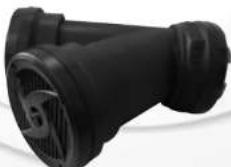
natural_image
Close-up of a black plastic mechanical component with a circular grille (no visible text or symbols)
PLATV650/PLABTV660
Dual Waterproof Powered Speaker Sound Systems
• Includes (2) Angular 'Y-Shaped' Speakers
• *Built-in Bluetooth Wireless Music Streaming (PLABTV660 ONLY)
• 4-Channel Digital Amplifier
• Universal Vehicle Mounting Ability
• Waterproof Marine Grade Housing
• Rugged, Heavy-Duty & Weather Resistant Design
• Dual Speaker 2-Way Powered Audio System
• Full Range Stereo Sound Reproduction
• Engineered Tube Enclosure for Maximum Bass Response
• Aux (3.5mm) Input Connector Jack
• Ability to Connect External Devices
• Instant Connect & Stream Audio Ability
• 'Plug & Play' Connection for Easy Installation
• Perfect for ATV, UTV, 4x4, Golf Carts, Jetski, Snowmobile & More!
• *Can be Hard-Wired or Powered via Vehicle Cigarette Lighter Power Outlet
Bluetooth Connectivity for PLABTV660 Only
• Wireless Audio Streaming Ability
• Works with All of Your Favorite Devices
• (iPhone, Android, Smartphones, iPad, Tablet, etc.)
• Includes Bluetooth Console Controller
- Bluetooth Version: 3.0
• Bluetooth Network Name: Pyle Audio
• Bluetooth Wireless Range: 30'+ Feet
• Automatic Bluetooth Activation with System Power On
• Automatic Bluetooth Disconnection with Aux-in Connection

natural_image
Exterior view of a yellow Catamar with black gear and camera (no visible text or symbols)SAFETY PRECAUTIONS:
- Do not operate any mobile video equipment while driving – safe driving should always be your highest priority.
- Do not open or attempt to repair this unit yourself. Refer any repairs to a qualified Pyle Audio technician.
- If there is smoke or any peculiar odor present during use or if there is damage to any of the component enclosures, immediately remove it from your system and send to your local dealer or service center as soon as possible.
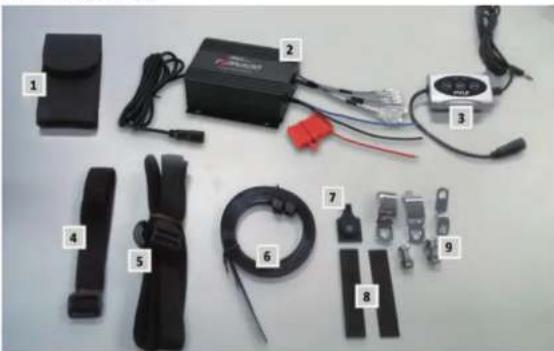
ACCESSORIES
natural_image
Collection of electronic devices and components laid out on a plain surface, including batteries, cables, and connectors (no visible text or labels)- Bluetooth Device Carying Bag
- 4 Channel Amplifier
- Bluetooth Remote control (PLABTV660 only)
- Belt for Carying Bag
- Mounting Belt to Attach Unit to ATV
C. The Tis-Sen-Wilkin and Marmaline
INSTALLATION PRECAUTIONS
- The unit has to be wired to a switched source to avoid draining your vehicles battery.
- Unit can be powered from a vehicles cigarette lighter port, or be hard wired to the battery.
- When wired directly to the vehicles battery, please insure proper fuse rating of 20 Amps is placed in line with the positive battery terminal.
- The unit is weather proof but should not be submerged in water under any circumstances.
- Unit can play audio out of any device that has a 3.5mm output audio jack
- Use only the installation parts provided with the unit.
INPUT AND OUTPUT CABLES:
text_image
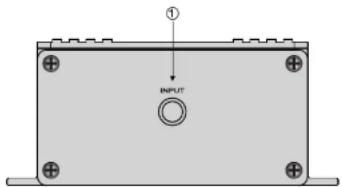
① INPUT① INPUT Aux (3.5mm) input connector Jack for connecting other audio devices for PLATV650
① INPUT Connected with Bluetooth controller for PLABTV660
POWER AND SPEAKER WIRING

flowchart
graph TD
    A["4 CHNAT POWER INverter"] --> B["White"]
    A --> C["WHITE/BLACK"]
    A --> D["GRAY"]
    A --> E["GRAY/BLACK"]
    A --> F["GREEN"]
    A --> G["GREEN/BLACK"]
    A --> H["PURPLE"]
    A --> I["PURPLE/BLACK"]
    A --> J["4-8 ohm speakers"]
    K["BATTERY"] --> L["Black"]
    K --> M["RED"]
    K --> N["BLUE"]
    K --> O["Accessory switch"]
wire color
Red
Black
Blue
White
White/Black
Gray
Grav/Black
Description
Battery (+), 12dc
Battery (-), Ground
Remote Turn On, 12vdc = ON
CH1 (+)
CH1(-)
CH2 (+)
CH2(1)
BLUETOOTH INSTALLATION

text_image
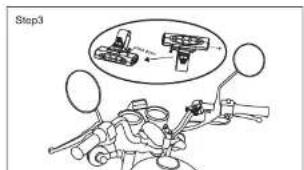
Step1- Install "P" shaped clamp or "Z" shaped bracket (item#9) threaded on to the Bluetooth controller hook. (packed with Bluetooth controller). Use the provided bolt to fix on the handlebar, it can be adjusted the tightness by provided EVA & rubber pad

text_image
Step2- Slide the Bluetooth controller into the hook.
text_image
Step3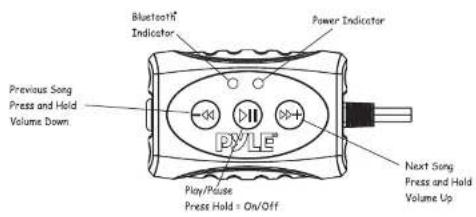
text_image
Previous Song Press and Hold Volume Down Bluetooth® Indicator Power Indicator PYLE™ Play/Pause Press Hold = On/Off Next Song Press and Hold Volume UpBLUETOOTH PAIRING AND CONNECTION:
-
Connect Bluetooth controller box to your device
-
Press and Hold >|| for three seconds until power indicator lights (red)
-
The system will automatically go into pairing mode The power indicator will turn red for about 7 seconds and then alternating red and blue (Bluetooth blue Power red) Please be sure that Bluetooth is turned on your device Select Pyle Audio on your device to connect Bluetooth controller (if the Bluetooth controller is connected the light will turn blue and not flash)
-
When the device is out of Bluetooth range, Bluetooth will be disconnected automatically and automatically reconnect when detected in range again. (If not please just repeat steps 1 and 2)
- When Bluetooth is disconnected or the 3.5mm AUX Input is plugged in, the power indicator will glow red.
PLAYING MUSIC:
- Press >|| to start or pause the music
- Press >>>+ shortly for next track, Press and hold for Volume up
- Press -<< shortly for previous track, Press and hold for Volume down
Pyleaudio.com
PYLE®

IMPORTANT: Pack carefully in original package if possible. We are not responsible for damage incurred in returning items for repair. A letter stating your exact street address, daytime phone number, and the problem you are experiencing should be included. You must also enclose a copy of the original receipt as proof of date of purchase
Brooklyn, NY 11204
(718)535-1800
Monday Through Thursday. 9AM to 5PM
Friday 9AM to 12PM Eastern.