PPHP158BMA - Speaker Pyle - Free user manual and instructions
Find the device manual for free PPHP158BMA Pyle in PDF.


User questions about PPHP158BMA Pyle
0 question about this device. Answer the ones you know or ask your own.
Ask a new question about this device
Download the instructions for your Speaker in PDF format for free! Find your manual PPHP158BMA - Pyle and take your electronic device back in hand. On this page are published all the documents necessary for the use of your device. PPHP158BMA by Pyle.
USER MANUAL PPHP158BMA Pyle
natural_image
Exterior view of a black and white audio amplifier speaker with mesh grille (no text or symbols visible)★★★☆☆×☆☆
★灯来啦▲▲+☆米门来翻○出■半六☆□■灯□+□▲来▲门来翻×来门
In order to achieve the best performance of your product, please read this instruction manual carefully before using, and keep it for future reference.

CAUTION
RISK OF ELECTRIC SHOCK, DO NOT OPEN

Caution: To reduce the risk of electric shock do not open this device, there are no serviceable parts for customers. Please refer any maintenance or repair to qualified personnel.

This sign means the existence of dangerous voltage at the inside of the unit, which states a risk of electric shock.

This sign means that there are important instructions of operation and handling in the manual that comes with this device.
IMPORTANT SAFETY INSTRUCTIONS - SAVE THESE INSTRUCTIONS
WARNING:
When using electric products, basic precautions should always be followed, including the following:
- Read all instructions before using the product.
-
Do not use this product near water, i.e. a bathtub, sink, web basement, or swimming pool.
• This product, in combination with other headphones and speakers, may -
The product should be located away from heat sources such as radiators, heat resistors, or any other product that produces heat.
- The product should be connected to a designated power supply described in these instructions.
- The power supply cord should be unplugged when left unused for a long period of time.
- Care should be taken so that objects do not fall or liquids are not spilled into the enclosure through its openings.
• The product should be serviced by quality personnel when: - The power supply cord or plug has been damaged
- Objects have fallen, or liquid has been spilled in the product
- The product has been exposed to rain
- The product does not appear to operate normally or exhibits a marked change in performance
- The product has been dropped, or the enclosure damaged
- Do not attempt to service the product beyond that described in the user-maintenance instructions. All other servicing should be performed by quality service personnel.
INSTRUCTION
Before connecting the speaker, make sure the system is off and the controls on the minimum level. On the contrary the system could damage:
- Plug the AC plug to electric power and to the speaker.
- Plug the microphone on the "MIC" input with a 6.3 connector or Canon.
- Plug an auxiliary system (CD,DECK,MP3,DVD.etc) on "LINE IN" input
- Turn on the systems. A green LED light up on the speaker to indicate it is
on. - Set the volume on the middle level on the MIC and LINE IN input.
- Increase little by little the master volume
- Set 5 band EQ controls to equalize the sound.
CAUTION
- Instructions are intended to alert the user to the risk of injury or material damage, should the unit be used improperly.
Step 1: Push the bottom "MODE", until to find "BLUE" on the display
Step 2: Turn on smart phone bluetooth function, search for speaker box Blue connect --- "Bluetooth", no password to finalize the connection of Bluetooth between smart phone and speaker box.
Step 3: Once the Bluetooth is connected between smart phone and speaker box, play the music on the smart phone, then please enjoy the big power sound from speaker box!
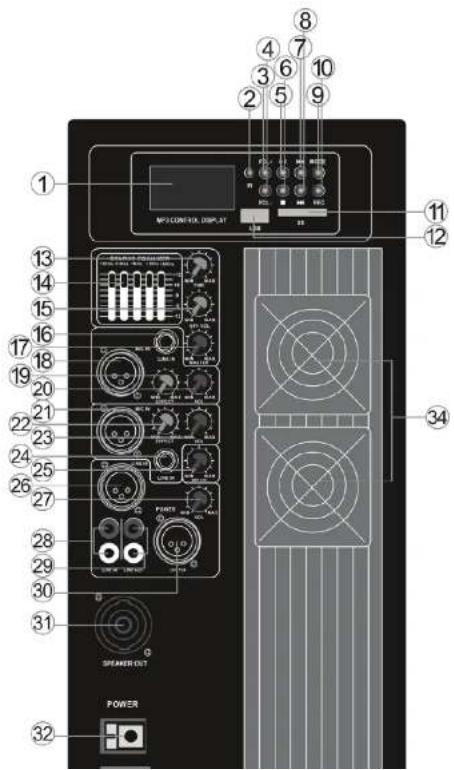
AMPLIFIER CONTROLS
-
LCD display
-
IR for remote control
-
FOL+: Next folder
-
FOL-: Last folder, long press this button to enter REPEAT: RANDOM/ALL/FOLDER/ONE
-
Play/Pause: Short press for pause on MP3/Bluetooth with automatic search function on FM
-
STOP
-
Last Track/channel
-
Next Track/channel
-
Mode: USB / SD / FM / Bluetooth function of conversion, in USB/SD mode, long press this button to power ON/OFF the unit but the backlite of LCD display is still lighted
-
REC: Short press to enter Recording folder, long press for recording: at first, you should ready U disk or SD card storage devices and audio input device for recording, press REC to start recording. After the recording, press REC to save and exit the current state of the recording, and then press REC to enter the recording folder through the "up and
-
SD input
- USB input
- TIME: Effect Delay Time
- EQ: 5 band graphic equalizer
- EFF VOL: Master Effect Volume Level
- LINE IN: LINE 1 input
- MASTER: Control General Volume Level
- MIC IN: MIC 1 input
- Effect volume Level for MIC IN 1/LINE IN 1
- VOL: MIC IN 1/LINE IN 1 Volume Level
- MIC IN: MIC 2 input
- Effect volume Level for MIC IN 2/LINE IN 2
- VOL: MIC IN 2/LINE IN 2 Volume Level
- LINE IN: LINE 2 input
- MP3 VOL: Control Volume of MP3
- LINE IN:XLR (balanced signal), and line input
- VOL: Control Volume of LINE IN
- LINE IN: LINE RCA input (Unbalanced signal)
- LINE OUT: RCA (Unbalanced signal) channel line output, used for recording or other linking
- OUTPUT: XLR (balanced signal) channel line output
- SPEAKER OUT: Speak on output for connecting a passive speaker
- POWER: Power Supply Switch
- Power Supply Input Connector: Using with a power cord.

text_image
1 2 3 4 5 6 7 8 9 10 11 12 13 14 15 16 17 18 19 20 21 22 23 24 25 26 27 28 29 30 31 SPEAKER OUT POWER MOSCONTRAL DISPLAY PDDR RCC CNC GND GND GND GND GND GND GND GND GND GND GND GND GND GND GND GNDREMOTE CONTROL
- MP3 ON/OFF
- MODE: USB / Bluetooth function of Conversion
- Loudspeaker mute
- Play/Pause
5.EQ - KEY number for selecting the music
- Last song
- Next song
9 & 10. Reduce/increase the volume - REPEAT ONE/ALL.
- USB Connect function of Conversion

text_image
① ② ③ Made ④ ⑤ EQ VOL- VBR+ 0 RPT USB ⑥ ⑦ ⑧ ⑨ ⑩ ⑪ ⑫ ⑬PPHP158BMA
Wireless BT Streaming PA Monitor Loudspeaker
High-Powered Stage PA Speaker Cabinet with Wireless Streaming
(15" -inch, 1000 Watt)
System Features:
- Versatile High-Powered PA Monitor Speaker System
• Active-Powered Loudspeaker Cabinet Design
• Rugged, Durable & Reliable Sound
• Stage & Studio Tested - Bluetooth Wireless Music Streaming
• Speaker System: 15" Woofer, 1.75" Tweeter
• Compression Driver with Titanium Diaphragm
• 2-Way Full Range Audio Projection
• Built-in Digital Audio Amplifier - Rear Panel Rotary Dial & Button Control Center
- Connect & Stream Audio from External Devices
• XLR (3-Pin) Microphone/Guitar/Instrument Connectors
• XLR (3-Pin) Audio Line Output
• 1/4" (6.35mm) Audio Input Connectors
• RCA (L/R) Audio Input/Output Jacks - Speak-On (8 Ohm) Speaker Connector
- USB Flash Drive & SD Memory Card Readers
• FM Radio with Digital LCD Display
• ID3 Tag Song Readout Info: LCD Displays Song Title/Song Artist - Independent Input Audio Configuration Settings
F. R...J C...L: F0 C...L
Bluetooth Wireless Streaming:
- Instantly Stream Music from Your Bluetooth Devices
- Works with All Your Favorite Bluetooth Devices (iPhone, Android, Smartphone, iPad, Tablet, PC, etc.)
- Bluetooth Version: 2.1
- Bluetooth Network Name: 'BLUE'
- Wireless Range: Up to 100' ft.
What's in the Box:
• PA Speaker Monitor
- Power Cable
- Remote Control
Technical Specs:
• Power Output: 1000 Watt MAX
• Speaker Style: Molded Cabinet
- Magnet: 60 Oz
• Voice Coil: 3.0" -inch
- Amplifier Class: AB
- Impedance: 8 Ohm
• T.H.D.: <1%
• Sensitivity: 96dB (+/-2dB)
• Mic Input Level: <15mV
• Line Input/Output Level: >250mV
• Frequency Response: 40-18kHz
• Digital Audio File Compatibility: MP3, WMA
• Maximum SD/USB Flash Memory Support: 32GB
- Remote Battery: Requires (1) x 'CR20-25' Button Cell, Included
• Power: 110/220V
- Dimensions (I, v W, v H) 10 R" v 17.5" v 21 R" inches
PYLE
PyleUSA.com

VISIT US ONLINE:
Have a question?
Need service or repair?
Want to leave a comment?
PyleUSA.com/ContactUs