
KBM-ABWS - Keyboard Xcellon - Free user manual and instructions
Find the device manual for free KBM-ABWS Xcellon in PDF.


| Brand | Xcellon |
| Model | KBM-ABWS |
| Product Type | Bluetooth + Wired Keyboard for Mac |
| Number of Keys | Full-size (104 keys) with numeric keypad |
| Switch Type | Low-profile scissor-switch |
| Connectivity | Bluetooth 5.0 (up to 4 devices) and USB-C wired |
| Operating Range | Up to 10 m (33 ft) |
| Battery Capacity | 400 mAh rechargeable lithium-ion |
| Charging Port | USB Type-C |
| USB Cable Length | 1.5 m (5 ft) |
| Dimensions (W × D × H) | 440 × 125 × 25 mm (17.3 × 4.9 × 1.0 in) |
| Weight | 480 g (1.06 lb) |
| Operating System Support | macOS (full function), Windows/Android (basic) |
| Function Keys | Brightness, Mission Control, Spotlight, Dictation, Screenshot, Media Controls, Volume, Sleep |
| LED Indicators | Caps Lock, Bluetooth, Battery |
| Special Features | Dedicated Bluetooth device selection keys (F1-F4), USB-C wired auto-switch |
| Included Accessories | USB-C to USB-A cable, user manual |
| Maintenance | Clean with soft dry cloth; remove dust with soft brush or compressed air |
| Safety Precautions | Keep away from moisture/heat; do not disassemble; do not remove keycaps |
| Certifications | FCC Part 15 compliant |
| Warranty | 1-year limited warranty |
Frequently Asked Questions - KBM-ABWS Xcellon
User questions about KBM-ABWS Xcellon
0 question about this device. Answer the ones you know or ask your own.
Ask a new question about this device
Download the instructions for your Keyboard in PDF format for free! Find your manual KBM-ABWS - Xcellon and take your electronic device back in hand. On this page are published all the documents necessary for the use of your device. KBM-ABWS by Xcellon.
USER MANUAL KBM-ABWS Xcellon
Bluetooth + Wired Keyboard for Mac
User Manual

XCELLON

Thank you for choosing Xcellon.
The ZentralPure keyboard is a Bluetooth keyboard that requires low-profile uniform construction designed for Apple computers on macOS. It offers a full-size key bed and numerically keyboard with virtual keyboard keys. The platform will open operation but alone may be reached directly. The keyboard is used to find wireless bytes and simultaneously set the hardware tool in the Bluetooth selector keys in addition, instead a strong PDF keyboard function buttons address wireless data transport and volume. Charge the keyboard as the US Type PCR.
Precautions
- Please read and follow these instructions and keep this manual in a safe plate.
- keep the product away from sources of moisture and heat
- stands the product of cars.
clear this point with only soft, dry cloth.
- Remove dust and debris with a soft brush or compressed air
- Do not remove the keycaps for any reason. Removing the keycaps will damage the keyboard
and exist: be accurately
Do not disassemble or repair the product yourself
All images are for illustrative purposes only.
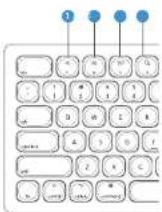
Function Keys
- Deutschebright news.
- Blacksmith/Alison USA
2 Increase brightness mode selector (fn-F1.5)
3 Missioncontrol 15 Bluetooth device selector - Snowlight
- Dictation other function keys
6 screenshot Peru
7 May/Pause - Revet: / Free cash
- Fast-foreurs/Next track
10 Mute
11 Volume does
17 Volume p
13 Poweroptons/Sleep
14 Blacksmith/White USB
mode selector (fn-F15)
15 Bluetooth device selector
[Non-Text]
Other function keys
16 Email Picker
[Non-Text]
LED Indicators
17 Caps Lock
16 Bluetooth
19 Battery
(二)本次股东大会

Powering On
Move the power switch to the OK position. The Bluetooth indicator will briefly illustrate
Charging the Keyboard
The battery indicator light binds when the battery is low.
Use the included USB Type-1 cable to connect the keyboard to a USB charge such as the
X color: Mighty Min LSD Type: C Change
The light is sold while the keyboard is charging.
the indicator turns off when the keyboard is fully charged.
Bluetooth Mode
The keyboard can be pulsed with four separate Bluetooth devices. Fair the keyboard to a computer, laptop, tablet, and iPhone and switch between the devices.
- Make sure Bluetooth is turned on in your device's Bluetooth settings.
- Press and hold: the Bluetooth key that will pair with the device. The device is in porting mode when the Bluetooth indicator light plinks
- On the devices bluetooth settings, select Bluetooth keyboard, and the device will pair with the Bluetooth key. The keyboard will not only any device that was previously paired with the key.
To select features filoted by device to another press the corresponding filset key.
Wired USB Mode
Use the included USD Type-Cable to connect to a computer. Once, the keyboard is connected to the computer, it automatically switches to wired mode and disables Bluetooth
Key Controls: Dictation
- Pass the 75 instructions open the Directional Design window. If the Directional Window is open, follow these instructions:
-
In System Preferences, select Keyboard
-
In the keyboard preferences select Dictation
-
In the Direction window, click to the Shortcut drop-down menu, and move sure Press Control Key Twice is selected
9
Note: This keyboard is configured for marks 12 (Monterey). Apple may change keyboard short tour functions in 'future OS versions.
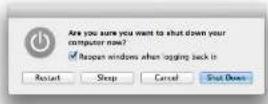
Power Button
From the back screen press, the power button to put the computer to sleep. Press is key to wake it up.
'when logger is, press and hold the power button to open the power option's dialog box
Specifications
| Number of Keys | |
| Switch Type | |
| System Connection | USB Type 5 |
| Operating Range | |
| Battery Capacity | |
| USB Cable Length | |
| Supported GS | OS (FACOS, Windows, Andoc, Basic Functionality) |
| Dimensions (X × I × Q) | 4.95 in (2.6 × 1.0 × 12.5 μm) |
| Weight |
FCC Compliance
This device is replaced with the 1.5 of the FOC Res. Operational subject to the following conditions
-
T's device technology implementation
-
This device may be open to interference/surface binding (including the main source underbed conditions).
Warning Charges or modifications are not expressly approved by the party responsible for implementation would not use authority or operate its implementation.
- The following described entities are not only all the initial and final designs, pursuant to Part 15 of the FCC lines. These limits are designed to provide reasonable information from the first time of the particular institution. This equipment generates an air and can reduce radio frequency, energy and heat. It is also rated for a reliable air and the actual means, if possible, are full, but it is not a certain area. However, these are possible that there are no other particular
(6) 1.2. (7) Equation, class 4, and the interference
radio or television report, which can be determined by turning the
preference by one or more of the 10 low measures
Excellent to locate the existing phenomena.
- 2017年1月1日
[1] Deesertentel, et al. Deesertel (the first letter)
10.4.11 2023年5月28日
be de are liu crei pa#t##d = neel generalll. opes te
Figure 4. The text can be used to find the following content on the exercise:
7.2.17 通过深圳证券交易所网站
One-Year Limited Warranty
The company's shareholding structure is defined as the parent company and its subsidiaries, which are not limited to use for a portion of the Buyer from the entire purchase date of infinity 60 days or any payment. The warranty provided herein will be subject to the sale, commonly used for the above 1% share capital, and the minimum value of 25 million dollars, of which product has been distributed in the bounded manner and its intended cost term, because it of the product or part(s) is deemed by the warranty owner in the products has been discontinued, the warranty consider retained the period for each other with termination, which may be retained in time.
(1) This company is not necessarily a legal or financial entity that is not to be construed as an offer or a solicitation of any such material, nor any other information.
In the case of the first, we have a 10% value in the second question. In that case, the value is \500 (in %) for the third, and the defect is associated with the \500, other, or of the last. Shipment of the defect is associated with the purchase's payment and expense.
For more information to arrange services with www.xcology.com or call Customer 50+ on 212-104-2018
Funk: 2014, 1985; 1986.
无法识别
Stock is a registered trademark of the Global Group, © 2022 Gradus Group LLC. This Reserved.

XCELLON
6.24


Brand : Xcellon
Model : KBM-ABWS
Category : Keyboard