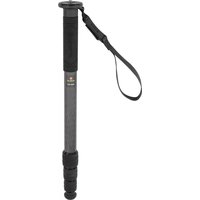
RCM-433 - Tripod Robus - Free user manual and instructions
Find the device manual for free RCM-433 Robus in PDF.


| Product Type | Monopod |
| Brand | Robus |
| Model | RCM-433 |
| Material | Fiber composite |
| Maximum Load | 38 lb (17.2 kg) |
| Maximum Height | 65 in (160 cm) |
| Folded Length | 17.2 in (43.7 cm) |
| Leg Sections | 6 |
| Weight | 1.0 lb (0.45 kg) |
| Mounting Screw | Reversible 3/8-16 and 1/4-20 |
| Included Tools | 2 mm and 2.5 mm hex keys |
| Feet Included | Rubber foot and spike foot |
| Accessories | Wrist strap, belt clip |
| Warranty | Ten-year limited warranty |
| Primary Use | Camera, lens, or head support |
| Extension Mechanism | Twist locks |
| Baseplate | Removable with set screw |
| Cleaning | Wipe with dry cloth; avoid solvents |
| Storage | Store in dry place when not in use |
| Country of Origin | Not specified in manual |
Frequently Asked Questions - RCM-433 Robus
User questions about RCM-433 Robus
0 question about this device. Answer the ones you know or ask your own.
Ask a new question about this device
Download the instructions for your Tripod in PDF format for free! Find your manual RCM-433 - Robus and take your electronic device back in hand. On this page are published all the documents necessary for the use of your device. RCM-433 by Robus.
USER MANUAL RCM-433 Robus
4 & 6 SECTION / CABLE ON FIBER MONDFODS
VANTAGE SERIES 3

ROBUS
Securing a Camera/Lens or Head
Determine which side of the mounting screw you will need to use for your camera, Ions or head and follow the instructions from reversing the Mounting Screw.
-
Attach your camera, lens, or head to the mounting screw, and make sure it's securely seated and flush with the baseplate.
-
Use the included 2.5 mm hex key to tighten the set screw from the bottom of the baseplate and secure your camera, lens, or head.

Extending the Monopod
Turn each twist lock clockwise and extend each leg section to the desired length. Turn the twist locks counterclockwise to tighten.

natural_image
Pure mechanical diagram of a cylindrical pipe with internal segments and directional arrows, no text or symbols present.Swapping the Feet
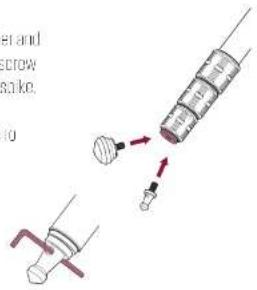
The monood comes with a rubber and a spike foot. To swap the foot, unscrew the rubber foot and screw in the spike.
Use one of the included hex keys to tighton or loosen the spike foot.
Wrist Strap and Belt Clip
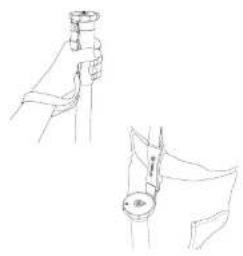
Use the wrist strap to turn to stabilize and secure the menoped in your hand.
The integrated belt clip attaches the monopod to your waist for hands free transport.
natural_image
Line drawing of two hand positions with a magnifying glass, no text or symbols presentReversing the Mounting Screw
The monopod offers a reversible 3/8-16 and 1/4-20 mounting screw.
- Loosen the set screw with the included 2 mm hex key.
- Un screw the baseplate until you can remove the mounting screw and switch it to the other side.
- Screw the baseplate back onto the monopod until it's secure, and tighten the set screw from the top.


Specifications
| RCM-633 RCM-439 | |
| Maximum Load 38 lb 75 kg/189 lb 6.7 kg) | |
| Maximum Height | 65 in (160 cm) |
| Folded Length 17.2 in (14.7 cm) 20.1 in 1536 cm) | |
| Leg Sections 6.4 | |
| Weight 1" lb (100 kg) 11 lb (1.5 kg) | |
included hex keys 2 and 2.5 mm
Ten-Year Limited Warranty
The following table provides the results of the overall process: for the time required, it is important and we need to be a formal condition that is not possible. It is important that the original process was taken on the 1st place of the environment whether you could have the activity now had been reported, if this was done, then it took place up to the other level of the environment. The activities were not required that take a high volume of the product in the final quarter end of the year. This is important because of the amount of capital shall be taken on the event now had the product has been recorded, but the activity was not necessary for the purpose of use as the material used for the time.
This authority does not over time to request the case of a case, or should be an attention on such information on whether the case is required. It is also that the case is required to be an attention on such information on which it is required. This is not allowed to provide any information in this case.
The following text is provided in the above section of the following: "A. A. A. A. A. A. A. A. A. A. A. A. A. A. A. A. A. A. A. A. A. A. A. A. A. A. A. A. A. A. A. A. A. A. A. A. A. A. A.

ROBUS™
A-Gradus Group Dr.12
10.27 AUST 9TH DEC 14TH 15TH 16TH WWW.TSD.BGJ.COM
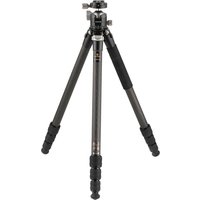

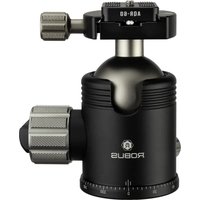
Brand : Robus
Model : RCM-433
Category : Tripod