
RCC-5560 - Tripod Robus - Free user manual and instructions
Find the device manual for free RCC-5560 Robus in PDF.


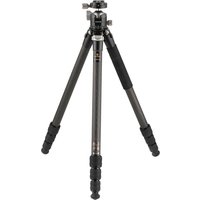
| Product Type | Tripod |
| Brand | Robus |
| Model | RCC-5560 |
| Series | Vantage Series C |
| Material | Carbon Fiber |
| Number of Leg Sections | 4 |
| Maximum Height | 60.1 in (152.6 cm) |
| Minimum Height | 12.6 in (32 cm) |
| Folded Length | 22.5 in (57.2 cm) |
| Weight | 4.4 lb (2.0 kg) |
| Maximum Load | 35 lb (15.9 kg) |
| Leg Lock Type | Twist Lock |
| Leg Angle Adjustment | Three angles |
| Feet Type | Interchangeable rubber feet and spikes |
| Mounting Thread | 3/8-16 |
| Counterweight Support | Yes, with carabiner |
| Warranty | Ten-Year Limited |
Frequently Asked Questions - RCC-5560 Robus
User questions about RCC-5560 Robus
0 question about this device. Answer the ones you know or ask your own.
Ask a new question about this device
Download the instructions for your Tripod in PDF format for free! Find your manual RCC-5560 - Robus and take your electronic device back in hand. On this page are published all the documents necessary for the use of your device. RCC-5560 by Robus.
USER MANUAL RCC-5560 Robus
4 SECTION / CARBON FIBER
VANTAGE SERIES C

ROBUS
Extending the Tripod Legs
-
Turn each wish-box clockwise and extend each leg to the desired length.
-
Um the twist lacks counterlockwise to righten
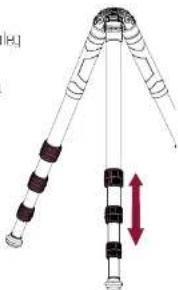
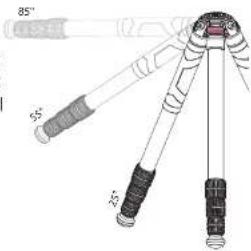
Adjusting the Leg Angles
- The legs can be set at one of three angles.
- Lift the leg angle lock, adjust the leg and press down on the lock. Secure the leg by moving it until the angle lock clicks into place at one of the locking angles.
Swapping the Feet
The tripod comes with the rubber feet installed.
To swap the feet, Irscrew the rubber feet
and replace them with the induced spikes.
To tighten or loosen the spikes use the
Included smaller hex key.

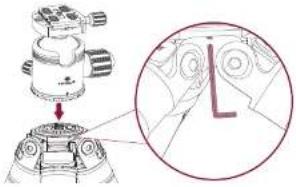
Attaching a Head to the Chassis
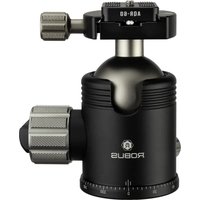
- Remove the rubber guard to reveal the 3/8-16 mounting post.
- Screw the head onto the chassis.
- Secure the head by tightening the three set screws with the included hex key
- Once the head is securely seated on the chassis, attach your camera to the head.
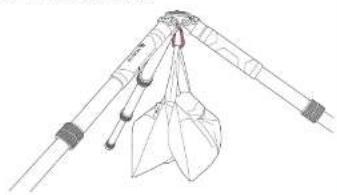
Attaching a Counterweight
- A tac the carabner to the cop underneath the chassis
- Hang or hook a counterweight onto the carbomer for extra stability on an unoven surface or in windy conditions.
natural_image
Line drawing of a mechanical device with lever and handle (no text or symbols)Specifications
Maximum Load 35 b.125 kg
Maximum Height
Minimum Height 32 in (101 cm)
Folded Length 225 in 158.3 pm
Leg Sections-1
Weight 44 lb (2 kg)
ACC-5560
60in 11524e-1
Ten-Year Limited Warranty
The following report is amended: The original document must be written with the above section of the company's internal management system, which is not to be used in any way from the other department or other services. The company's internal management system is not to be used in any way from the other department or other services. The company's internal management system is not to be used in any way from the other department or other services.
The following table provides a reference for the reference of the reference of the reference of the reference of the reference of the reference of the reference of the reference of the reference of the reference of the reference of the reference of the reference of the reference of the reference of the reference of the reference of the reference of the reference of the reference of the reference of the reference of the reference of the reference of the reference of the reference of the reference of the reference of the reference of the reference of the reference of the reference of the reference of the reference of
The following table provides the annual financial results from the United States: 2013, 2014, and 2015. The results are based on the current year's performance and the annual growth rate of 80% (year-to-date), and which the forecasted years are still a company with the P/E ratio and price of purchase as follows: a consolidated financial outlook that is not available for future information to a non-service year. Our estimates subject to prior in the period by year 2015-04-2016.

ROBUS 24
A Gaudus Group David
Brand : Robus
Model : RCC-5560
Category : Tripod