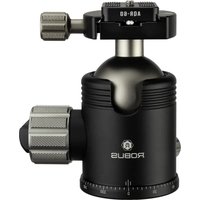
RTH-1050 - Tripod Robus - Free user manual and instructions
Find the device manual for free RTH-1050 Robus in PDF.


| Product Type | Ballhead for Tripod |
| Brand | Robus |
| Model | RTH-1050 |
| Maximum Load | 55 lb (25 kg) |
| Material | Aluminum |
| Height | 5 in (12.7 cm) |
| Base Diameter | 2.75 in (7 cm) |
| Weight | 1.8 lb (0.8 kg) |
| Lateral Tilt Range | -45° to +45° |
| Vertical Tilt Range | 0° to +90° |
| Panning Range | 360° |
| Quick-Release Plate Type | Arca-Swiss compatible |
| Mounting Screw | 1/4-20 |
| Base Mounting Thread | 3/8-16 |
| Key Features | Bubble level, 90° notch for portrait orientation, tension dial, pan lock |
| Operating Temperature Range | -22°F to 140°F |
| Warranty | 10-year limited warranty |
| Usage Precautions | Do not exceed max load, keep away from salt water, remove camera during setup/transport |
| Maintenance | Dry if wet, store at room temperature |
Frequently Asked Questions - RTH-1050 Robus
User questions about RTH-1050 Robus
0 question about this device. Answer the ones you know or ask your own.
Ask a new question about this device
Download the instructions for your Tripod in PDF format for free! Find your manual RTH-1050 - Robus and take your electronic device back in hand. On this page are published all the documents necessary for the use of your device. RTH-1050 by Robus.
USER MANUAL RTH-1050 Robus
TRIPLE ACTION/ BALLHEAD
VANTAGE SERIES

RTH-1050
ROBUS
Specifications
Maximum Load
Material
Lateral Tilt -45° to +45°
Vertical Tilt 0° to +90°
Panning Range 360°
Base Diameter 2.75 in. (7 cm)
Height 5 in. (12.7 cm)
Weight 1.8 lb. (0.8 kg)
55 lb. (25 kg)
Aluminum
Precautions
- Do not exceed the ballhead's maximum load capacity.
- Ensure that all appropriate locks are engaged when necessary.
- This ballhead should be used only in temperatures ranging between -22°F and 140°F. Do not operate in salt water. Dry the ballhead if it becomes wet.
- Remove the camera from the ballhead during setup or transport.
- Keep this product away from children.
- All images are for illustrative purposes only.
Overview
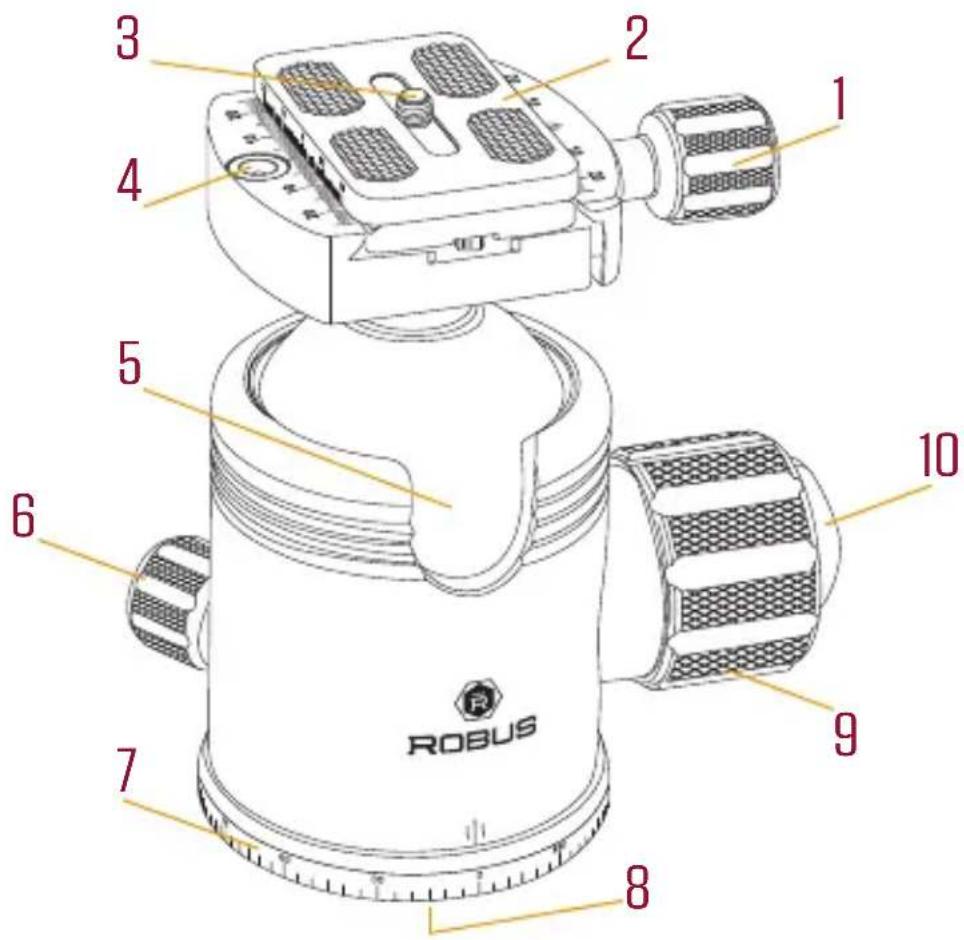
1. Quick-release knob
Turn counterclockwise to loosen the jaws or remove the quick-release plate. Turn clockwise to tighten and secure the quick-release plate.
2. Quick-release plate
The Arca-style compatible quick-release plate attaches to the base of your camera via the 1/4-20 mounting screw.
3.1/4-20 mounting screw
4. Bubble level
Use the bubble level to ensure that your camera is properly aligned with the horizon.
5. 90° notch
Use the notch to quickly switch your camera from landscape to portrait orientation.
6. Pan knob
Turn the knob counterclockwise to unlock the base. Rotate the base to the desired position, and lock the base by turning the knob clockwise.
7. Panoramic base with 360° markings
Use the pan degrees scale to accurately set up panoramic shots.
8. 3/8-16 threaded mounting socket
Tighten all the knobs on the head. Then rotate the ballhead clockwise onto the tripod.
9. Main locking knob
Turn clockwise to lock the ballhead's position. Turn counterclockwise to unlock and reposition your camera.
Important! Make sure to support the camera with one hand while you disengage the main locking knob.
10. Tension dial
Sets the minimum amount of friction on the ball. This ensures there's friction on the ball, even if the main locking knob is disengaged. This is useful to quickly unlock, reposition, and lock the ballhead without accidentally losing control of the camera.
Ten-Year Limited Warranty
This Robus product is warranted to the original purchaser to be free from defects in materials and workmanship under normal consumer use for a period of ten (10) years from the original purchase date or thirty (30) days after replacement, whichever occurs later. The warranty provider's responsibility with respect to this limited warranty shall be limited solely to repair or replacement, at the provider's discretion, of any product that fails during normal use of this product in its intended manner and in its intended environment. Inoperability of the product or part(s) shall be determined by the warranty provider. If the product has been discontinued, the warranty provider reserves the right to replace it with a model of equivalent quality and function.
This warranty does not cover damage or defect caused by misuse, neglect, accident, alteration, abuse, improper installation or maintenance. EXCEPT AS PROVIDED HEREIN, THE WARRANTY PROVIDER MAKES NEITHER ANY EXPRESS WARRANTIES NOR ANY IMPLIED WARRANTIES, INCLUDING BUT NOT LIMITED TO ANY IMPLIED WARRANTY OF MERCHANTABILITY OR FITNESS FOR A PARTICULAR PURPOSE. This warranty provides you with specific legal rights, and you may also have additional rights that vary from state to state.
To obtain warranty coverage, contact the Robus Customer Service Department to obtain a return merchandise authorization ("RMA") number, and return the defective product to Robus along with the RMA number and proof of purchase. Shipment of the defective product is at the purchaser's own risk and expense.
For more information or to arrange service, visit www.robussupports.com or call Customer Service at 212-594-2353.

ROBUS™ A Gradus Group Brand
Product warranty provided by the Gradus Group. www.gradusgroup.com Robus is a registered trademark of the Gradus Group. © 2019 Gradus Group LLC. All Rights Reserved. Images are for illustrative purposes only.

Brand : Robus
Model : RTH-1050
Category : Tripod