FEF303CWB - Cooker FRIGIDAIRE - Free user manual and instructions
Find the device manual for free FEF303CWB FRIGIDAIRE in PDF.


User questions about FEF303CWB FRIGIDAIRE
0 question about this device. Answer the ones you know or ask your own.
Ask a new question about this device
Download the instructions for your Cooker in PDF format for free! Find your manual FEF303CWB - FRIGIDAIRE and take your electronic device back in hand. On this page are published all the documents necessary for the use of your device. FEF303CWB by FRIGIDAIRE.
USER MANUAL FEF303CWB FRIGIDAIRE
Coil Surface Elements, with or without Clock
natural_image
Illustration of a kitchen oven with four circular gauges (no text or symbols)Welcome....2
Important Safety Instructions..3-4
Before Setting Oven Controls .. 5
Setting Clock & Minute Timer 5-6
Setting Surface & Oven Controls 6-7
Care & Cleaning 8-10
Before You Call
Solutions to Common Problems 11
Warranty......Back Cover


Welcome & Congratulations
Questions?
1-800-944-9044
(United States)
1-866-729-5199
(Canada)
Please attach sales receipt here for future reference.
Congratulations on your purchase of a new range! At Electrolux Home Products, we are very proud of our product and are completely committed to providing you with the best service possible. Your satisfaction is our number one priority.
We know you'll enjoy your new range and Thank You for choosing our product. We hope you consider us for future purchases.
PLEASE CAREFULLY READ AND SAVE THESE INSTRUCTIONS
This Use & Care Manual provides specific operating instructions for your model. Use your range only as instructed in this manual. These instructions are not meant to cover every possible condition and situation that may occur. Common sense and caution must be practiced when installing, operating and maintaining any appliance.
Please record your model and serial numbers below for future reference.
Model Number:
Serial Number:
Purchase Date:
natural_image
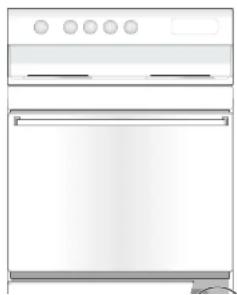
Illustration of a standard open oven with four circular gauges (no text or symbols)
text_image
Serial plate located under the cooktopImportant Safety Instructions

Read all instructions before using this appliance.
Save these instructions for future reference.
This manual contains important safety symbols and instructions. Please pay attention to these symbols and follow all instructions given.
WARNING
This symbol will help alert you to situations that may cause serious bodily harm, death or property damage.
CAUTION
This symbol will help alert you to situations that may cause bodily injury or property damage.
- Remove all tape and packaging before using the range. Destroy the carton and plastic bags after unpacking the range. Never allow children to play with packaging material.
- Proper Installation—Be sure your appliance is properly installed and grounded by a qualified technician in accordance with the National Electrical Code ANSI/NFPA No. 70 latest edition and local electrical code requirements. Install only per installation instructions provided in the literature package for this range.
Ask your dealer to recommend a qualified technician and an authorized repair service. Know how to disconnect the power to the range at the circuit breaker or fuse box in case of an emergency. - User servicing—Do not repair or replace any part of the appliance unless specifically recommended in the manuals. All other servicing should be done only by a qualified technician. This may reduce the risk of personal injury and damage to the range.
- Never modify or alter the construction of a range by removing leveling legs, panels, wire covers, anti-tip brackets/screws, or any other part of the product.
WARNING
- All ranges can tip.
- Injury to persons could result.
• Install anti-tip device packed with range.
• See Installation Instructions.

WARNING To reduce the risk of
CAUTION Do not store items of interest to children in the cabinets above a range or on the backguard of a range. Children climbing on the range to reach items could be seriously injured.
WARNING Never Use Your Appliance for Warming or Heating the Room.
- Storage in or on Appliance—Flammable materials should not be stored in an oven, warmer drawer, near surface units or in the storage drawer. This includes paper, plastic and cloth items, such as cookbooks, plasticware and towels, as well as flammable liquids. Do not store explosives, such as aerosol cans, on or near the range.
- Do Not Leave Children Alone—Children should not be left alone or unattended in the area where appliance is in use. They should never be allowed to sit or stand on any part of the appliance.
- DO NOT TOUCH SURFACE UNITS, AREAS NEAR THESE UNITS, HEATING ELEMENTS OR INTERIOR SURFACES OF THE OVEN. Both surface units and oven heating elements may be hot even though they are dark in color. Areas near surface units may become hot enough to cause burns. During and after use, do not touch, or let clothing or other flammable materials touch these areas until they have had sufficient time to cool. Among those areas are the cook top, surfaces facing the cook top, the oven vent openings and surfaces near these openings, oven door and window.

Important Safety Instructions
IMPORTANT INSTRUCTIONS FOR USING YOUR COOKTOP
- Know which knob controls each surface heating unit. Place a pan of food on the unit before turning it on, and turn the unit off before removing the pan.
- Use Proper Pan Size—This appliance is equipped with one or more surface units of different sizes. Select utensils having flat bottoms large enough to cover the surface unit heating element. The use of undersized utensils will expose a portion of the heating element to direct contact and may result in ignition of clothing. Proper relationship of utensils to element will also improve efficiency.
- Utensil Handles Should Be Turned Inward and Not Extend Over Adjacent Surface Elements—To reduce the risk of burns, ignition of flammable materials, and spillage due to unintentional contact with the utensil, the handle of the utensil should be positioned so that it is turned inward, and does not extend over adjacent surface units.
- Never Leave Surface Elements Unattended at High Heat Settings—Boilovers cause smoking and greasy spillovers that may ignite, or a pan that has boiled dry may melt.
- Do Not Immersive or Soak Removable Heating Elements—Heating elements should never be immersed in water. Heating elements clean themselves during normal operation.
- Glazed Cooking Utensils—Only certain types of glass, glass/ceramic, ceramic, earthenware, or other glazed utensils are suitable for cook top service without breaking due to the sudden change in temperature. Check the manufacturer's recommendations for cook top use.
- When flaming foods under a ventilating hood, turn the fan on.
IMPORTANT INSTRUCTIONS FOR USING YOUR OVEN
- Use Care When Opening Oven Door or Warmer Drawer (if equipped)—Stand to the side of the range when opening the door of a hot oven. Let hot air or steam escape before you remove or replace food in the oven.
- Keep Oven Vent Ducts Unobstructed. The oven vent is located under the left rear surface element if your model is equipped with coll elements. The oven vent is located below the backguard for models equipped with ceramic-glass cook tops. Touching the surfaces in this area when the oven is operating may cause severe burns. Also, do not place plastic or heat-sensitive items on or near the oven vent. These items could melt or ignite.
- Placement of Oven Racks. Always place oven racks in desired location while oven is cool. If rack must be moved while oven is hot use extreme caution. Use potholders and grasp the rack with both hands to reposition. Do not let potholders contact the hot heating elements in the oven. Remove all utensils from the rack before moving.
- Do not use the broiler pan without its insert. The broiler pan and its insert allow dripping fat to drain and be kept away from the high heat of the broiler.
- Do not cover the broiler insert with aluminum foil. Exposed fat and grease could ignite.
- Protective Liners—Do not use aluminum foil to line the oven bottom. Only use aluminum foil as recommended in this manual. Improper installation of these liners may result in risk of electric shock, or fire.
IMPORTANT INSTRUCTIONS FOR CLEANING YOUR RANGE
- Clean the range regularly to keep all parts free of grease that could catch fire. Pay particular attention to the area underneath each surface element. Do not allow grease to accumulate.
- Kitchen cleaners and aerosols—Always follow the manufacturer's recommended directions for use. Be aware that excess residue from cleaners and aerosols may ignite causing damage and injury.
Close Ventilation Heads Frequently. Assess should not be allowed to accommodate on the head or filter. Follow-up instructions
Before Setting Oven Controls

text_image
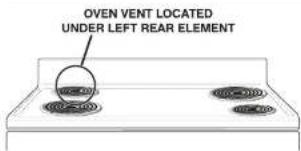
OVEN VENT LOCATED UNDER LEFT REAR ELEMENTOven Vent Location
For models equipped with coiled surface elements, the oven vent is located under the left rear surface element. When the oven is on, warm air flows through the left rear element. This venting is necessary for proper air circulation in the oven and good baking results. DO NOT BLOCK THE OVEN VENT.
Arranging Oven Racks
ALWAYS ARRANGE OVEN RACKS WHEN THE OVEN IS COOL (PRIOR TO OPERATING THE OVEN). Always use oven mitts when using the oven.
Removing & Replacing Oven Racks
To remove, pull the rack forward until it stops. Lift up front of rack and slide out. To replace, fit the rack onto the guides on the oven walls. Tilt the front of the rack upward and slide the rack back into place.

text_image
Rack positions 1 2 3 4 5RECOMMENDED RACK POSITIONS FOR BROILING, BAKING & ROASTING
| Food | Rack Position |
| Broiling meats, chicken or fish | 1, 2 or 3 |
| Cookies, cakes, pies, biscuits & muffins | 3 or 4 |
| Frozen pies, angel food cake, yeast, bread, casseroles, small cuts of meat or poultry | 5 |
| Turkey, roast or ham | 5 |
Setting Clock & Minute Timer (some models)

Models with no Clock
If your model has no Clock or Minute Timer, clock settings are not required to operate your range. Please proceed to Setting Surface & Oven Controls in this Use & Care Manual

Setting Clock & Minute Timer (some models)
Note: The Electronic Time of Day clock graphics shown vary by model.

text_image
Clock Timer On/off 11:59“:” Flashing indicates Minute Timer mode
To Set the 4 Button Time of Day Clock (some models)
When the range is first plugged in, or when the power supply to the range has been interrupted, "12:00" will flash in the display window.
-
Push . (Clock)
-
Push in and hold ∧ or ∨ until the correct time appears in the display. ∧ Increases time and ∨ decreases time.
To Set the 4 Button Minute Timer
- Push (Timer run), "0:00" will appear in the display window. The timer can be set for any amount of time from 00:01 minute to 12:00 hours.
- Push in and hold ⚠ until the correct amount of time appears in the display. ⚠ Increases time and √ decreases time. The minute timer will automatically start when the button is released. The “:” will flash to indicate Minute Timer mode.
- When the set time has passed, the control will display "0:00" and beep three times. The timer will continue to beep until


Note: Push at any time to cancel the timer and return to the clock operation.

Setting Surface & Oven Controls
Setting Surface & Oven Controls

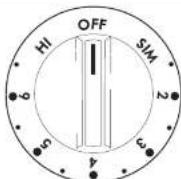
The surface control knob shown above may not look identical to the knob on your range.
The suggested settings found in the chart below are based on cooking in medium-weight aluminum pans with lids. Settings may vary when using other types of pans.
STANDARD SURFACE ELEMENTS
Setting Type of Cooking
HIGH (HI) Start most foods, bring water to a boil, pan broiling
MEDIUM HIGH (6) Continue a rapid boil, fry, deep fat fry
MEDIUM (4-5) Maintain a slow boil, thicken sauces and gravies, steam vegetables
MEDIUM LOW (2 - 3) Keep foods cooking, poach, stew
LOW (SIM) Keep warm, melt, simmer
To Operate the Oven Control
For satisfactory use of your oven, become familiar with the various functions of the oven as described below. Note: The Oven or Thermostat indicator light will glow when the oven is turned on when baking or broiling. A quick glance at this indicator light when cooking is finished is an easy check to be sure the oven is turned off.
To Bake
- Arrange oven racks while the oven is still cool. See "Arranging Oven Racks" under Before Setting Oven Control.
- Turn the Oven Control knob to the desired temperature,
- Preheat the oven for 10 to 12 minutes before baking. Preheating is not necessary when roasting, cooking casseroles or broiling most foods.
- When cooking is finished, turn the Oven Control knob to OFF.
To Broil
- Arrange oven rack while oven is still cool. For rare meats, position the broiler pan closer to the element (upper position). For well-done foods such as chicken, lobster tails or thick cuts of meat, position the pan further from the element (lower position).
- Turn the Oven Control to Broil. Most foods can be broiled at the Broil setting. To sear rare steaks, allow the element to become red-hot—about 2 minutes—before placing food in the oven.
- Place the insert on the broiler pan, then place the food on the insert. DO NOT use the broiler pan without the insert or cover the insert with aluminum foil. The exposed fat could ignite.
- Place the pan on the oven rack. Leave the door open at the broil stop position while broiling. The door will stay in this

Care & Cleaning
(Cleaning Chart)
Surfaces
| Aluminum (Trim Pieces) & Vinyl | Use hot, soapy water and a cloth. Dry with a clean cloth. |
| Painted and Plastic Control Knobs, Body Parts, and Decorative Trim | For general cleaning, use hot, soapy water and a cloth. For more difficult soils and built-up grease, apply a liquid detergent directly onto the soil. Leave on soil for 30 to 60 minutes. Rinse with a damp cloth and dry.DO NOTuse abrasive cleaners on any of these materials; they can scratch. To remove control knobs, turn to the OFF position; grasp firmly and pull straight off the shaft. To replace knobs after cleaning, line up the flat sides of both the knob and the shaft then push the knob into place. |
| Backguard | Before cleaning the control panel, turn all controls to OFF and remove the control knobs. To remove, pull each knob straight off the shaft. Clean using hot, soapy water and a dishcloth. Rinse with a clean water using a dishcloth. Be sure to squeeze excess water from the cloth before wiping the panel; especially when wiping around the controls. Excess water in or around the controls may cause damage to the appliance. To replace knobs after cleaning, line up the flat sides of both the knob and the shaft then push the knob into place. |
| Porcelain Enamel Broiler Pan and Insert, Door Liner, Body Parts, Warmer Drawer (if equipped) | Gentle scouring with a soapy scouring pad will remove most spots. Rinse with a 1:1 solution of clear water and ammonia. If necessary, cover difficult spots with an ammonia-soaked paper towel for 30 to 40 minutes. Rinse with clean water and a damp cloth, and then scrub with a soap-filled scouring pad. Rinse and wipe dry with a clean cloth. Remove all cleaners or the porcelain may become damaged during future heating.DO NOTuse spray oven cleaners on the cooktop. |
Oven Racks
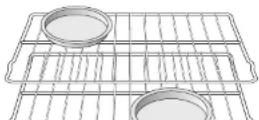
Remove oven racks and clean by using a mild, abrasive cleaner following manufacturer's instructions. Rinse with clean water and dry.
Rub the sides of the racks with wax paper or a cloth containing a small amount of baby oil or salad oil (this will make the racks glide easier into the rack positions).
Care & Cleaning

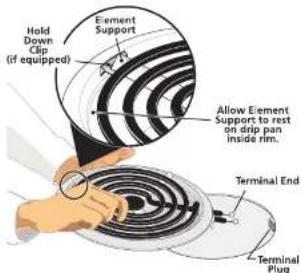
Surface Elements and Drip Bowls - Surface elements can be unplugged and removed to make cleaning the drip pans easier. The surface elements clean themselves when they are turned on. Food spilled on a hot element will burn off. Food spilled on a cool element may be cleaned with a damp cloth—any remaining soil will burn off the next time the element is used.
text_image
Hold Down Clip (if equipped) Element Support Allow Element Support to rest on drip pan inside rim. Terminal End Terminal PlugA CAUTION Be sure the range is cool before removing elements or drip bowls. Be careful not to bend terminal ends when replacing elements after cleaning.

text_image
Main top Lift-up rod⚠️CAUTION Never immerse a surface element in water.
To Remove the Surface Elements and Drip Bowls
-
Lift the edge of the drip bowl across from the terminal end. Lift the surface element and drip bowl together just enough to clear the cooktop.
-
While holding the drip bowl and surface element, gently pull the terminal end out from the terminal plug. If equipped, DO NOT remove the hold down clip from the drip bowl.
To Clean Drip Bowls
Wash in hot, soapy water or in the dishwasher. Rinse and dry while still warm. Hard to remove, burned on soil can be removed by soaking the drip bowls for about 20 minutes in a lightly diluted liquid cleanser or a solution of ammonia and water (1/2 cup ammonia to 1 gallon of water). A nylon scrubber may be used after soaking. DO NOT use abrasive cleaners or steel wool, as they will scratch the surface. Always rinse with clean water and polish dry with a soft cloth.
To Replace Drip Bowls and Surface Elements
- Slide the terminal end on the element through the opening in the drip bowl.
- Align the element support to rest on the rim inside the drip bowl. If your drip bowl is equipped with a hold down clip, align the element support opposite the terminal end with the slot in the hold down clip, and snap into place.
- After the element is positioned in the drip bowl, line up the terminal end with the terminal plug as shown.
- Hold the surface element and drip bowl together as level as possible and firmly push the terminal end into the terminal plug. Make sure element terminal is seated properly into terminal plug. Make sure the surface element is level to reduce the hazard of pans sliding off the element.

Care & Cleaning
text_image
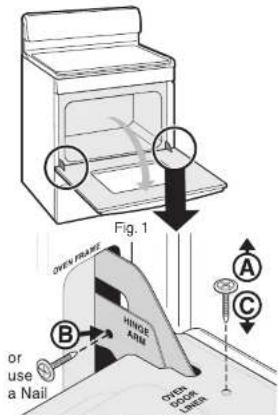
Fig. 1 OVER PRIME HINGE ARM B or use a Nail OVER DOOR LINDER A CFig. 2
text_image
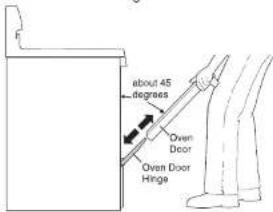
about 45 degrees Oven Door Oven Door HingeFig. 9
Removing and Replacing the Oven Door (all models)
CAUTION The door is heavy. For safe, temporary storage, lay the door flat with the inside of the door facing down.
To Remove Oven Door:
- Open oven door completely (horizontal with floor - See Fig. 1).
- Remove 2 screws located on the inside of the oven door liner (See A Fig. 2)
- Insert the 2 screws into the door hinge holes located on the side of the hinge arm, one into each hinge (See B Fig. 2).
- Close oven door until the door stops, (Do not force the door to close any further). The placement of these screws should keep door open in about a 45 degree position.
- Grasp oven door firmly on both sides and slide door up and off hinges at the same angle. (See Fig. 3)
- To clean oven door, follow the instructions provided in the Cleaning Chart at the beginning of the Care & Cleaning section (See Door Liner).
To Replace Oven Door:
- Be sure the hinge arms remain at the 45 degree angle position. Be sure the screws are still locking the hinge arms from moving. If the screws fall out of the hinge holes, the hinge(s) may snap back against the oven frame and could pinch fingers or chip the porcelain finish on the oven front frame.
- Hold door at the sides near the top while resting the lower front of door on your knee. Insert the door channels at the bottom of door over the door hinges, (See Fig. 3).
- Allow the door to slide down into the door hinges evenly at the same 45 degree angle. The hinge arms should be inserted into the bottom corners as far as they can go.
- Open door completely (horizontal with floor) and remove both screws from holes in door hinges.
- Reinstall the 2 screws into the door liner (See C Fig. 2).
- If the door is not in alignment with the oven frame, remove door and repeat the above steps.
Before You Call
Solutions to Common Problems

Before you call for service, review this list. It may save you time and expense. The list includes common occurrences that are not the result of defective workmanship or materials in this appliance.
| OCCURRENCE | POSSIBLE CAUSE / SOLUTION |
| Range is not level. | Poor Installation. Place oven rack in center of oven. Place a level on the oven rack. Adjust leveling legs at base of range until the oven rack is level. |
| Be sure floor is level and is strong and stable enough to adequately support range. | |
| If floor is sagging or sloping, contact a carpenter to correct the situation. | |
| Kitchen cabinet alignment may make range appear unlevel. Be sure cabinets are square and have sufficient room for range clearance. | |
| Cannot move appliance easily. Appliance must be accessible for service. | Cabinets not square or are built in too tightly. Contact builder or installer to make appliance accessible. |
| Carpet interferes with range. Provide sufficient space so range can be lifted over carpet. | |
| Surface element too hot or not hot enough. | Incorrect control setting. Make sure the correct control is on for the surface element to be used. |
| Lightweight or warped pans used. Use only flat, evenly balanced, medium or heavyweight cookware. Flat pans heat better than warped pans. Cookware materials and weight of the material affect heating. Heavy and medium-weight pans heat evenly. Because lightweight pans heat unevenly, foods may burn easily. | |
| Surface element does not heat. | No power to the appliance. Check steps under "Entire Appliance Does Not Operate" in this Before You Call Checklist. |
| Incorrect control setting. Make sure the correct control is on for the surface element to be used. | |
| Element not making contact in block. Follow instructions under "Surface Elements and Drlp Bowls" In the Care & Cleaning section. | |
| Entire appliance does not operate. | Make sure cord/plug is plugged tightly into outlet. |
| The time of day must first be set in order to operate the oven. | |
| Service wiring is not complete. Contact your authorized Servicer for assistance. |
Oven smokes excessively during broiling.
Control(s) not set properly. Follow instructions under Setting Surface & Oven Controls.

RANGE WARRANTY
Your range is protected by this warranty
| WARRANTY PERIOD | THROUGH OUR AUTHORIZED SERVICERS, WE WILL: | THE CONSUMER WILL BE RESPONSIBLE FOR: | |
| FULL ONE-YEAR WARRANTY | One year from original purchase date. | Pay all costs for repairing or replacing any parts of this appliance which prove to be defective in materials or workmanship. | Costs of service calls that are listed under NORMAL RESPONSIBILITIES OF THE CONSUMER.* |
| LIMITED 2ND-5TH YEAR WARRANTY (Glass Smoothtop, Seal & Elements) | Second through fifth years from original purchase date. | Provide a replacement for any defective surface heating element, deteriorated rubberized-silicone seal (upswing models only), or glass smoothtop that cracks due to thermal breakage (not customer abuse). | Diagnostic costs and any transportation and labor costs which are required because of service. |
| LIMITED WARRANTY (Applicable to the State of Alaska) | Time periods listed above. | All of the provisions of the full and limited warranties above and the exclusions listed below apply. | Costs of the technician's travel to the home and any costs for pick up and delivery of the appliance required because of service. |
In the U.S.A., your appliance is warranted by Electrolux Home Products North America, a division of White Consolidated Industries, Inc. We authorize no person to change or add to any of our obligations under this warranty. Our obligations for service and parts under this warranty must be performed by us or an authorized Electrolux Home Products North America servicer. In Canada, your appliance is warranted by WCI Canada, Inc.
\*NORMAL RESPONSIBILITIES OF THE CONSUMER
This warranty applies only to products in ordinary household use, and the consumer is responsible for the items listed below:
- Proper use of the appliance in accordance with instructions provided with the product.
- Proper installation by an authorized servicer in accordance with instructions provided with the appliance and in accordance with all local plumbing, electrical and/or gas codes.
- Proper connection to a grounded power supply of sufficient voltage, replacement of blown fuses, repair of loose connections or defects in house wiring.
- Expenses for making the appliance accessible for servicing, such as removal of trim, cupboards, shelves, etc., which are not a part of the appliance when it was shipped from the factory.
- Damages to finish after installation.
- Replacement of light bulbs and/or fluorescent tubes (on models with these features).
EXCLUSIONS
This warranty does not cover the following:
- CONSEQUENTIAL OR INCIDENTAL DAMAGES SUCH AS PROPERTY DAMAGE AND INCIDENTAL EXPENSES RESULTING FROM ANY BREACH OF THIS WRITTEN OR ANY IMPLIED WARRANTY.
NOTE: Some states do not allow the exclusion or limitation of incidental or consequential damages, so this limitation or exclusion may not apply to you.
- Canisys cells which do not involve malfunction or defects in wasmachia or material, or for applications not in