
Ethernet Switch - Ethernet Switch MARTIN - Free user manual and instructions
Find the device manual for free Ethernet Switch MARTIN in PDF.


| Product Type | Ethernet Switch |
| Brand | Martin |
| Model | Ethernet Switch (8x10/100T) |
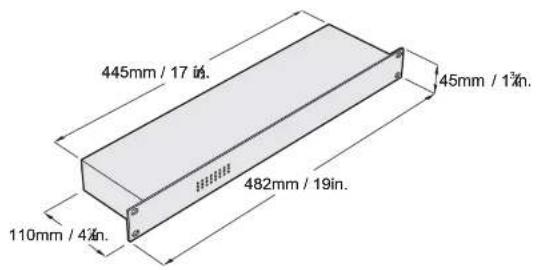
| Dimensions | 482 x 110 x 43 mm (19"/1U rack) |
| Weight | 1.4 kg (3.1 lb) |
| AC Power | 90-250 VAC, 50/60 Hz, 2.6 W, 37 mA |
| Main Fuse | 0.315 AT (slow blow), P/N 05020004 |
| Ethernet Ports | 8 x 10/100 Base-T on Neutrik Ethercon connectors |
| Auto-negotiation | Yes (10/100 Mb, half/full duplex) |
| MDI/MDI-X Auto-Crossover | Yes |
| Management | Unmanaged (plug-and-play) |
| Ethernet Cable Length (max) | 100 m (328 ft) |
| Connection Topology | Star configuration |
| Housing Material | Aluminum with electrostatic powder coating |
| Safety Approvals | UL 60950, EN 60950, EN 61000-6-3, EN 61000-6-1, EN 61000-3-2, EN 61000-3-3 |
| Included Items | 5 m Martin Ethernet cable (NE8MC/RJ-45), IEC power cable without plug |
| Ordering Part Number | P/N 90758110 |
Frequently Asked Questions - Ethernet Switch MARTIN
User questions about Ethernet Switch MARTIN
0 question about this device. Answer the ones you know or ask your own.
Ask a new question about this device
Download the instructions for your Ethernet Switch in PDF format for free! Find your manual Ethernet Switch - MARTIN and take your electronic device back in hand. On this page are published all the documents necessary for the use of your device. Ethernet Switch by MARTIN.
USER MANUAL Ethernet Switch MARTIN
Dimensions
© 2005 Martin Professional A/S, Denmark.
All rights reserved. No part of this manual may be reproduced, in any form or by any means, without permission in writing from Martin Professional A/S, Denmark
CONTENTS
Introduction 4
Features 4
Safety information 5
AC power 6
AC operating range 6
Power plug installation 6
Data connections 7
Ethernet connection 7
Connection to DMX 7
Ethernet Switch specifications 8
INTRODUCTION
Thank you for selecting the Ethernet Switch.
The Ethernet Switch is designed to expand the control possibilities of large lighting control systems that contain increased numbers of DMX
universes. Working together with the Ether2DMX box and the Neutrik Ethercon converter, the Ethernet Switch analyzes the data processing stream and forwards it to the required destination.
The Ethernet Switch automatically disables unnecessary functionality that would otherwise disturb a lighting control system.
The front plate has an 8x3 LED matrix that displays 10 Mb activity, 100 Mb activity and collision on each port.
The Ethernet Switch may be used to split out a single ethernet link from a console to several Ethernet/DMX nodes, or link several consoles together.
In addition, the Ethernet Switch's internal signal buffer allows you to extend the network beyond conventional 100-meter cable constraints.
Features
- 8 x 10/100 base-T ethernet ports on Neutrik ethercon connectors, can be connected via Martin ethercon CAT 5 cable and ethercon converter.
- Wire speed receiving and transmission. Can transmit and receive ethernet frames at full speed (maximum frame lengths set to 1536 Bytes).
- Auto-negotiation: automatically detects 10Mb or 100Mb devices on its ports and automatically switches between half and full duplex mode.
- MDI/MDI-X auto-crossover: automatically detects straight or crossover connections and adapts its ports, allowing free use of straight and crossover cables.
- Unmanaged operation (plug-and-play).
- Hardware-configured for lighting control purposes.
Safety information
The Ethernet Switch is not for household use. For safe operation, read this manual before use and follow the safety precautions listed below. If you have questions about how to operate the device safely, please contact your Martin distributor or dealer.
• This device is not for domestic use.
- Use the device only as described in this manual and on the device.
- Disconnect the device from AC power before removing fuses or any part, and when not in use.
• Always ground (earth) the device electrically.
- Use only a source of AC power that complies with local building and electrical codes and has both overload and ground-fault protection.
- Do not expose the device to rain or moisture.
- Never attempt to bypass fuses. Always replace defective fuses with ones of the specified type and rating.
- Do not operate the device if any cover or component is missing, damaged or deformed.
- Immediately replace any damaged power cables.
• Refer all service to a qualified technician.
- Do not modify the device or install other than genuine Martin parts.
AC POWER
AC operating range
The Ethernet Switch power supply is fully auto-sensing and the device can be connected to AC power at any voltage from 90 to 250 V at 50 or 60 Hz.
Power plug installation
The Ethernet Switch is supplied with an IEC-type power cable that may require a grounding-type (earthed) power plug suitable for your power distribution cable or outlet. Consult a qualified electrician if you have any doubts about proper installation.
Warning! For protection from dangerous electric shock, the device must be grounded (earthed). The local AC power source must be equipped with both overload and ground-fault (earth fault) protection devices.
Following the power plug manufacturer's instructions, connect the yellow and green wire to ground (earth), the brown wire to live, and the blue wire to neutral. The table below shows some pin identification schemes.
| Wire Pin Marking Screw color | ||
| brown live "L" yellow or brass | ||
| blue neutral "N" silver | ||
| yellow/green | ground | |
DATA CONNECTIONS
Since the Ethernet Switch actively processes network traffic, it functions independently of most topology rules, but networked devices must be connected to the switch in a star configuration with the switch at its center.
Ethernet connection
Direct connection to controller or PC
To connect a single Ethernet Switch to a controller or PC, use category 5 (CAT5) unshielded twisted pair (UTP) cable to connect the Artnet/Ethernet output of the controller or PC (on the Maxxyz, this connector is labeled EtherDMX) to one of the Ethercon RJ-45 sockets on the rear panel of the Ethernet Switch.
Note that the maximum recommended length of one run of Ethernet cable is 100 meters (328 ft.).
Connection to other switches and/or Ether2DMX boxes
We recommend use of Martin ethercon shielded twisted pair (STP) CAT5 0.14 mm ^2 (26 AWG) 100 Ohm patch cable for all connections from the Ethernet Switch outputs. A 5 meter (16 ft.) cable is supplied with the product. The Martin website at http://www.martin.com gives details of suitable Martin cable available in various lengths.
Connection of multiple Ethernet Switches
You can use as many Ethernet Switches as required to provide the maximum number of DMX universes supported by your controller or PC.
Connection to DMX
ETHERNET SWITCH SPECIFICATIONS
Physical
Size (L x W x H) 482 x 110 x 43 mm (19" 1U rack)
Weight. 1.4 kg (3.1 lb)
Construction
Housing aluminum
Finish .electrostatic powder coating
Electrical
AC Power 90 - 250 VAC, 50/60 Hz
Typical power and current....2.6 W, 37mA
Main fuse (internal)....0.315 AT (slow blow), P/N 05020004
Connections
AC power input.... IEC male socket
Data in/out 8 x Neutrik NE8MC locking Ethercon locking sockets
Approvals


US safety ....UL 60950
EU safety EN 60950
EU EMC .... EN 61000-6-3, EN 61000-6-1,
EN 61000-3-2, EN 61000-3-3
Included items
5m (16.4 ft.) Martin ethernet cable,
NE8MC/RJ-45 connector, UL/IEC approved.....P/N 91611100
IEC power cable w/o power plug P/N 11501012
Ordering information
Ether Switch 8x10/100T, ethercon . . . . . . . . . . . . . . . . . . . . . . . . . . . . . . . . . . . . . . P/N 90758110
- CONTENTS
- INTRODUCTION
- Features
- Safety information
- AC POWER
- AC operating range
- Power plug installation
- DATA CONNECTIONS
- Ethernet connection
- Direct connection to controller or PC
- Connection to other switches and/or Ether2DMX boxes
- Connection of multiple Ethernet Switches
- Connection to DMX
- ETHERNET SWITCH SPECIFICATIONS
- Physical
- Construction
- Electrical
- Connections
- Approvals
- Included items
- Ordering information
Brand : MARTIN
Model : Ethernet Switch
Category : Ethernet Switch