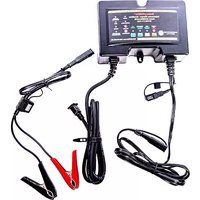
244CEC2-AA-S3 - Battery charger BatteryMINDer - Free user manual and instructions
Find the device manual for free 244CEC2-AA-S3 BatteryMINDer in PDF.


| Product Type | Aviation-Calibrated Maintenance Charger & Desulfator |
| Model Number | 244CEC2-AA-S3 |
| Brand | BatteryMINDer |
| Input Voltage | 90 - 140 Vac |
| Input Frequency | 47 - 63 Hz |
| Output Voltage & Current | 12V / 8A (max) 24V / 4A (max) |
| Enclosure Material | UL-94V0 Noryl or PC or PC+ABS |
| Enclosure Dimensions (L x W x H) | 7.32 in (186 mm) x 4.88 in (124 mm) x 2.44 in (52 mm) |
| Weight | Approx. 2.5 lb (1.1 kg) |
| Battery Compatibility | Lead-acid: Flooded, AGM, GEL; Specifically for Hawker-Odyssey & Gill LT/7000 (S3 model) |
| Charging Stages | Soft-Start, Constant Current (Bulk), Constant Voltage (Absorption), Battery Test, Maintenance/Float |
| Desulfation | Pulse desulfation during all output stages |
| Temperature Compensation | Built-in Ambient Temperature Sensor (ATS-1) adjusts voltage for -28mV/°C (12V) or -56mV/°C (24V) |
| Protection Features | Reverse polarity protection, spark-proof, overcharge protection, bad cell detection |
| Safety Certifications | UL 1236, UL 1012, CSA C22.2 No. 107.2 |
| Included Accessories | ATS-1 Temperature Sensor (installed), insulated fused 15A battery clip cordset (BCAA) with quick connect |
| Optional Accessories | BM-AIK2 Airframe Interface Kit (FAA-certified), RTA-2415EXP for experimental, 210AY Y-Connector |
| Warranty | 5-year limited warranty (with registration); 1-year 100% money-back guarantee |
| Mounting Orientation | Vertical only with cords exiting downward for weatherproof integrity |
| Operating Temperature Range | Recommended: -40°F to 123°F (-40°C to 51°C) battery temperature; charger ambient: -4°F to 122°F (-20°C to 50°C) |
Frequently Asked Questions - 244CEC2-AA-S3 BatteryMINDer
User questions about 244CEC2-AA-S3 BatteryMINDer
0 question about this device. Answer the ones you know or ask your own.
Ask a new question about this device
Download the instructions for your Battery charger in PDF format for free! Find your manual 244CEC2-AA-S3 - BatteryMINDer and take your electronic device back in hand. On this page are published all the documents necessary for the use of your device. 244CEC2-AA-S3 by BatteryMINDer.
USER MANUAL 244CEC2-AA-S3 BatteryMINDer
Aviation-Calibrated Maintenance Charger-Desulfator
INSTRUCTION MANUAL
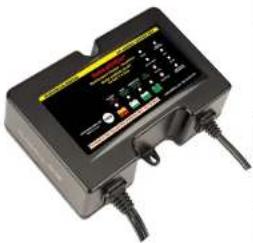
natural_image
Black industrial electrical terminal box with buttons and dials (no visible text or symbols)| BATTERY TYPE | RECOMMENDED CHARGER MODEL | |
| CONCORDE FLOODED | S2 | S5 |
| S2GILL FLOODED | ||
| CONCORDE SEALED RG | S5 | |
| HAWKER-ODYSSEY | S3 | |
| S3GILL LT/7000 | ||
All Models Include:
• ATS Temperature Sensor (installed)
• Insulated fused 15 Amp Battery Clip cordset (BCAA) with quick connect p


CONFORMS TO UL STD. 1236 AND UL STD. 1012 CERTIFIED TO CSA STD. C22.2 NO. 107.2
4006773
IMPORTANT: Maximum performance and extended battery life require full-time continuous maintenance and desulfation. We recommend the BatteryMINDER BM-AIK2 Airframe Interface Kit for use with FAA-Certified Aircraft or the BatteryMINDER RTA-2415EXP Connection for Experimental Aircraft (purchased separately) for the safest most effective means of connecting your BatteryMINDER to your aircraft's installed batteries (see Page 21 for more details).
BatteryMINDer®
Models 128CEC2 & 244CEC2-AA-Sx
Table Of Contents
| Glossary of Terms | 2 |
| Required Safety Instructions | 3 - 7 |
| Preparing to Charge | 5 |
| Charger Location | 5 |
| DC Connection Precautions | 5 |
| Qualifying Your Battery | 7 |
| Specific Gravity – Capacity Table | 7 |
| Testing a Filler Cap Lead-Acid Battery | 8 |
| Testing With a Hot/Cold Calibrated Hydrometer Tester | 8 |
| Testing a Sealed, AGM or GEL Lead Acid Battery | 9 |
| Simplified Operating Instructions | 10 |
| Detailed Specifications | 10 |
| Common Features | 11 |
| Common Features Details | 12 - 13 |
| Charging Stages | 13 |
| All Unit Labels and Descriptions | 14 - 15 |
| LED Indication Table | 16 |
| LED Indicator Lights Details | 16 - 17 |
| Load Light Table | 17 |
| Detailed Operating Instructions | 18 - 20 |
| OCV/Battery State of Charge Table | 19 |
| Charging a Battery in a Tightly Confined Area | 20 - 21 |
| Maintaining Multiple Batteries | 22 - 23 |
| Charge and Float Voltages at Various Temperature Ranges | 23 - 24 |
| Troubleshooting | 25 |
| Multi-Battery Configuration | 26 |
| Recommended Accessories (optional) | 26 |
| For Repair or Replacement / Registration | 27 |
| Guarantee/Warranty | 28 |
Glossary of Terms
- Maintain a battery
BatteryMINDer ensures batteries are truly fully charged and will likely continue improving the condition of the battery to the fullest extent possible.
- Rested
A battery that has been as fully charged as possible and left disconnected from charger or any type load overnight.
• Specific Gravity
One of the key parameters of battery operation is the specific gravity of the electrolyte. Specific gravity is the ratio of the weight of a solution to the weight of an equal volume of water at a specified temperature. Specific
IMPORTANT SAFETY INSTRUCTIONS - SAVE THESE INSTRUCTIONS
This manual contains important safety and operating instructions for all BatteryMINDER battery chargers unless otherwise specified.
A. WARNING: RISK OF EXPLOSIVE GASES
WORKING IN VICINITY OF A LEAD-ACID BATTERY IS DANGEROUS. BATTERIES GENERATE EXPLOSIVE GASES DURING NORMAL BATTERY OPERATION. FOR THIS REASON, IT IS OF UTMOST IMPORTANCE THAT YOU FOLLOW THE INSTRUCTIONS ON (1) BATTERY CHARGER, (2) BATTERY AND (3) PRODUCT USING BATTERY EACH TIME YOU USE THE CHARGER.
- To reduce risk of battery explosion, follow these instructions and those published by manufacturer of any equipment you intend to use in vicinity of battery. Review cautionary marking on these products and on engine.
- To reduce risk of injury, charge only lead acid type rechargeable batteries. Other types of batteries may burst causing personal injury and damage.
- Do not expose charger to rain or snow.
- Use of an attachment not recommended or sold by VDC Electronics may result in a risk of fire, electric shock, or injury to persons.
- To reduce risk of damage to electric plug and cord, pull by plug rather than cord when disconnecting charger. Make sure cord is located so that it will not be stepped on, tripped over, or otherwise subjected to damage or stress.
- An extension cord should not be used unless absolutely necessary. Use of Improper extension cord could result in a risk of fire and electric shock. If an extension cord must be used, make sure:
a. That pins on plug of extension cord are the same number, size, and shape as those of plug on charger;
b. Not to operate charger with damaged cord or plug – replace the cord or plug immediately.
c. That extension cord is properly wired and in good electrical condition; and
d. That wire size is large enough for AC ampere rating of charger as specified in Recommended Minimum AWG Size Table.
Recommended Minimum AWG size for Extension Cords For Battery Chargers
AC input rating amperes AWG size of cord
BatteryMINDer®
Models 128CEC2 & 244CEC2-AA-Sx
e. Do not operate charger with damaged cord or plug – replace the cord or plug immediately.
f. Do not operate charger If It has received a sharp blow, been dropped, or otherwise damaged in any way.
7. Do not disassemble charger; call VDC Electronics Tech Support Dept. 800.379.5579 x6 (ET) for advice when service or repair is required. Incorrect reassembly may result in a risk of electric shock or fire.
8. To reduce risk of electric shock, unplug charger from outlet before attempting any maintenance or cleaning.
B. PERSONAL PRECAUTIONS
- Consider having someone close enough by to come to your aid when you work near a lead-acid battery.
- Have plenty of fresh water and soap nearby in case battery acid contacts skin, clothing, or eyes.
- Wear complete eye protection and clothing protection. Avoid touching eyes while working near battery.
- If battery acid contacts skin or clothing, wash immediately with soap and water. If acid enters eye, immediately flood eye with running cold water for at least 10 minutes and get medical attention immediately.
- NEVER smoke or allow a spark or flame in vicinity of battery or engine.
- Be extra cautious to reduce risk of dropping a metal tool onto battery. It might spark or short-circuit battery or other electrical part that may cause explosion.
- Remove personal metal items such as rings, bracelets, necklaces, and watches when working with a lead-acid battery. A lead-acid battery can produce a short-circuit current high enough to weld a ring or the like to metal, causing a severe burn.
- Use charger for charging a LEAD-ACID battery only. It is not intended to supply power to a low voltage electrical system other than in a starter-motor application. Do not use battery charger for charging dry-cell batteries that are commonly used with home appliances. These batteries may burst and cause injury to persons and damage to property.
- NEVER charge a frozen battery or a battery at a temperature above 123^ F.
Always follow battery manufacturer's strict instructions for proper
BatteryMINDer®
Models 128CEC2 & 244CEC2-AA-Sx
C. PREPARING TO CHARGE
- If necessary to remove battery from vehicle to charge, always remove grounded terminal from battery first. Make sure all accessories in the vehicle are off, so as not to cause an arc.
- Be sure area around battery is well ventilated while battery is being charged.
- Clean battery terminals. Be careful to keep corrosion from coming in contact with eyes.
- Add distilled water in each cell until battery acid reaches level specified by battery manufacturer. Do not overfill. For a battery without removable cell caps, such as valve regulated lead acid batteries, carefully follow manufacturer's recharging instructions.
- Study all battery manufacturer's specific precautions while charging and recommended rates of charge.
- Determine voltage of battery by referring to your owner's manual and make sure it matches output rating of battery charger.
D. CHARGER LOCATION
- Locate charger as far away from battery as DC cables permit.
- Never place charger directly above battery being charged; gases from battery will corrode and damage charger.
- Never allow battery acid to drip on charger when reading electrolyte specific gravity or filling battery.
- Do not operate charger in a closed-in area or restrict ventilation in any way.
- Do not set a battery on top of charger.
- Always mount units in vertical position with cord sets exiting downward to ensure weather tight integrity. Unit must be mounted in this manner to ensure long-term trouble free life including weatherproof integrity. Mounting in any other manner or using un mounted (parallel to ground) except indoors may cause unit to fail due to water intrusion that is unable to drain correctly.
F. FOLLOW THESE STEPS WHEN BATTERY IS INSTALLED IN VEHICLE. A SPARK NEAR BATTERY MAY CAUSE BATTERY EXPLOSION.
TO REDUCE RISK OF A SPARK NEAR BATTERY:
- Position AC and DC cords to reduce risk of damage by hood, door, or moving engine part.
-
Stay clear of fan blades, belts, pulleys, and other parts that can cause injury to persons.
-
Always connect unit to battery BEFORE plugging into AC POWER SOURCE.
-
Check polarity of battery posts. POSITIVE (POS, P, +) battery post usually has larger diameter than NEGATIVE (NEG, N,−) post.
-
Determine which post of battery is grounded (connected) to the chassis. If negative post is grounded to chassis (as in most vehicles), see (5). If positive post is grounded to the chassis, see (6).
-
For negative-grounded vehicle, connect POSITIVE (RED) clip from battery charger to POSITIVE (POS, P, +) ungrounded post of battery. Connect NEGATIVE (BLACK) clip to vehicle chassis or engine block away from battery. Do not connect clip to carburetor, fuel lines, or sheet-metal body parts. Connect to a heavy gage metal part of the frame or engine block.
-
For positive-grounded vehicle, connect NEGATIVE (BLACK) clip from battery charger to NEGATIVE (NEG, N, -) ungrounded post of battery. Connect POSITIVE (RED) clip to vehicle chassis or engine block away from battery. Do not connect clip to carburetor, fuel lines, or sheet-metal body parts. Connect to a heavy gage metal part of the frame or engine block.
-
When disconnecting charger, disconnect AC cord, remove clip from vehicle chassis, and then remove clip from battery terminal.
-
See operating instructions for length of charge information.
G. FOLLOW THESE STEPS WHEN BATTERY IS OUTSIDE VEHICLE. A SPARK NEAR THE BATTERY MAY CAUSE BATTERY EXPLOSION. TO REDUCE RISK OF A SPARK NEAR BATTERY:
- Check polarity of battery posts. POSITIVE (POS, P, +) battery post usually
BatteryMINDer®
Models 128CEC2 & 244CEC2-AA-Sx
- Position yourself and free end of cable as far away from battery as possible – then connect NEGATIVE (BLACK) charger clip to free end of cable.
- Do not face battery when making final connection.
- When disconnecting charger, always do so in reverse sequence of connecting procedure and break first connection while as far away from battery as practical.
QUALIFYING YOUR BATTERY:
Preliminary Requirements
NOTE: The BatteryMINDer has no electrical output unless it is connected to a battery that is not completely dead. Testing the BatteryMINDer with a volt or an Amp meter without the unit being connected across a good battery will result in a false reading. If you experience any problems, or are not sure of how to properly use or connect your BatteryMINDER, please e-mail our technical support at: techsupport@vdcelectronics.com or call our toll-free technical support line 800-379-5579 x6 (M - F, ET 9 - 5). Be certain to leave your phone number with the area code, time zone and the best time to call. To gain the best result from your new charger and to maximize the life and performance of your batteries we strongly recommend you qualify (test) your batteries before attempting to either charge-maintain or desulfate them. Remember, even if you just purchased a "new" battery it may have been subjected to conditions that have caused "sulfation" such as high temperature (≥80°F).
| Specific Gravity | State of Charge Level |
| 1.270(4 Balls floating) | 100% |
| 1.250(3 Balls floating) | 75% |
| 1.190(2 Balls floating) | 50% |
| 1.150(1 Balls floating) | 25% |
| 1.120(0 Balls floating) | Discharged |
NOTE: If your battery is new and you are certain it was not subject to conditions that could have caused sulfation (such as high temperature storage ( ≥80^ ) and/or allowed to self-discharge to 12.4 Volts / 24.8 Volts or lower), even before you purchased it, then you can disregard our
BatteryMINDer®
Models 128CEC2 & 244CEC2-AA-Sx
Testing a Filler Cap or Manifold-type Lead Acid Battery
- Carefully remove all caps from your battery.
- Check the water-liquid electrolyte level. If the level is low or has ever been below top of plates, severe lead plate sulfation has taken place. Significant recharge/reconditioning time is needed to restore these plates to a condition where the battery can be expected to function normally.
- Refill each cell with distilled water only to the liquid level indicator found in each cell. Before proceeding further you must be thoroughly familiar with the safety and operating instructions.
- Recharge the battery with the BatteryMINDer to ensure that it is slowly and completely charged before you determine its condition. Allow battery to "rest" (see Glossary of Terms on page 2) overnight for a minimum of 12 hours before testing with a temperature compensated hydrometer and/or digital type voltmeter only.
Testing with a Hot/Cold Calibrated Hydrometer Tester
Read the tester instructions carefully for most accurate readings.
- When using the tester the first time or after a long period of non-use, fill the tester with the battery fluid and let it sit for 1/2 hour or longer. This will soak the balls in order to give you more accurate readings. Failure to do so will give you false readings indicating a battery that may not be in as good a condition as you may have thought.
- After inserting the tester in a cell, gently tap the tester several times against the inside wall of each cell to dislodge air bubbles that will cause more balls to float than should. Failure to do so will yield false readings that indicate a battery that is not fully desulfated or does not qualify for desulfation.
- If no balls float in any cell, the cell is shorted. This means your battery is beyond the point of being properly recharged or reconditioned/desulfated. Dispose of the battery.
- If each cell floats three (3) or more balls (or 1250 on gauge-type), your battery can be desulfated/reconditioned.
- Always rinse the tester with fresh water after every use. Failure to do so will cause false readings.
Testing a Sealed, AGM or GEL Lead Acid Battery
These batteries have no filler caps or manifold-type covers. Because you cannot gain access to the interior of your battery you cannot test it with a hydrometer. USE A DIGITAL VOLTMETER ONLY:
- Recharge the battery with the BatteryMINDer to ensure it is as completely charged as possible, before you determine its condition. Allow battery to "rest" overnight for a minimum of 12 hours before testing with a digital voltmeter only. Failure to test a "restod" battery will cause false readings. Be certain to read and understand all safety related instructions (pages 3 - 7) before proceeding further.
- Measure battery's voltage, without any load attached. If the voltage is less than 12.4 volts / 24.8 volts (Typically 50% of charge) the battery may be too heavily sulfated to be fully recoverable. If voltage is 12.4V / 24.8V or higher full recovery can be expected, given sufficient time (average 1-2 weeks for batteries that are heavily sulfated).
- Connect the BatteryMINDer to the battery. Charge battery to its maximum level. Allow battery to rest for a minimum of 8 hours before retesting. If improvement is seen, continue until battery voltage reaches full capacity level or no further increase is seen. Refer to Open Circuit No Load Voltage table.
- Note: Do not expect to completely dissolve sulfate in a day. Long established sulfate will require a longer period to be fully dissolved. Be patient and you will rewarded with a "sulfate-free" battery. If not seriously damaged by sulfate, battery has a very good chance of meeting 85% Cap (Airworthy) Test.
SIMPLIFIED OPERATING INSTRUCTIONS
Read and thoroughly understand ALL SAFETY Instructions, pages
3 - 7 including Preparing to Charge, DC Connection Precautions, Unit
Location and Qualifying Your Battery BEFORE proceeding further.
- Attach Battery Clips (8, supplied), to output cordset of charger (5).
- Attach output to battery terminals:
RED band = Positive +
BLACK band = Negative - - Ambient Temperature Sensor, ATS-1 comes already installed on the Temperature Sensor input connector (4). Do not detach. The Ambient Temperature Sensor (ATS-1) is mandatory when used with all Aviation batteries.
- Plug AC power cord (6) into a 120 Vac electrical outlet. Always connect unit to battery before plugging into AC POWER SOURCE.
- Observe POWER GREEN steady
- Observe BATTERY CONNECTION GREEN/RED LED indicator (3E): If lit RED, reverse battery connector attachments on battery.
IF IN DOUBT REGARDING ANY OF THE ABOVE, REFER TO Detailed Operating Instructions, page 18.
^1 See full instructions if not lit GREEN.
Note: None of our aircraft models are designed to function at input voltages above 140 VAC except when combined with a step-down transformer (not supplied).
| Detailed Specifications | ||
| Input Voltage: 90 - 140 Vac | ||
| Input frequency : 47 - 63 Hz | ||
| Output voltage and current: 12V / 8A | 24V / 4A | |
| Plastic enclosure material: UL-94V0 | Noryl or PC or PC+ABS | |
| Enclosure Dimension: Approx. 7.32 In. | (186 mm)(L) x 4.88 In.(124 mm)VH x 2.44 in. (52 mm)VH | |

| Common Features (All Models) | |
| 1 | MAINTENANCE MODE ONLY button |
| 2 | Battery Stage Indicators:Battery Stage IndicatorsA: Stage 1: Battery Low (Soft-Start)B: Stage 2: Constant Current (Bulk)C: Stage 3: Constant Voltage (Absorption)D: Stage 4: Battery Fully Charged (Maintenance/Float)See Common Features Details Table on next page & Load Light Table, p. 17 for additional information |
| 3 | LED Indicators: See Table on next page |
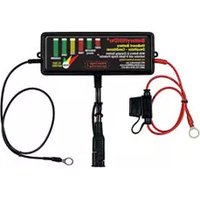
| 4 | Temperature Sensor input connector with ATS-1 Ambient Temperature Sensor installed (Included) |
| 5 | Output cord with quick connect plug |
| Common Features Details (All Models) Con't. from Previous Table | ||
| Meaning Action | ||
| 1 MAINTENANCE MODE ONLY | Maintenance Mode button – Generally used by a VDC Repair Technician when checking float voltage. | Used to skip over automatic charge sequence including the one hour minimum in the absorption stage (2C) putting the unit directly into a 10 minute Battery Test and then into Maintenance mode. |
| 2A SOFT-START VOLTAGE: LOW, REJECTED | Start of charge AMBER STEADY ON = battery fully discharged. | Allow BatteryMINDer to try to restore battery. |
| RED FLASHING = Battery voltage is near zero volts. | Battery rejected | |
| 2B BULK STAGE | Battery is being Constant Current charged to about 80%. | Allow BatteryMINDer to charge battery. |
| 2C ABSORPTION STAGE | Battery is being Constant Voltage charged to about 95%. | Allow BatteryMINDer to charge battery. |
| 2D MAINTENANCE/ FLOAT MODE | Battery is being topped off to 100%. | Allow BatteryMINDer to maintain and desulfate battery indefinitely. |
| 3A POWER | GREEN STEADY = AC power connected. GREEN FLASHING = ECO mode (no battery connected, very low standby power mode). | None required. |
| 3B BATTERY WEAK | Battery voltage is low at start of charge OR voltage is low after testing stage. | Allow BatteryMINDer to attempt to restore battery if low at start of charge. Replace battery if voltage is low after testing stage. |
| 3C BAD CELL | RED FLASHING = one or more cells of the battery are dead. | Battery must be replaced. |
| 3D DESULFATING | FLASHING = battery is being desulfated. | None required. |
| 3E | GREEN STEADY = battery connected properly. | If needed, correct battery |
| Common Features Details (All Models) Cont. from Previous Table | ||
| 3FLOAD | AMBER STEADY = some device is drawing current. Battery/MINDER is putting out max. current in maintenance mode. | Turn off external device if possible. |
| 3G TESTING | BLUE STEADY = test in progress, pause in charging. (Tests to see if battery holds charge.) | None possible. |
| 3H TEMPERATURE COMPENSATION | Meaning: BLUE STEADY = cold temperature compensation being applied. GREEN STEADY = hot temperature compensation being applied. | None required. |
Charging Stages
- Maintenance Mode: the CEC2 Aviation BatteryMINDER is fully automatic and after the batteries are fully charged, unit will go into Maintenance Mode by itself. Maintenance Mode Only button should only be used after the batteries are fully charged or after 3 days in charge mode. No need to push this button if unit automatically is in float. Soft-Start is used if a battery's voltage is under 10.5V/21.0V when charging begins. It uses a low constant current to slowly bring up voltage. This prepares a weak or neglected battery for the Constant Current stage.
- Constant Current (sometimes called Bulk) is the main charging stage. The charger puts out a constant current of 8A for 12V and 4A for 24V, its full power. Battery voltage rises until the battery reaches the optimal charging voltage.
- Constant Voltage (sometimes called Absorption) is the second charging stage. The charger regulates the current given to the battery to maintain constant voltage. As the battery nears a full charge, the current needed to maintain this voltage decreases. Once the current falls below a 0.10A change per hour, the stage is complete. It will be in this stage for a minimum of one hour.
- Battery Test is administered by reading your battery voltage while putting the battery under a load for 10 minutes. A voltage of under 12.5V/25.0V indicates a weak battery, under 11.5V/23.0V indicates a shorted cell. The battery is tested at completion of the Constant Voltage stage, and every 12 hours while in Float

128CEC2-AA-S2: Gill (Sealed [non-LT/7000] + Flooded Wet Cell) + Concorde Flooded
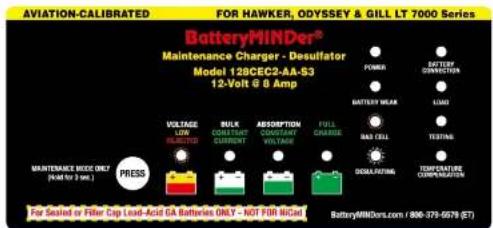
128CEC2-AA-S3: Hawker-Odyssey + Gill LT/7000
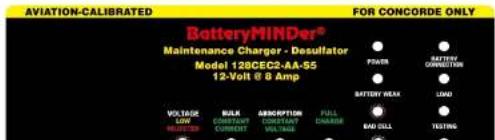
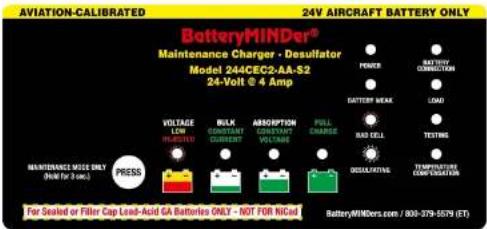
244CEC2-AA-S2: Gill (Sealed [non-LT/7000] + Flooded Wet Cell) + Concorde Flooded
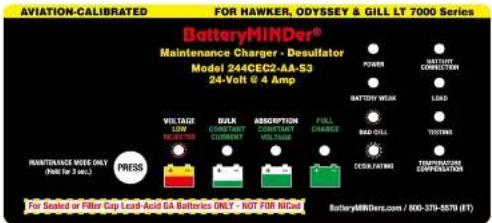
244CEC2-AA-S3: Hawker-Odyssey + Gill LT/7000

| LED INDICATION TABLE | |||
| POWER GREEN | |||
| Green Steady AC power connected | |||
| Green Flashing ECO mode | |||
| BATTERY CONNECTION GREEN RED | |||
| Green Steady Battery connected correctly | |||
| Red Steady Battery connected incorrectly | |||
| BATTERY WEAK AMBER | |||
| Amber Steady Battery requires soft-start charging or battery voltage is < 12.5V / 25.0V after analysis stage | |||
| LOAD AMBER | |||
| Amber Steady The output current is up to the maximum rating in Float mode | |||
| BAD CELL RED | |||
| Red Flashing Battery voltage is < 11.5V / 23.0V after analysis stage | |||
| TESTING BLUE | |||
| Blue Steady Analysis stage | |||
| DESULFATING BLUE | |||
| Blue Flashing | Desulfating pulses are in process | ||
| TEMPERATURE COMPENSATION | GREEN BLUE | ||
| Green Steady Ambient temperature > 27°C/80°F | |||
| Blue Steady Ambient temperature < 21°C/70°F | |||
| VOLTAGE LOW | AMBER | REJECTED | RED |
| Initial qualification of the battery's condition (at the beginning of Soft-Start stage) | |||
| Amber Steady Voltage: 12 Volt: 3 - 10.5V / 24 Volt: 6 - 21V | |||
| Red Flashing Voltage: 12 Volt: < 3V / 24 Volt: < 6V (Low Voltage) | |||
LED Indicator Light Details
• Power light is GREEN anytime the charger is plugged into AC Power.
- Battery Connection light is GREEN when the unit it is correctly connected to a battery. If the Battery Connection light is RED the polarity is reversed. The positive and negative terminals need to be switched or there is a closed circuit.
after 2 weeks it still reads as a Weak Battery, there is likely internal physical damage.
- Load light is AMBER if the charger is in Float and outputting full amperage. This indicates a drain on the battery. If possible remove any loads. See Load Light Table below.
- Bad Cell if the charger has not completed the Constant Current stage in 20 hours and battery voltage is under 11.5V/23.0V, or if the battery is under 11.5V/23.0 after a Battery Test.
The charger shuts off output to avoid any damage to your battery. Loads or banks of batteries may trigger this mode if they are too large for this charger. Remove any loads and charge batteries individually.
- Testing light flashes BLUE when the unit is performing a Battery Test (see Charging Stages).
- Desulfation light flashes BLUE any time the unit is desulfating. The BatteryMINDER desulfates any time it is outputting current.
- Temperature Compensation light is GREEN if the temperature is over 80^ F/ 27^ C, BLUE if the temperature is under 70^ F/ 21^ C. BatteryMINDer CEC models include an ambient temperature sensor which allows it to vary the output voltage as necessary to properly charge your 12V (-28mV/ ^ C) or 24V (-56mV/ ^ C) battery. Batteries charged at higher temperatures without compensation will overcharge and may out-gas. Batteries charged at lower temperatures without compensation will undercharge allowing sulfation to build, possibly leading to the battery freezing. By using temperature compensation, the BatteryMINDer ensures your battery will never over or under charge, even in extreme conditions.
Load Light Table
| 128CEC2-AA-S2, -S3 & -S5 | |
| Load Light OFF | |
| Soft-Start 4A | |
| Constant Current 8A | |
| Load Light ON | |
| Float (Battery < 11V) 8A | |
| 244CEC2-AA-S2, -S3 & -S5 | |
| Load Light OFF | |
| Soft-Start 2A | |
| Constant Current 4A | |
| Load Light ON | |
| Float (Battery < 22V) 4A | |
DETAILED OPERATING INSTRUCTIONS
Installed properly, your charger is set to provide your battery with what it needs to out-live and out-perform any similar battery used in the same application-conditions by a factor of two (2).
Read and thoroughly understand all safety instructions, pages 3 - 7 including preparing to charge, DC connection precautions, unit location and qualifying your battery before proceeding further.
- Attach output cord of charger to the battery clip(s) assembly (BCAA) (supplied). For aviation applications, we no longer advise use of the Ring Terminal Assembly on any batteries while the battery is located within a confined area, such as in an aircraft engine compartment.
- Battery should be removed from aircraft or open to free flowing air to avoid possible build-up of harmful hydrogen gas in the event battery has a shorted cell(s) or charging source is incorrect or malfunctions. You should always refer to your battery manufacturer's recommendations first and foremost on charging a battery within the aircraft for further information.
- Note: because some batteries are not easily accessible, for example located in the wing, tail, under the seat or in a battery box, it is acceptable to attach the positive alligator clip to the positive post of the battery relay or solenoid that is directly connected to the positive terminal of the battery and attach the negative alligator clip to a suitable aircraft ground connection. See page 20 for information on charging a battery in a tightly confined area.
- Plug the unit's power cord into a standard – grounded 120 VAC electrical outlet. The power on led indicator will light GREEN. Within 30 seconds, if it does not light GREEN check the outlet to be sure it is functioning. In addition, be sure if outlet is controlled by a switch, no one will accidentally shut off the power to the outlet. Check for correct polarity = (no error RED led indicator). If error indicator is lit, reverse the charger's output connections to the battery.
Charger will automatically start within 15 - 30 seconds. The Bulk LED Indicator will light GREEN. The charger will now begin charging by first checking the battery to determine its voltage and ability to accept a charge. Should the battery not have a normal fully disordered voltage (10.5V/0.10V)
Note: If the battery does not have a minimum no load OCV (Open Circuit Voltage) of 3/6 volts, the Soft-Start LED will light RED and charger will reject battery.
No further effort should be made to charge this battery with this charger or any charger. Discard this battery, unless it has just been subjected to a long period of continuous discharge under a load such as can occur with leaving lights on or cranking an engine excessively. Allow such a battery to "Rest" for several hours (overnight if possible) before determining if It is defective.
Be very suspicious of any 12V/24V battery that does not have at least 11V/22V (OCV) before it is recharged. It may well be seriously damaged and unsafe for any type of use or recharge. The unit's Battery Weak Indication LED will help you determine if battery is less than 11V/22V
(AMBER).
- After battery has been fully charged, Float stage LED will light. Battery may not be able to be fully charged, may be too large or too deeply discharged to be fully charged in the normal time allowed by charger. If you are certain battery is not defective, having read and understood completely all of the above concerns and conditions, proceed to reboot the charger by unplugging from the wall (AC), disconnecting from the battery (DC) and waiting 30 seconds before reconnecting the battery and then the AC. This allows charger to begin charging battery again. If battery is not defective it should be able to be fully charged after being restarted. After sufficient time has lapsed the Float stage LED Indicator (Common Features table, page 12, item 2D) will illuminate confirming when / if battery is now fully charged.
Note: If attempting to charge more than one battery at a time, it is very likely
| OCV=Open Circuit No Load Voltage | ||
| OCV - “Rested” Voltage | Full Capacity Percentage | |
| 12V 24V | ||
| 12.9 - 13.1 25.8 | 26.2 100% | |
| 12.6 - 12.9 25.2 | 25.8 75% | |
| 12.4 - 12.6 24.8 | 25.2 50% | |
| 12.3 - 12.4 24.4 | 24.8 25% | |
the charger will need to be restarted as described in order to completely charge multiple batteries. We do not recommend charging more than one battery at a time. A better solution is to charge each battery separately using your BatteryMINDER and then connect them together, if desired for long term maintenance-float charging. We suggest reading MAINTAINING MULTIPLE BATTERIES, page 22, and the additional LED Indicator Functions, page 16, not already covered above.
IMPORTANT!
Charging a Battery In a Tightly Confined Area
Charging a battery in a tightly confined area should always be avoided as it can be dangerous, especially if battery is, has or was:
- Older than 2 years
- Infrequently used without an approved maintenance aviation specific charger being consistently used
- Marginal at last capacity test
- Not frequently checked for proper electrolyte level in each cell
- Ever needed considerable water added, especially in one or more cells vs. other cells needing far less
- Different Specific Gravity (SG) readings-levels (cell to cell) or has one or more cells reading less than 1.220 after being fully charged, left to "Rest" for a minimum of 12 hours (as we describe repeatedly in all our Instruction Manuals)
^1 Rest / Resting = Fully charge battery, then remove charger and any loads connected to battery for a time not less than 8 hours nor more than 12. Measurements must be with a digital (only) type voltmeter and/or a temperature compensated hydrometer unless testing is done at temperatures no higher than 80^ F nor lower than 60^ F.
We no longer advise use of the Ring Terminal Assembly (RTA) on any battery while battery is located within a confined area, such as in an aircraft engine compartment. Battery should be removed or open to free flowing air to avoid possible build-up of harmful hydrogen gas should battery have a shorted cell(s) or charging source is Incorrect or malfunctions. Refer to your battery manufacturer's recommendations
relay or solenoid that is directly connected to the positive terminal of the battery and attach the negative alligator clip to a suitable aircraft ground connection.
Consult with the aviation battery manufacturer for further details and specifications important to fully comply with all regulatory authorities.
To achieve maximum performance and extended battery life requires full-time continuous maintenance and desulfation. We recommend a the following options for a safe, legal quick-connection harness (sold separately.)
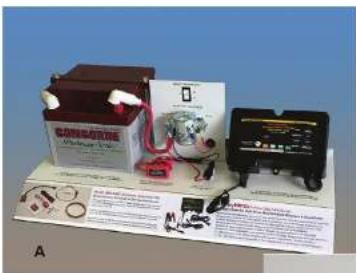
BMAIK2 (A & B)
Airframe Interface Kit For Use with FAA-Certified Aircrafts
For a permanently installed quick-connect charger harness on FAA-certified aircraft, order the optional Model BM-AIK2 Airframe Interface Kit from BatteryMINDers.com. Eligible as a minor alteration, installed by your mechanic. No STC, field approval or Form 337 required. Returned to service by mechanic's log entry.
natural_image
Coiled electrical cable with two blue connectors and a black sensor or meter device (no visible text or symbols)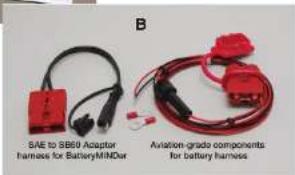
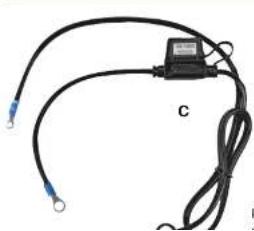
RTA-2415EXP Connection for
Experimental Aircraft (C)
Ready-to-use cable assembly provides simple connection to experimental circuit.
MAINTAINING MULTIPLE BATTERIES
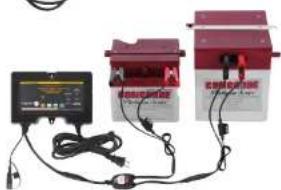
BatteryMINDer Aviation Maintenance-Charger-Desulfators can be used to maintain up to two 12-Volt or 24-Volt batteries at a time, providing each battery is fully operational (no dead-dying cells), free of sulfate and meeting the minimum open circuit charge "rested" voltage of 12.7 Volts or 25.4 Volts, after being fully desulfated.
Never connect two or more batteries together unless they are fully charged. ALL batteries MUST be properly tested to ensure they are in good condition (no dead-dying cells or excessive sulfation) before maintaining them in multiples. Only healthy, fully desulfated batteries should ever be MAINTAINED in sets of 2 or more. Check each cell of ALL filler cap batteries using an accurate, temperature compensated hydrometer. Check sealed (no filler caps) batteries using an accurate, DIGITAL type voltmeter, ONLY. The minimum voltage must not be less than 2.1 volts / cell after fully charging battery and letting it "rest" for 12 hours minimum, before testing. If battery voltage is less than 2.1 volts / cell you must first desulfate it until you reach a "rested" voltage of 2.1 volts / cell.
Remember, you must desulfate each battery by itself (one at a time) before maintaining them for extended periods. Attempting to desulfate more than one battery at a time will yield very poor results, as the strongest (healthiest) and not the weakest (most sulfated) battery will receive the majority of the desulfation pulse energy.
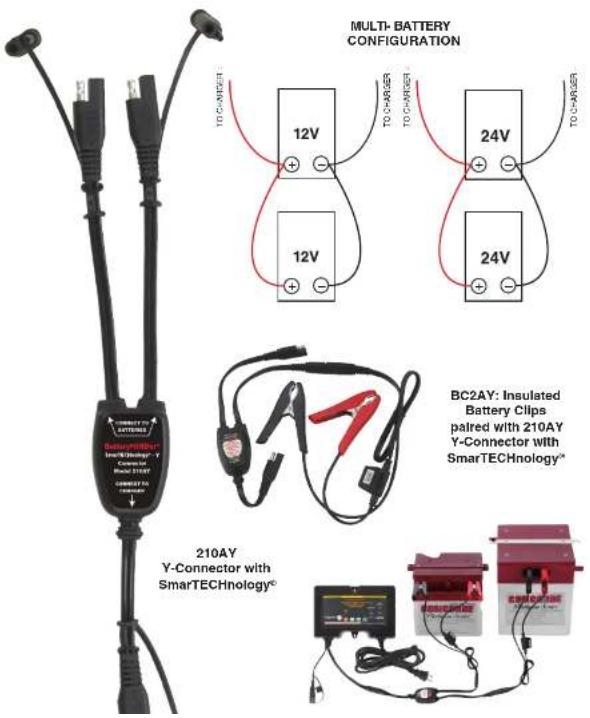
ALWAYS test each battery individually to be certain it is healthy and free of sulfate before attempting to charge or maintain them, either as a single battery or in sets. NEVER connect multiple batteries together for maintenance charging purposes using less than #18 Gauge Insulated wire or consider using BatteryMINDER Y-Connector Model 210AY with SmarTECHnology*.
See diagram on the page 26 for the most common multiple battery configuration.
^* BatteryMINDER ^® has developed a simple, safe and inexpensive method of connecting multiple batteries they call SmarTECHnology ^® Y. Using their single SmarTECHnology ^® -Y connector, two batteries can be maintained simultaneously using just a single output charger designed to maintain batteries. Adding additional Y-connectors allows from four (4) to eight (8) batteries to be connected depending on the maintenance charger
The chart below shows the need to regulate the output voltage of the 12V charger to ensure against over or under charging your battery over a wide range of temperatures. Using your Ambient Temperature Sensor (ATS-1) will accomplish this better than any other known method.
| 12 VOLT (128CEC2-AA-S2,S3& S5)Charge and Float Voltages atVarious Temperatures | |||||||
| Temp F^ | Optimum Charge Voltage Optimum Float Voltage Temp | C^ | |||||
| -S2 -S3 | -S5 -S2 | -S3 -S5 | |||||
| ≥122 | 13.40 | 14.00 | 13.88 | 13.05 | 13.20 | ≥50 | |
| 113 | 13.54 | 14.14 | 13.92 | 13.05 | 13.20 | 13.02 | 45 |
| 104 | 13.68 | 14.28 | 13.97 | 13.05 | 13.20 | 13.07 | 40 |
| 95 | 13.82 | 14.42 | 14.01 | 13.05 | 13.20 | ||
| 86 | 13.96 | 14.56 | 14.06 | 13.05 | 13.20 | ||
| 77 | 14.10 | 14.70 | 14.10 | 13.05 | 13.20 | ||
| 68 | 14.24 | 14.84 | 14.24 | 13.19 | 13.34 | ||
| 59 | 14.38 | 14.98 | 14.38 | 13.33 | 13.48 | ||
| 50 | 14.52 | 15.12 | 14.52 | 13.47 | 13.62 | ||
| ≤41 | 14.66 | 15.26 | 14.66 | 13.61 | 13.76 | ||
The chart below shows the need to regulate the output voltage of the 24V charger to ensure against over or under charging your battery over a wide range of temperatures. Using your Ambient Temperature Sensor (ATS-1) will accomplish this better than any other known method.
| 24 VOLT (244CEC2-AA-S2,S5& S5)Charge and Float Voltages atVarious Temperatures | |||||||
| Temp F^ | Optimum Charge Voltage Optimum Float Voltage Temp | C^ | |||||
| -S2 | -S3-S5 | -S2-S3 | -S5 | ||||
| ≥122 | 26.80 | 28.00 | 27.75 | 26.10 | 26.40 | 26.00 | ≥50 |
| 113 | 27.08 | 28.28 | 27.84 | 26.10 | 26.40 | 26.04 | 45 |
| 104 | 27.36 | 28.56 | 27.93 | 26.10 | 26.40 | 26.13 | 40 |
| 95 | 27.64 | 28.84 | 28.02 | 26.10 | 26.40 | 26.22 35 | |
| 86 | 27.92 | 29.12 | 28.11 | 26.10 | 26.40 | 26.31 30 | |
| 77 | 28.20 | 29.40 | 28.20 | 26.10 | 26.40 | 26.40 25 | |
| 68 | 28.48 | 29.68 | 28.48 | 26.38 | 26.68 | 26.68 20 | |
| 59 | 28.76 | 29.96 | 28.76 | 26.66 | 26.96 | 26.96 15 | |
| 50 | 29.04 | 30.24 | 29.04 | 26.94 | 27.24 | 27.24 10 | |
| ≤41 | 29.32 | 30.52 | 29.32 | 27.22 | 27.52 | 27.52 | ≤5 |
After carefully reading these instructions and Troubleshooting (page 25) sections, should you still have questions, please e-mail our technical support department at: techsupport@vdcelectronics.com. Allow up to 3 business days for a detailed response to your questions. Always identify the model number of the product and revision letter of this manual contained on this page below. Without this information we may not be able to assist you correctly.
| TROUBLESHOOTING GUIDE | ||
| PROBLEM POSSIBLE CAUSE SOLUTION | ||
| Power ON Indicator does not light after being plugged into AC for 30 seconds. | AC outlet is dead. | Plug in a lamp or other appliance to check for voltage. If controlled by a wall switch, be sure switch is on and try to prevent accidental shut off while charger is working. |
| Battery Connection Indicator lights RED solid. | Output lead connections to battery may be reversed. | Switch (reverse) connections at battery. |
| VOLTAGE Indicator lights RED blinking. (Common Features table, page 12, item 2A). | Battery voltage <3/6 volts. | Battery may be damaged and should not be recharged. Allow battery to “recover” by letting it “rest” without a load. |
| Battery was just recently removed from a load (lights, electronic equipment) or not used for extended time without a charger-maintainer. | If battery is healthy and just deeply discharged it should recover its voltage (rise above 3/6 volts) sufficiently to allow charger to begin an attempt to fully recharge it. | |
| Battery has “rested” and still cannot be recovered – recharged. | Battery should be safely discarded – recycled. | |
| Battery Weak Indicator lights AMBER solid. (Before battery has been completely charged). | Battery(s) may be weak, heavily sulfated, or too large to fully charge before unit times out. | |
| Battery may be so large it may require a second full recharge. | Reboot unit by unplugging from A.C. electrical outlet, disconnect from battery so there will be no electrical power going to the unit from either direction, wait 30 seconds, connect to battery first then plug into A.C. outlet. | |
| Battery can be weak | Attempt a full recharge and recheck | |
OPTIONAL ACCESSORIES
210AY Y-Connector with SmarTECHnology ^c
natural_image
Three electronic devices connected by wires, one with a black-and-white display and the other with red-orange casing (no visible text or symbols)FOR REPAIR OR REPLACEMENT
All returns must be authorized by VDC Electronics.
In the event that you believe your product may be defective, you MUST speak to a VDC Electronics technician at 1-800-379-5579 x6 (M - F, ET) before proceeding further. If you must return the unit, the technician will give you an RMA #. Please use Return Form found on batteryminders.com/ under Shipping & Returns when returning your product.
IMPORTANT NOTICE
BatteryMINDer® Five-Year Warranty Registration
BatteryMINDers.com/ under Registration
Please register your unit on-line within 10 days of purchase. Due to the ever-changing technology associated with this BatteryMINDER® unit, we may be unable to keep you informed of significant upgrades, changes, etc. without your registration. The information you provide upon registration will be used to keep a record of your purchase and will assist in providing support should you ever need to contact our Technical Service department: techsupport@vdcelectronics.com; 800-379-5579 x6 (ET).
BatteryMINDER Model 128CEC2-AA or 244CEC2-AA


Serial Number
Place of purchase ____
Date of purchase ____
RMA#
NOTES
BatteryMINDER® Guarantee and Warranty Policy effective Jan. 2013.
ALL Returns and Replacements must be authorized by a VDC Electronics technician. Units must only be returned to VDC Electronics, Inc., NOT TO THE DEALER FROM WHOM IT WAS PURCHASED.
For ALL Replacements, Returns or Repairs covered by Guarantee or Warranty:
Please call 800-379-5579 x6, M - F, 9 AM - 5 PM (ET) to speak to a technician. Have your unit available when you call. We will ask you for:
Your contact Information Product serial number Proof of purchase
One-Year 100% Unconditional Money Back Guarantee:
Your BatteryMINDer product is guaranteed within the first year to perform as claimed or VDC Electronics, Inc. will refund your full purchase price including all taxes, shipping or handling cost applicable to the purchase. Customer will return product to VDC Electronics at their expense.
The Technician will provide you with an RMA number and shipping information. You will be required to fill out a form to complete your return which can be found on BatteryMINDers.com, see Shipping/Returns. Clearly write your RMA number on the outside of the package you are returning. We suggest using a carrier that provides tracking information. VDC Electronics is not responsible for returned packages lost in transit. If the unit is to be replaced, it is shipped by ground with free shipping. Expedited shipping is available at extra cost.
Five-Year Limited Warranty:
Your BatteryMINDER product is warranted for FIVE years from date of purchase at retail against defective material or workmanship. We make no warranty other than this limited warranty and expressly exclude any implied warranty including any warranty for consequential damages. This limited warranty is not transferable.
- If the technician determines defective unit should be repaired, customer will return product at their expense. Once we receive the unit it will be repaired and shipped back to customer, all at no charge. Expedited shipping is available at extra cost.
- If the technician determines unit does not warrant repair but needs replacement, customer will be required to pay a \$9.95 shipping fee for the replacement unit. This fee may be subject to change without notice. There is no cost for the replacement unit itself. Expedited shipping is available at extra cost.

- Aviation-Calibrated Maintenance Charger-Desulfator
- INSTRUCTION MANUAL
- All Models Include:
- BatteryMINDer®
- Models 128CEC2 & 244CEC2-AA-Sx
- Glossary of Terms
- - Maintain a battery
- - Rested
- • Specific Gravity
- IMPORTANT SAFETY INSTRUCTIONS - SAVE THESE INSTRUCTIONS
- WARNING: RISK OF EXPLOSIVE GASES
- PERSONAL PRECAUTIONS
- PREPARING TO CHARGE
- CHARGER LOCATION
- FOLLOW THESE STEPS WHEN BATTERY IS INSTALLED IN VEHICLE. A SPARK NEAR BATTERY MAY CAUSE BATTERY EXPLOSION.
- TO REDUCE RISK OF A SPARK NEAR BATTERY:
- FOLLOW THESE STEPS WHEN BATTERY IS OUTSIDE VEHICLE. A SPARK NEAR THE BATTERY MAY CAUSE BATTERY EXPLOSION. TO REDUCE RISK OF A SPARK NEAR BATTERY:
- QUALIFYING YOUR BATTERY:
- Preliminary Requirements
- Testing a Filler Cap or Manifold-type Lead Acid Battery
- Testing with a Hot/Cold Calibrated Hydrometer Tester
- Read the tester instructions carefully for most accurate readings.
- Testing a Sealed, AGM or GEL Lead Acid Battery
- SIMPLIFIED OPERATING INSTRUCTIONS
- Charging Stages
- LED Indicator Light Details
- DETAILED OPERATING INSTRUCTIONS
- (AMBER).
- IMPORTANT!
- Charging a Battery In a Tightly Confined Area
- MAINTAINING MULTIPLE BATTERIES
- FOR REPAIR OR REPLACEMENT
- IMPORTANT NOTICE
- BatteryMINDER® Guarantee and Warranty Policy effective Jan. 2013.
- For ALL Replacements, Returns or Repairs covered by Guarantee or Warranty:
- One-Year 100% Unconditional Money Back Guarantee:
- Five-Year Limited Warranty:
Brand : BatteryMINDer
Model : 244CEC2-AA-S3
Category : Battery charger