GR-R712JBQ - Fridge LG - Free user manual and instructions
Find the device manual for free GR-R712JBQ LG in PDF.


User questions about GR-R712JBQ LG
0 question about this device. Answer the ones you know or ask your own.
Ask a new question about this device
Download the instructions for your Fridge in PDF format for free! Find your manual GR-R712JBQ - LG and take your electronic device back in hand. On this page are published all the documents necessary for the use of your device. GR-R712JBQ by LG.
USER MANUAL GR-R712JBQ LG
READ THIS OWNER'S MANUAL THOROUGHLY
BEFORE OPERATING AND KEEP IT HANDY
FOR REFERENCE AT ALL TIMES.
3828JD8780D
3828JD8780D(Ar)
16
P/No. 3828JD8780D
2005.1.28, 3:1 PM
CONTENTS
INSTALLATION 3
INNER PARTS 4
OPERATIONS 5-9
Starting
Lamp Auto-Off Feature
Before Setting The Temperature
Door Alarm
Self Test
Controls For Refrigerator Compartment
Super Cool
Child Lock
Controls For Freezer Compartment
Green Ion Door Cooling
Ice Making (Optional)
Fresh Zone (Optional)
Defrosting
Deodorizer (Optional)
Extra Shelf (Optional)
Vitamin Vegetable Drawer (Optional)
Dairy Conner
SUGGESTIONS ON FOOD STORAGE .....11
CLEANING 12
GENERAL INFORMATION ...... 12
LAMP REPLACEMENT 13
IMPORTANT WARNINGS .... 13
BEFORE CALLING FOR SERVICE .... 14
natural_image
Cartoon illustration of a smiling refrigerator character with arms and legs (no text or symbols)THIS REFRIGERATOR IS MANUFACTURED WITH GREAT CARE, AND UTILIZES THE LATEST IN TECHNOLOGY.
WE ARE CONFIDENT THAT YOU WILL BE FULLY SATISFIED WITH IT'S PERFORMANCE AND RELIABILITY.
BEFORE YOU START YOUR REFRIGERATOR, PLEASE READ THIS BOOKLET CAREFULLY.
IT PROVIDES EXACT INSTRUCTIONS FOR INSTALLATION, OPERATION AND
MAINTENANCE, AND ALSO SUPPLIES SOME USEFUL HINTS.
INSTALLATION
- Select a good location.
Place your refrigerator where it is easy to use. - Avoid placing the unit near heat sources, direct sunlight or moisture.
- There must be proper air circulation around your refrigerator to keep it operating efficiently. If your refrigerator is placed in a recessed area in the wall, allow at least 10 inches or greater clearance above the refrigerator and 2 inches or more from the wall. The refrigerator should be elevated 1 inch from the floor, especially if it is carpeted.
- To avoid vibrations, the unit must be level. If required, adjust the leveling screws to compensate for unevenness of the floor. The front should be slightly higher than the rear to aid in door closing.
Leveling screws can be turned easily by tipping the cabinet slightly. Turn the leveling screws clockwise( ) to raise the unit, counterclockwise( ) to lower it. - Don't install this appliance below 5 °C. It may cause the debasement of the refrigerator.
NEXT
- Clean your refrigerator thoroughly and wipe off all dust accumulated during shipping.
- Install accessories such as ice cube box, etc., in their proper places. They are packed together to prevent possible damage during shipment.
- You have a model with bar-type handle, assemble the handle according to instruction card.
- Connect the power supply cord (or plug) to the outlet. Don't double up with other appliances on the same outlet.
- Prior to storing food, leave your refrigerator on for 2 or 3 hours.
Check the flow of cold air in the freezer compartment to ensure proper cooling. Your refrigerator is now ready for use.
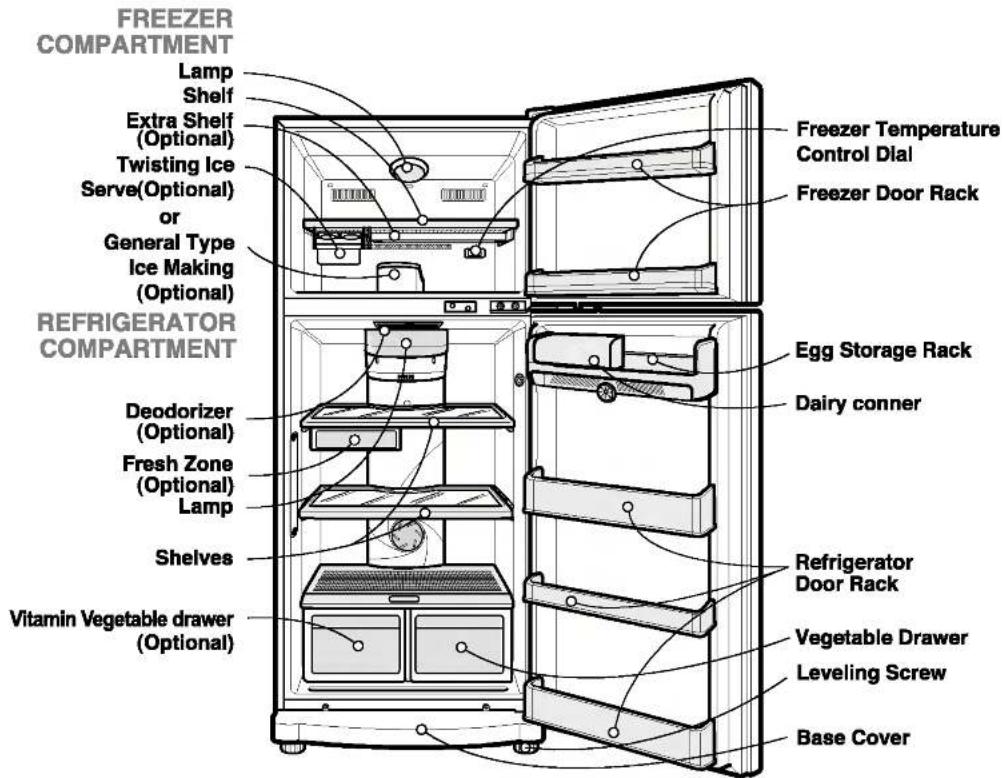
INNER PARTS
text_image
FREEZER COMPARTMENT Lamp Shelf Extra Shelf (Optional) Twisting Ice Serve(Optional) or General Type Ice Making (Optional) REFRIGERATOR COMPARTMENT Deodorizer (Optional) Fresh Zone (Optional) Lamp Shelves Vitamin Vegetable drawer (Optional) Freezer Temperature Control Dial Freezer Door Rack Egg Storage Rack Dairy conner Refrigerator Door Rack Vegetable Drawer Leveling Screw Base Cover
- This guide covers several different models. The refrigerator you have purchased may have some or all of the features shown above.
OPERATIONS
STARTING
When your refrigerator is first installed, allow it 2-3 hours to stabilize at normal operating temperatures prior to filling it with fresh or frozen foods.
If operation is interrupted, wait 5 minutes before restarting.
LAMP AUTO OFF FEATURE
When the door is open for 7 minutes or longer, the lamp inside goes off automatically to save energy and prevent overheating. However, the alarm sound continues until the door is closed.
BEFORE SETTING THE TEMPERATURE
- The temperature of the refrigerator is kept constant regardless of changes in room temperature. It is recommended that, once set, the temperature settings(the controls for the refrigerator and freezer compartments) not be changed unless necessary.
- This refrigerator has one temperature control button for the refrigerator compartment and one temperature control dial for the freezer compartment.
- The default setting of the temperature control button for the refrigerator compartment is 'Normal'.
- The default setting of the temperature control dial for the freezer compartment is '3'.
- This refrigerator has a temperature sensor in the refrigerator compartment. It will start and stop the compressor automatically as needed.
DOOR ALARM
When the door of the refrigerator or the freezer is open for 1 minute, an alarm will sound three. It the door remains open, the alarm will repeat every 30 seconds.
SELF TEST
- Your refrigerator contains a built in diagnostic capability. If it develops a malfunction in certain areas, it will display an error code to assist the repair technician. While an error code is displayed, other control and display functions will not operate.
- If an error code is displayed, contact a service center. Do not disconnect the power cord from the outlet.
CONTROLS FOR REFRIGERATOR COMPARTMENT
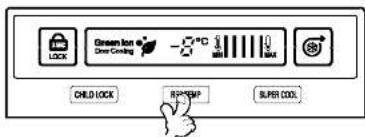
To control the Refrigerator temperature, press the REF TEMP button.
The temperature is set in 5 steps, from MIN to MAX cooling. (Min = warmest, MAX = coldest temperature.)
text_image
GREEN LION Clear Cooling PC MINI MAX CHILD LOCK R2*EXP SUPER COOL3828JD8780D(Eng) 2005.1.28 3:2 PM ^1 | ^1 | 6
OPERATIONS
SUPER COOL
- The Super Cool feature operates when the refrig
- When the door is opened, the warmer air can't
- Pull forward slightly, then push down gently
• Use the moving by pushing right the left with
3828JD8780D(Eng) 2005.1.28 3:2 PM || | 11
SUGGESTIONS ON FO
STORING FOOD
- Store fresh food in the refrigerator compartment
It is important that you refrigerator be kept clean to prevent undesirable odors. Spilled food should be
To remove the lamp shield inside the freezer corr