
EXT-USB250M - Hi-Fi System KanexPro - Free user manual and instructions
Find the device manual for free EXT-USB250M KanexPro in PDF.


| Product Type | HDMI Extender (Transmitter & Receiver) |
| Model | EXT-USB250M |
| HDMI Compliance | HDMI 2.0 |
| HDCP Compliance | HDCP 2.2 / HDCP 1.4 |
| Video Bandwidth | 18 Gbps |
| Max Video Resolution | 4K@60Hz 4:4:4 |
| Max Extension Distance (CAT6) | 197 ft (60 m) at 4K60, 230 ft (70 m) at 4K30/1080P |
| Audio Formats | LPCM 2.0/2.1/5.1/6.1/7.1, Dolby Digital, Dolby TrueHD, DTS-HD Master, DTS-X |
| HDR Support | Yes |
| IR Pass-through | One-way (Transmitter to Receiver) |
| PoC (Power over Cable) | Yes, power only one unit |
| EDID Management | Automatic copy |
| HDMI Loop Output | Yes (on Transmitter) |
| Dimensions (each unit) | 61 mm x 88 mm x 18 mm |
| Weight (Transmitter) | 160 g |
| Weight (Receiver) | 155 g |
| Power Supply | DC 12V/1A (locking adapter included) |
| Power Consumption | 3.84 W |
| Housing Material | Metal |
| Operating Temperature | 32 – 104°F (0 – 40°C) |
| Storage Temperature | -4 – 140°F (-20 – 60°C) |
| ESD Protection | ±38 kV (Air-gap), ±34 kV (Contact) |
| Package Contents | Transmitter, Receiver, IR Blaster, IR Receiver, Power Adapter, Mounting Ears, Manual |
Frequently Asked Questions - EXT-USB250M KanexPro
User questions about EXT-USB250M KanexPro
0 question about this device. Answer the ones you know or ask your own.
Ask a new question about this device
Download the instructions for your Hi-Fi System in PDF format for free! Find your manual EXT-USB250M - KanexPro and take your electronic device back in hand. On this page are published all the documents necessary for the use of your device. EXT-USB250M by KanexPro.
USER MANUAL EXT-USB250M KanexPro
4K HDR HDMI 2.0 18G Extender 50M over Cat6
All Right Reserved
MPN: EXT-USB250M
VER. 1.0
SAFETY PRECAUTIONS
Please read all instructions before attempting to unpack, install or operate this equipment and before connecting the power supply. Please keep the following in mind as you unpack and install this equipment:
- Always follow basic safety precautions to reduce the risk of fire, electrical shock and injury to persons.
- To prevent fire or shock hazard, do not expose the unit to rain, moisture or install this product near water.
- Never spill liquid of any kind on or into this product.
- Never push an object of any kind into this product through any openings or empty slots in the unit, as you may damage parts inside the unit.
- Do not attach the power supply cabling to building surfaces.
- Use only the supplied power supply unit (PSU). Do not use the PSU if it is damaged.
- Do not allow anything to rest on the power cabling or allow any weight to be placed upon it or any person walk on it.
- To protect the unit from overheating, do not block any vents or openings in the unit housing that provide ventilation and allow for sufficient space for air to circulate around the unit.
Table of Contents
- Introduction....3
- Features....3
- Package Contents .... 3
- Specifications....4
- Operation Controls and Functions....5
5.1 Transmitter Panel 5
5.2 Receiver Panel....5
5.3 IR Pin Definition....6 - Application Example....7
- Customer Service....8
1. Introduction
The KanexPro EXT-50M18G extender is a set of transmitter and receiver which sends full UHD 4K/60 HDMI signals over CAT6 cable up to 164ft. (50m). The transmitter module features a local HDMI output for preview monitor or local display support enabling you to see what you are extending over CATx cable. Beneficial for large lecture halls, house of worship centers and conference rooms. For control, the extender set can send/ receive IR signals from each other over CAT5e/6 cable with IR pass-through.
The extender includes two units: transmitter unit and receiver unit. The transmitter unit is responsible for capturing HDMI input signal and carries the signal
via one cost effective Cat6 cable and emitting IR control signals. The receiver unit is responsible for receiving the HDMI signal and transmitting IR control signal.
The extender offers the most convenient solution for HDMI extension over a single Cat5e/6 with long distance capability, and is the perfect solution for any application.
2. Features
• HDMI 2.0, HDCP 2.2 / HDCP 1.4 and DVI 1.0 compliant
• Supports 18Gbps bandwidth
- Supports input and output video resolution up to 4k2k@60Hz 4:4:4, extends
• distance up to 164ft / 50 meters
• Supports one HDMI loop output
• Supports one-way IR pass-through
• Supports HDR function
• Supports PoC (Power over Cable) function, it means that either transmitter
- or receiver is powered supply by 12V/1A power adapter, the other doesn't
- need power supply.)
• Supports automatic copy EDID function
- Compact design for easy and flexible installation.
3. Package Contents
- 1× HDMI 18Gbps Extender (Transmitter)
- 1× HDMI 18Gbps Extender (Receiver)
- 1× IR Blaster cable (1.5 meters)
- 1× 20\~60KHz IR Receiver cable (1.5 meters)
- 1× 12V/1A Locking Power adapter
- 4× Mounting Ears
- 1× User Manual
4. Specifications
| Technical | ||
| HDMI Compliance | HDMI 2.0 | |
| HDCP Compliance | HDCP 2.2 / HDCP 1.4 | |
| Video Bandwidth | 18Gbps | |
| Video Resolution | Up to 4K60Hz 4:4:4 | |
| Color Space | RGB / YCbCr 4:4:4, YCbCr 4:2:2/4:2:0, YUV 4:4:4 | |
| Color Depth | 8/10/12-bit (1080P60Hz, 4K30Hz, 4K60Hz YCbCr 4:2:2/4:2:0)8-bit (4K60Hz 4:4:4) | |
| HDMI Audio Formats | LPCM 2.0/2.1/5.1/6.1/7.1, Dolby Digital, Dolby TrueHD, Dolby Digital Plus(DD+), DTS-ES, DTS HD Master, DTS HD-HRA, DTS-X | |
| ESD Protection | Human body model - 38kV (Air-gap discharge) &34kV (Contact discharge) | |
| Connections | ||
| Transmitter | Inputs: 1x HDMI Type A [19-pin female]1x SERVICE [Micro USB, Update port]Outputs: 1x HDMI Type A [19-pin female]1x IR OUT [3.5mm Stereo Mini-jack]1x CAT OUT [RJ45, 8-pin female] | |
| Receiver | Inputs: 1x IR IN [3.5mm Stereo Mini-jack]1x CAT IN [RJ45, 8-pin female]1x SERVICE [Micro USB, Update port]Outputs: 1x HDMI Type A [19-pin female] | |
| Mechanical | ||
| Housing | Metal Enclosure | |
| Color | Black | |
| Dimensions | Transmitter / Receiver:61mm [W] x 88mm [D] x 18mm [H] | |
| Weight | Transmitter: 160g, Receiver: 155g | |
| Power Supply | Input: AC 100 - 240V 50/60HzOutput: DC 12V/1A | |
| Power Consumption | 3.84 W | |
| Operating Temperature | 32 - 104°F / 0 - 40°C | |
| Storage Temperature | -4 - 140°F / -20 - 60°C | |
| Relative Humidity | 20 - 90% RH (no condensation) | |
| Resolution / Distance | 4K60 - Feet / Meters | 4K30 / 1080P - Feet / Meters |
| CAT5e | 164ft / 50M | 164ft / 50M |
| CAT6/6a/7 | 197ft / 60M | 230ft / 70M |
| HDMI IN/OUT | 10ft / 3M | 30ft / 10M |
| The use of “Premium High-Speed HDMI” cable is highly recommended. | ||
5. Operation Controls and Functions 5.1 Transmitter Panel


| Number | Name | Function description |
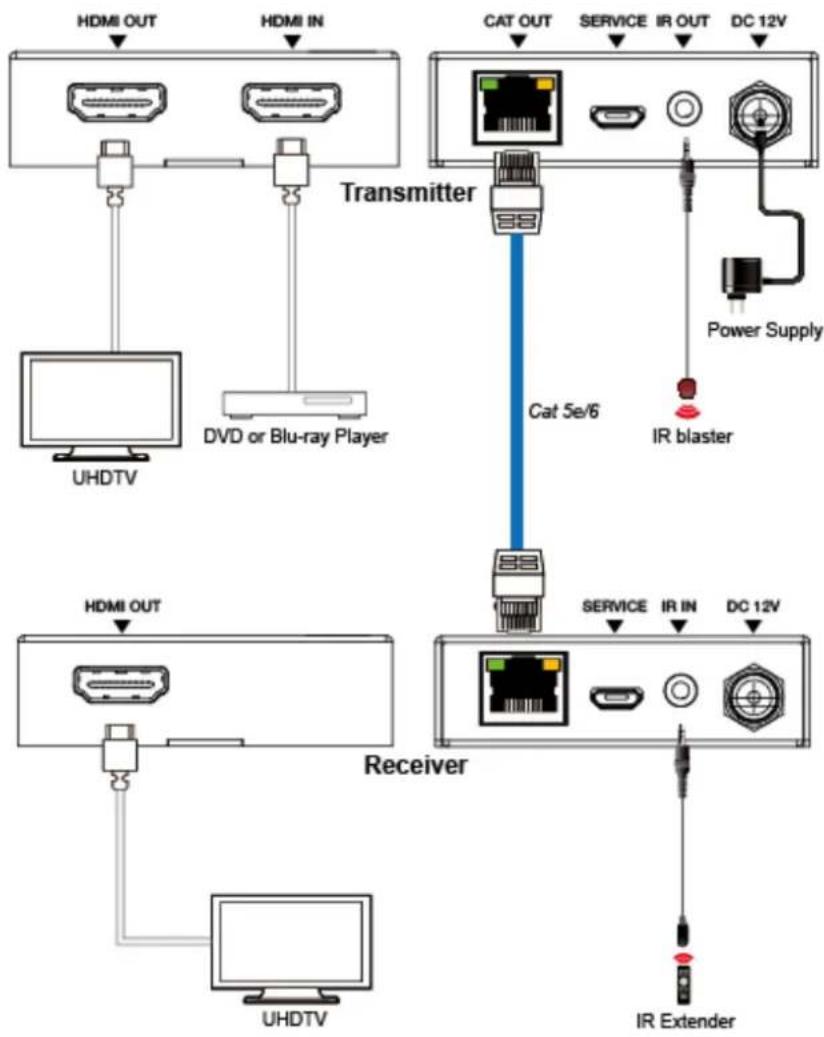
| 1 | HDMI OUT | HDMI loop output port, connect to HDMI display device such as TV or Projector with an HDMI cable. |
| 2 | HDMI IN | HDMI input port, connect to HDMI source device such as DVD or PS4 player with an HDMI cable. |
| 3 | CAT OUT | Connect to CAT IN port on the receiving end with a CAT6 cable. |
| 4 | Power Indicator Lamp (Green) | The lamp will illuminate when the transmitter is powered on. |
| 5 | Data signal Indicator Lamp (Orange) | The lamp will illuminate when the transmitter and the receiver have signal transmission. |
| 6 | SERVICE port | For firmware updated use. |
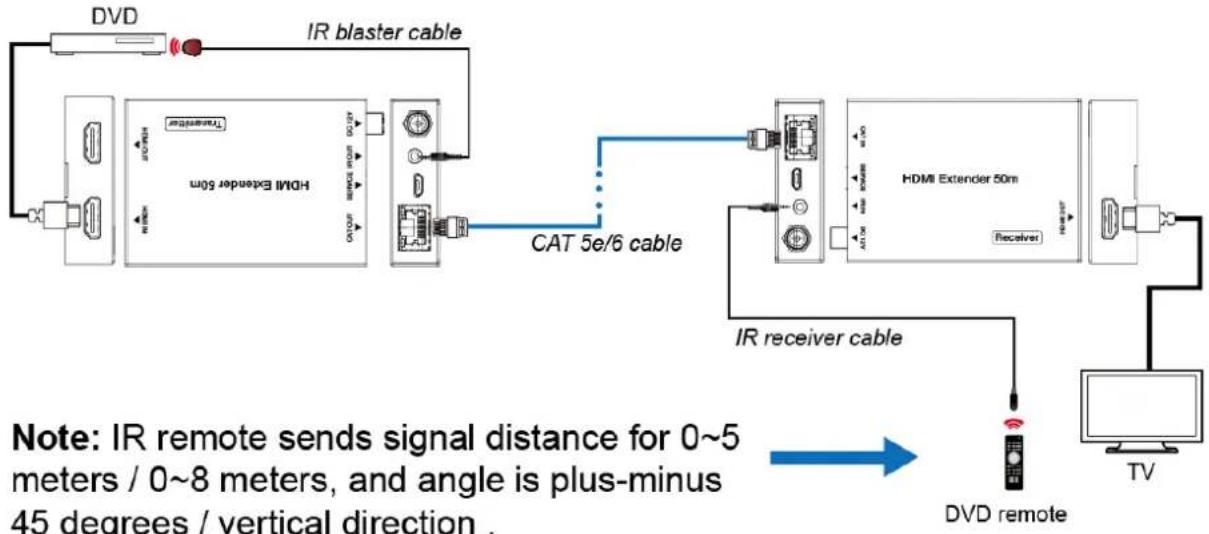
| 7 | IR OUT | Connect to wideband IR Blaster cable. The IR signal is from the IR IN port of the receiver. |
| 8 | DC 12V | Plug DC 12V/1A power supply into the unit and connect the adapter to an AC outlet.(Note: The extender supports PoC function, it meansthat either transmitter or receiver is powered supply by 12V/1A power adapter, the other doesn’t need power supply.) |
5.2 Receiver Panel


| Number | Name | Function description |
| 1 | HDMI OUT | HDMI output port, connect to HDMI display device such as TV or Projector with an HDMI cable. |
| 2 | CAT IN | Connect to CAT OUT port on the transmitter end with a CAT6 cable. |
| 3 | Power Indicator Lamp (Green) | The lamp will illuminate when the receiver is powered on. |
| 4 | Data signal Indicator Lamp (Orange) | The lamp will illuminate when the transmitter and the receiver have signal transmission. |
| 5 | SERVICE port | For firmware updated use. |
| 6 | IR IN | Connect to wideband IR Receiver cable. The IR signal will send to the IR OUT port of the transmitter. |
| 7 | DC 12V | Plug DC 12V/1A power supply into the unit and connect the adapter to an AC outlet.(Note: The extender supports PoC function, it meansthat either transmitter or receiver is powered supply by 12V/1A power adapter, the other doesn’t need power supply.) |
5.3 IR Pin Definition
IR Receiver and Blaster pin's definition as below:

The following is IR system diagram about IR cable use method.
flowchart
graph LR
    A["DVD"] --> B["IR blaster cable"]
    B --> C["TC"]
    C --> D["HDMI Extender 50m"]
    D --> E["CAT 5e/6 cable"]
    E --> F["HDMI Extender 50m"]
    F --> G["Receiver"]
    G --> H["TV"]
    H --> I["IR receiver cable"]
    I --> J["DVD remote"]
    note1["Note: IR remote sends signal distance for 0~5 meters / 0~8 meters, and angle is plus-minus 45 degrees / vertical direction."]
6. Application Example
flowchart
graph TD
    A["Transmitter"] --> B["HD/CM"]
    A --> C["CAT OUT"]
    A --> D["Service"]
    A --> E["IR OUT"]
    A --> F["DC 12V"]
    G["Power Supply"] --> H["IR blaster"]
    I["Receiver"] --> J["HD/CM"]
    I --> K["Service"]
    I --> L["IR IN"]
    I --> M["DC 12V"]
    N["UHDTV"] --> O["Transmitter"]
    P["HDMI OUT"] --> Q["Transmitter"]
    R["UHDTV"] --> S["Transmitter"]
    T["IR Extender"] --> U["Transmitter"]
7. Customer Service
The return of a product to our Customer Service implies the full agreement of the terms and conditions hereinafter. There terms and conditions may be changed without prior notice.
① Warranty
The limited warranty period of the product is fixed 3 (three) years.
② Scope
These terms and conditions of Customer Service apply to the customer service provided for the products or any other items sold by authorized distributor only.
③ Warranty Exclusions:
Warranty expiration.
Factory applied serial number has been altered or removed from the product. Damage, deterioration or malfunction caused by:
√ Normal wear and tear.
√ Use of supplies or parts not meeting our specifications.
√ No certificate or invoice as the proof of warranty.
√ The product model showed on the warranty card does not match with the model of the product for repairing or had been altered.
√ Damage caused by force majeure.
√ Servicing not authorized by distributor.
√ Any other causes which does not relate to a product defect. Shipping fees, installation or labor charges for installation or setup of the product.
④ Documentation:
Customer Service will accept defective product(s) in the scope of warranty coverage at the sole condition that the defeat has been clearly defined, and upon reception of the documents or copy of invoice, indicating the date of purchase, the type of product, the serial number, and the name of distributor.
Remarks: For further assistance or solutions, please contact your local distributor.


Brand : KanexPro
Model : EXT-USB250M
Category : Hi-Fi System