Pixie Strip 60 - Machine à effets Adj - Free user manual and instructions
Find the device manual for free Pixie Strip 60 Adj in PDF.


User questions about Pixie Strip 60 Adj
0 question about this device. Answer the ones you know or ask your own.
Ask a new question about this device
Download the instructions for your Machine à effets in PDF format for free! Find your manual Pixie Strip 60 - Adj and take your electronic device back in hand. On this page are published all the documents necessary for the use of your device. Pixie Strip 60 by Adj.
USER MANUAL Pixie Strip 60 Adj
natural_image
Three blue industrial lighting fixtures with mounting brackets and a color calibration bar below (no text or symbols)USER MANUAL
©2021 ADJ Products, LLC all rights reserved. Information, specifications, diagrams, images, and instructions herein are subject to change without notice. ADJ Products, LLC logo and identifying product names and numbers herein are trademarks of ADJ Products, LLC. Copyright protection claimed includes all forms and matters of copyrightable materials and information now allowed by statutory or judicial law or hereinafter granted. Product names used in this document may be trademarks or registered trademarks of their respective companies and are hereby acknowledged. All non-ADJ Products, LLC brands and product names are trademarks or registered trademarks of their respective companies.
ADJ Products, LLC and all affiliated companies hereby disclaim any and all liabilities for property, equipment, building, and electrical damages, injuries to any persons, and direct or indirect economic loss associated with the use or reliance of any information contained within this document, and/or as a result of the improper, unsafe, insufficient and negligent assembly, installation, rigging, and operation of this product.
DOCUMENT VERSION
Due to additional product features and/or enhancements, an updated version of this document may be available online.
Please check www.adj.com for the latest revision/update of this manual before beginning installation and/or programming.
| Date | Document Version | Software Version ≥ | DMX Channel Mode | Notes |
| 08/12/20 | 1.0 1.0 Not Applicable Initial Release. | |||
| 08/04/21 | 1.2 N/C Not Applicable Updated Installation and Accessories. | |||
Europe Energy Saving Notice
Energy Saving Matters (EuP 2009/125/EC)
Saving electric energy is a key to help protecting the environment. Please turn off all electrical products when they are not in use. To avoid power consumption in idle mode, disconnect all electrical equipment from power when not in use. Thank you!
TABLE OF CONTENTS
| Introduction 4 | |
| Features | Warranty Registration 5 | |
| Safety Guidelines 6 | |
| Overview 7 | |
| Installation 8 | |
| Limited Warranty 11 | |
| Dimensional Drawings 12 | |
| Specifications 14 | |
| Accessories 15 |
INTRODUCTION
Introduction: Congratulations on your purchase of the ADJ Pixie Strip! This device has been designed as part of a series of versatile pixel battens combining vibrants LEDs with intelligently-designed housings to create a powerful and versatile system. These devices are intended specifically for use in conjunction with the ADJ Pixie Driver 2000, and should perform reliably for years when the guidelines in this booklet are followed. Please read and understand the instructions in this manual carefully and thoroughly before attempting to operate this device. These instructions contain important information regarding safety during use and maintenance.
Please keep this manual with the unit for future reference.
Customer Support: Contact ADJ Service for any product related service and support needs. Also visit forums.adj.com with questions, comments or suggestions.
Parts: To purchase parts online visit:
http://parts.adj.com (US)
http://www.adjparts.eu (EU)
ADJ SERVICE USA - Monday - Friday 8:00am to 4:30pm PST
Voice: 800-322-6337 | Fax: 323-582-2941 | support@adj.com
ADJ SERVICE EUROPE - Monday - Friday 08:30 to 17:00 CET
Voice: +31 45 546 85 60 | Fax: +31 45 546 85 96 | support@adj.eu
ADJ PRODUCTS LLC USA
6122 S. Eastern Ave. Los Angeles, CA. 90040
323-582-2650 | Fax 323-532-2941 | www.adj.com | info@adj.com
ADJ SUPPLY Europe B.V
Junostraat 2 6468 EW Kerkrade, The Netherlands
+31 (0)45 546 85 00 | Fax +31 45 546 85 99
www.adj.eu | info@adj.eu
ADJ PRODUCTS GROUP Mexico
AV Santa Ana 30 Parque Industrial Lerma, Lerma, Mexico 52000
+52 (728) 282-7070
WARNING! To prevent or reduce the risk of electrical shock or fire, do not expose this unit to rain or moisture.
CAUTION! There are no user serviceable parts inside this unit. Do not attempt any repairs yourself, doing so will void your manufacturer's warranty. In the unlikely event your unit may require service, please contact ADJ Products, LLC.
Do not discard the shipping cartoon in the trash. Please recycle when ever possible.
FEATURES
• Lightweight aluminum housing
- Magnetic end caps
- Integrated adjustable mounting bracket
- Safety cable loop
Included Items:
• Round frosted cover (x1)
• Square froster cover (x1)
• Round smoked cover (x1)
• Square smoked cover (x1)
• 4-pin power/data cable (x1)
WARRANTY REGISTRATION
The Pixie Strip 30 / 60 / 120 carries a 2 year limited warranty. Please fill out the enclosed warranty card to validate your purchase. All returned service items, whether under warranty or not, must be freight pre-paid and accompanied by a return authorization (R.A.) number. The R.A. number must be clearly written on the outside of the return package. A brief description of the problem as well as the R.A. number must also be written down on a piece of paper included in the shipping carton. If the unit is under warranty, you must provide a copy of your proof of purchase invoice. You may obtain an R.A. number by contacting our customer support team. All packages returned to the service department not displaying an R.A. number on the outside of the package will be returned to the shipper.
SAFETY GUIDELINES
For Your Own Personal Safety, Please Read and Understand This Manual Completely Before You Attempt To Install Or Operate This Unit!
- Be sure to save the packing carton in the unlikely event the device may have to be returned for service
- Do not spill water or other liquids into or on to the device.
- Be sure that the local power outlet matches the required voltage for the device
- Do not open up the device under any conditions. There are no user serviceable parts inside
- Disconnect the device's main power when left unused for long periods of time
- Never connect this device to a dimmer pack
- Do not attempt to operate this device if it has been damaged in any way
- Never operate this device with the cover removed
• To reduce the risk of electrical shock or fire, do not expose this device to rain or moisture - Do not attempt to operate this device if the power cord has been frayed or broken. Do not attempt to remove or break off the ground prong from the electrical cord. This prong is used to reduce the risk of electrical shock and fire in case of an internal short
- Disconnect from main power before making any type of connection
- Never block the ventilation holes. Always be sure to mount this device in an area that will allow proper ventilation. Allow about 6" (15cm) between this device and a wall
- This unit is intended for indoor use only. Use of this product outdoors voids all warranties
• Always mount this unit in a safe and stable matter - Please route your power cord out of the way of foot traffic. Power cords should be routed so they are not likely to be walked on, or pinched by items placed upon or against them
- Keep flammable materials away from this fixture!
- IP20 Rating: Fixture is protected against solids approximately the size of an adult finger, or larger. FIXTURE IS NOT PROTECTED AGAINST LIQUID INTRUSION OF ANY KIND!
- The device should be serviced by qualified service personnel when:
A. The power-supply cord or the plug has been damaged.
B. Objects have fallen on, or liquid has been spilled into, the device.
C. The device has been exposed to rain or water.
D. The appliance does not appear to operate normally or exhibits a marked change in performance.
OVERVIEW
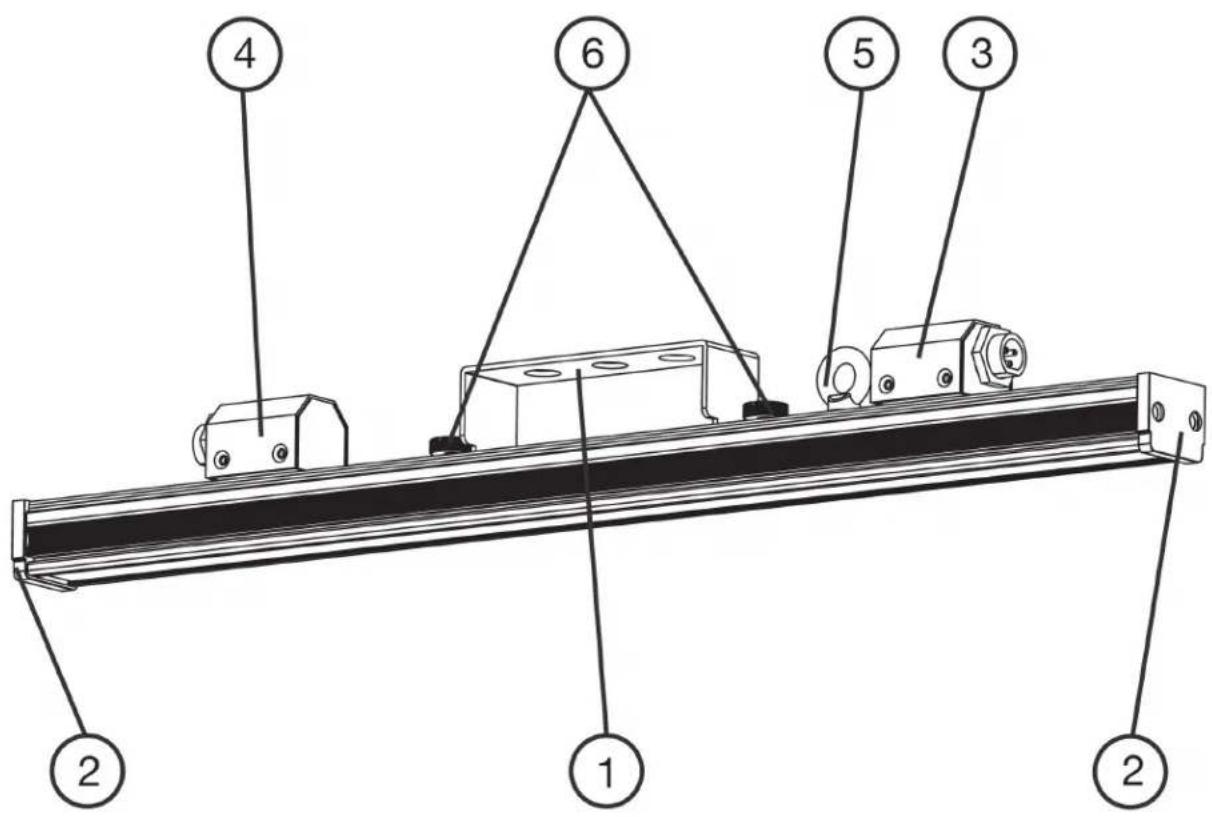
text_image
Technical diagram of a mechanical assembly with numbered components labeled 1 through 6- Mounting Bracket
- Magnetic End Cap
- Power/Data In
- Power/Data Out
- Safety Cable Attachment Point
- Mounting Bracket Adjustment Screws
NOTE: The specific model shown in the above image is the Pixie Strip 30, but the features listed as well as their locations on the device are applicable to all Pixie Strip models.
INSTALLATION
FLAMMABLE MATERIAL WARNING!
Keep drive a minimum of 5.0 feet (1.5m) away from flammable material and/or pyrotechnics.
ELECTRICAL CONNECTIONS
A qualified electrician should be used for all electrical connections and/or installations.
DO NOT INSTALL THE DEVICE IF YOU ARE NOT QUALIFIED TO DO SO!
The device MUST be installed following all local, national, and country commercial electrical and construction codes and regulations.
Before rigging or mounting a single fixture or multiple interconnected fixtures for custom matrix designs to any metal truss or structure or placing the fixture(s) on any surface, a professional equipment installer MUST be consulted to determine whether the metal truss, structure, or surface is properly certified to safely support the combined weight of the fixture(s), clamps, cables, and any other accessories.
Fixture(s) should be installed in areas outside walking paths, seating areas, or away from areas where unauthorized personnel might be able to reach the device by hand.
NEVER stand directly below the fixture(s) when rigging, removing, or servicing. Overhead fixture installation must always be secured with a secondary safety attachment, such as an appropriately rated safety cable (not included) that meets all local, national, and country codes and regulations. Allow approximately 15 minutes for the fixture to cool down before servicing.
SOCKET PIN CONFIGURATION
This device features two (2) output sockets on the back side, which may be used to connect the device to the desired lighting fixtures. The pins for each output socket are configured as shown in the image below. Please consult a qualified electrician for all electrical connections and/or installations.

text_image
4 1 3 2Pin 1: Power (+)
Pin 2: Data
Pin 3: CLK (clock pin)
Pin 4: Power (-)
INSTALLATION
CLAMP INSTALLATION
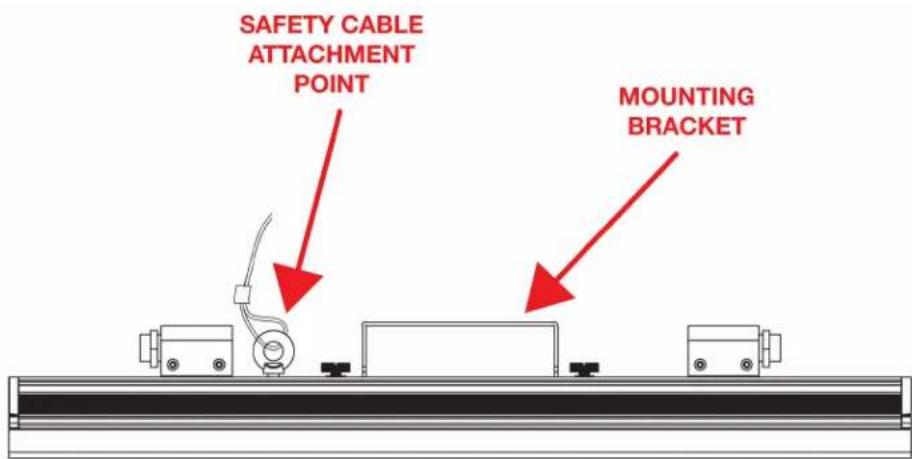
This fixture features a sliding, adjustable mounting bracket (some models feature multiple mounting brackets), as well as a safety cable attachment point on the main body of the fixture (see illustration below). When mounting this fixture in a suspended environment, be sure to secure an appropriately rated clamp (not included) to the mounting bracket, and attach a separate SAFETY CABLE (not included) to the safety cable attachment point.
text_image
SAFETY CABLE ATTACHMENT POINT MOUNTING BRACKET
SAFETY CABLE
Always attach a safety cable whenever installing this fixture in a suspended environment in order to ensure the fixture will not fall if the clamp fails!
RIGGING
Overhead rigging requires extensive experience, including but not limited to: calculating working load limits, understanding the installation material being used, and periodic safety inspection of all installation material and the fixture itself. If you lack the qualification, do not attempt the installation yourself. Improper installation can result in bodily injury.
INSTALLATION
MULTIPLE FIXTURES
Multiple fixtures may be daisy chained together via the Power/Data In and Power/Data Out ports located on each fixture. The maximum number of fixtures that may be daisy chained together and connected to a single driver output port is determined by a combination of the driver output limitations and the RGB pixel control configuration.
Please see the Driver Output Limitation section and the RGB Pixel Control sections of the manual for the ADJ Pixie Driver 2000 for details on these limitations and how to configure these settings to best accommodate your desired lighting setup.
The ADJ Pixie Driver 2000 that has been designed to work with these lighting fixtures has been programmed not to allow Pixie Strip fixtures to be added in such a way that the driver port output limitations will be exceeded. This is done by limiting the number of Pixie Strip units that can be selected in the System Menu of the driver based on what has already been set up. Please see the Driver Output Limitations section of the Pixie Driver 2000 manual for more detailed information.
ALLOWABLE CABLE LENGTHS
16-AWG 4-pin extension cable may be used to link multiple devices. However, please take note of maximum allowable cable lengths, as listed below.
• Max length of cable connecting a controller and a device: 59 feet (18m)
- Max length of cable connecting two devices: 32 feet (10m)
- Max total cable length in a single chain: 98 feet (30m) including the lengths of the lighting strip(s)
LIMITED WARRANTY (USA ONLY)
MANUFACTURER'S LIMITED WARRANTY
A. ADJ Products, LLC hereby warrants, to the original purchaser, ADJ Products, LLC products to be free of manufacturing defects in material and workmanship for a prescribed period from the date of purchase (see specific warranty period on reverse). This warranty shall be valid only if the product is purchased within the United States of America, including possessions and territories. It is the owner's responsibility to establish the date and place of purchase by acceptable evidence, at the time service is sought.
B. For warranty service you must obtain a Return Authorization number (RA#) before sending back the product-please contact ADJ Products, LLC Service Department at 800-322-6337. Send the product only to the ADJ Products, LLC factory. All shipping charges must be pre-paid. If the requested repairs or service (including parts replacement) are within the terms of this warranty, ADJ Products, LLC will pay return shipping charges only to a designated point within the United States. If the entire instrument is sent, it must be shipped in its original package. No accessories should be shipped with the product. If any accessories are shipped with the product, ADJ Products, LLC shall have no liability whatsoever for loss of or damage to any such accessories, nor for the safe return thereof.
C. This warranty is void if the serial number has been altered or removed; if the product is modified in any manner which ADJ Products, LLC concludes, after inspection, affects the reliability of the product; if the product has been repaired or serviced by anyone other than the ADJ Products, LLC factory unless prior written authorization was issued to purchaser by ADJ Products, LLC; if the product is damaged because not properly maintained as set forth in the instruction manual.
D. This is not a service contract, and this warranty does not include maintenance, cleaning or periodic check up. During the period specified above, ADJ Products, LLC will replace defective parts at its expense with new or refurbished parts, and will absorb all expenses for warranty service and repair labor by reason of defects in material or workmanship. The sole responsibility of ADJ Products, LLC under this warranty shall be limited to the repair of the product, or replacement thereof, including parts, at the sole discretion of ADJ Products, LLC. All products covered by this warranty were manufactured after August 15, 2012, and bear indentifying marks to that effect.
E. ADJ Products, LLC reserves the right to make changes in design and/or improvements upon its products without any obligation to include these changes in any products theretofore manufactured.
No warranty, whether expressed or implied, is given or made with respect to any accessory supplied with products described above. Except to the extent prohibited by applicable law, all implied warranties made by ADJ Products, LLC in connection with this product, including warranties of merchantability or fitness, are limited in duration to the warranty period set forth above. And no warranties, whether expressed or implied, including warranties of merchantability or fitness, shall apply to this product after said period has expired. The consumer's and/or Dealer's sole remedy shall be such repair or replacement as is expressly provided above; and under no circumstances shall ADJ Products, LLC be liable for any loss or damage, direct or consequential, arising out of the use of, or inability to use, this product.
This warranty is the only written warranty applicable to ADJ Products, LLC Products and supersedes all prior warranties and written descriptions of warranty terms and conditions heretofore published.
MANUFACTURER'S LIMITED WARRANTY PERIODS:
- Non L.E.D. Lighting Products = 1-year (365 days) Limited Warranty (Such as: Special Effect Lighting, Intelligent Lighting, UV lighting, Strobes, Fog Machines, Bubble Machines, Mirror Balls, Par Cans, Trussing, Lighting Stands etc. excluding LED and lamps)
- Laser Products = 1 Year (365 Days) Limited Warranty (excluding laser diodes which have a 6 month limited warranty)
- L.E.D. Products = 2-year (730 days) Limited Warranty (excluding batteries which have a 180 day limited warranty). Note: 2 Year Warranty only applies to purchases within the United States.
- StarTec Series = 1 Year Limited Warranty (excluding batteries which have a 180 day limited warranty).
- ADJ DMX Controllers = 2 Year (730 Days) Limited Warranty
DIMENSIONAL DRAWINGS
PIXIE STRIP 30
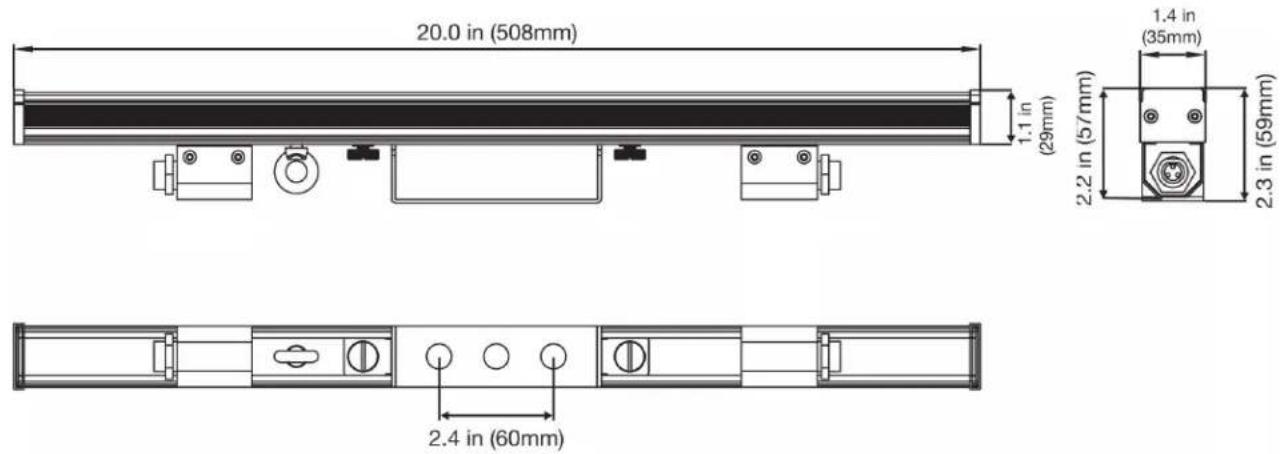
text_image
20.0 in (508mm) 1.1 in (29mm) 1.4 in (35mm) 2.2 in (57mm) 2.3 in (59mm) 2.4 in (60mm)PIXIE STRIP 60

text_image
39.6 in (1005mm) 1.4 in (35mm) 2.2 in (57mm) 2.3 in (59mm) 2.4 in (60mm) 2.4 in (60mm) 22.2 in (564mm)Drawings not to scale.
DIMENSIONAL DRAWINGS
PIXIE STRIP 120

text_image
50.3 in (1278mm) 2.4 in (60mm) 2.4 in (60mm) 2.4 in (60mm) 78.7 in (1999mm) 1.4 in (35mm) (59mm) 2.3 in (35mm) (57mm) 2.2 in (28mm) 1.1 in (59mm)Drawings not to scale.
SPECIFICATIONS
SOURCE:
• SMD RGB 3-in-1 LED's
• Color Resolution: 8 bits per color (24 bit per pixel)
• Viewing Angle: 120 x 120 degrees
- Pixels Per Meter: 60 pixels
- Pixel Pitch (pixel center-to-center) 16.5mm
- PWM (Pulse Width Modulation): 44,000Hz
CONNECTIONS:
• 4-pin Power/Data In/Out
SIZE / WEIGHT:
- Pixie Strip 30
- L x W x H: 19.7" x 1.26" x 2.64" (500mm x 32mm x 67mm)
- Weight: 1.54 lbs. (0.7kg)
- Pixie Strip 60
- L x W x H: 39.4" x 1.26" x 2.64" (1000mm x 32mm x 67mm)
- Weight: 2.7 lbs. (1.2kg)
- Pixie Strip 120
- L x W x H: 78.8" x 1.26" x 2.64" (2000mm x 32mm x 67mm)
- Weight: 4.6 lbs. (2.1kg)
ELECTRICAL:
- Pixie Strip 30 power consumption: 6W
• Pixie Strip 60 power consumption: 12W - Pixie Strip 30 power consumption: 24W
APPROVALS:
- CE | cETLus
Please Note: Specifications and improvements in the design of this unit and this manual are subject to change without any prior written notice.
ACCESSORIES
| Order Code (US) | Order Code (EU) | Description |
| PIX142 12262 | 200064 Pixie Driver | 2000 |
| PIX158 16110 | 000078 1-foot (30cm) | Pixie Strip Link Cable |
| PIX174 16110 | 000079 3-foot (1m) | Pixie Strip Link Cable |
| PIX188 16110 | 000080 5-foot (1.5m) | Pixie Strip Link Cable |
| PIX200 16110 | 000081 10-foot (3m) | Pixie Strip Link Cable |
| PIX213 16110 | 000082 15-foot (4.5m) | Pixie Strip Link Cable |
| PIX229 16110 | 000083 25-foot (7.5m) | Pixie Strip Link Cable |
| PIX242 16110 | 000084 50-foot (15m) | Pixie Strip Link Cable |
| Pixie Strip 30 Pixie | Strip 60 Pixie Strip 120 | ||
| US SKU# | PIX100 PIX113 | PIX128 | |
| EU SKU# | 1226200061 1226 | 200062 1226200063 | |
| UPC# | 818651027877 818 | 651027884 818651027891 | |
| ITF-14# | 10818651027874 108 | 18651027881 10818651027898 |