PH-U289WT - Air purifier LG - Free user manual and instructions
Find the device manual for free PH-U289WT LG in PDF.


User questions about PH-U289WT LG
0 question about this device. Answer the ones you know or ask your own.
Ask a new question about this device
Download the instructions for your Air purifier in PDF format for free! Find your manual PH-U289WT - LG and take your electronic device back in hand. On this page are published all the documents necessary for the use of your device. PH-U289WT by LG.
USER MANUAL PH-U289WT LG
Please read this manual carefully before operating your set and retain it for future reference.
PH-U289 series
THE ADVANTAGES ARE
Congratulations on your purchase and welcome to the LG Family.
By following the use and care instructions in this manual, your air purifier will provide you with many years of reliable service.
Easy to use HEPA filter system.
- Filter cleaning is easy with LG's convenient filter separation system.
Powerful allergy filter
- The allergy filter could absorbs and decomposes allergic ingredients, having the allergy preventive effect also removing the odor and anti-bacteria effect.
Natural humidifier filter system
- Allergy and various types of diseases can be prevented by maintain appropriate level of humidity in the dry indoor air.
SAFETY PRECAUTIONS
The precautions related with the safety shown below are to prevent unexpected hazard and damage through safe and accurate operation of the product.

WARNING
If not followed, it can cause death or major injury to the user.

CAUTION
This symbol will alert you to the possibility of improper use that may result in damage. Read instructions to avoid damage or injury.

This symbol will alert you to any product detail or operation that could lead to a safety hazard if the instructions in the manual are not followed properly.

WARNING
- Do not arbitrarily change or extend the power line.
This will be the cause of fire and electric shock. - When using the multi-outlet, do not use several appliances at the same time. Excessive use of electric power will be the cause of fire and electric shock.
- When the outlet is damaged or loosened, do not use it. It will be the cause of fire and electric shock.
- When gas is leaked, perform the ventilation by opening the window before operating the air purifier or remote controller.
Otherwise, it will be the cause of the explosion, fire, and burn. - Do not use the product at the location where moisture or floating particles are prevailed such as toilet or bathroom, laundry, etc. This will be the cause of fire and electric shock.
- Carry out the installation by avoiding direct sunlight, heating appliance, and dampness. These will be the cause of the electric shock, fire, and failure.
- Do not apply any impact on the front panel. It can cause injury, product damage or electric shock.
- Do not turn off the product by unplugging the power. It can cause electric shock or problem to the product.
- Do not place fire source near to the product. This will be the cause of fire.
- Do not arbitrarily change or extend the power line. This will be the cause of fire and electric shock.
- When using the multi-outlet, do not use several appliances at the same time. Excessive use of electric power will be the cause of fire and electric shock.
- When the outlet is damaged or loosened, do not use it. It will be the cause of fire and electric shock.
- When gas is leaked, perform the ventilation by opening the window before operating the air purifier or remote controller. Otherwise, it will be the cause of the explosion, fire, and burn.
- Do not use the product at the location where moisture or floating particles are prevailed such as toilet or bathroom, laundry, etc. This will be the cause of fire and electric shock.
- Carry out the installation by avoiding direct sunlight, heating appliance, and dampness. These will be the cause of the electric shock, fire, and failure.
- Do not apply any impact on the front panel. It can cause injury, product damage or electric shock.
- Do not turn off the product by unplugging the power. It can cause electric shock or problem to the product.
- Do not place fire source near to the product. This will be the cause of fire.
- Insert securely the power plug up to the end of its plug so that it will not be shaken. If connection is unstable, it will be the cause of fire.
- Do not touch the power plug with wet hand. This will be the cause of electric shock and injury.
- Do not remove the plug by pulling its power cord section. This will be the cause of fire and electric shock.
- Do not place rug etc. on the power cord. If heavy object is placed on the rug because the cord is invisible, it will be the cause of fire and electric shock.
- Do not touch the product and filter with wet hands. It can cause electric shock or problem to the product.
- When cleaning the product, start only when the power is unplugged and the rotating fan stops. It can cause electric shock or injury.
- Do not let the moisture generated from the humidifier directly contact the product. It can cause electric shock, fire and problem to the product.
- Do not install the product at the location where excessive industrial oil smoke or metallic dust is prevailed.
This will be the cause of fire and product failure.
- If the product is flooded, always entrust it to the customer care center. There is the hazard of electric shock or fire.
- Do not use power outlet except for AC 220 V. It can cause fire or electric shock.
- Do not sprinkle insecticide or spray to the product. This will be the cause of fire and product failure.
- Do not move the product while it is under operation.
This can be the cause of fire and electric shock or partial damage of the product can be occurred.
- Do not allow water to be infiltrated into the product. This will be the cause of fire and electric shock.
- Do not put coffee, flower vase, or various drinks on the top section of the product. This will be the cause of fire and electric shock.
- If abnormal noise, odor or smoke is coming out from the product, pull out the power plug and contact the customer care center. This will be the cause of fire and electric shock.
- When closing the front panel, be careful not to insert any part of the body such as hand etc.
This will be the hazard of product damage or injury.
- When the product falls over during humidifier function, the water can cause an electric shock.
After unplugging the power cord, remove any moisture inside the product and dry sufficiently before using the product.
- Do not move the product during or immediately after the use. Water can overflow to cause electric shock.
- Do not let the cap of the water tank be assembled without the packing. Water can easily overflow to cause electric shock or product damage.
- If the product is not used for a long period of time, always unplug the power from the outlet and remove any residual water inside the main unit (Water tank, tray). It can cause electric shock or fire. Fungus or bacteria can grow inside the product.
- Do not fill water directly on to the tray. Water can overflow to cause damage to the product and electric shock.
- Do not use the damaged water tank as is. Water can flow or overflow from the tray to cause electric shock or problem to product, and it can also damage other appliances.
- If there is water in the water tank and tray, move the product after removing the water tank and tray. Water inside the product can overflow to cause electric shock and product damage.
- When cleaning or when separating the tray to remove the water, always unplug the power from the outlet before proceeding. It can cause electric shock, burn or problem to product.
- Do not let children climb on top of the product or touch the product without permission. It can cause injury or problem to product.
CAUTION
- Do not install the product on transportation devices (Vehicle/Ship/Airplane etc.) It can cause problem to the product.
- When using combustion devices along with the air purifier in closed indoor setting, frequently ventilate the room.
Some hazardous substances, such as carbon dioxide may not be fully removed.
- When installing the product close to TV or audio, leave 1 m of clearance. TV or audio may malfunction.
- Install the product on a firm location and do not push over or apply impact to the product. It can cause fire and problem to product.
- Provide distance of more than 1.5 m from lighting appliance and more than around 10 cm from the wall. This will be the cause of the product discoloration and the cleaning capability may be deteriorated.
- Do not use the product as ventilation fan or hood for the range in the kitchen. It can shorten the product life.
- Do not use the product to remove toxic gas such as carbon monoxide. It can cause product failure.
- Do not use the product near the curtain. Humidity sensor may not work properly.
- Do not let the child open the front panel. The product can fall on top of the child to cause injury.
- Do not move the product by grabbing the front panel of the product. The product may partially be damaged.
- Do not place any obstacles around the air inlet or outlet of the product. This can cause product failure.
- Do not use the product for special application/location such as preservation of animal/plant, precision machinery, artifact etc. This can cause property damage.
- Do not clean the product with strong detergent such as solvent but use smooth cloth. It can cause fire and product deformation.
- Do not store or use combustible gas or flammable material near the product. It can cause fire or product failure.
- When not using the product for an extended period of time, pull out the power plug. It can cause product failure or fire.
- Be sure to insert all the filters before the use and perform regular cleaning of the Pre filter.
Otherwise, it will be the cause of product failure.
- Do not damage, process, excessively bend, twist, pull, insert into gap or heat the power cord.
Damaged cord can cause fire or electric shock.
- If the power cord is damaged, request for repair to the service technician to prevent any risk.
If not, it can cause fire, electric shock or product failure.
- Do not use the product for ventilation etc.
It can reduce the life of the product.
- Do not insert any obstacles or metallic objects into the air inlet or outlet.
It can cause product damage, injury or electric shock.
- When operating the product, do not open the front panel.
If opening the front panel, the operation will be stopped.
- Do not input inflammables into the product.
This will be the cause of fire and product failure.
• Always install the product on leveled surface.
If the installation surface is not leveled, the water can overflow from the vibration of the product.
- When not used, empty the water in the water tank and tray to avoid from freezing.
If the product is used while the water is frozen, it can cause product failure.
- When supplying water to the water tank or carrying the product, always hold the product with both hands.
The water tank can fall over to hit your feet.
- Do not use the product near the wall, furniture or ceiling.
It can cause scaling, growth of fungus or deformation.
- Do not drink the water used in the humidifier.
It can have negative effect on your body such as stomachache or diarrhea.
- Exchange the water in the tank with fresh water on a daily basis.
Throw away the water in the tray and clean the tray frequently. Contaminated water can deteriorate the performance, cause bad smell or send the scaling from the water through the blowing air.
- Do not use the product sideways.
Water can overflow to cause product failure.
- Do not use the product in unstable locations such as table susceptible to heat or on a rug with long tassels.
The product can fall over to spill the water or cause discoloration/deformation to the table and rug.
- Always keep the product leveled with both hands to avoid vibration when carrying the product.
Water tank or tray can fall out to cause damage.
- When throwing away the water on the tray, unplug the power and pull out the tray from the main unit, and then pour out the water.
Water penetrating inside the product can cause product failure.
- When the product is not used, do not store the product with the water on the tray. It can cause growth of fungus and bacteria.
- When pouring out the water within the tray, do not lift up the main unit but pull out the tray to pour out the water.
Water penetrated inside the product can cause product failure.
- When moving the product for a long distance, pour out the water inside the main unit (Water tank and tray).
When the product is transported with the water inside the product, it can overflow to cause risk.
- Use clean tap water at temperature of 40^ or less.
Using water warmer than 40^ C can cause product deformation.
- Do not use the humidifier filter for other usage.
It can deteriorate the performance of the humidifier filter.
- Do not use hot water above 40^ , air freshener, chemical or detergent in the water tank and tray.
Deformation can cause leakage.
- Do not apply any impact on the water tank.
Damage can cause leakage.
- Do not carry the product by holding the tray cover.
Damage can cause leakage.
- Do not carry the product by holding the water tank handle.
The product can fall over to cause an injury.
- Do not drink or feed the water left inside the product (Water tank and tray) to animal or plant.
It could be have a negative effect on your body or cause an unexpected accident.
- Do not put any magnet or metallic object on top of the main unit.
It can cause a malfunction.
- Do not leave the product where air conditioner or heat air reaches the product or near the window.
It can cause the humidity sensor to be inaccurate.
- Do not use the product with the tray, humidifier filter and water tank removed.
The performance can be degraded and it can cause water overflow or product failure.
TABLE OF CONTENTS
2 THE ADVANTAGES ARE
3 SAFETY PRECAUTIONS
9 TABLE OF CONTENTS
10 INSTALLATION
11 NAME OF EACH PART
11 Mainframe
12 Humidifier function
13 Display and Control Panel
14 Filter system
14 Humidifier filter system
15 OPERATION
15 Clean Operation mode
16 ADDITIONAL FUNCTION
16 Sleep function
16 Ionizer function
17 Filter Check Lamp
18 Lock Function
19 HUMIDIFIER FUNCTION
22 CLEANING
23 EXTERIOR AND DUST
SENSOR CLEANING
METHOD
25 FILTER CLEANING AND EXCHANGE
28 STORAGE
29 TROUBLESHOOTING BEFORE CALLING FOR SERVICE
32 PRODUCT SPECIFICATION
INSTALLATION
Places to Install
Mainframe
- Place with handy power connections
- Place with no obstacle to clog air inlet
- Place with horizontal surface and rich air circulation

WARNING
Install the air purifier on moving objects (car or ship etc) may cause the product defect, therefore do not install on those places.

WARNING
This appliance is not intended for use by persons (including children) with reduced physical, sensory or mental capabilities, or lack of experience and knowledge, unless they have been given supervision or instruction concerning use of the appliance by person responsible for their safety.
Children should be supervised to ensure that they do not play with the appliance.
Use the air purifier as this.
- During the cooking of the food with severe odor such as fish, reduce the use air purifier if possible.
- The oil emitted during the cooking may influence the performance of life of the filter, and odor may smear into the filter.
- When you sleep, maintain at least 1 m from the air purifier.
- Air purifier fan speed is not strong, after fallen asleep would feel cold.
- Do not place in the corner edge.
- Avoid to install at places surrounded by furniture, appliances etc. or in the edge corner. Install in the edge corner may cause difficulty to purify indoor air.
NAME OF EACH PART
Mainframe
- Hand grip
- Dust sensing section
- Power cord
-
Air outlet Cover
-
Filter case
(Dual protection filter + Allergy filter + Triple care filter + HEPA filter)
- Odor sensing section
- Front panel
- Clean Air Indicator Light
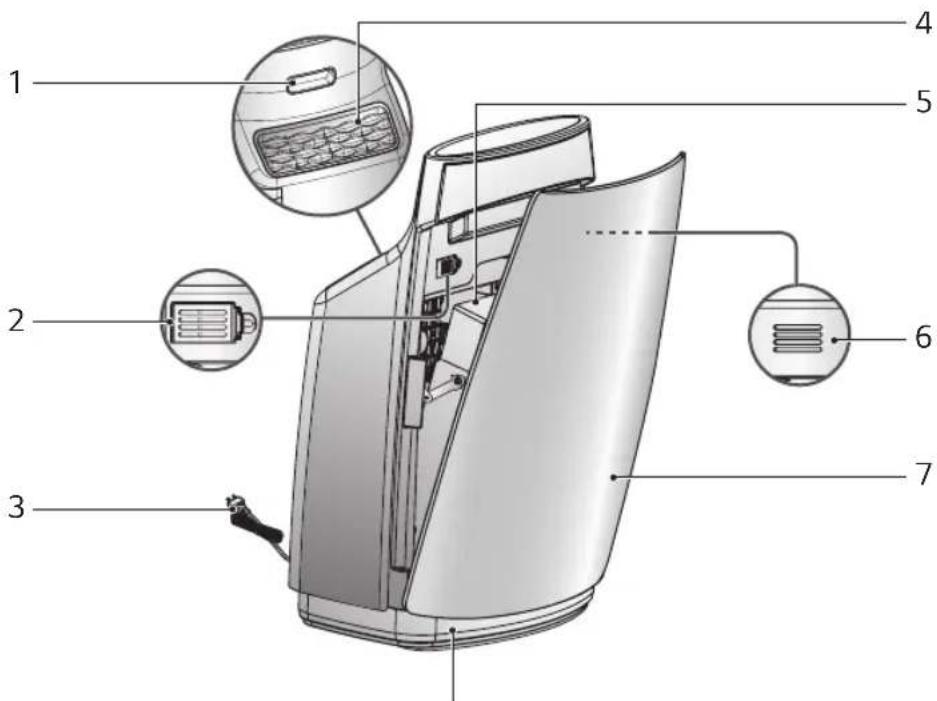
text_image
Labeled diagram of a portable electric heater with numbered parts for identification8 Clean Air Indicator Light
• Under general mode, clean air indicator light will show the quality the air in the surrounding area.
- When the air is at clean, contaminated, and intermediated stage, blue, red and violet color will be indicated respectively.
Humidifier function
- Humidifier filter
- Humidifier filter cover
- Humidifier filter shaft
- Tray lid
- Humidifier filter case
6.Float - Water tank
- Tank lever
- Cleaning brush
- Tray
- Packing
- Cap
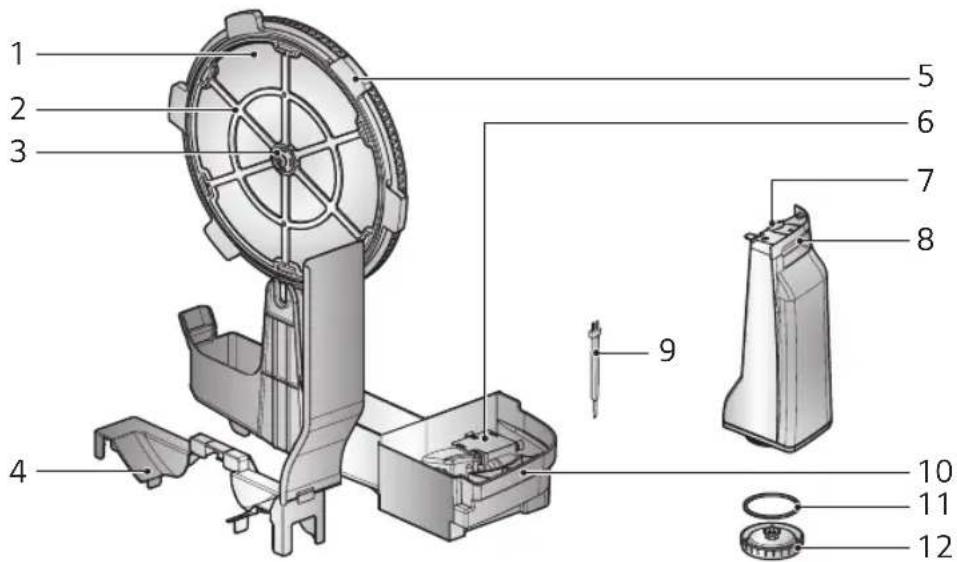
text_image
1 2 3 4 5 6 7 8 9 10 11 12Display and Control Panel
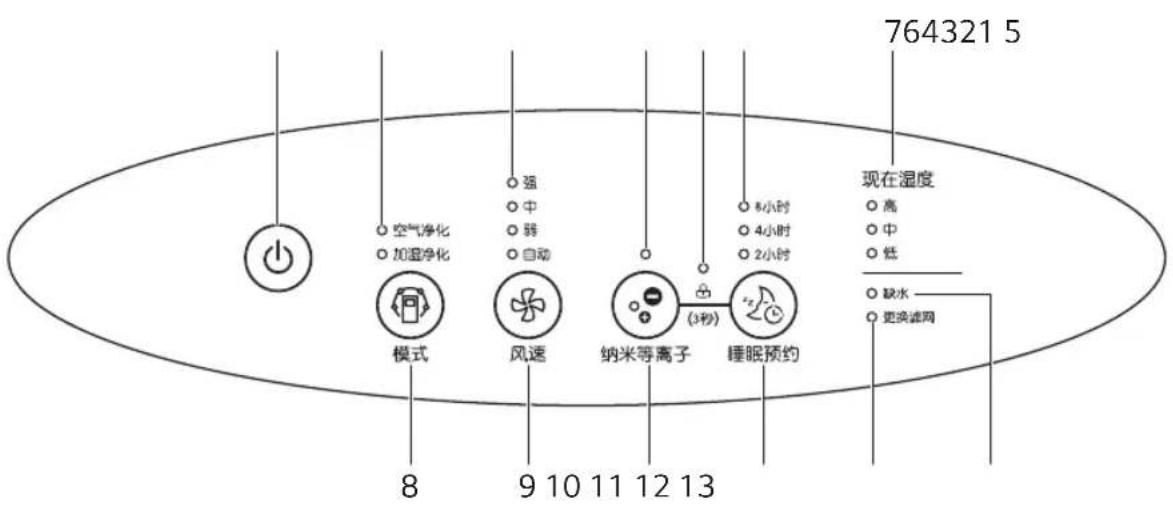
- Power On/Off button
- Operation mode indicator : Press the operation mode button to select the operation mode.
- Fan Speed Display : Press the fan speed button to change air volume.
- Ionizer lamp : It removes various bacteria in the room air by releasing sterilizing ion.
- Lock lamp : It sets or releases lock function when pressing the lonizer button and the Sleep button simultaneously.
-
Sleep mode display part: Press the Sleep button to select operation time.
-
Current humidity display part: It displays the current humidity when it operates the humidifying purification function.
- Operation mode button
- Fan speed button
- Ionizer button
- Sleep button
- Check filter lamp : Check the filter when light is on.
- No water lamp: This is turned on when there is no water in the water tank when using the humidifier function and off when water is filled.
Filter system
Only the filter section is described.
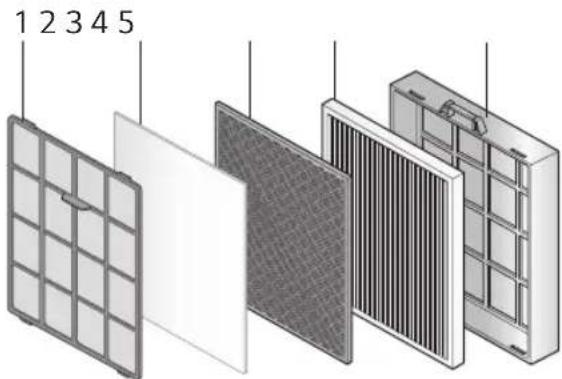
text_image
1 2 3 4 5-
Dual protection filter : It extends the replacement cycle of the filter for replacement by enabling two roles of antibacterial and removal of large dust particles with single filter.
-
Allergy filter: Adsorb and decompose allergic ingredients.
-
Triple care filter : This is the integrated deodorization filter and it removes cigarette smoke (odor), odor of living food waste, odor of animal's fur, odor of toilet, alkaline & acidic odor, and volatile organic compound (VOCs)..
-
HEPA filter : It removes minute particles such as dead ticks, flower powder, cigarette smoke (particle), minute dust, minute particles, animal fur etc. and does strong antibacterial process to the bacteria in the room air.
5. Filter case
* Dry sufficiently in the shades until water is dried up after washing the pre filter. (If it is not completely dried, it may cause failure or bad odor.)
* The replacement cycles of the Allergy filter, Triple care filter and HEPA filter are different for the using environment.
* When replacing the filter : Filter case are not enclosed. Do not throw them away.
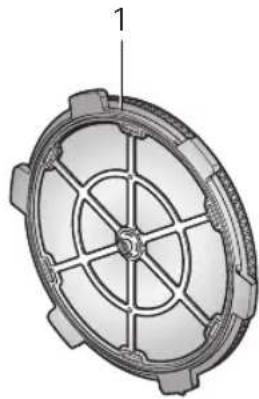
Humidifier filter system
natural_image
Technical illustration of a mechanical gear or wheel component with no visible text or symbols- Humidifier filter : The indoor air evaporates the water and removes the alien particles included in the water.
- Cleaning cycle: More than 1 time weekly
- Replacement cycle: 6-12 months
* Life of the humidifier filter may vary based on the water quality.
* Replace the filter in the following cases even when it is within 6 months.
- When the scaling or odor does not disappear even after cleaning.
- When discoloration (Black/Yellow) or dirtiness is severe.
- When the white chunk attached to the humidifier filter cannot be removed even after cleaned.
- When damage or deformation is severe. (Replace the part based on the manual included in the separately sold part.)

CAUTION
- Dispose the old humidifier filter according to the recycling direction.
• Material of humidifier filter: PET

OPERATION
Clean Operation mode
Purify Indoor Air.
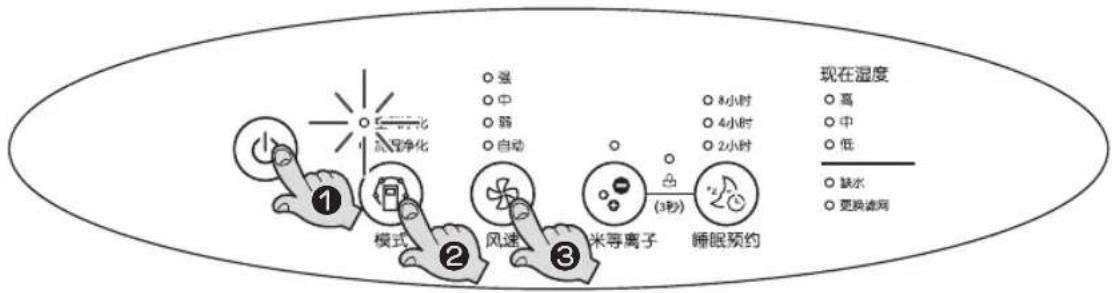
1. Press On/Off Button.
A confirmation tone will sound to indicate that the unit is powering on.
The unit will also produce a tone when the unit is first plugged in.
Fresh air will come out from the air outlet.
- Press On/Off button again to turn off.
- When restart air purifier, system will retrieve to the previous operating condition.
2. Adjust to Clean Operation mode with operation mode button.
3. Select the desired wind amount with Speed button.
- Every time you press the speed button, it is changed in the order of automatic → Low → Mid → High → automatic.
flowchart
graph LR
    A["1: 气温净化"] --> B["模式"]
    B --> C["2: 风速"]
    C --> D["3: 米等离子"]
    D --> E["4: 睡眠预约"]
    E --> F["5: 8小时"]
    E --> G["6: 4小时"]
    E --> H["7: 2小时"]
    style A fill:#f9f,stroke:#333
    style B fill:#ccf,stroke:#333
    style C fill:#cfc,stroke:#333
    style D fill:#fcc,stroke:#333
    style E fill:#cff,stroke:#333
    style F fill:#ffc,stroke:#333
    style G fill:#ffc,stroke:#333
    style H fill:#ffc,stroke:#333

Information
Use of power
• 220 V is exclusively used for this product.
- For power supply, use exclusive 220 V outlet.

CAUTION
- If the front panel is not closed properly, 4 wind amount indicator LEDs in the speed are lighted together.
• Properly close the front panel before the use.
ADDITIONAL FUNCTION
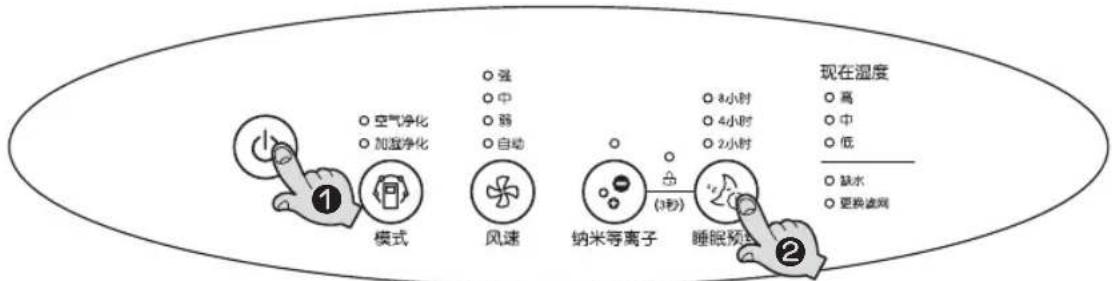
Sleep function
It is used when you go to sleep or to turn OFF after several hours.
-
Press On/Off Button.
-
Press Sleep button to set to the time for the timer.
- Every time you press the button, it is set in the order of 2 hours → 4 hours → 8 hours → OFF → 2 hours.
flowchart
graph TD
    A["模式"] --> B["空气净化"]
    A --> C["加湿净化"]
    D["风速"] --> E["强"]
    D --> F["中"]
    D --> G["弱"]
    D --> H["自动"]
    I["纳米等离子"] --> J["3小时"]
    I --> K["(3秒)"]
    L["睡眠预式"] --> M["8小时"]
    L --> N["4小时"]
    L --> O["2小时"]
    P["现在湿度"] --> Q["高"]
    P --> R["中"]
    P --> S["低"]
    T["缺水"] --> U["更换滤网"]
Information
- You can select up to maximum of 8 hours.
- It operates for the set hours and then automatically stops.
- When Sleep is set, it is operated with the wind amount of weak, and all button LEDs and cleanness indicator lamp are turned off except the timer hours.
- During the Sleep operation, you can still select humidification & cleaning and adjust wind amount, and after the selection, the button LED is turned off.
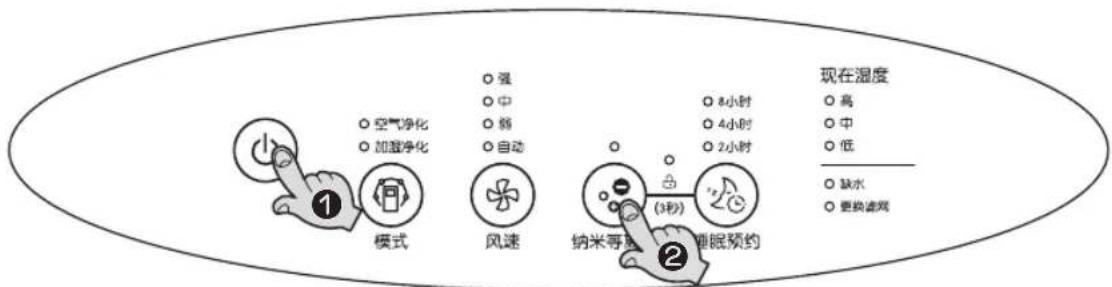
Ionizer function
The lonizer operation removes various bacteria in the room air by releasing sterilizing ion which is harmless to the human body.
-
Press On/Off Button.
-
Press the lonizer button.
- Whenever pressing the button, it repeats lonizer → Disabling lonizer → lonizer.
flowchart
graph TD
    A["模式"] --> B["风速"]
    B --> C["睡眠预约"]
    C --> D["现在湿度"]

    subgraph 模式
        E["空气净化"]
        F["加湿净化"]
    end

    subgraph 风速
        G["强"]
        H["中"]
        I["弱"]
        J["自动"]
    end

    subgraph 纳米等效
        K["8小时"]
        L["4小时"]
        M["2小时"]
    end

    subgraph 靠眠预约
        N["3秒"]
        O["睡眠预约"]
    end

    style A fill:#f9f,stroke:#333
    style B fill:#ccf,stroke:#333
    style C fill:#cfc,stroke:#333
    style D fill:#fcc,stroke:#333
    style E fill:#ffc,stroke:#333
    style F fill:#cfc,stroke:#333
    style G fill:#fcc,stroke:#333
    style H fill:#ffc,stroke:#333
    style I fill:#cfc,stroke:#333
    style J fill:#cfc,stroke:#333
    style K fill:#ffc,stroke:#333
    style L fill:#cfc,stroke:#333
    style M fill:#cfc,stroke:#333
    style N fill:#fcc,stroke:#333
    style O fill:#cfc,stroke:#333
Filter Check Lamp
May remind users to clean or replace the filter after use for a certain period.
-
During the operation, if the filter checking indicator light is on, open the front panel and check the filter under the operation state of the air purifier.
-
Detailed information for the filter cleaning, refer to the page 25-27.
Information
- Filter maintenance may vary depending on the environment.
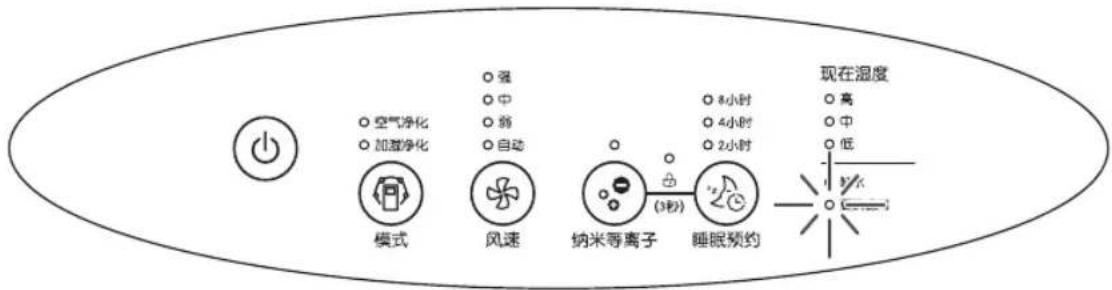
flowchart
graph LR
    A["模式"] --> B["风速"]
    B --> C["纳米等离子"]
    C --> D["睡眠预约"]
    D --> E["现在温度"]
    style A fill:#f9f,stroke:#333
    style B fill:#ccf,stroke:#333
    style C fill:#cfc,stroke:#333
    style D fill:#fcc,stroke:#333
    style E fill:#ffc,stroke:#333
Method 1. Separate the power cord from the socket.
Method 2. Press down Speed button and Sleep button together for 3 seconds or longer.
* After 24 hours, filter check lamp is automatically turned off, so please replace the filter in time.
Lock Function
This is the function so that the button of the product will not be acted in unintended condition.
-
During the operation, if pressing the lonizer button and Sleep button for 3 seconds simultaneously, the locking setup or release will be realized.
-
If buttons are not acted during the product operation, check the locking indicator of the display and release the locking setup.
- When the power cord is pulled out under the locking setup state, the locking setup will be released.

This maintains the optimal level of humidity when the indoor air is dry.
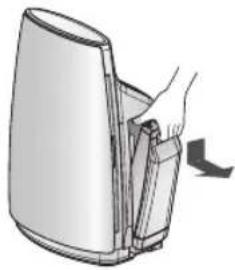
Check the assembly condition of humidifier filter
- Pull out the water tank.
natural_image
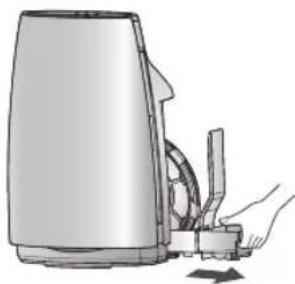
Illustration of a hand inserting a card into a device (no text or symbols visible)- Pull out the tray.
- Carefully lift the tray up to pull it out without spilling the water.
natural_image
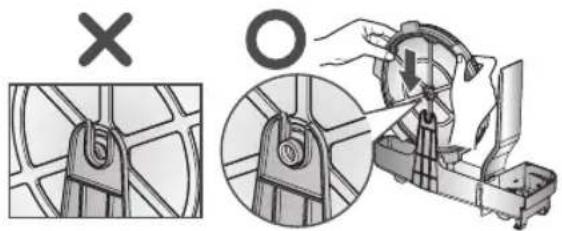
Illustration of a hand using a handheld device to clean or adjust a device (no text or symbols visible)- After assembling both ends of the humidifier filter case to the tray hook accurately as shown in the picture, assemble the tray to the main unit.
- If the humidifier is not accurately assembled, it can cause abnormal noise and the humidifier may not work.
text_image
Diagram illustrating a mechanical device operation with labeled parts and a cross symbol indicating failure or rejection.Supplying water to water tank
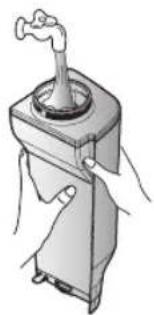
- Open the cap of the water tank and fill tap water to the water tank.
- Fill the water to the water tank to the level of no water leakage when the cap is closed.
natural_image
Illustration of a manual pump device with a handle and control panel (no text or symbols)
CAUTION
- Do not use anything other than tap water. It is difficult for bacteria to grow in tap water because it is treated with chlorine. But it is easy for fungus or bacteria to grow in other types of water (Well water, purified water, mineral water etc.).
- Do not use hot water above 40°C, aroma oil, chemical, contaminant and air freshener. (It can cause malfunction or failure.)
- Because the water tank can fall over, always hold the water tank with two hands.
2. Close the water tank cap.
- Check whether the water is leaking.
• Always wipe out any moisture around the water tank. - When the water tank is assembled without the packing on the cap, water can easily spill over to cause electric shock and product damage.


CAUTION
- When inserting the water tank, check whether the tray humidifier filter and float are assembled correctly. If not, it can limit the performance of the humidifier or cause product failure.
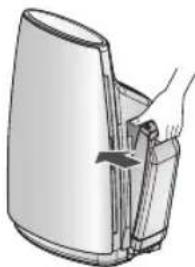
3. Assemble the water tank to the main unit.
- If the water tank is not mounted properly, it causes malfunction or noise.
natural_image
Illustration of a hand inserting a plug into a device (no text or symbols visible)
CAUTION
- When loosening or tightening the water tank cap or when filling water to the water tank, hold the water tank with hand while loosening the part.
Humidifier operation
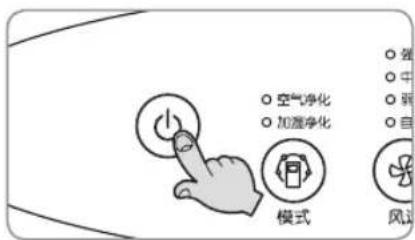
1. Press the ON/OFF button.
- The user cannot set to the specific level of humidity the user wants. When the humidifier operates, the mist may not be visible as it is humidified in fine particles.
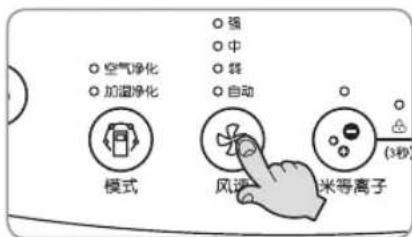
- Every time you press speed button, it is changed in the order of Automatic → Low → Mid → High → Automatic. During the humidification & cleaning operation, the wind amount can be selected from 3 stages.
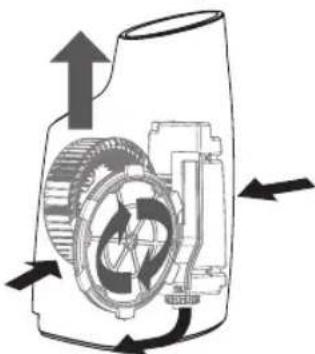
natural_image
Mechanical diagram showing a gear and motor assembly with directional arrows indicating motion (no text or labels)CAUTION
- If the water is low in the tank, No Water lamp is turned on and buzzer sounds, but the operation does not stop.
When you separate the water tank and the tray from the product during the humidification operation, No Water lamp is also turned on and buzzer sounds, but the operation does not stop.
Do not separate the water tank and the tray during the operation.
- When No Water lamp is on, make sure to turn off the product before removing the water tank to fill the water, and operate after assembling the refilled water tank to the main unit.
- The humidity may be still low or high depending on the space or condition of the room installed.
If it is not humidifying as it should.
→ Operate at higher fan speed.
If it is humidifying too much.
→ Turn off the humidifying purification operation.
- Operate air purification function for 5 minutes before turning off the humidifying purification function.
- It dries the wet humidifying filter fast, and maintain clean.
CLEANING
Tray, humidifier filter
- Pull out the water tank.

natural_image
Illustration of a hand inserting a card into a device (no text or symbols visible)- Pull out the tray.
- Carefully lift the tray up to pull it out without spilling the water.
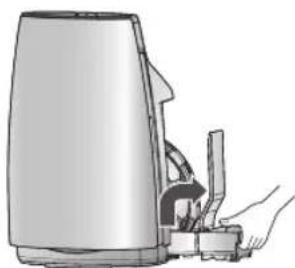
natural_image
Illustration of a hand using a handheld device to interact with a surface (no text or symbols visible)-
Separate the humidifier filter and tray lid.
-
Clean the tray and humidifier filter.
• After cleaning, always close the tray lid.
- If the humidifier function is not used for a long period of time, frequently dry the humidifier filter and wipe the water of the tray.

natural_image
Illustration of a hand operating a mechanical device with a rotating wheel and open base (no text or symbols)- Assemble the humidifier filter.
- Assemble the humidifier filter by aligning the hook part and assembly part.
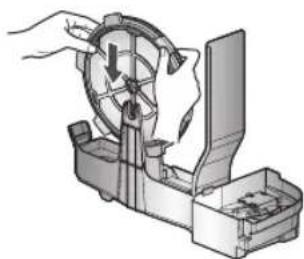
natural_image
Illustration of a hand operating a mechanical device with a rotating wheel (no text or symbols visible)- Assemble the tray and tank to the main unit.
- Assemble the tray and main unit so that there is no gap.
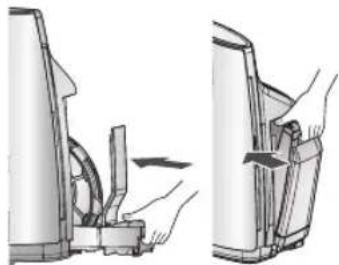
natural_image
Diagram showing two views of a mechanical device with hands operating the shaft (no text or symbols present)EXTERIOR AND DUST SENSOR CLEANING METHOD
Exterior and dust sensor cleaning method
Wipe the exterior of the unit with a soft cloth using warm water and a mild detergent.
natural_image
Cartoon illustration of a smiling can with a thumbs-up gesture (no text or symbols)
CAUTION
- Do not use harsh cleaners or very hot water. Do not wash in the dishwasher.
- Never pour water onto the unit; it could damage the internal components and create a shock and fire hazard.
Dust sensor cleaning method
The dust sensor is a device that senses the minute and large dust particles. The lens part must be periodically cleaned to maintain the performance.
- In case of under operation, be sure to OFF the power supply.
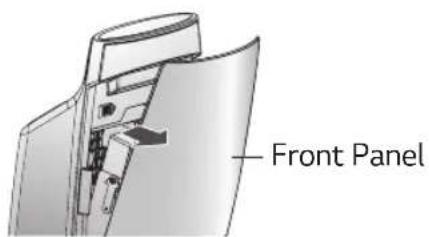
- Open the front panel by pulling it forward.
text_image
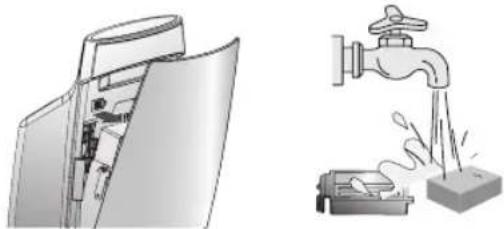
Front Panel- Open the dust sensor cover. Wash the sensor filter and dry the filter properly.
natural_image
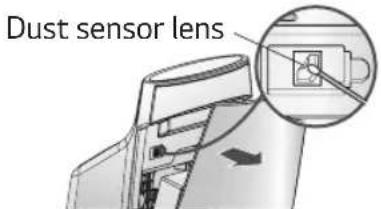
Illustration of a door switch and a faucet pouring liquid into a container (no text or symbols)- Wipe the lens of the dust sensor with a cotton stick.
• After cleaning the lens, close the cover of the dust sensor in the reverse order.
text_image
Dust sensor lens
CAUTION
- Clean the lens of the dust sensor once every 6 months. But the cleaning frequency can differ according to the using environment and time. So in an environment where it is dusty, clean more frequently.
Air outlet cleaning method
- Hold the wave pattern part of the air outlet cover, and lift upward to separate.
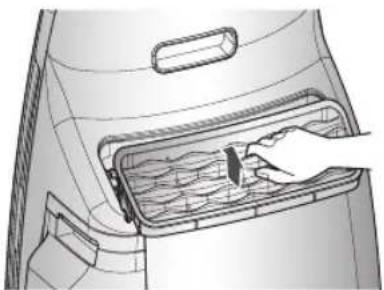
natural_image
Diagram of a hand inserting a component into a container with internal channels (no text or symbols)- Clean the safety grille with the soft brush and the suction inlet of vacuum cleaner.

natural_image
Illustration of hands inserting a device into a computer keyboard (no text or symbols visible)- Wash the air outlet cover with soft brush in the running water.
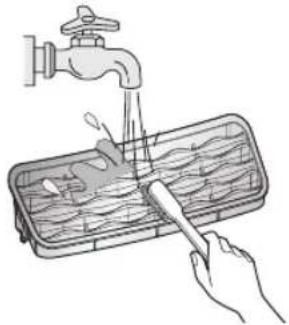
natural_image
Illustration of hands using a tool to clean or wash water from a faucet (no text or symbols)- When assembling after the cleaning, settle the front section of the air outlet cover after inserting the cover rear section to suit to the product as shown in the right side figure.
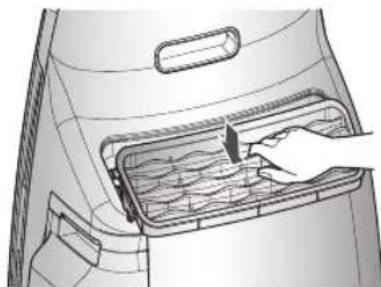
natural_image
Diagram of a hand placing a component into a container with internal flow lines (no text or symbols)Information
- Clean the air outlet once every 1\~2 months. But the cleaning frequency can differ according to the using environment and time. So in an environment where it is dusty, clean more frequently.
FILTER CLEANING AND EXCHANGE
- In case of under operation, be sure to OFF the power supply. Open the front panel by pulling it forward.

text_image
Front Panel- Remove the filter case by pulling it up.

natural_image
Illustration of a hand inserting a device into a folder, showing internal components and a directional arrow (no text or symbols)- Separate the Pre filter from the filter case by pulling it forward.
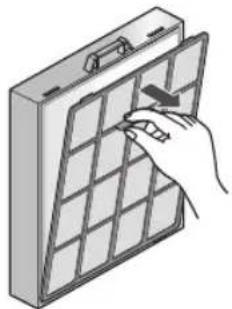
natural_image
Illustration of a hand inserting a grid into a rectangular panel (no text or symbols)- Clean the disassembled filter in accordance with the filter cleaning method in the next page.

text_image
Dual protection filte Triple care filter Allergy filter HEPA filter
CAUTION
- For washable filter, please dry it completely in a shade without any dampness.
(If it is not completely dried, it may cause failure or bad odor.) - Replace filters when unable to remove all dirt on the filter.
(After cleaning the filter, close the front panel. If not closed completely, the product will not work.)
Clean the inside of the product with the suction inlet of vacuum cleaner.
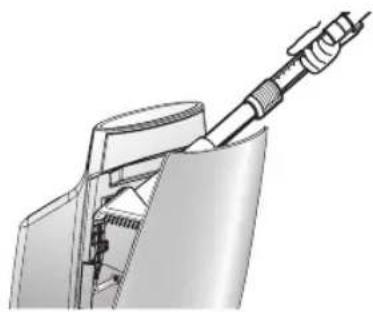
natural_image
Technical illustration of a mechanical assembly with a tool inserted into a housing (no text or symbols visible)Cleaning method of various filters
| Type of filter | Classification | Washing cycle | Cleaning method | |
| Dual protection filter | For washing | About a month washing Cycle | Clean the Dual protection filter with a vacuum cleaner or a soft brush, and when the contamination is severe, use a neutral detergent and water to clean it off. | Refer to the Fig. 1. |
| Allergy filter | For replacement | About 1 year replacement cycle | — | Refer to the Fig. 2. |
| Triple care filter | For replacement | About 1 year replacement cycle | — | Refer to the Fig. 3. |
| HEPA filter | For replacement | About 1 year replacement cycle | — | Refer to the Fig. 4. |
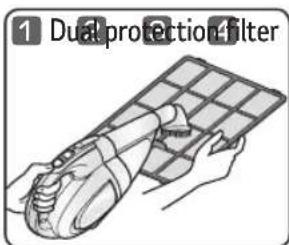
text_image
1 Dual protection filter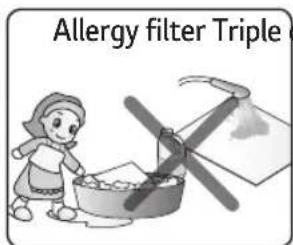
text_image
Allergy filter Triple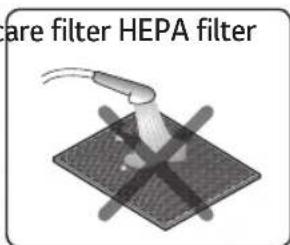
text_image
are filter HEPA filter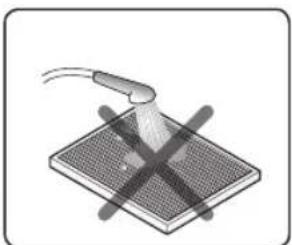
natural_image
Diagram of a device with a probe and cross mark on a grid surface (no text or symbols)
CAUTION
- The service of filter cleaning and replacement occurred during the operation, will be charged.
Cleaning method of tray and humidifier filter
| Classification | Replacement cycle | Cleaning cycle | Cleaning method |
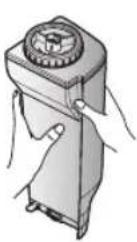
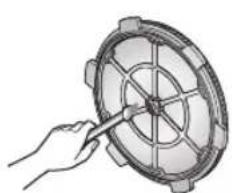
| Water tank | - Daily | When filling | the water tank, fill up to 1/3 and rinse it4-5 times to wash it out.Dissolve 10g of neutral detergent or citric acid in 1L of warm water for 1-2 hours, and then use the cleaning brush to clean the parts. After cleaning, make sure to rinse sufficiently. (After cleaning the filter, close the front panel. If not closed completely, the product will not work.)Make sure to clean with a soft brush any white powder contents, around the filter or the case, which may cause a smell or noise. |
| Tray | - Daily | ||
| Humidifier filter | 6-12 months | More than 1 time weekly |
natural_image
Illustration of a hand holding a circular mechanical component with a pointer (no text or symbols)
natural_image
Illustration of a basin with a spoon and fish (no text or symbols)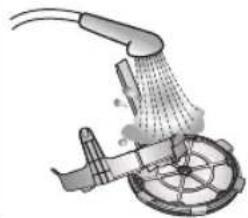
natural_image
Diagram of a mechanical device with fluid flow and component placement (no text or symbols)- Rinse the water tank by shaking 4-5 times.
* Citric acid: Can be purchased at pharmacy or on the Internet.
- Frequently wash the tray and humidifier filter. This will remove the scaling and you can use the product better sanitary condition.
- Do not disassemble the float of the tray. It can cause product failure. If the product is disassembled by impact, assemble in the order show in the right picture.
- DO NOT take the humidifier filter case apart. This may result in deformation or damage in the filter or the case.
- In cleaning, wipe the filter GENTLY with a brush, or the fiber can be degraded.
- Insert the float under this hook
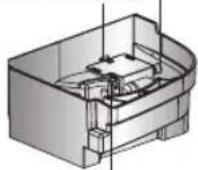
- Insert the hook on the other side of the float to the hole.

CAUTION
- If the part is not rinsed sufficiently it can carry the odor of the detergent or citric acid, and can cause discoloration or deformation of the product.
-
White chunk can be attached on the humidifier filter or the filter can be discolored to red or yellow during use. This is due to the impurity such as calcium included the tap water and is a normal phenomenon.
-
Insert the float hook into the hole.
[Non-Text]
[Non-Text]
[Non-Text]
[Non-Text]
[Non-Text]
[Non-Text]
[Non-Text]
[Non-Text]
[Non-Text]
[Non-Text]
[Non-Text]
[Non-Text]
[Non-Text]
[Non-Text]
[Non-Text]
[Non-Text]
[Non-Text]
STORAGE
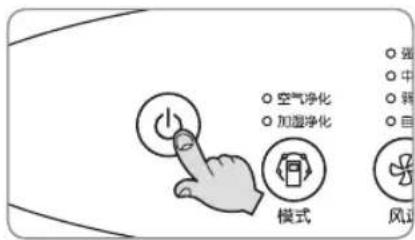
Operate the Air Purification operation mode for more than 1 hour on a clear day and then press the On/Off button to stop the operation.
Unplug the power plug.
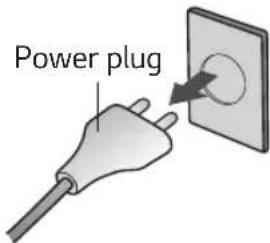
text_image
Power plugClean and protect the unit's mainframe.
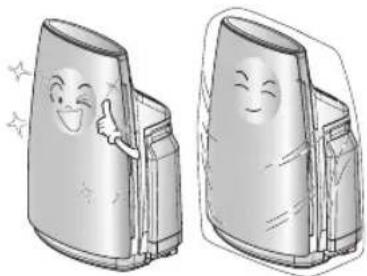
Cover the unit while storing for an extended period of time.
When cleaning, wipe the main body with smooth cloth.
- Otherwise, there is the worry of external damage due to the scratch etc.
natural_image
Illustration of two cartoon-style containers with smiling faces and gestures, no text or symbols presentTROUBLESHOOTING BEFORE CALLING FOR SERVICE
If abnormality is occurred, confirm the following items in advance before requesting to the customer care center.
| Symptom Confirmation Procedures | ||
| Air Purifier will not start. | • Is the power plug unplugged?• Whether a power cut occur?• Whether the front panel open or not? | - Plug the power properly.- Retrieve working when power cut finish.- When the front panel opened, operation cannot be performed. Close it completely. |
| Turning off presetting cannot be performed. | • Turning off presetting cannot be performed. | - Perform the presetting once again by referring to the instruction manual. |
| Air Purifier function is not working well. | • Is the indoor contamination severe?• Are there many particles on the Dual Protection Filter?• Is the using location too wide?• Are there any obstacles near the product?• Is the unit installed at a location where air flows freely? | - Ventilate the area to use the product.- Clean the Dual Protection Filter.- Use the product that fits the room size.(Avoid using it where it is ventilated well such as entrance, window etc.)- Remove any obstacles.- Move and install at a different location. |
| Action of buttons is not functioning well. | • Isn’t there any foreign material like gloves in the hand? | - Isn’t there any foreign material like gloves in the hand? |
| There is a weird sound from the product. | • Are the humidifier filter and tray assembled correctly?• Are there scaling built on the humidifier filter and tray?• Are the humidifier filter case and cover correctly locked? | - Assemble the humidifier filter hook and tray assembly part by aligning them.- Clean the humidifier filter and tray with citric acid.- Firmly lock the humidifier filter case and cover. |
| There is a “gulp” sound from the product. | - This is the sound of the water being supplied from the water tank to the tray. (This is not a problem.) | |
| The rate of water decreasing in the water tank is slowing or not decreasing at all. | • Is the humidifier filter correctly inserted in the tray? • Is there a high level of alien particles in the humidifier filter? • Is it raining or is the indoor temperature too low? | - Assemble the humidifier filter hook and tray assembly part by aligning them. - Clean the humidifier filter. If the filter is too dirty, replace the filter. - The water in the water tank is decreasing slowly because the humidifier amount is small. |
| Humidity level does not increase. | • Is the room too wide? • Is there water in the water tank? • Is there a high level of alien particles in the humidifier filter? | - Use the product by referring to the applied area. - Fill up water in the water tank. - Clean the humidifier filter. If the filter is too dirty, replace the filter. |
| Humidity display is not correct. | - Humidity display is measured with the humidity sensor inside the product, and it is the relative humidity against the temperature, and displayed as 3 stages of high, pleasant, and low. Even in the same space, the humidity may be different according to the height of where the product is placed, air flow, temperature difference, etc. Also, it may be different from the display of another hygrometer. | |
| There is water in the water tank but [No water] lamp is displayed. | • Is the float hanging within the tray? | - Pull out and clean the tray and remove any scaling or alien particles around the float. |
| Symptom Confirmation Procedures | |
| Air outlet has an abnormal odor | Are you using the product where there is smoke or odor?Are you using the product where there is a food smell?Is the water in the humidifier tray contaminated? |
| Sensor indicator has problem. | Dust sensor keeps high level always.Odor sensor level goes up?Aren’t the numerical values of the dust sensor, odor sensor and cleanness level continuously moving from side to side? |
PRODUCT SPECIFICATION
The external dimension, design and product standard can change to improve the quality of the product.
| Model Name PH-U289 series | |
| Power Supply 220 V~ 50 Hz | |
| * CADR (m3 / h) 303 | |
| Product Size (width x height x depth) 450 mm x 635 mm x 305 mm | |
* CADR(Clean Air Delivery Rate)