V-5166CT - Vacuum Cleaner LG - Free user manual and instructions
Find the device manual for free V-5166CT LG in PDF.


User questions about V-5166CT LG
0 question about this device. Answer the ones you know or ask your own.
Ask a new question about this device
Download the instructions for your Vacuum Cleaner in PDF format for free! Find your manual V-5166CT - LG and take your electronic device back in hand. On this page are published all the documents necessary for the use of your device. V-5166CT by LG.
USER MANUAL V-5166CT LG
Vacuum Cleaner OWNER'S MANUAL
MODEL : V-5060CT, V-5000CT V-5000HT/HD, V-5000T/D V-5166CT, V-5166CTV
Before installing and operating your vacuum cleaner, please read this owner's manual carefully and thoroughly, especially operation instructions and safety precautions.
text_image
Before installing and operating your vacuum clean please read this owner's manual carefully and the especially operation instructions and safety preca
natural_image
Illustration of a hand holding a mug and pouring liquid from a vertical pipe, with no text or symbols present.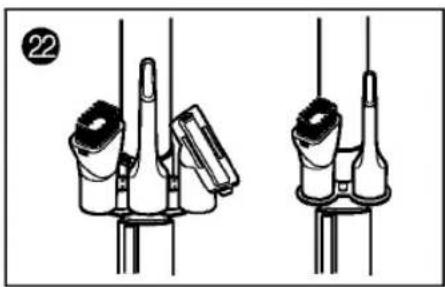
natural_image
Technical line drawing of two mechanical components with no visible text or symbols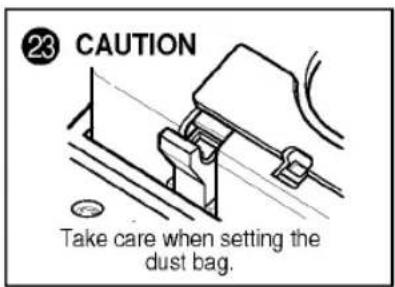
text_image
23 CAUTION Take care when setting the dust bag.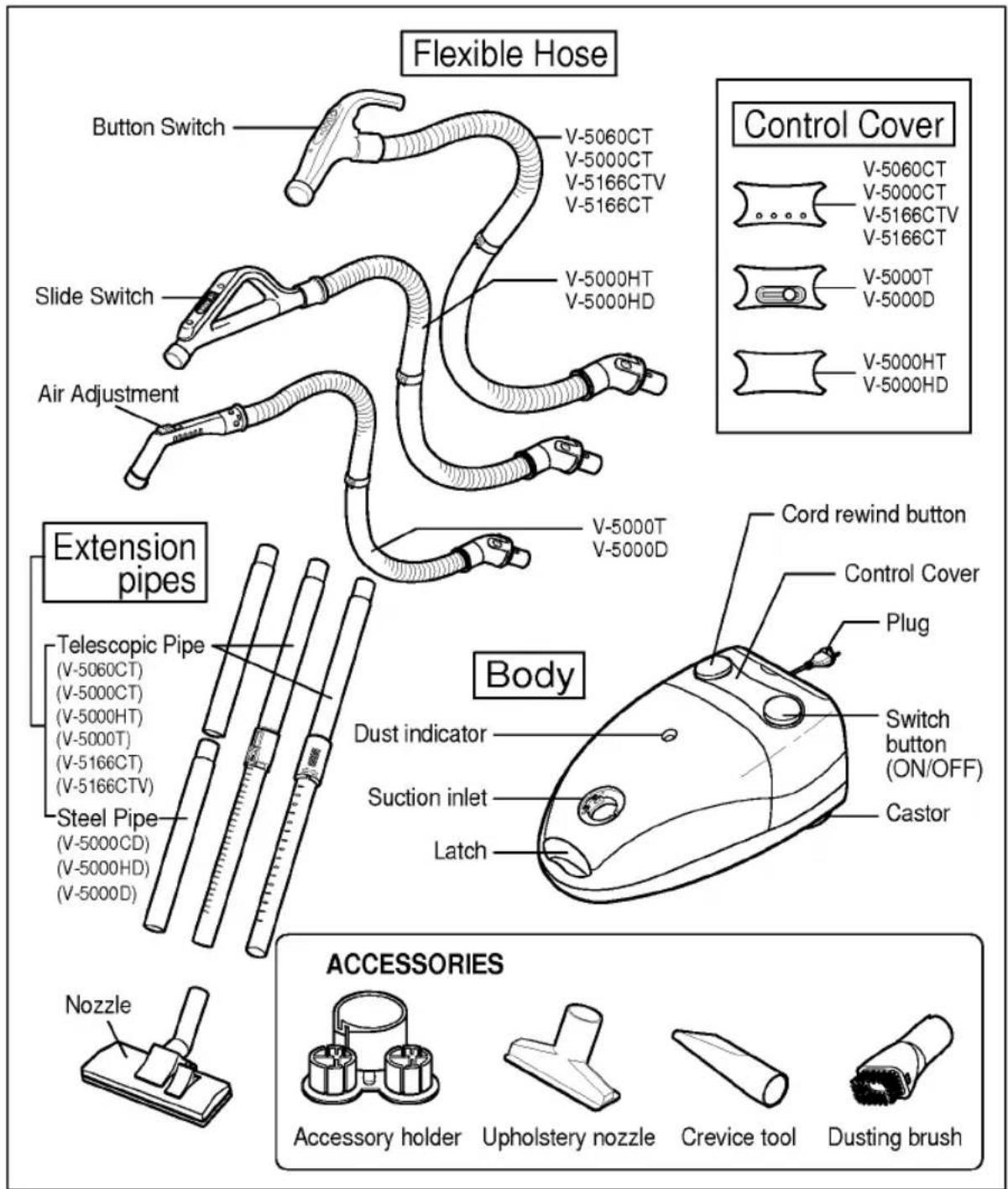
text_image
Flexible Hose Button Switch V-5060CT V-5000CT V-5166CTV V-5166CT Slide Switch V-5000HT V-5000HD Air Adjustment V-5000T V-5000D Extension pipes Telescopic Pipe (V-5060CT) (V-5000CT) (V-5000HT) (V-5000T) (V-5166CT) (V-5166CTV) Steel Pipe (V-5000CD) (V-5000HD) (V-5000D) Body Dust indicator Suction inlet Latch Cord rewind button Control Cover Plug Switch button (ON/OFF) Castor Nozzle ACCESSORIES Accessory holder Upholstery nozzle Crevice tool Dusting brush- When using an electric appliance, you should always follow safety instructions to prevent fire risk, electric shock and injury to persons.
- Read all instructions before using this appliance.
SAFETY INSTRUCTIONS
- Always keep the plug out of wall socket, when the appliance is not in use.
- Do not unplug the appliance by pulling the cord. To unplug, grasp the plug, not the cord.
- Do not use vacuum cleaner without dust bag and filters in the right place.
- If the power cord of this appliance is damaged, it must be replaced by LG or their authorized service representative, as special tools and parts are required.
- Do not pull the power cord in order to move the appliance.
- Keep the cord away from sharp edges, corners or heated surfaces.
- Do not drive the appliance over the power cord.
- The cord moves rapidly while rewound. Provide the appliance with a clear path and hold the plug when the cord is rewound onto the cord reel. Do not allow the cord to whip persons while rewound.
- Do not allow sharp or heavy objects to stay on the power cord. If the power cord is damaged or frayed, it may cause a fire or electric shock.
- Do not pull out the cord beyond the red mark. Pulling the cord out past the red mark may cause problems with the cord reel.
- Do not use your vacuum cleaner to suck up sharp and hard objects such as pins, stones, small toys, etc.
- Do not suck up water or wet materials.
- Never suck up ashes until they are cold.
- Never suck up flammable or combustible liquid or vapors such as gasoline.
- Do not allow children to play with the appliance. Pay attention when the appliance is used by children.
- Do not use the appliance for outdoor cleaning or wet surface cleaning.
- Only use the appliance with recommended accessories by manufacturer.
- Take electrical inspection when hose is cracked or the coat of power cord is peeled off.
- Do not grasp the plug or appliance with wet hands.
English
- Do not use toxic or flammable dry cleaning solvent to clean up the surface of the appliance. It may damage the surface. Just wipe off the surface with a clean towel.
- The use of radio transmitting devices close to the appliance may interfere the function of the appliance, input power may be vary.
- Do not put any object into openings; keep it free of anything that may prevent air flow, for example dust, lint, hair, and so on.
- Keep all part of your body, for example hair, loose clothing, fingers, etc., away from the openings.
- Always turn off all switches before unplugging.
- Do not put your vacuum cleaner on chairs, tables, etc. Extra care must be taken when cleaning stairs.
- Use this appliance only for those jobs expected for a home vacuum cleaner.
OPERATING INSTRUCTIONS
Getting the vacuum cleaner ready for use
- Connecting nozzle, extension pipes and hose handle one other: Insert the narrow part into the wide part. (Fig. 1)
* If you have a telescopic extension pipe, you can adjust the length of the pipe easily: Push the slide button downward or turn the locking knob to extend or retract extension pipe.(Fig.3) - Connecting hose to body: Insert the hose into the body of the vacuum cleaner until a clicking sound is heard.(Fig. 2)
- Pull the main plug out of the vacuum cleaner and connect it to the socket outlet: When you can see a red mark on the power cord, you must stop pulling out the cord immediately. (Fig. 4)
- Press the ON/OFF switch. (Fig. 5)
Power indicator will extinguish slowly when press switch button in off position.(V-5060CT, V-5166CT/CTV, V-5000CT)
Adjusting the suction power
1) For model V-5060CT, V-5166CT/CTV, V-5000CT (Fig. 6)
Adjust the suction power with the power control switch on the handle grip.
• Automatic : This mode is recommendable for normal situation. When you operate the appliance in this mode, the dust sensor in the appliance automatically controls the suction power. If you put the nozzle on dusty area, the power will go up: vice versa.
- Booster: This mode is suitable for removing dirt which is deeply embedded in a carpet or on the floor, and also recommendable when the hose, the pipes or the nozzle is clogged with any bulky obstacles. The Power in this mode is much higher than MAX mode power.
Booster operates for 10 seconds and the mode returns to the previous one automatically. (V-5060CT, V-5166CT/CTV)
English
- MIN : This mode is used for cleaning at night, or when silence is required. (V-5000CT)
- MAX: This mode is used for cleaning carpets or similar items which require strong inhaling force.
• OFF: Push this button when you want to stop operation.
2) For model V-5000HT, V-5000HD(Fig. 7)
- Adjust the power with the sliding volume switch on the grip handle.
3) For model V-5000T, V-5000D
- Adjust power with the slide switch on the body. (Fig. 9)
- Open the air damper hole on the grip handle. to reduce suction power. (Fig. 8)
Cleaning effectively
Try not to put much pressure on the nozzle while cleaning. Excessive pressure on the nozzle may cause damage your floor, particularly parquetry. Best results will be obtained by applying only light pressure. If the suction power is getting weak, raise the front part slightly.(Fig. 10)
Tips
Dust indicator (Fig. 11)
- Green: No problem. You can continue to use the appliance.
- Red: Filter bag is filled with dust. You should exchange your filter bag.
- Dust indicator works properly only when power is on. To check dust bag, turn on the appliance and keep the nozzle more than 10cm away from the floor for a moment.
English
Accessories
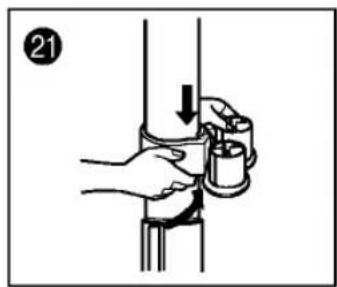
- Accessory holder can be attached to the extension wand by clamping hook.(Fig. 21)
- Accessories can be stored in the holder by two ways.(Fig. 22)
- Crevice tool can be stored at the tool box in the appliance.
There are 3 types of accessories which have different purposes.
- Crevice tool is designed for cleaning dust in the narrow gap, for example, between the ribs of the radiator or between the shelves.
- Dusting brush is designed for delicate vacuuming of fabrics on the furniture, curtain, etc.
- Upholstery nozzle is designed for vacuuming the dust on the upholstery.
Management of filter
Replacing the dust filter bag
- Turn off the appliance and remove the hose. Open the cover with pressing the latch.(Fig. 12)
- If you use a paper filter bag, dispose of the bag and install new one.(Fig. 14)
- If you use a cloth filter bag, empty the cloth filter bag after sliding the clip off or unzipping the bag. Then put it in the original place.(Fig. 15)
Cleaning the motor safety filter
- Open the cover and pull out the motor safety filter.(Fig. 16)
- Shake the dust off and wash filter in a warm soapy water. Do not clean it in a dish-washer or in a washing machine.
- Remove the moisture. Dry the filter sufficiently in shade for about a day.
English
The exhaust filter replacement.
- Open the exhaust cover on the back side of the appliance. (Fig. 17)
- Replace the old exhaust filter with the new one or clean exhaust filter.
- Insert the exhaust filter keeping arrow mark on it.
(Fig. 18-①: High efficiency pleated micro filter, Fig. 18-②: Multilayer micro and carbon filter - option)
Storage
- Store your vacuum cleaner in a cool, clean, and dry place.
- Upright position : Insert the nozzle hanger into the slot on the base of the v/cleaner.(Fig. 19)
- Horizontal position: Insert the nozzle hanger into the slot on the rear of the v/cleaner.(Fig. 20)
Before requesting service
- Proper assembly and safe use of your vacuum cleaner are your personal responsibilities. Read this "Owner's manual" carefully for important use and safety information.
- Repairs, when necessary, must be performed at an authorized service facilities. This appliance is intended for HOUSEHOLD USE ONLY and not for commercial or industrial use.
Tips
- When you finish your cleaning, unplug cord from power source and press the cord reel button. The cord will be automatically rewound.
• Always use LG dust bag. If you can not get it, use only 'HR6938-OSH' of paper bag made by PHILIPS.
Save this instructions
The serial number is found on the bottom of this unit. This number is unique to this unit and not available to others.
You should record requested information here and retain this guide as a permanent record of your purchase.
Date of purchase
Dealer purchased from
Dealer address
Dealer phone No.
Model No.
Serial No.
TROUBLE SHOOTING CHART
Review this chart to find do-it-yourself solutions for minor performance problems.
WARNING : Disconnect power supply before servicing and/or cleaning the unit as electrical shock could occur and/or the cleaner could suddenly start.
| Problem | Possible Cause | Possible solution |
| Cleaner won't run. | 1. Unplugged at wall outlet.2. Power control S/W is in 'OFF' position. | 1. Plug in firmly.2. Push switch button.3. Regulate the control s/w. |
| Poor suction. | 1. Full or clogged filter bag.2. Clogged clean filter.3. Hole in hose.4. Clogged nozzle.5. Filter cover open. | 1. Change the filter bag.2. Change the clean filter.3. Replace the hose.4. Clean the air passage of the nozzle.5. Close the filter cover. |
| Cleaner picks movable rug or nozzle pushstoo hard. | 1. Suction too strong. | 1. Regulate power control lever. |
MEMO
