AJ-LBX5 - Projector LG - Free user manual and instructions
Find the device manual for free AJ-LBX5 LG in PDF.


User questions about AJ-LBX5 LG
0 question about this device. Answer the ones you know or ask your own.
Ask a new question about this device
Download the instructions for your Projector in PDF format for free! Find your manual AJ-LBX5 - LG and take your electronic device back in hand. On this page are published all the documents necessary for the use of your device. AJ-LBX5 by LG.
USER MANUAL AJ-LBX5 LG
natural_image
Technical line drawing of a mechanical device with mounting bracket and internal circular component (no text or symbols)LAMP OWNER'S MANUAL
P/N : 3828VA0584G(0903_REV01)
\* Contact your dealer for replacing a new lamp.
The change interval of lamp may depend on the use environment of Projector. You can see the used lamp time in the CHECKING LAMP TIME section of the Menu. You must replace the lamp when:
● The projected image gets darker or starts to deteriorate.
● The lamp indicator is red.
● The message "Replace the lamp" appears on the screen when turning the projector on.
Be careful when replacing lamp
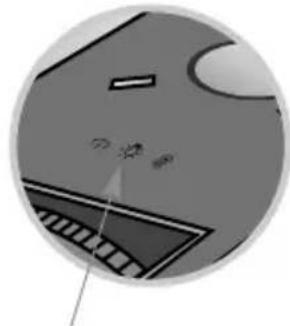
〈Front panel of the Projector〉
natural_image
Close-up of a computer monitor with a keyboard and mouse, showing no visible text or symbolsLamp indicator
- Press the POWER button on the control panel or remote control to turn off power.
- If the operation indicator LED is orange and blinking, do not disconnect the main supply until the operation indicator LED is lit up constantly (orange).
- Allow the lamp to cool for 1 hour before replacing it.
- Replace only with the same type lamp from an LG Electronics Service Center. Using another manufacturers lamp may cause damage to the Projector and lamp.
- Pull out the lamp only when replacing the lamp.
- Keep the lamp unit out of reach of children. Keep the Lamp away from heat sources such as radiators, stoves etc.
- To reduce the risk of fire do not expose the lamp to liquids or foreign materials.
- Do not place the lamp near any heat source.
- Make sure the new lamp is securely tightened with screws. If not, the image may be dark or there could be an increased risk of fire.
- Never touch the lamp unit glass otherwise image quality may be compromised or lamp life maybe reduced.
Replacing the Lamp
1 Turn off the projector and unplug the power cable. Carefully place on a cushioned surface.
(Allow the lamp to cool for 1 hour before removing the used lamp from the projector.)
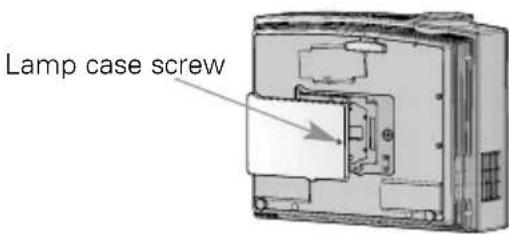
2 Unscrew the screw from the lamp cover using a screwdriver.
3 After lifting the lamp cover off, remove the two retaining screws on the lamp case with a screwdriver.
4 Lift up the fixed wire knob on the lamp.
5 Pull out the handle slowly and remove the lamp case.
6 Insert the new lamp gently into the correct position. Make sure it is inserted correctly.
text_image
Lamp case screw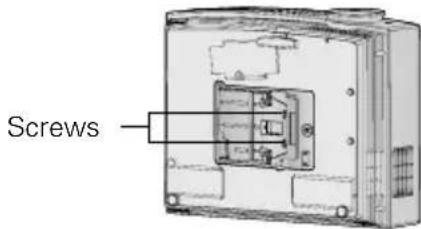
text_image
Screws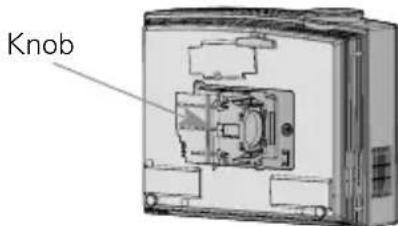
text_image
Knob7
Tighten the screws you removed in step 3.
(Make sure it is fixed hardly.)
8
Close the lamp cover and install the screws from step 2 to install the cover.
(If the lamp cover is not installed correctly the unit will not power on.)
Note!
Using another manufacturers lamp may cause damage to the projector or lamp. Make sure the lamp cover is securely fastened. If the lamp cover is not installed correctly the unit will not power on. If this fault persists contact an LG Authorized Service Center.
Reset Lamp Time
* You must reset lamp time on the menu after replacing the lamp.
1 Press the OK button on the projector and OK button on the remote control simultaneously (About 5 seconds).
| Lamp Use Time | 21 hr. |
| Total Lamp Use Time | 21 hr. |
| Lamp Reset Counter | 0 |
| Lamp Use Time Reset | Press Right to Reset |
| Reset [Right Key] | Exit [MENU Key] |
