FoxBat-LE6 - Watch AGM - Free user manual and instructions
Find the device manual for free FoxBat-LE6 AGM in PDF.


User questions about FoxBat-LE6 AGM
0 question about this device. Answer the ones you know or ask your own.
Ask a new question about this device
Download the instructions for your Watch in PDF format for free! Find your manual FoxBat-LE6 - AGM and take your electronic device back in hand. On this page are published all the documents necessary for the use of your device. FoxBat-LE6 by AGM.
USER MANUAL FoxBat-LE6 AGM
natural_image
Close-up of a black optical optical device with lens and aperture (no visible text or symbols)FOXBAT-LE
NIGHT VISION BI-OCULAR
© 2021 AGM Global Vision, LLC. All rights reserved.
This documentation is subject to change without notice.
No parts of this manual, in whole or in part, may be copied, photocopied, translated, or transmitted by any electronic medium or in machine-readable form without the prior written permission of AGM Global Vision, LLC.
If you have questions that are not covered in this manual, or need service, contact AGM Global Vision customer support for additional information prior to returning a product.
AGM Global Vision, LLC
173 West Main Street
PO Box 962
Springerville, AZ 85938
Tel. 928.333.4300
support@agmglobalvision.com
www.agmglobalvision.com
EXPORT INFORMATION
Buyer acknowledges that all products supplied by AGM Global Vision, LLC are subject to U.S. export control laws, including, but not limited to, the Export Administration Regulations, the International Economic Emergency Powers Act, and various U.S. embargoes and sanctions. AGM Global Vision products may not be exported, re-exported, or transferred contrary to U.S. export control laws. In particular, AGM Global Vision products may not be exported, re-exported, or transferred to prohibited countries, individuals, organizations, or entities, including but not limited to those individuals and entities listed on the List of Specially Designated Nationals and Blocked Persons administered or maintained by the U.S. Office of Foreign Assets Control ("OFAC"), the various lists maintained by the Bureau of Industry and Security of the Department of Commerce, and the U.S. State Department and Buyer represents and warrants that neither Buyer nor any of its officers, directors, or employees are on such lists. Distribution or resale by Buyer to such countries, individuals, organizations, or entities is expressly prohibited. Buyer has and will maintain a positive process to ensure compliance with this Section.
LIST OF CONTENTS
TITLE
PAGE
Safety Summary 4
1. GENERAL INFORMATION 6
1.1 System Description 6
1.2 Operation Principles 7
1.3 Standard and Optional Equipment 7
2. OPERATING INSTRUCTIONS 10
2.1 Controls and Indicators 10
2.2 Assembly and Preparation for Use 12
2.3 Operating Procedures 16
3. MAINTENANCE AND TROUBLESHOOTING 18
3.1 Cleaning Procedures 18
3.2 Troubleshooting 18
4. WARRANTY INFORMATION 20
4.1 Warranty Information 20
4.2 Limitation of Liability 20
4.3 Product Registration 21
4.4 Obtaining Warranty Service 21
5. SPECIFICATIONS 22
5.1 Specifications 22
APPENDIX 24
A. Spare Parts List 24
SAFETY SUMMARY
- Read and follow all instructions
- Read all warnings
- Only use the attachments/accessories specified by the manufacturer
- All service must be provided by the manufacturer
WARNING:
This product contains natural rubber latex, which may cause potentially fatal allergic reactions! If you are allergic to latex, it is important that you strictly avoid exposure to products that contain it.
WARNINGS:
The intensifier's phosphor screen contains toxic materials.
Please note:
- If the intensifier tube breaks, be extremely careful to avoid inhaling the phosphor screen material. DO NOT allow the material to come in contact with your mouth, eyes, or any open wounds on the skin.
- If the phosphor screen material comes in contact with your skin, wash it off immediately with soap and water.
- If you inhale or swallow any phosphor screen material, drink a lot of water, induce vomiting, and seek medical attention as soon as possible.
WARNINGS:
- When used in total darkness, the light from the unit's infrared (IR) illuminator is invisible to the naked eye. However, the light can be detected by other Night Vision Devices (NVD).
• To reduce the risk of detection by another NVD, avoid prolonged use of the IR illuminator. - Light from the IR illuminator is more easily detected by other NVDs when used in fog, smoke, and rain. Avoid prolonged use of the IR illuminator in these conditions.
- Do not use the contaminated eye cups. If contaminated, they must be replaced.
CAUTION:
- The FoxBat-LE is a precision optical instrument. To prevent damage to the unit, it should be handled carefully at all times.
- To protect the device from damage, do not direct it at bright light sources such as street lights, headlights, lanterns, fire, etc.
- Do not test the device in daylight for more than ten (10) minutes, even with the daylight filter/ lens cap on.
- To protect the image intensifier when using the device in daylight or when the device is not in use, keep the lens cap securely fitted over the objective lens.
- Use of rubber eye cups for extended periods of time may cause skin irritation or inflammation. If any symptoms develop, consult a doctor immediately.
- Do not scratch the external lens surfaces or touch them with your fingers.
NOTES:
To avoid physical danger to the user and damage to the equipment, you must read and understand the following equipment limitations.
- The built-in IR illuminator is meant to provide additional illumination when needed, while viewing scenes at close distances (up to 3 meters).
- To operate properly, the equipment requires some ambient light in the environment (moonlight, starlight, etc.).
-
Performance of the device in night-time conditions is dependent on the level of ambient light in the environment. Please remember:
-
The level of ambient light in an area is reduced by the presence of clouds, shade, or objects that block natural light, such as trees, buildings, or large vehicles.
- The equipment is less effective when operated in shadows and other conditions where there is very little to no ambient light.
- The equipment is less effective when operated in smoke, dust, rain, fog, sleet, or snow.
- The equipment cannot "see" through dense smoke.
1 GENERAL INFORMATION
1.1 SYSTEM DESCRIPTION
The AGM FoxBat-LE night vision bi-ocular is the perfect tool for mid-range and long-range observation. The FoxBat-LE is compatible with a range of professional high-quality objective lenses to match all users' requirements currently available in three configurations - 6x, 7x, and 10x magnification.
The FoxBat-LE is a professional night vision device favored by law enforcement and military units due to its unmatched performance, even in extreme temperatures and challenging weather conditions such as rain or excessive humidity. The device can be outfitted with either a Gen 2+ or Gen 3 high-performance image intensifier tube (IIT), which can be repaired or upgraded easily. The bright light shut-off feature ensures that the high-quality photocathode tube is protected. The FoxBat-LE is also equipped with Automatic Brightness Control (ABC), which adjusts the image brightness automatically, providing the highest possible image quality even in changing light conditions. FoxBat-LE is supplied with two AA batteries and its operating time is up to 40 hours of continuous use.
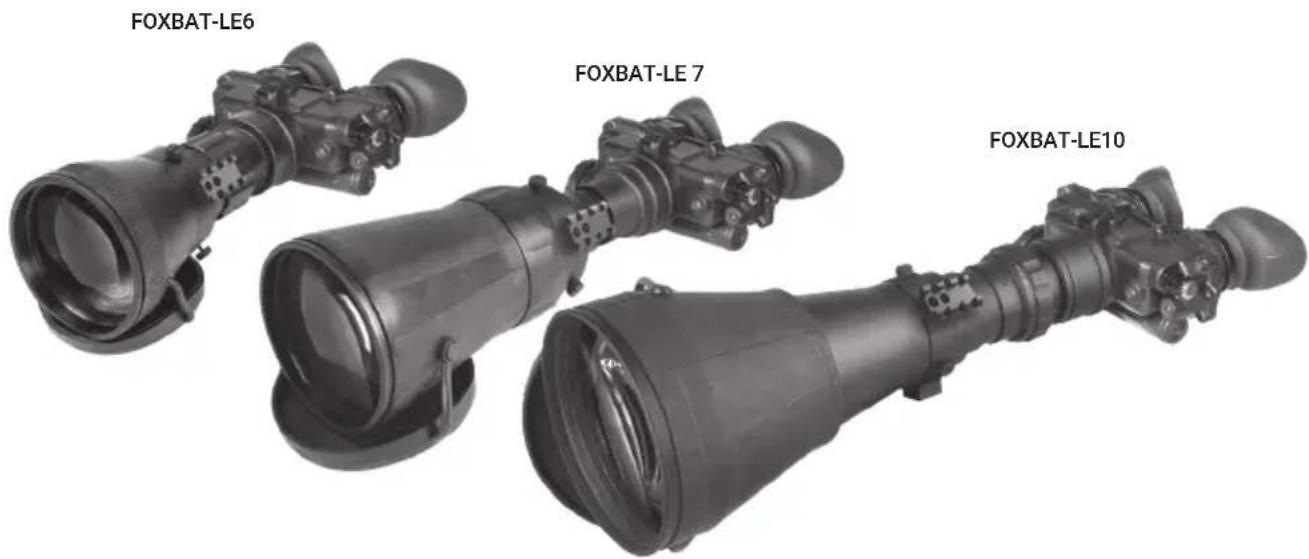
natural_image
Three FOXBAT-LE10 optical cameras with visible lens and port fittings (no text or symbols on the devices themselves)FIGURE 1-1. FOXBAT-LE NIGHT VISION BI-OCULARS LINE
The FoxBat-LE includes mechanical adjustments to accommodate physical differences between individual users. Functional features include the power switch, interpupillary adjustment, diopter adjustment, and objective lens focus.
1.2.2 OPTICAL FUNCTIONS
The optical functions include an objective lens, image intensifier, a collimator lens, and two eyepieces. The objective lens collects light reflected from the moon, stars, or other ambient light in the environment, and inverts and focuses an image of the scene onto the image intensifier. The image intensifier converts the captured light into a visible image, re-inverting it so that can be viewed though eyepiece lens.
1.2.3 ELECTRICAL FUNCTIONS
A. Power Source. The electronic circuit is powered by replaceable batteries; you have the option of using either a 3.0 Volt Lithium battery (BA-5567/U) or two AA 1.5 Volt Alkaline batteries (BA-305S/U). The Sioux850 detachable long-range infrared (IR) illuminator is powered by a separate 18650 rechargeable battery.
B. Function Switch. Power from the batteries is supplied to the components through the function switch as follows:
RESET/OFF Position. With the switch in the OFF position, the circuit will not supply energy to the image intensifier or the IR illuminator. You can also turn the switch to this position to reset your device after automatic shut-off or bright light cutoff.
ON Position. Energy is drawn from the battery compartment to power the bi-ocular. When the voltage drops to 2.4 VDC, a low battery indicator will begin to blink on the right side of the eyepiece, indicating approximately 30 minutes of remaining power.
IR/PULL Position. Energy is drawn from the battery compartment to power the bi-ocular and built-in IR light source, and a steady red indicator light will appear in the left side region of the eyepiece. The IR can be activated momentarily by turning the switch ON without pulling the knob.
C. Bright Light Cutoff. The bi-ocular will automatically shut off after 70 ( ±30 ) seconds of operation in daylight or bright room light. Individual bright lights (headlights, flashlights, or other concentrated light sources) will not activate this function, unless the high light detector on the front of the bi-ocular is pointed directly at the light source. To turn the bi-ocular back on in the event that this function is triggered, flip the switch to RESET/OFF and then back to ON again.
1.3 STANDARD AND OPTIONAL EQUIPMENT
A. FoxBat-LE Bi-Ocular Assembly. The bi-ocular assembly consists of four primary subassemblies: (1) a simple objective lens; (2) a wired housing assembly; (3) an image intensifier tube (IIT) assembly (not shown); and (4) a rear cover assembly. The wired housing assembly contains a built-in battery compartment, attached battery cap, and the function switch.
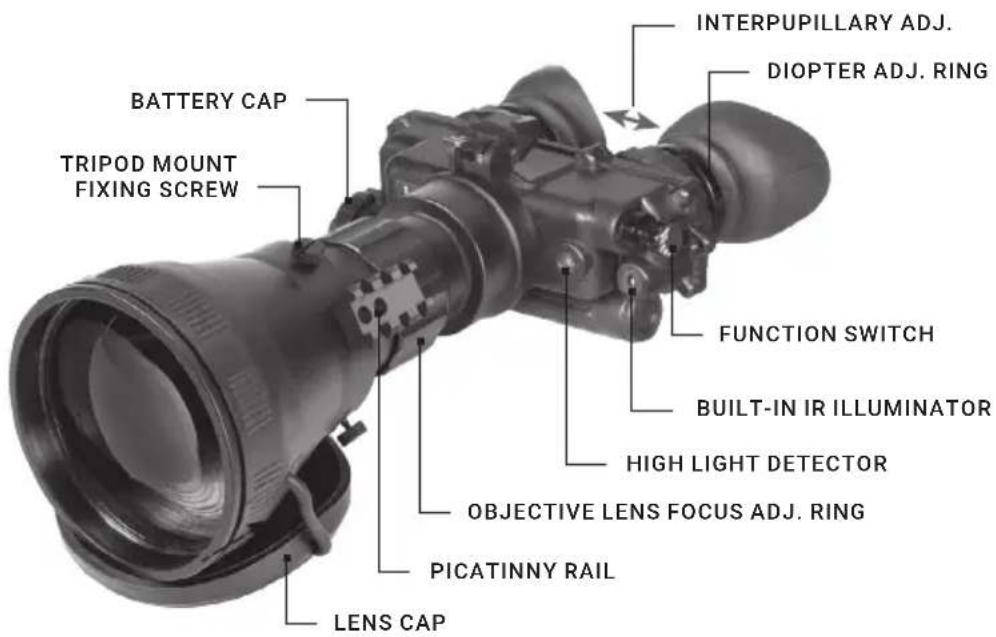
text_image
BATTERY CAP TRIPOD MOUNT FIXING SCREW INTERPUPILLARY ADJ. DIOPTER ADJ. RING FUNCTION SWITCH BUILT-IN IR ILLUMINATOR HIGH LIGHT DETECTOR OBJECTIVE LENS FOCUS ADJ. RING PICATINNY RAIL LENS CAPFIGURE 1-2. FOXBAT-LE MAIN PARTS
B. Sioux850 Long-Range Infrared Illuminator. The AGM Sioux850 extra long-range infrared illuminator provides advanced image-intensified viewing capabilities to night vision devices, and is ideally suited for operations in little to no ambient light. The Sioux850 model comes equipped with a rechargeable battery and charger.
C. Carrying Case. The canvas carrying case is provided for the transportation, protection, and storage of the FoxBat-LE, batteries, and accessories. A carrying case strap is also included.
D. Demist Shields. The two demist shields are used to prevent the eyepiece lenses from becoming fogged.
E. Optional Hard Case. Optional hard case can be used for shipping and storage of bi-ocular and accessories.
The FoxBat-LE components shown in Figure 1-3 and listed in Table 1-1.
The ITEM NO. column indicates the number used to identify items in Figure 1-3.
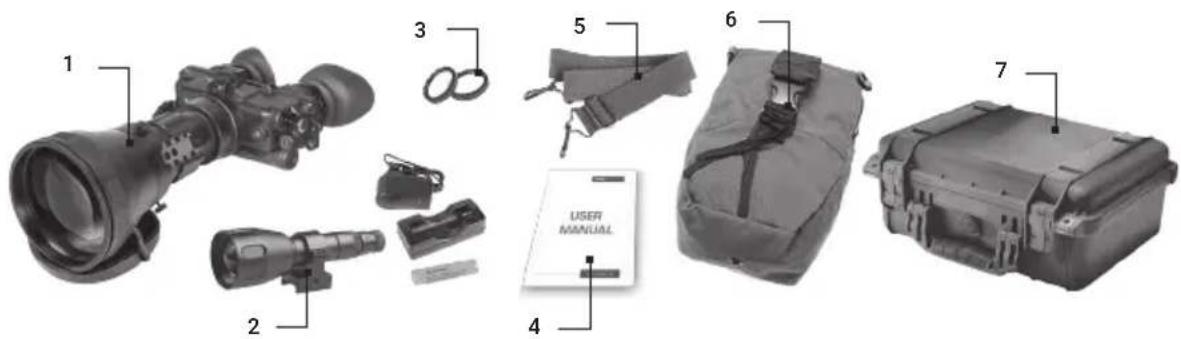
text_image
1 2 3 5 6 7 4 USER MANUALFIGURE 1-3. FOXBAT-LE COMPONENTS
TABLE 1-1. FOXBAT-LE COMPONENTS
| ITEM NO. DESCRIPTION | |
| 1 FoxBat-LE Assembly | |
| 2 | Sioux850 Long-Range Infrared Illuminator (comes included with rechargeable battery, charger, and mount) |
| 3 Demist Shield Assembly (2 pcs) | |
| 4 User Manual | |
| 5 Shoulder Strap Assembly | |
| 6 Carrying Case | |
| 7 Optional Hard Case (P/N 6610HCS1) | |
2 OPERATING INSTRUCTIONS
2.1 CONTROLS AND INDICATORS
CAUTION:
The FoxBat-LE is a precision electro-optical instrument and must be handled carefully at all times.
The FoxBat-LE is adjustable to accommodate different users and will correct for most differences in eyesight. The controls and indicators for the FoxBat-LE are shown or described in Figure 2-1 and Table 2-1.

text_image
Technical diagram of a mounted optical device with numbered parts and an inset showing a control dial labeled 'RESET OFF ON IR FULL'.FIGURE 2-1. FOXBAT-LE CONTROLS AND INDICATORS
TABLE 2-1. CONTROLS AND INDICATORS
| ITEM | CONTROLS AND INDICATORS | FUNCTIONS |
| 1 | Function Switch Controls bi-ocular and built-in IR light power ON or OFF. RESET/OFF: Same as system OFF. Also resets bi-ocular after high light cutoff.ON: Goggles activated.IR/PULL: Pull switch out and turn clockwise to activate bi-ocular and built-in IR. Illuminates LED indicator in left eyepiece. | |
| 2 | RESET/OFF-ON-IR/PULL Label | Defines the switch positions. |
| 3 | Objective Focus Ring Focuses the objective lens. Adjusts for the sharpest image. | |
| 4 | Diopter Adjustment Ring | Focuses the eyepiece lens for each eye (user will not need glasses). Adjusts for sharper image on intensifier screen. |
| 5 | Interpupillary Adjustment | Adjusts the distance between each eyepiece by sliding them together or apart, allowing for each eye to observe the entire field at the same time. |
| 6 | Tripod Mount Fixing Screw | Fixes a position of the tripod mount. |
| 7 | Battery Polarity Indicator | The polarity icons are engraved into the FoxBat-LE, and show the proper orientation of the batteries. |
| 8 | LED ON Indicator (Not Shown) | When illuminated (appears in the left eyepiece), this light indicates that the IR illumination is on. |
| 9 | Low Battery Indicator (Not Shown) | When illuminated (appears in the right eyepiece), this light indicates a low battery, with less than 30 minutes of power remaining. |
| 10 | Sioux850 Power Switch | Switches the IR illuminator on/off and adjusts for radiated power. Four ON positions are located between the two OFF positions, and are each marked with a different-sized spot. The larger the spot, the greater the radiated power. |
| 11 | Sioux850 Lens Focus | Adjusts the focus of the long-range IR illuminator for a narrow or wide angle IR beam. |
| 12 | Sioux850 Battery Polarity Indicator | The polarity icons are engraved on the battery cap and show the proper orientation of the battery. |
2.2 ASSEMBLY AND PREPARATION FOR USE
This chapter contains the necessary information to prepare the bi-ocular for operation. This includes unpacking, inspections for damage and defects, battery installation, sacrificial window installation, and Sioux850 IR illuminator installation and adjustments.
2.2.1 UNPACKING
The following steps must be done before each mission.
-
Open the carrying case, remove the FoxBat-LE, and inventory all items.
-
Inspect the bi-ocular and detachable IR illuminator for obvious evidence of damage to the optical surfaces, body, eyecups, power switch, battery cap, etc. Ensure that all optical surfaces are clean and ready for use. If necessary, clean with lens paper.
2.2.2 INSTALLATION OF BAT TERIES
WARNING:
The Lithium battery contains sulphur dioxide gas, which is under pressure. Do not heat, puncture, disassemble, short circuit, attempt to recharge, or otherwise tamper with the batteries.
If the battery compartment becomes excessively hot, turn off the equipment. If possible, wait until the batteries have cooled before removing them.
These types of batteries have safety vents to prevent explosion. When they are venting gas, they release a very potent smell, and you may hear the sound of gas escaping. When the safety vents have worked correctly, the risk of explosion is significantly reduced. However, the batteries must still be handled with extreme care due to high heat and remaining risk.
If you inhale sulphur dioxide, seek medical attention immediately.
The FoxBat-LE can be powered with either of the two battery types identified in Table 2-2. Batteries are not supplied with the FoxBat-LE and must be purchased by the user.
TABLE 2-2. ESTIMATED BATTERY LIFE
| BATTERY TYPE NEGLIGIBLE IR USAGE IR USAGE 10% OF THE TIME | |
| Lithium (BA-5567/U) 22 Hours 20 Hours | |
| AA Alkaline (BA-3058/U) 60 Hours 55 Hours | |
NOTE:
The battery data in Table 2-2 represents operation at room temperature. When operating in colder conditions, the battery life will decrease.
CAUTION:
- Always verify that the function switch is in the OFF position before installing the batteries.
- Do not mix battery types in the compartment (e.g., one Alkaline and one Lithium).
To install either two (2) AA batteries or one (1) BA-5567/U Lithium battery:
-
Turn the battery cap counterclockwise and remove it.
-
Verify that the O-ring is present. If it's not, replace it.
-
Following the polarity markings on the outside of the battery compartment, insert either two AA (1.5 V) batteries or one BA-5567/U Lithium (3.0 V) battery into the battery compartment, positive (+) end first (see Figure 2-2).
-
Secure the battery cap back on by placing it over the compartment and turning it clockwise. Verify that it is secure to ensure a watertight seal.
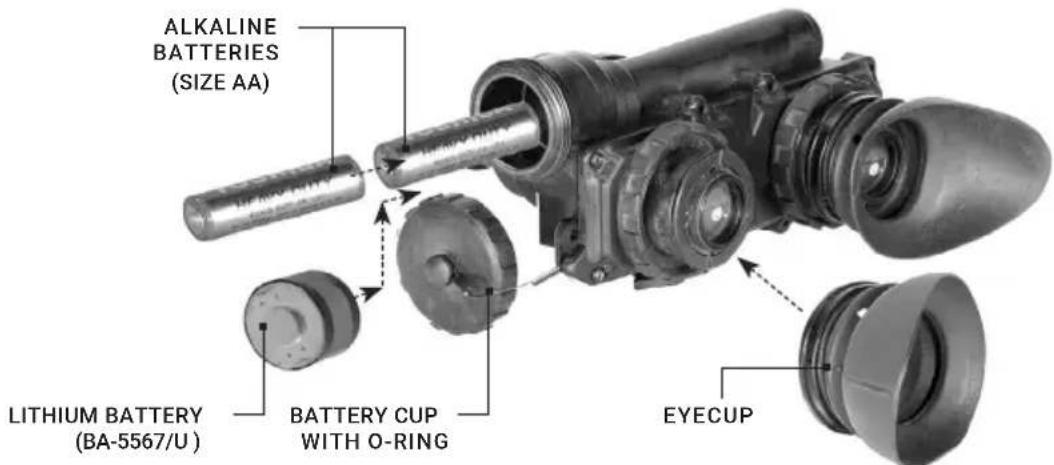
text_image
ALKALINE BATTERIES (SIZE AA) LITHIUM BATTERY (BA-5567/U) BATTERY CUP WITH O-RING EYECUPFIGURE 2-2. BATTERY AND EYE CAP INSTALLATION
Before using the Sioux850 illuminator, fully charge the 18650 rechargeable battery. Insert the battery into the charger, aligning the polarity symbols on the battery with the polarity symbols on the charger. Never install the battery backwards.
Connect the power cord to an appropriate power source. A red indicator light will flash while the battery is charging, and will turn green when it is fully charged. Remove the battery promptly after charging is complete.
CAUTION:
- Use only the supplied battery. Do not install any other types.
- Keep the Lithium batteries far away from open flame, extreme heat, or combustible materials. If handled or recharged incorrectly, Lithium ion batteries can cause fires, explosions, property damage, injuries, and death.
- Keep the batteries and charger far away from water or liquids of any kind. Exposure to water may cause shock hazards and fatal electrocution.
- Do not leave Lithium rechargeable batteries and chargers unattended while recharging.
- Do not operate the charger on wood, carpet, fabric, or any other soft or flammable surfaces.
- Do not attempt to recharge disposable Lithium batteries. Do not use any unprotected Lithium rechargeable batteries. Never recharge Lithium batteries in any chargers other than those designed for the specific battery types being used.
CAUTION:
Confirm that the IR Illuminator is off before installing the battery.
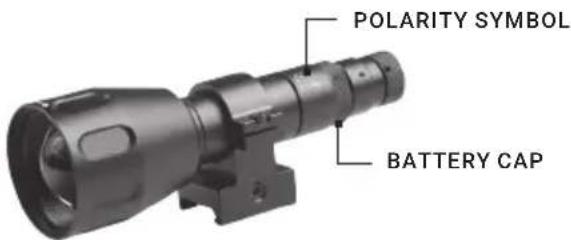
To install the battery into the Sioux850 (refer to Figure 2-3):
- Unscrew the battery cap of Sioux IR illuminator and remove it.
- Following the polarity markings on the battery cap, insert the fully charged 18650 rechargeable battery into the battery compartment, positive (+) end first.
- Replace the battery cap.
text_image
POLARITY SYMBOL BATTERY CAPFIGURE 2-3. IR ILLUMINATOR BATTERY INSTALLATION
2.2.3 INSTALLATION OF THE EYECUPS
To install the eyecups (refer to Figure 2-2):
-
Carefully press each eyecup over the diopter cell retainer.
-
Rotate each eyecup into the proper viewing position. Adjust for the best fit. The eyecups must seal around your eyes and prevent the green light from showing outside of the eyepieces.
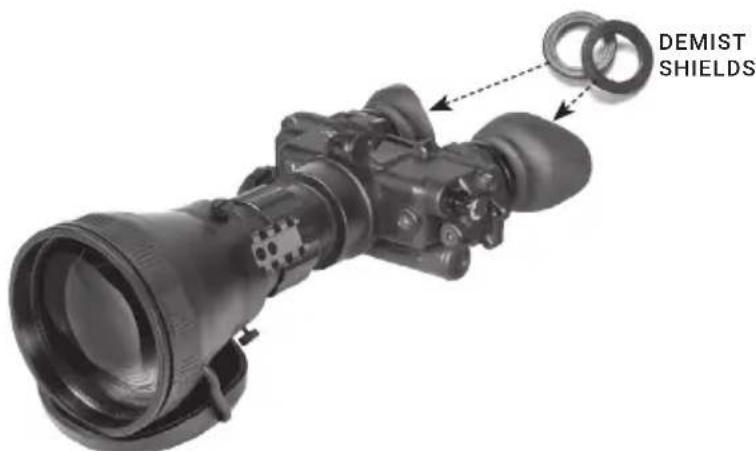
2.2.4 INSTALLATION OF THE DEMIST SHIELDS
To install the demist shields on the diopter lenses (refer to Figure 2-4):
text_image
DEMIST SHIELDSFIGURE 2-4. DEMIST SHIELDS INSTALLATION
CAUTION:
If the demisting shields need to be cleaned, make sure the shields are dry and only use dry lens paper. If the demist shields are wiped while wet or with wet lens paper, you will damage the coating.
NOTE:
If you are aware that inclement weather (e.g. significant temperature changes or high humidity) could occur while using the FoxBat-LE, install the demist shields before operation in order to minimize diopter lens fog.
- Carefully remove the eyecups.
- Carefully press a demist shield onto each eyepiece. Be careful not to smudge the eyepieces or demist shields.
- Replace the eyecups (see Paragraph 2.2.3).
2.2.5 MOUNTING LONG-RANGE IR ILLUMINATOR
The Sioux IR illuminator is delivered ready-assembled with a dedicated mount, to be installed on Picatinny rail of the FoxBat-LE. Refer to Figure 2-5 and complete the following steps:
- Loosen the mount screw of the IR illuminator.
- Mount the IR illuminator on the rail. The recoil stop of the Sioux mount should slide into one of the transverse slots of the rail.
- Tighten the mount screw.

text_image
RAIL RISER MOUNT SCREW IR ILLUMINATORFIGURE 2-5. LONG-RANGE IR ILLUMINATOR
If needed, you can use the riser to increase the height of the mount (for example, when a large objective lens interferes with or obscures the IR beam). To do so, install the Sioux on the rail of the riser. Then install the illuminator with the riser on the Weaver rail of adapter; the recoil stop of the riser should slide into one of the transverse slots of the rail. Tighten the nut using a screwdriver.
2.2.6 INSTALLING THE FOXBAT-LE ON A TRIPOD
The FoxBat-LE can be installed to a tripod. Screw the tripod into the 1/4" threaded socket of the tripod mount located on the objective lens of FoxBat-LE. If necessary, loosen the three fixing screws of mount and rotate the FoxBat-LE to adjust position.
CAUTION:
The unit may be badly damaged if the tripod collapses or falls over. Remove the unit from the tripod if it is not within your reach.
2.3 OPERATING PROCEDURES
This chapter contains operational procedures for using the FoxBat-LE. Prior to using the Sioux850, ensure that all steps in Chapter 2.2 have been completed.
2.3.1 BI-OCULAR OPERATIONS
CAUTION:
Only operate the FoxBat-LE in dark environments. If you must operate the device in daylight, always use the lens cap to cover the objective lens.
NOTE:
Proper objective focus cannot be achieved while the objective lens cap is covering the objective lens. Objective focus must be done in the dark with the objective lens cover removed.
- Verify that the batteries are properly installed (Paragraph 2.2.2).
- Turn the function switch ON.
- Adjust the interpupillary distance (Figure 2-1) by sliding the eyepieces together or apart so that each eye can observe the entire field of view at the same time. The eyepieces adjust independently.
- Hold the FoxBat-LE with your left hand and fold the left eyecup over the eyepiece with your left thumb or forefinger to obstruct the view through the left eyepiece. Rotate the right diopter adjustment ring until you are able to observe the clearest possible view through the image intensifier screen.
- Repeat step 4 for the right eye.
- While looking through the device, adjust the objective focus until the image becomes clear and sharp.
2.3.2 SIOUX850 OPERATIONS
WARNING:
In extreme darkness, light from the IR illuminator is invisible to the naked eye. However, it can be detected by other night vision devices.
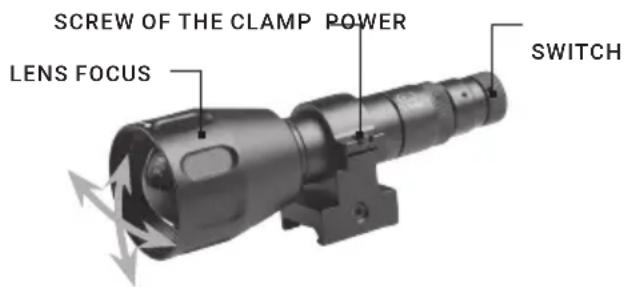
To operate the Sioux IR illuminator (refer to Figure 2-6):
- Turn on the IR illuminator by rotating the power switch. Four ON positions are located between the two OFF positions and are each marked with a different-sized spot.
-
To change the radiated power level, turn the power switch to one of the spots between the two OFF positions. The brightness levels are marked with dots of increasing size, respective to the four different output power levels. The larger the spot, the greater the radiated power.
-
To adjust IR beam divergence, rotate the objective lens.
-
To adjust the IR spot position in the field of view:
a) Loosen the screw of the clamp on the IR illuminator mount (using a 2.5 mm hex key);
b) Turn on the night vision device and the IR illuminator;
c) While looking through the eyepiece of your device, move the IR illuminator up, down, and side-to-side to observe the IR spot position relative to the night vision device;
d) Once the IR spot is centered in the field of view, tighten the clamp screw.
text_image
SCREW OF THE CLAMP POWER LENS FOCUS SWITCHFIGURE 2-6. SIOUX850 OPERATIONS
2.3.3 BUILT-IN INFRARED ILLUMINATOR OPERATIONS
Pull the function switch out and rotate it clockwise to the IR position. While looking through the FoxBat-LE, check that a red light appears in the left eyepiece. This indicates that the IR illuminator is operating.
Rotate the function switch from IR position to turn the built-in IR infrared off.
2.3.4 PREPARATION FOR STORAGE
A. Shut down.
- Turn off the bi-ocular by rotation the function switch OFF.
- Turn off the Sioux850 IR illuminator by rotating the power switch to the OFF position.
B. Packaging After Use.
- Unscrew the battery caps and remove the batteries from the bi-ocular and IR illuminator.
- Inspect the battery compartments for corrosion or moisture. Clean and dry if necessary.
- Replace the battery caps.
- Remove the Sioux850, if installed.
- Remove the demist shields, if installed.
NOTE:
Prior to placing the FoxBat-LE and its accessories into the carrying case, ensure that the bi-ocular and case are free of dirt, dust, and moisture.
- Place the manual, carrying case strap, lens paper, demist shields, batteries, and IR illuminator into the carrying case.
- With the objective lens facing downward, place the bi-ocular into the shallow pocket of the carrying case.
3 MAINTENANCE AND TROUBLESHOOTING
3.1 CLEANING PROCEDURES
CAUTION:
- The FoxBat-LE is a precision electro-optical instrument and must be handled carefully.
- Do not scratch the external lens surfaces or touch them with your fingers.
- Wiping demist shields while wet, or with wet lens paper, can damage the coating.
Clean the FoxBat-LE and Sioux850 as follows:
- Gently brush off any dirt from the device's body using a clean soft cloth.
- Moisten the cloth with fresh water and gently wipe external surfaces (except for glass surfaces).
- Dry any wet surfaces (except for glass surfaces) with another clean, soft, dry cloth.
- Using a lens brush, carefully remove all loose dirt from the glass surfaces.
- Clean the lenses with lens paper (and water if necessary, except for demist shields). The alcohol also can be used for lens cleaning. Slightly dampen a cotton swab with alcohol. Gently and slowly wipe the lenses. Without touching the lens holders, clean the glass surfaces in circular movements, beginning in the center and moving out towards the edge. Change the cotton swab after each circular stroke. Repeat until the glass surfaces are clean.
- Clean the demist shields with lens paper. Demist shields must be dry before being cleaned with dry lens paper.
- Clean the battery surfaces and contacts with a pencil eraser and/or alcohol-dampened cotton swabs.
3.2 TROUBLESHOOTING
Table 3-1 lists the most common malfunctions that may occur with your equipment. Perform the tests, inspections, and corrective actions in the order they appear in the table.
This table does not list all of the malfunctions that may occur with your device, or all of the tests, inspections, and corrective actions that may be necessary to fix them. If the equipment malfunction is not corrected by the suggested actions, or a problem occurs that is not listed in this table, please contact AGM Global Vision's Customer Support center or your retailer.
TABLE 3-1. OPERATOR TROUBLESHOOTING
| MALFUNCTION | PROBABLE CAUSE/TEST/INSPECTION | CORRECTIVE ACTION |
| 1. Bi-ocular fails to activate. | Visual.Check for defective, missing, or improperly installed battery/batteries | Turn the switch to the RESET/OFF position, then back to ON.Replace the battery/batteries or install them correctly.If FoxBat-LE still fails to activate, contact Customer Support. |
| 2. IR indicator fails to activate. | Visual. Look for the LED indicator. | Contact Customer Support. |
| 3. Poor image quality. Check the objective lens or eyepiece focus.Check for fogging or dirt on lens. | Refocus.Clean lens surface. | |
| 4. Light is visible around eyecup. | Check eye relief distance.Check eyecup for resiliency. | Adjust for proper eye relief distance.If the eyecups are defective, contact Customer Support. |
| 5. Diopter adjustment cannot be made. | Check to see if the diopter adjustment ring is bent or broken. | Check to see if the diopter adjustment ring is bent or broken. |
| 6. Interpupillary adjustment cannot be made (left & right eye). | Defective eyepiece assembly. Defective eyepiece assembly. | |
| 7. Battery cap is difficult to turn. | Check for dirt or grit in the threads.Visually inspect for the presence of an o-ring.Check for damaged battery cap or threads on the battery compartment. | Clean the battery cap.If the o-ring is missing, contact Customer Support.If damaged, contact Customer Support. |
| 8. The FoxBat-LE does not shut off when exposed to daylight or bright room light. | Perform the following tests in daylight or bright room light.Place the lens cap on the objective lens. Turn the FoxBat-LE on and verify that they shut off within 70 (±30) seconds after powering on.Turn the bi-ocular off and then back on. | If damaged, contact Customer Support. |
4 WARRANTY INFORMATION
4.1 WARRANTY INFORMATION AND REGISTRATION
4.1.1 WARRANTY INFORMATION
This product is guaranteed to be free from manufacturing defects in material and workmanship under normal use for a period of three (3) years from the date of purchase. In the event that a defect covered by the warranty below occurs during the applicable period stated above, AGM Global Vision, at its discretion, will either repair or replace the product; such action on the part of AGM Global Vision shall be the full extent of AGM Global Vision's liability, and the Customer's sole and exclusive reparation. This warranty does not cover a product if it has been (a) used in ways other than its normal and customary manner; (b) subjected to misuse; (c) subjected to alterations, modifications or repairs by the Customer or by any party other than AGM Global Vision without prior written consent of AGM Global Vision; (d) is the result of a special order or categorized as "close-out" merchandise or merchandise sold "as-is" by either AGM Global Vision or the AGM Global Vision dealer; or (e) merchandise that has been discontinued by the manufacturer and either parts or replacement units are not available due to reasons beyond the control of AGM Global Vision. AGM Global Vision shall not be responsible for any defects or damage that in AGM Global Vision's view are a result from the mishandling, abuse, misuse, improper storage or improper operation of the device, including use in conjunction with equipment that is electrically or mechanically incompatible with, or of inferior quality to, the product, as well as failure to maintain the environmental conditions specified by the manufacturer. This warranty is extended only to the original purchaser. Any breach of this warranty shall be enforced unless the customer notifies AGM Global Vision at the address noted below within the applicable warranty period.
The customer understands and agrees that except for the foregoing warranty, no other warranties written or oral, statutory, expressed or implied, including any implied warranty of merchantability or fitness for a particular purpose, shall apply to the product. All such implied warranties are hereby and expressly disclaimed.
4.1.2 LIMITATION OF LIABILITY
AGM Global Vision will not be liable for any claims, actions, suits, proceedings, costs, expenses, damages, or liabilities arising out of the use of this product. Operation and use of the product are the sole responsibility of the Customer. AGM Global Vision's sole undertaking is limited to providing the products and services outlined herein in accordance with the terms and conditions of this Agreement. The provision of products sold and services performed by AGM Global Vision to the Customer shall not be interpreted, construed, or regarded, either expressly or implied, as being for the benefit of or creating any obligation toward any third party of legal entity outside AGM Global Vision and the Customer; AGM Global Vision's obligations under this Agreement extend solely to the Customer. AGM Global Vision's liability hereunder for damages, regardless of the form or action, shall not exceed the fees or other charges paid to AGM Global Vision by the customer or customer's dealer. AGM Global Vision shall not, in any event, be liable for special, indirect, incidental, or consequential damages, including, but not limited to, lost income, lost revenue, or lost profit, whether such damages were foreseeable or not at the time of purchase, and whether or not such damages arise out of a breach of warranty, a breach of agreement, negligence, strict liability, or any other theory of liability.
4.1.3 PRODUCT REGISTRATION
In order to validate the warranty on your product, the customer must complete and submit AGM Global Vision PRODUCT REGISTRATION FORM on our website (www.agmglobalvision.com/customer-support).
4.1.4 OBTAINING WARRANTY SERVICE
To obtain warranty service on your unit, the End-user (Customer) must notify the AGM Global Vision service department via e-mail. Send any requests to support@agmglobalvision.com to receive a Return Merchandise Authorization number (RMA). When returning any device, please take the product to your retailer, or send the product, postage paid and with a copy of your sales receipt, to AGM Global Vision's service center at the address listed above. All merchandise must be fully insured with the correct postage; AGM Global Vision will not be responsible for improper postage or merchandise that becomes lost or damaged during shipment. When sending product back, please clearly write the RMA# on the outside of the shipping box. Please include a letter that indicates your RMA#, the Customer's Name, a Return Address, reason for the return, contact information (valid telephone numbers and/or an e-mail address), and proof of purchase that will help us to establish the valid start date of the warranty. Product merchandise returns that do not have an RMA# listed may be refused, or a significant delay in processing may occur. Estimated Warranty service time is 10-20 business days. The End-user/Customer is responsible for postage to AGM Global Vision for warranty service. AGM Global Vision will cover return postage/shipping after warranty repair to the End-user/Customer only if the product is covered by the aforementioned warranty. AGM Global Vision will return the product after warranty service by domestic UPS Ground service and/or domestic mail. Should any other requested, required, or international shipping methods be necessary, the postage/shipping fee will be the responsibility of the End-user/Customer.
For service, repair or replacement, please contact:
AGM Global Vision, LLC
173 West Main Street
PO Box 962
Springerville, AZ 85938
Tel. 928.333.4300
support@agmglobalvision.com
www.agmglobalvision.com
5 SPECIFICATIONS
5.1 SPECIFICATIONS
The following tables provide information pertaining to the operational, electrical, mechanical, optical, and environmental characteristics of the FoxBat-LE bi-oculars and Sioux IR illuminator.
TABLE 5-1. OPERATOR ADJUSTMENT LIMITS
| ITEM LIMITS | |
| Interpupillary Distance 55 to 71 mm | |
| Diopter Focus +2 to -6 diopters | |
| Objective Focus 10 ft / 10 m to infinity |
TABLE 5-2. ELECTRICAL DATA
| ITEM DATA | |
| Power Source Battery (3 VDC max.) | |
| Battery Requirements 2 AA Alkaline or 1 Lithium (BA-5567/U) | |
| Battery Life (operating) Up to 40 hours at 20°C |
TABLE 5-3. MECHANICAL DATA
| ITEM FOXBAT LE-6 FOXBAT LE-7 | FOXBAT LE-10 | ||
| Overall Dimensions | 11.1 × 6.0 × 3.8 in /282 × 152 × 96 mm | 13.5 × 6.0 × 4.1 in /343 × 152 × 104 mm | 15.0 × 6.0 × 5.4 in /382 × 152 × 137 mm |
| Weight | 2.25 lbs / 1.02 kg | 2.95 lbs / 1.34 kg | 4.2 lbs / 1.9 kg |
* The weight of the FoxBat-LE does not include the added weight of the accessories.
TABLE 5-4. OPTICAL DATA
| ITEM FOXBAT LE-6 FOXBAT LE-7 FOXBAT LE-10 | |||
| Magnification 5.6x 7.4x 9.6x | |||
| Lens System 145 mm; F/1.8 192 mm; F/2.13 250 mm; F/2.0 | |||
| Field of View 7° 5.4° 4° | |||
| Eyepiece Focus | -6 to +2 diopters | -6 to +2 diopters | -6 to +2 diopters |
| Focus Range | 27 yd / 25 m to infinity | 55 yd / 50 m to infinity | 55 yd / 50 m to infinity |
TABLE 5-5. ENVIRONMENTAL DATA
| ITEM | DATA |
| Operating Temperature | -40 to +122°F / -40 to +50°C |
| Storage Temperature | -58 to +122°F / -50 to +50°C |
| Illumination Required | Overcast starlight to moonlight |
| Waterproof | 1 yd / 1 m for 30 min. |
TABLE 5-6. SIOUX850 ILLUMINATOR DATA
| ITEM | DATA |
| IR Emitter Type | LED |
| Power | 1000 mW |
| Peak Wavelength | 850 nm |
| Illumination Range | Up to 1090 yd / 1000 m |
| Divergence | 4 to 35° |
| Battery | Single 18650 Rechargeable Battery (3.7V) |
| Battery Life at 20°C (68°F) | Up to 10 hr. (1/4 Power); 8 hr. (1/2 Power); 6 hr. (3/4 Power); 2.5 hr. (Full Power) |
| Overall Dimensions (with Mount) | 5.9 × 1.9 × 2.2 in / 150 × 48 × 57 mm |
| Weight (with Mount, w/o Battery) | 9.3 oz / 264 g |
| Operating Temperature | -4 to 122°F / -20 to +50°C |
| Storage Temperature | -58 to 158°F / -50 to +70°C |
| Environmental Rating | Water and Fog-Resistant |
NOTE:
All data subject to change without notice.
APPENDIX
A. SPARE PARTS LIST
The parts authorized in this list of spare parts are required for operator maintenance. This list includes parts that must be removed in order to replace authorized parts.
The PART NO. Column indicates the primary number used by the manufacturer to identify an item; this number controls the design and characteristics of the item, including standards, engineering specifications, and inspection requirements.
The NSN column indicates the National Stock Number.

text_image
1 8 7 10 11 14 12 4 13 15 17 16 USER MANUALFIGURE A-1. FOXBAT-LE SPARE PARTS
TABLE A-1. FOXBAT-LE SPARE PARTS LIST
| ITEM DESCRIPTION PART NO. NSN | |||
| 1 6x Objective Lens Assembly FXBT6OLAS | |||
| 2 7x Objective Lens Assembly (not shown) FXBT7OLAS | |||
| 3 10x Objective Lens Assembly (not shown) FXBT8OLAS | |||
| 4 6x Lens Cap FXBT6LCP | |||
| 5 7x Lens Cap (not shown) FXBT7LCP | |||
| 6 10x Lens Cap (not shown) FXBT8LCP | |||
| 7 Tripod Mount Assembly MLSTMAS | |||
| 8 Battery Cap 5855-01-246-8265 | |||
| 9 | O-Ring (not shown) | 5330-00-729-4992 | |
| 10 | Eyepiece Assembly | 5855-01-246-6810 | |
| 11 | Eyecup | 5855-01-246-8273 | |
| 12 | Switch Knob | 5930-01-246-8264 | |
| 13 | Sioux850 IR Illuminator with mount and charger | 501SIOUX850IR1 | |
| 14 | Demist Shield | 5855-01-246-8272 | |
| 15 | Shoulder Strap Assembly | 5340-01-250-2431 | |
| 16 | User Manual | FXBTUSMN | |
| 17 | Carrying Case | 5855-01-398-4284 | |
NOTES
AGM Global Vision, LLC
MAIN OFFICE
173 West Main Street
PO Box 962
Springerville, AZ 85938
USA
Tel. +1.928.333.4300
info@agmglobalvision.com
www.agmglobalvision.com
EUROPEAN OFFICE
Andrey Lyapchev #7
Sofia, P.C. 1756
Bulgaria
Tel. +35.988.412.5573
info@agmglobalvision.eu
www.agmglobalvision.eu