Comanche-40 - Binoculars AGM - Free user manual and instructions
Find the device manual for free Comanche-40 AGM in PDF.


| Product Type | Binoculars |
| Brand | AGM |
| Model | Comanche-40 |
| Magnification | 8x |
| Objective Lens Diameter | 40 mm |
| Field of View | 8.2° (143 m at 1000 m) |
| Exit Pupil | 5 mm |
| Eye Relief | 15 mm |
| Focus System | Center focus |
| Prism Type | Roof prism |
| Lens Coating | Fully multi-coated |
| Waterproof | Yes, O-ring sealed |
| Fogproof | Yes, nitrogen purged |
| Weight | 780 g (27.5 oz) |
| Dimensions (W x H x D) | 160 x 130 x 55 mm |
| Power Source | None (optical) |
| Included Accessories | Neck strap, lens caps, carrying case, cleaning cloth |
| Recommended Use | Outdoor, hunting, birdwatching |
| Cleaning | Use microfiber cloth for lenses; store in dry place |
| Safety Warning | Do not look directly at the sun; keep away from children |
Frequently Asked Questions - Comanche-40 AGM
User questions about Comanche-40 AGM
0 question about this device. Answer the ones you know or ask your own.
Ask a new question about this device
Download the instructions for your Binoculars in PDF format for free! Find your manual Comanche-40 - AGM and take your electronic device back in hand. On this page are published all the documents necessary for the use of your device. Comanche-40 by AGM.
USER MANUAL Comanche-40 AGM
natural_image
Technical line drawing of a mechanical device with no visible text or symbolsCOMANCHE 40
© 2021 AGM Global Vision, LLC. All rights reserved.
This documentation is subject to change without notice.
No parts of this manual, in whole or in part, may be copied, photocopied, translated, or transmitted by any electronic medium or in machine-readable form without the prior written permission of AGM Global Vision, LLC.
Approved for public release, distribution unlimited.
If you have questions that are not covered in this manual, or need service, contact AGM Global Vision customer support for additional information prior to returning a product.
AGM Global Vision, LLC
173 West Main Street
PO Box 962
Springerville, AZ 85938
Tel. 928.333.4300
support@agmglobalvision.com
www.agmglobalvision.com
EXPORT INFORMATION
Buyer acknowledges that all products supplied by AGM Global Vision, LLC are subject to U.S. export control laws, including, but not limited to, the Export Administration Regulations, the International Economic Emergency Powers Act, and various U.S. embargoes and sanctions. AGM Global Vision products may not be exported, re-exported, or transferred contrary to U.S. export control laws. In particular, AGM Global Vision products may not be exported, re-exported, or transferred to prohibited countries, individuals, organizations, or entities, including but not limited to those individuals and entities listed on the List of Specially Designated Nationals and Blocked Persons administered or maintained by the U.S. Office of Foreign Assets Control ("OFAC"), the various lists maintained by the Bureau of Industry and Security of the Department of Commerce, and the U.S. State Department and Buyer represents and warrants that neither Buyer nor any of its officers, directors, or employees are on such lists. Distribution or resale by Buyer to such countries, individuals, organizations, or entities is expressly prohibited. Buyer has and will maintain a positive process to ensure compliance with this Section.
LIST OF CONTENTS
TITLE
PAGE
Safety Summary 4
SECTION 1. GENERAL INFORMATION 6
1.1 General Information 6
1.2 Key Features 6
1.3 System Description 6
1.4 Standard Components 8
1.5 Optional Equipment 9
SECTION 2. OPERATING INSTRUCTIONS 10
2.1 Installation and Mounting 10
2.2 Controls and Indicators 14
2.3 Operating Procedures 15
SECTION 3. MAINTENANCE 17
3.1 Cleaning Procedures 17
3.2 Troubleshooting 17
SECTION 4. WARRANTY INFORMATION 19
4.1 Warranty Information 19
4.2 Limitation of Liability 19
4.3 Product Registration 20
4.4 Obtaining Warranty Service 20
SECTION 5. SPECIFICATIONS 21
5.1 Specifications 21
APPENDIX 23
A. List of Spare Parts 23
SAFETY SUMMARY
- Read and follow all instructions
- Read all warnings
- Only use the attachments/accessories specified by the manufacturer
- All service must be provided by the manufacturer
WARNING:
Always make sure your firearm is unloaded before you place the scope on the firearm. Verify that the chamber is empty, particularly if you stop the procedure and resume at a later time. Safe handling rules should be followed at all times.
WARNING:
If a scope is mounted too far to the rear of a weapon, the eyepiece can injure the shooter's brow. Shooting at an uphill angle also increases this risk, because it shortens the distance between the brow and the rear of the scope. When mounting your scope, we recommend positioning it as far forward in the mounts as possible.
With hard-recoiling rifles, serious injury or even death can result from eyepiece impact when discharging the firearm.
BEFORE SHOOTING THE FIREARM, verify that your installation provides sufficient space between the eyepiece and the scope to account for the recoil generated by your rifle.
NOTE: Give special attention to this warning when shooting uphill and/or from a prone position. These shooting conditions can dramatically reduce space allotted for recoil between your eyes and the weapon. PLEASE maintain maximum distance when shooting magnum firearms or firearms with heavy recoil. THE USER ASSUMES ALL RESPONSIBILITY AND LIABILITY FOR HAVING THE RIFLESCOPE PROPERLY MOUNTED TO A FIREARM AND USING THE RIFLESCOPE PROPERLY. ALWAYS CHECK THE CONDITION OF YOUR MOUNTING SYSTEM PRIOR TO USING YOUR FIREARM.
WARNING:
This product contains natural rubber latex which may cause allergic reactions! The FDA has reported an increase in the number of deaths that are associated with an apparent sensitivity to natural latex proteins. If you are allergic to latex, it is a good idea to learn which products contain it and strictly avoid exposure to those products.
WARNING:
- It is recommended that you use an eyecup on the eyepiece of the day scope, allowing for the eyepiece diameter and eye relief and having side paddle preferably in order to escape detection.
- The light from the infrared illuminator is invisible to the unaided eye. However, the light can be detected by other night vision devices.
CAUTION:
• DO NOT dismantle the equipment.
- Keep the equipment clean. Protect it from moisture, dramatic temperature changes, and electric shocks.
• DO NOT drop or hit the equipment.
- Protect the equipment from overexposure to light: DO NOT activate the equipment in daylight with the objective lens cap removed; DO NOT aim the equipment at bright light sources (a fire, car headlights, lanterns, streetlamps, room lights, etc.).
- DO NOT force the equipment controls past their stopping points.
- DO NOT leave the equipment activated during breaks in operation.
- Verify that the equipment is off before installing a battery.
- DO NOT store the equipment with the battery still in it.
- To avoid deformation or damage, remove the light suppressor from the Comanche 40 before placing the equipment in storage.
- Thoroughly clean and dry each item before placing them into the storage case.
- Scope Mounting Systems are not recommended for installing the Comanche 40 on firearms having vigorous recoil (0.308 Win or stronger).
NOTES:
- Optical axes of the Comanche 40 and day scope should align. It is not recommended for the distance between the axes to exceed 3mm. If the difference in the axis heights of the Comanche 40 and day scope above the weapon rail exceeds 3mm, you will need to replace the day scope mounting rings or monoblock.
- The equipment requires some level of ambient light (moonlight, starlight, etc.) to function correctly.
- Performance of the device in night-time conditions depends on the level of ambient light in the environment. Please remember the following:
— The level of ambient light is reduced by the presence of clouds, shade, or objects that block natural light (trees, buildings, etc.).
— The equipment is less effective when operated in shadows and other darkened areas.
— The equipment is less effective when operated in rain, fog, sleet, snow, dust or smoke.
— The equipment will not "see" through dense smoke.
- For the purpose of returning defective components, retain all packaging materials.
1 GENERAL INFORMATION
1.1 GENERAL INFORMATION
The AGM Global vision Comanche 40 Night Vision Clip-On (NVCO) system uses the latest advances in night vision clip-on technology. Designed for mid-range nighttime shooting, the Comanche 40 delivers exceptional clarity, reliability, and versatility providing the most significant functionality and features at the lowest possible price.
The Comanche 40 is mounted to a standard Weaver or Picatinny rail in front of an existing day scope; transforming it into a Night Vision Device (NVD) with no re-zeroing required. This NVCO can be used with day scopes of up to 12x magnification for optimal performance and is equipped with a quick release mount and remote control. It provides unmatched target acquisition and enhanced aiming capabilities, making it extremely practical and effective during the most challenging missions.
1.2 KEY FEATURES
- Simple, quick conversion of daytime scopes to NVDs
- Manual gain control
- Mounts in front of any daytime scope, no re-zeroing required
• Equipped with a remote control - Powered by a single Alkaline 1.5V AA or 3V CR123A Lithium battery
• Bright-light cut-off system - Quick-release mount
- Limited 3-year warranty
1.3 SYSTEM DESCRIPTION
The Comanche 40 consists of two primary parts: the night vision device (hereafter referred to as NVD) and the mount. The Comanche 40 is delivered already assembled with a mount. The mount should be secured to the seating rail of the NVD with two screws.
The NVD includes four main components: the objective and output lenses, an image intensifier tube, and the body.
The objective lens focuses available light (photons) on the photocathode of the image intensifier tube (IIT). The light energy causes electrons to be released from the cathode. After being amplified, the electron flow represents an intensified version of the original image of the scene. The electrons then strike the IIT phosphor screen, which reacts to them by glow that is visible to the human eye. The image is projected by the output lens from the IIT screen to the day scope lens.
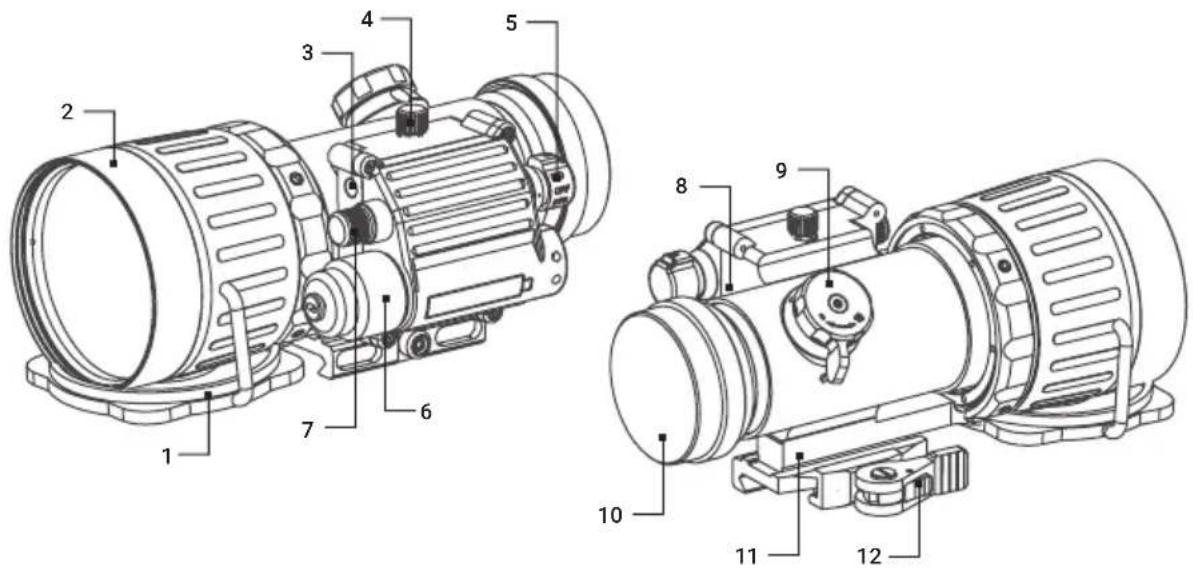
The Comanche 40 incorporates manual gain control, which allows the operator to increase or decrease the brightness of the image to compensate for overly bright or extremely dark conditions. The Comanche 40 is powered by a single Alkaline 1.5V AA or 3V CR123A Lithium battery. The mount system quick and reliable mounts the Comanche 40 to the Picatinny/Weaver rail. The Comanche 40 is shown in Figure 1-1. The ITEM NO. column in Table 1-1 indicates the number used to identify items in Figure 1-1.
text_image
Technical diagram of an electric motor with numbered parts for identification and assembly reference.| ITEM DESCRIPTION ITEM DESCRIPTION | |
| 1 Objective Lens Cap 7 Gain Control Knob | |
| 2 Objective Lens 8 Dual-Color LED Indicator | |
| 3 Photoreceiver 9 Focus Knob | |
| 4 | Remote Control Connector |
| 5 Operation Switch 11 | Seating Rail |
| 6 | Battery Cap with Adapter |
| 10 | Output Lens with a Cap |
| 12 | Quick-Release Mount |
1.4 STANDARD COMPONENTS
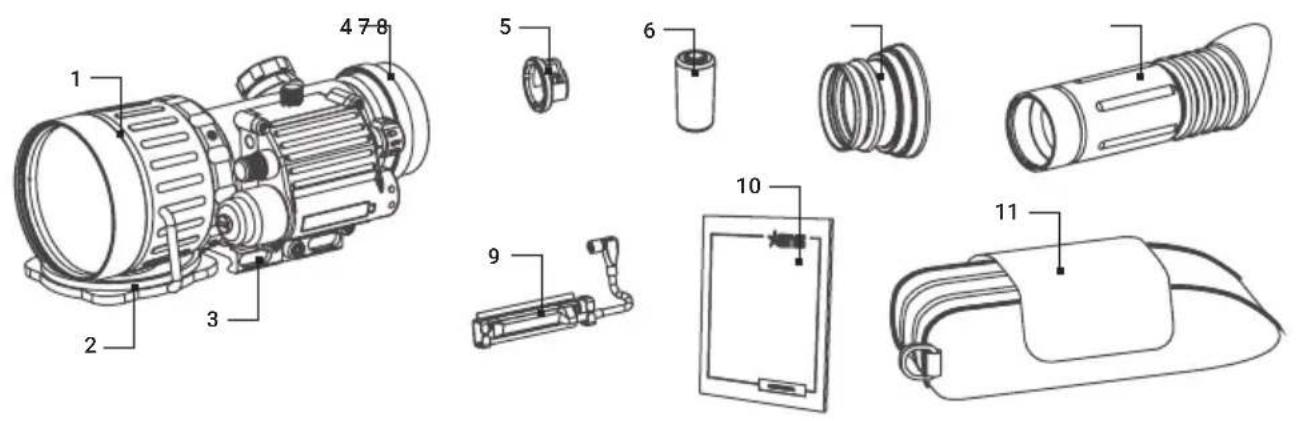
The Comanche 40 standard components are shown in Figure 1-2 and listed in Table 1-2. The ITEM column indicates the number used to identify items in Figure 1-2.
text_image
Technical diagram of an electric motor with numbered parts for identification and assembly reference.FIGURE 1-2. STANDARD COMPONENTS
TABLE 1-2. STANDARD COMPONENTS
| ITEM DESCRIPTION QUANTITY | ||
| 1 Comanche 40 Night Vision Clip-On 1 | ||
| 2 Lens Cap 1 | ||
| 3 Quick-Release Mount 1 | ||
| 4 Output Lens cap 1 | ||
| 5 Battery Adapter 1 | ||
| 6 CR123A Battery 1 | ||
| 7 Light Suppressor | 1 | |
| 8 Light Suppressor for Day Scope | 1 | |
| 9 Remote Control | 1 | |
| 10 | User Manual | 1 |
| 11 | Carrying Case | 1 |
1.5 OPTIONAL EQUIPMENT
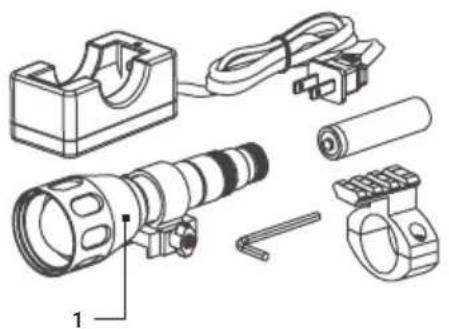
The Comanche 40 optional equipment are shown in Figure 1-3 and listed in Table 1-3. The ITEM column indicates the number used to identify items in Figure 1-3.
natural_image
Technical line drawing of a mechanical device with labeled parts (no text or symbols present)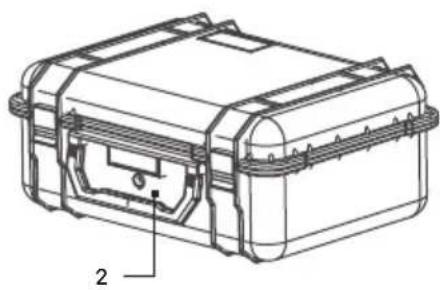
natural_image
Technical line drawing of a mechanical housing or casing with labeled component '2' (no text or symbols beyond label)FIGURE 1-3. OPTIONAL EQUIPMENT
TABLE 1-3. OPTIONAL EQUIPMENT
| ITEM DESCRIPTION PART NO. | ||
| 1 | Sioux850 Long Range Infrared Illuminator(Mount, 18650 Rechargeable Battery, Charger, and Adapter are included) | 501SIOUX850IR1 |
| 2 Hard Case for Storage/Transportation 6610HCS1 | ||
2 OPERATING INSTRUCTIONS
2.1 INSTALLATION AND MOUNTING
CAUTION
To protect the image intensifier tube when the device is not in use or when it is being operated in daylight, keep the protective objective lens cap securely fitted over the lens.
2.1.1 COMANCHE 40 BATTERY INSTALLATION
NOTE:
At operating temperatures below -20^ ( -4^ ), alkaline battery life will be severely reduced. Under said conditions, the use of lithium battery is recommended.
CAUTION:
Ensure that the device is off before installing the battery.
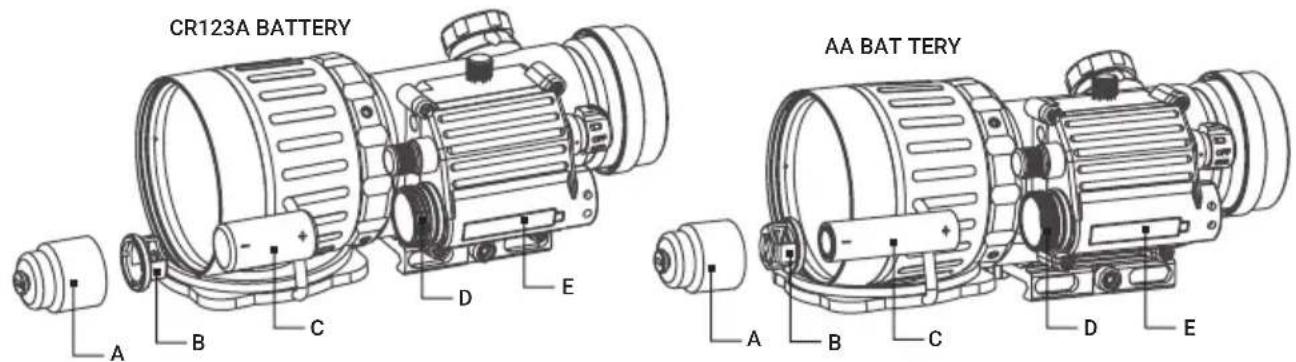
Install the battery as follows (refer to Figure 2-1):
- Unscrew the battery cap (A) and check the position of the adapter (B). See Figure 2-1 for the correct positioning of the threaded adapter, which changes depending on the battery being installed.
- If necessary, change the adapter position in the cap.
- Install the battery (C) into the battery compartment (D), following the polarity order marked on the compartment for reference (E).
- Replace the battery cap.
text_image
CR123A BATTERY AA BAT TERY A B C D E A B C D EFIGURE 2-1. COMANCHE 40 BATTERY INSTALLATION
2.1.2 INSTALLING THE COMANCHE 40 ON A PICATINNY/WEAVER RAIL
WARNING:
When installing the equipment on a weapon, verify that the weapon is clear and that the safety is on before proceeding.
WARNING:
It is recommended that you use an eyecup on the eyepiece of the day scope, allowing for the eyepiece diameter and eye relief and having side paddle preferably in order to escape detection.
NOTE:
The optical axes of the Comanche 40 and day scope should be aligned. The distance between the axes should not exceed 3mm . If the difference in the axis heights of the Comanche 40 and day scope above the weapon rail exceeds 3mm , you will need to replace the day scope mounting rings or monoblock.
Install the Comanche 40 on a Picatinny/ Weaver rail in front of a day scope as follows:
- Remove the output lens cap and place it in the storage case.
- Remove the light suppressor from the storage case. Install it to the output lens in place of the cap.
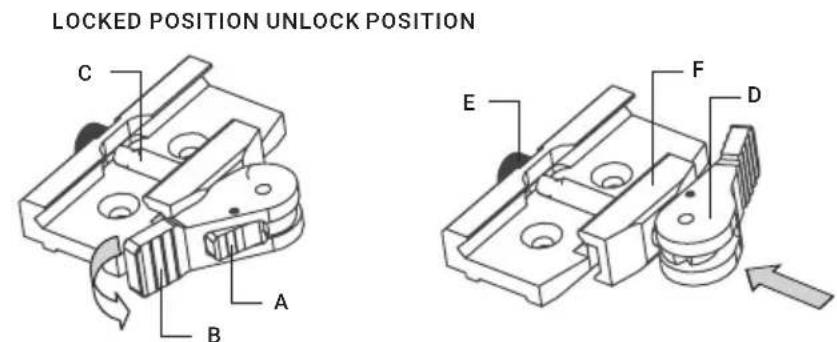
- Unlock the clamping device of the Comanche 40 mount by pushing down on the lever holder (A, see Figure 2-2) and unlocking the cam lever (B).
- Install the Comanche 40 on the Picatinny/ Weaver rail in front of the day scope so that the stop (C) slides into one of the rail's transverse slots. The light suppressor should cover the day scope's objective lens.
- Affix the Comanche 40 to the rail by locking the cam lever (B).
- Verify that the clamping device is firmly holding the Comanche 40. If necessary, adjust the clamping device as detailed below (Clamping Device Adjustment).
text_image
LOCKED POSITION UNLOCK POSITION C A B E F DFIGURE 2-2. MOUNT. UNDERSIDE VIEW
Figure 2-3 shows the Comanche 40 (A) and a day scope (B) installed with the light suppressor (C) on a Picatinny/Weaver rail (D).

text_image
A C B DFIGURE 2-3. COMANCHE 40 ON A PICATINNY RAIL IN FRONT OF A DAY SCOPE
Clamping Device Adjustment
To adjust the mount's clamping device, do the following:
- Remove the Comanche 40 from the weapon.
- With the clamping device unlocked, push the cam (D) towards the arrow, which will cause the nut (E) to slide out of its hole.
- To tighten/loosen the clamping device (F) turn the nut (E) CW/CCW respectively, in one-two increments (see note below). Much like when the cam (D) is released, backward-moving springs will cause the nut (E) to slide back into its hole.
NOTE:
The eight-sided nuts of the mount lever-cam locks will only fit into their holes if turned in one of the discrete positions, using increments equal to 360^/8 .
- Verify that the adjusted lever-cam lock securely holds the weapon mounting rail.
2.1.3 INSTALLING THE REMOTE CONTROL
Install the Remote Control as follows (refer to Figure 2-4):
- Unscrew the protective cap of Remote Control Connector.
- Connect a cable of the Remote Control to the Comanche connector.
- Using Velcro tape, fasten the Remote Control to your weapon in an easily accessible place (e.g., on the front of the rifle stock).

natural_image
Technical line drawing of an electric motor with a lever and adjustment lever (no text or symbols)FIGURE 2-4. REMOTE CONTROL
2.1.4 INSTALLING THE LIGHT SUPPRESSOR FOR A DAY SCOPE
The Light Suppressor for a Day Scope (A, Figure 2-5) slides over the eyepiece of your daytime scope (B). The suppressor can be used with scopes that have 40..43mm eyepiece diameter and 100..120 mm eye relief.
The suppressor can be adjusted for the eye relief of your scope by cutting the rubber at the desired distance (C).

text_image
Technical diagram of a flashlight with labeled components A, B, and C, alongside its exploded view.FIGURE 2-5. LIGHT SUPPRESSOR FOR A DAY SCOPE
2.1.5 INSTALLING THE OPTIONAL IR ILLUMINATOR
The Sioux850 is delivered ready-assembled with a dedicated mount, to be installed on the Weaver rail.
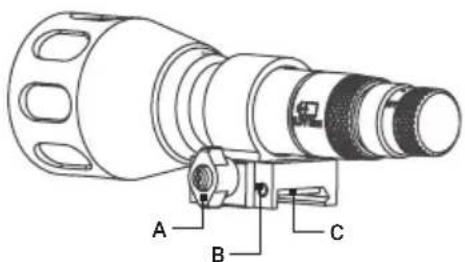
Mount the Sioux850 as follows (Figure 2-6):
-
With the nut (A) loosened, install the mount (B) on the Weaver rail so that the stop (C) slides into one of the transverse slots of the rail.
-
Tighten the nut (A).
text_image
Technical diagram of a mechanical device with labeled parts A, B, and CFIGURE 2-6. SIOUX850 IR ILLUMINATOR
Use the optional Platform Ring to install the Sioux850 on the day scope.
The Platform Ring with IR illuminator installed on a day scope is shown in Figure 2-7.

natural_image
Technical line drawing of a mounted optical instrument with multiple lenses and adjustment knobs (no text or symbols)FIGURE 2-7. SIOUX850 IR ILLUMINATOR
Install the platform ring on the mounting tube of the day scope as follows (refer to Figure 2-8):
- Using a 3 mm hex key, unscrew the both clamp screws (C).
- Place the ring's clamps (D, E) onto the scope's mounting tube with/ without the pair of inserts (A), depending on the mounting tube size (25.4/ 30 mm respectively). Screw the clamps together without tightening the screws (C).
- Adjust position of the platform ring until its Weaver rail (B) is level. Apply a small amount of thread lock to the threads and tighten the screws (C).

text_image
B C D A EFIGURE 2-8. PLATFORM RING
2.2 CONTROLS AND INDICATORS
CAUTION:
DO NOT force the equipment controls past their stopping points.
2.2.1 COMANCHE 40 CONTROLS AND INDICATOR
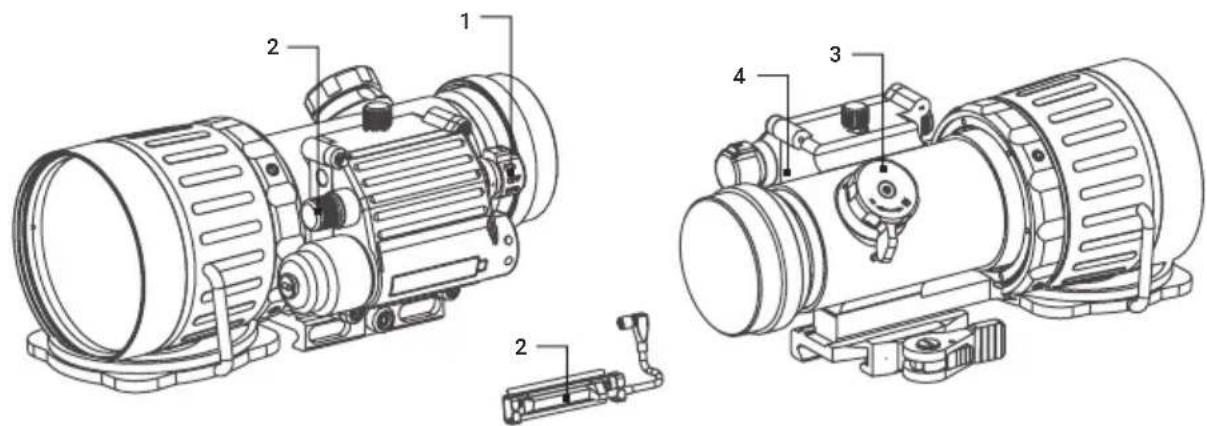
The Comanche 40 controls and indicator are shown in Figure 2-9 and defined in Table 2-1. The ITEM column indicates the number used to identify items in Figure 2-7.
text_image
Technical diagram of an electric motor with labeled components and exploded viewFIGURE 2-9. COMANCHE 40 CONTROLS AND INDICATOR
TABLE 2-1. COMANCHE 40 CONTROLS AND INDICATOR
| ITEM CONTROLS/INDICATORS FUNCTION | ||
| 1 | Operation Switch | Activates the Comanche 40, when turned to ON position. |
| Actuates the battery check mode, when turned to BATTERY position (marked with a battery icon). | ||
| Activates standby mode, when turned to STB position. | ||
| Deactivates the Comanche 40, when turned to OFF position. | ||
| 2 Gain Control Knob Adjusts the brightness of the image. | ||
| 3 Focus Knob Focuses the objective lens. | ||
| 4 | Bicolor LED Indicator | PERMANENT GREEN GLOW indicates excessive light conditions. After 10 seconds the image intensifier tube will be cut off. The Comanche 40 turns back again when moved away from the excessive light. |
| PERMANENT RED GLOW indicates usable condition of the battery. | ||
| - Remote Control Button Activates/deactivates the Comanche 40 in standby when pressed/released. | ||
2.3 OPERATING PROCEDURES
Operating procedures should be performed in night light conditions only.
CAUTION:
Use of the Comanche 40 in brightly lit conditions may damage the image intensifier tube.
- Verify that the battery is installed as required.
- Remove the objective lens cap and place it over the lens' housing.
- Verify that there are no bright light sources in the Comanche 40's field of view. Turn the device on by rotation the operation switch to the ON position. After a slight delay, a green glow will appear in the day scope's output lens.
CAUTION:
Avoid exposing the device to bright light sources such as firelight, headlights, searchlights, etc., as these can damage the Comanche 40.
-
Observe the scene and adjust the focus. Bring the object into focus by turning the objective focus knob. Rotate the focus knob until the subject looks sharp in the viewfinder.
-
Adjust the image brightness. Look into the eyepiece of day scope. Rotate the gain control knob to gradually adjust the brightness until the desired level is reached.
- If the day scope includes a focusing ring (i.e., parallax adjustment knob), adjust the focus for a parallax free image.
- Turn on the day scope's reticle illumination and adjust the reticle brightness.
- To operate the Comanche 40 in short-time activation mode, turn the device on standby. To activate the Comanche 40, press and hold the remote control button. Release the remote control button to deactivate the Comanche 40.
- To turned the Comanche 40 off rotate the operation switch to the fixed OFF position.
CAUTION:
DO NOT leave the Comanche 40 activated if it is not being used.
2.3.2 SHUT-DOWN
Shut-down the Comanche 40 as follows:
- Turn off the device. The glow in viewfinder will disappear.
- Place the cap over the objective lens.
- Remove the remote control.
- Remove the Comanche 40 from the weapon.
- Remove the light suppressor from the output lens.
- Place the protective cap to output lens.
- Remove the battery from Comanche 40.
CAUTION:
DO NOT store the equipment with the battery still in it.
- Ensure that the Comanche 40 and any accessories are clean and dry before placing them into the storage case.
- Place the Comanche 40 and any accessories into the storage case.
- Store the Comanche 40 and accessories in the appropriate locations in the case and close the cover.
3 MAINTENANCE
3.1 CLEANING PROCEDURES
CAUTION:
Thoroughly dry each item before placing them into the storage case.
Clean the Comanche 40 as follows:
- Gently brush off any dirt from the device's body using a clean soft cloth.
- Moisten the cloth with fresh water and gently wipe external surfaces (except for glass surfaces).
- Dry any wet surfaces (except for glass surfaces) with another clean, soft, dry cloth.
- Using a lens brush, carefully remove all loose dirt from the glass surfaces.
- Slightly dampen a cotton swab with ethanol. Gently and slowly wipe the lenses. Without touching the lens holders, clean the glass surfaces in circular movements, beginning in the center and moving out towards the edge. Change the cotton swab after each circular stroke. Repeat until the glass surfaces are clean.
- Clean the battery surfaces and contacts with a pencil eraser and/or alcohol-dampened cotton swabs.
3.2 TROUBLESHOOTING
The purpose of troubleshooting is to identify the most commonly occurring equipment malfunctions, their probable causes, and the corrective actions required to fix them.
Table 3-1 lists the common malfunctions that may occur during the operation or maintenance of the Comanche 40. Perform the tests, inspections, and corrective actions in the order listed in the table.
This table cannot list all of the malfunctions that may occur with your Comanche 40, or all of the tests and corrective actions that may be necessary. If you experience an equipment malfunction that is not listed, or is not fixed by the corrective actions listed in the table, please contact Customer Service center.
TABLE 3-1. TROUBLESHOOTING
| MALFUNCTION | PROBABLE CAUSE/ TEST/ INSPECTION | CORRECTIVE ACTION |
| Comanche 40 fails to activate. | Battery is missing or improperly installed. | Insert battery or install correctly. |
| Battery is dead. Replace the battery. | ||
| Battery surfaces or contacts are dirty or corroded. | Clean the contact surfaces with a pencil eraser and/or alcohol and cotton swabs. | |
| Defective image intensifier tube. | Please contact Customer Support. | |
| Poor image quality. Check focus. Refocus. | ||
| Comanche 40 affects boresight after installation or during the firing. | Factory alignment is broken. Please contact Customer Support. | |
| Hindered rotation of the battery cap. | Dirty cap thread. Clean the thread. | |
| Damaged cap thread. Please contact Customer Support. | ||
| Battery adapter difficult to remove. | Check for damaged battery adapter and battery cap. | If damaged please contact Customer Support. |
| Light visible around light suppressor. | Incorrect position of the Comanche 40 in relation to the day scope. | Reposition the Comanche 40 on the Picatinny/ Weaver rail. |
| Check the light suppressor resilience. | If light suppressor is defective please contact Customer Support. | |
4 WARRANTY INFORMATION
4.1 WARRANTY INFORMATION
This product is guaranteed to be free from manufacturing defects in material and workmanship under normal use for a period of three (3) years from the date of purchase. In the event that a defect covered by the warranty below occurs during the applicable period stated above, AGM Global Vision, at its discretion, will either repair or replace the product; such action on the part of AGM Global Vision shall be the full extent of AGM Global Vision's liability, and the Customer's sole and exclusive reparation. This warranty does not cover a product if it has been (a) used in ways other than its normal and customary manner; (b) subjected to misuse; (c) subjected to alterations, modifications or repairs by the Customer or by any party other than AGM Global Vision without prior written consent of AGM Global Vision; (d) is the result of a special order or categorized as "close-out" merchandise or merchandise sold "as-is" by either AGM Global Vision or the AGM Global Vision dealer; or (e) merchandise that has been discontinued by the manufacturer and either parts or replacement units are not available due to reasons beyond the control of AGM Global Vision. AGM Global Vision shall not be responsible for any defects or damage that in AGM Global Vision's view are a result from the mishandling, abuse, misuse, improper storage or improper operation of the device, including use in conjunction with equipment that is electrically or mechanically incompatible with, or of inferior quality to, the product, as well as failure to maintain the environmental conditions specified by the manufacturer. This warranty is extended only to the original purchaser. Any breach of this warranty shall be enforced unless the customer notifies AGM Global Vision at the address noted below within the applicable warranty period.
The customer understands and agrees that except for the foregoing warranty, no other warranties written or oral, statutory, expressed or implied, including any implied warranty of merchantability or fitness for a particular purpose, shall apply to the product. All such implied warranties are hereby and expressly disclaimed.
4.2 LIMITATION OF LIABILITY
AGM Global Vision will not be liable for any claims, actions, suits, proceedings, costs, expenses, damages, or liabilities arising out of the use of this product. Operation and use of the product are the sole responsibility of the Customer. AGM Global Vision's sole undertaking is limited to providing the products and services outlined herein in accordance with the terms and conditions of this Agreement. The provision of products sold and services performed by AGM Global Vision to the Customer shall not be interpreted, construed, or regarded, either expressly or implied, as being for the benefit of or creating any obligation toward any third party of legal entity outside AGM Global Vision and the Customer; AGM Global Vision's obligations under this Agreement extend solely to the Customer. AGM Global Vision's liability hereunder for damages, regardless of the form or action, shall not exceed the fees or other charges paid to AGM Global Vision by the customer or customer's dealer. AGM Global Vision shall not, in any event, be liable for special, indirect, incidental, or consequential damages, including, but not limited to, lost income, lost revenue, or lost profit, whether such damages were foreseeable or not at the time of purchase, and whether or not such damages arise out of a breach of warranty, a breach of agreement, negligence, strict liability, or any other theory of liability.
4.3 PRODUCT REGISTRATION
In order to validate the warranty on your product, the customer must complete and submit AGM Global Vision PRODUCT REGISTRATION FORM on our website (www.agmglobalvision.com/customer-support).
4.4 OBTAINING WARRANTY SERVICE
To obtain warranty service on your unit, the End-user (Customer) must notify the AGM Global Vision service department via e-mail. Send any requests to support@agmglobalvision.com to receive a Return Merchandise Authorization number (RMA). When returning any device, please take the product to your retailer, or send the product, postage paid and with a copy of your sales receipt, to AGM Global Vision's service center at the address listed above. All merchandise must be fully insured with the correct postage; AGM Global Vision will not be responsible for improper postage or merchandise that becomes lost or damaged during shipment. When sending product back, please clearly write the RMA# on the outside of the shipping box. Please include a letter that indicates your RMA#, the Customer's Name, a Return Address, reason for the return, contact information (valid telephone numbers and/or an e-mail address), and proof of purchase that will help us to establish the valid start date of the warranty. Product merchandise returns that do not have an RMA# listed may be refused, or a significant delay in processing may occur. Estimated Warranty service time is 10-20 business days. The End-user/Customer is responsible for postage to AGM Global Vision for warranty service. AGM Global Vision will cover return postage/shipping after warranty repair to the End-user/Customer only if the product is covered by the aforementioned warranty. AGM Global Vision will return the product after warranty service by domestic UPS Ground service and/or domestic mail. Should any other requested, required, or international shipping methods be necessary, the postage/shipping fee will be the responsibility of the End-user/Customer.
For service, repair or replacement, please contact:
AGM Global Vision, LLC
173 West Main Street
PO Box 962
Springerville, AZ 85938
Tel. 928.333.4300
support@agmglobalvision.com
www.agmglobalvision.com
5 SPECIFICATIONS
5.1 SPECIFICATIONS
The following tables provide information pertaining to the operational, optical, electrical, mechanical, and environmental characteristics of the Comanche 40 clip-on system.
TABLE 5-1. OPTICAL DATA
| ITEM DATA | |
| Magnification 1X | |
| Objective Lens Focal Length 80 mm | |
| Objective Lens F/number 1:1.44 | |
| Range of Focus 10 m to infinity | |
| Field of View 12° | |
| Exit Pupil Diameter 40 mm |
TABLE 5-2. SYSTEM DATA
| ITEM DATA | |
| Controls Direct | |
| Manual Gain Control Yes | |
| Low Battery Indicator Yes | |
| Excessive light Conditions Indicator | Yes |
| Automatic Shut-Off System | Yes |
TABLE 5-3. MECHANICAL DATA
| ITEM DATA | |
| Overall Dimensions (L×W×H) | 189 × 104 × 90 mm (7.4 × 4.1 × 3.5 in) |
| Weight (without Battery) | 1.04 kg (2.3 lb) |
| Height of the Comanche 40 Optical Axis above Picatinny/ Weaver Rail | 40 mm (1.6 in) |
TABLE 5-4. ELECTRICAL DATA
| ITEM DATA | |
| Battery One CR123A (3V) or AA (1.5 V) | |
| Battery Life at 20°C Up to 60 hrs. (3V) |
TABLE 5-5. ENVIRONMENTAL DATA
| ITEM DATA | |
| Operating Temperature -40 to +50°C (-40 to 122°F) | |
| Storage Temperature -50 to +50°C (-58 to 122°F) | |
| Illumination Required | Natural night illumination(overcast starlight to moonlight) |
| Environmental Rating Water and Fog-Resistant | |
NOTE:
All data are subject to change without notice.
APPENDIX
A. LIST OF SPARE PARTS
The parts authorized in the below list of spare parts are required for operator maintenance. This list includes parts that must be removed in order to replace authorized parts.
The ITEM NO. column indicates the number used to identify items in Figure A-1.
The PART NO. column indicates the primary number used by the manufacturer to identify an item; this number controls the design and characteristics of the item by means of its engineering, specifications, standards, and inspection requirements.
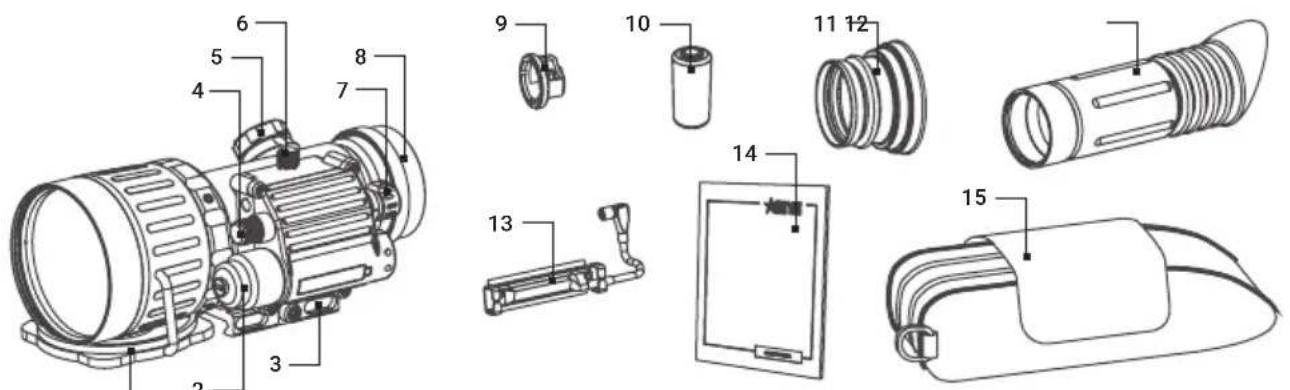
text_image
Technical diagram of a mechanical device with numbered parts for identification and assembly reference.FIGURE A-1. COMANCHE 40 SPARE PARTS
TABLE A-1. COMANCHE 40 LIST OF SPARE PARTS
| ITEM DESCRIPTION PART NO. | ||
| 1 Objective Lens Cap CMN40OBLC | ||
| 2 Battery Cap CMN40BTCP | ||
| 3 Quick-Release Mount CMN40QRM | ||
| 4 Gain Control Knob CMN40GCK | ||
| 5 Focus Knob CMN40FCKN | ||
| 6 Remote Control Cap CMN40RCCP | ||
| 7 Operation Switch CMN400PSW | ||
| 8 Output Lens Cap CMN40OLCP | ||
| 9 Battery Adapter CMN40BTAD | ||
| 10 Battery | - | |
| 11 | Light Suppressor | CMN40LTSP |
| 12 | Light Suppressor for Day Scope | CMN40LSDS |
| 13 | Remote Control CMN40RNCT | |
| 14 User Manual | CMN40USMN | |
| 15 | Carrying Case | CMN40CRCS |
AGM Global Vision, LLC
MAIN OFFICE
173 West Main Street
PO Box 962
Springerville, AZ 85938
USA
Tel. +1.928.333.4300
info@agmglobalvision.com
www.agmglobalvision.com
EUROPEAN OFFICE
Andrey Lyapchev #7
Sofia, P.C. 1756
Bulgaria
Tel. +35.988.412.5573
info@agmglobalvision.eu
www.agmglobalvision.eu