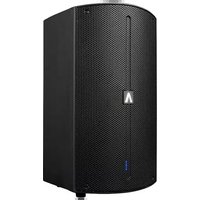
Imperio Gig Rig 210 - Hi-Fi System Avante - Free user manual and instructions
Find the device manual for free Imperio Gig Rig 210 Avante in PDF.


User questions about Imperio Gig Rig 210 Avante
0 question about this device. Answer the ones you know or ask your own.
Ask a new question about this device
Download the instructions for your Hi-Fi System in PDF format for free! Find your manual Imperio Gig Rig 210 - Avante and take your electronic device back in hand. On this page are published all the documents necessary for the use of your device. Imperio Gig Rig 210 by Avante.
USER MANUAL Imperio Gig Rig 210 Avante
©2019 ADJ PRODUCTS LLC all rights reserved. Information, specifications, diagrams, images, and instructions herein are subject to change without notice. ADJ logo and identifying product names and numbers herein are trademarks of ADJ PRODUCTS LLC. Copyright protection claimed includes all forms and matters of copyrightable materials and in- formation now allowed by statutory or judicial law or hereinafter granted. Product names used in this document may be trademarks or registered trademarks of their respective companies and are hereby acknowledged. All non-ADJ brands and product names are trademarks or registered trademarks of their respective companies.
ADJ PRODUCTS LLC and all affiliated companies hereby disclaim any and all liabilities for property, equipment, building, and electrical damages, injuries to any persons, and direct or indirect economic loss associated with the use or reliance of any information contained within this document, and/or as a result of the improper, unsafe, insufficient and negligent assembly, installation, rigging, and operation of this product.
AVANTE World Headquarters USA
6122 S. Eastern Ave. | Los Angeles, CA 90040 USA
323-316-9722 | Fax: 323-582-2941 | www.avanteaudio.com | info@avanteaudio.com
AVANTE NETHERLANDS
Junostraat 2 | 6468 EW Kerkrade | Netherlands
+31 45 546 85 00 | Fax: +31 45 546 85 99 | europe@avanteaudio.com
AVANTE MEXICO
Santa Ana 30 | Parque Industrial Lerma | Lerma Mexico 52000
+52 (728) 282.7070 | ventas@avanteaudio.com
FCC STATEMENT
This device complies with Part 15 of the FCC Rules. Operation is subject to the following two conditions: (1) this device may not cause harmful interference, and (2) this device must accept any interference received, including interference that may cause undesired operation.
FCC RADIO FREQUENCY INTERFERENCE WARNINGS & INSTRUCTIONS
This product has been tested and found to comply with the limits as per Part 15 of the FCC Rules. These limits are designed to provide reasonable protection against harmful interference in a residential installation. This device uses and can radiate radio frequency energy and, if not installed and used in accordance with the included instructions, may cause harmful interference to radio communications. However, there is no guarantee that interference will not occur in a particular installation. If this device does cause harmful interference to radio or television reception, which can be deter- mined by turning the device off and on, the user is encouraged to try to correct the interference by one or more of the following methods:
- Reorient or relocate the device.
- Increase the separation between the device and the receiver.
- Connect the device to an electrical outlet on a circuit different from which the radio receiver is connected.
- Consult the dealer or an experienced radio/TV technician for help.
Energy Saving Matters (EuP 2009/125/EC)
Saving electric energy is a key to help protecting the environment. Please turn off all electrical products when they are not in use. To avoid power consumption in idle mode, disconnect all electrical equipment from power when not in use. Thank you!
Document Version: An updated version of this document may be available online. Please check www.adj.com for the latest revision/update of this document before beginning installation and use.
| Date | Document Version | Notes |
| 01/31/19 | 1 | Initial release |
| 04/09/19 | 1.2 | Added Imperio Sub210 |
| 05/06/19 | 1.3 | Added Imperio Sub210 frequency chart & silkscreen |
| 07/18/19 | 1.4 | Updated Imperio Sub210 Info. |
CONTENTS
| General Information | 4 |
| Limited Warranty (USA Only) | 5 |
| Safety Guidelines | 6 |
| Maintenance Guidelines | 8 |
| Overview | 9 |
| Configuration & DSP Presets | 14 |
| Installation | 18 |
| Imperio Frequency Charts | 26 |
| Imperio Sub 10 & Imperio Sub 210 Frequency Charts | 30 |
| Specifications | 31 |
| Components and Accessories | 32 |
GENERAL INFORMATION
INTRODUCTION
This speaker is designed for professional use only. Please read and understand all the instructions and guidelines in this manual carefully and thoroughly before attempting to operate these speakers. These instructions contain important information regarding safety, installation, and use.
UNPACKING
Every speaker has been thoroughly tested and has been shipped in perfect operating condition. Carefully check the shipping carton for damage that may have occurred during shipping. If the carton appears to be damaged, carefully inspect speaker for damage and be sure all accessories necessary to install and operate the speaker have arrived intact. In the event damage has been found or parts are missing, please contact our customer support team for further instructions. Please do not return this speaker to your dealer without first contacting customer support at the number listed below. Please do not discard the shipping carton in the trash. Please recycle whenever possible.
CUSTOMER SUPPORT
AVANTE provides a customer support line to provide set up help, answer any question should you encounter problems during your set up or initial operation, and for any service related issues.
You may also visit us on the web at www.avanteaudio.com for any comments or suggestions.
AVANTE SERVICE USA - Monday - Friday 8:00am to 4:30pm PST
Voice: 800-322-6337
Fax: 323-532-2941
support@avanteaudio.com
AVANTE SERVICE EUROPE - Monday - Friday 08:30 to 17:00 CET
Voice: +31 45 546 85 30
Fax: +31 45 546 85 96
europe@avanteaudio.com




@avanteaudio
WARRANTY REGISTRATION
Please register your product online: www.avanteaudio.com Online product registration is required in order to activate the third year of the 3-year warranty. All returned service items, whether under warranty or not, must be freight pre-paid and accompany a return authorization (R.A.) number. The R.A. number must be clearly written on the outside of the return package. A brief description of the problem as well as the R.A. number must also be written down on a piece of paper and included in the shipping container. If the unit is under warranty, you must provide a copy of your proof of purchase invoice and the unit must be registered online at www.avanteaudio.com to receive year 3 of the 3-year warranty. Items returned without a R.A. number clearly marked on the outside of the package will be refused and returned at customer's expense. You may obtain a R.A. number by contacting customer support.
LIMITED WARRANTY (USA ONLY)
- ADJ Products, LLC hereby warrants, to the original purchaser, AVANTE products to be free of manufacturing defects in material and workmanship for a prescribed period of up to 3-years (1,095 days) from the original purchase date. Product must be registered online at www.avanteaudio.com in order to activate year 3 of the 3-year warranty period. This warranty shall be valid only if the product is purchased within the United States of America, including possessions and territories. It is the owner's responsibility to establish the date and place of purchase by acceptable evidence at the time service is sought.
- For warranty service you must obtain a Return Authorization number (RA#) before sending the product back; please contact ADJ Products, LLC Service Department at 800-322-6337. Send the product only to the ADJ Products, LLC factory. All shipping charges must be pre-paid. If the requested repairs or service (including parts replacement) are within the terms of this warranty, ADJ Products, LLC will pay return shipping charges only to a designated point within the United States. If the entire instrument is sent, it must be shipped in its original package. No accessories should be shipped with the product. If any accessories are shipped with the product, ADJ Products, LLC shall incur no liability whatsoever for loss of or damage to any such accessories, or for the safe return thereof.
- This warranty is void if the serial number has been altered or removed; if the product is modified in any manner which ADJ Products, LLC concludes, after inspection, affects the reliability of the product; if the product has been repaired or serviced by anyone other than the ADJ Products, LLC factory unless prior written authorization was issued to purchaser by ADJ Products, LLC; if the product is damaged because it was not properly maintained as set forth in the instruction manual.
- This is not a service contract, and this warranty does not include maintenance, cleaning or periodic checkup. During the period specified above, ADJ Products, LLC will replace defective parts at its expense with new or refurbished parts, and will absorb all expenses for warranty service and repair labor by reason of defects in material or workmanship. The sole responsibility of ADJ Products, LLC under this warranty shall be limited to the repair of the product, or replacement thereof, including parts, at the sole discretion of ADJ Products, LLC. All products covered by this warranty were manufactured after August 15, 2012, and bear identifying marks to that effect.
- ADJ Products, LLC reserves the right to make changes in design and/or improvements upon its products without any obligation to include these changes in any products theretofore manufactured. No warranty, whether expressed or implied, is given or made with respect to any accessory supplied with products described above. Except to the extent prohibited by applicable law, all implied warranties made by ADJ Products, LLC in connection with this product, including warranties of merchantability or fitness, are limited in duration to the warranty period set forth above. And no warranties, whether expressed or implied, including warranties of merchantability or fitness, shall apply to this product after said period has expired. The consumer's and/or Dealer's sole remedy shall be such repair or replacement as is expressly provided above; and under no circumstances shall ADJ Products, LLC be liable for any loss or damage, direct or consequential, arising out of the use of, or inability to use, this product. This warranty is the only written warranty applicable to ADJ Products, LLC Products and supersedes all prior warranties and written descriptions of warranty terms and conditions heretofore published.
- Warranty Registration: Please register your product online: www.avanteaudio.com. Online product registration is required in order to activate the third year of the 3-year warranty. All returned service items, whether under warranty or not, must be freight pre-paid and accompany a return authorization (R.A.) number. The R.A. number must be clearly written on the outside of the return package. A brief description of the problem as well as the R.A. number must also be written down on a piece of paper and included in the shipping container. If the unit is under warranty, you must provide a copy of your proof of purchase invoice and the unit must be registered online at www.avanteaudio.com to receive year 3 of the 3-year warranty. Items returned without a R.A. number clearly marked on the outside of the package will be refused and returned at customer's expense. You may obtain a R.A. number by contacting customer support.
SAFETY GUIDELINES
This speaker is a sophisticated piece of electronic equipment. To guarantee a smooth operation, it is important to follow all instructions and guidelines in this manual. AVANTE is not responsible for injury and/or damages resulting from the misuse of this speaker due to the disregard of the information printed in this manual. Only qualified and/or certified personnel should perform the installation of this speaker and all included and/or optional rigging accessories. Only the original included and/or optional rigging parts and accessories for this speaker should be used for proper installation. Any modifications to the speaker, included and/or optional rigging parts and accessories will void the original manufactures warranty and increase the risk of damage and/or personal injury.

PROTECTION CLASS 1 - SPEAKER MUST BE PROPERLY GROUNDED

TO REDUCE RISK OF ELECTRICAL SHOCK, DO NOT REMOVE ANY COVER. THERE ARE NO USER SERVICEABLE PARTS INSIDE THIS SPEAKER. DO NOT ATTEMPT ANY REPAIRS YOURSELF; DOING SO WILL VOID YOUR MANUFACTURES WARRANTY. DAMAGES RESULTING FROM MODIFICATIONS TO THIS SPEAKER AND/OR THE DISREGARD OF SAFETY INSTRUCTIONS AND GUIDELINES IN THIS MANUAL VOID THE MANUFACTURES WARRANTY AND ARE NOT SUBJECT TO ANY WARRANTY CLAIMS AND/OR REPAIRS. NEVER OPEN THIS SPEAKER WHILE IN USE! UNPLUG POWER BEFORE SERVICING SPEAKER! KEEP FLAMMABLE MATERIALS AWAY FROM SPEAKER!

DRY LOCATIONS USE ONLY! DO NOT EXPOSE SPEAKER TO RAIN AND/OR MOISTURE! DO NOT SPILL WATER AND/OR LIQUIDS ON OR INTO THE SPEAKER!
This speaker is for PROFESSIONAL USE ONLY! Read all INSTRUCTIONS and follow all WARNINGS!
DO NOT use speaker near wet and/or damp locations. Speaker must be kept away from direct contact with liquids and must not be exposed to water/liquid dripping or splashing.
DO NOT attempt installation and/or operation without knowledge how to do so. Consult a professional sound equipment installer for proper and safe speaker installation. ONLY the original included, and/or optional rigging parts and accessories listed in this manual should be used for proper installation and use.
DO NOT expose any part of the speaker to open flame or smoke, or position speaker close to any flammable materials while operating. Be sure to install this speaker in an area that will allow proper ventilation. Allow approximately 6 inches (152mm) behind the speaker cabinet for proper cooling. The speaker contains an internal power amplifier that produces heat during use. Keep speaker away from heat sources such as radiators, heat registers, stoves, or other appliances (including amplifiers) that produce heat.
DO NOT operate speaker if power cord is frayed, crimped, damaged, and/or if any of the power cord connectors are damaged and do not insert into the speaker securely with ease. NEVER force a power cord connector into the speaker. If the power cord or any of its connectors are damaged, replace it immediately with a new one of similar power rating.
DO NOT disassemble speaker, there are NO user serviceable parts inside. Refer all servicing to qualified service personnel. Servicing is required when the speaker has been damaged in any way, such as power-supply cord or plug is damaged, liquid has been spilled and/or objects have fallen into the speaker, the speaker has been exposed to rain and/or moisture, does not operate normally, or has been dropped.
DO NOT defeat the safety purpose of the polarized or grounding-type plug. A polarized plug has two blades with one wider than the other. A grounding type plug has two blades and a third grounding prong. The wide blade or the third prong is provided for your safety. If the provided plug does not fit into your outlet, consult an electrician for replacement of the obsolete outlet.
SAFETY GUIDELINES
POWER SOURCES: This product must be connected to a power supply only of the type described in these operating instructions, or as marked on the unit. This product is Country Specific.
PROTECTIVE EARTHING TERMINAL: The speaker should be connected to a mains socket outlet with a protective earth-ground/earthing connection.
ONLY handle power cord by the plug end, never pull the plug out by tugging the wire portion of the cord.
DO NOT use solvents or glass cleaner to clean speaker. Clean only with a dry cloth.
ALWAYS disconnect speaker from main power source before performing any servicing or cleaning procedure.
CAUTION: To avoid physical damage, read the installation instructions carefully before installation.
CAUTION: Listening to speakers at high volume for extended time or within immediate proximity may damage hearing.
CAUTION: Speakers should be installed/operated by qualified and trained professionals ONLY.
CAUTION: Always mount speakers in a safe and stable manner.
CAUTION: Wear appropriate safety equipment during speaker installation.
CAUTION: Route power and audio cables so that they are NOT likely to be walked on or pinched.
CAUTION: Unplug the speaker during lightning storms and/or when unused for long periods of time.
ONLY use the original packaging materials and/or case to transport the speaker in for service.
PLEASE recycle shipping boxes and packaging whenever possible.
MAINTENANCE GUIDELINES
Regular maintenance is necessary to optimize the potential functional lifespan of the speakers.
- Read the installation and operation instructions for correct operation of the speakers.
- Although the speakers are rugged and designed to withstand limited impact forces when installed correctly, take care to avoid impact damage when handling or transporting speakers, especially the speaker mesh screen.
- The speakers should be serviced by a qualified service technician when:
A. Objects have fallen, or liquid has been spilled into the speaker.
B. Been exposed to rain or water conditions.
C. Does not appear to operate normally or exhibits a marked change in performance.
D. Has fallen and/or been subjected to extreme handling.
- Check each speaker for loose screws and/or other fasteners.
- If the speaker installation is fixed or displayed for a lengthy time, regularly inspect all rigging and installation equipment, and replace or repair it as necessary, and during long periods of non-use, disconnect the main power to the unit.
- If while conducting an electrical test a circuit shorts, a breaker-switch trips, wires burn, and or any other abnormality appears, discontinue testing, and troubleshoot units to find the problem before continuing with any testing or operation.
- The speakers are designed for dry locations use only.
- When not in use, store speakers in a dry, well ventilated storage location.
OVERVIEW - CONTENTS & DIMENSIONS
IMPERIO
- Speaker
- 2 ft (0.6m) powerCON Power Link Cable
- 2 ft (0.6m) 3pin XLR Signal Cable
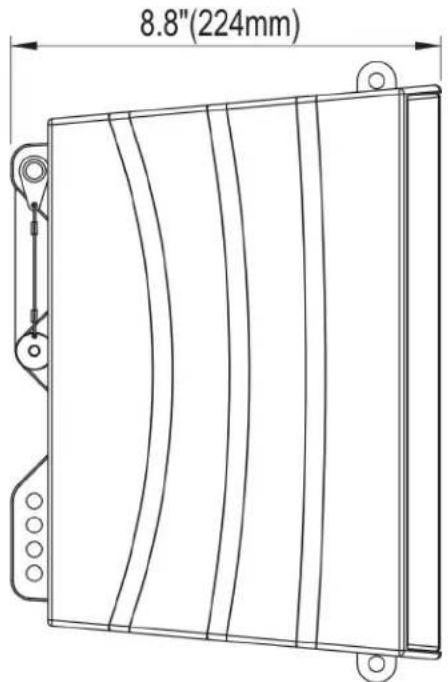
text_image
8.8"(224mm)
text_image
12.8"(324mm)- Linkpin 1 (2x Locking-Pins)
- User Manual
- Linkpin 1 (2x Locking-Pins)
- User Manual

text_image
7.3"(184.8mm)*Dimensions not to scale
IMPERIO SUB
- Sub
- 9.8 ft (3m) Main Power Cable
- 2 ft (0.6m) powerCON Power Link Cable

text_image
18.3"(464.8mm)
text_image
20.7"(525mm)- 6.6 ft (2m) 3pin XLR Signal Cable
- User Manual
- 6.6 ft (2m) 3pin XLR Signal Cable
- User Manual
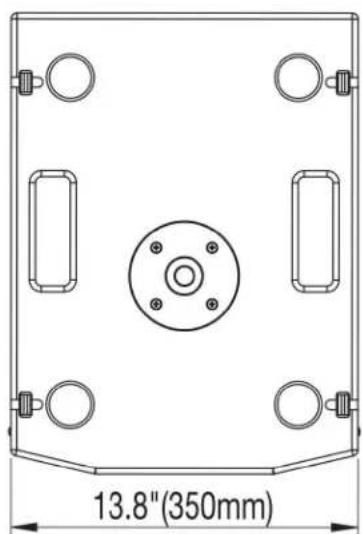
text_image
13.8"(350mm)*Dimensions not to scale
IMPERIO SUB210
- Sub210
- 9.8 ft (3m) Main Power Cable
-
2 ft (0.6m) powerCON Power Link Cable
-
6.6 ft (2m) 3pin XLR Signal Cable
- User Manual
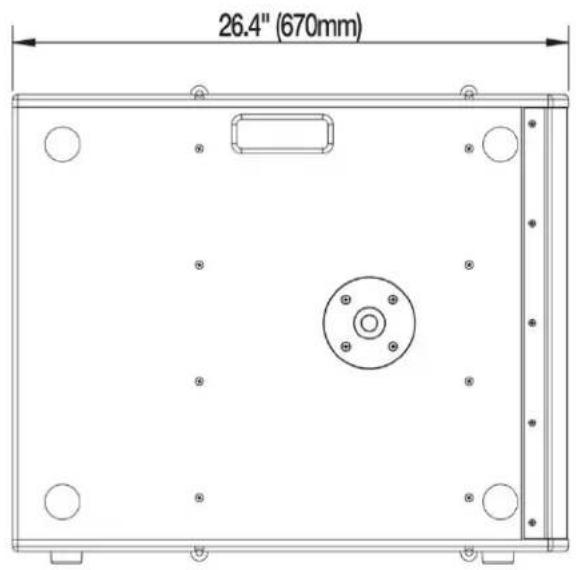
text_image
26.4" (670mm)
text_image
22.6" (575mm)
text_image
14.25" (362mm)*Dimensions not to scale
OVERVIEW - CONTENTS & DIMENSIONS IMPERIO FLYBAR - SMALL
Sold Separately

text_image
11.8"(300mm) 8.3"(210mm) 2.4"(62mm) 40"(1.6mm) *Dimens*Dimensions not to scale
IMPERIO FLYBAR - LARGE
Sold Separately
text_image
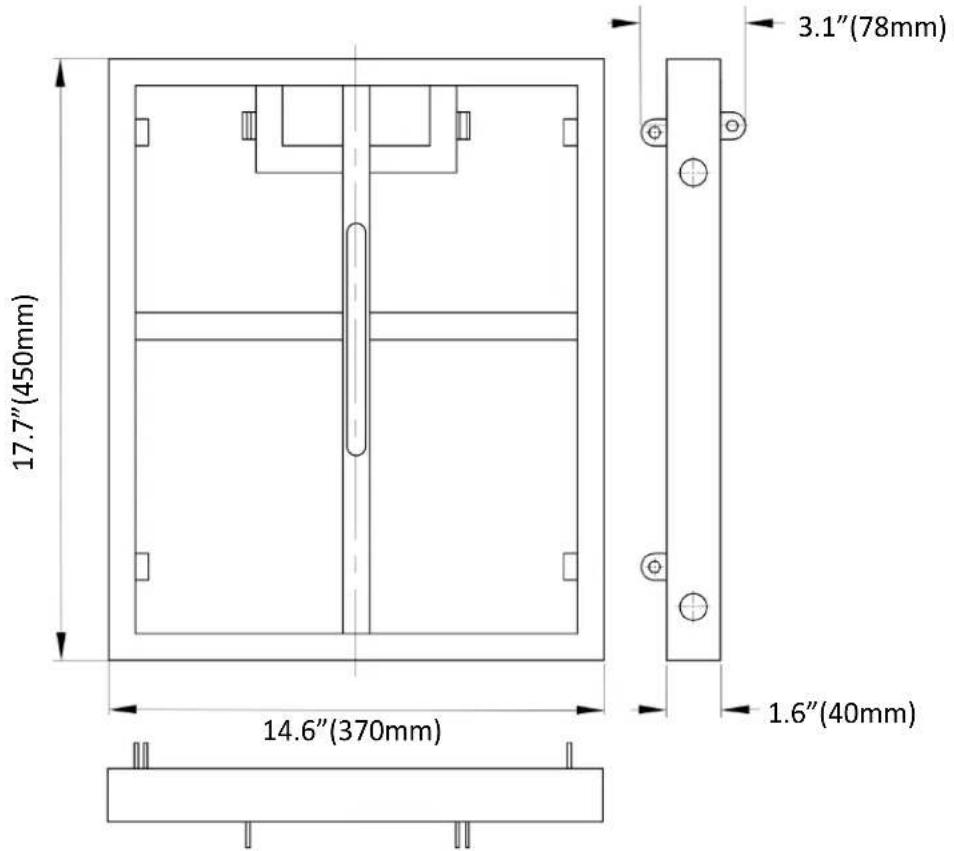
17.7"(450mm) 14.6"(370mm) 3.1"(78mm) 1.6"(40mm)*Dimensions not to scale
OVERVIEW - CONNECTIONS & CONTROLS: IMPERIO
text_image
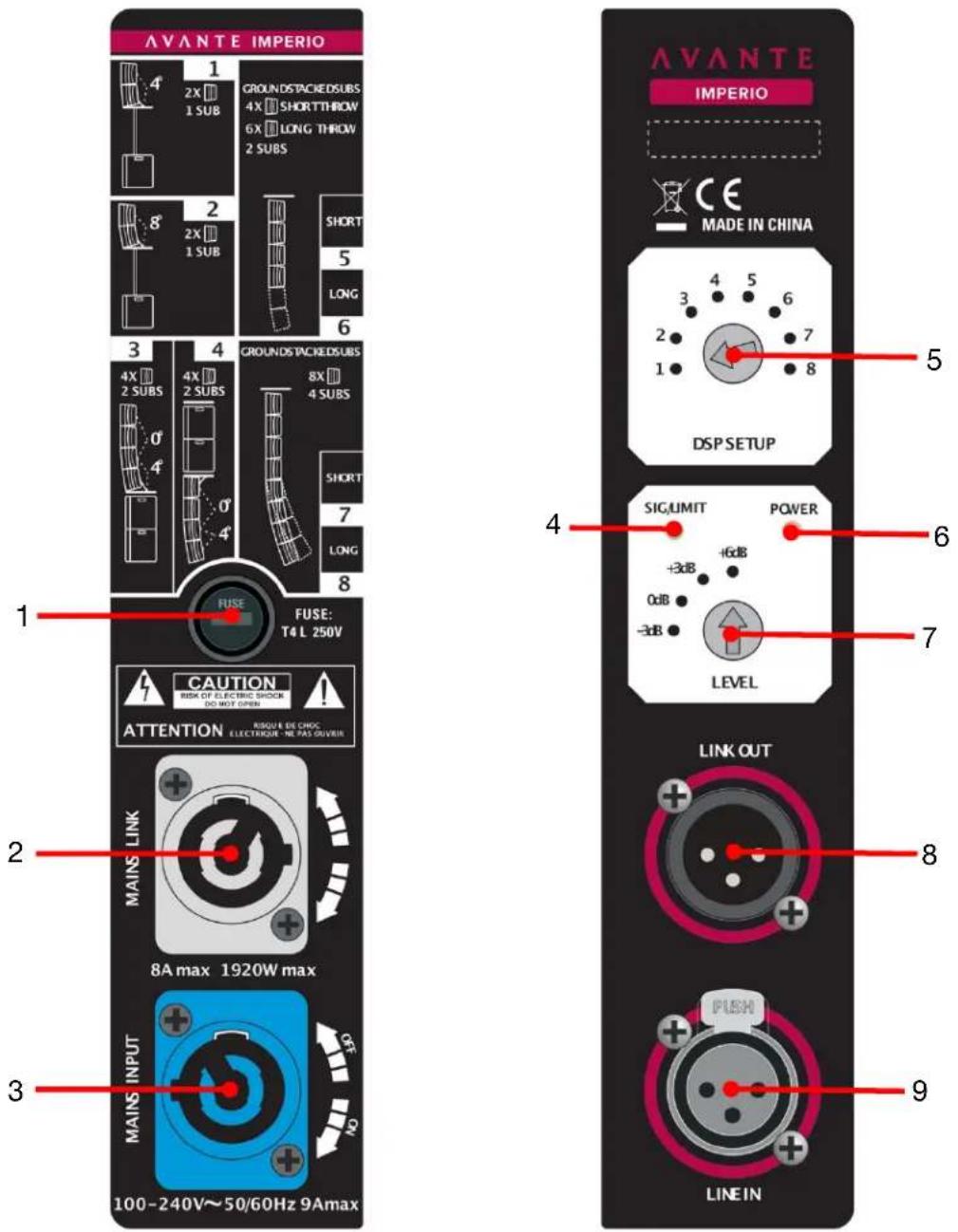
AVANTE IMPERIO 1 2X 1 SUB GROUNDSTACKEDSUBS 4X SHORTTHROW 6X LONG THROW 2 SUBS 3 2X 1 SUB SHORT 5 LONG 6 4X 2 SUBS 4X 2 SUBS GROUNDS TACKEDSUBS 8X 4 SUBS SHORT 7 LONG 8 FUSE: T4 L 250V CAUTION RISK OF ELECTRIC SHOCK DO NOT OPEN ATTENTION RISQUE DE CHOC ELECTRIQUE NE PAS-QUIVER MAINS LINK 8A max 1920W max MAINS INPUT 100-240V~50/60Hz 9Amax AVANTE IMPERIO CE MADE IN CHINA DSP SETUP SIGUMIT POWER +3dB -16dB 0dB -3dB LEVEL LINK OUT FLUSH LINEINIMPERIO
- FUSE: Slow-Blow 4.0 Amp 250V fuse (100-240V).
- MAINS LINK: Power output (-). Output is connected in parallel with mains input (3) and can be used to power additional IMPERIO speakers.
- MAINS INPUT: Power input (+).
- SIG/LIMIT: Green indicates a signal ≥ 25dBu, and red indicates that the internal limiter circuit has tripped, preventing amplifier distortion and speaker overloads.
- DSP SETUP: 8-position rotary switch selects between 8 equalization curve and DSP presets.
- POWER: Blue indicates main power.
- LEVEL: Control internal speaker volume (from -3dB to +6dB).
- LINK OUT: 3pin XLR output connector (balanced line-level audio output).
- LINE IN: 3Pin XLR input connector (balanced line-level audio input).
OVERVIEW - CONNECTIONS & CONTROLS: SUB10

text_image
AVANTE IMPERIO SUB SHRUMIT POWER MINO MAX LEVEL CROSSOVER OUTPUT MODE 90Hz 120Hz CROSOVER LINK LINE IN PUSH SUBWOOFER PHASE OUTPUT 0' 180'120V Silkscreen

text_image
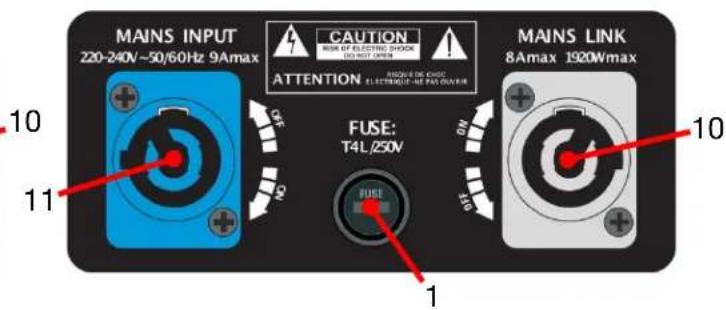
MAINS INPUT 100-120V ~50/60Hz 9Amax CAUTION MAIN OF CREATIVE SWITCH BEET NOT OPEN ATTENTION SUBVE OF CREAM ELECTRIDGE, NE PAUL POWER FUSE: T8AH/250V FUSE 11 1 MAINS LINK 7Amax 840W max240V Silkscreen
text_image
MAINS INPUT 220-240V~50/60Hz 9Amax CAUTION RISK OF ELECTRIC SHOCK INVEST OPEN ATTENTION AVIOVE DE CHICIE ELECTRUMOUT-NE PALE OWNER FUSE: T4L/250V MAINS LINK 8Amax 1920Wmax 10 11 10IMPERIO SUB
- FUSE: Slow-Blow 8.0 Amp 250V fuse for 100-120V / Slow-Blow 4.0 Amp 250V fuse for 220-240V.
- LEVEL: Speaker volume control.
- LINE IN: 3pin XLR input connector (balanced line-level audio input).
- SIG/LIMIT: Green indicates a signal ≥ 25dBu, and red indicates that the internal limiter circuit has tripped, preventing amplifier distortion and speaker overloads.
- POWER: Blue indicates main power.
- CROSSOVER: High pass filter sends high frequency content to the outputs. The lower frequencies under the crossover point will be played by the internal speaker in the subwoofer (selectable 90Hz/120Hz).
- OUTPUT MODE: Switches between the internal CROSSOVER and LINK modes. When set to CROSSOVER, the XLR jacks send the input signal to the built-in crossover, allowing you to select the crossover frequency. The output signal should then be used to play the filtered frequencies with your standard full frequency speakers (IMPERIO). When set to LINK, the crossover function is disabled.
- OUTPUT: 3pin XLR output connector (balanced line-level audio output or CROSSOVER).
- SUBWOOFER PHASE: Phase switch alters the polarity of the input signal between "0°" and "180°". When the phase switch is set to "0°," phase is unaffected.
- MAINS LINK: power output (-). Output is connected in parallel with input (11) and can be used to power additional IMPERIO speakers.
- MAINS INPUT: Power input (+).
OVERVIEW - CONNECTIONS & CONTROLS: SUB210

text_image
AVANTE IMPERIO SUB210 SIM LIMIT POWER MINO MAX LEVEL CROSSOVER OUTPUT MODE 90Hz 120Hz CROSOVER LINK LINE IN PUSH SUBWOOFER PHASE OUTPUT 0° 180° 8 9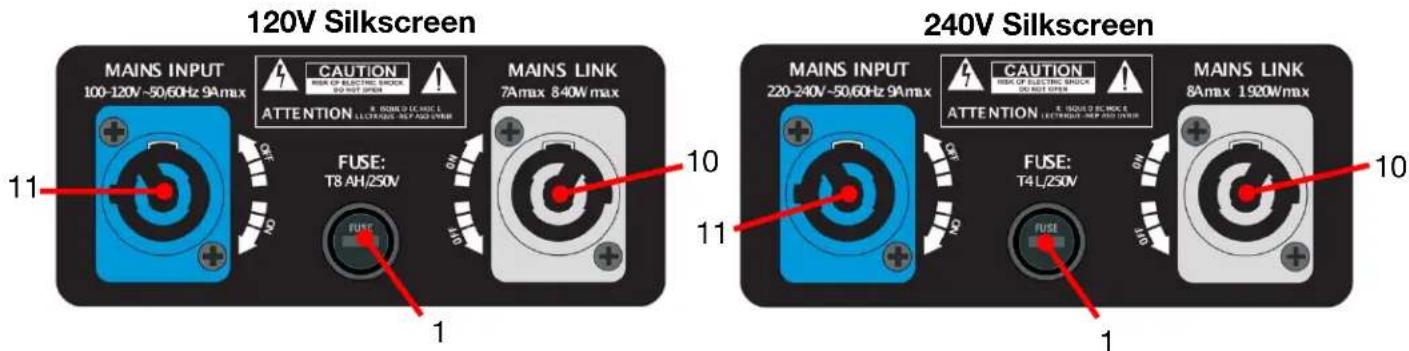
text_image
120V Silkscreen MAINS INPUT 100-120V~50/60Hz 9Amax CAUTION HIGH OP ELECTRIC BLOCK SO NOT OPEN ATTENTION 8. RUBB D.C. HOC I. ELECTRANS - 9A MAX OPEN FUSE: T8 AH/250V MAINS LINK 7A max 840W max 10 11 240V Silkscreen MAINS INPUT 220-240V~50/60Hz 9A max CAUTION HIGH OP ELECTRIC BLOCK DO NOT OPEN ATTENTION Z. ISQUID B. SCIENCE E. ELECTRANS - 9A MAX OPEN FUSE: T4 L/250V MAINS LINK 8A max 1920W max 10 1IMPERIO SUB210
- FUSE: Slow-Blow 8.0 Amp 250V fuse for 100-120V / Slow-Blow 4.0 Amp 250V fuse for 220-240V.
- LEVEL: Speaker volume control.
- LINE IN: 3pin XLR input connector (balanced line-level audio input).
- SIG/LIMIT: Green indicates a signal ≥ 25dBu , and red indicates that the internal limiter circuit has tripped, preventing amplifier distortion and speaker overloads.
- POWER: Blue indicates main power.
- CROSSOVER: High pass filter sends high frequency content to the outputs. The lower frequencies under the crossover point will be played by the internal speaker in the subwoofer (selectable 90Hz/120Hz).
- OUTPUT MODE: Switches between the internal CROSSOVER and LINK modes. When set to CROSSOVER, the XLR jacks send the input signal to the built-in crossover, allowing you to select the crossover frequency. The output signal should then be used to play the filtered frequencies with your standard full frequency speakers (IMPERIO). When set to LINK, the crossover function is disabled.
- OUTPUT: 3pin XLR output connector (balanced line-level audio output or CROSSOVER).
- SUBWOOFER PHASE: Phase switch alters the polarity of the input signal between "0°" and "180°". When the phase switch is set to "0°," phase is unaffected.
- MAINS LINK: power output (-). Output is connected in parallel with input (11) and can be used to power additional IMPERIO speakers.
- MAINS INPUT: Power input (+).
CONFIGURATION & DSP PRESETS
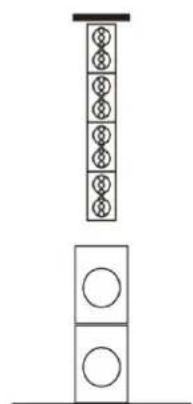
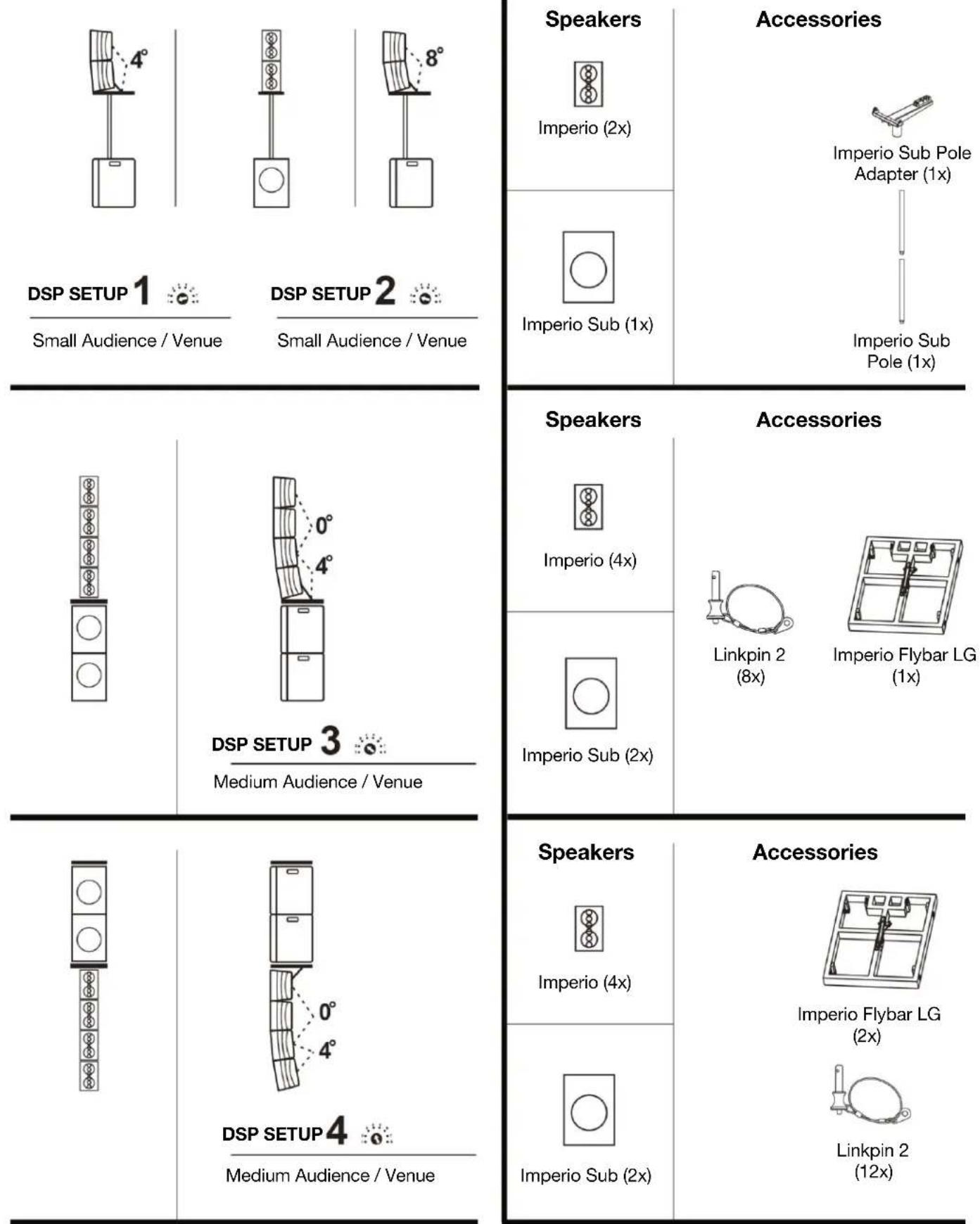
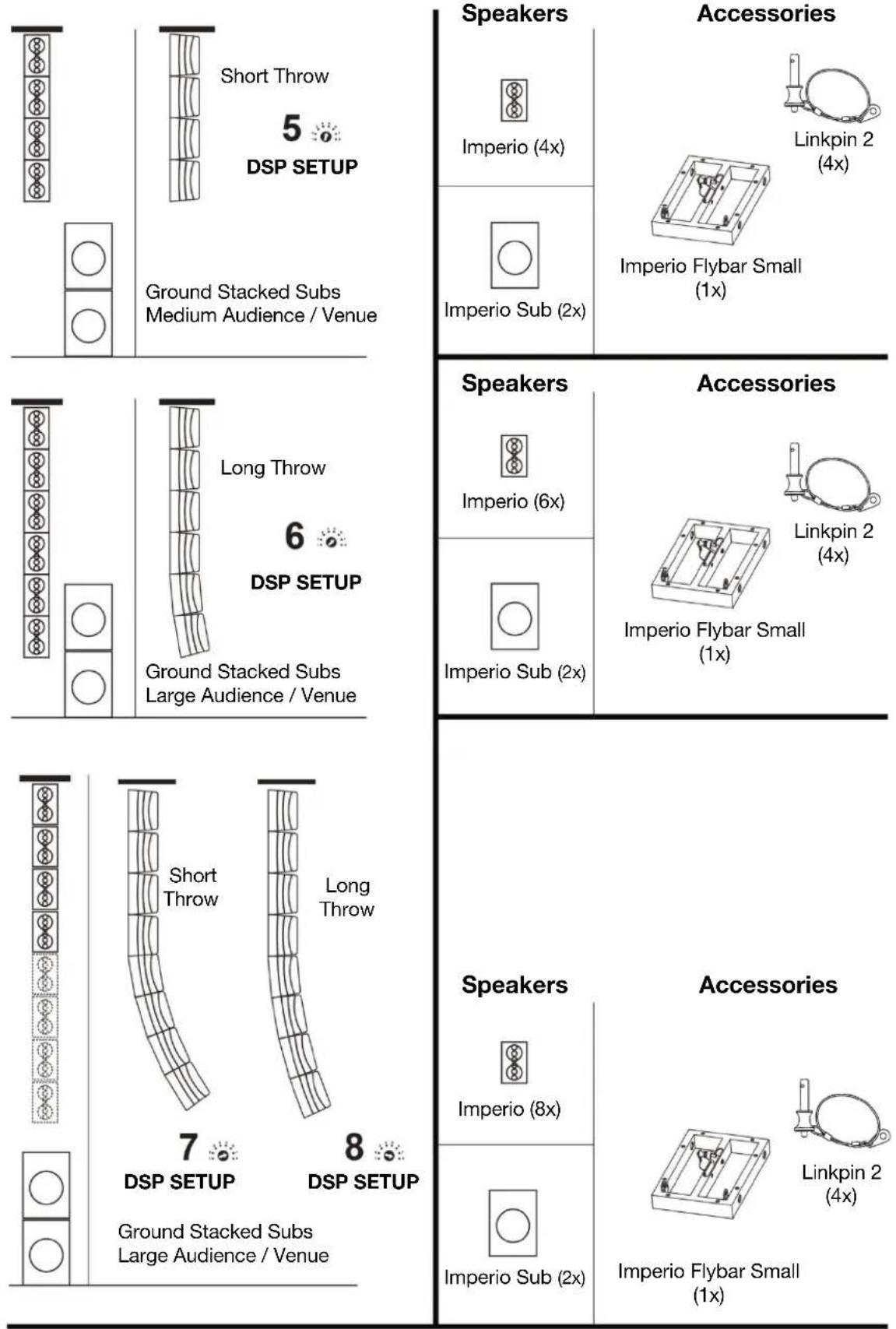
The Imperio speakers can be configured in various ways to optimize setup for crowd size and venue, whether pole-mounted on a standard speaker stand (not included), pole mounted on top of the Imperio Sub, stacked on the Imperio Sub, or flying attached to a rig.

DSP set up 1
DSP set up 2
DSP set up 3
DSP set up 4
natural_image
Simple line drawing of a vertical stack of circular elements above a rectangular base (no text or symbols)
natural_image
Pure electrical circuit lines without any symbols
text_image
near field distant field Bass on the groundDSP set up 5
DSP set up 6
DSP set up 7
DSP set up 8 :→:
CONFIGURATION & DSP PRESETS 1,2,3,4
text_image
Speakers Imperio (2x) Accessories Imperio Sub Pole Adapter (1x) Imperio Sub Pole (1x) DSP SETUP 1 Small Audience / Venue DSP SETUP 2 Small Audience / Venue Speakers Imperio (4x) Accessories Linkpin 2 (8x) Imperio Flybar LG (1x) DSP SETUP 3 Medium Audience / Venue Speakers Imperio (4x) Accessories Imperio Flybar LG (2x) Linkpin 2 (12x) DSP SETUP 4 Medium Audience / VenueCONFIGURATION & DSP PRESETS 5,6,7,8
text_image
Short Throw 5 DSP SETUP Ground Stacked Subs Medium Audience / Venue Speakers Imperio (4x) Accessories Linkpin 2 (4x) Imperio Sub (2x) Long Throw 6 DSP SETUP Ground Stacked Subs Large Audience / Venue Speakers Imperio (6x) Accessories Linkpin 2 (4x) Imperio Sub (2x) 7 DSP SETUP 8 DSP SETUP Ground Stacked Subs Large Audience / Venue Speakers Imperio (8x) Accessories Linkpin 2 (4x) Imperio Sub (2x) Imperio Flybar Small (1x)IMPORTANT!
INSTALLATION - RIGGING AND SUSPENSION

DO NOT INSTALL SPEAKERS IF YOU ARE NOT QUALIFIED TO DO SO! INSTALLATION BY QUALIFIED TECHNICIANS ONLY!

INSTALLATIONS SHOULD BE CHECKED BY A QUALIFIED PERSON ONCE A YEAR!

FLAMMABLE MATERIAL WARNING
Keep speaker a minimum of 5.0 feet (1.5m) away from flammable materials and/or pyrotechnics.

ELECTRICAL CONNECTIONS
A qualified electrician should complete all electrical connections and/or installations.

A MAXIMUM OF 8 IMPERIO speakers may be suspended from a SMALL FLYBAR.
A MAXIMUM OF 2 IMPERIO Sub speakers may be suspended from a LARGE FLYBAR, plus A MAXIMUM OF 4 IMPERIO speakers may be suspended from a LARGE FLYBAR attached to the bottom of the above mentioned 2 suspended IMPERIO SUB speakers.

USE CAUTION WHEN POWER LINKING MULTIPLE SPEAKERS AS THE POWER CONSUMPTION OF OTHER SPEAKER MODELS MAY EXCEED THE MAX POWER OUTPUT ON THIS SPEAKER. CHECK SILK SCREEN ON SPEAKER FOR MAX AMPS.
WARNING! The safety and suitability of any lifting equipment, installation location/platform, anchoring/rigging/mounting method, hardware, and electrical installation is the sole responsibility of the installer.
Install speaker(s), all speaker accessories, and all anchoring/rigging/mounting hardware following all local, national, and country commercial, electrical, and construction codes and regulations.
Consult a professional equipment installer to determine if the metal truss/structure or surface is properly certified to safely support the combined weight of the speakers(s), clamps, cables, and all rigging hardware and accessories before rigging/mounting a single speaker or multiple interconnected speakers to any metal truss/structure.
Carefully consider item selection for rigging in unusual environmental conditions as rigging and suspension equipment could be subject to wear, misuse, overloading, corrosion, deformation, alteration, and other factors that may reduce their capacity rating.
Visually inspect metal truss/structure to ensure it does not flex and/or become deformed due to the weight of the speaker(s). Damage caused to speaker(s) through mechanical stress is not covered by warranty.
Install speakers(s) in areas outside walking paths, seating areas, or away from areas were unauthorized personnel might reach the speaker(s) by hand. Access under work area must be blocked.
IMPORTANT!
INSTALLATION - RIGGING AND SUSPENSION
OVERHEAD RIGGING
Overhead rigging requires extensive experience, including amongst others, calculating working load limits, installation material being used, and periodic safety inspection of all installation material and the speaker. If you lack these qualifications, do not attempt the installation yourself. Improper installation can result in bodily injury and property damage. Regardless of local installation conditions, the following guidelines apply to all overhead rigging installations:
NEVER stand directly below the speaker(s) when rigging, removing or servicing.
To limit swinging or tipping the load when lifting the Imperio Sub speaker(s) and/or Imperio speaker(s) into position when stacking, rigging, and/or suspending them using the available Imperio Flybar(s), determine the center of gravity of the overall assembly, then rig or suspend the load through a lifting point straight above the center of gravity. If using multiple rigging/anchor points and a single lifting point, ensure that all suspension load angles used are symmetrical about the lifting point with respect to the center of gravity so that load tensions are balanced between ropes, wires, chains, or cables.
Structural members, such as a truss system, must always be used to attach or suspend loads from a ceiling or to a wall. Never use a ceiling or wall surface itself to attach or suspend external loads, the catastrophic failure of which can or likely will result in potential structural/property damage, injury, or death.
Inspect/verify the structural integrity of the structural member used to suspend, hang, or support external loads by looking for hidden structural weaknesses.
Avoid using threaded fasteners in wooden structural members for suspending overhead loads (nails, screws, lag bolts, etc.). Threaded fasteners are inherently unreliable for suspending overhead loads, due in part to possible hidden structural weaknesses in the wood (cracks, knots, etc.).
Suspension points provided by the installation owner or third-party may not be adequate to lift or suspend the intended overhead loads.
You must consult an expert, such as a structural engineer or rigging specialist, if there is even the slightest question or doubt about the structural integrity of any part of the installation.
Take all appropriate precautions and safety measures when placing equipment in potentially dangerous locations, especially where public safety is a concern.
INSTALLATION - OVERVIEW
text_image
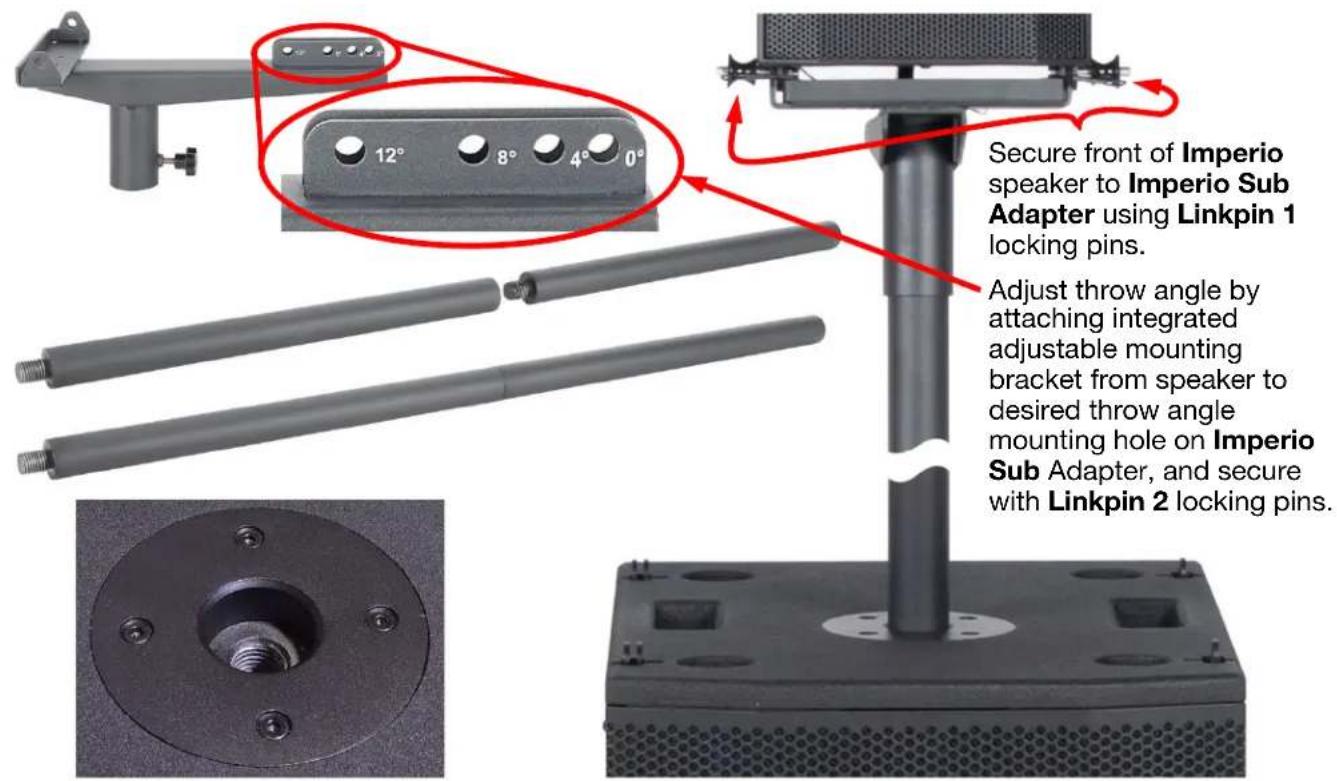
Secure front of Imperio speaker to Imperio Sub Adapter using Linkpin 1 locking pins. Adjust throw angle by attaching integrated adjustable mounting bracket from speaker to desired throw angle mounting hole on Imperio Sub Adapter, and secure with Linkpin 2 locking pins.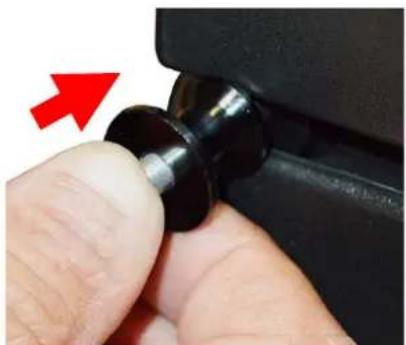
natural_image
Close-up of a finger pressing a black plastic component with a red arrow pointing to it (no text or symbols visible)Secure front of top Imperio speaker to top of bottom Imperio speaker using Linkpin 1.
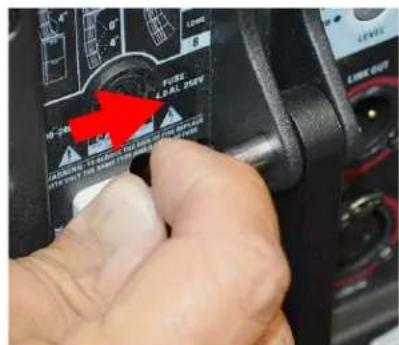
text_image
FUSE & REL. SET WARNING: 100% OFF TO BE USED OF THE OFFICE WE CAN't be sure I'm unable to use the device.Pull Linkpin 2 from integrated adjustable mounting bracket of the top Imperio speaker.
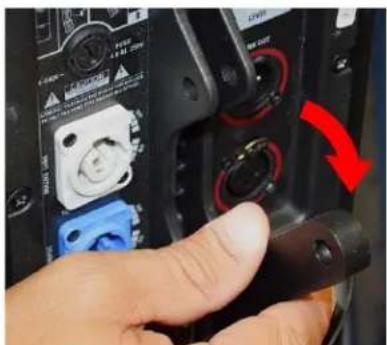
text_image
Close-up of a hand pressing a black cable with a red arrow indicating rotation or adjustment, showing connector details and buttons.Swing integrated adjustable mounting bracket down.

text_image
0# 4# 8# 12°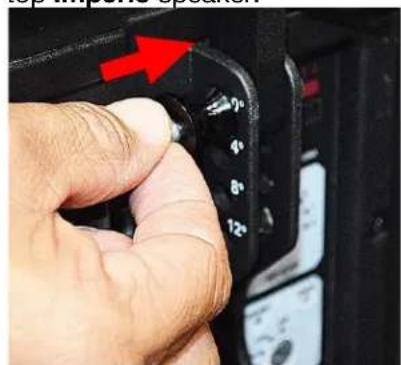
natural_image
Close-up of a hand pressing down on a camera mode dial with a red arrow indicating the action (no text or symbols visible)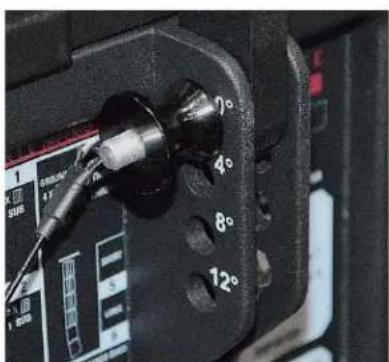
text_image
70° 40° 80° 120°Adjust throw angle by attaching integrated adjustable mounting bracket from Imperio speaker, swinging it down to desired throw angle mounting hole on bottom Imperio speaker or Flybar, secure with Linkpin 2.
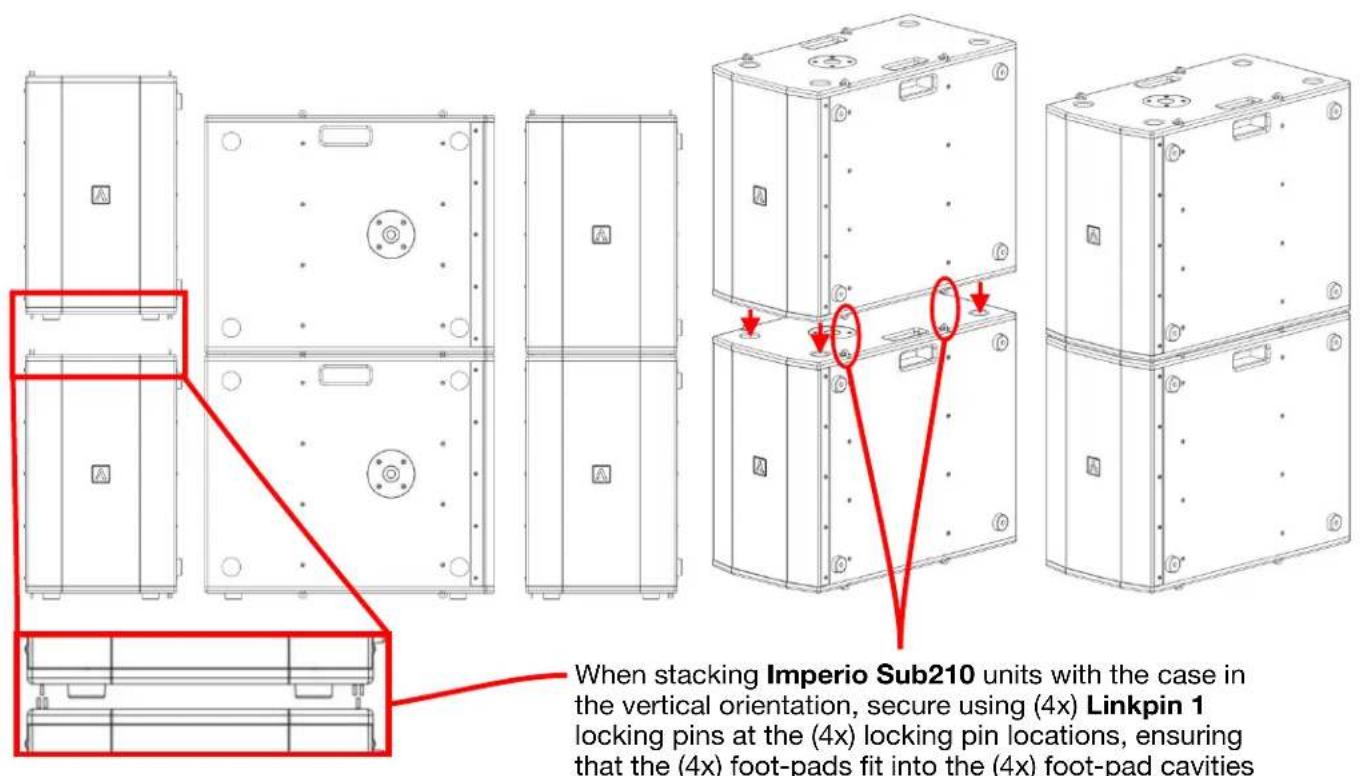
INSTALLATION - STACKING THE IMPERIO SUB210
VERTICAL CASE ORIENTATION
text_image
When stacking Imperio Sub210 units with the case in the vertical orientation, secure using (4x) Linkpin 1 locking pins at the (4x) locking pin locations, ensuring that the (4x) foot-pads fit into the (4x) foot-pad cavitiesHORIZONTAL CASE ORIENTATION

text_image
When stacking Imperio Sub210 units with the case in a horizontal orientation, they cannot be secured using the integrated locking pin rings, so exclusively rely on the (4x) foot-INSTALLATION - DSP PRESET 1 & 2

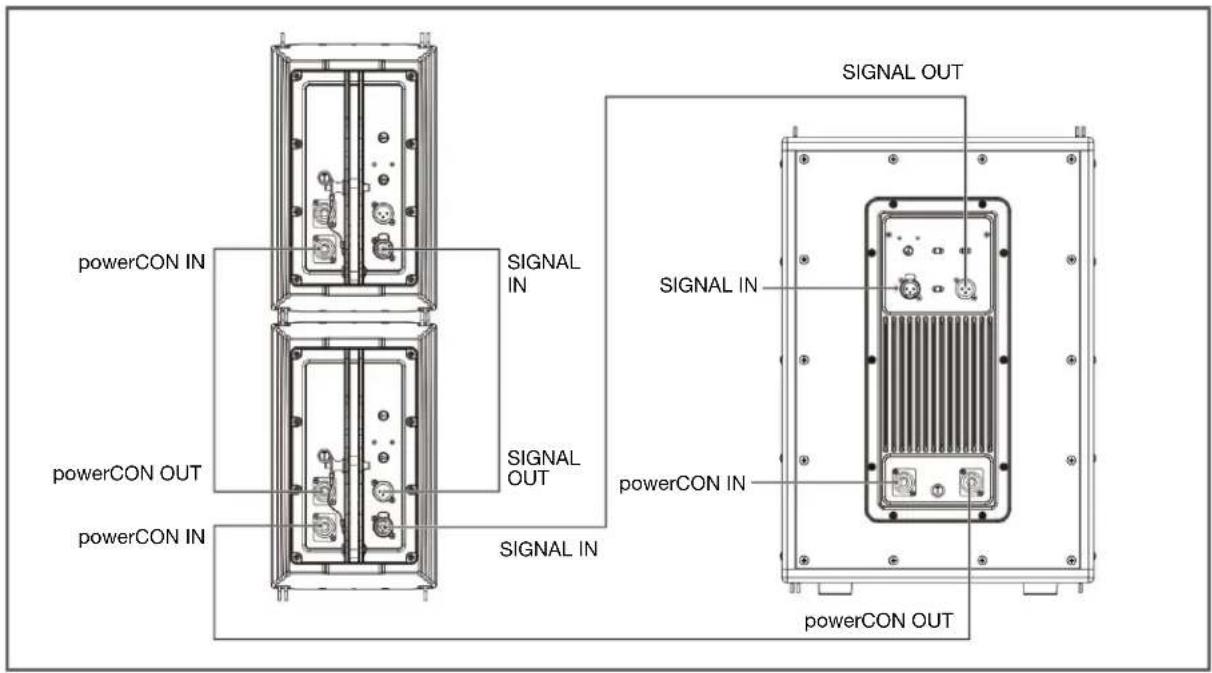
text_image
powerCON IN powerCON OUT powerCON IN SIGNAL IN SIGNAL OUT SIGNAL IN SIGNAL OUT SIGNAL IN SIGNAL OUT powerCON IN powerCON OUTINSTALLATION - DSP PRESET 3
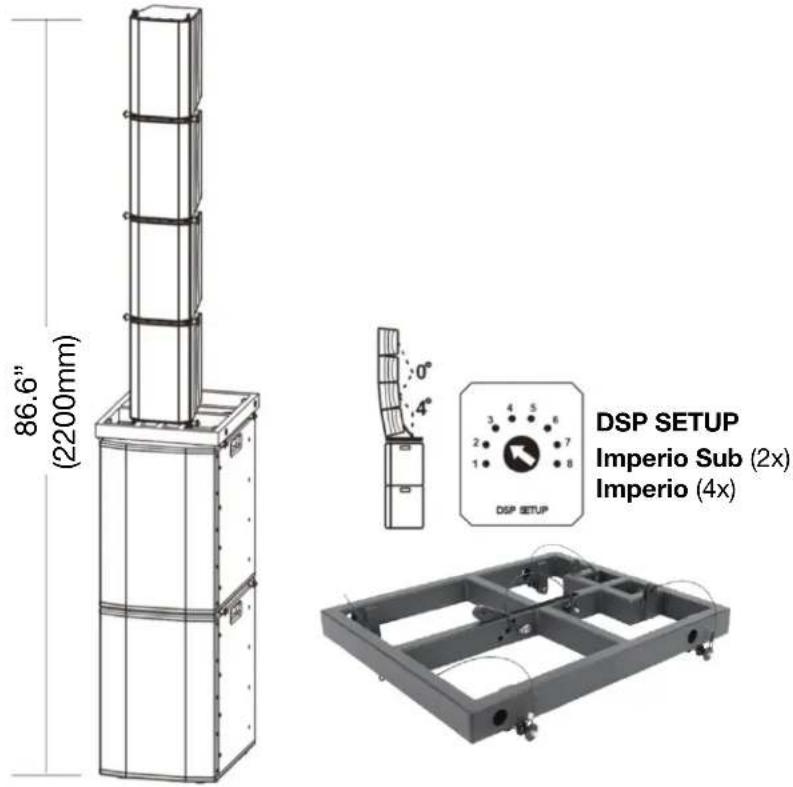
text_image
86.6" (2200mm) DSP SETUP Imperio Sub (2x) Imperio (4x)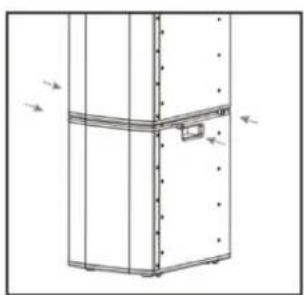
natural_image
Technical line drawing of a vertical cabinet or enclosure with mounting holes and a small rectangular component (no text or symbols)- With 2X stacked Imperio Subs, secure them with Linkpin 1 locking-pins, and connect with power and XLR cables.
natural_image
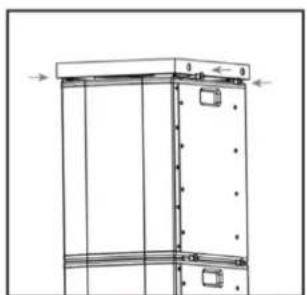
Technical line drawing of a vertical structural frame with mounting holes and dimension lines (no text or symbols)- Locate Imperio Flybar LG on top stacked Imperio Sub and secure with Linkpin 2 locking-pins.

natural_image
Technical line drawing of a mechanical assembly with no visible text or symbols- Position Imperio speaker on Imperio Flybar LG and secure front holes with Linkpin 1 locking-pins.

natural_image
Technical line drawing of a mechanical device with an inset close-up showing a component detail (no text or symbols present)- Flip back-bracket down & select desired throw angle by inserting Linkpin 2 locking-pin into corresponding hole of Imperio Flybar LG.
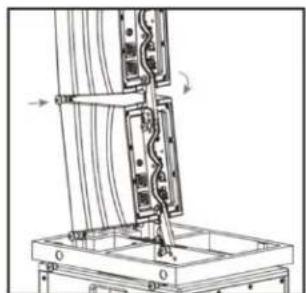
natural_image
Technical line drawing of a mechanical assembly with no visible text or symbols- Stack second Imperio speaker, secure front holes with Linkpin 1 locking-pins, then select desired throw angle and secure with Linkpin 2 locking-pin.
INSTALLATION - DSP PRESET 4
text_image
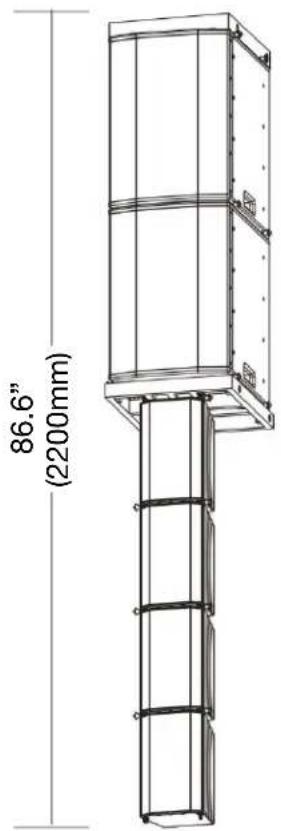
86.6" (2200mm)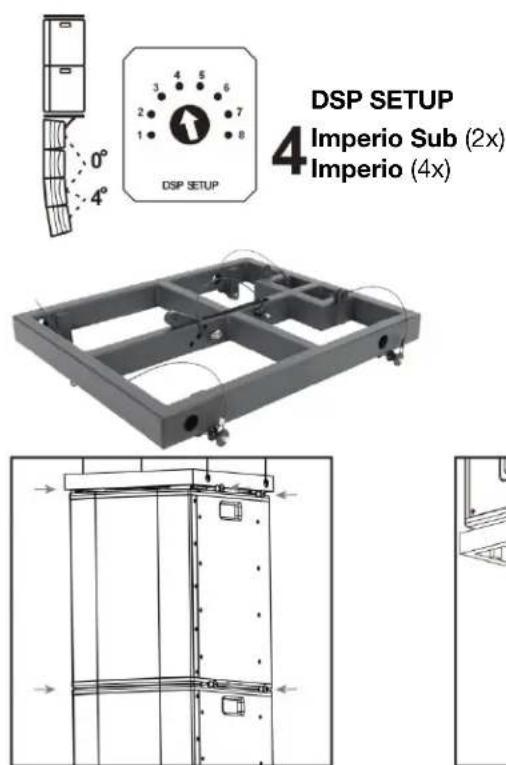
text_image
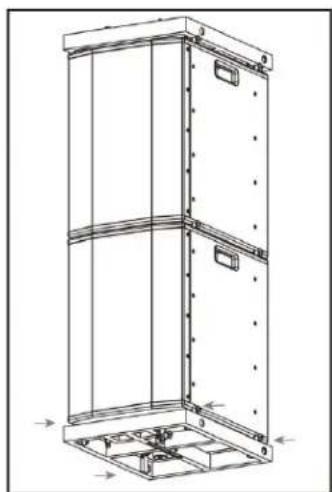
DSP SETUP 4 Imperio Sub (2x) Imperio (4x)- Secure top Imperio Sub to Imperio Sub Flybar with Linkpin 2 locking-pins, then secure second hanging Imperio Sub with Linkpin 1 locking-pins.
natural_image
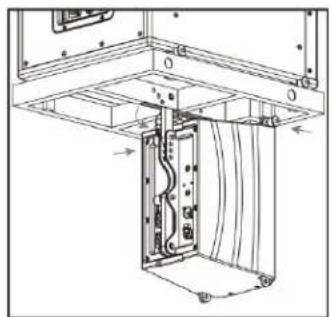
Technical line drawing of a vertical metal cabinet or enclosure with mounting holes and internal structural ribs (no text or symbols)- Secure Imperio Sub Flybar underneath bottom (hanging) Imperio Sub & secure with Linkpin 2 locking-pins.
natural_image
Technical line drawing of a mechanical assembly with no visible text or symbols- Position Imperio speaker underneath Imperio Flybar LG & secure front holes with Linkpin 1 locking-pins, and bracket with Linkpin 2 locking-pins.

natural_image
Technical line drawing of a mechanical assembly with no visible text or symbols- Hang second Imperio speaker and secure front holes with Linkpin 1 locking-pins & adjust throw bracket by select desired throw angle, and secure with Linkpin 2 locking-pins.
INSTALLATION - DSP PRESET 5, 6, 7, 8
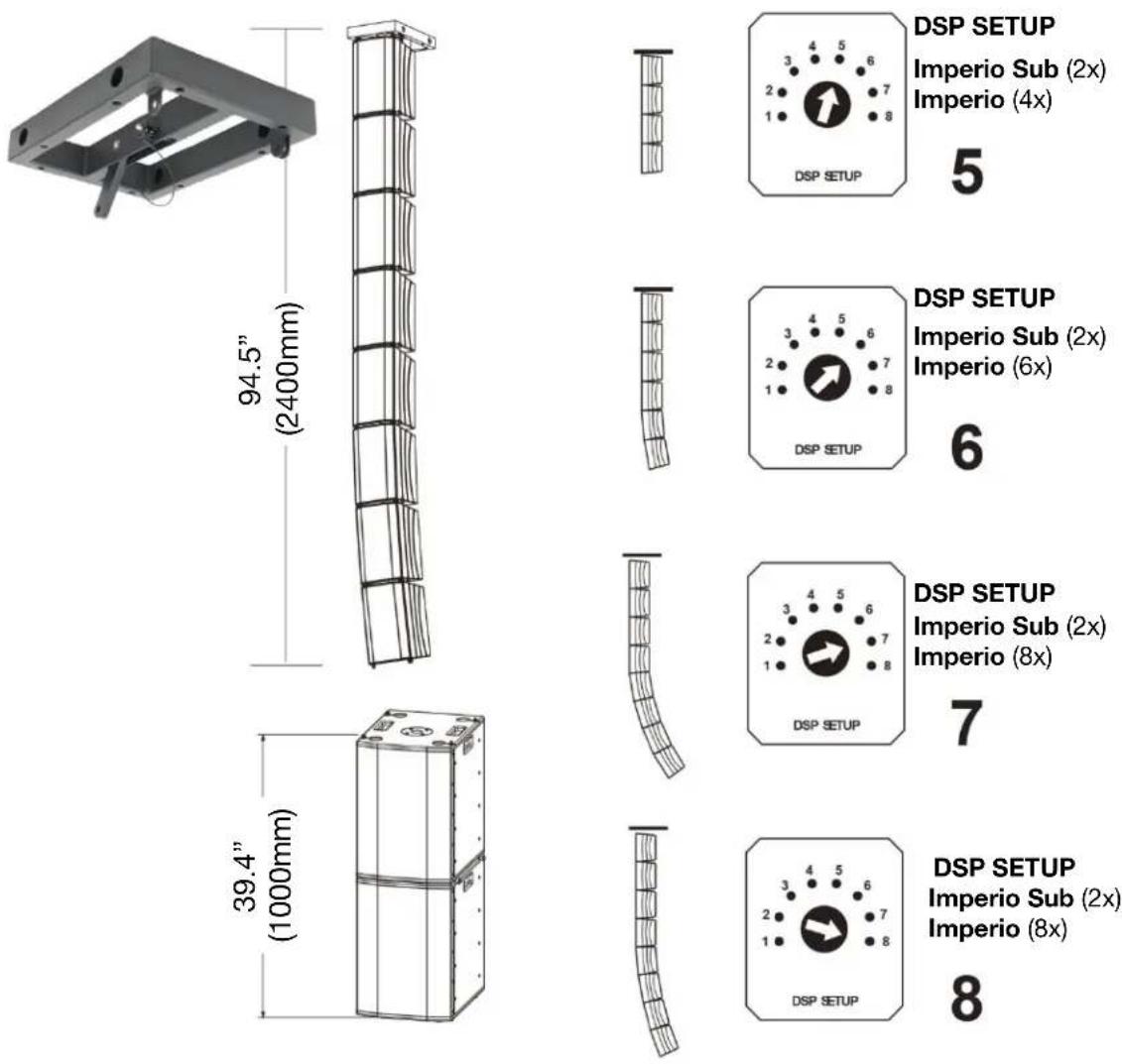
natural_image
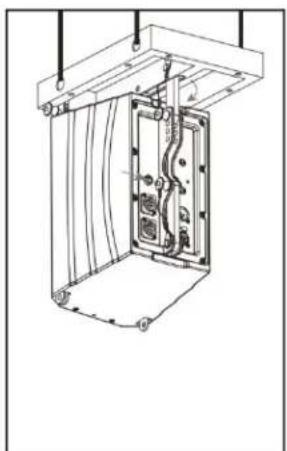
Technical line drawing of a mechanical assembly with internal components and mounting brackets (no text or symbols)- Suspend & secure Imperio Flybar Small, secure top front of Imperio speaker with Linkpin 1 locking-pins, swing adjustable mounting bracket up, select throw angle, and secure with Linkpin 2 locking-pin.
natural_image
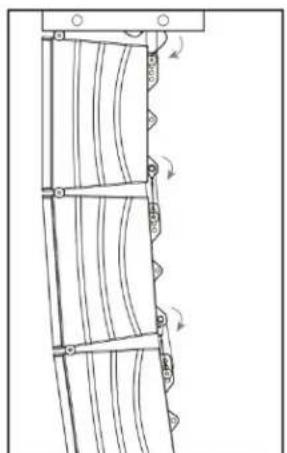
Pure mechanical diagram showing a ladder with curved railings and directional arrows, no text or symbols present.- Hang each successive Imperio speaker and secure with Linkpin 1 locking-pins, select desired throw angle, & secure with Linkpin 2 locking-pin.

natural_image
Line drawing of a double refrigerator with mounting holes and side-mounted buttons (no text or symbols)- Stack (2x) Imperio Subs, connect power and signal cables, and secure with Linkpin 1 locking-pins.
IMPERIO FREQUENCY CHARTS
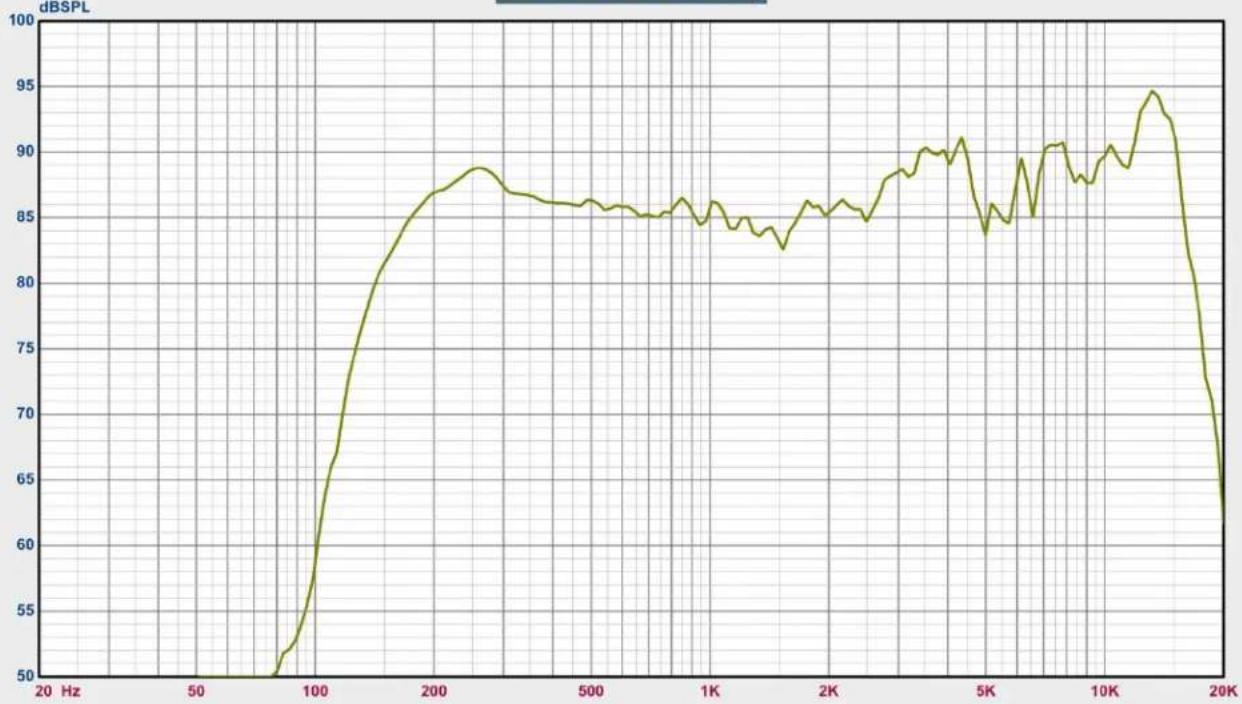
SPL vs Freq
line
| Frequency (Hz) | dB SPL | | -------------- | ------ | | 20 | 50 | | 50 | 50 | | 100 | 65 | | 200 | 88 | | 500 | 86 | | 1K | 85 | | 2K | 86 | | 5K | 84 | | 10K | 90 | | 15K | 95 | | 20K | 63 |
-1: IMPERIO DSP PRESET 1
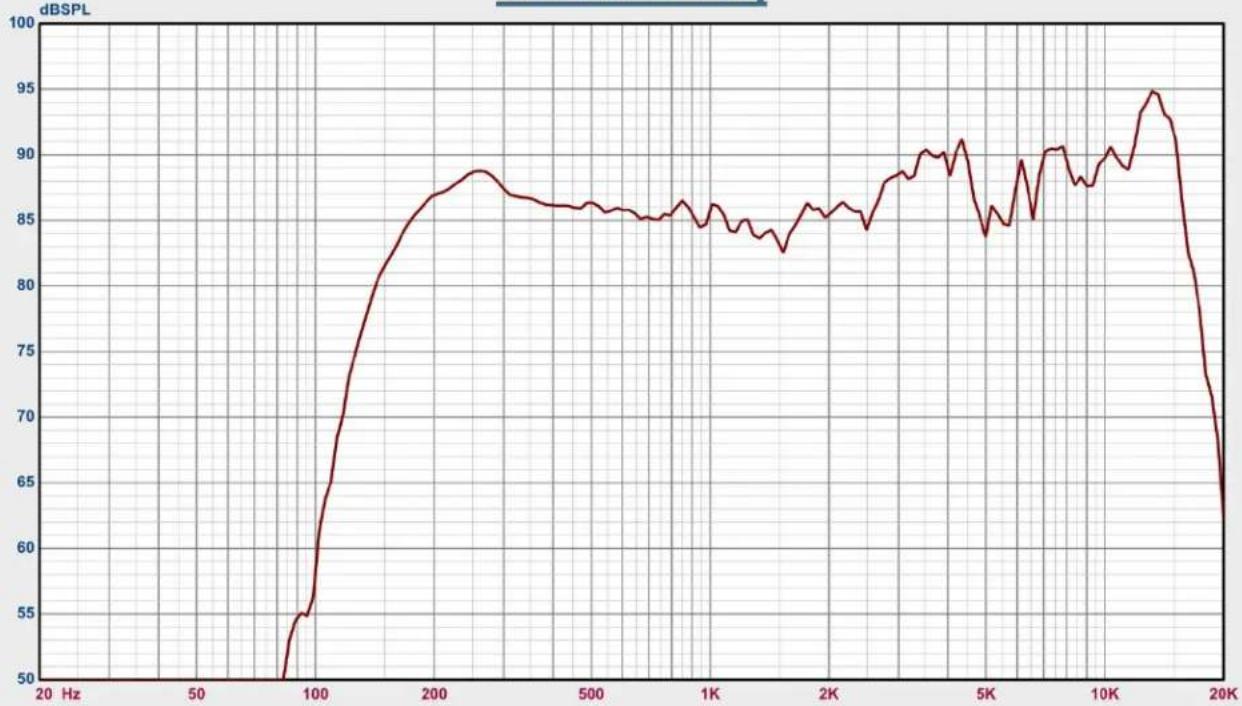
SPL vs Freq
line
| Frequency (Hz) | dB SPL | | -------------- | ------ | | 20 | 50 | | 50 | 50 | | 100 | 55 | | 200 | 87 | | 500 | 86 | | 1K | 85 | | 2K | 86 | | 5K | 84 | | 10K | 90 | | 15K | 95 | | 20K | 65 |
-2: IMPERIO DSP PRESET 2
SPL vs Freq
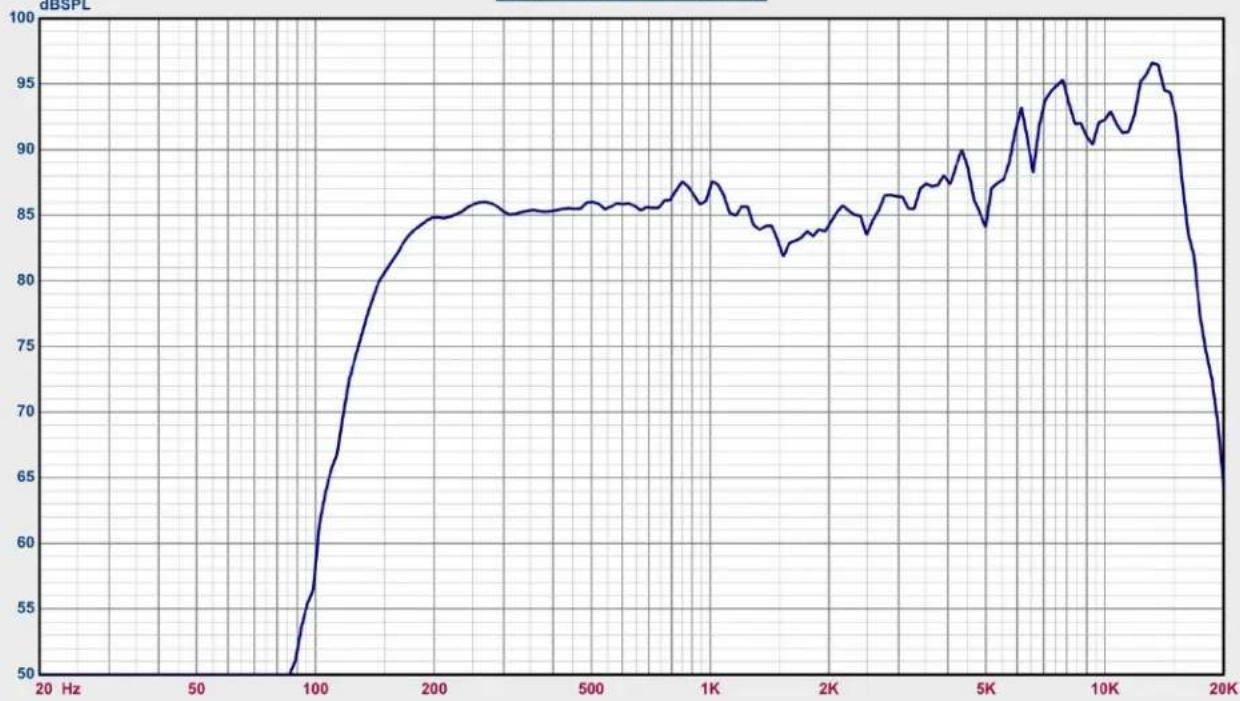
line
| Frequency (Hz) | dB SPL | | -------------- | ------ | | 20 | 50 | | 50 | 50 | | 100 | 65 | | 200 | 85 | | 500 | 85 | | 1K | 87 | | 2K | 84 | | 5K | 88 | | 10K | 95 | | 20K | 65 |Map
- 3: IMPERIO DSP PRESET 3
SPL vs Freq
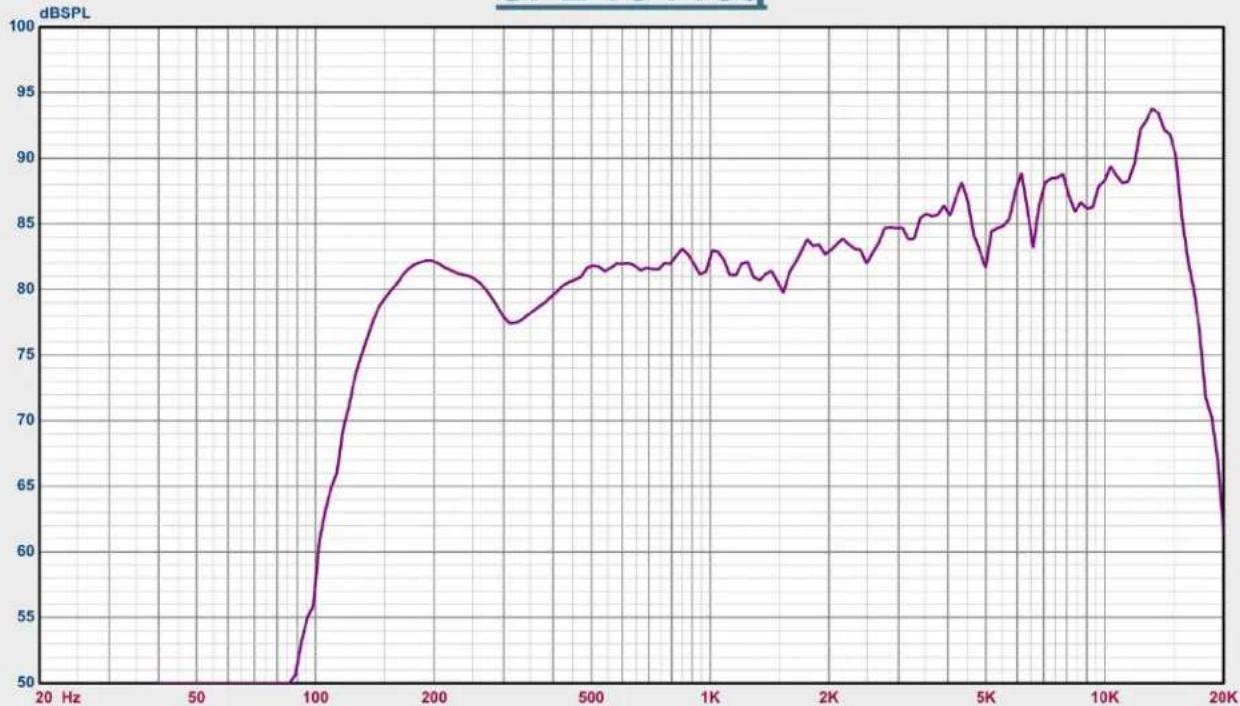
line
| Frequency (Hz) | dB SPL | | -------------- | ------ | | 20 | 50 | | 50 | 50 | | 100 | 65 | | 200 | 82 | | 500 | 81 | | 1K | 83 | | 2K | 84 | | 5K | 85 | | 10K | 90 | | 20K | 63 |Map
-4: IMPERIO DSP PRESET 4
SPL vs Freq
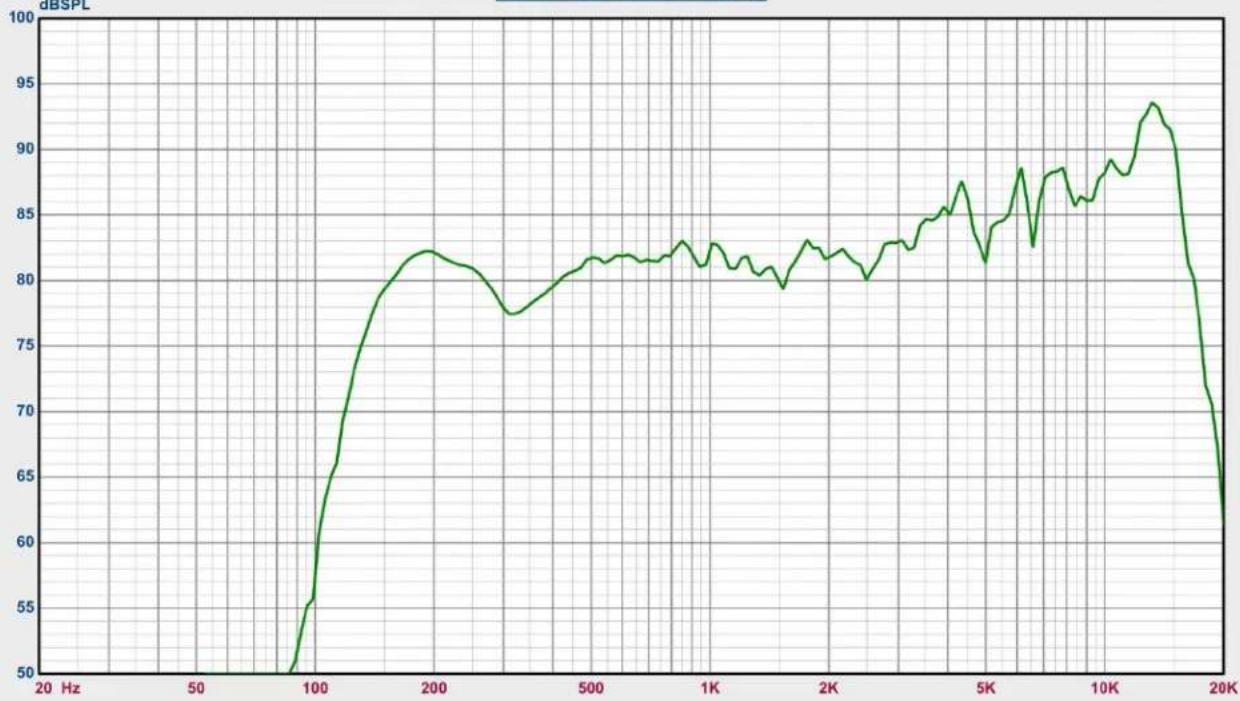
line
| Frequency (Hz) | dB SPL | | -------------- | ------ | | 20 | 50 | | 50 | 55 | | 100 | 65 | | 200 | 82 | | 500 | 81 | | 1K | 82 | | 2K | 80 | | 5K | 85 | | 10K | 88 | | 15K | 93 | | 20K | 63 |
-5: IMPERIO DSP PRESET 5
SPL vs Freq
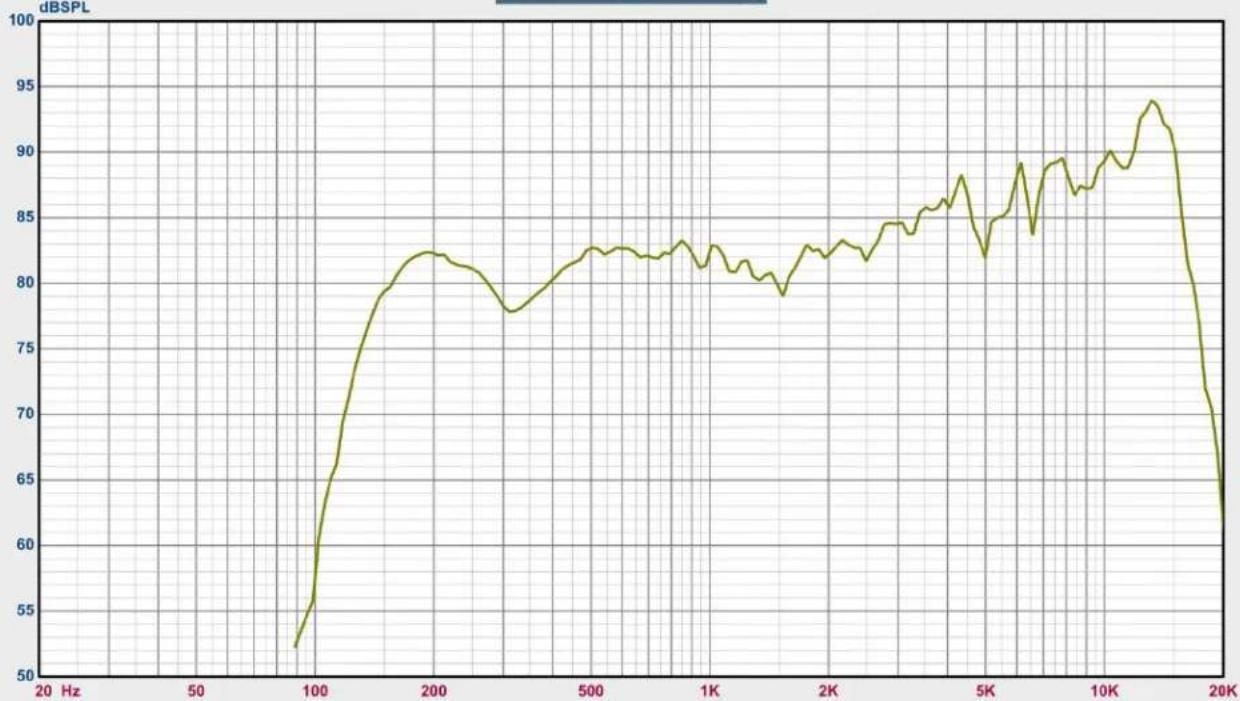
line
| Frequency (Hz) | dB SPL | | -------------- | ------ | | 20 | 53 | | 100 | 65 | | 200 | 82 | | 500 | 83 | | 1K | 82 | | 2K | 84 | | 5K | 85 | | 10K | 90 | | 15K | 94 | | 20K | 63 |
-6: IMPERIO DSP PRESET 6
SPL vs Freq

line
| Frequency | ABSPL | | --------- | ----- | | 20 Hz | 50 | | 100 | 65 | | 200 | 82 | | 500 | 81 | | 1K | 82 | | 2K | 84 | | 5K | 85 | | 10K | 90 | | 15K | 94 | | 20K | 63 |
-7: IMPERIO DSP PRESET 7
SPL vs Freq

line
| Frequency (Hz) | dB SPL | | -------------- | ------ | | 20 | 50 | | 50 | 50 | | 100 | 60 | | 200 | 82 | | 500 | 81 | | 1K | 83 | | 2K | 84 | | 5K | 87 | | 10K | 90 | | 15K | 94 | | 20K | 63 |
—8: IMPERIO DSP PRESET 8
IMPERIO SUB10 FREQUENCY CHART

line
| Frequency (Hz) | 9a: IMPERIO SUB 10 | 9b: IMPERIO SUB 10 | | -------------- | ------------------ | ------------------ | | 20 | 50 | 50 | | 30 | 50 | 50 | | 40 | 63 | 50 | | 50 | 85 | 85 | | 60 | 90 | 90 | | 70 | 93 | 93 | | 80 | 95 | 94 | | 90 | 95 | 93 | | 100 | 95 | 91 | | 150 | 85 | 80 | | 200 | 65 | 60 | | 300 | 50 | 50 | | 400 | 50 | 50 | | 500 | 50 | 50 | | 600 | 50 | 50 | | 700 | 50 | 50 | | 800 | 50 | 50 | | 900 | 50 | 50 | | 1K | 50 | 50 |IMPERIO SUB210 FREQUENCY CHART

line
| Frequency (Hz) | 10a: IMPERIO SUB 210 (dB SPL) | 10b: IMPERIO SUB 210 (dB SPL) | 10a: IMPERIO SUB 210 (Deg) | 10b: IMPERIO SUB 210 (Deg) | | -------------- | ----------------------------- | ----------------------------- | -------------------------- | -------------------------- | | 20 | 50 | 50 | -24 | -24 | | 30 | 65 | 65 | -12 | -12 | | 40 | 85 | 85 | 0 | 0 | | 50 | 95 | 95 | 16 | 16 | | 60 | 98 | 98 | 24 | 24 | | 70 | 98 | 98 | 24 | 24 | | 80 | 97 | 97 | 24 | 24 | | 90 | 95 | 95 | 24 | 24 | | 100 | 90 | 90 | 24 | 24 | | 150 | 75 | 75 | -16 | -16 | | 200 | 55 | 55 | -24 | -24 | | 300 | 55 | 55 | -24 | -24 | | 400 | 50 | 50 | -24 | -24 | | 500 | 50 | 50 | -24 | -24 |SPECIFICATIONS
| Amplifier | IMPERIO | IMPERIO SUB / SUB210 |
| Inputs | 1x 3pin XLR / powerCON (NAC3FCA) | 1x 3pin XLR / powerCON (NAC3FCA) |
| Output | 1x 3pin XLR powerCON (NAC3FCB) | 1x 3pin XLR powerCON (NAC3FCB) |
| Power Output | 2x 120W RMS | 600W Peak | Sub: 400W RMS | 800W PeakSub210: 2x350W RMS | 1400W Peak |
| Volume | Selectable Input Sensitivity Dial | Volume Control Dial |
| Power Input | 100-240V ~ 50/60Hz | 100-120V / 220-240V ~ 50/60Hz |
| Features | 240W Class D Amplifier Module | 400W Class D Amplifier Module |
| Features | Switching Power Design | LED Power / Signal / Clip Indicator |
| LED Power / Signal / Clip Indicator | Internal X-Over for Satellite (90Hz or 120Hz) | |
| 24bit DSP Selectable Configurations | Phase Switchable (0 / 180) | |
| Output Mode Switch (X-Over or Link Output) | ||
| Speaker | IMPERIO | IMPERIO SUB / SUB210 |
| Type | 2-Way Active Closed Design | 6^th Order Bandpass Subwoofer |
| Frequency Response | 150Hz - 20KHz | 60Hz - 150 Hz |
| Impedance | 4 ohm | 8 ohm |
| Max Output SPL | 117dB (single box measured on Axis @1m) | 123dB (at max amp output) |
| Selectable Input Sensitivity | -3dB, 0dB, 3dB, 6dB | n/a |
| Driver | 2x 4.75" Neodymium Woofers with 1" VC | 1x 10" Transducer with a 2.5" VC |
| 6x 1.75" Drivers in IDVAT Configuration | ||
| Cabinet | ABS Plastic | Plywood with Black Painted Finish Cabinet |
| Grill | 1.0mm Steel | 1.2mm Steel |
| Pole | n/a | M20 Screw pole |
| Splay Angles | 0, 4, 8, 12 Degrees | n/a |
| Dispersion Angle | 90° x 15° | n/a |
| Dimensions / Weight | IMPERIO | IMPERIO SUB |
| L 7.3" x D 8.8" x H 12.8" | 14 lbs. | L 13.8" x D 18.3" x H 20.7" | 49.6 lbs. | |
| L 184.8mm x D 224mm x H 324mm | 6.3kg | L 350mm x D 464.8mm x H 525mm | 22.6kg | |
| IMPERIO SUB210 | ||
| L 14.25" x D 26.4" x H 22.6" | 76 lbs. | ||
| L 362mm x D 670mm x H 575mm | 34.5kg | ||
| Integrated Rigging | Yes | Yes |
Specifications subject to change without any prior written notice, zero SLA.
FCC STATEMENT
This device complies with Part 15 of the FCC Rules. Operation is subject to the following two conditions: (1) this device may not cause harmful interference, and (2) this device must accept any interference received, including interference that may cause undesired operation.
FCC RADIO FREQUENCY INTERFERENCE WARNINGS & INSTRUCTIONS
This product has been tested and found to comply with the limits as per Part 15 of the FCC Rules. These limits are designed to provide reasonable protection against harmful interference in a residential installation. This device uses and can radiate radio frequency energy and, if not installed and used in accordance with the included instructions, may cause harmful interference to radio communications. However, there is no guarantee that interference will not occur in a particular installation. If this device does cause harmful interference to radio or television reception, which can be determined by turning the device off and on, the user is encouraged to try to correct the interference by one or more of the following methods:
Reorient or relocate the device.
Increase the separation between the device and the receiver.
Connect the device to an electrical outlet on a circuit different from which the radio receiver is connected.
Consult the dealer or an experienced radio/TV technician for help.
COMPONENTS & ACCESSORIES
| Model # (SKU) | Description | ||
| IMP092 | IMPERIO SPEAKER | ||
| IMP400 | IMPERIO SUB10 (120V) | ||
| 1163900017 | IMPERIO SUB10 (240V) | ||
| SUB210 | IMPERIO SUB210 (120V) | ||
| 1163900023 | IMPERIO SUB210 (240V) | ||
| IMP340 | Linkpin 2 (4 Pack) | ||
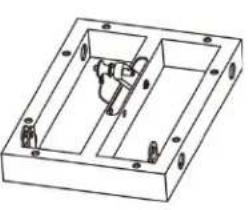
| IMP496 | IMPERIO FLYBAR SMALL | ||
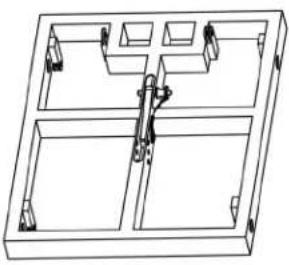
| IMP265 | IMPERIO FLYBAR LG | ||
| IMP194 | IMPERIO POLE (with Mounting Adaptor) | ||
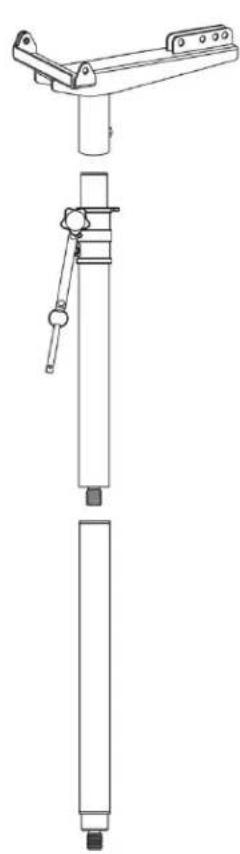
| IMP211 | ADJUSTABLE IMPERIO POLE (with Mounting Adaptor) | ||
 |  |  |  |
| IMPERIO SUB POLE (with Mounting Adaptor) | |||
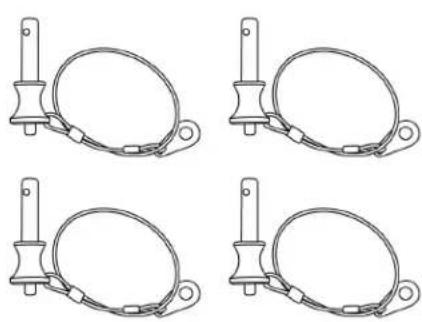 | |||
| IMPERIO FLYBAR SMALL | IMPERIO FLYBAR LG | ADJUSTABLE IMPERIO SUB POLE (with Mounting Adaptor) | Linkpin 2 (4 Pack) |
(Left Blank)