
Cine Special II - Camera KODAK - Free user manual and instructions
Find the device manual for free Cine Special II KODAK in PDF.


| Product Type | 16mm Motion Picture Camera |
| Brand | Kodak |
| Model | Cine Special II |
| Film Format | 16mm single or double perforated |
| Film Capacity | 100 ft (standard chamber), 200 ft (accessory chamber) |
| Lens Mount | Turret for two Kodak Cine Ektar lenses |
| Shutter | Variable shutter (Open, 1/2-Open, 1/4-Open) |
| Frame Speeds | 8, 16, 24, 32, 64 frames per second (intermediate settings available) |
| Drive | Spring-wound motor; hand crank for manual advance/reverse |
| Viewfinder | Eye-level finder (front and rear) and Reflex finder for precision framing |
| Frame Counter | 0-40 frames, synchronized with camera film meter |
| Focusing | Manual focusing ring on lens; reflex finder for critical focus |
| Depth of Field | Scale on lens barrel |
| Exposure Control | Lens opening ring, shutter speed, and variable shutter |
| Film Meters | Chamber film meter (remaining) and camera film meter (exposed) |
| Interchangeable Film Chambers | Yes, 100 ft and 200 ft chambers available |
| Single-Frame Exposure | Yes, using single-frame release or hand crank on single-frame shaft |
| Multiple Exposure | Yes, with or without masks |
| Fade and Dissolve | Yes, via variable shutter lever |
| Hand Crank | Included for manual film advance/reverse and single-frame work |
| Tripod Mount | Standard 1/4-inch tripod socket |
| Care | Clean lens with lens cleaning paper; clean film chamber with cloth; oil camera every 5000 ft or 6 months |
| Warning | Audible buzzing if shutter is closed during exposure; do not force film chamber door |
| Accessories | Various Kodak Cine Ektar lenses, filters, carrying case, optical finder, spacer rings, sports finder |
Frequently Asked Questions - Cine Special II KODAK
User questions about Cine Special II KODAK
0 question about this device. Answer the ones you know or ask your own.
Ask a new question about this device
Download the instructions for your Camera in PDF format for free! Find your manual Cine Special II - KODAK and take your electronic device back in hand. On this page are published all the documents necessary for the use of your device. Cine Special II by KODAK.
USER MANUAL Cine Special II KODAK

This manual is your guide for using the Cine-Kodak Special II Camera to full advantage. We have arranged the detail, as far as possible, according to its relative importance.
You can use your camera successfully if you understand the sections on the film chambers, loading, unloading, setting the film meters, and basic camera operation.
BUT the Cine-Kodak Special II Camera is designed for versatility. After you are familiar with the basic camera operation, read on. There is a correct way to use your camera for effect photography—for animation, for fades and dissolves, and for many other special applications.
You have a fine, precision camera. Take pride in knowing all you can about it.
contents
Film Chambers 2
Loading
The 100-foot film chamber 5
The 200-foot film chamber 8
Setting the Film Meters 12
Unloading 12
Basic Camera Operation
Winding the camera motor 14
Setting the speed dial 14
Focusing the lens 15
Setting the lens opening 15
Depth of field 16
Using the finders 16
Making the exposure 18
Tripod 18
Picture Controls 19
Effect Photography
Animation by single-frame exposures 22
Use of the single-frame shaft 22
Using the crank attached to the
single-frame shaft 23
To hand crank the camera 23
To run down the camera motor 24
How to make jades and dissolves 25
Other uses of the variable shutter 26
Using the frame counter 27
Multiple exposures 28
with mask 28
without masks 31
Titles for films 32
Duplicates 34
Films for the Cine-Kodak Special II Camera 35
Magnetic sound track for 16mm film 36
Care of the Cine-Kodak Special II Camera 37
Picture making aids 40

how to use the Cine-Kodak Special II Camera
FILM Any 16mm, single or double perforated film can be used. Detailed information about Kodak 16mm films is given on page 35.
THE FILM CHAMBERS
The Cine-Kodak Special II Camera has a 100-foot film chamber as standard equipment. An important feature is that film chambers for this camera are interchangeable. With this feature you can quickly change rolls of film with little loss of action in the scene. You can also change from one type of film to another without loss of footage. Interchangeable 200-foot film chambers are also available.
1
2
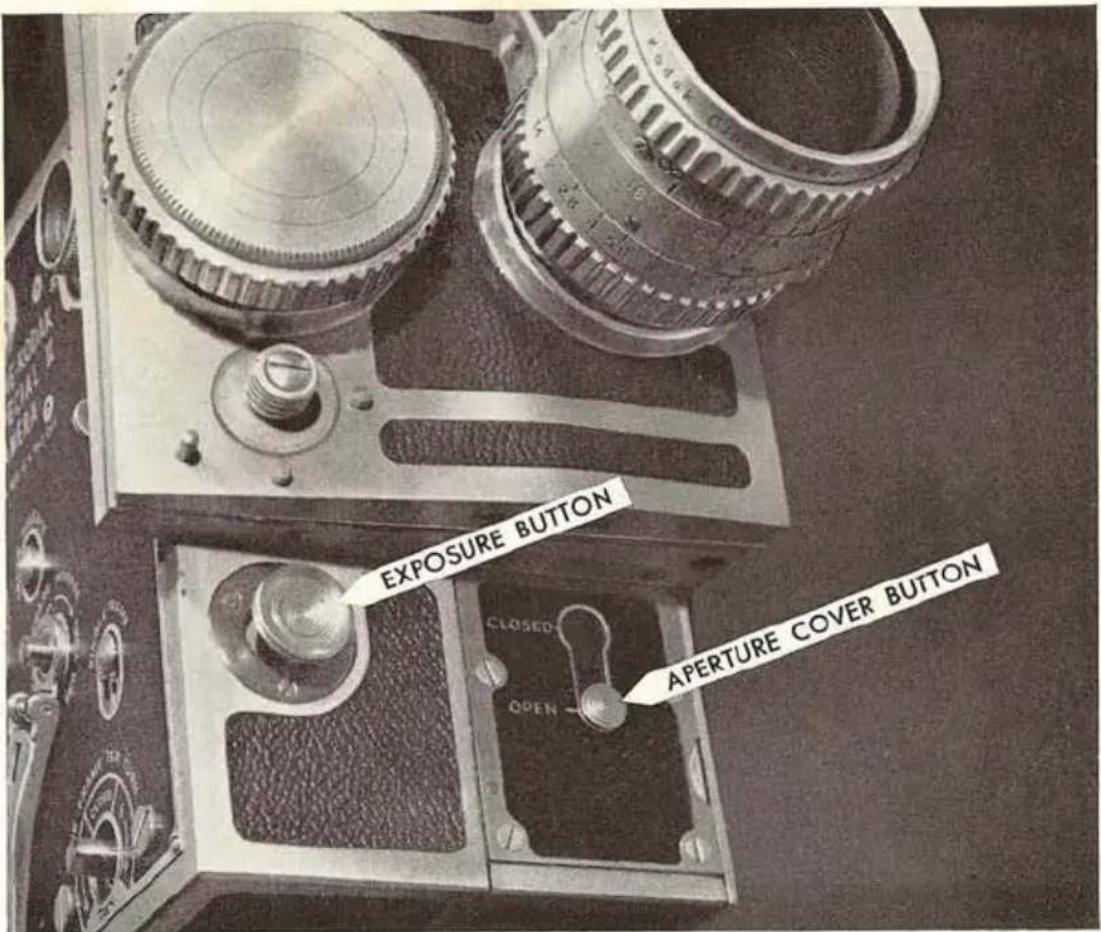
to remove the film chamber
Do not remove the film chamber when the camera is run down all the way. See the section on winding the motor, page 14.
1 Push the APERTURE COVER BUTTON to CLOSED. This prevents exposing the frame of film positioned in the aperture and locks the camera mechanism. Do not attempt to remove the film chamber with the aperture cover button at OPEN.
2 Raise the CHAMBER RELEASE until it snaps out.
3 Swing the film chamber down to disengage the film chamber from the mechanism half of the camera.
2
3

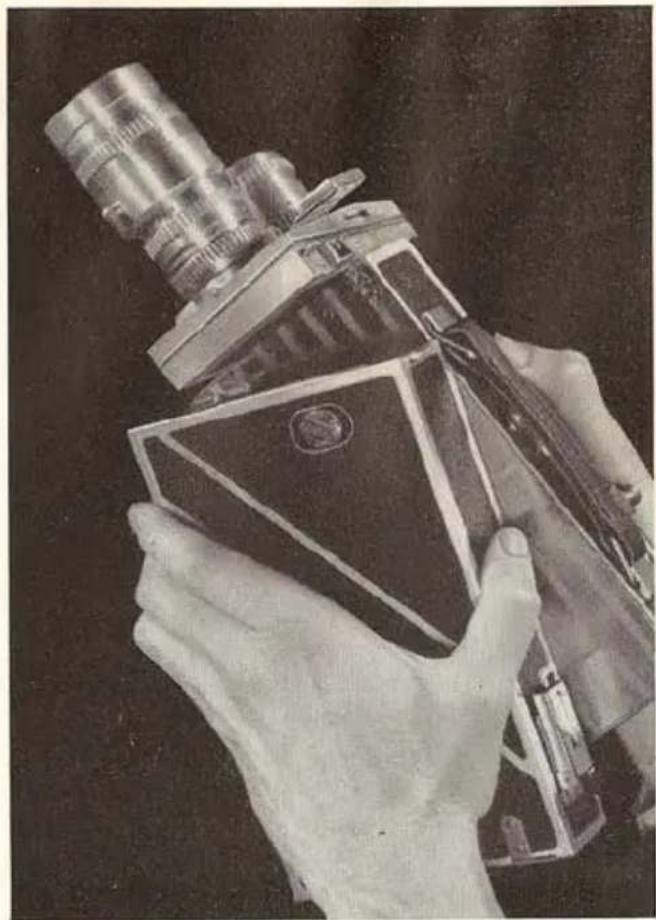
to replace the film chamber
1 Hold the film chamber in the left hand and the mechanism half of the camera in the right hand.
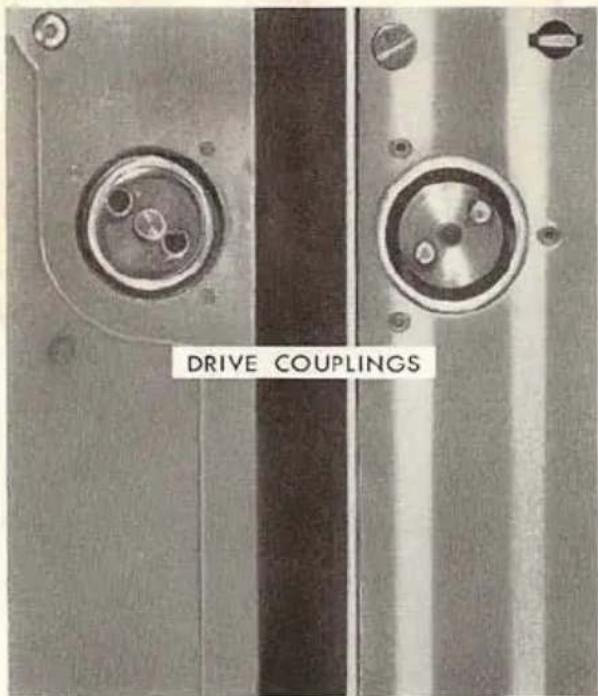
2 Match the DRIVE COUPLINGS, as shown in the illustration below.
3 Swing the film chamber up as far as it will go. It must be engaged with the LUG on the mechanism part of the camera.
4 Push in and down on the chamber release.
5 Move the aperture cover button to OPEN.
note: when you attach an empty film chamber to the camera, always run the camera for a moment to engage the drive couplings.

the 100-foot film chamber
The 100-foot film chamber is supplied with a 100-foot and a 50-foot Cine-Kodak Film Spool. Save these spools and use them for take-up spools when you load the camera. A short strip of film is provided to practice threading.
note: If the motor is run down, turn the motor crank a few turns before threading the film chamber.

1 Turn the DOOR LOCK one-half turn counterclockwise and push it toward OPEN; then swing open the door.
2 Push the BOSS of the tension lever toward the SPROCKET until it locks; then remove the take-up spool from the take-up spindle.
3 Push in the CLAMP RELEASE and open the sprocket clamp.
4 Unroll about one foot of film and fit the square hole in the spool of film over the square base on the SUPPLY SPINDLE. (If the film chamber is off the mechanism part, unroll about two feet of film.)

5 Refer to the illustration. The white line represents the path the film must follow.
6 Engage the film perforations with the sprocket teeth, and place the film between the GUIDES; then push the clamp until it snaps closed.
7 Follow the white line between the guides and the PRESSURE PLATE.
8 Pass the film in front of the pressure plate as follows:
Pull back the pressure plate; then exert additional pressure on it to make certain that the PULIDOWN is free of the film channel. (See the note under step 9 if the film chamber is detached.)
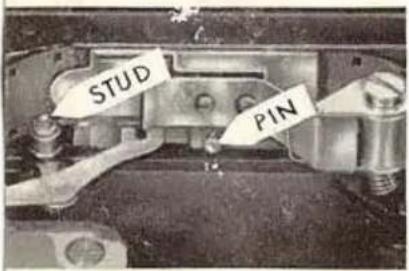
Slide the film into the film channel and between the STUD and the front of the camera. The film must be all the way in the channel, so that the film perforations are engaged by the pulldown. Release the pressure plate.
note: The pressure plate must be seated entirely within the film channel and properly engaged with the PIN. See illustration.
9 Observe the film in the film channel and press the exposure button for an instant; then release it. If the film is correctly threaded, the pulldown will draw the film through the film channel. If it is incorrectly threaded, the film will be driven by the sprocket and will pile up without going through the film channel.
When the film is properly threaded, take hold of the loose end of film and hold in the exposure button until an additional foot of film is run off the supply spool.
note: If the film chamber is not attached to the mechanism part of the camera, insert the film into the film channel as follows:
Rotate the sPROCKET until the pulldown is clear of the film channel; then open the pressure plate and slide the film into the channel. Turn the sprocket clockwise a few turns so that the pulldown draws the film through the channel. It may be necessary to move the film in the channel slightly until the pulldown engages the perforations. The sprocket must turn easily and the pulldown must draw the film through the channel.
10 Open the sprocket clamp. Thread the film along the guide line and between the sprocket and the clamp. Fit the film perforations over the sprocket teeth, which already engage the film coming from the supply spool. Close the sprocket clamp and make sure that it snaps into place.
11 Attach the end of the film to the slot in an empty TAKE-UP SPOOL; then wind the film a few turns around the core, in the direction of the arrow, to take up the slack and to make certain that it is attached securely. The film must be attached so that the square hole in the spool will fit over the square base on the spindle.
√√ double check these points
Press the exposure release for a moment and observe the following conditions (if the film chamber is not attached to the camera mechanism, turn the sprocket clockwise a few turns):
-
The spools must be seated all the way down on the spindles.
-
The sprocket clamp must be closed.

-
The film must move evenly along the path designated by the threading guide line.
-
The film loops must be maintained.
caution: It is possible to run film through the camera without taking satisfactory pictures, when the pulldown does not engage the film perforations. This is because the main driving force comes from the sprocket. Always make certain that the pulldown engages the film perforations.
Close the film chamber and lock it by pushing the door lock toward CLOSE and turning it one-half turn in the direction of the arrow. When you close the door the tension lever will automatically close so that it will ride against the film on the take-up spool. The rear FOOTAGE LEVER will ride against the film on the supply spool.
note: Never force the door. If it does not close easily, a foreign object may be obstructing it. Forcing the door can cause it to spring at the hinges and cause light leak.
the 200-foot film chamber
The accessory 200-foot film chamber is removed from the mechanism half of the camera in the same manner as the 100-foot film chamber (page 3); replace it on the mechanism half (page 4) and unload (page 13) as described for the 100-foot chamber.
to load the 200-foot film chamber—The 200-foot film chamber is supplied with a 200-foot and a 100-foot spool. Save the spools and use them for take-up spools when you load the camera. A short strip of film is provided to practice threading.
note: If the motor is run down, turn the motor crank a few turns before threading the film chamber.
1 Turn the door LOCK counterclockwise and remove the door.
2 Hold the FILM METER ARM to the right and remove the spool from the SUPPLY SPINDLE.
3 Press in the two CLAMP RELEASES and open the two SPROCKET CLAMPS.

4 Unroll about a foot of film and fit the square hole in the spool of film over the square base on the supply spindle. (If the film chamber is off the mechanism part, unroll about two and one-half feet of film.)
5 Refer to the illustration. The white line represents the path the film must follow.
6 Thread the film between the SPROCKET and the upper sprocket clamp. Engage the film perforations with the sprocket teeth; then close the clamp.
7 Follow the threading guide line between the upper guide and PRESSURE PLATE, so that the proper film loop is formed.
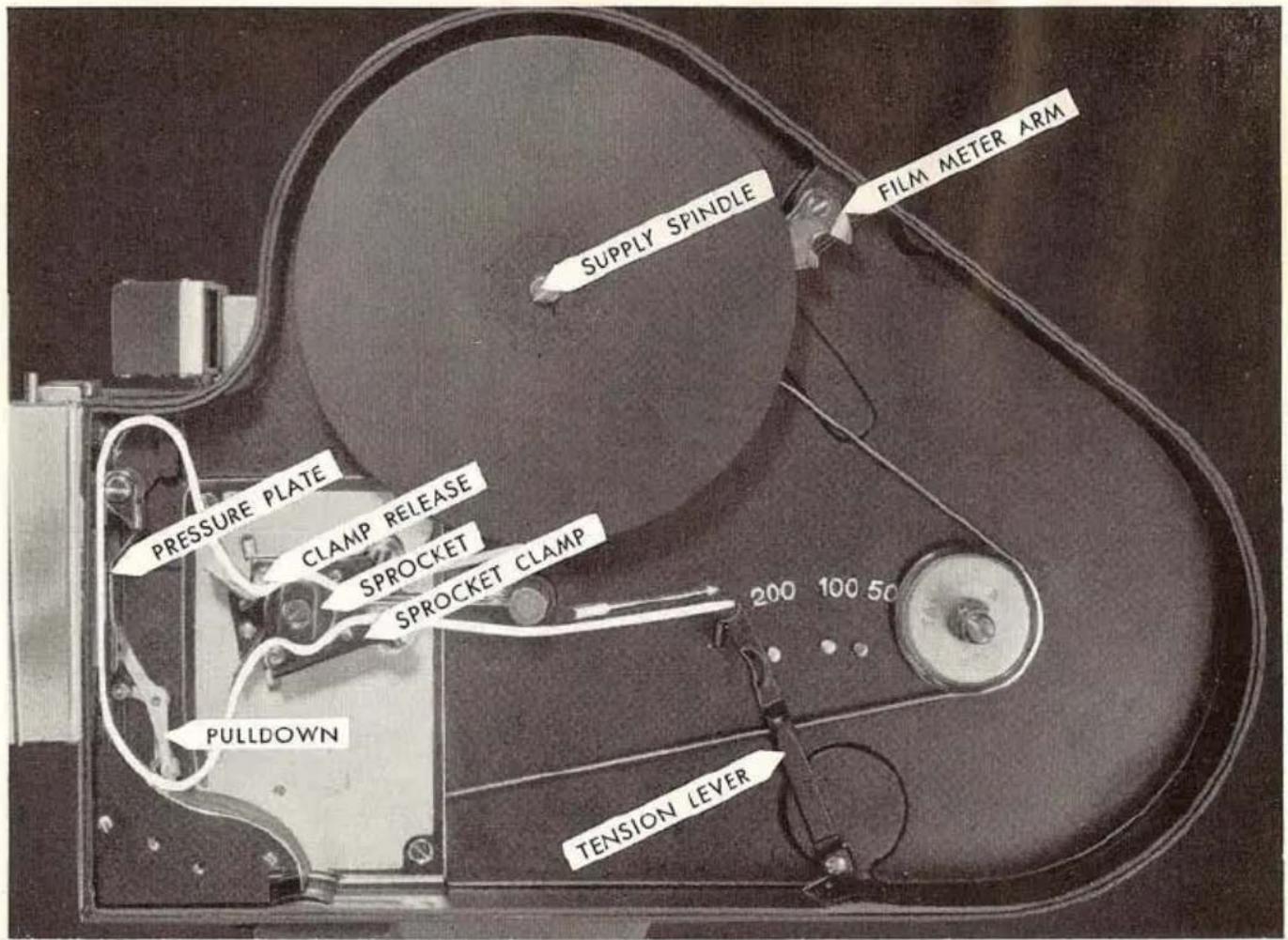

8 Pass the film in front of the pressure plate as follows:
Pull back the pressure plate; then exert additional pressure on it to make certain that the PULLDOWN is free of the film channel. (See the note under step 9 if the film chamber is detached.) Slide the film into the film channel and between the STUD and the front of the camera. The film must be all the way in the channel so that the film perforations are engaged by the pulldown. Release the pressure plate.
note: The pressure plate must be seated entirely within the film channel and properly engaged with the PIN. See illustration.
9 Observe the film in the film channel and press the exposure button for an instant; then release it. If the film is correctly threaded, the pulldown will draw the film through the film channel. If it is incorrectly threaded, the film will unwind from the supply spool and will pile up without going through the film channel.
When the film is properly threaded, take hold of the loose end of film and hold in the exposure button until about an additional foot and a half of film is run off the supply spool.
note: If the film chamber is not attached to the mechanism part of the camera, insert the film into the film channel as follows:
Rotate the sPROCKET until the pulldown is clear of the film channel; then open the pressure plate and slide the film into the channel. Turn the sprocket counterclockwise a few times so that the pulldown draws the film through the channel. It may be necessary to move the film in the channel slightly until the pulldown engages the perforations. The sprocket must turn easily and the pulldown must draw the film through the channel.
10 Follow the threading guide line between the pressure plate and the lower guide; then thread the film between the sprocket and the lower sprocket clamp. Engage the film perforations with the sprocket teeth; then close the clamp to hold the film in position.
11 Locate the TENSION LEVER to the left of the stud marked with the size of the spool used.

12 Attach the end of the film in the slot in an empty TAKE-UP SPOOL; then wind the film a few turns around the core, in the direction of the arrow, to take up the slack and to make certain that it is attached securely. The film must be attached so that the square hole in the spool will fit over the square base on the spindle.
√√ double check these points
Press the exposure release for a moment and observe the following conditions (if the film chamber is not attached to the camera mechanism, turn the sprocket counterclockwise a few turns):
- The spools must be seated all the way down on the spindles.
- The sprocket clamps must be closed.
- The film must move evenly along the path designated by the threading guide line.
- The film loops must be maintained.
caution: It is possible to run film through the camera without taking satisfactory pictures, when the pulldown does not engage the film perforations. This is because the main driving force comes from the sprocket. Always make certain that the pulldown claw engages the film perforations.
Replace the film chamber door; turn the handle clockwise to lock it.
SETTING THE FILM METERS
There are two film meters to watch when you are exposing film.
The CHAMBER FILM METER is located on the back of the 100-foot film chamber and on the side of the 200-foot chamber. It shows the number of feet of un-exposed film remaining in the chamber.
The CAMERA FILM METER is located under the carrying handle. It shows the number of feet of exposed film in the camera. It must be set each time the camera is loaded, when a film chamber is replaced, or when the film chamber is removed to run down the motor. Set the film meter by rotating it with your thumb.
After loading the film chamber set the camera film meter at 95 for all film spools. Run off the leader until the meter shows 0.
Additional footage has been supplied on all rolls of film to allow for handling and processing. This permits you to run off the leading and trailing edges of the film and still have the 50, 100, or 200 feet of film for actual picture taking.
To reset the camera film meter when one film chamber is replaced with another partially used chamber, proceed as follows: Note the number of feet of unexposed film registered on the chamber film meter. Subtract this figure from 50, 100, or 200, depending upon the size of the roll of film in the chamber. The answer is the number of feet of exposed film. Set the camera film meter at this number.
UNLOADING
The usable length of film has been exposed when the camera film meter shows 0. Before opening the film chamber door, run off the trailer as follows:
Run the camera until the chamber film meter shows EMPTY. The end of the film can usually be heard as it leaves the film channel. Never open the chamber door in bright sunlight or strong artificial light. Open the door, pull down the tension lever, and remove the full spool from the take-up spindle.


Have the film processed as soon as possible after it is exposed. See the directions that accompany your film.
BASIC CAMERA OPERATION
winding the camera motor
Make sure the EXPOSURE BUTTON is out. Bring the MOTOR CRANK down from its position on the top of the camera so that the square hole on the handle engages the square end of the winding SHAFT. Wind the motor in the direction of the arrow. Stop winding when the warning bell sounds. About 35 feet of film can be exposed with this winding.
If the camera is wound slowly and carefully to the stop, about three turns after the bell sounds, approximately 38 feet of film can be exposed.
The warning bell also sounds when the motor is nearly run down. About 3 feet of film can be exposed after the bell rings.
setting the speed dial
Turn the SPEED DIAL until the index mark is opposite the mark for any one of the five speeds (8, 16, 24, 32, and 64 frames per second). Intermediate speeds can be obtained by setting the index mark between any two numbers.

For normal screen action in silent pictures, set the index mark opposite 16.
Sound pictures are projected at 24 frames per second. If sound is to be added to the film, set the index mark opposite 24 for normal screen action.
Any camera speed faster than projection speed will produce slower-than-normal action in the projected picture. Conversely, any speed slower than projection speed will produce faster-than-normal action in the projected picture.
Do not operate the camera without film at speeds exceeding 32.
focusing the lens
Turn the FOCUSING RING on the lens until the figure representing the camera-to-subject distance is opposite the index mark.
You can use the reflex finder to determine focus, as described in The Reflex Finder, page 17.
When you focus by actual measurement, always measure from the subject to the film plane φ on the forward edge of the film chamber.
setting the lens opening
Turn the LENS OPENING RING until the selected lens opening is opposite the index mark.
The lens opening can be determined from several sources. The latest exposure data will be found on the instruction sheet packed with every rollof Cine-Kodak

film. The Kodak Cine Photoguide and the Kodaguide Movie Dial contain on-the-spot movie-making information. See your Kodak dealer.
depth of field
In addition to the distance scale, all Kodak Cine Ek-tar lenses have a DEPTH-OF-FIELD SCALE. Depth of field is the distance measured from the film-plane marker from the nearest to the farthest point that will be in sharp focus. The smaller the lens opening, the greater the depth of field.
To read the depth-of-field scale, set the lens opening ring and the focusing ring. Read the nearest and farthest distances opposite the f-number index marks. In the illustration, page 15 (10 feet at f/5.6), everything from 6 feet to 30 feet will be in sharp focus. For distances less than 3 feet, you may prefer to use the depth-of-field table found in the Kodak Cine Ektar Lens manual packed with the camera.
using the finders
The Eye-Level Finder consists of the FRONT FINDER and the REAR FINDER. Attach the front finder to the SPRING STUD as shown in the illustration.
When it is not being used, it is usually convenient to swing the finder to the side position as shown on page 17. Make sure that the hole in the finder frame is over the side locating stud.


note: When the rear finder is used with the:
Regular front finders with lenses, sight through the small hinged lens. Use the BLACK parallax correction scale.
Sports finders (marked in red) for 25mm and 40mm lenses, sight through the small rectangular opening at the top of the rear finder. Use the RED parallax correction scale.
Other sports finders and regular front finders without lenses, move the small hinged lens out of position and sight through the hole in the rear finder. Use the BLACK parallax correction scale.
The rear finder has a parallax-correcting slide which compensates for sighting differences between the finder and lens. Set the slide at camera-to-subject distance. For distances greater than 20 feet, set the slide at infinity ( ∞ ).
Always use the REFLEX FINDER when the camera-to-subject distance is closer than 2 feet.
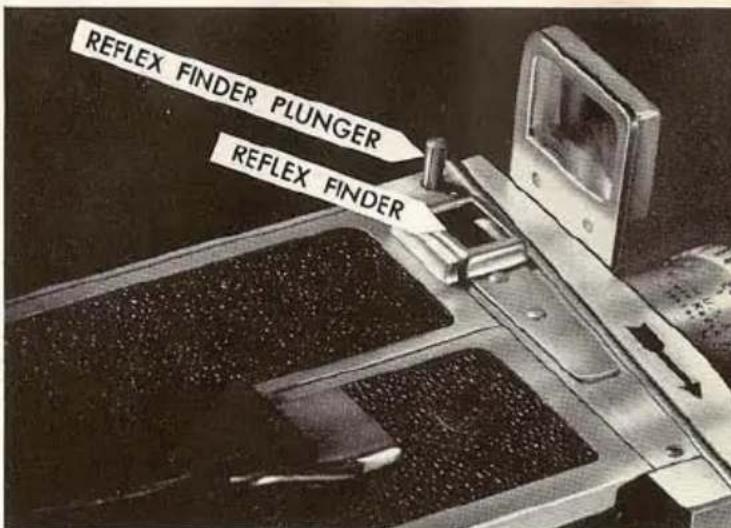
The Reflex Finder is used for precision framing. It shows the actual image formed by the camera lens. The reflex finder can also be used for focusing.
To use the finder push the REFLEX FINDER PLUNGER down until it locks. Open the lens to its largest opening. Center your eye over the finder and compose the picture. Turn the focusing ring on the lens until the main subject is in sharp focus. Reset the lens opening before taking pictures.
The reflex finder will close automatically when the exposure button is pressed. Never try to use the re-


flex finder while the camera is running, and do not hold it open when starting the camera motor.
making the exposure
See that the camera is wound. Set the speed dial, the focusing ring, and the lens opening ring.
Make certain that the aperture cover button is at OPEN. For normal operation, see that the SHUTTER LEVER is at OPEN.
Push the exposure button all the way in. Hold it in and up for the length of time necessary for exposing the desired scene, or lock it in position by pushing in and down. To unlock the button push it up; then release it.
caution: When the exposure button is pushed in, it will have a tendency to lock in running position unless you exert upward pressure on it.
tripod
Satisfactory results for sports or field type operation can be obtained by hand-holding the camera. However, when convenient, a sturdy tripod should be used. Always use a tripod when you are taking pictures with telephoto lenses. Any standard tripod screw will fit into the tripod socket on the bottom of the camera.

Kodak cine lenses
A wide variety of lenses are available for use with the Cine-Kodak Special II Camera. See page 40.
No adapter is necessary for attaching lenses to the camera. You will find two slots on the lens mount inside the KNURLED COLLAR. Match the locating pin on the lens to the slot which brings the index marks for focusing and lens opening to a convenient reading position. If the lens is not in the taking position, the index marks will be on the bottom of the lens. Make sure the lens is properly seated; then tighten the knurled collar.

Except for the front finder supplied with the camera, a clip-on front finder must be purchased for every new lens. Each finder is engraved with the focal length of the lens with which it is to be used. Directions for attaching the finder are on page 16.
the turret
The lens turret on the Cine-Kodak Special II Camera is made to accommodate any two Kodak cine lenses, either one of which can be in the taking position without optical interference from the other lens. To change the lens position, rotate the turret in the direction indicated by the arrow on the turret. A lens is in taking position when it is on the chamber side of the camera directly below the reflex finder.
the masks
The set of six masks packed with your camera is used for effect photography. Detailed information about masks is given on page 28.
variable shutter lever
The SHUTTER LEVER is used for (1) closing the shutter when it is necessary to reverse or advance the film without exposing it; (2) exposure control; (3) fades and dissolves; (4) sharpening images of moving objects; and (5) out-of-focus background.
hand crank
The HAND CRANK is used on the eight-frame shaft for winding the film through the camera, either forward or reverse. The film can be cranked through the camera to make exposures, if desired.
It is used on the single-frame shaft for making single-frame exposures and exact wind-backs.
crank release
The CRANK RELEASE is used for holding the hand crank to the eight- or single-frame shaft. To remove the crank from the eight-frame shaft, push up on the release and pull the crank from the shaft. Return the release to the lower position to lock the crank on either shaft.
the eight-frame shaft
The EIGHT-FRAME SHAFT is used for advancing or reversing the film. It is used extensively for multiple-exposure work. The film moves eight frames through the film channel with each turn of the shaft.
the single-frame shaft
The SINGLE-FRAME SHAFT is used for making single-frame or prolonged exposures. The film moves one frame through the film channel with each turn of the shaft.
the single-frame release
The SINGLE-FRAME RELEASE is used for making single-frame exposures. To use, pull out by the grooved
edge of the button. One frame is exposed each time the release lever is pressed downward. When not in use, push the release lever back into the camera.
the frame counter
The FRAME COUNTER and the camera film meter are used together to make accurate runs and rewinds in single-frame, and double- and multiple-exposure work. The counter is numbered from 0 to 40.
audible shutter warning
If the exposure button is pressed with the shutter lever at CLOSED, a buzzing noise will be heard. Stop the camera. There need be no loss of film; if the shutter is left closed, the film can be wound back (the audible shutter warning will again sound) by means of the hand crank attached to the eight-frame shaft.
The same warning is heard when the film is wound forward or backward through the camera with the shutter closed.

animation by single-frame exposures
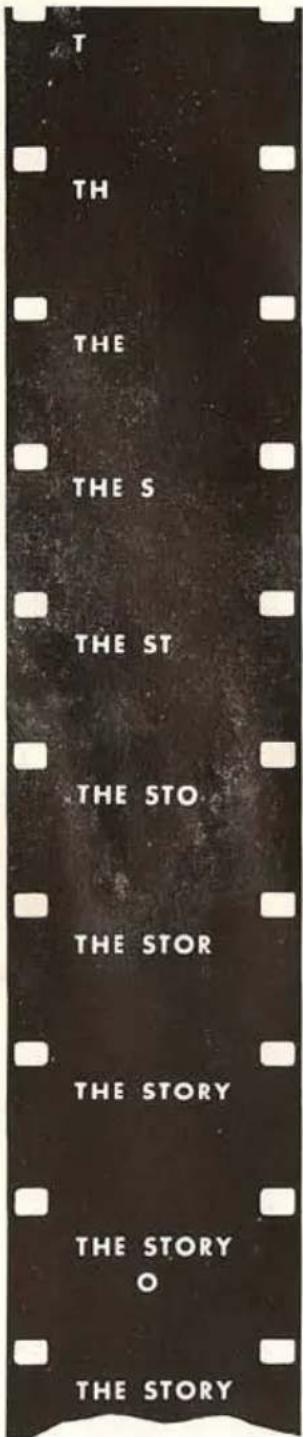

Animation has a wide variety of applications. It is used in television commercials, in travelogues to trace the path of travel across a map, in graphs, in titles, in the assembly or disassembly of manufactured products, etc.
Animation is accomplished with single-frame exposures as follows:
1 For exposure control, set the speed-dial index to 16. Although the exposure is about 1/35 second when the camera is operating at 16 frames per second, the single frame is exposed at about 1/17 second. This admits twice as much light as when the camera is continuously operated at speed 16. To compensate for this exposure, close the lens one opening; for example, f/8 to f/11. Best results will be obtained if the release is used only when the motor is fully wound.
2 Pull out the single-frame release.
3 Make the exposure by pressing down the single-frame release.
To give movement to the subject, expose a single frame, move the subject slightly, expose another frame, move the subject again, and so on.
The number of frames to be exposed will depend upon (1) the speed at which you intend to project the film and (2) the length of time the action is to last on the screen. For example: If the action is to last 5 seconds on the screen, and your projection speed is 16 frames per second, you will have to expose 80 frames (5 x 16).
Your Cine-Kodak Special II is also excellent for time-lapse photography—a method of greatly accelerating a period of time. The growth of a flower to full bloom, rapid movement of street traffic, cloud formations for an entire day, can be shown in a few seconds' projection. Expose one frame at time intervals which will produce the desired effects. The intervals between exposures will vary according to subject matter.
use of the single-frame shaft—A motor for making single-frame exposures can be connected to the single-
frame shaft. Write to the Eastman Kodak Company, Rochester 4, New York for details and manufacturers' names.
using the crank attached to the single-frame shaft—Place the hand crank on the single-frame shaft and push down on the crank release to lock the crank on the shaft. To move the film forward, lock the exposure button in and turn the crank in the direction of the arrow F; to wind the film in reverse, lock the exposure button in and turn in the direction of the arrow R. Turning the crank in the direction of the arrow R also winds the camera motor.
warning: If the warning bell sounds while you are turning the crank in a reverse direction, stop winding. Run down the motor as described on page 24. The strong mechanical leverage that is obtained when winding in reverse with the single-frame shaft can cause serious damage to the stopping mechanism of your camera.
The hand crank attached to the single-frame shaft is useful for multiple-exposure work which requires winding the film forward or in reverse a definite number of turns. It is also useful for making exposures of long duration.
The shutter lever must always be at CLOSED when moving the film through the camera unless the film is being exposed. When exposing film the shutter lever must be at OPEN.
note: Each exposure must be of the same duration, otherwise there will be a variation in density from frame to frame.
When the dot on the end of the single-frame shaft is up, the camera shutter is closed; when the dot is down, the shutter is open.
to hand-crank the camera
One of the most frequent uses for the hand crank is to wind the film through the camera in reverse for such effects as lap dissolves, double exposures, split frames, etc. There are, in addition, other uses for the hand crank. The hand crank winds film through the camera either in reverse or forward.
reverse—To hand-crank film through the camera in reverse without exposing film, proceed as follows:
Move the shutter lever to CLOSED and attach the hand crank to the eight-frame shaft. Lock it to the shaft by pressing down the crank release. Place the rectangular opening in the handle over the shaft; then push in and hold (or lock in) the exposure button. Turn the crank in the direction of the REVERSE arrow. The buzzer will sound when the shutter lever is closed. When the required amount of film is wound through the channel, release the exposure button and return the hand crank to the picture-taking position.
Winding in reverse winds the camera motor. If the warning bell sounds, stop winding and run down the motor as described below.
forward—For scenes that require more than 38 feet of film (the run of the motor), hand crank the camera after the motor has run down. Do not hand crank when the camera is set at speeds exceeding 24 frames per second.
Before starting an extended exposure, wind the camera motor to the stop. Attach the hand crank to the eight-frame shaft. Lock it to the shaft by pressing down the crank release.
When the exposure button is pressed, the hand crank will turn. Lock the exposure button in the picture-taking position.
When you hear the warning bell, which indicates the camera motor is nearly run down, grasp the hand crank and follow it while it turns. Continue turning at the same rate of speed when the motor stops. The motor governor will resist any attempt to turn the crank at excessive speed.
to run down the camera motor

Winding the camera in reverse with either the single-frame shaft or the eight-frame shaft winds the motor. For multiple exposures, split frames, etc., it may be necessary to wind the film back more than one full run of the motor (about 35 feet).
Always stop reverse winding when you hear the warning bell. If additional winding in reverse is required, proceed as follows: Remove the film chamber; then push in the exposure button and the PLUNGER. Lock the exposure button in until the mo-
tor stops. When the motor is completely run down, release the exposure button and attach the film chamber; then continue winding in reverse. In this manner you can wind back the entire roll of film.
how to make fades and dissolves
A fade-out is a gradual darkening of the end of a scene until it is completely blacked out. A fade-in starts as a black-out and gradually lightens until the scene is properly exposed. A dissolve is the fading-out of one scene with the simultaneous fading-in of the next scene.
The speed with which the shutter lever is operated determines the length of the fade or dissolve. The shutter lever may be opened and closed uniformly or regulated to match the tempo of the subject being filmed.
Do not make fades or dissolves at speed 64. When operating the shutter lever, bear toward the front of the camera so that the lever will not catch in the notches. Practice making fades and dissolves with the camera empty before taking actual scenes.
to fade out—Lock the exposure button in the running position. When the action in a scene reaches the point for the fade-out, slowly move the shutter lever past CLOSED to the upper end of the slot. The camera motor will automatically stop and end the fade-out. Allow about 64 frames (or 4 seconds at speed 16) for the fade-out.
to fade in—Set the shutter lever at CLOSED. Press the exposure button, and at the same time, start to move the shutter lever toward OPEN. Allow about 64 frames for the fade-in.

to dissolve—Fade out, wind back the film; then fade in. Standard dissolves contain either 40 frames (about 21/2 seconds at speed 16) or 60 frames (about 33/4 seconds at speed 16).
For most purposes you can gage the duration of the fade-out and fade-in by counting. When exposing at 16 frames per second, two complete turns of the eight-frame shaft are required to wind back the film exposed in one second. When exposing at 24 frames per second, three complete turns wind back the film exposed in one second.
other uses of the variable shutter

A wide number of effects can be obtained by using the variable shutter. The principle of the shutter is as follows:
When the film is being exposed at 16 frames per second with the shutter at OPEN, the exposure to each individual frame is 1/35 second; at 1/2 -OPEN, the exposure is about 1/70 second, or 1/2 the exposure of OPEN. The other controls affecting exposure (camera speed and lens opening) also change in multiples of two-f/8 admits twice as much light as f/11, and speed 32 is twice as fast as speed 16. For this reason it is simple to keep the exposure at the correct value while changing one or more of the exposure-governing factors.
For example, a certain exposure calls for 16 frames per second with a lens opening of f/11. If you wish to change the shutter speed to 32 frames per second (twice the speed of 16), it is necessary to adjust the lens opening to f/8 (twice the light admitted at f/11).
Similarly, if you wish to change the shutter opening to 1/2 -OPEN, you can maintain the same relative exposure at 16 frames per second by changing the lens opening to f/8.
EXPOSURE TIME PER FRAME
| Adjust-ment of Shutter | Angle of Opening in Shutter--Degrees | EXPOSURE TIME IN SECONDS | |||||
| Single Frames | 8 Frames per Second | 16 Frames per Second | 24 Frames per Second | 32 Frames per Second | 64 Frames per Second | ||
| OPEN 1/2 OPEN 1/4 OPEN | 16582.541.25 | 1/171/351/70 | 1/171/351/70 | 1/351/701/140 | 1/521/1051/210 | 1/701/1401/280 | 1/1401/2801/560 |

exposure control—If the light is so intense that even the smallest lens opening will give overexposure, move the shutter lever to 1/2 -OPEN (equal to one lens opening smaller) or to 1/4 -OPEN (equal to two openings smaller).
to sharpen images of moving objects—To sharpen the image of each frame showing rapidly moving objects (sports events, industrial processes, waterfalls, etc.), move the shutter lever to 1/2 -OPEN or 1/4 -OPEN. This shortens the exposure time for each frame and results in sharper pictures. Compensate by opening the lens one or two stops to maintain correct exposure.
for out-of-focus background—It may be desirable at times to emphasize an object in the foreground by throwing the background out-of-focus. Use a large lens opening to decrease the depth of field and set the shutter lever at 1/4 -OPEN to avoid overexposure. Do not use the shutter at 1/4 -OPEN while taking pictures of moving subjects close to the camera.
using the frame counter
The frame counter rotates whenever the exposure button is pressed or whenever the hand crank is used. One foot of film, or 40 frames, passes through the film channel each time the counter travels from 0 to 40. One complete revolution of the counter moves the camera film meter one division.
When the frame counter is matched to the camera film meter, any one of thousands of frames in a roll of film can be relocated exactly. Adjust the two dials for accurate readings as follows:
1 Load the camera and advance the film leader until the film meter reads between 99 and 0.
2 Operate the single-frame release until the frame counter reads O.
3 Set the film meter at O.
When this adjustment is followed, the two dials have a range of 4000 frames (or 100 feet) before repeating.
An example of using the dials to locate an exact frame is given as follows: You wish to start a double exposure when the film meter is between 7 and 8 feet
and the frame counter is at 23. At the end of the first exposure the film meter reads 12 feet and the frame counter shows 16. Wind the film in reverse with the hand crank, as shown on page 23, until the film meter again shows between 7 and 8 feet and the frame counter shows 23. Make the second exposure. Stop exposing when the film meter shows 12 feet and the frame counter shows 16.
Stopping at the exact frame the second time requires some practice. If there is motion in the scene, it will be necessary to watch the rotating dials and stop as close as possible to the desired position. If there is no motion, it is possible to stop a little short of the desired position and use the single-frame release. See page 22. Another alternative is to cut off the longer of the double exposures when the film is edited.
multiple exposures
Double or other types of multiple exposures are made by exposing the same strip of film two or more times. The exposures can be made with or without the use of the masks. Successful results depend upon the rigidity of the tripod, uniformity of the exposure, camera speed, and lens opening. After composing and focusing the picture, adjust the tripod for maximum rigidity and be sure that the camera is securely locked to the tripod head.
multiple exposures with masks
The set of six masks, packed with your Cine-Kodak Special II, can be used to produce a wide variety of effects. They are easy to use and can create both dramatic and humorous results. They can be very effectively used in industrial cine photography. The uses that we suggest are intended only as guides. You will be able to think of many other uses for them.
To use the mask, lift out the mask plug located behind the reflex finder. Always replace the plug when the masks are not in use to prevent stray light from reaching the film. Replace the plug so that the thick part of the top is toward the rear of the camera.
The masks are inserted behind the reflex finder;
therefore the image in the finder does not show the effect of the masks.
Because the light rays reflected from the subject cross as they pass through the camera lens, the left side of the subject is recorded on the right side of the film and the top of the subject is recorded on the bottom of the film. Remember this simple rule: Always place the solid part of the mask on the same side as

the subject you wish to record. For example, if the subject is on the left side (as viewed through the front finder), place the solid part of the mask on the left as it is inserted into the slot. When you are using the horizontal masks, use the mask with the solid part at the top for photographing subjects that appear at the top of the front finder.
Place the mask in the slot in the film chamber with the pin toward the reflex finder.
Push the mask into the slot as far as it will go so that the pin fits in the recess in the slot.
important: Do not use a lens opening smaller (in area) than f/5.6 when half masks are used. If this rule is followed, the line formed by the overlapping areas, at the junction of the masks, will be less conspicuous. If possible, compose the scene so that this line is across a dark area of the picture. If the light is too bright, avoid overexposure by using a filter or by setting the shutter lever at 1/2 -OPEN or 1/4 -OPEN.

Now, examine the masks. You will find one set of vertical masks, one set of horizontal masks, an oval mask, and a circular mask.
the vertical masks—Effects similar to the following can be produced with the vertical masks; comparison of operations seen at the same time, a telephone conversation from two different places, people disappearing behind thin trees, subjects vanishing into air, subjects appearing twice in the same picture, etc.
Select either the right or the left side to be photographed first. Insert the mask into the slot with the solid part on the same side as the subject you are photographing.
After the mask has been inserted, push the top of the mask toward the film chamber door to avoid having a line formed in the middle of the picture.
Use the reflex finder to frame your subject correctly, but remember, the side to be photographed will appear on the opposite side of the finder.
Note the readings on the camera film meter and the frame counter. Make the exposure for the one side of the picture; then move the shutter lever to CLOSED and rewind the film to the original starting position. Move the shutter lever to OPEN, and remove the mask used for the first exposure. Insert the unused vertical mask (pin toward the lens), and expose the second half of the picture. Remember to push the top of the mask toward the film chamber door.
the horizontal masks—Use the horizontal masks to separate action taking place above and below the horizontal middle of the projected picture. Effects similar to the following can be produced by using these masks: comparison of mechanical operations, different types of mechanical operations, many humorous effects such as heads moving without bodies, etc.
Select the upper or lower half of the picture and
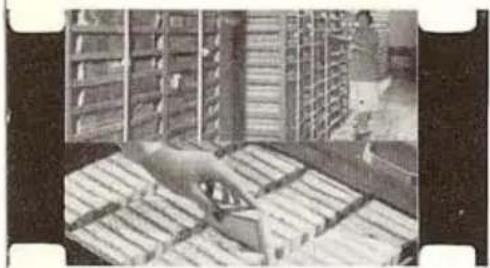

frame your subject in the reflex finder. Remember to insert the mask so that the solid part is on the same half being photographed. Follow the same procedure explained for using vertical masks.
the oval and circular masks—The use of either of these masks will produce a projected image of the corresponding shape of the mask being used. These masks are inserted in the same manner as the other masks.
When using the oval or circular masks, keep the important part of the scene in the center of the picture.
Special effects can be created if masked shots are combined with double exposures of still subjects. In this case, the exposure should be halved for each run. The result will be a shaded mask area in place of the solid black obtained by using a normal exposure.
multiple exposures without masks
making miniatures—The “imp in the bottle” technique has long been used in the motion-picture industry. The effect is this: A person appears on the screen imprisoned in a bottle many times his size. Variations of this can be done with people and objects. Use a black background. Make a close-up exposure of the small subject and note the frame and footage readings. Move the shutter lever to CLOSED, and attach the hand crank to the eight-frame shaft. Hold the crank and lock the exposure button in running position. Wind the film back to the point at which the exposure was started. Release the exposure button. Move the shutter lever to OPEN.
Move the camera back until the large subject appears as small as desired in the reflex finder. Make the second exposure.
they just fade away—To make a person or object disappear from the scene, do this: Lock the exposure button in the running position, and fade out the scene. Note the footage reading at the beginning of the fade-out. Rewind the film to the start of the fade-out. Make a fade-in of the scene with the person or object missing and expose as long as you wish. To make a person or object appear, reverse the above procedure. To make an immediate appearance or disappearance,

stop the camera, place or take away the person or object, and continue filming.
Whenever people or other moving objects appear in the scene, make sure that there is no movement while the camera is stopped, otherwise register will be imperfect.
twin results—To have the subject appear in the same scene several times, do this: Use a black background, or if the scene covers too large an area, cut a hole in a black piece of paper, and hold the paper two feet in front of the camera lens.
Make the first exposure and note the footage and frame counter readings. Move the shutter lever to CLOSED and rewind the film as previously described to the point where the exposure was started. Move the shutter lever to OPEN. Reposition the subject. Repeat the filming and rewinding the number of times necessary to make the desired effect.
When using the black paper in front of the camera lens, use the reflex finder to see that the paper overlaps the background and does not cut into the field being photographed.
ghosts and x-rays—To make ghost or transparent images, set the camera for the correct exposure. Halve the exposure either by stopping down one lens opening or by setting the shutter lever to 1/2 -OPEN. Note the footage and frame readings and make the exposure without the subject in the picture. Rewind, as described before, to the point at which the exposure was started. Do not change the exposure. Now your “ghost” makes an appearance. Rephotograph the scene until the rewound film has been used.
X-ray effects are useful in showing the interiors of all types of mechanical equipment. The finished results show the equipment; then the protective housing seemingly disappears, revealing the inner workings. To do this, photograph (full exposure) the equipment against a black background, noting the readings of the film meter and frame counter. Rewind the film to the original reading and remove the housing. Leave the shutter lever at CLOSED, and fade in for the second exposure.
titles for films
Almost every motion picture requires titles to explain shifts in subject material, or to clarify certain types of action. Users of the Cine-Kodak Special II Camera can make their own titles.
to make titles with the Special—Many times a shot of a sign or a name, made outdoors, is sufficient to bridge a gap in a film story.
At other times a typewritten, hand-lettered, or printed title, or a close-up of a map or folder may be more desirable. The height and width of all such titles should be in a 3 x 4 proportion.
Printed titles can be made by daylight or by artificial light. Mount the camera on a tripod or other solid support. Lay the copy to be photographed on a table or mount it upright.
To center cards or other copy for filming, use the reflex finder.
wipe titles—A wipe title can be made of scenes that contain no action, or from photographs. In this type of title, a line appears to pass across the screen wiping off one scene as it uncovers another scene or title.
Set the camera on a table and place a piece of fine-ruled paper (such as graph paper) flat on the table between the camera and the vertically mounted subject.
Attach a piece of dull black card to a block, the card being of such a size as to obstruct completely the camera field when the block is placed vertically about two feet in front of the 25mm lens. With the aid of the reflex finder, determine the points on the graph paper (at a marked distance from the camera) that represent the two sides of the picture area. The block is to be drawn square by square, from one side of the picture to the other.
Photograph the subject in the usual manner. When the camera is stopped at the end of the scene, make necessary exposure adjustments for single-frame work. Draw the block across the graph paper one square, expose one frame, move the block another square, expose another frame, and so on until the camera field is completely blocked.
Count the number of squares traversed, close the shutter, and wind the film back that number of frames

by means of the single-frame shaft. This may necessitate removal of the camera from the table.
With the camera returned to the same position in relation to the graph paper, and a new scene or title before the camera, place the block so that the trailing edge is at exactly the same place as the leading edge was when the wipe was started. Uncover the new scene by one square, expose a frame, and so on until the scene is entirely cleared. Be sure to move the block in the same direction for both phases of the wipe. The speed of the wipe depends upon the number of frames consumed in blocking off or unblocking the scene. At least sixty squares should be used for a smooth wipe effect.
duplicates
All Cine-Kodak film can be duplicated in black and white. Kodachrome film can be duplicated in full color or black and white.
SERIAL NUMBERS
Your Cine-Kodak Special II Camera has two serial numbers—one on the camera mechanism and one on the film chamber. Record these numbers—keep them in a safe place—they will be a means of positive identification in case your camera is lost or stolen. Too, most insurance companies require serial numbers on equipment policies.
Camera Mechanism—beneath the chamber release lever.
Film Chamber—next to the drive coupling.
Owner's Name Plate—bottom of turret mounting block.
Cine-Kodak Reversal Films
Four 16mm Cine-Kodak reversal films are available in 50-, 100-, and 200-foot rolls. Scientific processing, without additional charge, is done by Kodak processing laboratories. All Cine-Kodak film can be duplicated in black and white. Kodachrome films can be duplicated in full color.
Kodachrome Film Daylight Type reproduces in full color when exposed under daylight conditions.
Kodachrome Film Type A is color-balanced for photographic flood lamps and requires no filter when so used. The film can also be used for taking pictures in daylight with the Kodak Daylight Filter for Kodak Type A Color Films (see page 42).
Cine-Kodak Super-X Film is the first choice for general black-and-white picture making. It can be used with natural or artificial illumination. It is very fine grained.
Cine-Kodak Super-XX Film is a very fast black-and-white film ideally suited for photographing subjects under normal indoor illumination without additional light. It is used for sporting events on dull days, indoor-lighted events, and night-lighted outdoor events.
Cine-Kodak C-P Reversal Films (Plus-X, Super-X, and Super-XX)
These films are sold at a price which does not include processing by the Eastman Kodak Company. They are intended for those who desire to process their own films or to have them processed elsewhere.
All are high-speed panchromatic films suitable for exterior and interior work. They are used for television photography for either studio work or kinescope recording. When processed by reversal methods, they yield a positive image having both good contrast and graininess characteristics.
Cine-Kodak Negative Films
The purchase price does not include processing: processing information is packed with the films.
Panchromatic is a very fine grain, medium-speed negative film intended for use in making original negatives from which prints are to be made for background projection. It is also suitable for general exterior photography.
Super-XX is a high-speed negative film of medium graininess. It is particularly suited to newsreel work, where photographs of important news events must be obtained under poor lighting conditions. It can also be used for production work wherever the need for emulsion speed arises.
Tri-X is an extremely high-speed negative film. Since its emulsion speed is approximately two and one-half times as fast as Super-XX, it can be used under very poor lighting conditions.
magnetic sound track for 16mm film
Kodak Sonotrack Coating—a magnetic sound track coating service—is now available for processed, single-or double-perforated Kodachrome or black-and-white 16mm Cine-Kodak film.
Sonotrack Coating can be applied to film taken at either sound or silent speed. It is placed on the side of the film that faces the projection lamp.
Kodak Sonotrack Coating is available in three widths. Single-perforated 16mm film having no sound track will be Sonotrack coated the full width of the track area. When an optical sound track is on the film, then it will be Sonotrack coated half the width of the optical track, unless you specify that the full width of the optical track be coated. It is also available with edge-coating for double-perforated 16mm film.
Sonotrack Coating must be ordered through your Kodak dealer. This coating can be ordered by your dealer when he returns your 16mm Cine-Kodak film for processing.
See your dealer for complete information.
CARE OF THE CINE-KODAK SPECIAL II CAMERA
Proper care of the Cine-Kodak Special II is essential to satisfactory performance. The film channel and pressure plate must be kept clean at all times, the front and rear outside surfaces of the lens used must be free of finger marks and dirt, and the reflex finder should be cleaned whenever necessary. The outside and inside working parts of the camera must be oiled regularly.
to clean the lens
It is impossible to obtain sharp pictures of good contrast unless the lens is kept clean.
To clean the lens, carefully brush off any dust or grit with wadded Kodak Lens Cleaning Paper or a fine camel's-hair brush. If necessary, wipe the surfaces gently with a wad of one or several sheets of lens cleaning paper or a clean, soft, lint-free cloth. Always wipe with a circular motion. Fingerprints, oil spots, or other scum deposits can be removed with a drop of Kodak Lens Cleaner on the cloth.
to clean the film chamber

Remove the PRESSURE PLATE by pushing the PRESSURE ARM to the right and lifting out the plate.
With the ball of the thumb, rub off any accumulation of dirt on the polished tracks of the plate. With a match covered with a clean cloth that has been dipped in Stoddard's Solvent, or its equivalent, remove any accumulation on the tracks of the aperture plate and FILM GUIDE. (Do not use alcohol as a cleaning agent.)
Remove any dust or lint on the edges of the rectangular aperture.
Be extremely careful not to scratch the polished surfaces over which the film travels. Never scrape the tracks with a metallic tool.
Since the film rides on the six circular surfaces on the aperture plate (four at the corners of the aperture, and two near the bottom of the plate), make sure that these surfaces are clean before each roll of film is threaded for use.
To replace the pressure plate, fit the small slot on the edge over the pin on the aperture plate. Be sure the pressure plate seats properly.
to clean the reflex finder
When the reflex finder is used for focusing, the top surface must be kept clean. If dust collects inside the reflex finder, slide the magnifier lens to the right, hold the camera upside down, and blow into the finder with a rubber pinch bulb or similar device.
To reach the mirror, remove the lens from the lens turret. To reach the top of the ground glass, slide the finder lens toward the right side of the camera.
to oil the camera
A bottle of Kodak Special Lubricating Oil with a wire applicator is furnished with the Cine-Kodak Special II Camera. Never use any other lubricant, or high speed and cold weather operation of the camera will be seriously impaired. Use very little oil.
Oil the camera after about 5,000 feet of film (fifty 100-foot rolls) is run through the camera or every six months if less than 5,000 feet is used during this period.
To oil the camera, place it on its side with the control plate facing up. Apply the oil with the wire at-

tached to the cork. Just touch the points indicated in the illustration so that a drop of oil runs down the sides of the shafts. After oiling, run the camera at normal (16) speed. Start and stop the camera several times to allow the oil to spread over the bearing surfaces. Wipe off the excess oil.
Oil the inside of the film chamber at the points illustrated. Remove the screws from the supply and take-up spindles and place a drop of oil on the studs. Do not lift the spindles off the studs. Run the camera intermittently as before. Wipe off the excess oil, particularly at those points near the film track, as oil on the film will cause spots in the developed image. Follow this same procedure for both the 100-foot and 200-foot film chambers.
Remove the film chamber and lay the mechanism half of the camera face up on a support. Oil the points indicated in the illustration. Press the plunger, and operate the camera intermittently. Wipe off the excess oil and replace the film chamber.


lenses
There are seven Kodak Cine Ektar lenses available—the finest lenses ever made for 16mm motion-picture cameras.
The longer focal-length lenses give a telephoto effect; they will also magnify objects close by, give concentrated field coverage, improve perspective, and eliminate undesired backgrounds.
The 15mm lenses cover a wider-than-normal field and are called wide-angle lenses. They solve the problems of filming in cramped quarters where backing up space is limited.
The Kodak Cine Ektar lenses are as follows: (See your dealer about more information.)
25mm f/1.4 or f/1.9 Kodak Cine Ektar Lens—Considered best for general work. These lenses can be used as fixed-focus lenses (except for extreme close-ups) when set at 15 feet and lens openings of f/5.6 or smaller. With these settings, all objects from about 8 feet to infinity will be in sharp focus. Angle of View: 21.5° x 16.2°. Focusing Range: 12 inches to infinity. A screw-type filter holder, Kodak Adapter Ring Series VI No. 27, screws directly to the lens.
15mm f/2.5 Kodak Cine Ektar Wide-Angle Lens—This lens includes an area over 21/2 times as great as the standard lens at the same distance from the subject. It focuses to the remarkably short distance of six inches. Angle of View: 34.0° × 25.7° . Focusing Range: 6 inches to infinity. Adapter Ring Size: No. 28 Screw-in. Series VI Kodak Combination Lens Attachments.
40mm f/1.6 Kodak Cine Ektar Lens—Gives about twice the image size of the 25mm lens. Angle of View: 13.7° x 10.3° . Focusing Range: 2 feet to infinity. Adapter Ring Size: No. 27 Screw-in. Series VI Kodak Combination Lens Attachments.
63mm f/2.0 Kodak Cine Ektar Lens—Gives 2½ times the image size of the 25mm lens. Angle of View:
film chambers There are some who feel that, in order to give the best results, lenses and film chambers should be individually fitted with matching frame lines. This is usually necessary for only the most critical work. This service is available for those who wish to have it done. For further information, write to Apparatus Service Department, Eastman Kodak Company, Rochester 4, New York.
8.7° x 6.5°. Focusing Range: 2 feet to infinity. No adapter ring needed. Series VI Kodak Combination Lens Attachments.
102mm f/2.7 Kodak Cine Ektar Lens—Gives 4 times the image size of the 25mm lens. Angle of View: 5.4° x 4.1°. Focusing Range: 3 feet to infinity. No adapter ring needed. Series VI Kodak Combination Lens Attachments.
152mm f/4.0 Kodak Cine Ektar Lens—Gives 6 times the image size of the 25mm lens. Angle of View: 3.6° x 2.7°. Focusing Range: 6 feet to infinity. No Adapter Ring needed. Series VI Kodak Combination Lens Attachments.
Kodak Ektar f/1.4 Converter 25mm to 15mm—Is an optical accessory which reduces the effective focal length of the Kodak Cine Ektar Lens 25mm f/1.4 to approximately 15mm. The reduction in focal length is accomplished with all the advantages of maintaining the fast speed and image quality of the f/1.4 lens. Covers a field about 60% larger than a 25mm lens. All the glass-air surfaces of the converter are Lumenized.
Kodak combination lens attachments
Kodak Combination Lens Attachments are available for use on all Kodak Cine lenses. The design of these attachments permits their use either as a single unit, such as a filter, or as a combination of units, such as a filter and a Portra Lens. Details are included in the manuals packed with your lenses.
Cine-Kodak filters
Filters are used in black-and-white photography to obtain correct tone rendering, to create special sky and moonlight effects, to reduce haze, and to obtain contrast between areas differing in color. The wise use of a filter will often make the difference between excellent photography and a mere record.
Correction filters aid in reproducing colors as grays in the relative brightnesses that the eye sees them. Oftentimes blue reproduces too light without a
filter and there is no contrast between sky and clouds.
Filters also cut bluish atmospheric haze on distant scenes.
The following filters are recommended for black-and-white photography: CK-3, G, A, and X1. All are supplied as Kodak Combination Lens Attachments in series sizes.
Additional information on filters comes with your film.
Kodachrome filters
The Kodak Skylight Filter is for use with Kodachrome Film Daylight Type. It is especially useful for pictures in open shade under a clear blue sky, pictures made on overcast or hazy days, distant scenes (mountain or marine views), sunlit snow scenes, and aerial photographs.
The Kodak Photoflood Filter for Kodak Daylight Type Color Films is needed if regular daylight Kodachrome is to be exposed indoors with photographic flood lamp illumination. This is for emergency use only. Type A film should be used for photographic flood illumination.
The Kodak Daylight Filter for Kodak Type A Color Films is needed if Kodachrome Film Type A is to be exposed outdoors in daylight. Exposures with this filter are the same as those recommended for Kodachrome Film Daylight Type.
carrying cases
Sturdily built and smart appearing, the Cine-Kodak Carrying Case for the Cine-Kodak Special II Camera is supplied for 100- and 200-foot film chambers. There is ample room in the cases for several lenses, Kodak Combination Lens Attachments, rolls of film, and an extra film chamber.
reflex finder image magnifier
A device which magnifies the reflex finder image and makes it possible to use the reflex finder from the


back of the camera. Images are seen as they actually appear to the eye right side up with lefts and rights maintained. An especially valuable accessory for any filming that requires extensive use of the reflex finder. The magnifier also has an adjustable eyepiece to accommodate individual vision. The Reflex Finder Image Magnifier must be fitted to the camera at the factory. It cannot be used with the 200-foot film chamber.
optical finder
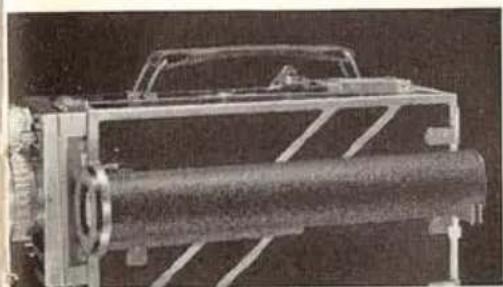
The Optical Finder for the Cine-Kodak Special II Camera corrects for parallax down to two feet and has a graduated magnifying lens which can be set to indicate the field covered by any of the Kodak Cine lenses. It is particularly useful when lenses of different focal lengths are often interchanged. The Optical Finder must be fitted to the camera and all film chambers at the factory.
Cine-Kodak lens spacer rings
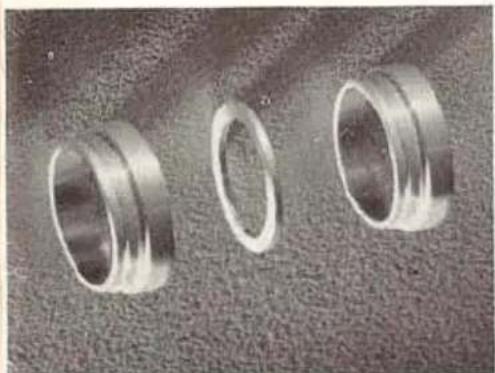
These simple and effective accessories provide the means for extending the camera's close-up range to permit filming very small movie subjects. Designed to be used with standard or accessory lenses, they make possible the coverage of fields as small as 1/2 inch in width.
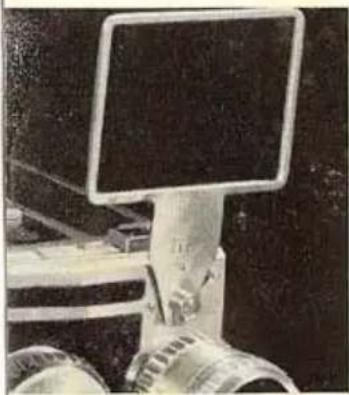
Cine-Kodak sports finders
These open-frame finders provide an image of normal size and make it especially easy to follow action. The sports finder can be used with the 100-foot film chamber only.
Kodascope projectors
The Kodascope projectors answer all your needs for sound or silent motion pictures. The projectors come equipped with powerful 750-watt lamps amply bright for average projection. A 1000-watt lamp can be used for large audiences. The projectors are fitted with a 2-inch f/1.6 Lumenized Kodak Projection Ektanon Lens. The following Kodak Projection Ektanon Lenses are also available: a 1½-inch f/2.0, a 3-inch f/2.0, and a 4-inch f/2.5.
The Kodascope Pageant Sound Projector operates on ac or dc, 105 to 125 volts and has a capacity of 2000 feet of film. It operates at both sound and silent speeds. An accessory microphone plugged into the amplifier enables you to narrate your silent movies and to use the Pageant as a public address system.
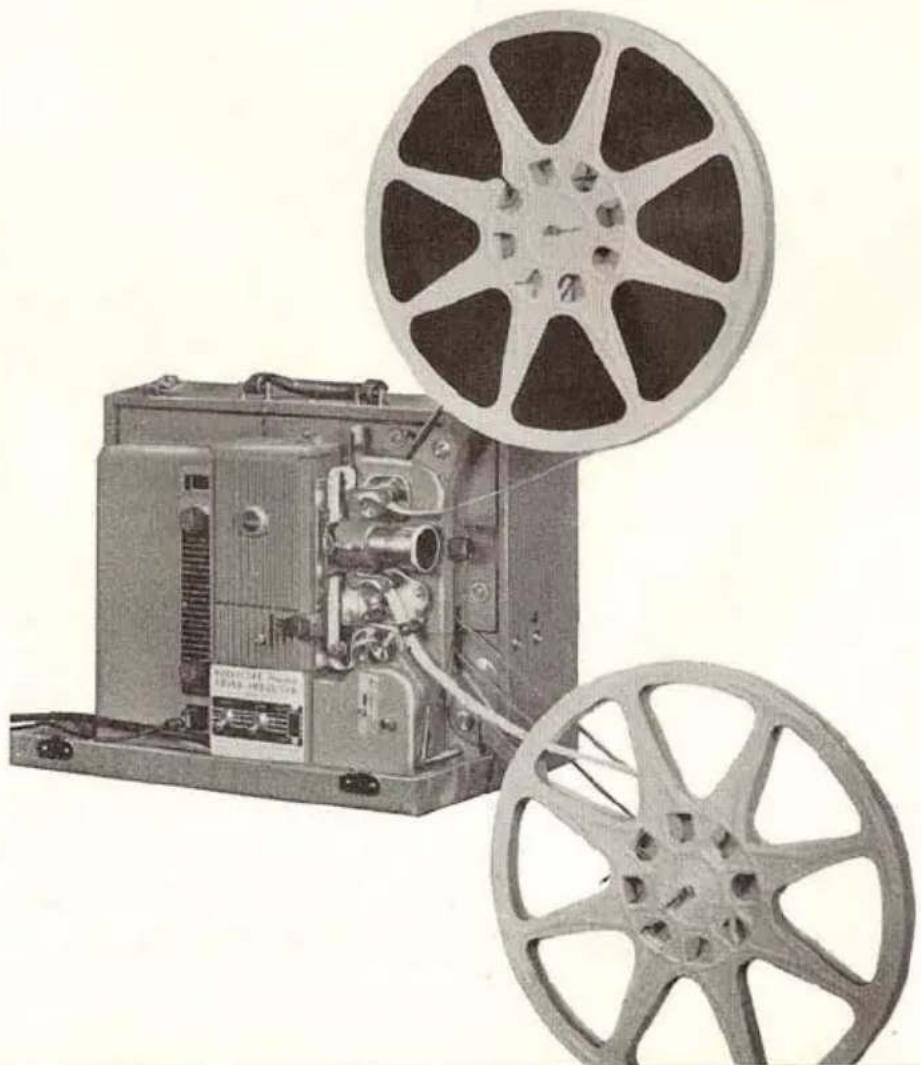
The Kodascope Royal Projector is designed to give the best in silent movie projection. It operates on both ac or dc, 105 to 125 volts, both forward and in reverse and has a speed control knob for rapid re-wind.

The Kodascope Analyst Projector, illustrated above, 60-cycle ac only, can project movies in normal fashion on a screen and also on a table top in natural light on its own built-in screen. It also operates by a remote control switch of immediate forward or reverse operation. It is ideally suited for such special applications as sports analysis, motion study, etc.
The Eastman 16mm Projector, Model 25 is a heavy-duty 16mm projector. It is a precision instrument designed for continuous professional operation.
The projector can be supplied in form best suited to the particular auditorium in which it is to be installed. The Model 25 is available either with 1000-watt tungsten or with 46-ampere arc illumination.

Kodak
- CONTENTS
- FILM CHAMBERS 2
- LOADING
- SETTING THE FILM METERS 12
- UNLOADING 12
- BASIC CAMERA OPERATION
- PICTURE CONTROLS 19
- EFFECT PHOTOGRAPHY
- FILMS FOR THE CINE-KODAK SPECIAL II CAMERA 35
- MAGNETIC SOUND TRACK FOR 16MM FILM 36
- CARE OF THE CINE-KODAK SPECIAL II CAMERA 37
- PICTURE MAKING AIDS 40
- HOW TO USE THE CINE-KODAK SPECIAL II CAMERA
- THE FILM CHAMBERS
- TO REMOVE THE FILM CHAMBER
- TO REPLACE THE FILM CHAMBER
- THE 100-FOOT FILM CHAMBER
- √√ DOUBLE CHECK THESE POINTS
- THE 200-FOOT FILM CHAMBER
- SETTING THE FILM METERS
- UNLOADING
- WINDING THE CAMERA MOTOR
- SETTING THE SPEED DIAL
- FOCUSING THE LENS
- SETTING THE LENS OPENING
- DEPTH OF FIELD
- USING THE FINDERS
- MAKING THE EXPOSURE
- TRIPOD
- KODAK CINE LENSES
- THE TURRET
- THE MASKS
- VARIABLE SHUTTER LEVER
- HAND CRANK
- CRANK RELEASE
- THE EIGHT-FRAME SHAFT
- THE SINGLE-FRAME SHAFT
- THE SINGLE-FRAME RELEASE
- THE FRAME COUNTER
- AUDIBLE SHUTTER WARNING
- ANIMATION BY SINGLE-FRAME EXPOSURES
- TO HAND-CRANK THE CAMERA
- TO RUN DOWN THE CAMERA MOTOR
- HOW TO MAKE FADES AND DISSOLVES
- OTHER USES OF THE VARIABLE SHUTTER
- USING THE FRAME COUNTER
- MULTIPLE EXPOSURES
- MULTIPLE EXPOSURES WITH MASKS
- MULTIPLE EXPOSURES WITHOUT MASKS
- TITLES FOR FILMS
- DUPLICATES
- SERIAL NUMBERS
- CINE-KODAK REVERSAL FILMS
- CINE-KODAK C-P REVERSAL FILMS (PLUS-X, SUPER-X, AND SUPER-XX)
- CINE-KODAK NEGATIVE FILMS
- MAGNETIC SOUND TRACK FOR 16MM FILM
- CARE OF THE CINE-KODAK SPECIAL II CAMERA
- TO CLEAN THE LENS
- TO CLEAN THE FILM CHAMBER
- TO CLEAN THE REFLEX FINDER
- TO OIL THE CAMERA
- LENSES
- KODAK COMBINATION LENS ATTACHMENTS
- CINE-KODAK FILTERS
- KODACHROME FILTERS
- CARRYING CASES
- REFLEX FINDER IMAGE MAGNIFIER
- OPTICAL FINDER
- CINE-KODAK LENS SPACER RINGS
- CINE-KODAK SPORTS FINDERS
- KODASCOPE PROJECTORS
- KODAK
Brand : KODAK
Model : Cine Special II
Category : Camera