GR-L257SVB - Fridge LG - Free user manual and instructions
Find the device manual for free GR-L257SVB LG in PDF.


User questions about GR-L257SVB LG
0 question about this device. Answer the ones you know or ask your own.
Ask a new question about this device
Download the instructions for your Fridge in PDF format for free! Find your manual GR-L257SVB - LG and take your electronic device back in hand. On this page are published all the documents necessary for the use of your device. GR-L257SVB by LG.
USER MANUAL GR-L257SVB LG
Please read this guide thoroughly before operating and keep it handy for reference at all times.

natural_image
Abstract geometric design with a white circle containing an L-shaped symbol and a small circle, no text or symbols present.Table of contents
| Introduction | Entry | 3 |
| Important safety instruction | 3 | |
| Identification of parts | 4 | |
| Installation | Where to install | 5 |
| Door removal | 6 | |
| Door replacement | 7 | |
| Feed water pipe installation | 7 | |
| Height adjustment | 8 | |
| Operation | Starting | 9 |
| Adjusting the temperatures and functions | 9 | |
| Refreshment center (Applicable to some models only) | 14 | |
| Shelf (Applicable to some models only) | 15 | |
| Wine holder (Applicable to some models only) | 15 | |
| Egg box (Applicable to some models only) | 15 | |
| Humidity control in the vegetable compartment | 16 | |
| Convert into a vegetable or meat compartment (Applicable to some models only) | 16 | |
| Deodorizer (Applicable to some models only) | 16 | |
| Miracle Zone Temperature Transition Corner (Applicable to some models only) | 17 | |
| Temperature Change at Miracle Zone (Applicable to some models only) | 17 | |
| Miracle Zone (Applicable to some models only) | 17 | |
| Suggestion on food storage | Location of foods | 18 |
| Storing foods | 19 | |
| Care and maintenance | How to dismantle parts | 20 |
| General information | 22 | |
| Cleaning | 22 | |
| Trouble shooting | 23 |
Entry
The model and serial numbers are found on the inner case or back of refrigerator compartment of this unit. These numbers are unique to this unit and not available to others. You should record requested information here and retain this guide as a permanent record of your purchase. Staple your receipt here.
| Date of purchase | : |
| Dealer purchased from | : |
| Dealer address | : |
| Dealer phone no. | : |
| Model no. | : |
| Serial no. | : |
Important safety instruction
Before it is used, this refrigerator must be properly installed and located in accordance with the installation instructions in this document.
Never unplug your refrigerator by pulling on the power cord. Always grip plug firmly and pull it straight out from the outlet.
When moving your appliance away from the wall, be careful not to roll over the power cord or to damage it in any way.
After your refrigerator is in operation, do not touch the cold surfaces in the freezer compartment, particularly when your hands are damp or wet. Skin could adhere to these extremely cold surfaces.
Unplug the power cord from the power outlet for cleaning or other requirements. Never touch it with wet hands because you can get an electric shock or be hurt.
Never damage, process, severely bend, pull out, or twist the power cord because damage the power cord may cause a fire or electric shock. You have doubts on whether the appliance is properly grounded.
Never place glass products in the freezer because they may be broken due to expansion when their contents are frozen.
Never allow your hands within the ice storage bin of the automatic ice maker. You could be hurt by the operation of the automatic ice maker.
The appliance is not intended for use by young children or infirm persons without supervision.
Young children should be supervised to ensure that they do not play with the appliance.
Never allow anyone to climb, sit, stand or hang on the refreshment center door. These actions may damage the refrigerator and even tip it over, causing severe personal injury.
If possible, connect the refrigerator to its own individual electrical outlet to prevent it and other appliances or household lights from causing an overload that could cause a power outage.
The refrigerator-freezer should be so positioned that the supply plug is accessible for quick disconnection when accident happens.
If the supply cord is damaged, it must be replaced by the manufacturer or its service agent or a similarly qualified person in order to avoid a hazard.
Do not modify or extend the Power Cord length.
- It will cause electric shock or fire.
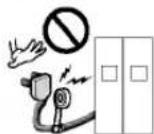
Don't use an extension cord
Accessibility of Supply Plug Supply Cord Replacement
Warning

flowchart
graph TD
    A["Refrigerator Compartment"] --> B["Freezer Compartment"]
    B --> C["Automatic Icemaker"]
    B --> D["Lamp"]
    B --> E["Shelf"]
    B --> F["Lamp"]
    B --> G["Shelf"]
    B --> H["Drawer"]
    B --> I["Door Rack"]
    B --> J["Drawer"]
    B --> K["Door Rack"]
    B --> L["Lower Cover"]

    M["Milk product corner"] --> N["Can Server (Optional)"]
    O["Lamp"] --> P["Wine holder (Plastic or wire)"]
    Q["Door Rack"] --> R["Refreshment center (Optional)"]
    S["Shelf"] --> T["Shelf (Folding or Normal)"]
    U["Egg Box"] --> V["Vegetable Drawer"]

    W["Humidity Switch"] --> X["Miracle Zone (Optional)"]
    Y["Fresh compartment (Optional)"] --> Z["Door Rack"]
    AA["Conversion switch (Mesto/Vegetables) (Optional)"] --> AB["Lower Cover"]
Select a good location
Where to Install
- Place your appliance where it is easy to use.
- Avoid placing the unit near heat sources, direct sunlight or moisture.
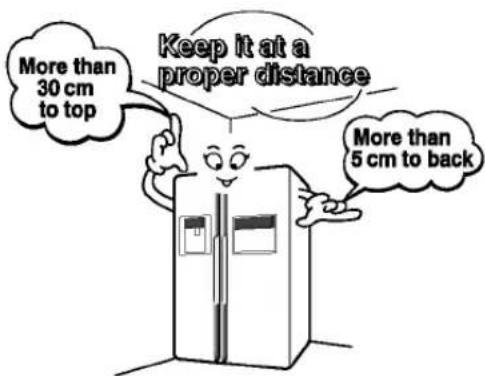
- Air must circulate properly around your appliance to ensure efficient operation. If your appliance is placed in a recessed area in the wall, allow at least a 12 Inches (30 cm) or greater clearance above the appliance and 2 inches (5 cm) or more from the wall. The appliance should be elevated 1 inch (2.5 cm) from the floor, especially if it is carpeted.
text_image
More than 30 cm to top Keep it at a proper distance More than 5 cm to back-
To avoid vibrations, the appliance must be leveled.
-
Don't install the appliance below 5°C. It may cause affect the performance.
Disposal of the old appliance
This appliance contains fluid (refrigerant, lubricant) and is made of parts and materials which are reusable and/or recyclable.
All the important materials should be sent to the collection center of waste material and can be reused after rework (recycling). For take back, please contact with the local agency.

Warning
Remove lower cover and then feed water tube
Remove the freezer compartment door
Remove the refrigerator door
Door removal
Electric Shock Hazard
Disconnect electrical supply to refrigerator before installing.
Failure to do so could result in death or serious injury.
If your access door is too narrow for the refrigerator to pass through, remove the refrigerator door and pass the refrigerator laterally.
Remove the lower cover by lifting upward, and remove clip, and then pull up the feed water tube while pressing area ① shown in the figure to the right.
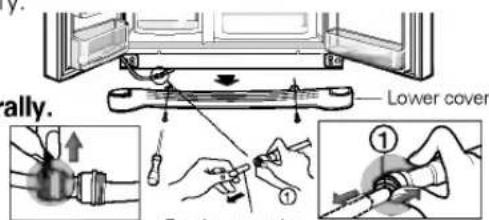
text_image
rally. Lower cover ① ②Feed water tube
NOTE
• If a tube end is deformed or abraded, cut the part away.
1) Removing the hinge cover by loosening the screws. Separate all connection wires except for the earth line after.
2) Remove the keeper by rotating it counter clockwise (①) and then lifting the upper hinge up (②).

text_image
Hinge cover Connection wires Upper hinge Earth line Keeper Upper hingeNOTE
- When removing the upper hinge, be careful that the door does not fall forwards.
3) Remove the freezer compartment door by lifting it upward. This time, the door should be lifted enough for the feed water pipe tube to be completely pulled out.

text_image
Lower hinge Enough for water feed pipe tube to be completely pulled outNOTE
- Move the refrigerator compartment door passing through the access door and lay it down, but be careful not to damage the feed water pipe tube.
1) Loosen the hinge cover screws and remove the cover. Remove connection wire, if any, except for the earth line.
2) Remove keeper by rotating it clockwise (①) and then remove the upper hinge by lifting it up (②).
3) Remove the refrigerator compartment door by lifting it up.
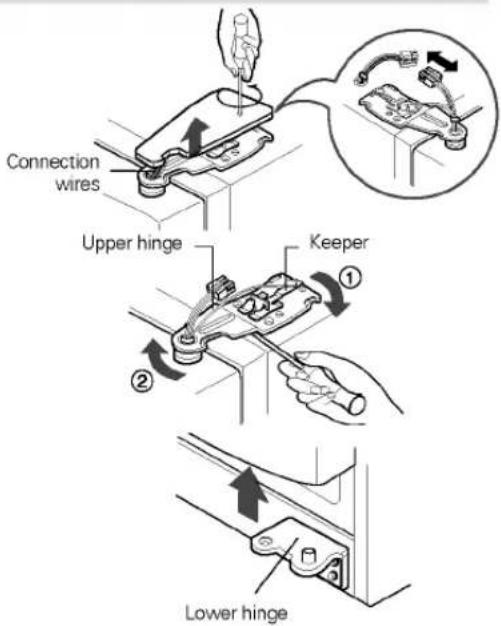
text_image
Connection wires Upper hinge Keeper Lower hingePass the refrigerator
Pass the refrigerator laterally through the access door as shown in the right figure.

natural_image
Illustration of a person standing beside an open refrigerator in a tiled room (no text or symbols visible)Door replacement
Mount them in the reverse sequence of removal after they pass through the access door.
Before installation
Feed water pipe installation
- Automatic ice maker operation needs water pressure of 147\~834 kPa (1.5\~8.5 kgf/cm²) (That is, an instant paper cup (180 cc) will be fully filled within 3 sec.).
- If water pressure does not reach the rating 147 kPa (1.5 kgf/cm ^2 ) or below, it is necessary to purchase a separate pressure pump for normal automatic icing and cool water feed.
- Keep the total length of the feed water pipe tube within 8 m and be careful for the tube not be bent. If the tube is 8 m or longer it may cause trouble in water feed owing to the drain water pressure.
- Install the feed water pipe tube at a place free from heat.

Warning
■ Connect to potable water supply only.
- Refer to instructions with water filter kit for installation.
If the freezer compartment door is lower than the refrigerator compartment door
If the freezer compartment door is higher than the refrigerator compartment door
After leveling the door height
Next
Height adjustment
Level the door by inserting flat (- type) driver into the groove of the left height adjusting screw and rotate it clockwise (①).
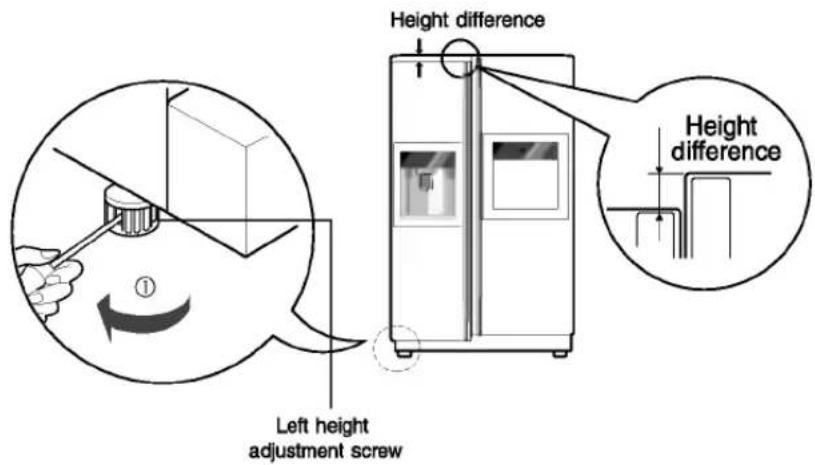
text_image
Height difference Height difference Left height adjustment screwLevel the door by inserting flat (- type) driver into the groove of the right height adjusting screw and rotate it clockwise (①).
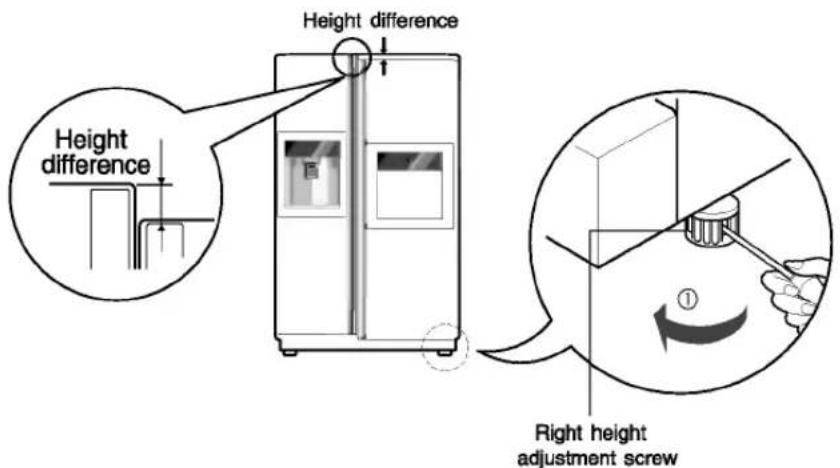
text_image
Height difference Height difference Right height adjustment screwThe refrigerator doors will close smoothly by heightening the front side by adjusting the height adjusting screw. If the doors do not close correctly, performance may be affected.
- Wipe off all dust accumulated during shipping and clean your appliance thoroughly.
- Install accessories such as the ice cube box, cover evaporating tray, etc., in their proper places. They are packed together to prevent possible damage during shipping.
- Connect the power supply cord (or plug) to the outlet. Don't double up with other appliances on the same outlet.
Starting
When your refrigerator is first installed, allow it to stabilize at normal operating temperatures for 2-3 hours prior to filling it with fresh or frozen foods. If operation is interrupted, wait 5 minutes before restarting.
Adjusting the temperatures and functions

text_image
Water/Ice Output Dispenser Push Switch Dispenser Lamp (hidden) Refreshment Center Button Refreshment Center Function display board 189 °C ROOM TEMPERATURE -88 °C 88 °C FILTER MONTH HOLD 3SECS DOOR ALARM 3SECS LOCK EXPRESS FRZ. DISPENSER FREEZER REFRIGERATOR LIGHT/FILTER ALARM/LOCK Display Power Saving ModeNOTE
- Your model may not include every option.
- The control display is operated by touch. Excessive moisture on the display may cause a malfunction. Please keep display clean and dty.
How to adjust the temperature in the freezer compartment
How to adjust the temperature in the refrigerator compartment
Display Power Saving Mode
This function places the display into power saving mode until the next time the door is opened.
Press the FREEZER and EXPRESS FRZ. buttons simultaneously and hold them for 5 seconds until the Ding sounds. All LEDs will then turn ON, then OFF. When the power saving mode is activated, the display will remain off until the next time the door is opened. Then, it will come on whenever a door is opened or a button is pressed and remain on for 20 seconds after the last door opening or button selection. To deactivate the power saving mode, press the FREEZER and EXPRESS FRZ. buttons simultaneously and hold them for 5 seconds until the Ding sounds.
You can adjust temperature of and freezer room and refrigerator room.
Freezer Compartment temperature adjustment

text_image
FREEZER -88°C Setting temperature -15°C -17°C -19°C -22°C -23°CRefrigerator Compartment temperature adjustment

text_image
REFRIGERATOR 88°C Setting temperature 6°C 4°C 3°C 2°C 0°C* Whenever pressing button, setting is repeated in the order of (Weak) → (Middle Weak) → (Middle) → (Middle Strong) → (Strong).
- The actual inner temperature varies depending on the food status, as the indicated setting temperature is a target temperature, not actual temperature within refrigerator.
- Refrigeration function is weak in the initial time. Please adjust temperature as above after using refrigerator for minimum 2\~3 days.
How to use dispenser
- Select among crushed ice, water, and cubed ice and press the push switch with a glass or other container.
Crushed Ice
Light the crushed ice lamp by pressing the selection button.
- Crushed ice will be dispensed by pressing the push switch with a glass.
Water
Light the water lamp by pressing the selection button.
• Water will be dispensed by pressing the push switch with a glass.
Cubed Ice
Light the cubed ice lamp by pressing the selection button.
• Cubed ice will be dispensed by pressing the push switch with a glass.
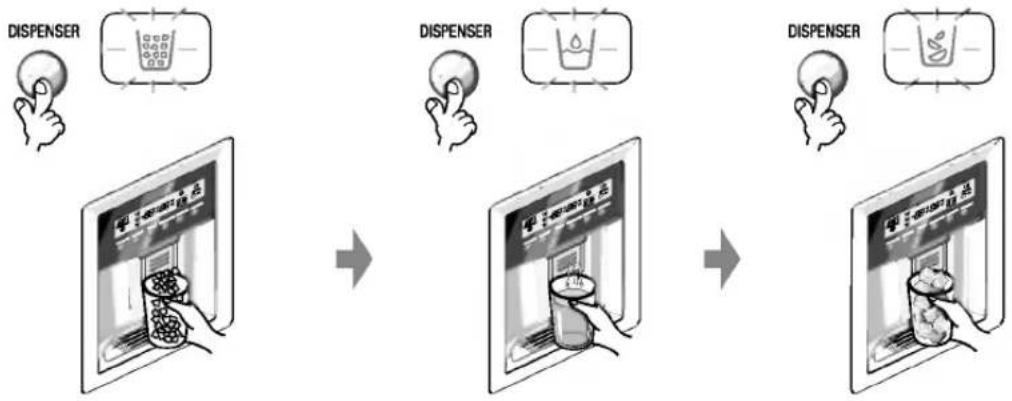
flowchart
graph LR
    A["DISPENSER"] --> B["Add drink to drink with liquid"]
    B --> C["Add liquid to liquid with glass"]
    C --> D["Add cup to cup with liquid"]
    D --> E["Add cup to cup with liquid"]
- Reference: Hold your cup in place for a couple of seconds after dispensing ice or water so the last few drops go in to your cup instead of the floor.
Automatic icemaker

text_image
Water Amount Indicator Light Water Amount Selection Button Power Switch Feeler Arm- The automatic icemaker can automatically make 6 cubes at a time, 70\~120 pieces per day. This quantity may vary by circumstance, including ambient temperature, door opening, freezer load, etc.
- Icemaking stops when the ice storage bin is full.
- If you don't want to use the automatic icemaker, turn the icemaker switch to OFF. If you want to use automatic icemaker again, change the switch to ON.
- The water amount will vary depending on the water amount selection button. Setting, as well as the water pressure of the connected water line.
NOTE
- It is normal that a noise is produced when ice drops into the ice storage bin.
When ice maker does not operate smoothly
Ice is lumped together
- When ice is lumped together, take the ice lumps out of the ice storage bin, break them into small pieces, and then place them into the ice storage bin again.
- When the ice maker produces too small or lumped together ice, the amount of water supplied to the ice maker need to adjusted. Contact the service center.
* If ice is not used frequently, it may lump together.
Power failure
- Ice may drop into the freezer compartment. Take the ice storage bin out and discard all the ice then dry it and place it back. After the machine is powered again, crushed ice will be automatically selected.
The unit is newly installed
- It takes about 12 hours for a newly installed refrigerator to make ice in the freezer compartment.
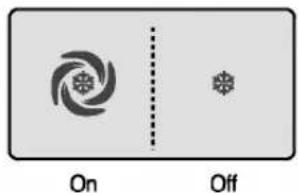
Express freezer
Please select this function for prompt freezer.
■ OFF→ON→OFF is repeated whenever pressing EXPRESS FRZ button.
■ The arrow mark graphic remains at the On status after flickering 4 times when selecting Special Refrigeration On.
- Prompt freezer function automatically turns off after a fixed time passes.
EXPRESS FRZ.
text_image
On OffLock
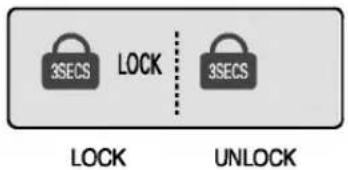
This button stops operation of different button.
- Locking or Release is repeated whenever the ALARMLOCK is pressed more than 3 seconds.
- If you use the ALARM/LOCK button, none of the other buttons will work until you unlock them.
ALARM/LOCK
text_image
3SECS LOCK 3SECS LOCK UNLOCKDoor alarm
Door open warning
- A warning tone will sound 3 times at thirty-second intervals if the refrigerator or freezer door is left open for more than sixty seconds.
- Please contact with the local service center if warning continue to sound even after closing the door.
ALARM/LOCK

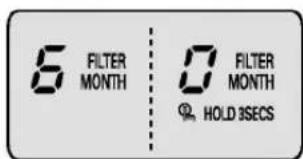
Filter condition (filter replacement cycle) display function
- There is a replacement indicator light for the water filter cartridge on the dispenser.
- The water filter should be replaced every six months.
- The filter light comes on to let you know when to replace filter.
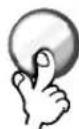
■ After replacing the filter, press and hold the filter button more than 3 seconds to reset the indicator.
LIGHT/FILTER
text_image
5 FILTER MONTH 0 FILTER MONTH HOLD 3SECSDispenser light
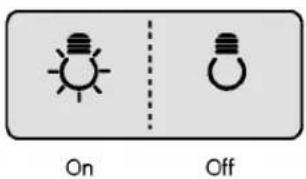
This button turn the dispenser light in the dispenser on an off.
- The dispenser light function is turned ON or OFF by pressing Light/Filter button.
LIGHT/FILTER

text_image
On OffOther functions
How ice/cold water is supplied
Cautions
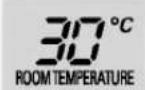
Ambient Temperature Display Window.
- Temperature is displayed only between -9°C \~ 49°C.
- Temperature less than -9°C is indicated with LO and temperature more than 49°C is indicated with HI.
Diagnosis (failure detection) function
■ Diagnosis function automatically detects failure when failure is found in product during the use of refrigerator.
- If failure occurs at product, it does not operate though pressing any button and normal indication is not done. In this case, do not turn power off but immediately contact with the local service center. A lot of time are need for service engineer to detect the failed part if turning it off.
Water is cooled while stored in the water tank in the refrigerator compartment, and then sent to the dispenser.
Ice is made in the automatic ice maker and sent to the dispenser divided into crushed or cubed form ice.
NOTE
- It is normal that the water is not very cold at first. If you want colder water, add ice into the glass.
Throw away the ice (about 20 pieces) and water (about 7 glasses) first made after refrigerator installation.
The first ice and water may include particles or odor from the feed water pipe or feed water box. This is necessary in case that the refrigerator has not been used for a long time.
Keep children away from the dispenser.
Children may push switch incorrectly bad or damage lamps.
Be careful that food is not block the ice passage.
If foods are placed at the entrance of ice passage, ice may not be dispensed. The ice passage may also be covered with ice powder if splinter ice is used only. This time, remove the ice powder accumulated.
Never store beverage cans or other foods in ice storage bin for the purpose of rapid cooling.
Such actions may damage the automatic ice maker.
Never use thin crystal glass or crockery to collect ice.
Such glasses or containers may be broken.
Put ice first into a glass before filling water or other beverages.
Water may be splashed if ice is added to existing liquid in a glass.
Never touch a hand or other tools on ice outlet.
Touch may cause a part breakage or hand injury.
Never remove the ice maker cover.
Sometimes level the surface so that the ice storage bin is fully filled with ice.
Ice is piled up just near the ice maker. So, such status may be considered, by the ice maker, that the ice storage bin is fully filled and ice making operation may stop.
If discolored ice is dispensed, immediately contact service center, stopping use.
Never use too narrow or deep glass.
Ice may be jammed in ice passage and, thus, the refrigerator may be failed.
Keep the glass at a proper distance from ice outlet.
A glass too close to the outlet may hinder ice from coming out.
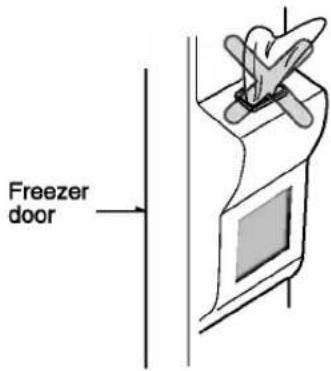
text_image
Freezer doorRefreshment center (Applicable to some models only)
How to use
Open the refreshment center door.
- You can access the refreshment center without opening refrigerator door and thus saving electricity.
- Inner lamp is lit in refrigerator compartment when the refreshment center door opens. Thus it is easy to identify the contents.

natural_image
Illustration of a hand inserting a tray into an open oven (no text or symbols)Use the refreshment center door as a stand
- Never use the refreshment center door as a chopping board and take care not to damage it with sharp tools.
■ Never rest your arms or severely press on it.
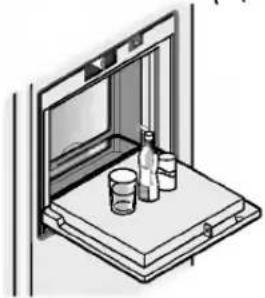
natural_image
Isometric line drawing of a window with bottles and cups on a shelf (no text or symbols)Never take out the inner refreshment center cover
- The refreshment center can not function normally without the cover.
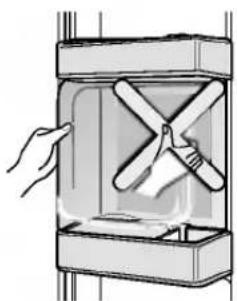
natural_image
Illustration of a hand holding a propeller inside a transparent container (no text or symbols)Never place heavy items on the refreshment center door or allow children to hang it on.
- Not only can the refreshment center door may be damaged, but also children may be hurt.
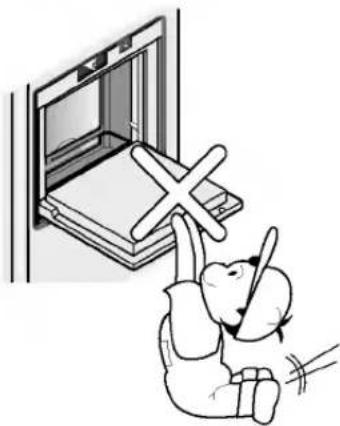
natural_image
Illustration of a child sitting on a bench with a cross symbol above, next to an open book (no text or symbols present)Folding Shelf
Shelf (Applicable to some models only)
You can store taller items such as a gallon container or bottles by simply pushing in front half of shelf underneath back half of shelf. Pull toward you to return to a full shelf.

natural_image
Illustration of a refrigerator interior with an open refrigerator and a side view showing liquid bottles on the stove (no text or symbols)Wine holder (Applicable to some models only)
Wine holder adjustment (Type 1)
Bottles can be stored laterally with this wine corner. This can be attached to any shelf.

natural_image
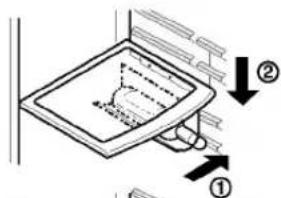
Diagram of a mechanical assembly with two stacked square components and an arrow indicating rotation (no text or symbols)In case of inserting the wine holder :
Pull the wine holder downward as in ② after inserting it into the side anchoring part of the shelf as in ① by catching it upward as in ①.
text_image
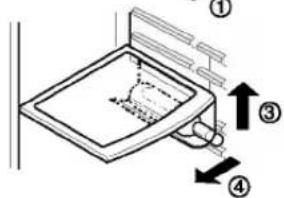
Diagram showing a bathroom sink with labeled parts and directional arrows indicating movement or forceIn case of separating the wine holder :
Pull the wine holder inward as in ④ after holding it upward as in ③ by catching it.
text_image
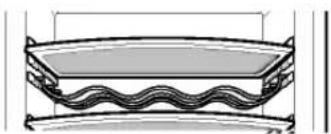
Diagram of a kitchen sink with numbered arrows indicating parts of the sink and handle(Type 2)
Bottles can be stored laterally with this wine rack.
natural_image
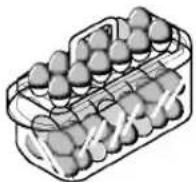
Technical line drawing of a bowl with wavy bottom and curved top (no text or symbols)Egg box (Applicable to some models only)
You can move the egg box to wherever you want.

natural_image
Simple line drawing of a rectangular container filled with eggs (no text or symbols)[Type-1]

[Type-2]
NOTE
- Never use the egg box as an ice storage bin. It can be broken.
- Never store the egg box in the freezer compartment or fresh compartment.
Humidity control in the vegetable compartment
The humidity can be controlled by adjusting the humidity control switch to the left/right when storing vegetables or fruits.
High humidity
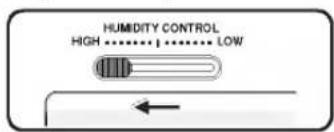
text_image
HUMIDITY CONTROL HIGH ....... ... LOWLow humidity

text_image
HUMIDITY CONTROL HIGH •••••• •••• • LOW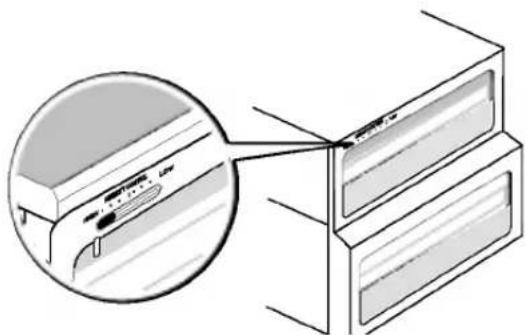
natural_image
Diagram showing a close-up of a device's cable connector with an inset magnified view (no text or symbols)Convert into a vegetable or meat compartment (Applicable to some models only)
- The bottom drawer in the refrigerator can be converted into a vegetable or meat compartment

Vegetable compartment

Meat compartment

natural_image
Illustration of a refrigerator with doors open, showing internal compartments (no text or symbols)
text_image
Conversion switch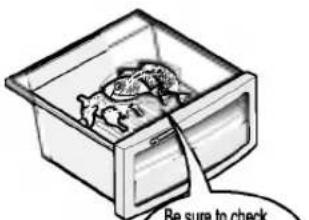
text_image
Be sure to checkBe sure to check the conversion switch before storing foods
The meat compartment maintains the temperature at a lower point than the refrigerator compartment so that meat or fish can be stored fresh longer.
NOTE
- Vegetables or fruits are frozen if the conversion switch is set to meats compartment. So, be sure to check it before storing foods.
Deodorizer (Applicable to some models only)
This system efficiently absorbs strong odors by using the optical catalyst. This system does hot have any affect on stored food.
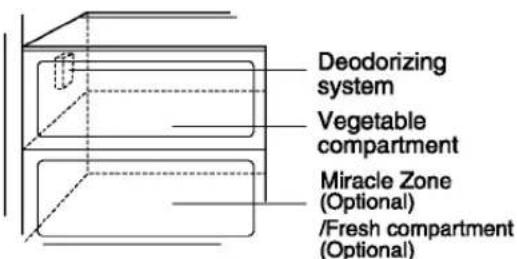
text_image
Deodorizing system Vegetable compartment Miracle Zone (Optional) /Fresh compartment (Optional)How to use the deodorizing system
- Since it is installed already installed onto the cool air intake duct from the from the refrigerator compartment, you need no separate installation.
- Please use closed containers to store food with pungent odors.
- Otherwise, this oder can be absorbed by other food in the compartment.
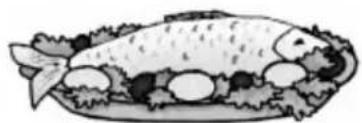
Miracle Zone Temperature Transition Corner (Applicable to some models only)
By pressing the button, store vegetables, fruits or other types of food such as meat to be defrosted, raw fish, etc.
natural_image
Illustration of a fish dish with vegetables and meat (no text or symbols)Method to Use
Temperature Change at Miracle Zone (Applicable to some models only)
You can select optimum temperature range depending on types of foods stored.

text_image
MIRACLE ZONE VEGETABLE- 3-step of temperature selection including -3°C, -1°C and 4°C is available. Vegetables/fruits and cold storage foods requiring humidity maintenance and meats/fishes can be more freshly stored depending on
- When using the Miracle Zone as storage room of meats, storing vegetables or fruits may be frozen
- When using the Miracle Zone as storage room of meats, keeping meats or fishes may be spoiled and thus meats or fishes must be kept at the F-room.
- If opening a door of the R-room, lamp turns on in the selected status and lamp turns off if closing it.
- (Vegetable/Fruit) → (Cold storage while maintaining humidity) → (Meat) is sequentially repeated whenever pressing the "Selection" button.
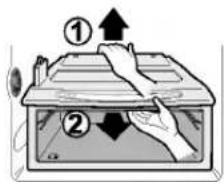
When removing Miracle Zone
Miracle Zone (Applicable to some models only)
- First, remove the vegetable bin.
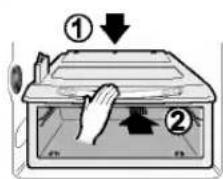
■ After lifting the Miracle Zone case slightly ①, reach inside and pull it outward ②. - Fit the Miracle Zone case on to the ledge ① and gently slide it in ②.
- When forced, the connecting parts can be damaged.
text_image
Diagram showing two hands operating a device with labeled arrows and directional indicatorsWhen installing Miracle Zone
text_image
Diagram showing a hand pressing down on a device with labeled parts ① and ②, indicating a process or operation.Location of foods
(Refer to identification of parts)
Wine holder
Snack drawer
Freezer compartment shelf
Freezer compartment door rack
Freezer compartment drawer
Milk product corner
Egg box
Refreshment center
Refrigerator compartment shelf
Refrigerator compartment door rack
Vegetable drawer
Vegetable drawer /meat drawer conversion corner
Store wine.
Store small foods such as bread, snacks, etc..
Store various frozen foods such as meat, fish, ice cream, frozen snacks, etc..
■ Store small packed frozen food.
■ Temperature is likely to increase as door opens. So, do not store long-term food such ice cream, etc..
- Store meat, fish, chicken, etc.. after wrapping them with thin foil.
■ Store dry.
Store milk products such as butter, cheese, etc..
Place this egg box in the proper location.
Store foods of frequent use such as beverage, etc..
Store side dishes or other foods at a proper distance.
Store small packed food or beverages such as milk, juice, beer, etc..
Store vegetables or fruits.
Store vegetable, fruits, meat to thaw, raw fish, etc.. setting the conversion switch as necessary.
Be sure to check the conversion switch setting before storing foods.

natural_image
Illustration of various food items including bread, fish, milk, cheese, and vegetables arranged vertically (no text or labels)Freezer compartment
Refrigerator compartment
Storing foods
- Store fresh food in the refrigerator compartment. How food is frozen and thawed is an important factor in maintaining its freshness and flavor.
- Do not store food which goes bad easily at low temperatures, such as bananas, and melons.
- Allow hot food to cool prior to storing, placing hot food in the refrigerator could spoil other food, and lead to higher energy consumption.
- When storing the food, cover it with vinyl wrap or store in a container with a lid. This prevents moisture from evaporating, and helps food to keep its taste and nutrients.
- Do not block air vents with food. Smooth circulation of chilled air keeps refrigerator temperatures even.
- Do not open the door frequently. Opening the door lets warm air enter the refrigerator, and cause temperatures to rise.
- Never keep too much food in door rack because they may push against by inner racks so that the door cannot be fully closed.
- Do not store bottles in the freezer compartment - they may break when frozen.
- Do not refreeze food that has been thawed. This causes loss of taste and nutrient.
- When storing frozen food like ice cream for a long period, place it on the freezer shelf, not in the door rack.
- Do not touch the cold foods or containers- especially made of metallic -, with wet hands and place glass products in the freezer compartment.
-
That's why you may have chilblains and they may be broken when their inner matters are frozen, causing personal injury.
-
Avoid placing moist food in top refrigerator shelves, it could freeze from direct contact with chilled air.
- Always clean food prior to refrigeration. Vegetables and fruits should be washed and wiped, and packed food should be wiped, to prevent adjacent food from spoiling.
- When storing eggs in their storage rack or box, ensure that they are fresh, and always store them in an upright position, which keeps them fresh longer.
NOTE
- If you keep the refrigerator in a hot and humid place, frequent opening of the door or storing a lot of vegetables in it may cause dew to form which has no effect on its performance. Remove the dew with dust cloth free from care.
How to dismantle parts
NOTE
- Dismantling is done in the reverse sequence of assembly. Be sure to unplug the power plug before dismantling and assembly. Never apply severe force to dismantle parts. Parts may be damaged.
Freezer compartment lamp
Separate the lamp by pulling it out ③ while slightly pressing ① and rotating ② the lamp cover. Turn the bulb counterclockwise. Use a 40-watt bulb (max.) which can be purchased at a service center.
Freezer compartment shelf
To remove a shelf, push the shelf to the left ①, lift the left part of the shelf a bit ②, lift the right part up ③, and take it out.
Door rack and support
Lift the door rack holding both sides ① and pull it out ②.
Ice storage bin
Hold the ice storage bin as shown in the right figure and pull it out ② while slightly lifting it ①.
- Do not dismantle the ice storage bin unless it is necessary.
- Use both hands to remove the ice bin to avoid dropping it.
After dispenser is used
The water collector has no self-draining function. It should be cleaned regularly. Remove the cover by pulling the front side of water collector cover and dry it with a cloth.

text_image
Diagram illustrating a three-step process of a device with directional arrows and a small robot-like figure below.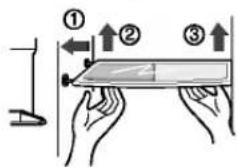
text_image
Diagram illustrating a hand holding a tool with three directional arrows labeled ①, ②, and ③ indicating movement or force directions.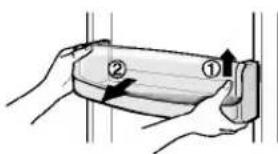
text_image
Diagram showing two labeled parts (① and ②) being handled by hands, likely illustrating a mechanical or electrical component.
text_image
Diagram showing a refrigerator interior with labeled parts, including hand positioning and numbered callouts.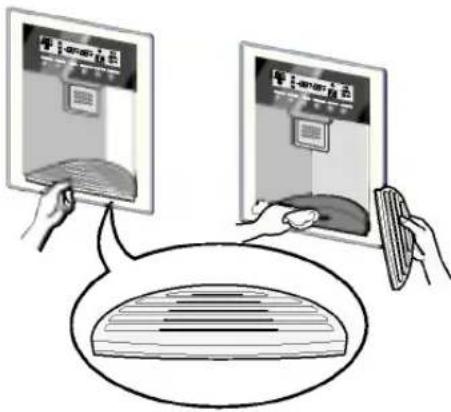
text_image
Illustration showing two devices with a screen displaying 'amort 71' and a hand holding a device, connected to a speech bubble containing a grid.Lamp in refrigerator compartment
To remove the lamp cover, press the protrusion under the lamp cover to the front and then pull the lamp cover out.
Turn the bulb counterclockwise. Max. 40 W bulb for refrigerator is used and can be purchased at a service center.
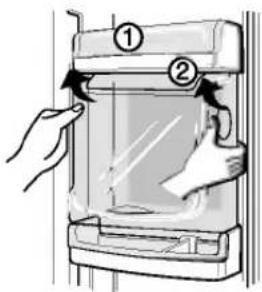
Refreshment center
- Separate the bin (①) to upward.
- Separate the upper rack of the refreshment center and then pull out the refreshment center cover (②).
- The refreshment center can be removed by pulling it upwards.
text_image
Diagram showing a hand pressing down on a device with numbered parts and directional arrows indicating motion or movement.NOTE
- Be sure to remove parts from the refrigerator door when removing the vegetable compartment, snack drawer and refreshment center cover.
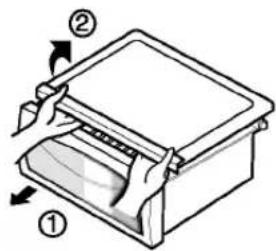
Vegetable compartment cover
- To remove the vegetable compartment cover, pull out the vegetable compartment a bit to the front ①, lift the front part of the vegetable compartment cover as shown by ②, and take it out.
text_image
Diagram of a printer with labeled parts showing two numbered parts and directional arrows indicating movement or assembly.Vacation time
Power failure
If you move
Anti condensation pipe
Exterior
Interior
After cleaning
Warning
General information
During average length vacations, you will probably find it best to leave the refrigerator in operation. Place freezable items in freezer for longer life.
When you plan not to operate, remove all food, disconnect the power cord, clean the interior thoroughly, and leave each door OPEN to prevent odor formation.
Most power failures that are corrected in an hour or two will not affect your refrigerator temperatures.
However, you should minimize the number of door openings while the power is off.
Remove or securely fasten down all loose items inside the refrigerator.
To avoid damaging the height adjusting screws, turn them all the way into the base.
The outside wall of the refrigerator cabinet may sometimes get warm, especially just after installation.
Don't be alarmed. This is due to the anti-condensation pipe, which pumps hot refrigerator to prevent "sweating" on the outer cabinet wall.
Cleaning
It is important that your refrigerator be kept clean to prevent undesirable odors. Spilled food should be wiped up immediately, since it may acidify and stain plastic surfaces if allowed to settle.
Use a lukewarm solution of mild soap or detergent to clean the durable finish of your refrigerator.
Wipe with a clean damp cloth and then dry.
Regular cleaning is recommended. Wash all compartments a baking soda solution or a mild detergent and warm water. Rinse and dry.
Please verify that the power cord is not damaged, power plug is not overheated, or power plug is well inserted into the power consent.
Always remove power cord from the wall outlet prior to cleaning in the vicinity of electrical parts (lamps, switches, controls, etc.).
Wipe up excess moisture with a sponge or cloth to prevent water or liquid from getting into any electrical part and causing an electric shock.
Never use metallic scouring pads, brushes, coarse abrasive cleaners, strong alkaline solutions, flammable or toxic cleaning liquids on any surface.
Do not touch frozen surfaces with wet or damp hands, because damp object will stick or adhere to extremely cold surfaces.
Trouble shooting
Before calling for service, review this list. It may save you both time and expense. This list includes common occurrences that are not the result of defective workmanship or materials in this appliance.
| Occurrence | Possible cause | Solution |
| Running of refrigerator | ||
| Refrigerator compressor does not run. | Refrigerator control is off. | Set refrigerator control. See setting the controls. |
| Refrigerator is in defrost cycle. | This is normal for a fully automatic defrosting refrigerator. The defrost cycle occurs periodically. | |
| Plug at wall outlet is disconnected. | Make sure plug is tightly pushed into outlet. | |
| Power outage. Check house lights. | Call local electric company. | |
| Refrigerator runs too much or too long | Refrigerator is larger than the previous one you owned. | This is normal. Larger, more efficient units run longer in these conditions. |
| Room or outside weather is hot. | It is normal for the refrigerator to work longer under these conditions. | |
| Refrigerator has recently been disconnected for a period of time. | It takes some hours for the refrigerator to cool down completely. | |
| Large amounts of warm or hot food may have been stored recently. | Warm food will cause the refrigerator to run longer until the desired temperature is reached. | |
| Doors are opened too frequently or too long. | Warm air entering the refrigerator causes it to run longer. Open the door less often. | |
| Refrigerator or freezer door may be slightly open. | Make sure the refrigerator is level. Keep food and containers from blocking door. See problem section. OPENING/CLOSING of doors. | |
| Refrigerator control is set too cold. | Set the refrigerator control to a warmer setting until the refrigerator temperature is satisfactory. | |
| Refrigerator or freezer gasket is dirty, worn, cracked, or poorly fitted. | Clean or change gasket. Leaks in the door seal will cause refrigerator to run longer in order to maintain desired temperatures. | |
| Thermostat is keeping the refrigerator at a constant temperature. | This is normal. Refrigerator goes on and off to keep the temperature constant. | |
| Refrigerator compressor does not run. | Thermostat is keeping the refrigerator at a constant temperature. | This is normal. The refrigerator goes on and off to keep the temperature constant. |
| Temperatures are too cold | ||
| Temperature in the freezer is too cold but the refrigerator temperature is satisfactory. | Freezer control is set too cold | Set the freezer control to a warmer setting until the freezer temperature is satisfactory. |
| Temperature in the refrigerator is too cold and the freezer temperature is satisfactory. | Refrigerator control is set too cold. | Set the refrigerator control to a warmer setting |
| Food stored in drawers freezes. | Refrigerator control is set too cold. | See above solution. |
| Meat stored in fresh meat drawer freezes. | Meat should be stored at a temperature just below the freezing point of water (32°F, 0°C) for maximum fresh storage time. | It is normal for ice crystals to form due to the moisture content of meat. |
| Temperatures are too warm | ||
| Temperatures in the refrigerator or freezer are too warm. | Freezer control is set too warm. | Set the freezer or refrigerator control to a colder setting until the freezer or refrigerator temperature is satisfactory. |
| Refrigerator control is set too warm. Refrigerator control has some effect on freezer temperature. | Set the freezer or refrigerator control to a colder setting until the freezer or refrigerator temperature is satisfactory. | |
| Doors are opened too frequently or too long. | Warm air enters the refrigerator/ freezer whenever the door is opened. Open the door less often. | |
| Door is slightly open. | Close the door completely. | |
| Large amounts of warm or hot food may have been stored recently. | Wait until the refrigerator or freezer has a chance to reach its selected temperature. | |
| Refrigerator has recently been disconnected for a period of time. | A refrigerator requires some hours to cool down completely. | |
| Temperature in the refrigerator is too warm but the freezer temperature is satisfactory. | Refrigerator control is set too warm. | Set the refrigerator control to a colder setting. |
| Sound and noise | ||
| Louder sound levels when refrigerator is on. | Today's refrigerators have increased storage capacity and maintain more even temperatures. | It is normal for sound levels to be higher. |
| Louder sound levels when compressor comes on. | Refrigerator operates at higher pressures during the start of the ON cycle. | This is normal. The sound will level off as the refrigerator continues to run. |
| Vibrating or rattling noise. | Floor is uneven or weak. Refrigerator rocks on the floor when it is moved slightly. | Be sure floor is level and solid and can adequately support refrigerator. |
| Items placed on the top of the refrigerator are vibrating. | Remove items. | |
| Dishes are vibrating on the shelves in the refrigerator. | It is normal for dishes to vibrate slightly. Move dishes slightly. Make sure refrigerator is level and firmly set on floor. | |
| Refrigerator is touching wall or cabinets. | Move refrigerator so that it does not touch the wall or refrigerator. | |
| Water/Moisture /Ice inside refrigerator | ||
| Moisture collects on the inside walls of the refrigerator. | The weather is hot and humid which increases the rate of frost buildup and internal sweating. | This is normal. |
| Door is slightly open. | See problem section opening/closing of doors. | |
| Door is opened too often or too long. | Open the door less often. | |
| Water/Moisture /Ice outside refrigerator | ||
| Moisture forms on the outside of the refrigerator or between doors. | Weather is humid. | This is normal in humid weather. When humidity is lower, the moisture should disappear. |
| Door is slightly open, causing cold air from the inside the refrigerator to meet warm air from the outside. | This time, close the door completely. | |
| Odors in refrigerator | ||
| Interior needs to be cleaned. | Clean interior with sponge, warm water and baking soda. | |
| Food with strong odor is in the refrigerator. | Cover food completely. | |
| Some containers and wrapping materials produce odors. | Use a different container or brand of wrapping materials. | |
| Opening/Closing of doors/Drawers | ||
| Door(s) will not close. | Food package is keeping door open. | Move packages that keep door from closing. |
| Door(s) will not close. | Door was closed too hard, causing other door to open slightly. | Close both doors gently. |
| Refrigerator is not level. It rocks on the floor when it is moved slightly. | Adjust the height adjusting screw. | |
| Floor is uneven or weak. Refrigerator rocks on the floor when it is moved slightly. | Be sure floor is level and can adequately support refrigerator. Contact carpenter to correct sagging or sloping floor. | |
| Refrigerator is touching wall or cabinets. | Move refrigerator.. | |
| Drawers are difficult to move. | Food is touching shelf on top of the drawer | Keep less food in drawer. |
| Track that drawer slides on is dirty. | Clean drawer and track. | |
| Dispenser | ||
| Dispenser will not dispense ice | Ice storage bin is empty. | When the first supply of ice is dropped into the bin, the dispenser should operate. |
| Freezer temperature is set too warm. | Turn the freezer control to a higher setting so that ice cubes will be made. When the first supply of ice is made, the dispenser should operate. | |
| Household water line valve is not open. | Open household water line valve and allow sufficient time for ice to be made. When ice is made, dispenser should operate. | |
| Refrigerator or freezer door is not closed. | Be sure both doors are closed. | |
| Dispenser will not dispense ice. | Ice has melted and frozen around auger due to infrequent use, temperature fluctuations and/or power outrages. | Remove ice storage bin, and thaw and the contents. Clean bin, wipe dry and replace in proper position.When new ice is made, dispenser should operate. |
| Ice dispenser is jammed. | Ice cubes are jammed between the ice maker arm and back of the bin. | Remove the ice cubes that are jamming the dispenser. |
| Ice cubes are frozen together. | Use the dispenser often so that cubes do not freeze together. | |
| Ice cubes that have been purchased or made in some other way have been used in the dispenser. | Only the ice cubes made by the ice maker should be used with the dispenser. | |
| Dispenser will not dispense water. | Household water line valve is not open.See problem "Ice maker is not making any ice." | Open household water line valve. |
| Refrigerator or freezer door is not closed. | Be sure both doors are closed. | |
| Water has an odd taste and/or odor. | Water has been in the tank for too long. | Draw and discard 7 glasses of water to freshen the supply. Draw and discard an additional 7 glasses to completely rinse out tank. |
| Unit not properly connected to cold water line. | Connect unit to cold water line which supplies water to kitchen faucet. | |
| Sound of ice dropping | This sound is normally made when automatically made ice is dropped into ice storage bin. Volume may vary according to refrigerator's location. | |
| Sound of water supply | This sound is normally made when ice maker is supplied with water after dropping the automatically made ice. | |
| Other | Please thoroughly read 'Automatic ice maker and dispenser' in this manual. | |
For any further information, please contact LGEIL Branch & Remote Area Offices
Branch / RAO Addresses
Ahmedabad 101-102, Narayancomplex, Near Navrangpura Busstand, Navrangpura Ahmedabad - 380 009. Tel: 079-26562794, 26407633, 34, 35
Mehsana GL-41, Apollo Enclave, Opp Jainderasar, Highway, Maisana, Gujrat, Tel : 9825600404
Agra 28 Gulmohar Vatika, Shitla Road, Khandan Crossing Agra, Tel : 0562-2530913, 2530917
Jhansi 200/1,Behind National Bakery,Sipri Road,Civil Lines,Jhansi,Tel:9839508012
Asansol Block-E, Ist Floor, P C Chattarjee Market, Rambandhu Tala, GT Road (E) Asansol-713303, Tel: 0341-3096036, Mob: 3092009, 3092010
Siliguri 3rd Mile, Sevoke Road, Siliguri-7134401, Tel: 9434006690
Midnapore BE-27,Bidhannagar,Midnapore,Tel:9830522899
Aurangabad 207-B, Tapadiya Super Market, Nirala Bazaar Road, Samartha Nagar, Aurangabad - 431005, Tel : 0240-2344705
Jalgaon Nanded & Jalgaon Area office is on finalisation stage, Tel: 9823317119, 9823317113
Nasik Flat No:6, Vijay Tower, Opposite Telephone Exchange, Canada Corner Saralpur Road., Nasik-422105., Tel: 9823317006
Amritsar 690,Batala Road,Amritsar,Punjab,Tel:0183-5096753
Gurdaspur SCO-19, Gurunanak Market, Opp. LIC Office, Shastri Nagar, Batala., Tel: 9855409012
Bhatinda 142, C/O Pipul Care Centre, Bibi Wala Road Bhatinda, Tel : 0164-2222448
Sangrur C/o Sigma Enterprises, Gola Market, Sangroor
Ferozepur C/o Saini electronics, Bagdadi Road, Ferozpur, Tel : 9814435428
Bangalore 93,TKN Mansion, Ground Flr, KH Road, Bangalore- 560027, Tel: 080-51145145, Mob: 30910754,30910753
Mysore No.763, 12th Main, Near Akshay Bandar, Kuvempunagar, Mysore - 570 023.
Bhopal 3 Malik Warehouse, J K Road ,Bhopal, Tel : 0755-5262847, 5262848,5260717, Mob : 3092938 , 3959804
Gwalior C/o Electrocare, Anuj Sadan, Opp. Dainik Bhaskar Lane, Jayendra Ganj, Gwalior, Tel: 0751-3958510, Mob: 9826722553
Jabalpur C/o K.M.Marketing Associates, 472,K.S House,Katangi Road, Karmeta,Jabalpur, Tel: 0761-3097858, 5016847, Mob: 9826722552
Satna C/o Satna Services, Gali No. 1, Pushpraj Colony, Satna(M.P), Tel: 07672-309705, Mob: 9826722554
Bhubaneshwar Plot No.02,1st Flr.,Bapuji Nagar, Bhubaneshwar- 751009, Tel : 0674-2531430, 2534280, Mob : 3966525,3966526
Rourkela Qtr. No: L-129, Phase - 1, Basanti Colony, Rourkela - 12.
Behrampur Gandhi Nagar, Main Road, Opp: Indian Gas, BEHRAMPUR - 01, Tel : 9937099009
Calcutta 1, Ho-Chi-Min-Sarani, 6th Floor, Metro Towers, Calcutta-700071, Tel: 033-22883250/51, Mob: 30946125
Barackpore 195 Barasat Road, Near Panasia Nursing Home , 24 Paraganas (North), Kolkata - 700 122, Mob : 9830191903
Chandigarh Plot No.177-G, Ind. Area, Phase-1, Chandigarh, Tel: 0172-5087389,90, Mob: 3959595,3959596
Dharamshala 301, Civil Lines, Dharamshala, Tel: 01892-229194, Mob: 9816050402
Chennai AA11, 2nd Avenue, Fatima Tower, Anna Nagar West, Chennai-600040, Tel: 044-55510500\~08, Mob: 30924478,30924479
Vellore No. 3, Post office-3, Krishnanagar ,Opp. Venus Theatre, Vellore-1, Mob : 9894721033
Cochin 40/1270, Vasudeva Buildings, T.D.Road ,Ernakulam Cochin-682011, Tel : 0484-2368966, 2370744, Mob : 3946877,3946878
Kottayam C/o Maria Electronics, Goodshed road, Ozhathgil Lane, Kottayam, 686001, Mob : 9895399809
Trivendrum Hi-Tech Electronics, Hrishikesh, PC 25/2829, Mathrubhumi Road, Trivandrum -35, Mob : 9895399815
Coimbatore 250a, Sanganur Main Road, Kannappa Nagar, Coimbatore-641027, Tel: 0422-2332506, 2331862, Mob: 3094613,3094573
Salem F-13, Indira Gandhi Road, Fairlands, Salem-636016, Mob : 9843204202
Delhi (South) 221, Okhla Industrial Area, Phase-III, New Delhi, Tel: 011-26830953, 26837347, Mob: 30989283, 30989365/66/67, 30989278, 30989358
Delhi (West) 13 Milestone, Rohtak Road, Opp Maharaja Agrsen Hospital,Punjabi Bagh,ew Delhi-110026, Tel: 011-9873002340/9873002339
Dehradun M-22, Mobbewala, Tata Commercial Compound, Dehradun Saharanpur Road, Dehradun, Tel: 0135-2644213,2644283
Haldwani Church Compound, Behind PNB, Advocate Jasgdish Kr. Bldg, Nanital Road, Haldwani, Mob : 9897173003
Goa Plot No-D-3&D-4,Rego Baug, Alto Santacruz, Bambolim, Goa-403, Mob : 3094755,3094955,3094956
South Goa D-3,4, Rego Bagh, Alto St. Cruz, Bambolim, GOA, Mob : 9850478909
Gurgaon II nd Flr, A Block, Centre Point Bldg, Sushant Lok, Gurgaon, Tel: 0124-5047461-62-63, Mob: 3950019,3099959
Hissar SCF-2, Red square market, Near Bank of Baroda, Railway Road ,Hissar, Mob : 9811354295
Ghaziabad J-10, RDC Rajnagar Ghaziabad, Tel: 0120-2722973, 2724686, 3943465, 3943467, Mob: 3943465, 3943467
Bareilly 218, Chitrakoot Building, Chander Gupt Hotel Lane, Bareilly, Tel: 955812422673/72, Mob: 9837066696
Meerut A-8, Garh Road, Near Raja Rani Banquet Hall, Meerut, Tel: 95121-3099920/21, Mob: 9837778124
Guwahati Shantineer Bhawan, C K Aggarwal Path, Chenikurthi, Guwahati-781003, Tel: 0361-2668984, 2662896, 2663895, 2665983, 2666958
Jorhat KB Road, Near: L.I.C. Office, Jorhat, Tel: 0376-2301057, Mob : 9864028139
Silchar N.N. Dutta Road, Near Jain Temple, Silchar District - Cachar, Assam, Mob : 9864029750
Hyderabad K/1/1,IDA, Uppal, Hyderabad -500039, Tel: 040-27207504,05,06, Mob: 30921140
Warrangal D. No-1-7-1788, Below Labour Office, BalaSamudram Main Road, Hanmakonda, Warangal, Mob : 9849989552
Hubli 603/1B, Ravi Nagar Road, Behind Renuka Petrol Pump, Gokul Road, Hubli-580030, Tel: 0836-2337251,52,53, Mob: 3090749.3090651
Mangalore 2/116, Aspinwall & Co Godown, Opp to Aspinwall & Co., Kulshekar - Maroli Road, Maroli, Mangalore - 575005, Mob : 9845941038
Gulbarga No.-1-21/4,Mehta Compound, Court Road ,Gulburga, GULBURGA-585102, Mob : 9845941005
Shimoga Opp. Saphagiri Finance, Jail Circle, Kuvempu Road, SHIMOGA-577201, Mob : 9845941006
Belgaum Jyoti Suraj Bldg., CCB-101, Maratha Colony, Off-congress road, Tilakwadi, BELGAUM-590006, Mob: 9845941030
Indore 3rdflr.,304 Bansi Trade Centre,581/5 M.G.Road,Indore-452003, Tel: 0731-5065523\~24, 2546985, 25065669, Mob: 3956060,3956065
Jaipur B-71, Shankar Marg, Lal Kothi Scheme, Jaipur-302015, Tel: 0141-2741553, 2742639, Mob: 3951458, 3951478
Alwar Plot No. 234A, II/3, State Bank Colony, Police Line, Ajmer-305001, Mob : 9829213525

Branch / RAO Addresses
| Jallandhar | Opp Jassi Market, Village Khajurla,Near TVS Godown Jallandhar -Phagwada, G T Road, Jallandhar, Tel : 01824-502,667,502,668,502,000 |
| Hoshiarpur | C/o GIDDA Complex, Near Sale Tax Office, New Hari Nagar Railway Road, Hoshiarpur, Mob : 9814924553 |
| Jammu | Plot No.-52,Transport Nagar, Narwal, Jammu, Tel : 0191-2477420, 2477419, 2474396, 2474384 |
| Srinagar | 1-A, Arabian Complex, RajBagh, Srinagar, Mob : 949135809 |
| Jodhpur | 22 (1-A), RIICO Heavy Industrial area, Jodhpur - 342003, Tel : 0291-2742403 ,2742384 , Mob : 3093487(Accounts) ,3093489 |
| Bikaner | II B-9, Jai Narayan Vyas Colony, Shiv Bari Road, Opp Krishna Marriage Place, Bikaner-334003, Rajasthan, Tel : 0151-2230115 |
| Sikar | Mob : 9829213531 |
| Kundli | Sunshine Enterprises, Sunder Cold Storage, Gt Karnal Road, Kundli-Sonipat , Tel : 0130-2219201, 2219202, 2219203, 2219204 |
| Ambala | Plot No. 4261-62,Punjabi Mohalla, Cross Road No. 2, Near Vijaya Bank, Ambala Cantt. 133001, Tel : 0171-2600355 |
| Kozhikode | 11 / 434, Eranhikkal Bldgs, Cherooty Road, Kozhikhode- 673001 Kerala, Tel : 0495-2366755, 2366756, 2366678 |
| Lucknow | 537,Hari Kunj, Keshav Nagar, Sitapur Road Lukhnow, Tel : 0522-2757538,39 ,58,59, Mob : 3951507/8/9 |
| Kanpur | 117/Q/707,120 Ft. Road, Shardanagar, Kanpur, Mob : 9839014446 |
| Sitapur | 447 Aryanagar, Sitapur, Mob : 9839173524 |
| Ludhiana | Village Jhande,Near Badowal Railway Station,Opp ferozpur Road Ludhiana, Tel : 0161-2804412 - 15, Mob : 3959985 |
| Patiala | (Richie Electronics) LG Care Centre, Upper Mall, Opposite polo ground, Patiala, Mob : 9814649420 |
| Ropar | (Anukar Utility Service) LG Care Centre, SCF - 56, Phase -II, Mohali, Mob : 9814088934 |
| Madurai | 7-1-54,Jothimal Godown,Madurai Dindigul Highroad, Paravai,Madurai-625402 Tamilnadu, Tel : 0452-2464016 |
| Tirunelveli | No:71,Trivandrum High Road, Palayamkottai, Tirunelveli-627002, Mob : 9843204316 |
| Mumbai(North) | Unit No.3,L Wing,2nd Flr., Tax Center, Behind HDFC Bank, Off Saki Vihar Road, Chandiwali, Andheri(E), Mumbai-400072, Tel : 022-28472410-14 |
| Mumbai(south) | 108/109, Nav Neelam Bldg, Near Flora Restaurant, R G Thadani Marg, Worli , Mumbai- 4000018, Tel : 022-24971357, 26244427, 56244428, 29, 30, 31 |
| Nagpur | 5a,Road No.13,Behind Msrtc Workshop, Midc Hinga,Nagpur-440016, Tel : 07104-235120, 235122, Fax: 234401, Mob : 3092641,3092642 |
| Akola | C/o Anand Building, New Bhagat plot, Behind Indraprastha Road, Akola, Mob : 9822225336 |
| Patna | B-8, Shakra Manzil, S K Puri, Patna, Tel : 0612-2211373, 2236580, Mob : 3098714 |
| Bhagalpur | F/O. LIC Building-II(Old), R.B.S.S.S.Road, Bhikhanpur, Bhagalpur - 812 001, Mob : 9431022463 |
| Gaya | Sumitra Sadan, Boring Road Crossing, Patna, Mob : 9431022465 |
| Muzaffarpur | New Bela Ashram Road, Mithanpura Chowk, Muzaffarpur |
| Pune | 105/106, Pride Silicon Plaza, Senapati Bapat Road, Pune-411016, Tel : 020-4030100, Mob : 30922960,30967366,30915833,30967635 |
| Solapur | 940/2 "Garud Bunglow", North Sadar Bazar, Solapur- 413003, Tel : 0217-2317403, Mob : 9823317096 |
| Kolhapur | 517/10, Sawali Bungalow, Near Vikram high school, Shivaji park, Kolhapur 416 001 |
| Pune Plant | Plot A-5 MIDC,Ranjan Gaon, Tahseel Shirur Distt.-Pune, Tel : 02138-232268/69/70 |
| Raipur | Nathani Compound, Shyam Nagar, Katora Talab, Raipur(C.G), Tel : 0771-5037470, 5053171, Mob : 3959707,3959708 |
| Bilaspur | Hari Kishan Colony, Near PGBT College, High Court Road, Bilaspur - 495 001, Chattisgarh, Tel : 07752 - 515164, Mob : 9826139333 |
| Ranchi | 402,Commerce Tower, Opp. Gel Church Complex, Main Road, Ranchi, Tel : 0651-2331519, 2331815, Mob : 3090426 |
| Dhanbad | Mouja-Dhansar, Moja No. 52, Khata No. 30 , Plot no. 101,102,103, Opp: Dhansar Thana , Dhansar, Dhanbad , Jharkhand, Tel : 0326-2306884 |
| Jamshedpur | 4,5 Ravindra Nagar, New Kasidih ,Road No -1, Sakchi ,Jamshedpur, Cell : 9431104061, 9431104052 |
| Rajkot | 301, 302 Dhanrajni ,Dr. Yagnik Road, Rajkot - 360001, Tel : 0281-2481499,2467692, Mob : 3094093,3094096 |
| Jamnagar | 102, Cozy Hill, Bedi Bandar Road, Pt. Nehru Marg, Jamnagar - 362 005, Tel : 0288-2753916, Mob : 9825612179 |
| Bhavnagar | UL-40, Pattani Plaza, Nr. Nilam Bag Circle, Dairy Road, Bhavnagar - 364 002, Tel : 0278-2524685 |
| Bhuj | 12, Second floor, Shree Swaminarayan Vanijya Sankul Building, Main Hospital road, Bhuj - 370001, Mob : 9825610041 |
| Surat | 1001-1004,Ascon Plaza, Ilnd Flr, Anand Mahal Road, Behind Bhulka Bhavan School,Adajan,Surat-395009, Tel : 0261-2730982 - 85, Mob : 3954419 |
| Baroda | 204, Silver Line Complex,Opp. BBC Tower, Sayajigunj, Baroda - 390 005, Tel : 0265 - 222 59 70/71, Mob : 9879106703 |
| Thane | Ad-1-13,Rajlaxmi Commercial Complex, Opp. Durgesh Park, Village-Kalher, Thane- Bhiwandi Highway Dist.-Thane-421302, Tel : 02522-277497/27755 |
| Vashi | Mangalmurti Chember, HB Builder Shop No.-4 , Plot No-17, Sector No.-30 Opp.Sanpada Railway Station Vashi Navi Mumbai, Mob : 9820707742 |
| Mira Road | Shop No. 6, Jagannath Dham, Vinayak Nagar, Shree Vinayak Mandir Marg, Nr. Reliance Energy Coll Centre, Bhayander(W) 401101, Tel : 022-28183108 |
| Kalyan | Shop No.1, Satyam Appartment, Bhanu Nagar, Near Bhanu Sagar Theatre, Station Road, Kalyan (WEST), Mob : 9819382052 |
| Tirupati | 19-3-13/M4, Behind Hero Honda Showroom,Renugunta Road, Tirupati - 517501, Tel : 0877-2282306/08 |
| Ananthpur | Shop No.1, L.S.Towers, Opp.Lalithakala Parishad, Subash Road, Ananthapur - 515 001, Tel : 08554-241025, Mob : 9849987409 |
| Kurnool | 76-103-104, Vesavi Traders Godown, Bellary Road, Kumool - 518 004, Mob : 9849987557 |
| Trichi | 5/2, Kumaran Plaza, Kumaran Nagar, Vayalur Main Road, Trichy -17, Tel : 0431-2771530 / 40 / 50, Mob : 3099564 |
| Pondicherry | RS No. 70, Manaveli, Ariyankuppam, Pondicherry-605 007 |
| Kumbakonam | Siva Complex, No. 29,Pettai Salai Karai Theru, Thanjavur Main Road, Tharasuram, Kumbakonam-612 001, Mob : 9443146973 |
| Udaipur | 101,Moti Magri Scheme,Udaipur, Tel : 0294-2419761 |
| Kota | 377-B, Near Radha Kishan Temple, Taiwandi, Kota, Tel : 0744-2406902, Mob : 9829213510 |
| Varanasi | Shree Ganga Keramos Compound,Lahartara Road, Shivdaspur, Manduadih, Varanasi, Tel : 0542-2373919, Mob : 3091773, 1774, 98398 000 00 |
| Gorakhpur | C/179/301,Daudpur (Op.Kali Mandir), Gorakhpur,(U P) Pin Code-273001, Tel : 0551-2202197, Mob : 9839800106 |
| Allahabad | 7-E/5 Tashkent Marg, Opp. St. Joseph College, Allahabad. (U.P), Pin. Code : 211001, Tel : 0532 - 2604216, Mob : 9839800104 |
| Vijaywada | 1st Floor, Yalamanchili Complex, Ring Road, Near Executive Club, Vijay wada - 520008, Tel : 0866-2450128, Mob : 3094526,3094528 |
| Rajahmundri | D.No: 79-5-7, Plot No: 44, Thilak Road, Beside State Bank Of Hyd, Rajahmundry, Mob : 9849987509 |
| Vizag | D.No:14-1-99, Fiat No: G-01, Horizon Enclave, Nowrozi Road, Maharani Peta, Vishakapatnam, Mob : 9849987507 |
WARRANTY
The LG Refrigerator comes with 1 year warranty on all parts (except bulb, glass & loose plastic parts) & 4 years warranty on Compressor from the date of purchase against the defective material or workmanship. In case of defect, LG Electronics India Pvt. Ltd. undertakes to get set repaired free of charge during warranty period
INSTRUCTIONS FOR THE CUSTOMER
- This warranty card has 2 parts. Kindly ensure that the dealer fills all parts correctly.
- Part A is the customer's copy. It should be retained by you for record.
- Part B must be torn and mailed to the nearest LG ELECTRONICS CUSTOMER CARE CENTRE listed in this booklet. If not, please tell the dealer to keep Part B for collection.
- In the event of a defect developing in the product, contact the authorised LG Electronics Customer Care Centre with whom you have registered, for obtaining warranty service and inform him of the defect, Model No. & SI. No.
TERMS AND CONDITIONS
- Repairs & Replacements will be carried out either by the dealer from whom the set has been purchased, or through the Authorised Customer Care Centre with whom the set has been registered.
- For Units installed beyond the municipal limits of the jurisdiction of the authorised customer care centre, all expenses incurred in collecting the units or parts thereof from the company's customer care centre, as well as expenses incurred with deputising of service personnel/technicians towards conveyance and other incidentals etc. will be borne by the customer.
- The concerned customer care centre will advise the customer whether to effect the repair at site or at the customer care centre.
- While the company will make every effort to carry out repairs at the earliest, it however is made expressly clear that the company is under no obligation to do so in a specified period of time.
- The company or its authorised customer care centre/service dealer reserves the right to retain any part/s or components replaced at its discretion, in the event of a defect being noticed in the equipment during the warranty period.
- Warranty does not cover accessories external to the equipment supplied by the dealer.
CUSTOMER COPY
PART A
MODEL No.:
DATE OF PURCHASE :
UNIT Sr. No.:
CUSTOMER NAME & ADDRESS
TEL.
DEALER NAME & ADDRESS
TEL.
Customerí Signature
Dealerís Signature
This card is valid only if it is filled in and stamped by our authorised dealer on the date of purchase.
Warranty voids if :
- The warranty card is not completed properly at the time of purchase. 2. The completed warranty card is not presented to authorised personnel at the time of service of the product. 3. The Refrigerator is not operated according to instructions given in the Operating Instructions booklet. 4. Defects are caused by improper or reckless use, which shall be determined by company personnel. 5. Any repair work is carried out by persons other than a authorised company personnel. 6. Defects are caused due to causes beyond control like lightning, abnormal voltage, acts of God or while in transito service centre or purchaser's residence. 7. The warranty is not valid in case, the Serial Number is deleted, defected or altered. 8. Damage to the refrigerator or any parts due to transportation or shifting is not covered by this warranty 9. This warranty automatically expirres after 12 months of original date of purchase, even if the refrigerator may not be in use for any time for whatsoever reasons during the warranty period.
COMPANY COPY
PART B
MODEL No.:
DATE OF PURCHASE :
UNIT Sr. No.:
CUSTOMER NAME & ADDRESS
TEL.
DEALER NAME & ADDRESS
TEL.
Customerí Signature
Dealer's Signature
This card is valid only if it is filled in and stamped by our authorised dealer on the date of purchase.
Customer Information Center
For any query related to the after sales service, please contact us on the numbers listed below :
| City name | Contact No. |
| Bangalore | 19011809999(BSNL/MTNL Users) |
| Bhopal | |
| Calcutta | |
| Chennai | |
| Coimbatore | |
| Hyderabad | |
| Indore | |
| Jaipur | |
| Rajkot | |
| Surat | |
| Ahmedabad | |
| Delhi + NCR | |
| Lucknow | |
| Mumbai + Thane | |
| Nagpur | |
| Pune | |
| State | 19011809999(BSNL/MTNL Users) |
| Andhra Pradesh | |
| Gujarat | |
| Karnataka | |
| MP | |
| Rajasthan | |
| Tamil Nadu | |
| UP - Eastern | |
| West Bengal | |
| Chandigarh | |
| Punjab |

LG Electronics India Pvt. Ltd.
(Regd. Off.): 20-A, Shivaji Marg, Moti Nagar, New Delhi-110015
LG ELECTRONICS INDIA PVT. LTD. CUSTOMER CARE CENTRE

LG Electronics Inc.
LG Twin Tower, 20, Yoido-Dong, Youngdungpo-Gu, Seoul, 150-721, Korea. http://www.lge.com