
99-8155 - Car Installation Kit Metra - Free user manual and instructions
Find the device manual for free 99-8155 Metra in PDF.


| Product Type | Installation Kit |
| Brand | Metra |
| Model | 99-8155 |
| Compatible Vehicles | 1997-2001 Lexus ES Series |
| Radio Provision | DIN Head Unit with Pocket, ISO DIN Head Unit with Pocket |
| Kit Components | Radio Housing, Radio Housing Brackets, Trim Plate, ISO Brackets |
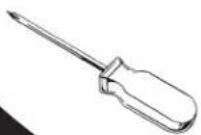
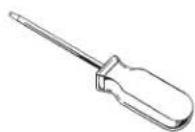
| Tools Required | Phillips Screwdriver, Small Flat Blade Screwdriver, Socket Wrench |
| Wiring Standard | EIA Color Code (12V Ignition Red, 12V Battery Yellow, Ground Black, etc.) |
| Installation Method | Dash disassembly, bracket attachment, cage mounting, wiring connections |
| Power Supply | 12V DC vehicle electrical system |
| Safety Precautions | Disconnect negative battery terminal before installation to prevent short circuit |
| Care and Cleaning | Wipe with dry cloth; avoid liquids and abrasives |
| Spare Parts Availability | Contact Metra or authorized dealers for replacement components |
| Reparability | Modular design allows replacement of individual brackets or trim plate |
| Dimensions | Standard DIN/ISO DIN size (approx. 180 x 50 mm for radio opening) |
| Weight | Approximately 0.5 kg (kit components) |
| Warranty | Refer to Metra warranty policy |
| Country of Origin | Not specified, likely China or USA |
Frequently Asked Questions - 99-8155 Metra
User questions about 99-8155 Metra
0 question about this device. Answer the ones you know or ask your own.
Ask a new question about this device
Download the instructions for your Car Installation Kit in PDF format for free! Find your manual 99-8155 - Metra and take your electronic device back in hand. On this page are published all the documents necessary for the use of your device. 99-8155 by Metra.
USER MANUAL 99-8155 Metra
INSTALLATION INSTRUCTIONS FOR PART 99-8155
APPLICATIONS
1997-2001 Lexus ES Series
99-8155
KIT FEATURES
• DIN Head Unit Provision with Pocket
• ISO DIN Head Unit Provision with Pocket

natural_image
Interior view of a car dashboard with air gauges and control panels (no visible text or symbols)KIT COMPONENTS
(A) Radio Housing • (B) Radio Housing Brackets • (C) Trim Plate • (D) ISO Brackets

natural_image
Technical line drawing of a mechanical bracket or housing component (no text or symbols)
natural_image
Technical line drawing of three mechanical bracket assemblies (no text or symbols)

TOOLS REQUIRED:
Phillips Screwdriver • Small Flat Blade Screwdriver • Socket Wrench


1-800-221-0932

www.metraonline.com
© COPYRIGHT 2004 METRA ELECTRONICS CORPORATION
TABLE OF CONTENTS
Dash Disassembly
1997-2001 Lexus ES Series .... 1
Kit Assembly
1997-2001 Lexus ES Series 2
DIN Head Unit Provision with Pocket 3
ISO DIN Head Unit Provision with Pocket 4
Final Assembly 5
1997-2001 LEXUS ES SERIES
1 Disconnect the negative battery terminal to prevent an accidental short circuit.
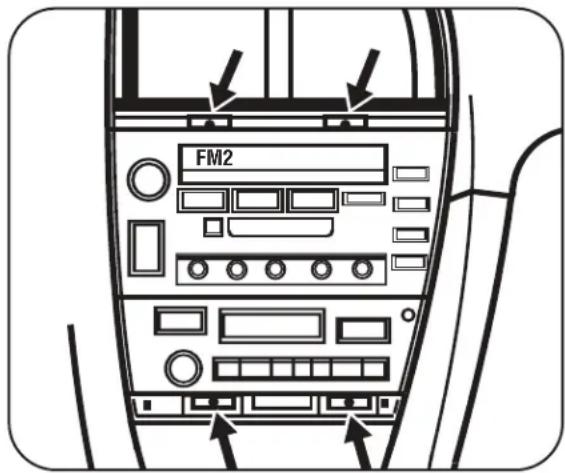
2 Carefully pry out and remove small trim panel between ashtray and bottom of climate control. (Figure A)
3 Using a small flat blade screwdriver gently pry out on the top of the A/C vent assembly (including clock) and remove. (Figure B)
4 Remove (4) retaining screws securing factory radio/climate control assembly to remove. (Figure C)
5 Remove (4) retaining screws securing factory climate control to bracket assembly. (Figure D)
D

A

natural_image
Line drawing of a car air conditioner unit panel with control buttons and buttons (no text or symbols)B

natural_image
Line drawing of a front-mounted air conditioner unit with ventilation grilles and control panel (no text or symbols)C
1997-2001 LEXUS ES SERIES
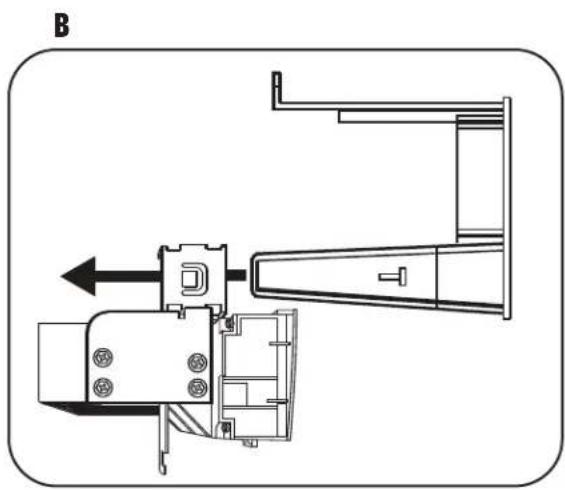
1 Attach the corresponding bracket to the factory climate control using the factory hardware. (Figure A)
2 Slide the factory climate control and bracket assembly onto the 99-8155 housing until side clips engage. (Figure B)

natural_image
Technical line drawing of a mechanical device with directional arrows indicating movement (no text or symbols)1997-2001 LEXUS ES SERIES
DIN HEAD UNIT PROVISION
1 Slide the DIN cage into the Radio Housing and secure by bending the metal locking tabs down. (Figure A)
2 Slide the aftermarket head unit into the cage and secure. (Figure B)

natural_image
Line drawing of a hand using a tool to adjust or install a mechanical component (no text or symbols visible)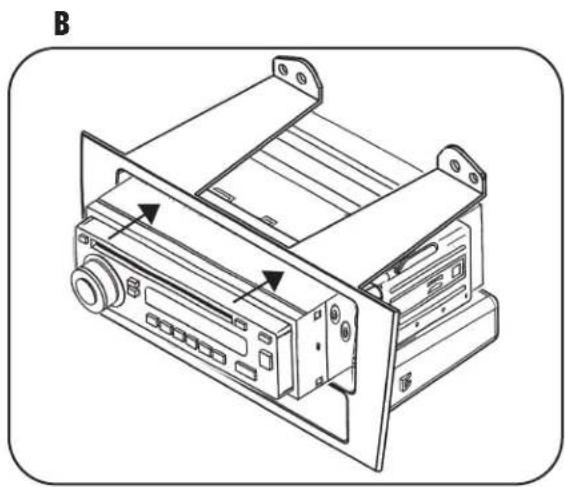
natural_image
Technical line drawing of a device chassis with labeled ports and connectors (no text or symbols)1997-2001 LEXUS ES SERIES
ISO DIN HEAD UNIT PROVISION
1 Mount the ISO brackets to the radio with the screws supplied with the unit. (Figure A)
2 Slide the head unit into the radio opening until the side clips engage. (Figure B)
3 Snap the trim plate into the radio housing. (Figure B)
A

natural_image
Line drawing of a hand using a screwdriver to adjust or install an electronic device (no text or symbols present)B

FINAL ASSEMBLY
1 Locate the factory wiring harness in the dash and make the connection as shown. Metra recommends using the proper mating adapter and making the connections as shown. (Isolate and individually tape off the ends of any unused wires to prevent electrical short circuit.)
2 Re-connect the negative battery terminal and test the unit for proper operation.
3 Reassemble radio and dash assemblies in reverse order of disassembly.
FINAL WIRING CONNECTIONS
Make wiring connections using the EIA color code chart shown below and the instructions included with the head unit. Metra recommends making connections as shown below; Strip, Splice, Solder, Tape. Isolate and individually tape off ends of any unused wires to prevent electrical short circuit.

A) Strip wire ends back 1/2"
B) Twist ends together
C) Solder
D) Tape
METRA / EIA WIRING CODE
12V Ignition / Acc ... R e d
12V Batt / Memory .. Yellow
Ground .... Black*
Power Antenna ..... Blue
Amp Turn-On ..... Blue / White
Amp Ground ..... Black / White
Illumination.....Orange
Dimmer ..... Orange / White
Right Front (+) ..... Gray
Right Front (-) ..... Gray / Black
Left Front (+) ..... White
Left Front (-) ..... White / Black
Right Rear (+).....Violet
Right Rear (-) ..... Violet / Black
Left Rear (+).... Green
Left Rear (-) ..... Green / Black
*NOTE: When a Black wire is not present, ground radio to vehicle chassis.
All colors may not be present on all leads due to manufacturer's specifications.
INST998155


Brand : Metra
Model : 99-8155
Category : Car Installation Kit