
99-7888 - Car Installation Kit Metra - Free user manual and instructions
Find the device manual for free 99-7888 Metra in PDF.


| Product Type | Car Stereo Installation Kit |
| Brand | Metra |
| Model | 99-7888 |
| Compatible Vehicles | Select Acura, Honda, Isuzu models (1990-2002) |
| Kit Components | Radio housing, trim plate, radio support, mounting bracket, equalizer dummy plate, shaft masks, (2) pal nuts |
| Radio Provisions | 2-shaft and DIN radio compatibility |
| Equalizer Provision | Dedicated slot for aftermarket equalizer; includes dummy plate |
| Rear Support | Included for secure mounting |
| Tools Required | Phillips screwdriver, cutting tool, socket wrench |
| Dimensions (approx.) | 7 x 2 x 5 inches (radio housing) |
| Weight (approx.) | 1.5 lbs |
| Power Supply | Passive; no power required |
| Installation Difficulty | Moderate; professional installation recommended |
| Safety Precautions | Disconnect battery; connect all accessories before cycling ignition |
| Maintenance | Wipe with dry cloth; avoid moisture |
| Spare Parts Availability | Contact Metra or authorized dealers |
| Certification | Meets automotive standards; MECP recommended |
| Manual | 8-page PDF with step-by-step instructions |
Frequently Asked Questions - 99-7888 Metra
User questions about 99-7888 Metra
0 question about this device. Answer the ones you know or ask your own.
Ask a new question about this device
Download the instructions for your Car Installation Kit in PDF format for free! Find your manual 99-7888 - Metra and take your electronic device back in hand. On this page are published all the documents necessary for the use of your device. 99-7888 by Metra.
USER MANUAL 99-7888 Metra
Installation instructions for part INST-7800
Acura/Honda 1990-2002 INST-7800
INSTALLATION INSTRUCTIONS
Refer to each section title page.
APPLICATION OVERVIEW
| 99-7888 | 99-7890/99-7892 | 99-7891 |
| Acura Integra 1990-2001 | Acura CL 1997-1999 | Honda Civic 1996-1998 |
| Acura Legend 1990-1996 | Acura Integra 1990-2001 | |
| Acura TL 1996-1998 | Acura Legend 1990-1996 | 99-7893 |
| Acura Vigor 1992-1994 | Acura TL 1996-1998 | Honda CR-V 1997-2001 |
| Honda Accord 1990-1993 | Acura Vigor 1992-1994 | Honda Prelude 1997-2001 |
| Honda Odyssey 1995-1998 | Honda Accord 1990-1997 | 99-7894/99-7895 |
| Isuzu Oasis 1996-1999 | Honda Odyssey 1995-1998 | Honda Accord 1998-2002 |
| 99-7889 | Isuzu Oasis 1996-1999 |
APPLICATIONS
See application list inside cover
Contents
Installation Instructions Section
-99-7888 1.0
-99-7889 2.0
-99-7890 3.0
-99-7891 4.0
-99-7892 5.0
-99-7893 6.0
-99-7894 7.0
-99-7895 8.0
INST-7800 is a collection of installation instruction booklets. Use the Application Overview when selecting which installation instruction selection to use. Each section is setup as a chapter with its own table of contents.
CAUTION! All accessories, switches, climate controls panels, and especially air bag indicator lights must be connected before cycling the ignition. Also, do not remove the factory radio with the key in the on position, or while the vehicle is running.

99-7888
Section 1
Acura/Honda/Isuzu 1990-2001
99-7888
KIT FEATURES
- 2-shaft radio provision
- DIN radio provision
- Equalizer provision
- Rear support provision
KIT COMPONENTS
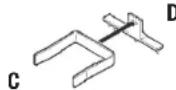
- A) Radio housing • B) Trimplate • C) Radio support
• D) Mounting bracket • E) Equalizer dummy plate
• F) Shaft masks • G) (2) Pal nuts
A

B

E

F

G

TOOLS REQUIRED
- Phillips screwdriver • Cutting tool • Socket wrench
Table of Contents
Dash Disassembly
- Acura Integra 1990-1993 .... 1.0
- Acura Integra 1994-2001 .... 1.1
- Acura Legend 1990 .... 1.1
- Acura Legend 1991-1996 .... 1.1
- Acura TL 1996-1998 .... 1.2
- Acura Vigor 1992-1994 .... 1.2
— Honda Accord 1990-1993 .... 1.3 - Honda Odyssey 1995-1998 1.3
– Isuzu Oasis 1996-1999 .... 1.3
Kit Assembly
- 2-shaft radio provision....1.4
– DIN radio provision 1.5
Dash Disassembly
Acura Integra 1990-1993
-
Remove (3) screws from each side of the center console and remove the console.
-
Remove (2) screws securing the factory radio to the sub-dash support bracket.
-
Slide the radio/pocket assembly out and disconnect the wiring. (Figure A)
-
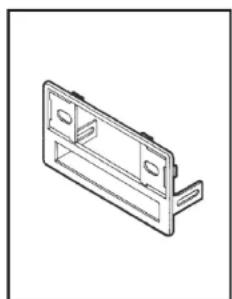
Locate the radio housing. (Figure B)
Continue to kit assembly for ALL VEHICLES, Section 1

natural_image
Line drawing of a device with a box and a front panel (no text or symbols)(Figure A)
natural_image
Isometric line drawing of a mechanical bracket or housing (no text or symbols)(Figure B)

99-7888
Dash Disassembly
Acura Integra 1994-2001
- Remove the cover cap located under the emergency brake and remove (2) screws exposed.
- Remove (2) screws from the rear corners of the lower dash trim bezel and remove. (Figure A)
- Remove the ashtray and (2) screws exposed. (Figure A)
- Unsnap the ashtray housing and disconnect the cigarette lighter harness.

natural_image
Technical line drawing of a mechanical housing assembly with cutouts and mounting brackets (no text or symbols)(Figure A)
- Remove the gear shifter knob and unsnap the shifter trim.
- Remove (2) screws below the radio opening and remove the upper dash trim bezel.
- Remove (2) 8mm screws securing the factory radio and disconnect the wiring.
- Locate the radio housing. (Figure B)
Continue to kit assembly for ALL VEHICLES, Section 1

natural_image
Isometric line drawing of a mechanical bracket component (no text or symbols)Acura Legend 1990
- Remove (2) screws below the ashtray. (Figure A)
- Unclip the dash trim bezel then disconnect the cigarette lighter wiring and remove the bezel.
- Remove (2) bolts securing the rear of the factory radio and disconnect the wiring.
- Modify the factory radio housing by cutting and

(Figure B)
removing the shaded portions of the housing lip. (Figure B)
Continue to kit assembly for ALL VEHICLES, Section 1

natural_image
Technical line drawing of a mechanical bracket assembly (no text or symbols)(Figure A)
Acura Legend 1991-1996
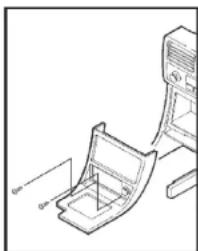
- Remove (2) screws below the ashtray. (Figure A)
- Unclip the dash trim bezel and disconnect the cigarette lighter wiring and remove the bezel.
- Remove (2) bolts securing the rear of the factory radio and disconnect the wiring.
- Locate the radio housing. (Figure B) Continue to kit assembly for ALL VEHICLES, Section 1
natural_image
Technical line drawing of a mechanical assembly with no visible text or symbols(Figure A) (Figure B)(Figure B)

natural_image
Isometric line drawing of a mechanical bracket or housing (no text or symbols)Dash Disassembly
Acura TL 1996-1998
- Using a small screwdriver, unclip the perimeter of the radio trim bezel.
- Disconnect the climate control and rear defroster wiring and remove the bezel.
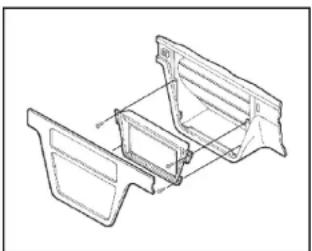
- Remove (4) Phillips screws securing the factory radio/trim bezel assembly. (Figure A)
- Loosen (2) Phillips screws securing the back of the radio to
the metal housing and slide the radio out.
Note, it is NOT necessary to remove the screws securing the metal housing to the bezel.
- Disconnect the wiring.
- Cut and remove the top clips from the radio housing. (Figure B)
Continue to kit assembly for ALL VEHICLES, Section 1
natural_image
Technical line drawing of a mechanical bracket assembly (no text or symbols)(Figure A) (Figure A) (Figure B)(Figure B)

natural_image
Diagram showing a tool cutting into a metal bracket with scissors (no text or symbols)Acura Vigor 1992-1994
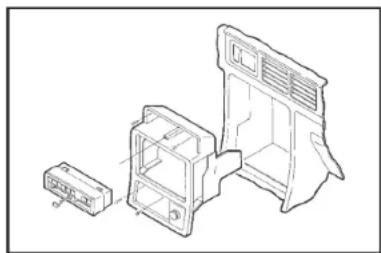
- Remove the access cap from the climate control cluster and (1) screw exposed. (Figure A)
- Unclip the cluster and remove (2) screws exposed.
- Remove the ashtray and (2) Phillips screws exposed. (Figure A)
- Remove the cover caps from each front corner of the center console and the screws exposed.
- Open the storage compartment, lift up the carpet and remove (2) screws exposed.
natural_image
Technical line drawing of a device housing assembly with internal compartments and mounting points (no text or symbols)- Lift up on the center console and remove.
- Unclip the radio trim bezel and disconnect the wiring.
- Remove (2) bolts from the back of the factory radio and disconnect the wiring.
- Modify the factory radio housing by cutting and removing the shaded portions of the housing lip. (Figure B)
Continue to kit assembly for ALL VEHICLES, Section 1


99-7888
Dash Disassembly
Honda Accord 1990-1993
- Remove (4) screws from the lower portion of the center console. (Figure A)
- Remove the gear shifter knob and lift the console out.
- Remove the ashtray and ashtray bracket.
- Remove (2) screws from the bottom of the radio support, slide the unit out and disconnect the wiring.
- Locate the radio housing. (Figure B)
Continue to kit assembly for ALL VEHICLES, Section 1

natural_image
Technical line drawing of a device with a housing and base unit (no text or symbols)
natural_image
Isometric line drawing of a rectangular electronic component with mounting holes (no text or symbols)(Figure A) (Figure B) (Figure A) (Figure B)
Honda Odyssey 1995-1998 Isuzu Oasis 1996-1999
- Remove (2) 8mm screws under the glove box.
- Remove (1) Phillips screw on the glove box arm and remove the box.
- Remove (2) Phillips screws exposed in the glove box cavity then remove (2) Phillips screws below the storage box door (under the ashtray). (Figure A)
- Remove (2) screws from the left side of the dash console.

natural_image
Line drawing of a mechanical component with two views: one showing a cutaway view and the other a flat base (no text or symbols)- Remove (1) Phillips screw from the coin tray and then remove (1) Phillips screw under the ignition.
- Remove (4) Phillips screws securing the factory cupholder.
- Remove (2) 8mm hex-head screws from the rear support bracket and disconnect the wiring.
- Locate the radio housing. (Figure B)
Continue to kit assembly for ALL VEHICLES, Section 1

natural_image
Isometric line drawing of a mechanical housing or bracket (no text or symbols)
99-7888
Kit Assembly
All Vehicles
2-shaft radio provision:
- Attach the trim plate and shaft masks to the radio housing. (Figure A1)
- Slide the radio into the kit and secure with shaft nuts. (Figure A1)
Continue to Step 5
DIN radio provision:
- Cut and remove the shaft supports from the radio housing.
- Remove the metal DIN sleeve from the aftermarket radio.
- Slide the sleeve into the kit and secure by bending the metal locking tabs down.
- Slide the radio into the sleeve until it clicks in. (Figure A2)
Continue to Step 5

natural_image
Technical line drawing of an electrical connector assembly (no text or symbols)(Figure A1) (Figure A2)

natural_image
Technical line drawing of a device with an attached panel (no text or symbols)
natural_image
Technical line drawing of a device with an attached panel (no text or symbols)5. If an equalizer will be included:
Slide the aftermarket equalizer into the back of the radio housing. Using the hardware included with the equalizer, secure the unit to the kit. (Figure B)
If an equalizer will NOT be included:
Snap the Equalizer Dummy Plate into the radio housing. (Figure C)
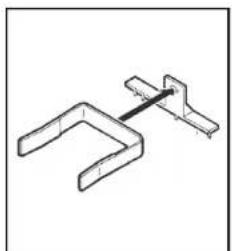
- Insert the Radio Support into the Mounting Bracket. (Figure D)
- Turn the Radio Support to lock into place. (Figure E)
- Secure the assembly to the factory mounting plate in the sub-dash with (2) Pal Nuts supplied. (Figure F)
Continue on the next page

natural_image
Diagram showing two electronic components with an arrow indicating connection (no text or symbols present)(Figure B) (Figure C)

natural_image
Technical line drawing of a mechanical component with a bracket and base plate (no text or symbols)
99-7888
Kit Assembly
natural_image
Pure mechanical linkage diagram without any text, numbers, or symbols
natural_image
Pure mechanical diagram of a bent pipe or bracket without any text, numbers, or symbols(Figure D) (Figure E)
- Locate the factory wiring harness in the dash. Metra recommends using the proper mating adapter from Metra. Test the radio for proper operation.
- Integra, Accord, Odyssey, Oasis:
Snap the completed assembly into the sub-dash. (Figure G)
Legend, TL, Vigor:
Snap the completed assembly into the factory trim bezel. Secure the bezel to the dash with those screws previously removed. (Figure H)
- Reassemble the dash in reverse order of disassembly.

natural_image
Technical illustration of a car air conditioner unit with a magnified inset showing the component detail (no text or symbols present)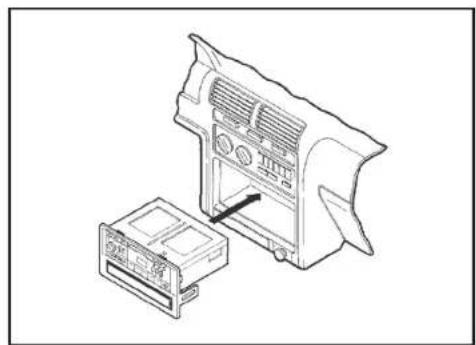
natural_image
Technical line drawing of a device housing and internal components (no text or symbols)(Figure G) (Figure H)(Figure F)

natural_image
Technical line drawing of two electronic components with an arrow indicating a transformation or assembly (no text or symbols present)
Installation instructions for part INST-7800

IMPORTANT
If you are having difficulties with the installation of this product, please call our Tech Support line at 1-800-253-TECH. Before doing so, look over the instructions a second time, and make sure the installation was performed exactly as the instructions are stated. Please have the vehicle apart and ready to perform troubleshooting steps before calling.

KNOWLEDGE IS POWER
Enhance your installation and fabrication skills by enrolling in the most recognized and respected
enrolling in the most recognized and respected mobile electronics school in our industry.
Log onto www.installerinstitute.com or ca
800-354-6782 for more information and take steps
toward a better tomorrow.

Metra recommends MECP
certified technicians


- Acura/Honda 1990-2002 INST-7800
- INSTALLATION INSTRUCTIONS
- APPLICATIONS
- Contents
- Installation Instructions Section
- Section 1
- 99-7888
- KIT FEATURES
- KIT COMPONENTS
- TOOLS REQUIRED
- Table of Contents
- Dash Disassembly
- Kit Assembly
- Acura Integra 1990-1993
- Acura Integra 1994-2001
- Acura Legend 1990
- Acura Legend 1991-1996
- Acura TL 1996-1998
- Acura Vigor 1992-1994
- Honda Accord 1990-1993
- Honda Odyssey 1995-1998 Isuzu Oasis 1996-1999
- All Vehicles
- 2-shaft radio provision:
- DIN radio provision:
- If an equalizer will be included:
- If an equalizer will NOT be included:
- IMPORTANT
Brand : Metra
Model : 99-7888
Category : Car Installation Kit