
99-9008 - Car Installation Kit Metra - Free user manual and instructions
Find the device manual for free 99-9008 Metra in PDF.


| Product Type | Car Installation Kit |
| Brand | Metra |
| Model | 99-9008 |
| Compatible Vehicles | Volkswagen Beetle 1998-2010 |
| Radio Provision | ISO DIN and DIN (selectable) |
| Kit Components | ISO DIN housing, ISO DIN trim plate, ISO DIN brackets, DIN trim plate |
| Required Tools | 86-9001 radio removal keys, Torx T-10 driver |
| Required Wiring Harness (sold separately) | 70-1784 |
| Required Antenna Adapter (sold separately) | 40-VW54 |
| Installation Notes | Disconnect negative battery terminal before installation; do not remove radio with ignition on. |
| Tech Support | 1-800-253-TECH |
| Dimensions (approximate) | Standard DIN size (approx. 7 x 2 inches faceplate) |
| Weight (approximate) | 0.5 lbs (0.23 kg) |
| Material | Plastic, metal brackets |
| Maintenance | Wipe with dry cloth; avoid solvents |
| Safety Warning | Disconnect battery; ensure airbag indicator lights are connected before reconnecting battery. |
| Certification | Metra recommends MECP certified technicians |
Frequently Asked Questions - 99-9008 Metra
User questions about 99-9008 Metra
0 question about this device. Answer the ones you know or ask your own.
Ask a new question about this device
Download the instructions for your Car Installation Kit in PDF format for free! Find your manual 99-9008 - Metra and take your electronic device back in hand. On this page are published all the documents necessary for the use of your device. 99-9008 by Metra.
USER MANUAL 99-9008 Metra
Installation instructions for part 99-9008
Volkswagen Beetle 1998-2010 99-9008
KIT FEATURES
• ISO DIN radio provision
• DIN radio provision
*Aftermarket radios are equipped with a trim ring surrounding the face of the radio. Since some installers prefer the trim ring equipped with the radio (DIN) and others do not (ISO DIN), this kit was designed to allow the installer to choose.
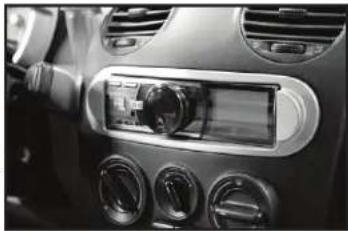
natural_image
Interior view of a car dashboard with air filters and a digital display (no visible text or symbols)KIT COMPONENTS
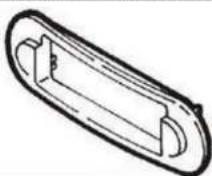
- A) ISO DIN housing • B) ISO DIN trim plate • C) ISO DIN brackets • D) DIN trim plate
A

B
C

D

WIRING & ANTENNA CONNECTIONS (sold separately)
Wiring Harness: • 70-1784
Antenna Adapter: • 40-VW54
TOOLS REQUIRED
• 86-9001 radio removal keys • Torx T-10 driver
Table of Contents
Dash Disassembly 2
Kit Assembly
- ISO DIN radio provision.... 3
– DIN radio provision.... 4
CAUTION! Metra recommends disconnecting the negative battery terminal before beginning any installation, unless the vehicle manufacturer recommends against so. Please check with your local Dealership for more information. All accessories, switches, climate controls panels, and especially air bag indicator lights must be connected before reconnecting the battery or cycling the ignition. Also, do not remove the factory radio with the key in the on position, or the vehicle running. It would be best to remove the key from the ignition and then wait a few seconds before removing the factory radio.

99-9008
Dash Disassembly
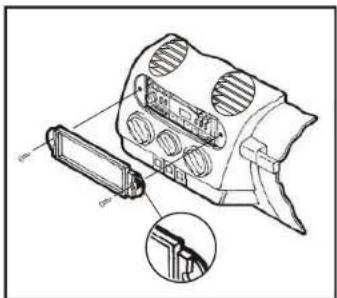
- Insert the long end of the 86-9001 radio removal tool into the slots in the factory radio (flat sides pointing out), and then pull the radio out. Disconnect all connectors and then remove the radio. (Figure A)
- For ISO DIN radio installations only, remove (2) Torx T-10 screws exposed in the radio cavity. (Figure A)
Continue to kit assembly

natural_image
Technical line drawing of a mechanical device with clamped parts and motion arrows (no text or symbols)(Figure A)
99-9008
Kit Assembly
ISO DIN radio provision
- Remove the metal DIN sleeve and trim ring from the aftermarket radio.
- Align the holes in the ISO DIN brackets with the holes in the radio and then secure the brackets to the radio with the screws included with the radio. (Figure A)
Note: The screws provided with certain radios may create a clearance problem during radio installation. In these cases it may be necessary to trim the walls of the dash bezel to provide the proper clearance.
- Locate the factory wiring harness and antenna connector in the dash and make all necessary connections to the radio. Metra recommends using the proper mating adapters from Metra and/or AXXESS. Re-connect the negative battery terminal and test the radio for proper operation.

(Figure A)
natural_image
Diagram of a device with ventilation slots and an arrow indicating direction (no text or symbols)(Figure B) (Figure D)
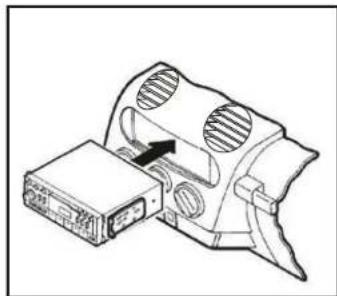
- Slide the radio into the radio cavity until it clicks in. (Figure B)
- Position the ISO DIN housing over the radio with the side notches in the upper corners. Secure with the (2) Torx T-10 screws removed in dash disassembly. (Figure C)
- Attach the ISO DIN trim plate onto the ISO DIN housing. (Figure D)
(Figure C)

natural_image
Technical line drawing of a mechanical component with internal parts and a handle (no text or symbols)
Installation instructions for part 99-9008

Kit Assembly
DIN radio provision
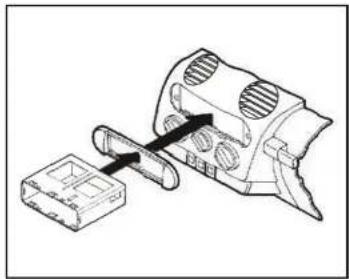
- Remove the metal DIN sleeve from the aftermarket radio.
- Attach the DIN trim plate in the radio cavity, then slide the sleeve through the DIN trim plate, and then secure by bending the metal locking tabs down. (Figure A)
- Locate the factory wiring harness and antenna connector in the dash and make all necessary connections to the radio. Metra recommends using the proper mating adapters from Metra and/or AXXESS. Re-connect the negative battery terminal and test the radio for proper operation.
- Slide the radio into the sleeve until it clicks in. (Figure B)
natural_image
Technical line drawing of a mechanical component with a housing and a tool, no visible text or symbols(Figure A)

natural_image
Technical line drawing of a mechanical device with internal components and a rectangular base (no text or symbols)(Figure B)
IMPORTANT
If you are having difficulties with the installation of this product, please call our Tech Support line at 1-800-253-TECH. Before doing so, look over the instructions a second time, and make sure the installation was performed exactly as the instructions are stated. Please have the vehicle apart and ready to perform troubleshooting steps before calling.

KNOWLEDGE IS POWER
Enhance your installation and fabrication skills by enrolling in the most recognized and respected mobile electronics school in our industry. Log onto www.installerinstitute.com or call 600-354-6782 for more information and take steps toward a better tomorrow.

Metra recommends MECP certified technicians


Brand : Metra
Model : 99-9008
Category : Car Installation Kit