
MDD36W-E-A - Unknown Micro Matic - Free user manual and instructions
Find the device manual for free MDD36W-E-A Micro Matic in PDF.


| Product Type | Dual-Temperature Wine Keg Dispenser |
| Model | MDD36W-E-A |
| Brand | Micro Matic |
| Keg Capacity | 4 to 6 kegs (20L each), dual zone |
| Temperature Range (Whites) | 42–48°F (5.5–8.8°C) |
| Temperature Range (Reds) | 55–65°F (12.7–18.3°C) |
| Thermostats | 2 color-coded digital thermostats (Blue for whites, Red for reds) |
| Refrigerant | R-134a |
| Voltage / Frequency | 115V / 60Hz |
| Plug Type | NEMA 5-15P |
| Running Amps | Approx. 2.7–6.5 A (depending on model) |
| Condenser HP | 1/6 to 1/3 HP |
| Exterior Material | 18 gauge stainless steel top, black vinyl over steel body |
| Interior Material | 20 gauge stainless steel floor, galvanized walls |
| Insulation | Foamed-in-place CFC-free polyurethane, 1.5" thick |
| Wine Font Holes | 2 holes (3" diameter) for dual dispensing |
| Door Type | Solid self-closing doors, field reversible |
| Ventilation | Front and side or rear ventilated |
| Condensate Evaporator | Automatic, no drain connection required |
| Mobility | Castors standard (some models with fixed legs) |
| Approvals | ETL Listed |
| Warranty | 1 year parts and labor, additional 4 years compressor part only |
| Maintenance | Clean condenser coil every 30-60 days; use non-chloride cleaners on stainless steel |
| Installation | Must be placed at least 2" from walls; avoid heat sources; professional installation recommended |
Frequently Asked Questions - MDD36W-E-A Micro Matic
User questions about MDD36W-E-A Micro Matic
0 question about this device. Answer the ones you know or ask your own.
Ask a new question about this device
Download the instructions for your Unknown in PDF format for free! Find your manual MDD36W-E-A - Micro Matic and take your electronic device back in hand. On this page are published all the documents necessary for the use of your device. MDD36W-E-A by Micro Matic.
USER MANUAL MDD36W-E-A Micro Matic
natural_image
Exterior view of a stainless steel multi-tiered industrial water treatment machine (no visible text or symbols)MDD23W Series MDD58W Series
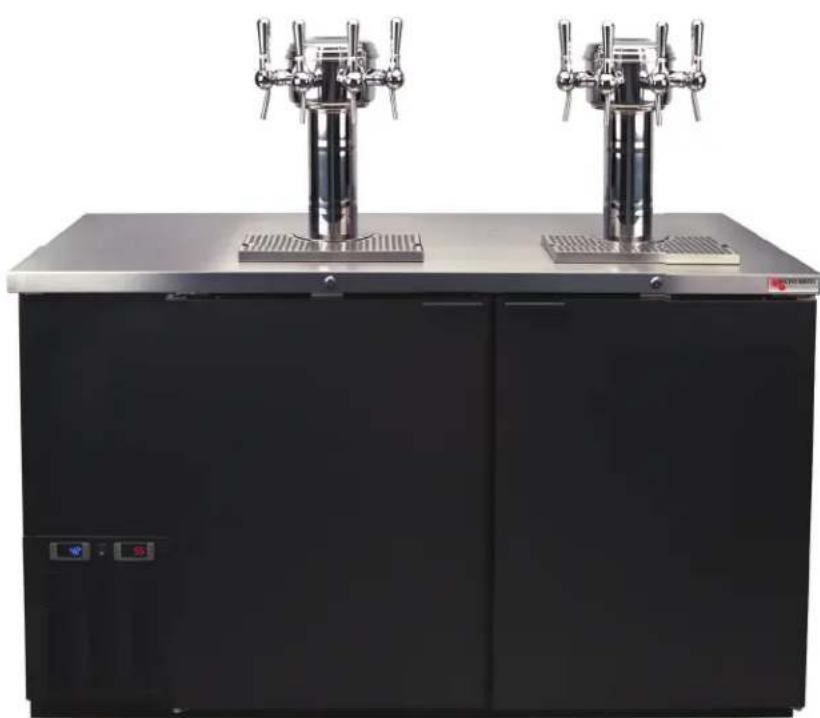
natural_image
Exterior view of a black industrial water control cabinet with two metallic vertical pumps on top (no visible text or symbols)Pro-Line Wine
Dual-Temperature Wine Keg Storage & Dispensing

SAFETY FIRST
PLEASE READ BEFORE USE
Before getting started please read this user manual and at all times follow the important safety instructions.
Wine On Tap
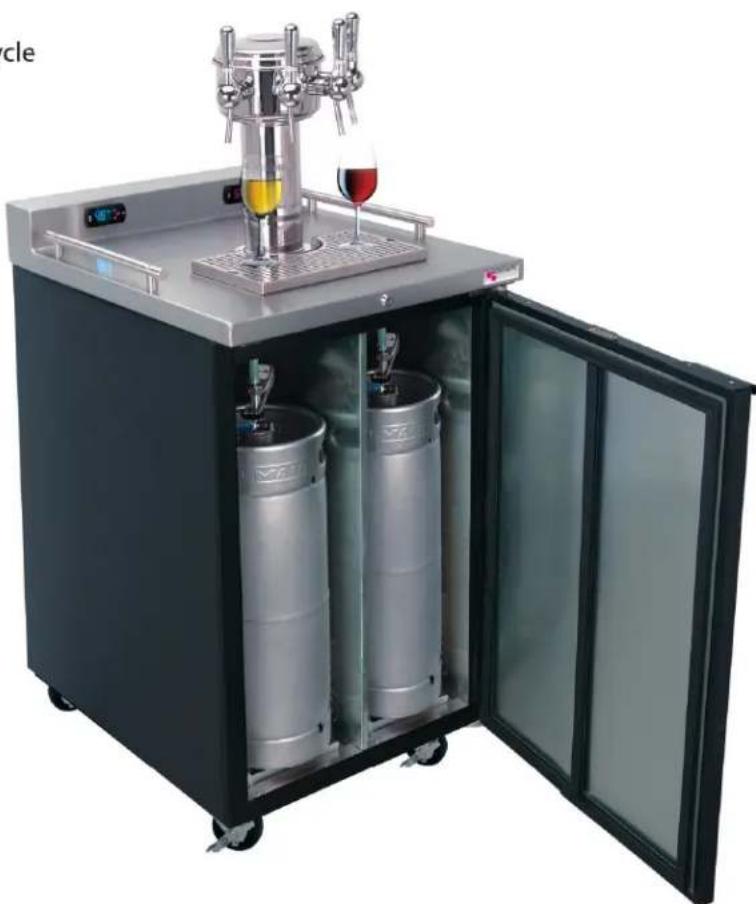
Keg wine is the smart choice. Fine varietal wines are now in kegs. Serve wine at the optimal temperature the vintner intended it to be enjoyed. Pro-Line Wine units feature dedicated dual-temperature zones: one for whites (45°F) and one for reds (55°F). Keg wine is a great value with minimal waste and stays fresh until poured.
Increase Sales
• Dispense Wine...Any Place, Any Time
• Capture incremental sales
- Open up new opportunities for profitability
Dispense Quality Wine
• Pour consistency from the first to the last glass
• Once tapped, keg wine stays fresh for up to 6 weeks
- Eliminate open bottle degradation and oxidation
Operating Efficiency
- No corks to pull, no bottles to stock or recycle
• Realize maximum product yield - Low maintenance cost
- Small footprint = 26 bottles per keg
natural_image
Exterior view of a modern dual-bottle beer stand with glass doors open, featuring a hand mixer and two cylindrical bokins (no text or symbols visible)Table Of Contents
Receiving & Inspecting......Page 3
Location Page 4
Installation Page 4
- Install Wine Font
• Install Keg Tapping Kit
Specifications & Dimensions......Page 5
Keg Temperature Storage & Serving......Page 7
Thermostat Adjustment......Page 9
Data Plate......Page 13
Electrical Connections ...... Page 13
Troubleshooting......Page 14
Maintenance......Page 15
- Cleaning the Cabinet
- Defrosting
- Cleaning Condensor Coil
• Door Gasket Maintenance
Wiring Diagrams......Page 17
Parts Listing......Page 19
Warranty Page 22
Receiving & Inspecting
Upon receiving your new Micro Matic Pro-Line Wine dispenser, check the package and the unit for any damages that may have occurred during transportation. Visually inspect the exterior of the package. If damaged, open and inspect the contents with the carrier. Any damage should be noted and reported on the delivering carrier's receipt.
In the event that the packaging is not damaged, yet upon opening, there is concealed damage to the equipment notify the carrier immediately. Notification should be made verbally as well as in written form. Request an inspection by the shipping company of the damaged equipment. Retain all crating material until inspection has been made. Finally, contact Micro Matic.
Uncrating
- Cut and remove the outer packaging.
- Lift the unit off the skid.
- If the unit has been laid down during this operation leave upright for 24 hours before plugging into power source.

Location
- Be sure the location chosen has a floor strong enough to support the total weight of the unit and contents.
- Recommended to use a professional installation company.
- For the most efficient operation, be sure to provide good air circulation around the unit.
• MDD23W cannot be used for built-in applications. - Avoid hot corners and locations near stoves and ovens.
- It is recommended the unit be installed no closer than 2" from any wall.
- The place for the dispenser must be open and free of dust and debris.
Installation
Install Wine Font (Sold Separately)
- Place rubber washer over draft tower mounting holes in cabinet top.
- Place wine line down through holes.
- Secure font with four bolts provided.
- Attach keg connectors to wine lines (provided with wine font).
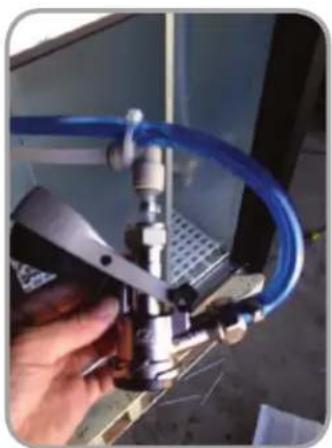
Install Keg Tapping Kit(s) (Sold Separately)
Use only Wine Certified components for wine dispensing. This includes grade 304 stainless steel or better and Barriermaster Flavourlock tubing. Use of these components assures vintners quality.
natural_image
Hand holding a blue piping bag attached to a mechanical component (no visible text or symbols)
natural_image
Laboratory setup with blue tubing and metal frame, no visible text or symbolsUse John Guest swivel elbows to minimize line kinking. Use zip ties to secure to gas line (blue hose) to John Guest fi tting.
Specifications & Dimensions
MDD58W Series
| Capacity of 20 Liter Kegs 8 (4 per zone) | |
| Cubic Feet Per Side TBD | |
| Hole for Wine Font 2 | |
| Hole Diameter 3" | |
| Color-coded Digital Thermostats 2 | (Blue LED-Whites & Red LED-Reds) |
| Temperature Range-Whites 42–48°F (5.5–8.8C) | |
| Temperature Range-Reds 55–65°F | (12.7–18.3C) |
| Approval ETL Listed | |
| Running Amps 6.5 | |
| Condenser HP 1/3 | |
| Voltage 115/60/1 | |
| Plug Type | NEMA-5-15P |
| Cord Length | 8' |
| Refrigerant | R-134a |
| Charge oz (Grs) | 10.5 (300) |
| Exterior | 18 gauge stainless steel top, 22 gauge solid self-closing doors, black vinyl over 24 gauge steel front, sides and back. |
| Interior | 20 gauge stainless steel floor, rugged false floor, reinforced frame, 24 gauge galvanized walls. |
| Ventilation | Front and side ventilated |
| Plumbing | Automatic condensate evaporator, no drain connection required. Evaporator condensate has been plumbed to a condensate pan located in the compressor housing. |
| Insulation | Foamed-in-place using high density, CFC-free polyurethane; 1-1/2" top, walls and floor. |
| Accessories | Castors or 6" Fixed legs |
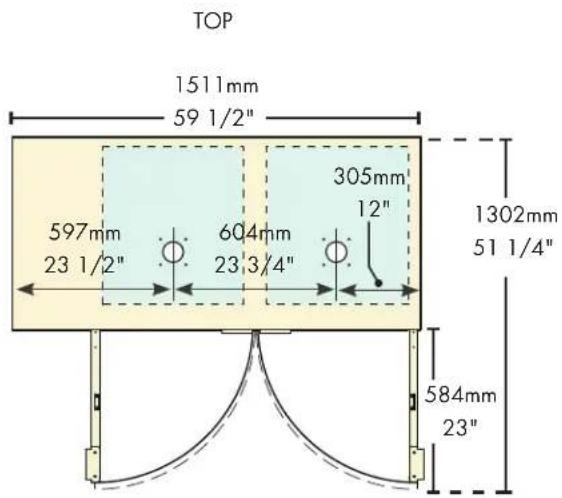
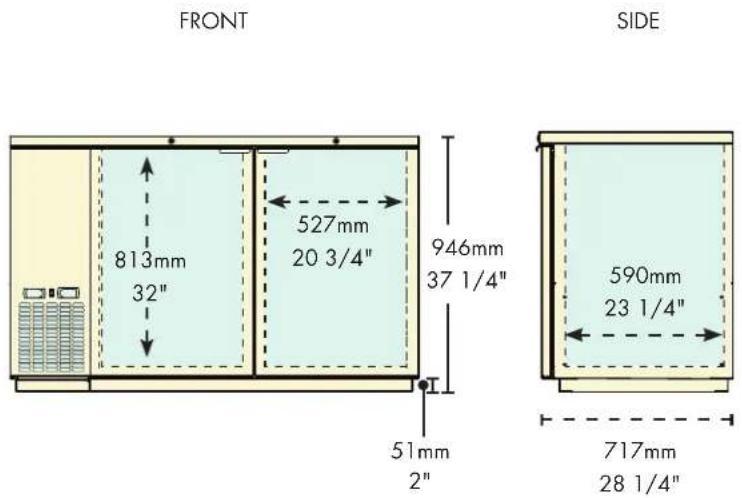
Specifications & Dimensions
MDD23W Series
| Capacity of 20 Liter Kegs 4 (2 per zone) | |
| Cubic Feet Per Side TBD | |
| Hole for Wine Font 1 | |
| Hole Diameter 3" | |
| Color-coded Digital Thermostats 2 | (Blue LED-Whites & Red LED-Reds) |
| Temperature Range-Whites 42–48°F (5.5–8.8C) | |
| Temperature Range-Reds 55–65°F | (12.7–18.3C) |
| Approval ETL Listed | |
| Running Amps 2.7 | |
| Condenser HP 1/6 | |
| Voltage 115/60/1 | |
| Plug Type | NEMA-5-15R |
| Cord Length | 8' |
| Refrigerant | R-134a |
| Charge oz (Grs) | 10.5 (300) |
| Exterior | 18 gauge stainless steel top, 22 gauge solid doors, black vinyl over 24 gauge steel front, sides and back. |
| Interior | 20 gauge stainless steel floor, rugged false floor, reinforced frame, 24 gauge galvanized walls. |
| Ventilation | Rear ventilated |
| Plumbing | Automatic condensate evaporator, no drain connection required. Evaporator condensate has been plumbed to a condensate pan located in the compressor housing. |
| Insulation | Foamed-in-place using high density, CFC-free polyurethane; 1-1/2" top, walls and floor. |
| Mobility | Castors are standard and not removable. |

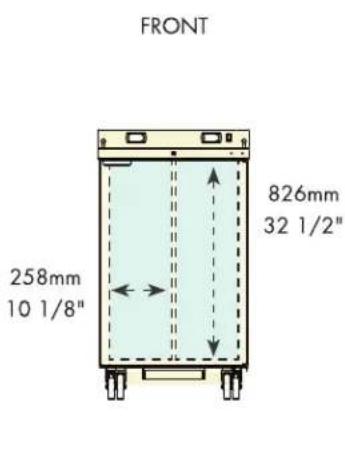

Keg Temperature: Storage & Serving
Storage
It is important to understand that when the keg of wine is delivered it must be properly stored.
- White wine must be stored inside the cooler as soon as possible, as it may take as many as 24 hours for the temperature to be reduced to the desirable range.
- It is recommended to store both reds and whites at room temperature (approximately 72^ .)
- Wine kegs stored in a walk-in cooler (approximately 38°F) may dramatically effect the time it takes to reach the desired serving temperatures.
- Allow 24 hours for kegs to reach the desired serving temperature (45°F for whites and 55°F for reds).
- Just like a bottle of wine, the best temperature to store white or red wines is between 45-60°F: neither too cold, nor too warm. Remember, wines are both cold- and heat-stabilized. Most white wines are cold-stabilized to approximately 36°F. If the wine gets any colder for any length of time, the risk arises that the naturally occurring "tartrates" may drop out of solution and appear as "sediment" in the bottom of a wine glass.
Serving
Pro-Line Wine units are designed to maintain your wine keg temperature within the vintners recommended temperature serving range:
- White wines: 45^ (range: 40 - 45^ )
• Red wines: 55°F (range: 55-60°F)
IMPORTANT NOTICE:
The thermostats on the Pro-Line Wine units have been factory preset at approximately 45^ F for white wine dispensing and approximately 55^ F for red wine dispensing. Any change to the factory settings will affect performance of unit and void the warranty.
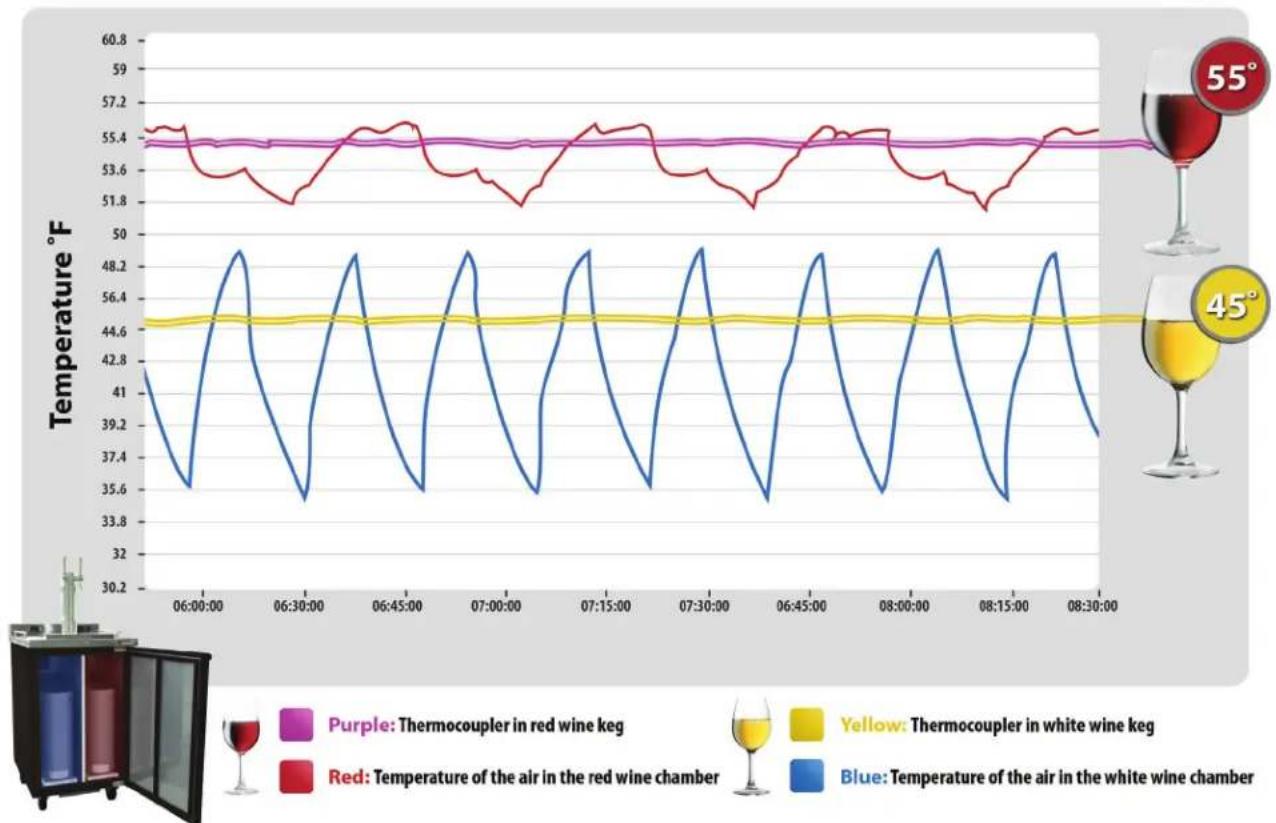
Factory testing has produced results that show consistent wine (liquid) temperatures are being maintained by the unit. The Pro-Line Wine unit operates like any refrigeration unit; the compressor is engaged when the interior air temperature reaches the pre-determined maximum level, cooling the unit until it reaches the pre-determined minimum level. The goal is consistent wine (liquid) temperature inside the keg. Thermostat displays are reading the air temperature setting and may be dramatically different than the keg (liquid) temperatures. To verify, measure the temperature of the wine dispensed in the glass.
MDD23W Air & Wine Temperatures
This chart shows that air temperature cycles, but keg (liquid) temperature remains consistent.
line
| Time | Temperature (°F) - Red Line | Temperature (°F) - Blue Line | Temperature (°F) - Yellow Line | |------------|-----------------------------|------------------------------|--------------------------------| | 06:00 | 55.4 | 41.0 | 44.6 | | 06:30 | 51.8 | 35.6 | 44.6 | | 06:45 | 55.4 | 49.0 | 44.6 | | 07:00 | 51.8 | 35.6 | 44.6 | | 07:15 | 55.4 | 49.0 | 44.6 | | 07:30 | 51.8 | 35.6 | 44.6 | | 06:45 | 55.4 | 49.0 | 44.6 | | 08:00 | 51.8 | 35.6 | 44.6 | | 08:15 | 55.4 | 49.0 | 44.6 | | 08:30 | 51.8 | 35.6 | 44.6 |Adjusting the Thermostat
The Pro-Line Wine dispenser is designed to maintain your wine keg temperature within the most desirable range of 45^ to 55^ (depending on the varietal). You can expect the Pro-Line unit to maintain temperature with the proper temperature control setting and in a normal environment.
If a different setting is desired, follow these instructions to adjust the thermostat.

| SET | To display target set point, in programming mode it selects a parameter or confi rms an operation |
 | To start a manual defrost (only XR02CX). |
 | In programming mode it browses the parameter codes or increases the displayed value. |
 | In programming mode it browses the parameter codes or decreases the displayed value. |
| Key Combination Operation | |
| To lock or unlock the keyboard | |
| To enter into programming mode | |
| To return to room temperature display | |
| Symbol Mode Operation | ||
 | On Compressor enabled | |
| Flashing Anti short cycle delay enabled (AC parameter) | ||
 | On Defrost in progress | |
| Flashing Dripping in progress | ||
 | On Measurement unit | |
| Flashing Programming mode | ||
 | On Measurement unit | |
| Flashing Programming mode | ||
How To See The Set Point
-
Push and immediately release the key, the SET point will be displayed.
-
Push and immediately release the SET key or wait about five (5) seconds to return to normal display.
How To Change The Set Point
-
To change the set point number, push the key for more than two (2) seconds.
-
The number of the set point will be displayed and the "C" or "FLED will blink.
-
To change the set number push the arrow up or down keys within ten (10) seconds.
-
To hold the new set point number push the SET key again or wait ten (10) seconds.
How To Change A Parameter Number
-
Enter the Programming mode by pressing the keys to "Tree" (3) seconds, the "C" or "FLED will blink.
-
Select the required parameter. Press the SET key to display the number.
-
Use the up or down arrow keys to change the number.
-
Press SET to store the new number and move to the following parameter.
To exit: Press SET+▼ or wait fifteen (15) seconds without pressing a key.
NOTE: The set number is stored even when the procedure is exited by waiting for the time-out to expire.
How To Enter The Hidden Menu
-
Enter the programming mode by pressing the keys from Tree(3) seconds, the "C" or "F"ED will blink.
-
Release the keys, then again push the SET+▼ keys for more than seven (7) seconds. The L2 label will be displayed immediately followed by the Hy parameter.
NOW YOU ARE IN THE HIDDEN MENU
-
Select the required parameter.
-
Press the SET key to display its number.
-
Use the up or down arrows to change its number.
-
Press the SET key store the new number and move to the following parameter.
To Exit: Press the SET+▲ or wait 15 seconds without pressing a key.
NOTE 1: If no parameter is present in L1, after three (3) seconds the nP message is displayed. Keep the keys pushed until the L2 message is displayed.
NOTE 2: The set number is stored even when the procedure is exited by waiting for the time-out to expire.
NOTE: Any change in these parameters will effect unit performance and void warranty.
Parameters for MDD23W Thermostat
| Parameter Description | For Blue Display | For Red Display | |
| SEt Set point | 40 56 | ||
| Hy Differential | 10 3 | ||
| LS Minimum set point | 40 55 | ||
| US Maximum set point | 46 60 | ||
| ot | Thermostat probe calibration | 8 | 0 |
| P2 | Evaporator probe presence | n | n |
| oE | Evaporator probe calibration | 0 | 0 |
| od | Outputs activation delay at start up | 3 | 3 |
| AC | Anti-short cycle delay | 1 | 1 |
| Cy | Compressor ON time with faulty probe | 8 | 6 |
| Cn | Compressor OFF time with faulty probe | 12 | 30 |
| CF | Temperature measurement units | F | F |
| rE | Resolution (only for °C) | in | in |
| Ld | Default display | P1 | P1 |
| dy | Display delay | 5 | 2 |
| dE | Defrost termination temperature | 50 | 60 |
| id | Interval between defrost cycles | 8 | 0 |
| Md | Maximum length for defrost | 15 | 1 |
| dF | Display during defrost | sp | sp |
| AU | Maximum temperature alarm | 99 | 99 |
| AL | Minimum temperature alarm | -50 | -50 |
| Ad | Temperature alarm delay | 15 | 15 |
| dA | Exclusion of temperature alarm at startup | 90 | 90 |
| d2 | Second probe display | 0 | 0 |
Parameters for MDD58W Thermostat
| Parameter Description | For Blue Display | For Red Display | |
| SEt Set point | 42 55 | ||
| Hy Differential | 10 5 | ||
| LS Minimum set point | 40 55 | ||
| US Maximum set point | 48 60 | ||
| ot | Thermostat probe calibration | 8 | 5 |
| P2 | Evaporator probe presence | n | n |
| oE | Evaporator probe calibration | 0 | 0 |
| od | Outputs activation delay at start up | 3 | 3 |
| AC | Anti-short cycle delay | 1 | 1 |
| Cy | Compressor ON time with faulty probe | 6 | 6 |
| Cn | Compressor OFF time with faulty probe | 12 | 30 |
| CF | Temperature measurement units | F | F |
| rE | Resolution (only for °C) | in | in |
| Ld | Default display | P1 | P1 |
| dy | Display delay | 2 | 2 |
| dE | Defrost termination temperature | 0 | 0 |
| id | Interval between defrost cycles | 0 | 0 |
| Md | Maximum length for defrost | 1 | 1 |
| dF | Display during defrost | rt | rt |
| AU | Maximum temperature alarm | 99 | 99 |
| AL | Minimum temperature alarm | -50 | -50 |
| Ad | Temperature alarm delay | 15 | 15 |
| dA | Exclusion of temperature alarm at startup | 90 | 90 |
| d2 | Second probe display | 0 | 0 |
| Pt | Parameter table code (readable only) | 5 | 5 |
| rL | Firmware release (readable only) | 0 | 0 |
Data Plate
The data plate is located inside the unit, near the top front left corner. Under no circumstances should the data plate be removed from the unit. The data plate is essential to identify the particular features of the unit and is of great benefit to installers, operators and maintenance personnel. It is recommended that, in the event the data plate is removed, you copy down the essential information in this manual for reference before installation.
If service is required call 1-800-544-0400
Service agent will require the data plate information.
Electrical Connections
Refer to the amperage data in this manual or on data plate and your local code or the National Electrical Code to be sure unit is connected to the proper power source. Verify correct incoming voltage according to the Data Plate information.
A protected circuit of the correct voltage and amperage must be run for connection of the supply cord. Unit must be grounded and connected in accordance with NEC Article 422 Appliances.

DANGER: Power must be turned off and disconnected from the power source whenever performing maintenance, repair or cleaning the condensing unit. If unit is still running when power is off, disconnect power at the circuit breaker before unplugging the unit.
WARNING: Unit and compressor warranties are void if failure is due to improper electrical installation.
Troubleshooting
Sometimes, working failures are due to simple causes which can be solved by the user. Before asking for the help of a qualified technician, you have to do some verifications. These failures are not covered by the warranty:
- Refrigeration is not cooling?
a. Check the unit is still connected to power supply.
-
The thermostats on the Pro-Line Wine units have been factory preset at approximately 45^ F for white wine dispensing and 55^ F for red wine dispensing. Any change to the factory settings will affect performance of unit and void the warranty.
-
After 24 hours, refrigerated compartments do not reach temperature?
a. Check temperature of dispensed wine.
b. Check that the door gasket is clean and in good condition; door is sealed.
c. Check that the fan is operating.
Maintenance
Cleaning the Cabinet
- Proper cleaning of stainless steel requires a soft cloth, never use steel pads, wire brushes or scrapers.
- Cleaning solutions need to be alkaline or non-chloride cleaners. Any cleaner containing chlorides will damage the protective film of the stainless steel. Chlorides are also commonly found in hard water, salts, household and industrial cleaners.
- Routine cleaning of stainless steel can be done with soap and water. Extreme stains or grease should be cleaned with a non-abrasive cleaner and plastic scrub pad.
- Stainless steel cleaners available which can restore and preserve the finish of the steel's protective layer.
- Never use an acid based cleaning solution. Many food products have an acidic content which can deteriorate the finish — these items include peppers, tomatoes and other vegetables.
- Be sure to clean ALL food products from any stainless steel surface.
- The interior of the cabinet should be cleaned only with lukewarm water, taking care not to scratch the galvanized metal surface. Mild detergents are recommended.
Defrosting
The unit will not require defrosting if the door is only opened for a minimum time. Should ice form on evaporator turn unit off and allow to defrost. Make sure the door closes properly and gasket seals completely as warm air entering the unit will cause evaporator to freeze and malfunction. Do not use a pick, knife, etc., to pry ice from evaporator as this could puncture evaporator or damage the coils.
Cleaning Condenser Coil
- Clean the condenser coil every three months. A dirty condenser will reduce the performance of the cooling system.
- Do not block airflow to the perforated panel and do not operate the Pro-Line Wine unit in environments above 100°F.
DANGER: Power must be turned off and disconnected from the power source whenever performing maintenance, repair, or cleaning the condensing unit.
- Disconnect unit from power supply.
- Remove compressor cover panel and carefully blow out any dust or debris on or around the condensing unit.
- Use a vacuum or compressed air to blow though the condenser coil.
- THE CONDENSER MUST BE CLEANED AT REGULAR INTERVALS (30-60 DAYS). FAILURE TO DO SO CAN CAUSE COMPRESSOR MALFUNCTION AND WILL VOID WARRANTY.
- If you keep the condenser clean you will minimize your service expense and lower your electrical costs. Failure to maintain a clean condenser coil will cause high temperatures and excessive run times. Continuous operation with dirty or clogged condenser coils can result in compressor failures.
Gasket Maintenance
- Gaskets require regular cleaning to prevent mold and mildew build up and also to keep the elasticity of the gasket.
- Gasket cleaning can be done with the use of warm soapy water.
- Avoid full strength cleaning products on the gasket as this can cause it to become brittle and prevent a proper seal.
- Never use sharp tools or knives to scrape or clean the gasket which could possibly tear the gasket and rip the bellows.
- Gaskets can easily be replaced and do not require the use of tools or authorized service persons.
Wiring Diagram – MDD23W Series
| Standard Color | AWG Size | Ref. | Symbol | Description | Symbol | Description |
| Green | 18 AWG | A | VE | Evaporator's Fan | RDE | Defrost Resistance |
| Dark Blue | 16 AWG | B | COM | Compressor | RG | Drain Resistance |
| Brown | 16 AWG | C | VC | Condenser Fan | CONT | Auxiliar Contactor |
| Light Blue | 18 AWG | D | LAM | Light | JB | Juction Box |
| Brown | 18 AWG | E | CE | Electronic Controller | TA | Thermostat |
| Dark Bluc | 18 AWG | F | MP | Door Micro-Switch | T1 | Environment Sensor |
| Yellow | 18 AWG | G | INT | Main Switch | T2 | Defrost Sensor |
| Red | 18 AWG | H | RW | Wall Resistance | INT-L | Light Switch |
| Black | 16 AWG | I | ||||
| White | 18 AWG | J | ||||
| White | 14 AWG | K | ||||
| Black | 14 AWG | L | ||||
| Black Striped | 14 AWG | M | ||||

Wiring Diagram – MDD58W Series
| Standard Color | AWG Size | Ref. | Symbol | Description | Symbol | Description |
| Green | 18 AWG | A | VE | Evaporator's Fan | RDE | Defrost Resistance |
| Dark Blue | 16 AWG | B | COM | Compressor | RG | Drain Resistance |
| Brown | 16 AWG | C | VC | Condenser Fan | CONT | Auxiliar Contactor |
| Light Blue | 18 AWG | D | LAM | Light | JB | Junction Box |
| Brown | 18 AWG | E | CE | Electronic Controller | TA | Thermostat |
| Dark Blue | 18 AWG | F | MP | Door Micro-Switch | T1 | Environment Sensor |
| Yellow | 18 AWG | G | INT | Main Switch | T2 | Defrost Sensor |
| Red | 18 AWG | H | RW | Frame Resistance | INT-L | Light Switch |
| Black | 16 AWG | I | ||||
| White | 18 AWG | J | ||||
| White | 14 AWG | K | ||||
| Black | 14 AWG | L | ||||
| Black Striped | 14 AWG | M | ||||
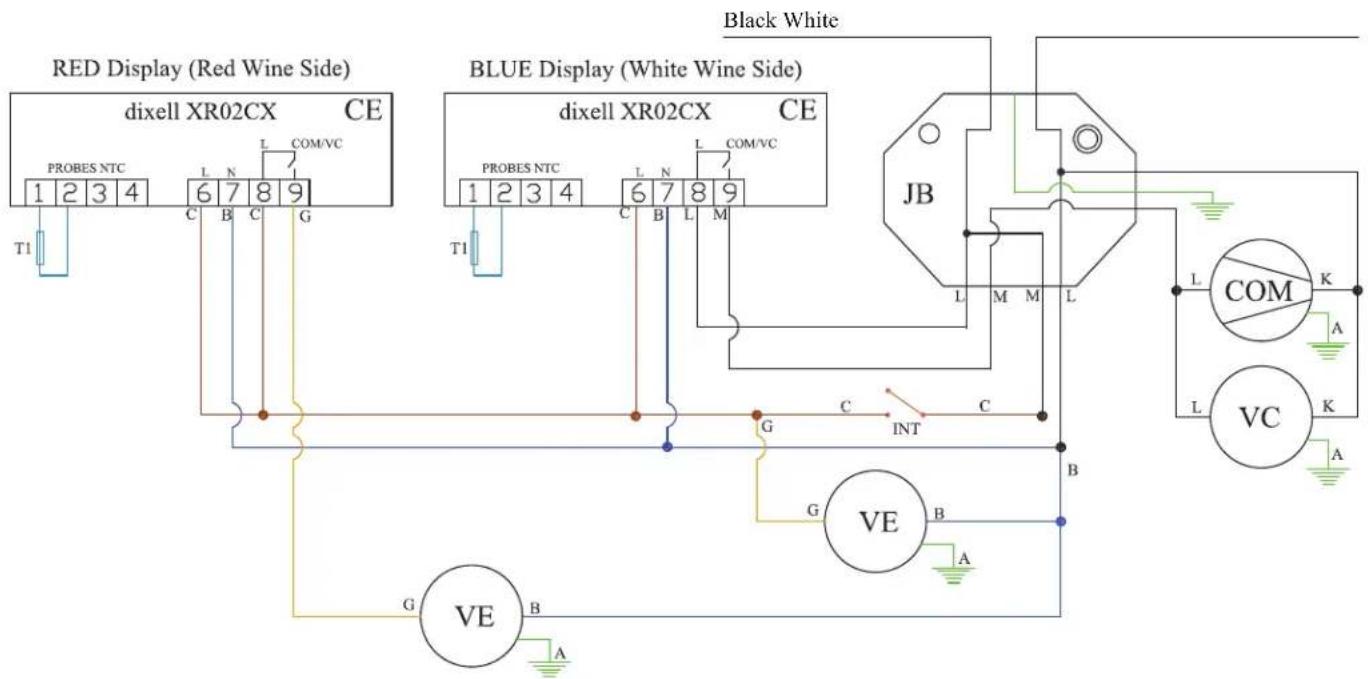
Parts Listing
| Item | Part # Description | MDD23W | MDD58W | |
| Castors & Legss | ||||
| 1 | 603313M0013 Castor w/o B D.3" 2 | |||
| 603313M0014 Castor with B D.3" 2 | ||||
| Compressors | ||||
| 2 | 602121M0073 Compressor EM55HNX 1 | |||
| 602101M0082 Start Kit Compressor EM55HNX 1 | ||||
| 604701M0002 Filter 25gr. 1 | ||||
| 602101M0020 Compressor NE6187Z 1 | ||||
| 602101M0035 Start Kit Compressor NE6187Z 1 | ||||
| 604701M0001 Filter 40gr. | 1 | |||
| Condensers & Others | ||||
| 3 | 6029020023 | Condenser Coil | 1 | |
| 602902M0009 | Condenser Coil | 1 | ||
| 4 | 6021050020 | Fan Condenser | 1 | 2 |
| Condensing Units | ||||
| 5 | M17301M0034 | Condensing Unit | 1 | |
| M17301M0036 | Condensing Unit | 1 | ||
| Doors & Others | ||||
| 6 | M16901M0153 | Black Left Door Kit | 1 | |
| M16901M0154 | Black Right Door Kit | 1 | ||
| M16901M0133 | Black Door Kit | 1 | ||
| 600305M0133 | Door Spacer | 1 | 2 | |
| 7 | 604501M0007 | Door Gasket | 1 | 2 |
| 604501M0019 | Door Central Gasket | 1 | ||
| 8 | 603301M0056 | Lock (Master Key) | 1 | 1 |
| 9 | M16909M0019 | Left Self-Closing Hinge Kit | 1 | |
| M16909M0020 | Right Self-Closing Hinge Kit | 1 | ||
| M16909M0023 | Right Hinge Kit | 1 | ||
| Evaporators & Others | ||||
| 12 | 6021050020 | Fan Evaporator 115V | 2 | 1 |
| 602105M0003 | Fan Evaporator 120V | 1 | ||
| 13 | 602901M0009 | Evaporator Coil | 1 | |
| 602901M0017 | Evaporator Coil | 1 | ||
| 14 | 602713M0002 | Grid Fan Evaporator | 2 | 2 |
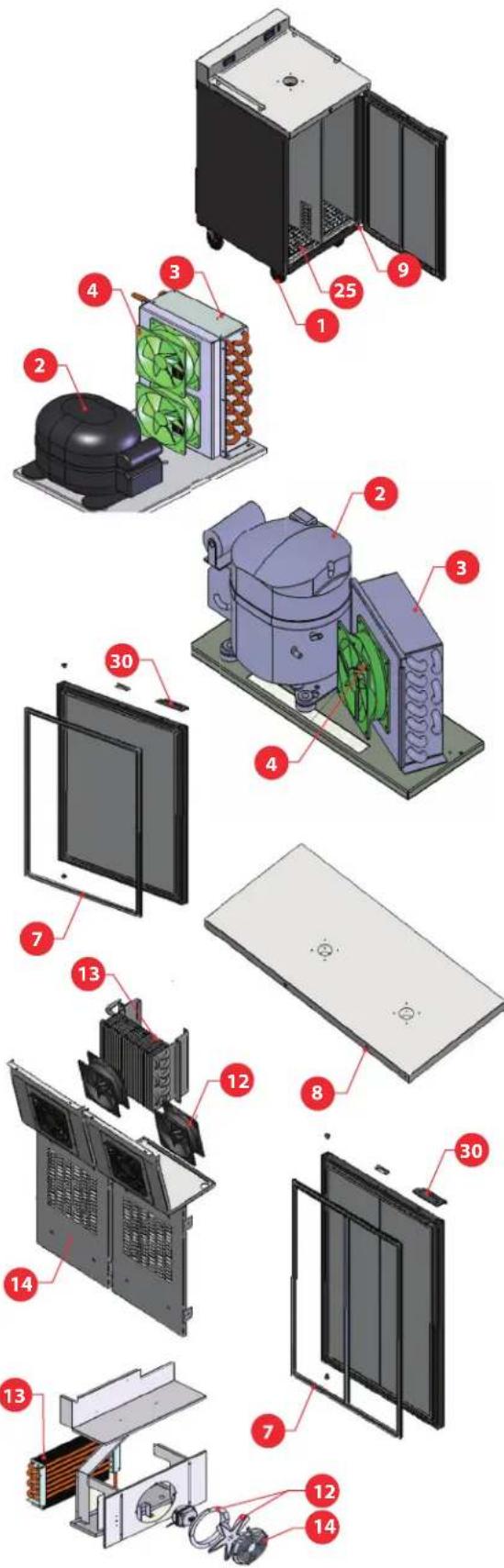
Parts Listing
| Item Part # Description | MDD23W MDD58W | |||
| Controllers | ||||
| 16 | 602135M032 Thermometer Digital 1 1 | |||
| 602135M0033 Thermometer Digital 1 1 | ||||
| 602125M0034 Inner Side Panel Heater 1 | ||||
| 602135M026 Probe 2 2 | ||||
| Panels | ||||
| 18 | M10917M0549 Bottom Panel 1 | |||
| M10917M0621 Inner Side Panel | ||||
| 19 | M10917M0567 Side Panel 1 | |||
| 20 | M10917M0133 Back Panel | 1 | ||
| M10917M0164 Back Panel | 1 | |||
| 21 | M10913M0500 Top Panel | 1 | ||
| 22 | 603305M0022 Handrail | 2 | ||
| 603305M0005 Separator Handrail | 4 | |||
| Racks | ||||
| 25 | 600301M0032 Plastic Bottom Protector | 2 3 | ||
| M10305M0011 Plastic Bottom Protector | 1 | |||
| 26 | M18101M0261 Top MDD23W | 1 | ||
| M18101M0264 | Top MDD58W | 1 | ||
| CO2 Distributor | ||||
| 29 | 604313M0002 Air Distributor 4 Ways | 2 | ||
| Handles | ||||
| 30 | M10917M0503 Black Handle, Door | 1 2 | ||
| Hardware | ||||
| 31 | 602509M0018 Bolt Hex, M.4 DOMO | 6 | 12 | |
| 602505M0028 Bolt M6x45 | 4 8 | |||
| 32 | 603301M0106 Support Hinges | 1 1 | ||
| 603301M0107 Support Hinges | 1 1 | |||
| 603301M0118 Support Hinges | 1 | |||
| 603301M0119 Support Hinges | 1 | |||
| 34 | 604145M0008 Power Cord w/ Connections | 1 1 | ||
| 35 | 600301M0011 Bumper | 2 | ||
| 38 | A10905M0221 | Probe Protector | ||
| 39 | 600305M0132 Rubber Membrane | 2 | ||
| Capillary Tubes | ||||
| 37 | 6007020003 | Capillary tube 0.42 x 9.5 FT | 1 | |
| 6007020004 | Capillary tube 0.54 x 5.9 FT | 1 | ||
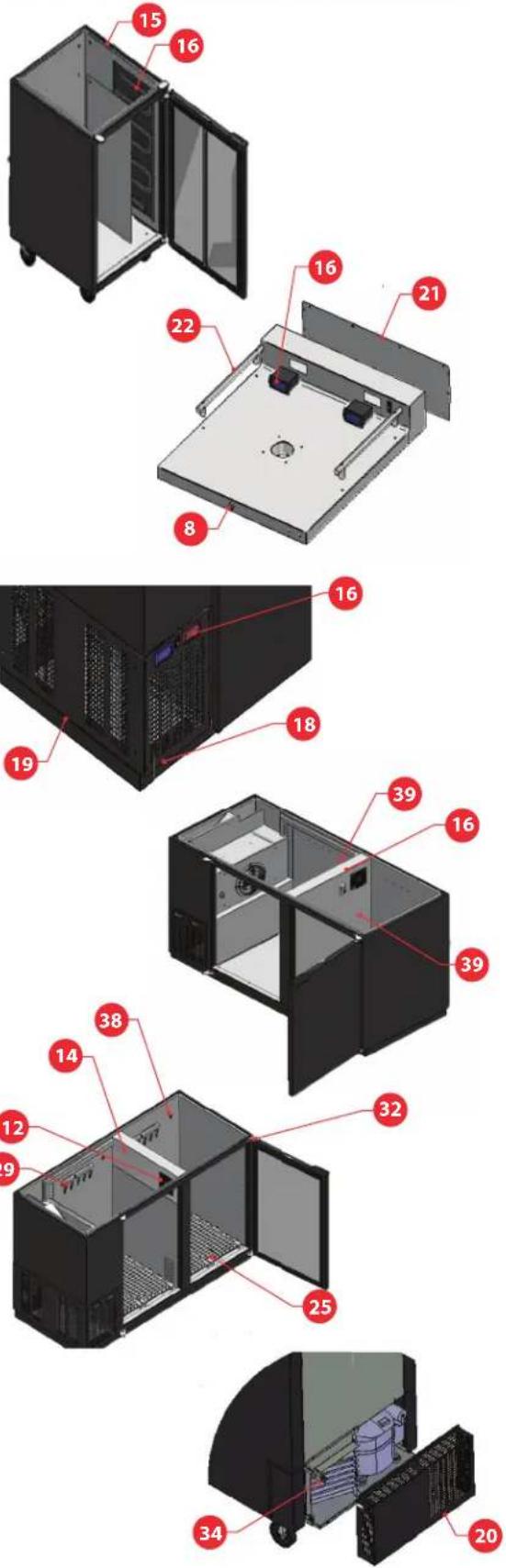
Notes:
Warranty
For warranty service call: 1-800-544-0400. Please have the model number and serial number.
Warranty Claims Procedure:
If there is a defect in material or factory workmanship covered by this Warranty reported to Micro Matic during the period the applicable Warranty is in force and effect, Micro Matic will repair or replace, at Micro Matic's option, that part of the Equipment that has become defective. Micro Matic will cover labor cost within one year from the Warranty Commencement date or 15 months from shipment date, whichever occurs first. Micro Matic shall bear all labor costs in connection with the installation of these replacement parts, provided that, the installation is conducted by Micro Matic or its authorized representative. Charges for warranty travel time to round trip total of (2) two hours or up to 100 miles total. Any charges exceeding those stated herein or overtime rates must have prior authorization by Micro Matic.
Additional Four Year Compressor Part Warranty:
In addition to the warranty set above. Micro Matic warrants the compressor (part only) for an additional four (4) years based on the installation date. This warranty is for defects both in workmanship and material under the normal and proper use and maintenance service. The four (4) year extended warranty only applies to hermetically sealed parts of the compressor and does not apply to any other part or component, including, but not limited to cabinet, temperature control, refrigerant, motor starting equipment, fan assembly, or any other electrical or mechanical component.
The original purchaser shall be responsible for returning the defective compressor to Micro Matic prepaid. This warranty shall be void if the compressor, in Micro Matic's sole judgment, has been subjected to misuse, neglect, alteration or accident, operated contrary to the recommendations specified by the Unit manufacturer, repaired or altered by anyone other than Micro Matic in any way so as, in Micro Matic's sole judgment, to affect its quality or efficiency or if the serial number has been altered, defaced or removed. This warranty does not apply to a compressor in any unit that has been moved fro the location where it was originally installed.
Parts Warranty Coverage:
Micro Matic warrants all new machine parts produced or authorized by Micro Matic to be free from defects in material and workmanship for a period of 90 days from the Warranty Commencement Date. If any defect in material and workmanship is found to exist within the warranty period, Micro Matic will replace the defective part without charge. Defective parts become the property of Micro Matic.
Micro Matic will have no responsibility to honor claims received after the date the applicable Warranty expires. Notwithstanding the foregoing, any claim with reference to the Equipment or any parts therefore for any cause shall be deemed waived unless submitted
by the User to Micro Matic within thirty (30) days after the date the User discovered, or should have discovered, the claim. In connection with all claims under this Warranty, Micro Matic will have the right, at its own expense, to have its representatives inspect the Equipment at the User's premises and to request all of User's records pertaining to the Equipment to determine whether a defect exists, whether the conditions set forth in this Warranty have been satisfied, and whether or not the applicable Warranty is in effect.
Exclusions from and Conditions to Warranty Coverage:
This Warranty does not cover parts or accessories, which (a) carry the warranty of a supplier or (b) are, abused. Application of this Warranty is further conditioned upon the following:
Installation:
The Equipment must be properly installed in accordance with Micro Matic's installation procedures.
No Alteration:
The Equipment must not have been modified or altered from its condition at the date of original installation. Any alteration from factory settings on thermostats will void warranty.
Use. Micro Matic equipment in not designed for personal, family or household purposes, and its sale for such purposes is not intended. in the event the equipment is so used, this warranty shall be null and void, and the equipment shall be deemed to have been sold "as is-where is" without any warranty of any kind, including without limitation any warranty of title, non-infringement, merchant-ability or fitness for a particular purpose.
Proper Maintenance and Operation. The Equipment must be properly maintained and operated in accordance with Micro Matic's maintenance and operating procedures. All service, labor and parts must be acquired from Micro Matic or its authorized service representative for the User's area.
This warranty is void if failure is a direct result of handling and/or transportation, fire, water, accident, misuse, acts of god, attempted repair by unauthorized persons, improper installation, if serial number has been removed or altered, or if unit is used for purpose other than it was originally intended.
Failure to comply with any of these conditions will void this Warranty. In addition, this Warranty does not cover defects due to apparent abuse, misuse or accident.

www.micromatic.com • 1 (866) 327-4159
- Pro-Line Wine
- Wine On Tap
- Increase Sales
- Dispense Quality Wine
- Operating Efficiency
- Table Of Contents
- Receiving & Inspecting
- Uncrating
- Location
- Installation
- Install Wine Font (Sold Separately)
- Install Keg Tapping Kit(s) (Sold Separately)
- Specifications & Dimensions
- Keg Temperature: Storage & Serving
- Storage
- Serving
- IMPORTANT NOTICE:
- MDD23W Air & Wine Temperatures
- Adjusting the Thermostat
- How To See The Set Point
- How To Change The Set Point
- How To Change A Parameter Number
- How To Enter The Hidden Menu
- NOW YOU ARE IN THE HIDDEN MENU
- Data Plate
- Electrical Connections
- Troubleshooting
- Maintenance
- Cleaning the Cabinet
- Defrosting
- Cleaning Condenser Coil
- Gasket Maintenance
- Wiring Diagram – MDD23W Series
- Wiring Diagram – MDD58W Series
- Notes:
- Warranty
- Warranty Claims Procedure:
- Additional Four Year Compressor Part Warranty:
- Parts Warranty Coverage:
- Exclusions from and Conditions to Warranty Coverage:
- Installation:
- No Alteration:
Brand : Micro Matic
Model : MDD36W-E-A
Category : Unknown