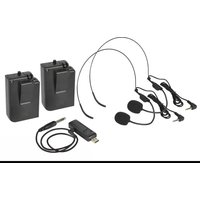
U-Mic 171.812UK - Loudspeaker Qtx - Free user manual and instructions
Find the device manual for free U-Mic 171.812UK Qtx in PDF.


| Product Type | Wireless Microphone System |
| Brand | Qtx |
| Model | U-Mic 171.812UK |
| Carrier Frequency | 863.2 MHz + 864.8 MHz |
| RF Power | 10 mW |
| Frequency Response | 50 Hz - 15 kHz |
| Microphone Capsule | Back Electret Condenser |
| Wireless Range | Up to 50 m |
| Output Connection | 3.5 mm Mono Jack |
| Receiver Power Supply | 5 Vdc 1000 mA via USB |
| Transmitter Power Supply | 2 x AA Batteries (each) |
| Receiver Dimensions | 80 x 34 x 15 mm |
| Transmitter Dimensions | 105 x 65 x 30 mm |
| Receiver Weight | 17 g |
| Transmitter Weight (without battery) | 67 g |
| Number of Transmitters | 2 |
| Included Accessories | 2 neckband microphones, USB receiver, 3.5mm to 6.3mm jack lead |
| Audio Output | Mixed mono from both transmitters |
| Setup Requirement | USB power source (5V, 1000mA) for receiver |
| Compliance | EU Directive 2014/53/EU |
| Disposal | Electronic waste - do not dispose with household waste |
| Storage Recommendation | Remove batteries and unplug receiver for long-term storage |
Frequently Asked Questions - U-Mic 171.812UK Qtx
User questions about U-Mic 171.812UK Qtx
0 question about this device. Answer the ones you know or ask your own.
Ask a new question about this device
Download the instructions for your Loudspeaker in PDF format for free! Find your manual U-Mic 171.812UK - Qtx and take your electronic device back in hand. On this page are published all the documents necessary for the use of your device. U-Mic 171.812UK by Qtx.
USER MANUAL U-Mic 171.812UK Qtx
natural_image
Four electronic devices with attached cables and earphones, shown in black and white (no text or symbols visible)Version 1.1

Caution: Please read this manual carefully before operating Damage caused by misuse is not covered by the warranty
Introduction
Thank you for choosing the U-MIC for your wireless microphone requirements. This system is designed to provide a reliable, cable-free solution with minimal setup and ease of use. Please read and keep this user manual to get the best results from your product and avoid damage through misuse.
Layout

-
Volume control
-
3.5mm mic input
-
LED power indicator
-
Power switch
-
Battery compartment
-
USB type A plug
-
3.5mm audio output
-
USB type A socket
Setting up
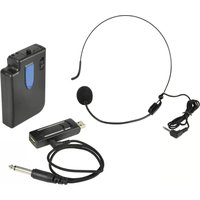
The U-MIC is supplied as 2 individual beltpack microphone transmitters and a USB receiver with a 3.5mm to 6.3mm jack lead.
The USB type A plug (6) on the receiver should be connected to a USB port for power (5V, 1000mA). This can be from a USB power adaptor or power bank for portable use if required. The connection can also be made to the receiver using an optional USB extension lead if preferred.
Note: the audio is not transmitted to the USB port. The USB is for power only.
If the USB port is a U-Disk player or computer port, the digital media (USB stick) or other peripheral device can still be connected through the receiver by connecting to the USB type A socket (8) on the rear of the receiver.
Operation
The U-MIC receiver is designed to connect to a microphone input jack on a mixer or amplifier. Turn down the volume level on the microphone input of the mixer or amplifier before connecting to avoid loud noises when connecting.
Connect the 3.5mm plug of the supplied lead into the USB receiver (7) and connect the 6.3mm plug to the appropriate microphone input jack on the mixer or amplifier.
Note: The output of both of the beltpack transmitters is mixed to the same single 3.5mm output.
Each beltpack transmitter has an on/off switch (4), which should be in the up position (off). The top volume control (1) should be turned fully down. Connect the neckband microphone to the 3.5mm microphone input (2).
Slide open the cover of the battery compartment (5) and insert 2 x AA alkaline batteries per transmitter, ensuring that the polarity is the correct way around.
Move the switch down to the "on" position and the power indicator (3) should light. Note that the switch has a centre position which is also "on".
Gradually turn up the volume control on top of each beltpack transmitter and the level on the mixer or amplifier and speak into the neckband microphones in turn until the sound can be heard through the connected speakers or recording equipment. Increase the volume to the required level.
If the microphones are not being used, turn down the volume level on the top of each beltpack transmitter and the mixer/amplifier and switch the power off.
For long term storage, unplug the jack and USB receiver and remove the batteries from both beltpack transmitters.
Specifications
| Carrier frequency | 863.2MHz + 864.8MHz |
| RF power | 10mW |
| Power supply: transmitter | 2 x AA batteries (each) |
| Power supply: receiver | 5Vdc 1000mA (USB) |
| Frequency response | 50Hz - 15kHz |
| Capsule | Back electret condenser |
| Output connection | 3.5mm mono jack |
| Wireless range | Up to 50m |
| Dimensions: transmitter | 105 x 65 x 30mm each |
| Weight: transmitter | 67g (no battery) each |
| Dimensions: receiver | 80 x 34 x 15mm |
| Weight: receiver | 17g |

Disposal: The "Crossed Wheelie Bin" symbol on the product means that the product is classed as Electrical or Electronic equipment and should not be disposed with other household or commercial waste at the end of its useful life. The goods must be disposed of according to your local council guidelines.
Hereby, AVSL Group Ltd. declares that the radio equipment type 171.812UK is in compliance with Directive 2014/53/EU
The full text of the EU declaration of conformity is available at the following internet address: http://www.avsl.com/assets/exportdoc/1/7/171812UK%20CE.pdf
Errors and omissions excepted. Copyright© 2021. AVSL Group Ltd. Unit 2-4 Bridgewater Park, Taylor Rd. Manchester. M41 7JQ AVSL (EUROPE) Ltd, Unit 3D North Point House, North Point Business Park, New Mallow Road, Cork, Ireland.


Brand : Qtx
Model : U-Mic 171.812UK
Category : Loudspeaker