PSBWP9BK - Speaker Pyle - Free user manual and instructions
Find the device manual for free PSBWP9BK Pyle in PDF.


User questions about PSBWP9BK Pyle
0 question about this device. Answer the ones you know or ask your own.
Ask a new question about this device
Download the instructions for your Speaker in PDF format for free! Find your manual PSBWP9BK - Pyle and take your electronic device back in hand. On this page are published all the documents necessary for the use of your device. PSBWP9BK by Pyle.
USER MANUAL PSBWP9BK Pyle
natural_image
Black cylindrical device with green and white label, no visible text or symbols on bodyPSBWP9BK
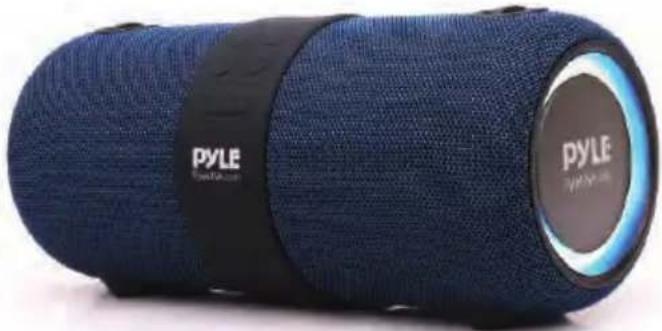
natural_image
Blue PYLE brand light bulb with black strap, no visible text or symbols on bodyPSBWP9BL

natural_image
Abstract black star-like patterns on white background (no text or symbols)
natural_image
Row of abstract geometric symbols including stars, circles, and triangles (no text or labels)2 Channel BT Fabric Speaker, TWS Function, USB/FM Radio/RGB Lighting with Rechargeable Battery
USER GUIDE
To ensure correct operation and avoid damage, please read this user manual carefully before using this product.
Product Details:
- Power On/Off
- Mode Button (turn the modes among BT,
- TWG D. 11
- Siri Button
- Play/Pause
- Charging Jack
- Forward/Volume Up 10. USB Port
- Battery Indicator 11. AUX IN port
- Backward/Volume Down 12. Reset Jack
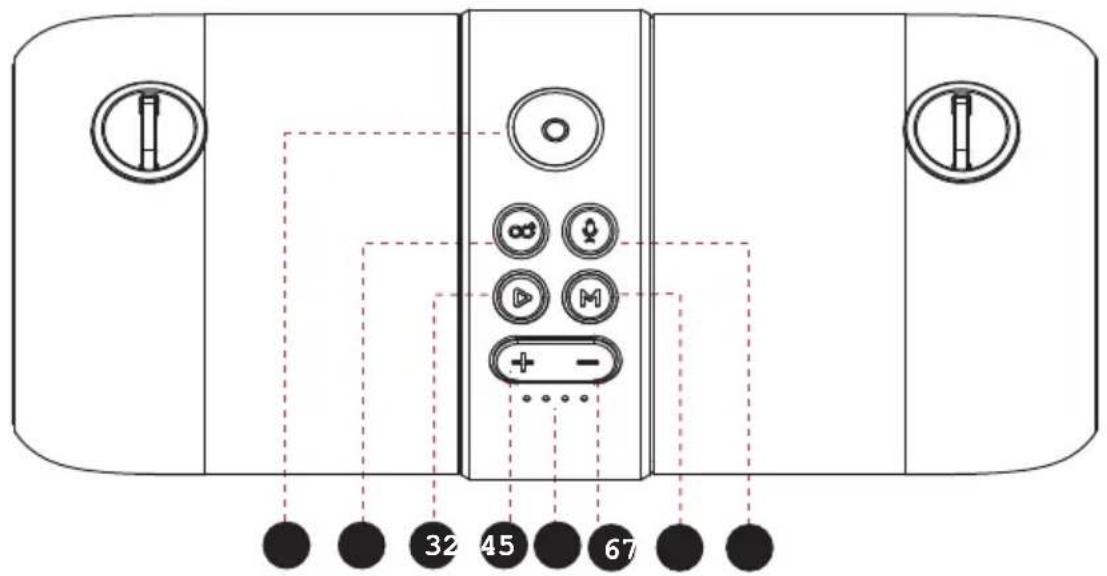
text_image
32 45 67
text_image
DC 0V RESET 91 112Power On/Off: Press and hold the Power button to turn the speaker on and off.
Wireless BT Streaming:
- Turn the power button to "ON", the speaker enter Wireless BT mode automatically.
- Activate Wireless BT of mobile phone and search for device name "PyleUSA" then connect it.
- Play the music from your mobile phone and enjoy.
- Press and hold Forward or Backward button on the device or operate on Mobile phone to select songs you like.
- Press Forward or Backward button to adjust volume up and down. Or adjust the mobile phones' volume.
- Press Play/Pause button on the device or operate on Mobile phones to play/pause the music.
- Press and hold TWS button to disconnect the Wireless BT connection with the mobile device.
TWS Function:
- Turn on two identical speakers you want to pair, both under Wireless BT mode. Only need to set one of the two units.
- Press the "TWS" button to pair, the TWS button will keep lighting after paired successfully.
- Make Wireless BT connection with your mobile phone to play music by the two paired Speakers to create more powerful surround sound effect.
- Press the "TWS" button again to exit TWS mode.
Notes:
- Under TWS mode and Wireless BT connected, when user press and hold the TWS button, both the TWS connection and Wireless BT connection will be disconnected.
- When Wireless BT connected, if user press TWS button to make TWS connection, the Wireless BT connection will be disconnected for a short time, after TWS paired, the Wireless BT will be connected again.
Playing music from USB disk:
- Turn the Power button to "ON".
- Insert USB flash disk into slot, the speaker will play the stored music automatically.
- Press and hold Forward or Backward button to select songs you like, press to adjust the volume up and down.
- Press Play/Pause to play or pause.
Notes: Under Wireless BT playing mode, insert USB disk will disconnect the Wireless BT and switch to play the USB disk. You can short-press the MODE button to switch to Wireless BT mode again.
FM Radio:
- Turn the power button to "ON", short-press the "MODE" button to enter radio state.
- Press and hold "Play/Pause" button to auto search the FM Channel and store it automatically. Press "Play/Pause" button to mute the speaker.
- Press and hold Forward or Backward button to change the stored FM channel, press to adjust the volume up and down.
AUX-IN:
- For other compatible music devices or your MP3/MP4 players, use the supplied audio line cable to connect from the device's "Line Out" to the "Aux In" of this device, then enjoy...
- Under any playing mode, when you use the audio cable to connect the device, it will auto-switch to the AUX mode.
- When using an external device, all functions can be controlled by the external device.
RGB Lighting
When the speaker is turned on, the RGB light is on automatically, user can press and hold the Mode button to switch the RGB light on and off.
Activating Voice Assistant:
- Make Wireless BT connection with your mobile phone.
- Short-press Siri button to activate voice assistant SIRI/GOOGLE ASSISTANT.
Hands-free call:
- Under Wireless BT connection status, if there is an incoming call, user can press Play/Pause button to accept the call or press and hold Play/Pause button to reject the call.
- During the call, user can press and hold Play/Pause button to switch to talking on the phone.
- Press Play/Pause button or operate on mobile phone to end the call.
Reset Functionality:
If the speaker does not turn off or respond, user can short-press the RESET jack with a small round pin to reset the speaker.
More Remarks:
- Default volume is at 50% status of max volume.
- Play time may vary depending on volume level and music style.
How to charge:
- The charger is not included in the package, please charge the speaker via a standard 5V/1-2A charger or via a PC.
- Charge time should be 6-8 hours. After full charging, the 4 LEDs keep lighting.
- When battery voltage is low, the speaker will prompt for recharging.
- The unit does not have power bank function, it is forbidden to charge other device via this unit or to connect other device via the USB port.
IMPORTANT:
When playing music during charging, please put the volume to middle, because for some music with heavy bass, the charger may not be able to afford the high current temporarily under the maximum volume.
Warning:
- Don't use/store this speaker in extreme temperatures.
- Please store it in cool and dry area, keep away from anything that generates heat, such as radiators, stoves, etc.
- In order to have hearing protection and an extended speaker life, avoid listening to songs on maximum volume.
- When cleaning this speaker, use a soft dry cloth. For more sever stains, please dampen the cloth with water only. Anything else has the chance of dissolving the paint or damaging the plastic.
natural_image
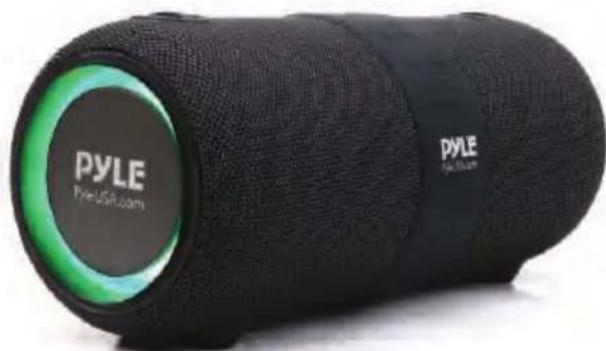
Black cylindrical device with green accent, labeled 'PYLE' and 'Pyle USA.com' on its body (no additional text or symbols visible)PSBWP9BK Black

natural_image
Blue PYLE brand light bulb with black strap, no visible text or symbols on bodyPSBWP9BL Blue
Features:
• 2.0 Channel Portable Wireless BT Fabric Speaker
• Water Resistant IPX6
• TWS Function, Double Enhanced Stereo Sound
- Optimized Google Assistant and Siri Voice Control
- Hands-free Mic for Easy Picking Up the Call
- RGB Lighting
- With A2DP Wireless Streaming Music BT
- USB Support
- FM Radio
• Line-in Function, Suitable for PC, MID, TV, and other Audio Devices
• Built-in Lithium Rechargeable Battery, 5400mAh
- Shoulder Strap, Easy to Take Out
• Without Adapter or Outlet Plug
- Perfect for Beach, Pool Side, Boat, and More Outdoor Activities
Wireless BT Connectivity:
- Instantly Stream Music from Your Devices
• Works with All Your Favorite Wireless BT Devices (iPhone, Android, Smartphone, iPad, Tablet, PC, etc.) - Wireless BT Version: V4.2+BR
• Wireless BT Protocol: A2DP/AVRCP/HFP
• Wireless BT Network Name: 'PyleUSA' - Wireless Range: Over 32'+ Ft.
What's in the Box:
- Portable Wireless BT Speaker
- Charging Cable
- Audio Cable
- Shoulder Strap
Technical Specs:
• Power Output: MAX Power: 14W (7W x 2)
• Sound System: 3" -inches x 2
- Speaker Type: Compact & Portable Boombox
- Play Time: Approximate 6 hours at Maximum Volume (with Light Off)
• Construction Material: LG
• BT Transmission Power: -6\~4dbm
• Transmission Distance: Up to 32+ ft(10 meters)
- Charging (5V 2A): 6-7 hours (Micro USB-TYPE-C charging)
- USB Music Format: MP3/wav/wma/flac/ape
• USB Maximum Capacity: 32G
- SNR: 72DB
- Wireless BT Connecting Range: 10m
• FM Frequency: 87.5MHz-108MHz
- Speaker driver size: 3" -inches x 2
- Battery Capacity: 3.7V 5400mAh
• Frequency Response: 100hz-20Khz
- Input Power Supply: DC 5V
- Product Size: 11.14" x 4.84" x 4.96" –inches

WARNING:
This product can expose you to a chemical or group of chemicals, which may include "Cadmium (Cd)" which is known in the state of California to cause cancer, birth defects, or other reproductive harm. For more info, go to https://www.p65warnings.ca.gov/.
PYLE
PyleUSA.com

natural_image
Illustration of a laptop with a red checkmark on screen, next to partial text 'V H N W' (no readable document content)VISIT US ONLINE:
Have a question?
Need service or repair?
Want to leave a comment?
PyleUSA.com/ContactUs
PYLE
Questions? Issues?
We are here to help!
Phone: (1) 718-535-1800
Email: support@pyleusa.com