
Ultimia 5 - Audio player Chord - Free user manual and instructions
Find the device manual for free Ultimia 5 Chord in PDF.


| Product Type | Stereo Power Amplifier |
| Brand | Chord Electronics |
| Model | Ultimia 5 |
| Dimensions (Approx) | 480 x 150 x 360 mm (W x H x D) |
| Weight (Approx) | 20 kg |
| Power Supply | 15A IEC mains lead, 100-240V AC |
| Audio Inputs | Balanced XLR (1 pair), Unbalanced RCA (1 pair) |
| Speaker Outputs | 2 pairs (banana plugs, spades, or bare wire) |
| 12V Trigger Input | Yes, for remote power on/off |
| LED Brightness Adjustment | Yes, via hidden button on faceplate |
| Thermal Protection | Internal, auto shutdown if overheating |
| Chassis Material | Thick solid aluminium |
| Warranty | 5 years (transferable with proof of purchase) |
| Country of Manufacture | United Kingdom |
| Placement Recommendation | Allow 10cm clearance around unit for convection cooling |
| Safety Note | No user-serviceable parts; do not expose to liquids or heat sources |
Frequently Asked Questions - Ultimia 5 Chord
User questions about Ultimia 5 Chord
0 question about this device. Answer the ones you know or ask your own.
Ask a new question about this device
Download the instructions for your Audio player in PDF format for free! Find your manual Ultimia 5 - Chord and take your electronic device back in hand. On this page are published all the documents necessary for the use of your device. Ultimia 5 by Chord.
USER MANUAL Ultimia 5 Chord
Chord Electronics Ltd.
Contents 0.0
1.0 Safety instructions 03
1.1 Introduction 04
1.2 Protection against liquids & heat 05
1.3 Dismantling & Radio 06 frequency interference
1.4 Connecting your equipment 07
3.0 Getting to know ULTIMA 5
3.1 Getting to know ULTIMA 5 12
3.2 The front panel 13
3.3 The top panel 14
3.4 The rear panel 15
2.0 Warranty 08
2.1 Warranty period & registering 09 your purchase
2.2 Making a claim & warranty exclusions 10
4.0 Setting up ULTIMA 5
4.1 Placement 17
4.2 Connecting ULTIMA 5 to 18 ancillary equipment
4.3 Audio inputs 19
4.4 Audio outputs 20
4.5 Power-on sequence and 12V trigger 21
4.6 Earthing issues in Europe 22
4.7 Adjusting the brightness of the LED's 23
0.0
Contents
Safety instructions 1.0
1.1 Introduction
1.2 Protection against liquids & heat
1.3 Dismantling & Radio Frequency interference
1.4 Connecting your equipment
1.0
Safety instructions
Introduction 1.1

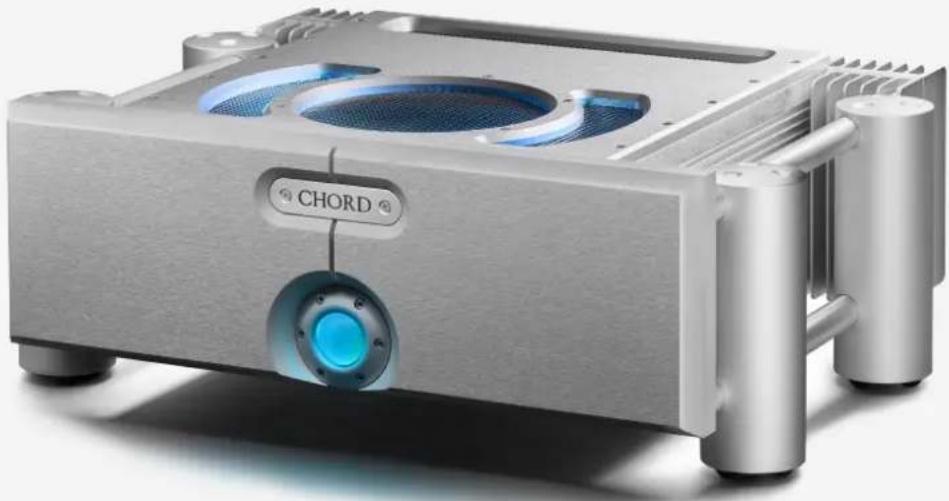
ULTIMA 5 is an incredibly reliable and technologically
advanced stereo power amplifier. It is our most powerful stereo amplification offering within the Full Size range.
Before operation, we strongly advise that you read this user manual thoroughly, storing it in a safe place along with your original receipt of purchase, in case you should require assistance in the future.
natural_image
Exterior view of a metallic audio compressor unit with blue-lit speaker and 'CHORD' label (no other text or symbols)
Made in BRITAIN
Protection against liquids & heat
1.2

The ULTIMA 5 is not protected against liquids of any kind. Never place containers of liquid on ULTIMA 5. Never allow ULTIMA 5 to come into contact with moisture or liquids; doing so could result in electrocution or damage to the ULTIMA 5 internal circuitry.
Be aware that liquids, including water that has dried, can leave minerals that can affect the PCB and other components, which could eventually lead to oxidisation and short-circuiting.
If the ULTIMA 5 comes into contact with moisture or liquids, immediately disconnect from the mains power supply, and connected equipment, and contact Chord Electronics for further advice.

The ULTIMA 5 has internal thermal protection that will cut er supply if reached.
Never operate the ULTIMA 5 near sources of heat or naked flames as this will decrease the lifespan of the internal components. It is advised that you do not operate the ULTIMA 5 in an area of direct sunlight or on top of significant heat-producing devices.
Please be aware that it is entirely normal for the ULTIMA 5 to become warm during use, particularly within a stacked configuration. If you are concerned about the temperatures, please switch the device off and consider a different placement.
Dismantling & radio frequency interference
1.3

There are no user-serviceable components within the ULTIMA 5 or its power supply. Dangerous voltages/currents exist within the ULTIMA 5 and its power supply, posing a severe risk of electrocution and/or fire.
With a thick, solid aluminium chassis, the ULTIMA 5's casework largely protects the sensitive internal circuitry from radio frequency interference. However, for optimal performance, it is recommended that the following points are observed:

Although the ULTIMA 5 is largely shielded, it can generate radio frequency interference that may have an effect on radio and television reception. If this occurs, please reconsider your placement.

Never attempt to open, dismantle or apply internal thirdparty devices to it or insert anything other than the listed interconnects or speaker cables within this user manual.

- Consider placing the ULTIMA 5 away from wireless routers.

- Separate the ULTIMA 5 from amplifiers using dal transformers.
If the ULTIMA 5 develops a fault or the casework becomes damaged, immediately disconnect from the mains power supply and connected equipment and contact Chord Electronics for further advice.

- Operate mobile phones at a distance to avoid interference.
Connecting your equipment 1.4
Before connecting the ULTIMA 5 to any equipment, consult the manufacturer's user guide to confirm compatibility.
When connecting the ULTIMA 5 to any equipment, make sure that all devices are off, including the ULTIMA 5.
Once connected, switch all equipment on starting with the source and ending with the amplification.
Initially, operate the any connected equipment on its lowest gain setting and lowest volume setting, gently increasing to a comfortable listening level.
Never operate connected equipment to the ULTIMA 5 at excessive sound levels; permanent hearing damage and loss can occur.
The included 15 amp IEC mains lead plugs into the ULTIMA 5.
If the power supply is prematurely disconnected ULTIMA 5 may still remain active for up to 15 seconds, however, this may cause damage to connected equipment.
WARNING: Never disconnect the power cable during operation. Only disconnect when ULTIMA 5 is off. If the power cable is disconnected during operation there is a risk of damage to connected equipment.

natural_image
Exterior view of a silver audio amplifier with a blue-lit speaker and 'CHORD' button (no additional text or symbols)Warranty 2.0
2.1 Warranty period & registering your purchase
2.2 Making a claim & warranty exclusions
2.0
Warranty
Warranty period & registering your purchase
2.1
At point of sale, Chord Electronics Ltd. provides ULTIMA 5 with a comprehensive five-year warranty* which covers defects in materials and workmanship through fair wear and tear. The warranty will be void if any other PSU other than that supplied is used.
*The warranty is transferable with proof of purchase, however, warranty on ex-demonstration units begins from the retailer's date of purchase.

Please use the form below to record the details of your purchase
in the event that these are required at a later date, we further advise that all purchases are registered with Chord Electronics at: chordelectronics.co.uk/register-product/

FIVE YEAR WARRANTY
| RETAILER: | |
| PURCHASE PRICE: | |
| UNIT COLOUR: | |
| DATE OF PURCHASE: | |
| TRANSACTION ID: |
Making a claim
& warranty exclusions
2.2
In the unlikely event of a claim, you must provide Chord Electronics with the details of the claim, including your original proof of purchase and serial number in order to validate the nature of the repair.
Upon receipt, Chord Electronics will make an assessment within 30 days and provide a reasonable solution.
All warranty repairs must be carried out by Chord Electronics or an approved service centre to guarantee the quality and safety of the repair.
WARRANTY EXCLUSIONS: The warranty does not cover connected equipment, personal injury or development natural patina of the metalwork and will be null and void if the following is applied: wilful neglect; modification or tampering of the product; improper use of the product; acts of God; damage caused by a connected device; mechanical shock; fire or application of excessive heat or repair/modification by a non-authorised third-party vendor.
Getting to know ULTIMA 5
3.0
3.1 Getting to know ULTIMA 5
3.2 The front panel
3.3 The top panel
3.4 The rear panel
3.0
Getting to know ULTIMA 5
Getting to know ULTIMA 5 3.1
Before operation, we strongly advise you read this user manual thoroughly, storing it in a safe place along with your original receipt of purchase, should you require assistance in the future.

natural_image
Exterior view of a silver audio amplifier with blue-lit speaker and 'CHORD' branding (no additional text or symbols)The front panel 3.2
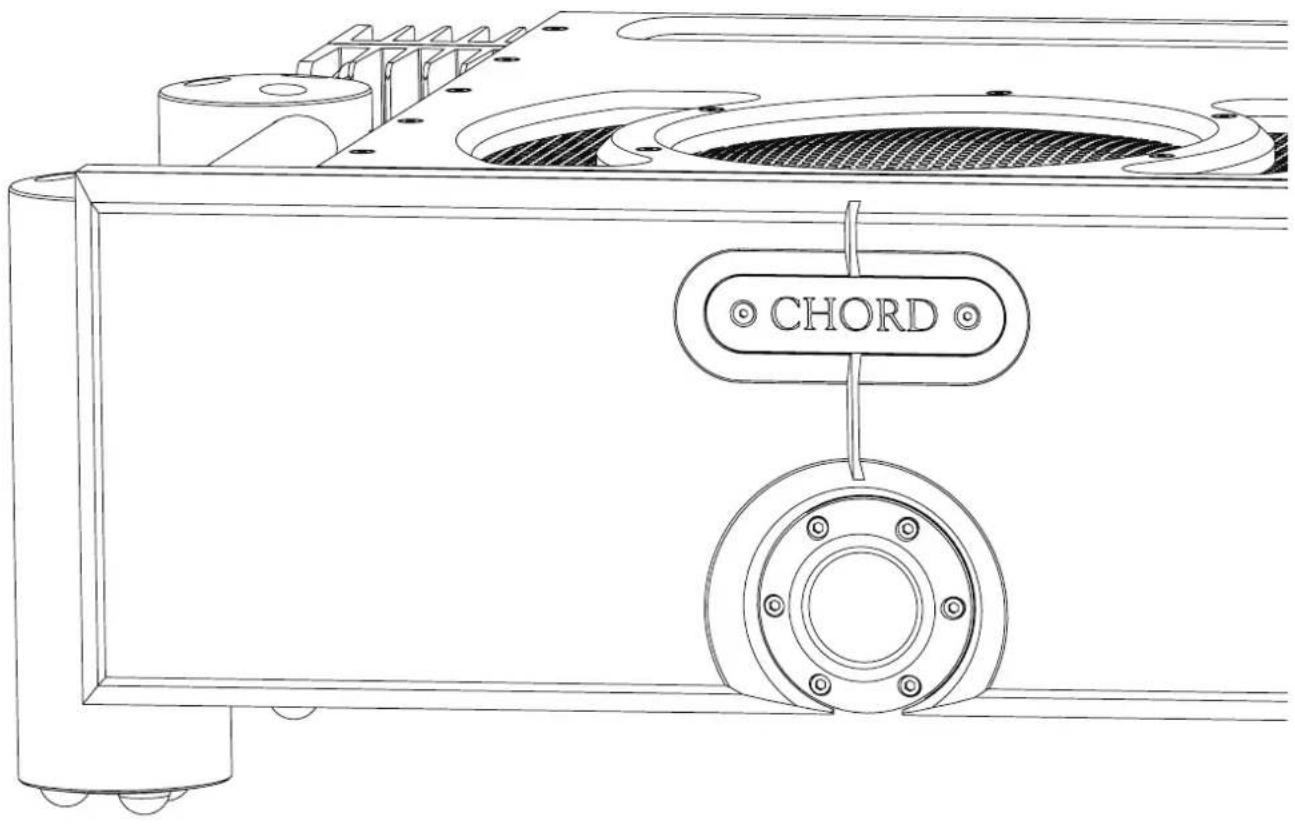
With only two buttons, everyday operation of ULTIMA 5 is simple and you can tailor the brightness of the feature lighting to suit the ambience of your listening room. Please view page 23 to learn how to do this.


The top panel 3.3
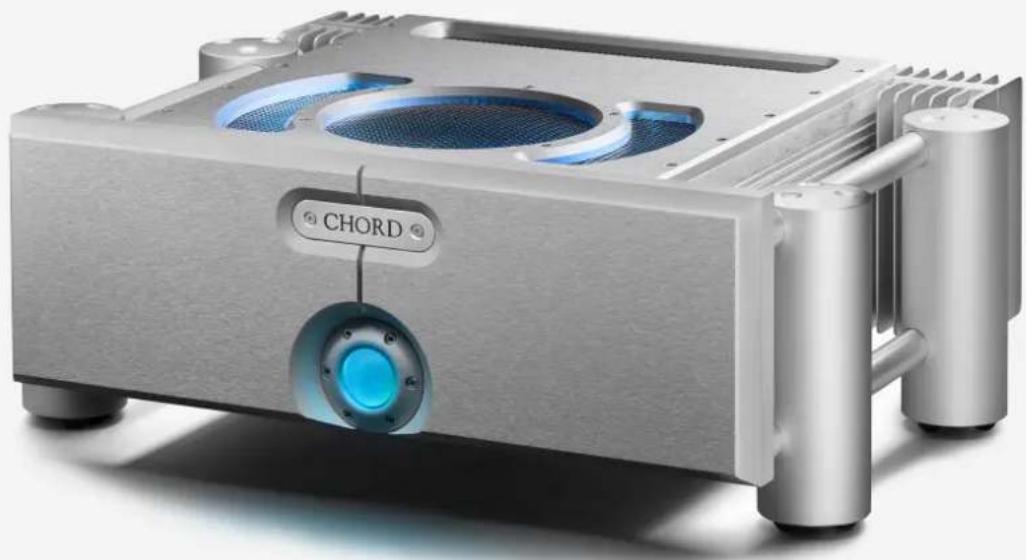
The top panel has no user configurable options. Instead, three teal feature light rings illuminate. If you find that these rings are too bright for your listening room you can control the brightness via the front panel.

WARNING: You must keep all vents clear.

The rear panel 3.4
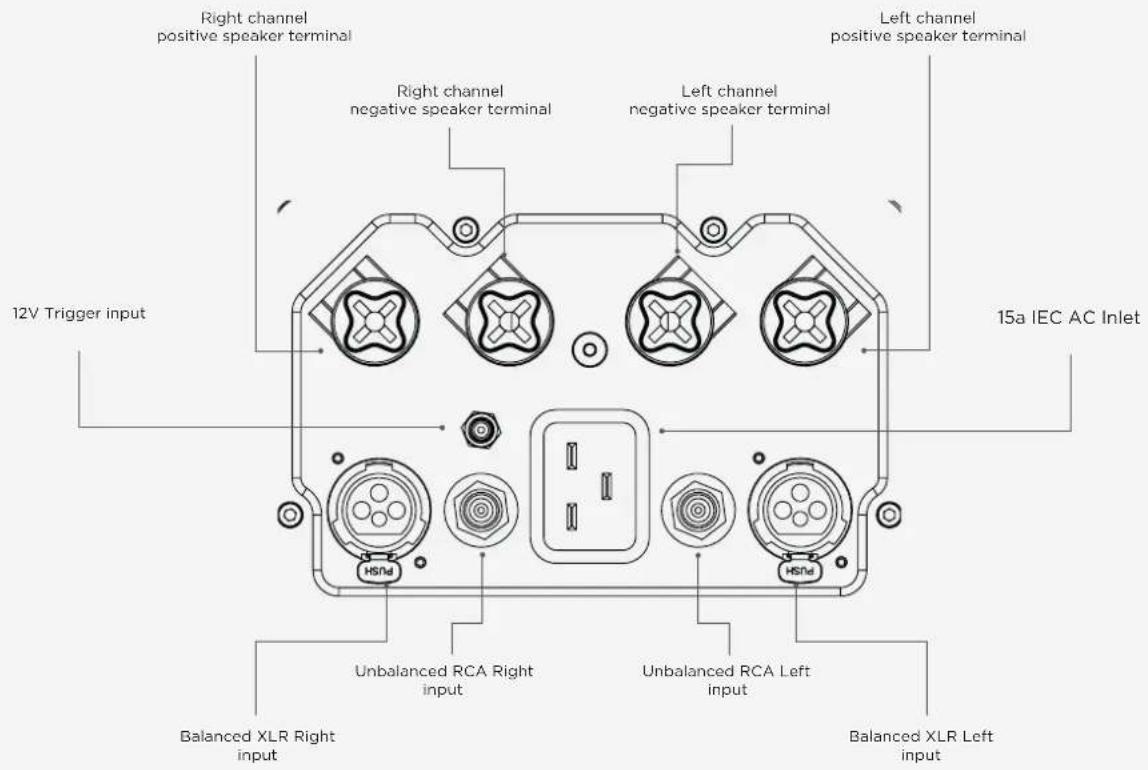
The rear panel offers a comprehensive connectivity suite, featuring both standard connections and those which are used with other Chord Electronics' devices.
When installing any cable, you must make sure that they securely click into place, especially optical.

WARNING: You must keep all vents clear.
Setting up ULTIMA 5
4.0
4.1 Placement
4.2 Connecting ULTIMA 5 to ancillary equipment
4.3 Audio inputs
4.4 Audio outputs
4.5 Power-on sequence and 12V trigger
4.6 Earthing issues in Europe
4.0
Setting up ULTIMA 5
4.1 Placement
4.2 Connecting ULTIMA 5 to
ancillary equipment
4.3 Audio inputs
4.4 Audio outputs
4.5 Power-on sequence and 12V trigger
4.6 Earthing issues in Europe
4.7 Adjusting the brightness of the LED's
Placement 4.1
Whilst ULTIMA 5 will operate normally within a typical Chord Electronics configuration, stacked via the Integra legs, it is recommended that ULTIMA 5 is allowed to 'breathe' with 10cm of space around it to convection-cool during operation.
natural_image
Exterior view of a metallic audio amplifier with blue-lit speaker and 'CHORD' label (no other text or symbols)Connecting ULTIMA 5 to ancillary equipment
4.2
When connecting the ULTIMA 5 to equipment within the signal path, ensure all devices are switched off. It is recommended that once all equipment is properly connected, that the volume setting is operated to its lowest setting, before slowly being raised to a comfortable listening level. Always observe partnering manufacturers' guidelines.
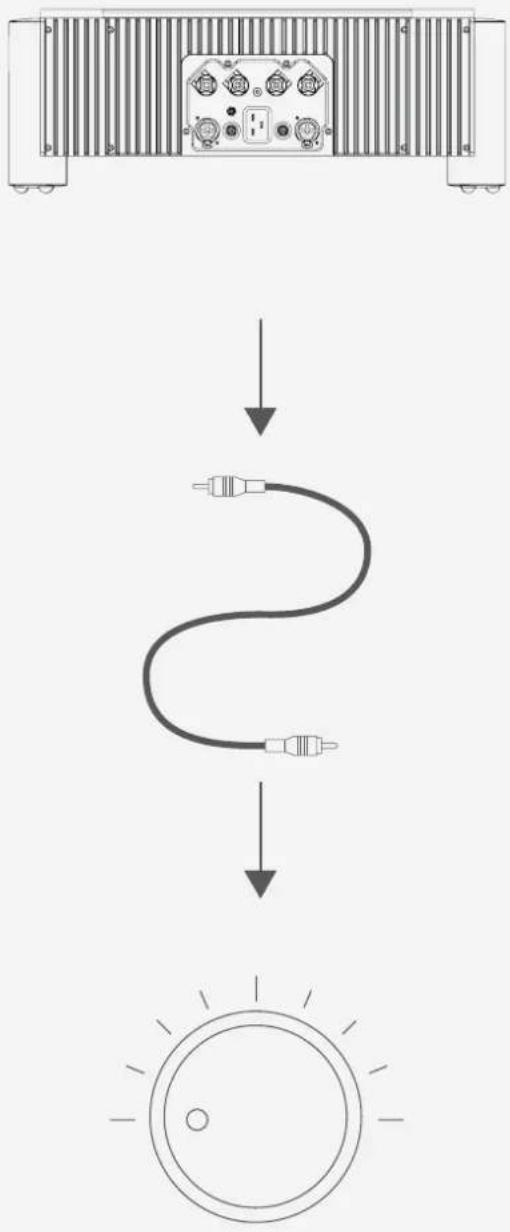
flowchart
graph TD
    A["Device Back"] --> B["Signal Line"]
    B --> C["Circular Display"]
    style A fill:#f9f,stroke:#333
    style B fill:#ccf,stroke:#333
    style C fill:#cfc,stroke:#333
4.1 Placement
4.2 Connecting ULTIMA 5 to
ancillary equipment
4.3 Audio inputs
4.4 Audio outputs
4.5 Power-on sequence and 12V trigger
4.6 Earthing issues in Europe
4.7 Adjusting the brightness of the LED's
Audio inputs 4.3
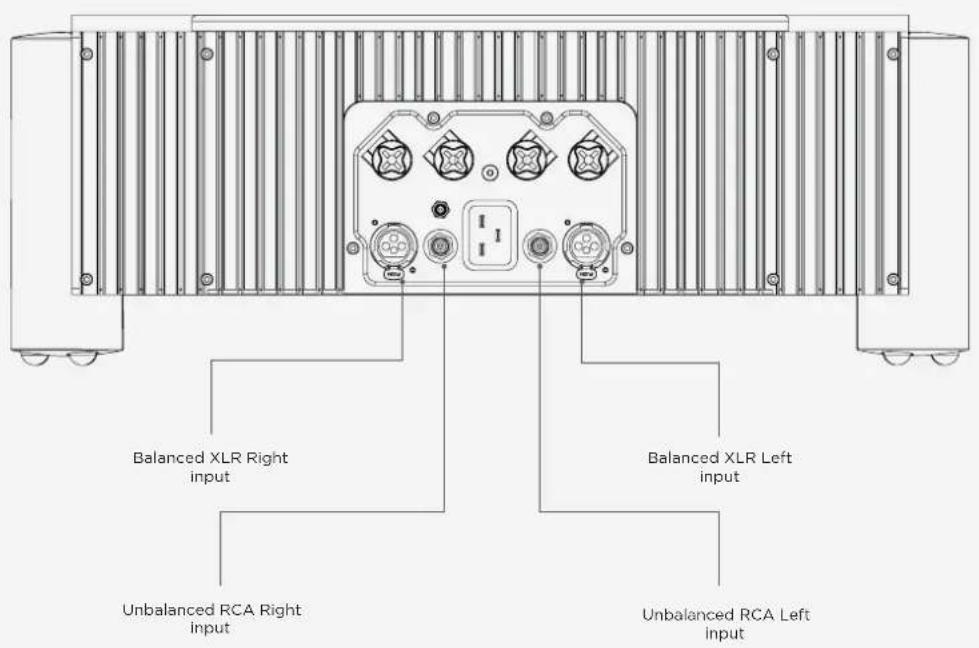
ULTIMA 5 is equipped with both balanced XLR inputs as well as unbalanced RCA inputs. ULTIMA 5 has no ability to switch between the inputs therefore, only one must be used.
WARNING: ULTIMA 5 must be connected to a dedicated preamplifier, or a device capable of attenuating its output. Failure to attenuate the volume before it enters ULTIMA 5 could result in irreversible hearing damage, speaker damage and could void the warranty.
4.1 Placement
4.2 Connecting ULTIMA 5 to
ancillary equipment
4.3 Audio inputs
4.4 Audio outputs
4.5 Power-on sequence and 12V trigger
4.6 Earthing issues in Europe
4.7 Adjusting the brightness of the LED's
Audio outputs 4.4
As ULTIMA 5 is a stereo amplifier, it supports 2 speaker outputs.
In order to connect ULTIMA 5 to loudspeakers, use high-quality loudspeaker cable terminated with 4mm banana plugs or 6mm spades. Bare wire can be used, but it is not recommended.
Connect the black (negative) terminal from ULTIMA 5 to the negative terminal on your loudspeaker and the red (positive) terminal from ULTIMA 5 to the red positive terminal on your loudspeaker. Please pay careful attention to the diagram below when plugging in your speakers.
WARNING: Please pay attention to the polarity on your speakers and the layout of the Ultima 5 outputs. Ensure that all wires are correctly placed.

4.1 Placement
4.2 Connecting ULTIMA 5 to
ancillary equipment
4.3 Audio inputs
4.4 Audio outputs
4.5 Power-on sequence and 12V trigger
4.6 Earthing issues in Europe
4.7 Adjusting the brightness of the LED's
Power-on sequence and 12V trigger
4.5

POWER-ON SEQUENCE: During normal operation, when ULTIMA
5 is in standby mode the large power button on the front panel will illuminate an red colour. To power-on ULTIMA 5 press the large power button once until you feel a click. ULTIMA 5's power button will now change to a green colour whilst it begins its initial safety checks.
During this phase do not increase the gain on the input device as you cannot determine its final amplified volume which can damage the connected speakers.
Once the amplifier has passed the safety check and is operational, after approximately ten seconds, the amplifier will display a teal colour.
12V Trigger: A 12V trigger can be used to remotely turn ULTIMA 5 on or off. Please refer to the below diagram to correctly wire your 12V trigger.
When a 12V trigger is sensed by ULTIMA 5 the colours displayed on power button will be different.
During standby the large power buton on the front panel will illuminate an orange colour, however just like the power sequence without the 12V trigger a green colour will be displayed once you switch the unit on and it performs its safety checks. You should still not increase the gain on the input device.
Once the amplifier becomes operational the power button will display a continuous purple glow.

WARNING: In the rare event that a fault is detected
the amplifier will switch itself off. If this occurs discontinue use immediately and seek help from your Chord Electornics retailer.

4.1 Placement
4.2 Connecting ULTIMA 5 to
ancillary equipment
4.3 Audio inputs
4.4 Audio outputs
4.5 Power-on sequence and 12V trigger
4.6 Earthing issues in Europe
4.7 Adjusting the brightness of the LED's
Earthing issues in Europe 4.6

In some European countries, a hum or buzz may occur if the
amplifier is connected to mains sockets that do not have an earth or adequate earth. If this occurs, please ensure that your equipment is connected via a good-quality multi-way mains block which contains an earth point at every socket outlet.
We recommend that an earthing method for your building is implemented.
4.1 Placement
4.2 Connecting ULTIMA 5 to
ancillary equipment
4.3 Audio inputs
4.4 Audio outputs
4.5 Power-on sequence and 12V trigger
4.6 Earthing issues in Europe
4.7 Adjusting the brightness of the LED's
Adjusting the brightness of the 4.7 LED's
At any time, you can adjust the brightness of the LEDs to suit your listening environment. Simply locate the hidden button in the middle of the faceplate as indicated below, insert a thin object and push until you hear an audible 'click'. The light ring and power button will cycle between low and high brightness modes.


Chord Electronics Ltd.


- Contents 0.0
- Safety instructions 03
- Getting to know ULTIMA 5
- Warranty 08
- Setting up ULTIMA 5
- 0.0
- Contents
- Safety instructions 1.0
- 1.0
- Safety instructions
- Introduction 1.1
- Protection against liquids & heat
- Dismantling & radio frequency interference
- Connecting your equipment 1.4
- 2.0
- Warranty
- Warranty period & registering your purchase
- Making a claim
- & warranty exclusions
- 2.2
- 3.0
- Getting to know ULTIMA 5
- Getting to know ULTIMA 5 3.1
- The front panel 3.2
- The top panel 3.3
- The rear panel 3.4
- Setting up ULTIMA 5
- 4.0
- Placement
- Placement 4.1
- Connecting ULTIMA 5 to ancillary equipment
- Audio inputs 4.3
- Audio outputs 4.4
- Power-on sequence and 12V trigger
- Power-on sequence and 12V trigger
- Earthing issues in Europe 4.6
- Adjusting the brightness of the 4.7 LED's
Brand : Chord
Model : Ultimia 5
Category : Audio player