GC-F501ELDZ - Fridge LG - Free user manual and instructions
Find the device manual for free GC-F501ELDZ LG in PDF.


User questions about GC-F501ELDZ LG
0 question about this device. Answer the ones you know or ask your own.
Ask a new question about this device
Download the instructions for your Fridge in PDF format for free! Find your manual GC-F501ELDZ - LG and take your electronic device back in hand. On this page are published all the documents necessary for the use of your device. GC-F501ELDZ by LG.
USER MANUAL GC-F501ELDZ LG
Read this owner's manual thoroughly before operating the appliance and keep it handy for reference at all times.
EN ENGLISH AR

TABLE OF CONTENTS
This manual may contain images or content different from the model you purchased.
This manual is subject to revision by the manufacturer.
SAFETY INSTRUCTIONS ....3
IMPORTANT SAFETY INSTRUCTIONS....3
INSTALLATION 12
Before Installation....12
Reversing Doors (*) 13
Levelling the Appliance 13
To Install Appliance in Pairs (*) 13
Connecting the Appliance....13
Moving the Appliance 13
OPERATION 14
Parts and Functions....14
Notes for Operation 15
Control Panel 16
Using Easy Open Door....18
Using the Water Dispenser (*) 18
Other Functions....19
SMART FUNCTIONS....20
LG ThinQ Application....20
Smart Diagnosis 22
MAINTENANCE....23
Notes for Cleaning....23
Cleaning the Door Basket....23
Cleaning the Shelf 24
Cleaning the Vegetable Drawer....24
Removing the Water Tank (*) 25
TROUBLESHOOTING 26
SAFETY INSTRUCTIONS
EN
The following safety guidelines are intended to prevent unforeseen risks or damage from unsafe or incorrect operation of the appliance.
The guidelines are separated into 'WARNING' and 'CAUTION' as described below.

This symbol is displayed to indicate matters and operations that can cause risk. Read the part with this symbol carefully and follow the instructions in order to avoid risk.

WARNING
This indicates that the failure to follow the instructions can cause serious injury or death.

CAUTION
This indicates that the failure to follow the instructions can cause the minor injury or damage to the product.
IMPORTANT SAFETY INSTRUCTIONS

WARNING
To reduce the risk of explosion, fire, death, electric shock, injury or scalding to persons when using this product, follow basic precautions, including the following:
Children in the Household
- This appliance is not intended for use by persons (including children) with reduced physical, sensory or mental capabilities, or lack of experience and knowledge, unless they have been given supervision or instruction concerning use of the appliance by a person responsible for their safety. Children should be supervised to ensure that they do not play with the appliance.
- If the appliance is equipped with a lock (some models only), keep the key out of reach of children.
Installation
- This appliance should only be transported by two or more people holding the appliance securely.
- Ensure that the socket outlet is properly grounded, and that the earth pin on the power cord is not damaged or removed from the power plug. For more details on grounding, inquire at an LG Electronics customer information centre.
- This appliance is equipped with a power cord having an equipment-grounding conductor and a grounding power plug. The power plug must be plugged into an appropriate socket outlet that is installed and grounded in accordance with all local codes and ordinances.
- If the power cord is damaged or the hole of the socket outlet is loose, do not use the power cord and contact an authorized service centre.
- Do not plug the appliance into a multi socket adapter which does not have a power cable (mounted).
- Do not modify or extend the power cable.
- The appliance should be connected to a dedicated power line which is separately fused.
- Do not use a multi socket outlet which is not properly grounded (portable). In case of using a properly-grounded multi socket outlet (portable), use the multi socket outlet with the current capacity of the power code rating or higher and use the multi socket outlet only for the appliance.
• Install the appliance in a place where is easy to unplug the power plug of the appliance.
- Be careful not to point the power plug up or let the appliance lean against the power plug.
•Install the appliance on a firm and level floor.
- Do not install the appliance in a damp and dusty place. Do not install or store the appliance in any outdoor area, or any area that is subject to weathering conditions such as direct sunlight, wind, rain, or temperatures below freezing.
- Do not place the appliance in direct sunlight or expose it to the heat from heating appliances such as stoves or heaters.
- Be careful not to expose the rear of the appliance when installing.
- Be careful not to let the appliance door fall during assembly or disassembly.
- Be careful not to pinch, crush, or damage the power cable during assembly or disassembly of the appliance door.
- Do not connect a plug adapter or other accessories to the power plug.
Operation
- Do not use the appliance for any purpose (storage of medical or experimental materials or shipping) other than any domestic household food storage use.
- Unplug the power plug during a severe thunderstorm or lightening or when not in use for a long period of time.
- Do not touch the power plug or the appliance controls with wet hands.
- Do not bend the power cable excessively or place a heavy object on it.
- If water penetrates electrical parts of the appliance, disconnect power plug and contact an LG Electronics customer information centre.
- Do not place hands or metallic objects inside the area emitting the cold air, cover or heat releasing grille on the back.
- Do not apply excessive force or impact to the back cover of the appliance.
- Do not put animals, such as pets into the appliance.
- Be careful of nearby children when you open or close the appliance door. The door may bump the child and cause injury.
- Avoid the danger of children getting trapped inside the appliance. A child trapped inside the appliance can cause suffocation.
- Do not place heavy or fragile objects, containers filled with liquid, combustible substances, flammable objects (such candles, lamps, etc.), or heating devices (such as stoves, heaters, etc.) on the appliance.
- If there is a gas leakage (isobutane, propane, natural gas, etc.), do not touch the appliance or power plug and ventilate the area immediately. This appliance uses a refrigerant gas (isobutane,R600a). Although it uses a small amount of the gas, it is still combustible gas. Gas leakage during appliance transport, installation or operation can cause fire, explosion or injury if sparks are caused.
- Do not use or store flammable or combustible substances (ether, benzene, alcohol, chemical, LPG, combustible spray, insecticide, air freshener, cosmetics, etc.) near the appliance.
- Immediately unplug the power plug and contact an LG Electronics customer information centre if you detect a strange sound, odour, or smoke coming from the appliance.
- Fill with potable water only into icemaker or dispenser water tank.
- Do not damage the refrigerant circuit.
- Do not place any electronic appliance (such as heater and mobile phone) inside the appliance.
Maintenance
- Disconnect the power cord before cleaning the appliance or replacing the inside lamp (where fitted).
- Securely plug the power plug in the socket outlet after completely removing any moisture and dust.
- Never unplug the appliance by pulling on the power cable. Always grip the power plug firmly and pull straight out from the socket outlet.
- Do not spray water or inflammable substances (toothpaste, alcohol, thinner, benzene, flammable liquid, abrasive, etc.) over the interior or exterior of the appliance to clean it.
- Do not clean the appliance with brushes, cloths or sponges with rough surfaces or which are made of metallic material.
- Only qualified service personnel from LG Electronics service centre should disassemble, repair, or modify the appliance. Contact an LG Electronics customer information centre if you move and install the appliance in a different location.
- Do not use a hair drier to dry the inside of the appliance or place a candle inside to remove the odours.
- Do not use mechanical devices or other means to accelerate the defrosting process.
Disposal
- When discarding the appliance, remove the door gasket while leaving the shelves and baskets in place and keep children away from the appliance.
- Dispose of all packaging materials (such as plastic bags and styrofoam) away from children. The packaging materials can cause suffocation.
Technical Safety
- Keep ventilation openings, in the appliance enclosure or in the built-in structure, clear of obstruction.
- Do not use electrical appliances inside the refrigerator.
- The refrigerant and insulation blowing gas used in the appliance require special disposal procedures. Consult with service agent or a similarly qualified person before disposing of them.
- Refrigerant leaking out of the pipes could ignite or cause an explosion.
- The amount of refrigerant in your particular appliance is shown on the identification plate inside the appliance.
- Never start up an appliance showing any signs of damage. If in doubt, consult your dealer.
- This appliance is intended to be used in household and similar applications only. It should not be used for commercial, or catering purposes, or in any mobile application such as a caravan or boat.
- Do not store explosive substances such as aerosol cans with a flammable propellant in this appliance.
Risk of Fire and Flammable Materials
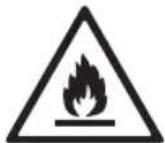
This symbol alerts you to flammable materials that can ignite and cause a fire if you do not take care.
- This appliance contains a small amount of isobutane refrigerant (R600a), but it is also combustible. When transporting and installing the appliance, care should be taken to ensure that no parts of the refrigerating circuit are damaged.
- If a leak is detected, avoid any naked flames or potential sources of ignition and air the room in which the appliance is standing for several minutes. In order to avoid the creation of a flammable gas air mixture if a leak in the refrigerating circuit occurs, the size of the room in which the appliance is used should correspond to the amount of refrigerant used. The room must be 1 ~m^2 in size for every 8 g of R600a refrigerant inside the appliance.
- When positioning the appliance, ensure the supply cord is not trapped or damaged.
- Do not locate multiple portable socket-outlets or portable power supplies at the rear of the appliance.

CAUTION
To reduce the risk of minor injury to persons, malfunction, or damage to the product or property when using this product, follow basic precautions, including the following:
Installation
- Do not tilt the appliance to pull or push it when transporting.
- Make sure not to get a body part such as a hand or foot stuck while moving the appliance.
Operation
- Do not touch frozen food or the metal parts in the freezer compartment with wet or damp hands. It may cause frostbite.
- Do not place glass containers, bottles or cans (especially those containing carbonated drinks) in the freezer compartment, shelves or ice bin that will be exposed to temperatures below freezing.
- The tempered glass on the front side of the appliance door or the shelves can be damaged by an impact. If it is broken, do not touch it with hands, as this may result in injury.
- Do not hang from the appliance doors, storage room, shelf or climb up into it.
- Do not store an excessive amount of water bottles or containers for side dishes on the door baskets.
- Prevent animals from nibbling on the power cable or water hose.
- Do not open or close the appliance door with excessive force.
- If the hinge of the appliance door is damaged or operates improperly, stop using the appliance and contact an authorized service centre.
- Do not clean glass shelves or covers with warm water when they are cold. They may break if exposed to sudden temperature changes.
- Never eat frozen foods immediately after they have been taken out in the freezer compartment.
- Make sure not to get a hand or foot stuck upon opening or closing the appliance door or door in door.
Maintenance
- Do not insert the shelves upside down. The shelves may fall.
- To remove frost from the appliance, contact an LG Electronics customer information centre.
- Dispose of the ice inside the ice bin in the freezer compartment during an extended power outage.
INSTALLATION
EN
Before Installation
Dimensions and Clearances
- Too small of a distance from adjacent items may result in the degradation of freezing capability and increased electricity costs. Allow over 50 mm of clearance from each adjacent wall when installing the appliance.
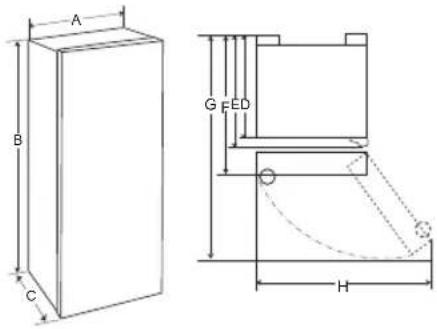
text_image
A B C G FED H| - Size(mm) | |
| A 595 | |
| B 1850 | |
| C 673 | |
| D 568 | |
| E 616 | |
| F 638 | |
| G 1120 | |
| H 870 |
Ambient Temperature
- The appliance is designed to operate within a limited range of ambient temperatures, depending on the climate zone.
- The internal temperature could be affected by the location of the appliance, the ambient temperature, the frequency of door opening and so on.
- The climate class can be found on the rating label.
| Climate Class | Ambient Temperature Range °C |
| SN (Extended Temperate) | +10 - +32 |
| N (Temperate) +16 | - +32 |
| ST (Subtropical) +16 | - +38 |
| T (Tropical) +16 | - +43 / +10 - +43* |
*Australia, India, Kenya
NOTE
- The appliances rated from SN to T are intended to be used at an ambient temperature between 10 °C and 43 °C.
Accessories
*:This feature is only available on some models.
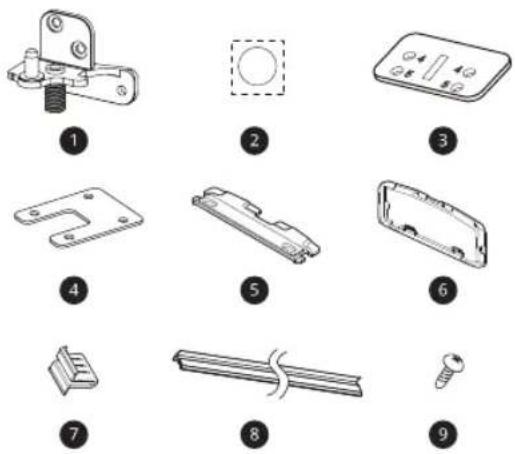
text_image
Illustration of nine different mechanical components with numbered labels, likely for assembly or manufacturing instructions.
10
1 Lower Hinge*
2 Sticker
3 Bracket A*
4 Bracket B*
5 Bracket C*
6 Cover*
7 Decoration Cover*
8 Decoration Case*
9 Screw A*
10 Screw B*
Reversing Doors ( \* )
Your appliance is designed with reversible doors, so that they may open from either the left or right hand side to suit your kitchen design.
NOTE
- Reversing the doors must be performed by the qualified personnel of LG Electronics. If not, the doors will not be covered by the warranty.
• (*): This feature varies depending on the model purchased.
Levelling the Appliance
To avoid vibration, the unit must be levelled.
If required, adjust the levelling screws to compensate for the uneven floor.
The front should be slightly higher than the rear to aid in door closing.
Levelling screws can be turned easily by tipping the cabinet slightly.
Turn the levelling screws counterclockwise to raise the unit, clockwise to lower it.
To Install Appliance in Pairs ( ^* )
Your appliance can be installed with fridge/freezer in pairs.

natural_image
Line drawing of an open refrigerator with multiple compartments and doors (no text or symbols)NOTE
- However when you want to install your appliance in pairs, you must call to service center. Installation condition is not covered by the warranty.
• (*): This feature varies depending on the model purchased.
Connecting the Appliance
After installing the appliance, connect the power plug into a socket outlet.
NOTE
- After connecting the power supply cord (or plug) to the outlet, wait 2 or 3 hours before you put food into the appliance. If you add food before the appliance has cooled completely, your food may spoil.
Moving the Appliance
1 Remove all food from inside the appliance.
2 Pull the power plug out, insert and fix it into the power plug hook at the rear or on top of the appliance.
3 Tape parts such as shelves and the door handle to prevent from falling off while moving the appliance.
4 Move the appliance with more than two people carefully. When transporting the appliance over a long distance, keep the appliance upright.
5 After installing the appliance, connect the power plug into a socket out to switch on the appliance.
OPERATION
EN
Parts and Functions

text_image
Diagram of an open refrigerator with numbered parts for identification and assembly reference.1 Control Panel
This sets the fridge target temperature.
② Water Dispenser (*)
This is a dispenser to get cold water.
③ LED Lamp
The LED lamps inside the product light when you open the fridge door.
4 Fridge Shelf
This is where refrigerated foods and other items are stored.
- The shelf height can be adjusted by inserting the shelf in another groove of different height.
- Store the foods with higher moisture content at the front of the shelf.
- The actual number of shelves will differ from model to model.
⑤ Bottle Rack (*)
This is where drinks tall bottles or containers are stored.
⑥ Vegetable Drawer
This is where fruits and vegetables are stored to remain fresh for as long as possible.
⑦ Dairy Corner
This is where dairy products such as the butter or cheese are stored.
8 Door Basket
This is where small packages of refrigerated foods, drinks and sauce containers are stored.
NOTE
- The appearance or components of the appliance may differ from model to model.
• (*): This feature varies depending on the model purchased.
EN
Notes for Operation
- Users should keep in mind that frost can form. If the door is not closed completely, if the humidity is high during the summer, or if the freezer door is opened frequently.
- Ensure there is sufficient space between food stored on the shelf or door basket to allow the door to close completely.
- Opening the door lets warm air enter the appliance, and may cause the internal temperature to rise.
- If you are leaving the appliance turned off for an extended period of time, remove all food and unplug the power cord. Clean the interior, and leave the doors slightly ajar to prevent mold from growing in the appliance.
Suggestion for Energy Saving
- Ensure there is sufficient space between stored foods. This allows cold air to be circulated evenly and lowers electricity bills.
- Store hot food only after it has cooled in order to prevent dew or frost.
- Do not put food near the temperature sensor of the fridge compartment. Keep a distance of at least 3 cm from the sensor.
- Note that a temperature rise after defrosting has a permissible range in the appliance specifications. If you wish to minimise the impact this may have on the food storage due to a temperature rise, seal or wrap the stored food in several layers.
- The automatic defrosting system in the appliance ensures that the compartment remains free of ice buildup under normal operating conditions.
Storing Foods Effectively
- Store frozen food or refrigerated food inside sealed containers.
- Check the expiration date and label (storage instructions) before storing food in the appliance.
- Do not store food for a long period of time (more than four weeks) if it spoils easily at a low temperature.
- Place the refrigerated food or frozen food in each fridge or freezer compartment immediately after purchasing.
- Do not wrap and store vegetables with newspaper. Printing material of newspaper or other foreign substances may smear and contaminate food.
- Do not overfill the appliance. Cold air can not circulate properly if the appliance is overfilled.
- If you set an excessively low temperature for food, it may become frozen. Do not set a temperature lower than the required temperature for the food to be stored correctly.
- For more space, you can remove bottle rack, egg tray, ice tray and fresh converter drawer. - In the event of a blackout, call the electricity company and ask how long it is going to last.
- You should avoid door openings while the power is off.
- When the power supply gets back to normal, check the condition of the food.
Control Panel Units and Functions
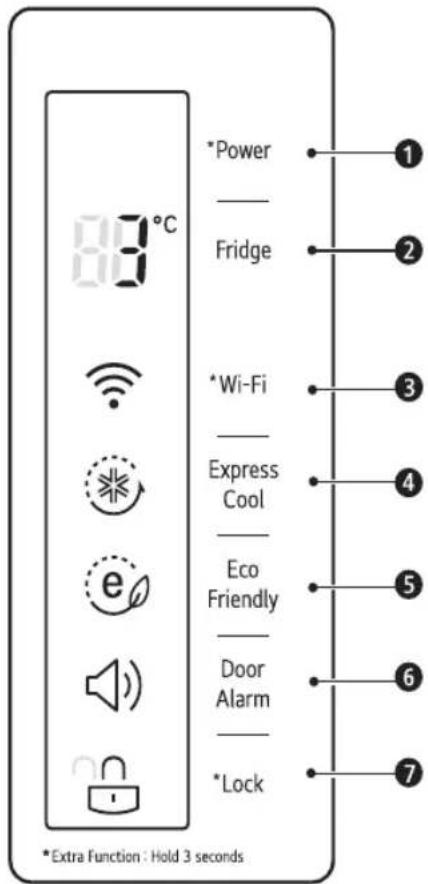
text_image
83°C *Power _ Fridge *Wi-Fi _ Express Cool _ Eco Friendly _ Door Alarm _ *Lock ① ② ③ ④ ⑤ ⑥ ⑦ *Extra Function : Hold 3 seconds1 *Power
• This turns the power on and off.
② Fridge Temperature
• This sets the fridge target temperature.
3 * Wi-Fi
- This sets the appliance to connect to your home's Wi-Fi network.
4 Express Cool
• This sets Express Cool functions.
⑤ Eco Friendly
- This controls the Eco Friendly mode for lowering energy consumption.
6 Door Alarm
- This sets the alarm sound which is activated when the appliance door is opened.
⑦ *Lock
- This locks the buttons on the control panel.
NOTE
- The actual control panel may differ from model to model.
- The control panel will turn off automatically for energy saving.
- If there is any finger or skin contacts to the control panel while cleaning it, the button function may operate.
EN
Setting Power
This turns the power on and off.
- Press the Power button for 3 seconds or longer. The control panel lights, and the power is on.
NOTE
- Turn off the power when you are not using the appliance.
Setting the Temperature
This sets the fridge temperature or freezer temperature.
- Press the Fridge button or Freezer button to adjust the temperature.
• The initial temperature is set.
- Fridge : 3 °C
• The temperature can be adjusted.
- Fridge : from 0 °C to 6 °C
- The actual inner temperature varies depending on the food status, as the indicated setting temperature is a target temperature, not actual temperature within the appliance.
NOTE
- The default temperature setting may vary depending on the appliance.
- Wait until two or three hours have passed after connecting the appliance to the outlet before storing food in the appliance.
Setting Express Cool
This quickly cools many refrigerated foods at once.
- When you press the Express Cool button, the Express Cool icon lights on the control panel, and the Express Cool function is set. The function is enabled and disabled in turn each time you press the button.
- The Express Cool function automatically terminates after a specific period (around 12 hours) has passed.
Setting Eco Friendly
The function makes the fridge-freezer work in the Eco Friendly mode which is useful when you are away on a holiday as it reduces energy consumption.
- Pressing the Eco Friendly button starts the operation with the lamp on, and pressing it again stops the operation.
- When the Eco Friendly mode is on, the other buttons will not operate. When you finish using the Eco Friendly mode, turn it off so that other buttons work and the refrigerator returns to its previous temperature setting.
Setting Door Alarm
This sets an alarm to activate when the appliance door is opened.
- When you press the Door Alarm button, the Door Alarm icon lights and activates the alarm. The function is enabled and disabled in turn each time you press the button.
- Contact an LG Electronics customer information centre if the alarm sound continues even after closing the door.
Setting and Resetting Lock
This locks the buttons on the control panel.
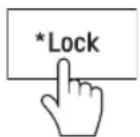
- Press and hold the Lock button for 3 seconds. When the Lock function is set, all buttons are locked.
-
When you press the Lock button for 3 seconds, the Lock icon on the control panel lights. The function is enabled and disabled in turn each time you press the button.
-
If you press a button other than lock when the lock is set, the button will not function.
- When you press a button other than lock when the lock is set, the Lock icon on the control panel will flash 3 times.
- To change a setting, first press the Lock button for three seconds to disable the function.
Using Easy Open Door
To easily open the door, hold the handle and softly turn it to the right.

natural_image
Diagram showing a mechanical component before and after rotation, with no text or symbols present.Using the Water Dispenser ( \* )
1 Open the cap on the top of the water tank.

natural_image
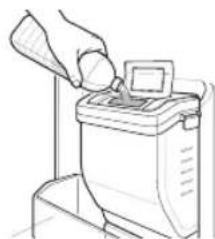
Line drawing of a handbar with an open lid and a triangular handle (no text or symbols)2 Fill the water tank with potable water and close the cap.
• The water tank can hold up to 2.3 L.
natural_image
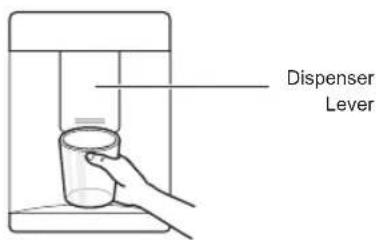
Line drawing of a hand pouring liquid into a machine (no text or symbols)3 Press the lever of the water dispenser to get cold water.
text_image
Dispenser LeverWARNING
- Do not fill the water tank with drinks other than water or fill with hot water.
NOTE
• (*): This feature varies depending on the model purchased.
EN
Other Functions
Door Open Alarm
The alarm sounds 3 times in a 30-second interval if the door is left open or not completely closed for one minute.
- Contact the LG Electronics customer information centre if the alarm sound continues even after closing the door.
Failure Detection
The appliance can automatically detect problems during the operation.
- If a problem is detected, the appliance may not operate and an error code is displayed even when any button is pressed.
- When this occurs, do not turn off the power and immediately contact the LG Electronics customer information centre. If you turn off the power, the repair technician from the LG Electronics customer information centre may have difficulty finding the problem.
SMART FUNCTIONS
EN
LG ThinQ Application
This feature is only available on models with Wi-Fi.
The LG ThinQ application allows you to communicate with the appliance using a smartphone.
LG ThinQ Application Features
Communicate with the appliance from a smart phone using the convenient smart features.
Smart Diagnosis
- If you experience a problem while using the appliance, this smart diagnosis feature will help you diagnose the problem.
Settings
- Allows you to set various options on the refrigerator and in the application.
NOTE
- If you change your wireless router, Internet service provider, or password, delete the registered appliance from the LG ThinQ application and register it again.
- The application is subject to change for appliance improvement purposes without notice to users.
• Functions may vary by model.
Before Using LG ThinQ Application
1 Check the distance between the appliance and the wireless router (Wi-Fi network).
- If the distance between the appliance and the wireless router is too far, the signal strength becomes weak. It may take a long time to register or installation may fail.
2 Turn off the Mobile data or Cellular Data on your smartphone.

3 Connect your smartphone to the wireless router.
NOTE
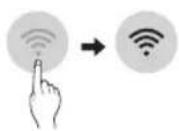
- To verify the Wi-Fi connection, check that Wi-Fi icon on the control panel is lit.
- The appliance supports 2.4 GHz Wi-Fi networks only. To check your network frequency, contact your Internet service provider or refer to your wireless router manual.
- LG ThinQ is not responsible for any network connection problems or any faults, malfunctions, or errors caused by network connection.
- If the appliance is having trouble connecting to the Wi-Fi network, it may be too far from the router. Purchase a Wi-Fi repeater (range extender) to improve the Wi-Fi signal strength.
- The Wi-Fi connection may not connect or may be interrupted because of the home network environment.
- The network connection may not work properly depending on the Internet service provider.
- The surrounding wireless environment can make the wireless network service run slowly.
EN
- The appliance cannot be registered due to problems with the wireless signal transmission. Unplug the appliance and wait about a minute before trying again.
- If the firewall on your wireless router is enabled, disable the firewall or add an exception to it.
- The wireless network name (SSID) should be a combination of English letters and numbers. (Do not use special characters.)
- Smartphone user interface (UI) may vary depending on the mobile operating system (OS) and the manufacturer.
- If the security protocol of the router is set to WEP, you may fail to set up the network. Please change it to other security protocols (WPA2 is recommended) and register the product again.
Installing LG ThinQ Application
Search for the LG ThinQ application from the Google Play Store or Apple App Store on a smart phone. Follow instructions to download and install the application.
Connecting to Wi-Fi
The Wi-Fi button, when used with the LG ThinQ application, allows the appliance to connect to a home Wi-Fi network. The 📋 icon shows the status of the appliance's network connection. The icon illuminates when the appliance is connected to the Wi-Fi network.
Initial Appliance Registration
Run the LG ThinQ application and follow the instructions in the application to register the appliance.
Re-registering the Appliance or Registering Another User
Press and hold the Wi-Fi button for 3 seconds to temporarily turn it off. Run the LG ThinQ application and follow the instructions in the application to register the appliance.
NOTE
- To disable the Wi-Fi function, press and hold the Wi-Fi button for 3 seconds. The 🔺 icon will be turned off.
Open Source Software Notice Information
To obtain the source code under GPL, LGPL, MPL, and other open source licenses, that is contained in this product, please visit http://opensource.lge.com.
In addition to the source code, all referred license terms, warranty disclaimers and copyright notices are available for download. LG Electronics will also provide open source code to you on CD-ROM for a charge covering the cost of performing such distribution (such as the cost of media, shipping, and handling) upon email request to opensource@lge.com. This offer is valid for a period of three years after our last shipment of this product. This offer is valid to anyone in receipt of this information.
Smart Diagnosis
This feature is only available on models with the Ⓧ or Ⓧ logo.
NOTE
- For reasons not attributable to LGE's negligence, the service may not operate due to external factors such as, but not limited to, Wi-Fi unavailability, Wi-Fi disconnection, local app store policy, or app unavailability.
- The feature may be subject to change without prior notice and may have a different form depending on where you are located.
Using LG ThinQ to Diagnose Issues
If you experience a problem with your Wi-Fi equipped appliance, it can transmit troubleshooting data to a smartphone using the LG ThinQ application.
- Launch the LG ThinQ application and select the Smart Diagnosis feature in the menu. Follow the instructions provided in the LG ThinQ application.
Using Audible Diagnosis to Diagnose Issues
Follow the instructions below to use the audible diagnosis method.
- Launch the LG ThinQ application and select the Smart Diagnosis feature in the menu. Follow the instructions for audible diagnosis provided in the LG ThinQ application.
1 Press the Lock button to activate the lock function.
- If the display has been locked for over 5 minutes, you must deactivate the lock and then reactivate it.
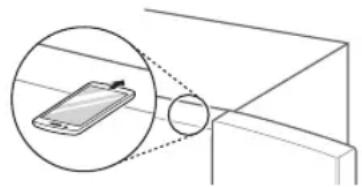
2 Press and hold the Fridge button for three seconds or longer.
3 Open the fridge door and then hold the phone on the upper right speaker hole.
natural_image
Diagram showing a smartphone mounted on a table with an inset magnified view of its screen (no text or symbols present)4 After the data transfer is complete, the diagnosis will be displayed in the application.
NOTE
- For best results, do not move the phone while the tones are being transmitted.
MAINTENANCE
EN
Notes for Cleaning
- When removing a shelf or drawer from inside the appliance, remove all stored foods from the shelf or drawer to prevent injury or damage to the appliance.
- Otherwise, injury may occur due to the weight of stored foods.
- If cleaning the outside air vents of the appliance by means of vacuuming, then the power cord should be unplugged from the outlet to avoid any static discharge that can damage the electronics or cause an electric shock.
- Detach the shelves and drawers and clean them with water, and then dry them sufficiently, before replacing them.
- Regularly wipe the door gaskets with a wet soft towel.
• After cleaning, check if the power cable is damaged, warm or improperly plugged.
- Keep the air vents on the exterior of the appliance clean.
- Blocked air vents can cause fire or appliance damage.
- When cleaning the inside or outside of the appliance, do not wipe it with a rough brush, toothpaste, or flammable materials. Do not use cleaning agents containing flammable substances.
- This may cause discoloration or damage to the appliance.
- Flammable substances: alcohol (ethanol, methanol, isopropyl alcohol, isobutyl alcohol, etc.), thinner, bleach, benzene, flammable liquid, abrasive, etc.
- For the appliance exterior, use a clean sponge or soft cloth and a mild detergent in warm water. Do not use abrasive or harsh cleaners. Dry thoroughly with a soft cloth.
- Never clean the shelves or containers in the dishwasher.
- The parts may become deformed due to the heat.
- If the appliance is equipped with an LED lamp, do not remove lamp cover and LED lamp in any attempt to repair or service it. Please, contact the LG Electronics customer information centre.
Cleaning the Door Basket
Removing the Door Basket
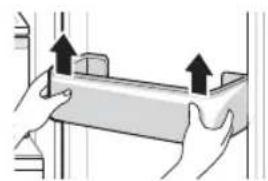
Hold both edges of the basket and remove it by lifting it upward.
natural_image
Illustration of two hands holding a rectangular object with upward arrows indicating motion or force (no text or symbols)Refitting the Door Basket
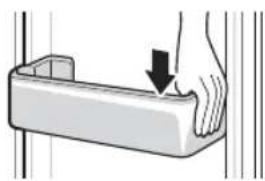
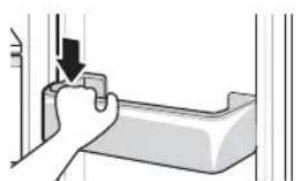
1 Hold both edges of the door basket, gently push one edge to assemble, and then in the same manner assemble the other edge.
natural_image
Illustration of a hand pressing down on a rectangular object with a downward arrow (no text or symbols)2 After assembling, tap the door basket gently to fix it horizontally.
natural_image
Illustration of a hand holding a tool with an arrow pointing to a component (no text or symbols present)EN
Cleaning the Shelf Removing the Fridge Shelf
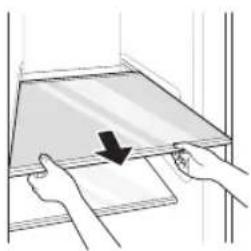
1 Remove the shelf by pulling it out.
natural_image
Illustration of two hands holding a transparent tray with a downward arrow, no text or symbols present2 Tilt the cover slightly and support it with both hands while pulling it out.

natural_image
Hand holding a flatboard with an arrow indicating direction (no text or symbols)Refitting the Fridge Shelf
Mount them in the reverse order of the removal process.
Cleaning the Vegetable Drawer
Removing the Vegetable Drawer
1 Hold both edges of the door basket and lift it to remove.
- You must remove the door basket first before removing the vegetable drawer.

natural_image
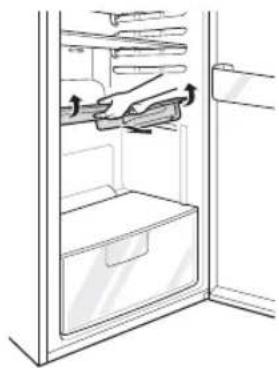
Illustration of hands holding a rectangular object with two upward arrows indicating motion or force (no text or symbols)2 Slightly lift the vegetable drawer while pulling it out.

natural_image
Illustration of a hand inserting a card into a window frame (no text or symbols)3 Hold the front edge of the shelf with both hands, and lift it.
natural_image
Line drawing of a refrigerator interior showing hand positioning and storage areas (no text or symbols)Refitting the Vegetable Drawer
Mount them in the reverse order of the removal process.
EN
Removing the Water Tank ( \* )
1 Hold the handle of the water tank and lift it.

natural_image
Illustration of a hand using a tool to lift a small cylindrical object (no text or symbols visible)2 Lift the water tank and pull it out.

natural_image
Illustration of hands holding a device with an arrow indicating rotation (no text or symbols)3 Remove the cover while the handle of the water tank is lifted.

natural_image
Illustration of a hand holding a container with an arrow indicating direction (no text or symbols)NOTE
• (*): This feature varies depending on the model purchased.
TROUBLESHOOTING
EN
| Symptoms Possible Cause & Solution | |
| There is no refrigeration or freezing. | Is there a power interruption?Check the power of other appliances. |
| If the power plug unplugged from the outlet?Plug the power plug in the outlet properly. | |
| There is poor refrigeration or freezing. | Is the fridge or freezer temperature set to its warmest setting?Set the fridge or freezer temperature to 'Medium'. |
| Is the appliance in direct sunlight, or is it near a heat generating object such as cooking oven or heater?Check the installation area and reinstall it away from heat generating objects. | |
| Did you store hot food without cooling it first?Cool the hot food first before putting it in the fridge or freezer compartment. | |
| Did you put in too much food?Maintain an appropriate space between food. | |
| Are the appliance doors completely closed?Completely close the door and make sure that stored food is not obstructing in the door. | |
| Is there enough space around the appliance?Adjust the installation position to make enough space around the appliance. | |
| The appliance contains a bad smell. | Is the fridge or freezer temperature set to 'Warm'?Set the fridge or freezer temperature to 'Medium'. |
| Did you put in food with a strong smell?Store foods with strong smells in a sealed containers. | |
| Vegetables or fruit may have spoiled in the drawer?Throw away rotten vegetables and clean the vegetable drawer. Do not store vegetables too long in the vegetable drawer. | |
| The inside lamp in the appliance does not turn on. | Does the inside lamp in the appliance turn off?It is not possible for customers to replace the inside lamp in the appliance as they are not serviceable. If the inside lamp does not turn on, please contact the LG Electronics customer information centre. |
EN
| Symptoms Possible Cause & Solution | |
| The appliance door is not closed tightly. | Is the appliance leaning forward?Adjust the front feet to raise the front side slightly. |
| Were the shelves properly assembled?Refit the shelves if needed. | |
| Did you close the door with excessive force?If you apply too much force or speed when closing the door, it may remain briefly open before closing. Make sure that you do not slam the door closed. Close without force. | |
| It is difficult to open the appliance door. | Did you open the door right after you closed it?If you try to open the appliance door within one minute after you closed it, you may have difficulties because of the pressure inside the appliance. Try to open the appliance door again in a few minutes so that the internal pressure stabilizes. |
| There is condensation inside the appliance or on the bottom of the vegetable drawer cover. | Did you store hot food without cooling it first?Cool the hot food first before putting it inside the fridge or freezer. |
| Did you leave the appliance door open?Although the condensation will disappear soon after you close the appliance door, you can wipe it with a dry cloth. | |
| Do you open and close the appliance door too frequently?Condensation can form due to the temperature difference from the outside. Wipe out the dampness with a dry cloth. | |
| Did you put warm or moist food inside without sealing it in a container?Store food in a covered or sealed container. | |
| Frost has formed in the freezer compartment. | Doors may not be closed properly?Check if the food item inside the appliance is blocking the door and make sure that the door is tightly closed. |
| Did you store hot food without cooling it first?Cool the hot food first before putting it in the fridge or freezer compartment. | |
EN
| Symptoms Possible Cause & Solution | |
| Frost has formed in the freezer compartment. | Is the air entry or exit of the freezer compartment blocked?Make sure that air entry or exit is not blocked so that the air can circulate inside. |
| Is the freezer compartment overfilled?Maintain an appropriate space between items. | |
| Frost or condensation has formed inside or outside the appliance. | Did you open and close the appliance door frequently or is the appliance door improperly closed?Frost or condensation can form if the outside air penetrates inside the appliance. |
| Is the installation environment humid?Condensation can appear on the exterior of the appliance if the installation area is too humid or on a humid day such as a rainy day.Wipe off any moisture with a dry cloth. | |
| The appliance is noisy and generates abnormal sounds. | Is the appliance installed on a weak floor or improperly levelled?Install the appliance on a solid and flat area. |
| Does the rear of the appliance touch the wall?Adjust the installation position to allow enough clearance around the appliance. | |
| Are objects scattered behind the appliance?Remove the scattered objects from behind the appliance. | |
| Is there an object on top of the appliance?Remove the object on top of the appliance. | |
| The side or front of the appliance is warm. | There are anti condensation pipes fitted to these areas of the appliance to reduce condensation forming from around the door area.The heat releasing pipe to prevent condensation is installed on the front and side of the appliance. You may feel it particularly hot right after the appliance is installed or during the summer. You can be assured that this is not a problem and is quite normal. |
| There is water inside or outside of the appliance. | Is there water leakage around the appliance?Check if the water has leaked from a sink or another place. |
| Is there water on the bottom of the appliance?Check if the water is from the thawed frozen food or a broken or dropped container. | |
EN
| Symptoms Possible Cause & Solution | |
| Clicking noises | The defrost control will click when the automatic defrost cycle begins and ends. The thermostat control (or appliance control on some models) will also click when cycling on and off.· Normal Operation |
| Rattling noises | Rattling noises may come from the flow of appliance, the water line on the back of the unit (for plumbed models only), or items stored on top of or around the appliance.· Normal Operation |
| Appliance is not resting evenly on the floor.· Floor is weak or uneven or levelling legs need to be adjusted. See the Door Alignment section. | |
| Appliance with linear compressor was moved while operating.· Normal operation. If the compressor does not stop rattling after three minutes, turn the power to the appliance off and then on again. | |
| Whooshing noises | Evaporator fan motor is circulating air through the fridge and freezer compartments.· Normal Operation |
| Air is being forced over the condenser by the condenser fan.· Normal Operation | |
| Gurgling noises | Appliance flowing through the cooling system· Normal Operation |
| Popping noises | Contraction and expansion of the inside walls due to changes in temperature.· Normal Operation |
| Vibrating | If the side or back of the appliance is touching a cabinet or wall, some of the normal vibrations may make an audible sound.· To eliminate the noise, make sure that the sides and back do not make any contact with any wall or cabinet. |
EN
| Symptoms Possible Cause & Solution | |
| Your home appliance and smartphone is not connected to the Wi-Fi network. | The password for the Wi-Fi that you are trying to connect to is incorrect.· Find the Wi-Fi network connected to your smartphone and remove it, then register your appliance on LG ThinQ. |
| Mobile data for your smartphone is turned on.· Turn off the Mobile data of your smartphone and register the appliance using the Wi-Fi network. | |
| The wireless network name (SSID) is set incorrectly.· The wireless network name (SSID) should be a combination of English letters and numbers. (Do not use special characters.) | |
| The router frequency is not 2.4 GHz.· Only a 2.4 GHz router frequency is supported. Set the wireless router to 2.4 GHz and connect the appliance to the wireless router. To check the router frequency, check with your Internet service provider or the router manufacturer. | |
| The distance between the appliance and the router is too far.· If the distance between the appliance and the router is too far, the signal may be weak and the connection may not be configured correctly. Move the location of the router so that it is closer to the appliance. | |