MC-156SH - Microwaves LG - Free user manual and instructions
Find the device manual for free MC-156SH LG in PDF.


User questions about MC-156SH LG
0 question about this device. Answer the ones you know or ask your own.
Ask a new question about this device
Download the instructions for your Microwaves in PDF format for free! Find your manual MC-156SH - LG and take your electronic device back in hand. On this page are published all the documents necessary for the use of your device. MC-156SH by LG.
USER MANUAL MC-156SH LG
OWNER'S MANUAL & COOKING GUIDE
PLEASE READ THIS OWNER'S MANUAL THOROUGHLY BEFORE OPERATING.
MC-156SH
TABLE OF CONTENTS
SAFETY 3-4
Precautions to Avoid Possible Exposure
to Excessive Microwave Energy 3
Grounding Instructions.... 3
Important Safety Instructions 4
UNDERSTANDING YOUR
MICROWAVE OVEN 5-11
Specifications 5
Installation....5
Parts and Accessories 6
Built-In Kits 6
Control Panel 7
Cooking Comparison Guide....8
Cookware Guide 9
Using the Oven Rack....9
Tips for Microwave Cooking 10
Precautions 11
Cleaning 11
Multi-Stage Cooking.... 15
Microwave Power Levels 15
Sensor Touch Operation Instruction 16
Sensor Cook 16
Sensor Popcorn 16
Sensor Reheat 16
Sensor Cook Guide 17-19
Sensor Reheat Guide 20
Defrost Auto/Time 21
Auto Defrost 21
Auto Defrost Chart 21
Time Defrost 22
Ez-Defrost 22
UNDERSTANDING YOUR
CONVECTION OVEN 23
Tips for Convection Cooking.... 23
Precautions 23
USING YOUR CONVECTION OVEN ..... 24-30
Auto Bake 24
Auto Roast 24
Auto Bake Guide.... 25
Auto Roast Guide 26
Convection 27
Convection Cooking Guide 28-30
UNDERSTANDING YOUR
COMBINATION OVEN 31
Tips for Combination Cooking 31
Helpful Hints for Combination Cooking .... 31
Precautions 31
Combination 31
TROUBLESHOOTING 35-37
Questions and Answers 35-36
Before Calling for Service.... 37
The serial number is found on the front of this unit. This number is unique to this unit and not available to others. You should record requested information here and retain this guide as a permanent record of your purchase.
Date of Purchase:
Dealer Purchase From:
Dealer Address:
Dealer Phone No.:
Model No.:
Serial No.:
SAFETY
PRECAUTIONS TO AVOID POSSIBLE EXPOSURE TO EXCESSIVE MICROWAVE ENERGY
- Do not attempt to operate this oven with the door open, since open-door operation can result in harmful exposure to microwave energy. It is important not to defeat or tamper with the safety interlocks.
- Do not place any object between the oven front face and the door, or allow soil or cleaner residue to accumulate on sealing surfaces.
- Do not operate the oven if it is damaged. It is particularly important that the oven door closes properly and that there is no damage to the:
- door (bent),
- hinges and latches (broken or loosened),
- door seals and sealing surfaces.
- The oven should not be adjusted or repaired by anyone except properly qualified service personnel.
GROUNDING INSTRUCTIONS
This appliance must be grounded. In the event of an electrical short circuit, grounding reduces the risk of electric shock by providing an escape wire for the electric current. This appliance is equipped with a cord having a grounding wire and a grounding plug. The plug must be plugged into an outlet that is properly installed and grounded.

text_image
Ensure exists bW WARNING W
Improper grounding can result in a risk of electric shock. Consult a qualified electrician if the grounding instructions are not completely understood, or if doubt exists as to whether the appliance is properly grounded, and either:
- If it is necessary to use an extension cord, use only a 3-wire extension cord that has a 3-blade grounding plug and a 3-slot receptacle that will accept the plug on the appliance.
The marked rating of the extension cord shall be equal to or greater than the electrical rating of the appliance, or ...
- Do not use an extension cord. If the power supply cord is too short, have a qualified electrician or serviceman install an outlet near the appliance.
NOTES:
- A short power-supply cord is provided to reduce the risks resulting from becoming entangled in or tripping over a longer cord.
- Longer cord sets or extension cords are available and may be used if care is exercised in their use.
- If a long cord or extension cord is used, (1) the marked electrical rating of the cord set or extension cord should be at least as great as the electrical rating of the appliance, (2) the extension cord must be a grounding-type 3-wire cord, and (3) the longer cord should be arranged so that it will not drape over the countertop or tabletop where it can be pulled on by children or tripped over accidentally.
SAFETY
IMPORTANT SAFETY INSTRUCTIONS
The safety instructions below will tell you how to use your oven to avoid harm to yourself or damage to your oven.
WARNING
■ To reduce the risk of burns, electric shock, fire, injury to persons, or exposure to excessive microwave energy:
- Read all instructions before using the appliance.
- Read and follow the specific PRECAUTIONS TO AVOID POSSIBLE EXPOSURE TO EXCESSIVE MICROWAVE ENERGY found on page 3 of this manual.
- This appliance must be grounded. Connect only to properly grounded outlet. See GROUNDING INSTRUCTIONS found on page 3 of this manual.
- Install or locate this appliance only in accordance with the provided installation instructions.
- Some products, such as whole eggs and sealed containers – for example, closed glass jars – may explode and should not be heated in this oven.
- Use this appliance only for its intended use as described in the manual. Do not use corrosive chemicals or vapors in this appliance. This type of oven is specifically designed to heat, cook, or dry food. It is not designed for industrial or laboratory use.
- As with any appliance, close supervision is necessary when used by children.
- Do not operate this appliance if it has a damaged cord or plug, if it is not working properly, or if it has been damaged or dropped.
-
This appliance should be serviced only by qualified service personnel. Contact the nearest authorized service facility for examination, repair, or adjustment.
-
Do not cover or block any openings on the appliance.
- Do not store this appliance outdoors. Do not use this product near water – for example, near a kitchen sink, in a wet basement, or near a swimming pool, and the like.
- Do not immerse cord or plug in water.
- Keep cord away from heated surfaces.
- Do not let cord hang over the edge of a table or counter.
-
When cleaning surfaces of door and oven that come together on closing the door, use only mild, nonabrasive soaps or detergents applied with a sponge or soft cloth.
-
To reduce the risk of fire in the oven cavity:
a. Do not overcook food. Carefully attend appliance if paper, plastic, or other combustible materials are placed inside the oven to facilitate cooking.
b. Remove wire twist-ties from paper or plastic bags before placing bag in oven.
c. If materials inside the oven should ignite, KEEP OVEN DOOR CLOSED, turn oven off, and disconnect the power cord or shut off power at the fuse or circuit breaker panel.
d. Do not use the cavity for storage purposes. Do not leave paper products, cooking utensils, or food in the cavity when not in use. -
Do not heat any type of baby bottles or baby food. Uneven heating may occur and could cause personal injury.
-
Avoid heating small-necked containers such as syrup bottles.
-
Avoid using corrosive and vapors, such as sulfide and chloride.
-
Liquids heated in certain shaped containers (especially cylindrical-shaped containers) may become overheated. The liquid may splash out with a loud noise during or after heating or when adding ingredients (instant coffee, etc.), resulting in harm to the oven and possible injury. In all containers, for best results, stir the liquid several times before heating. Always stir liquid several times between reheatings.
SAVE THESE INSTRUCTIONS
| MODEL | MC-156SH | |
| Power Supply | 120 V AC, 60 Hz | |
| Rated Power Consumption | Microwave | 1,500 W |
| Convection | 1,500 W | |
| Power Output | Microwave | 1,000W* |
| Convection | 1,500W | |
| Frequency | 2,450 MHz | |
| Rated Current | Microwave | 13 A |
| Convection | 13 A | |
| Overall Dimensions (WxHxD) | 22^5/_8'' × 14^7/_8'' × 20'' | |
| Oven Cavity Dimensions (WxHxD) | 15^1/_4'' × 10^7/_8'' × 15^1/_4'' | |
| Capacity of Oven Cavity | 1.5 Cu. Ft. | |
*IEC 705 RATING STANDARD
Specifications subject to change without prior notice.
INSTALLATION
A. Circuits
For safety purposes this oven must be plugged into a 20 Amp circuit. No other electrical appliances or lighting circuits should be on this line. If in doubt, consult a licensed electrician.
B. Voltage Warning
The voltage used at the wall receptacle must be the same as specified on the oven name plate located on the front or on the side of the control panel of the oven. Use of a higher voltage is dangerous and may result in a fire or other type of accident causing oven damage. Low voltage will cause slow cooking. In case your microwave oven does not perform normally in spite of proper voltage, remove and reinsert the plug.
C. Placement of the Oven
Your microwave oven can be placed easily in your kitchen, family room, or anywhere else in your home. Place the oven on a flat surface such as a kitchen countertop or a specially designed microwave oven cart at least 100cm (39.4 inches) from floor. Do not place oven above a gas or electric range. Free air flow around the oven is important. Allow at least 2 inches of space at the top, sides, and back of the oven for proper ventilation.
NOTES:
- Never place the turntable in the oven upside down.
- You can build your microwave oven into a wall or cabinet by using one of the trim kits listed in the "Built-In Kits" section.
D. Do not block the air vents
All air vents should be kept clear during cooking. If air vents are covered during oven operation the oven may overheat. In this case, a sensitive thermal safety device automatically turns the oven off. The oven will be inoperable until it has cooled sufficiently.
E. Radio interference
- Microwave oven operation may interfere with TV or radio reception.
- When there is interference, it may be reduced or eliminated by taking the following measures:
a. Clean the door and the sealing surfaces of the oven.
b. Reorient the receiving antenna of radio or TV.
c. Relocate the microwave oven in relation to the TV or radio.
d. Move the microwave oven away from the receiver.
e. Plug the microwave oven into a different outlet so that microwave oven and receiver are on different branch circuits.
PARTS AND ACCESSORIES
Your oven comes with the following accessories:
1 Owner's Manual and Cooking Guide
1 Glass Turntable
1 Rotating Ring
1 Metal Rack

text_image
Oven Front Plate Window Door Screen Door Seal Display Window Control Panel Safety Interlock System
text_image
Glass Turntable Rotating Ring
text_image
Metal RackNOTE: This microwave oven is designed for household use only. It is not recommended for commercial use.
BUILT-IN KITS
You can build in your microwave oven by using one of the following trim kits. These kits are available from your dealer.
| SIZE | COLOR | KIT MODEL NO. |
| 27" | White | CMK-1527W |
| 30" | White | CMK-1530W |
-
DISPLAY: The display includes a clock and indicators that tell you the time of day, cook time settings, and cooking functions selected.
-
AUTO BAKE: Touch this pad to bake foods automatically.
-
AUTO ROAST: Touch this pad to roast foods automatically.
-
CONVECTION COOK: Touch this pad to cook with convection manually.
-
COMBINATION ROAST: Touch this pad to cook with combination roast.
-
COMBINATION BAKE: Touch this pad to cook combination bake.
-
SENSOR COOK: Touch this pad to cook without entering a cook power or time.
-
SENSOR POPCORN: Touch this pad to pop popcorn without entering a cook power or time.
-
SENSOR REHEAT: Touch this pad to reheat without entering a cook power or time.
-
MORE: Touch this pad to add time to Sensor Cook, Time Cook, and other oven functions, or to increase temperature for the convection cooking.
-
LESS: Touch this pad to subtract time from Sensor Cook, Time Cook, and other oven functions, or to decrease temperature in the convection cooking.
-
TIMER ON/OFF: Touch this pad to use your microwave oven as a kitchen timer.
-
CUSTOM SET: Touch this pad to select sound control, clock Off or On, scroll speed, Demo Off or On, lbs °F/kg °C.
-
WARM HOLD: Touch this pad to keep hot, cooked foods warm in your microwave oven.
-
HELP: Touch this pad for feature information.
-
DEFROST AUTO/TIME: Touch this pad to defrost foods by entering weight or cook time.
-
EZ-DEFROST: Touch this pad to defrost foods quickly.
-
EZ ON: Touch this pad to cook at 100% cook power for 1 minute to 99 minutes, 59 seconds.
-
NUMBER PADS: Touch number pads to enter cook time, power level, quantities, or weights.
-
TIME: Touch this pad to set a cook time.
-
POWER: Touch this pad to set a cook power.
-
REMINDER: Touch this pad to use your oven like an alarm clock.
-
RECALL: Touch this pad to repeat the previous manual cooking program.
-
START/PAUSE: Touch this pad to start all entries, stop cooking without opening the door, or pause the oven temporarily during cooking.
-
CLEAR: Touch this pad to clear all entries during cooking and programming.
-
CLOCK: Touch this pad to enter the time of day.

text_image
More Less Clock Timer On/Off Convection Cook Auto Bake Auto Roast Combination Roast Bake Microwave Sensor Cook Sensor Popcorn Sensor Reheat Defrost Auto/Time Ez-Defrost 1 2 3 4 5 6 7 8 9 Time 0 Power Custom Set Warm Hold Help Reminder Recall Ez On Clear Start/PauseCooking with your new oven offers a wide variety of food preparation options: microwave cooking, convection cooking, and combination cooking.
Microwave cooking uses very short, high-frequency radio waves. The movement of the microwaves through the food generates heat and cooks most foods faster than regular methods, while retaining their natural texture and moisture. Microwave cooking heats food directly, not the cookware or the interior of the oven. Reheating is easy and defrosting is particularly convenient because less time is spent in food preparation.
Convection cooking constantly circulates heated air around the food, creating even browning and sealed-in flavor by the constant motion of hot air over the food surfaces.
Combination cooking combines microwave energy with convection to cook with speed and accuracy, while browning and crisping to perfection.
You can use microwave cooking, convection cooking, or combination cooking to cook by time. Simply preset the length of cooking time desired and your oven turns off automatically.
The following guide shows at a glance the difference between microwave, convection, and combination cooking.
| MICROWAVE | CONVECTION | COMBINATION | |
| COOKING METHOD | 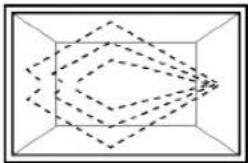 Microwave energy is distributed evenly throughout the oven for fast, thorough cooking of food. Microwave energy is distributed evenly throughout the oven for fast, thorough cooking of food. | 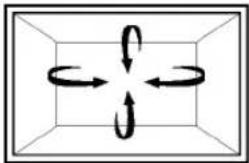 Hot air circulates around food to produce browned exteriors and sealed-in juices. Hot air circulates around food to produce browned exteriors and sealed-in juices. | 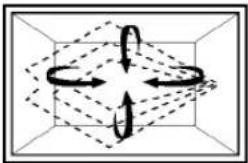 Microwave energy and convection heat combine to cook foods in up to one-half the time of regular ovens, while browning and sealing in juices. Microwave energy and convection heat combine to cook foods in up to one-half the time of regular ovens, while browning and sealing in juices. |
| HEAT SOURCE | Microwave energy. | Circulating heated air. | Microwave energy and circulating heated air. |
| HEAT CONDUCTION | Heat produced within food by instant energy penetration. | Heat conducted from outside of food to inside. | Food heats from instant energy from penetration and heat conducted from outside of food. |
| BENEFITS | Fast, high efficiency cooking.Oven and surroundings do not get hot.Easy clean-up. | Aids in browning and seals in flavor.Cooks some foods faster than regular ovens. | Shortened cooking time from microwave energy.Browning and crisping from convection heat. |
| Read this guide to learn the many different things your Microwave/Convection/Combination Oven can do.You will find a wide variety of cooking methods and programs designed to suit your lifestyle. | |||
Most heat-resistant, non-metallic cookware is safe for use in your microwave oven.
However, to test cookware before using, follow these steps:
- Place the empty cookware in the microwave oven.
- Measure 1 cup of water in a glass measuring cup and place it in the oven beside the cookware.
- Microwave on 100% power for 1 minute. If the dish is warm, it should not be used for microwave cooking.
Convection Cooking
- Metal Pans are recommended for all types of baked products, but especially where browning or crusting is important.
- Dark or dull finish metal pans are best for breads and pies because they absorb heat and produce a crisper crust.
- Shiny aluminum pans are better for cakes, cookies, or muffins because these pans reflect heat and help produce a light, tender crust.
- Glass or glass-ceramic casserole or baking dishes are best suited for egg and cheese recipes due to the cleanability of glass.
Combination Cooking
- Glass or glass-ceramic baking containers are recommended. Be sure not to use items with metal trim as it may cause arcing (sparking) with oven wall or oven shelf, damaging the cookware, the shelf or the oven.
- Heat-resistant plastic microwave cookware (safe to 450^ ) may be used, but is not recommended for foods that require crusting or all-around browning, because plastic is a poor conductor of heat.
| COOKWARE | MICROWAVE | CONVECTION | COMBINATION |
| Heat-Resistant Glass, Ceramic Glass | Yes | Yes | Yes |
| Ceramics, China | Yes(Do not use china with gold or silver trim.) | Yes | Yes |
| Metal Cookware | No | Yes | No |
| Non Heat-Resistant Glass | No | No | No |
| Microwave-Safe Plastic | Yes | No | Yes* |
| Plastic Wrap, Wax Paper | Yes | No | No |
| Paper Products | Yes | No | No |
| Straw, Wicker, and Wood | Yes | No | No |
| * Use only microwave cookware that is safe to 450°F | |||
USING THE OVEN RACK
| MICROWAVE | CONVECTION | COMBINATION | |
 | No | Yes | Yes |
Meat and poultry with high fat content cooked for at least 10 to 15 minutes will brown lightly. Foods cooked a shorter time can be brushed with a browning agent, such as Worcestershire sauce, soy sauce, or barbecue sauce.
COVERING
A cover will trap heat and steam and cause the food to cook more quickly. Use a lid or microwave-safe plastic wrap with one corner folded back to vent the excess steam. Lids on glass casseroles can become hot during cooking; always handle carefully. Waxed paper will prevent the food from splattering in the oven and help retain heat. When warming bread items, use waxed paper, napkins, or paper towels. To absorb extra moisture, wrap sandwiches and fatty foods in paper towels.
SPACING
Arrange individual foods, such as baked potatoes, cupcakes, and hors d'oeuvres in a circle and at least 1 inch apart. This will help the food cook more evenly.
STIRRING
Stirring blends flavors and redistributes the heat in foods. Always stir from the outside toward the center of the dish. Food at the outside of the dish heats first.
TURNING
Large foods, such as roasts and whole poultry, should be turned so that the top and bottom cook evenly. Also turn over chicken pieces and chops.
ARRANGEMENT
Do not stack food. Arrange in a single layer in the dish for more even cooking. Because dense foods cook more slowly, place thicker portions of meat, poultry, fish, and vegetables toward the outside of the dish.
TESTING FOR DONENESS
Foods cook quickly in a microwave oven; test frequently for doneness.
STANDING TIME
Food often needs to stand from 2 to 15 minutes after being removed from the oven. Usually, you need to cover food during standing time to retain heat. Remove most foods when they are slightly undercooked and they will finish cooking during standing time. The internal temperature of food will rise about 10^ F during standing time.
SHIELDING
To prevent some portions of rectangular or square dishes from overcooking, you may need to shield them with small strips of aluminum foil to block the microwaves. You can also cover poultry legs and wing tips with foil to keep them from overcooking.
Always keep foil at least 1 inch from oven walls to prevent arcing.
PIERCING
Pierce the shell, skin, or membrane of foods before cooking to prevent them from bursting. Foods that require piercing include yolks and whites of eggs, hot dogs, clams, oysters, and whole vegetables, such as potatoes and squash.
- Place the front surface of the door three inches or more from the countertop edge to avoid accidental tipping of the microwave oven during normal use.
- To program the oven, make sure you touch the center of each pad firmly since the areas between the pads will not activate the oven. A tone will sound each time a pad is touched correctly. Do not touch several pads at once.
- Do not strike the control panel with silverware, cookware, etc. Breakage may occur.
- Always use caution when taking cookware out of the oven. Some dishes absorb heat from the cooked food and may be hot. See the "Cookware Guide" earlier in this section for more information.
- Do not rinse cookware immediately after cooking. This may cause breakage. Also, always allow the turntable to cool before removing it from the oven.
- Never operate the oven when it is empty. Food or water should always be in the oven during operation to absorb the microwave energy.
-
Do not use the oven to dry newspapers or clothes. They may catch fire.
-
Use thermometers that have been approved for microwave oven cooking.
• The turntable must always be in place when you operate the oven. - Do not use your microwave oven to cook eggs in the shell. Pressure can build up inside the shell, causing it to burst.
• There are several precautions to follow when microwaving popcorn:
— Do not pop popcorn, except in a microwave-safe container or commercial packages designed for microwave ovens.
— Never try to pop popcorn in a paper bag that is not microwave-approved.
— Overcooking may result in smoke and fire.
— Do not repop unpopped kernels.
— Do not reuse popcorn bags.
— Listen while corn pops. Stop oven when popping slows to 2-3 seconds between pops.
— Do not leave microwave unattended while popping corn.
— Follow directions on bag.
CLEANING
NOTE: Before cleaning the oven, unplug the power cord. If this is impossible, open the oven door to prevent an accidental oven start.
INTERIOR
Wipe the oven inside and outside with a soft cloth and a mild detergent solution. Then rinse and wipe dry. This should be done weekly or more often, if needed. Never use cleaning powders or rough pads.
Excessive oil splatters on the inside top will be difficult to remove if left for many days. Wipe splatters with a wet paper towel, especially after cooking chicken or bacon.
REMOVABLE PARTS
The turntable and rotating ring are removable. They should be hand-washed in warm (not hot) water with a mild detergent and a soft cloth. Once they are clean, rinse well and dry with a soft cloth. Never use cleaning powders, steel wool, or rough pads.
- The turntable may be cleaned at the sink. Be careful not to chip or scratch the edges as this may cause the turntable to break during use.
• The rotating ring should be cleaned regularly.
DOOR
For best performance and safety, the inner door panel and the oven front frame should be free of food or grease buildup. Wipe often with a mild detergent; then rinse and wipe dry. Never use cleaning powders or rough pads.
After cleaning the control panel, touch CLEAR to clear any entries that might have been entered accidentally while cleaning the panel. Also make sure that the turntable and rotating ring are in the right position.
When your oven is plugged in for the first time or when power resumes after a power interruption, the contents of whole display will show on the display.
To set the clock for 12:30.
- Touch Clear.
Clear
- Touch Clock. Display scrolls the words ENTER TIME OF DAY.

- Enter the correct time by touching the numbers in sequence. Display scrolls the words TOUCH START.

- Touch Start/Pause.

TIMER ON/OFF
Timer On/Off operates as a kitchen timer for timing up to 99 minutes, 99 seconds and can be used at any time, even when the oven is operating.
To set 3 minutes.
- Touch Clear.
Clear
- Touch Timer On/Off. Display scrolls the words ENTER TIME IN MIN AND SEC.

- Enter the time by touching the numbers in sequence. Display scrolls the words TOUCH TIMER.

- Touch Timer On/Off.

To cancel timer at any time, touch Timer On/Off.
NOTES:
- To set the timer when the oven is operating, touch Timer On/Off and enter the desired time by touching the number pads; then touch Timer On/Off again.
The timer countdown will show on the display for four seconds, then the cooking time will display again. - You can check the timer at any time while the oven is operating by touching the Timer On/Off pad.
• To cancel the timer, touch Timer On/Off twice.
CHILD LOCK
This is a unique safety feature that prevents unwanted oven operation by children. Once the CHILD LOCK is set, no cooking can take place.
To set the Child Lock.
- Touch and hold 0 until LOCKED appears in the display and two tones are heard. If the clock is already set, the time of day will show on the display.

If the CHILD LOCK is set and another cooking pad is touched, the word LOCKED will show in the display.
To cancel the Child Lock.
- Touch and hold 0 until LOCKED disappears from the display.

After CHILD LOCK is turned off, the time of day will show on the display and the oven's cooking functions will operate normally.
EZ ON
A time-saving feature, this pad lets you set and start microwave cooking without touching Start/Pause.
To cook for 2 minutes.
- Touch Clear.
Clear
- Touch Ez On twice.
Ez On
- At the end of the cook time, four tones will sound. The oven will stop.
x 2
You can safely keep hot, cooked food warm in your microwave oven for up to 99 minutes. You can use WARM HOLD by itself, or to automatically follow a timed cooking cycle.
To use WARM HOLD.
- Put hot, cooked food in the oven and close the door.
- Touch Clear.
- Touch Warm Hold. Display scrolls the words TOUCH START.
- Touch Start/Pause. Display shows WARM.
Clear
Warm Hold
Start/Pause
To program WARM HOLD to automatically follow another cooking cycle:
• After entering the timed cooking instruction, touch WARM HOLD before touching Start/Pause.
- When the last cooking cycle is over, you will hear two tones. "WARM" will show on the display while the oven continues to run.
NOTES:
- Opening the door or touching Clear cancels WARM HOLD. Close the door and touch WARM HOLD, then touch Start/Pause if additional WARM HOLD time is desired.
- Food that is covered during cooking should be covered during WARM HOLD.
- Pastry items (pies, turnovers, etc.) should be uncovered during WARM HOLD.
- Complete meals kept warm on a dinner plate should be covered during WARM HOLD.
- Do not use more than one complete WARM HOLD cycle. The quality of some foods will suffer with extended time.
REMINDER
The reminder feature can be used like an alarm clock without starting the oven. The reminder time can be set to activate up to 12 hours later.
Be sure the clock shows the correct time of day.
- Touch Clear.
- Touch Reminder. Display scrolls the words ENTER REMIND TIME.
- Enter the time you want the oven to remind you. Display scrolls the words TOUCH REMINDER.
- Touch Reminder. Display scrolls the words REMINDER SET Once.
Clear
Reminder
Reminder
NOTE: Programmed reminder time can be displayed by touching Reminder. To clear the reminder program, touch Reminder then touch Clear.
RECALL
This convenient feature lets you repeat the previous cooking function without having to reprogram the oven.
To set RECALL.
- Put the food in the oven and close the door.
- Touch Clear.
- Touch Recall.
Clear
Recall
The oven will repeat the previous cooking program.
START/PAUSE
Touch this pad to:
- Start the function you set.
- Pause the oven temporarily during cooking.
- Touch this pad again to restart after PAUSE.
CLEAR
Touch this pad to:
- Cancel a program during cooking.
- Erase or reset during programming.
The More and Less functions will adjust the cook time of many oven functions. More will add 10 seconds to the cook time each time you press it. Less will subtract 10 seconds of cook time each time you press it.
To adjust SENSOR POPCORN for more cook time.
- Touch Sensor Popcorn. The oven will cook food automatically with the sensor system.
- Touch More. Remaining cook time will increase by 10 seconds.
NOTES:
- More and Less do not adjust cook time for the DEFROST and WARM HOLD functions.
- Use More and Less during the cook cycle.
- For Convection cooking, More and Less are used as temperature selection pads.
CUSTOM SET
Program your microwave oven to turn the clock and demo modes on or off, adjust the sound level, adjust the scroll speed of the display, and switch between pounds and kilograms, °C and °F.
To turn off the clock.
- Touch Custom Set.
Custom Set
- Touch 2. Display scrolls the words CLOCK ON TOUCH1 OFF TOUCH2.
2
- Touch 2. CLOCK OFF.
2
NOTE: To turn the clock back on, repeat Steps 1-3.
CUSTOM SET CHART
| Function | Touch Keypad | Choices |
| Sound Control | 1 | Mute, Low, Medium, Loud |
| Clock ON/OFF | 2 | Clock On or Clock Off |
| Scroll Speed | 3 | Slow, Normal, Fast |
| LBS °F/KG °C | 4 | Lbs °F or Kg °C |
| Demo ON/OFF | 5 | Demo On or Demo Off |
NOTE: When the power cord is first plugged in, the default settings are: Loud Sound, Clock ON, Normal Speed, LBS °F, Demo OFF.
TIMED COOKING
This feature lets you program a specific cook time and power. There are 10 power level settings in addition to HIGH power (100%). Refer to the "Microwave Power Level Chart" on page 15 for more information.
To cook for 5 minutes 30 seconds at 80% power.
- Touch Time. Display scrolls the words ENTER COOKING TIME.
Time
- Touch 5, 3, and 0. Display scrolls the words TOUCH START OR POWER.
5 3 0
- Touch Power. Display scrolls the words ENTER POWER LEVEL 1 - 10.
Power
- Touch 8. Display scrolls the words P-80 TOUCH START.
8
- Touch Start/Pause.
Start/Pause
- At the end of the cook time, four tones will sound. The oven will stop.
NOTE: If you do not select a power level, the oven will automatically cook at HIGH (100%) power.
HELP
The Help displays feature information and helpful hints. Press Help, then select a feature pad.
| To learn about custom set. | |
| 1. Touch Help. | Help |
| 2. Touch Custom set. | Custom Set |
For best results, some recipes call for different cook powers during different stages of a cook cycle. You can program your oven to switch from one power level to another for up to 2 stages.
Your microwave oven has 10 cook power levels to let you cook or heat a wide variety of foods. Refer to the chart below for suggestions:
To set a 2-stage cook cycle.
- Touch Time. Display scrolls the words ENTER COOKING TIME.

- Touch 5, 3, and 0. Display scrolls the words TOUCH START OR POWER.

- Touch Power. Display scrolls the words ENTER POWER LEVEL 1 - 10.

- Touch 8. Display scrolls the words P-80 TOUCH START.

- Touch Time. Display scrolls the words ENTER COOKING TIME.

- Touch 3, 0, and 0. Display scrolls the words TOUCH START OR POWER.

- Touch Power. Display scrolls the words ENTER POWER LEVEL 1 - 10.

- Touch 3. Display scrolls the words P-30 TOUCH START.

- Touch Start/Pause.

-
When the first stage is over, you will hear two short tones as the oven begins the second cook stage.
-
At the end of the cook time, four tones will sound. The oven will stop.
NOTE: If you are using the AUTO DEFROST feature as one of the cooking stages, it must be programmed as the first stage.
Microwave Power Level Chart
| Power Level | Use |
| 10 (High) | ·Boiling water.·Making candy.·Cooking poultry pieces, fish, & vegetables.·Cooking tender cuts of meat.·Cooking whole poultry. |
| 9 | ·Reheating rice, pasta, & vegetables. |
| 8 | ·Reheating prepared foods quickly.·Reheating sandwiches. |
| 7 | ·Cooking egg, milk, & cheese dishes.·Cooking cakes, breads.·Melting chocolate. |
| 6 | ·Cooking veal.·Cooking whole fish.·Cooking puddings & custard. |
| 5 | ·Cooking ham, whole poultry, & lamb.·Cooking rib roast, sirloin tip. |
| 4 | ·Thawing meat, poultry, & seafood. |
| 3 | ·Cooking less tender cuts of meat.·Cooking pork chops, roast. |
| 2 | ·Taking chill out of fruit.·Softening butter. |
| 1 | ·Keeping casseroles & main dishes warm.·Softening butter & cream cheese. |
| 0 | ·Standing time. |
A sensor detects steam from the food and automatically adjusts cook time for the best cooking results. It's easy and convenient—the oven will guide you, step-by-step, to cook or reheat foods. The Sensor Menu, with many popular food choices, is preprogrammed to cook or reheat food perfectly every time.
For more information about Sensor Touch Cooking Programs, see the "Sensor Cook Guide" on pages 17-19. This Guide provides specific instructions for cooking and heating a variety of foods.
- The Sensor Touch system works by detecting a build-up of vapor.
• Make sure the door remains closed. - Once the vapor is detected, two beeps will sound.
- Opening the door or touching the Clear before the vapor is detected will abort the process. The oven will stop.
- Before using Sensor Touch, make sure the glass turntable is dry, to assure the best results.
Categories:
Sensor Cook
Sensor Popcorn
Sensor Reheat
SENSOR COOK
SENSOR COOK allows you to cook most of your favorite foods without having to select cooking times and power levels. The oven automatically determines required cooking times for each food item.
Sensor Cook has 10 food categories.
To cook FROZEN ENTREE.
- Touch Clear.
Clear
- Touch Sensor Cook. Display scrolls the words SELECT MENU 0 - 9
Sensor Cook
- Touch 4. Display shows SENSING. The oven will cook food automatically by sensor system.
4
SENSOR POPCORN
SENSOR POPCORN lets you pop commercially packaged microwave popcorn (1.75 to 3.5 ounces).
For best results:
- Use fresh popcorn.
- Place only one bag of prepackaged microwave popcorn on the center of turntable.
To pop 3.5 oz.
- Touch Clear.
Clear
- Touch Sensor Popcorn.
The oven will cook food automatically by sensor system.
Sensor Popcorn
NOTES:
- Do not attempt to reheat or cook any unpopped kernels.
- Do not use popcorn popping devices in microwave oven with this feature.
- If you use a microwave popper, test it on sensor. There are many such devices available and their results may vary.
- IN NO CASE should you use a popper that concentrates the microwave energy.
SENSOR REHEAT
This feature allows you to reheat precooked, room-temperature or refrigerated foods without selecting cooking times and power levels.
Sensor Reheat has 3 categories: Dinner plate, Soup/Sauce, Casserole.
To reheat casserole.
- Touch Clear.
Clear
- Touch Sensor Reheat. Display scrolls the words SELECT MENU 1 - 3
Sensor Reheat
- Touch 3. Display shows SENSING. The oven will cook food automatically by sensor system.
3
SENSOR COOK GUIDE
- POTATOES

natural_image
Two round, yellowish-yellow food items on a clear white plate (no text or symbols visible)To cook potatoes:
Serving size is 1 to 4 medium, about 8 to 10 oz (225g to 280g) each.
Pierce each potato several times with a fork and place around the edge of the oven tray, at least 1 inch (2.5cm) apart.
- FRESH VEGETABLES

natural_image
Top-down view of a glass bowl containing several orange-colored food items (no text or symbols visible)To cook fresh vegetables:
Serving size is 1 to 4 cups (250mL to 1L).
Place moist vegetables in a microwavable container.
Add 2 to 4 tablespoons water.
Cover with plastic wrap and vent.
Most vegetables need stirring and 2 to 3 minutes standing time after cooking.
- FROZEN VEGETABLES

natural_image
Close-up of sliced meat in a clear glass bowl (no text or symbols visible)To cook frozen vegetables:
Serving size is 1 to 4 cups (250mL to 1L).
Remove from package and place vegetable in a microwavable container.
Add 2 to 4 tablespoons water.
Cover with plastic wrap and vent.
Most vegetables need stirring and 2 to 3 minutes standing after cooking.
- FROZEN ENTRÉE

natural_image
Top-down view of a rectangular container filled with yellow liquid, no visible text or symbols.To cook a frozen entrée:
Entrée size: 10 to 20 oz (280g to 560g).
Remove from outer package. Loosen cover on three sides.
If entrée is not in a microwave-safe container, place it on a plate, cover with plastic wrap and vent.
Most entrées need 2 to 3 minutes standing time after cooking.
SENSOR COOK GUIDE
- RICE

natural_image
Top-down view of a clear glass petri dish containing a pale yellow substance, likely a gel or starch, with no visible text or symbols.To cook rice:
Follow package instructions for ingredient amounts. Place rice and liquid (water, chicken, or vegetable stock) in a microwave-safe container, cover with casserole lid or plastic wrap and vent. Most rice needs 2 to 3 minutes standing time after cooking.
- CASSEROLE

natural_image
Close-up of a transparent glass bowl containing a small amount of white granular substance (no text or symbols visible)To cook casseroles:
Serving size is 1 to 4 cups (250mL to 1L). Combine the ingredients per the recipe in a 1- to 2-quart (1- to 2-L) casserole dish. Cover with plastic wrap and vent. After cooking is complete, allow 3 minutes standing time.
- GROUND MEAT

natural_image
Close-up of raw meat in a clear glass bowl (no text or symbols visible)To cook ground meat:
Serving size is 4 to 32 oz ( 14 to 2 lbs). Crumble meat into a microwavable container. Season and cover with plastic wrap. Vent cover for well-done meat. Cover dish for medium cooked meat (such as meat to be used in another dish and cooked further).
- FISH/SEAFOOD

natural_image
Close-up of a translucent, light-colored object wrapped in plastic film (no visible text or symbols)To cook fish/seafood:
Serving size is 4 to 32 oz ( ^1/4 to 2 lbs). Place the food around the sides of a microwave-safe container. Season and add ^1/4 to ^1/_2 cup (60 to 125ml) liquid (wine, water, salsa, etc.) if desired. Cover with plastic wrap and vent.
SENSOR COOK GUIDE
- SCRAMBLED EGGS

natural_image
Close-up of a clear glass bowl containing a yellow liquid, with no visible text or symbols.To cook scrambled eggs:
Serving size is 2 to 5 eggs.
Break eggs into a 4-cup (1L) measuring cup or
1-quart (1L) casserole dish.
Add 1 tablespoon (15mL) milk or water per egg and
beat. Cover with plastic wrap and vent.
When cooking is complete, remove from oven, stir, and
allow 1 to 2 minutes standing time.
- FROZEN PIZZA

natural_image
Plate of pizza with toppings including cheese, bread, and toppings (no visible text or symbols)To cook frozen pizza:
Use only frozen pizza made for microwave use.
Do not cover (the kind that comes with a succceptor cooking tray).
Serving size is 1 or 2 pizzas.
Follow package directions.
SENSOR REHEAT GUIDE
- DINNER PLATE

natural_image
Three food items on a white plate: green onion, yellow garlic, and brown instant noodles (no text or symbols visible)To reheat dinner plate:
Serving size is about 8 to 16 oz (225g to 450g).
Place food to be heated on a dinner plate or similar dish.
Cover with plastic wrap and vent.
- SOUP/SAUCE

natural_image
Top-down view of a petri dish containing a reddish-brown liquid, likely a gel or similar container (no text or symbols visible)To reheat soup/sauce:
Serving size is 1 to 4 cups (250mL to 1L).
Place food to be heated in a casserole dish.
Cover with plastic wrap and vent.
- CASSEROLE

natural_image
Clear glass bowl containing a small amount of white granular substance, possibly food or material (no text or symbols visible)To reheat casserole:
Serving size is 1 to 4 cups (250mL to 1L).
Place food to be heated in a casserole dish.
Cover with plastic wrap and vent.
The Defrost Auto/Time feature gives you two ways to defrost frozen foods. Touch Defrost Auto/Time once for Auto Defrost or twice for Time Defrost.
AUTO DEFROST
Four defrost choices are preset in the oven. The defrost feature provides you with the best defrosting method for frozen foods. The Auto Defrost list shows which defrost setting is recommended for the food you are defrosting. With the Auto Defrost feature, the oven automatically sets the defrosting times for each food item according to the weight you enter. For added convenience, the Auto Defrost includes a built-in tone mechanism that reminds you to check, turn over, separate, or rearrange the food during the defrost cycle. Four different defrosting levels are provided.
- MEAT
- POULTRY
- FISH
- BREAD
After touching the Defrost Auto/Time pad once, select the food category by touching a number pad: 1 (MEAT), 2 (Poultry), 3 (Fish), and 4 (Bread). Available weights for Meat, Poultry and Fish are 0.1 to 6.0 lbs (0.1 to 4.0kgs). The available weight for Bread is 0.1 to 1 lb (0.1 to 0.5kg).
To defrost 1.2 lbs of meat.
| 1. Touch Clear. |  |
| 2. Touch Defrost Auto/Time once. Display scrolls the words MEAT TOUCH 1 POULTRY TOUCH 2 FISH TOUCH 3 BREAD TOUCH 4. |  |
| 3. Touch 1. Display scrolls the words ENTER WEIGHT. |  |
| 4. Enter the weight by touching 1 and 2. Display scrolls the words 1.2 LBS TOUCH START. |  |
| 5. Touch Start/Pause. |  |
NOTE: After you touch Start/Pause, the display counts down the defrost time. The oven will beep once during the Defrost cycle. At this time, open the door and turn, separate, or rearrange the food as needed. Remove any portions that have thawed then return frozen portions to the oven and touch Start/Pause to resume the defrost cycle. The oven will not STOP during the BEEP unless the door is opened.
For best results:
- Remove fish, shellfish, meat, and poultry from its original closed paper or plastic package (wrapper). Otherwise, the wrap will hold steam and juice close to the foods, which can cause the outer surface of the foods to cook.
- Form the meat into the shape of a doughnut before freezing. When defrosting, scrape off thawed meat when the beep sounds and continue defrosting.
- Place foods in a shallow glass baking dish or on a microwave roasting rack to catch drippings.
- Foods should still be somewhat icy in the center when removed from the oven.
AUTO DEFROST CHART
| Sequence | Food |
| 1. MEAT0.1 to 6.0 lbs(0.1 to 4.0kg) | BEEFGround beef, Round steak, Cubes for stew,Tenderloin steak, Pot roast, Rib roast,Rump roast, Chuck roast, Hamburger patty.LAMBChops (1-inch thick), Rolled roastPORKChops ( 12 -inch thick), Hot dogs, Spareribs,Country-style ribs.Rolled roast, Sausage.VEALCutlets (1 lb, 12 -inch thick) |
| 2. POULTRY0.1 to 6.0 lbs(0.1 to 4.0kg) | POULTRYWhole (under 4 lbs), Cut up, Breasts (boneless)CORNISH HENSWholeTURKEYBreast (under 6 lbs) |
| 3. FISH0.1 to 6.0 lbs(0.1 to 4.0kg) | FISHFillets, Whole SteaksSHELLFISHCrab meat, Lobster tails, Shrimp, Scallops |
| 4. BREAD0.1 to 1.0 lb(0.1 to 0.5kg) | MUFFINSROLL CAKE |
Time Defrost allows you to defrost for a selected length of time.
To defrost for 3 minutes.
| 1. Touch Clear. |  |
| 2. Touch Defrost Auto/Time twice. Display scrolls the words ENTER DEFROST TIME. |  |
| 3. Touch 3, 0, and 0. Display scrolls the words TOUCH START. |  |
| 4. Touch Start/Pause. |  |
| 5. Turn food over when the oven signals. | |
| 6. At the end of the defrost time, four tones will sound. The oven will stop. |
EZ-DEFROST
The EZ-Defrost feature provides you with the quick defrosting method for 1.0 pound frozen foods. The oven automatically sets the defrosting time for each food. Three quick defrost settings are preset in the oven. Select a category by touching the number pad: 1 (Meat), 2 (Poultry) and 3 (Fish).
| To defrost 1 lb of meat. | |
| 1. Touch Clear. | Clear |
| 2. Touch Ez-Defrost. Display scrolls the words MEAT TOUCH 1 POULTRY TOUCH 2 FISH TOUCH 3. | Ez-Defrost |
| 3. Touch 1. Display scrolls the words TOUCH START. | 1 |
| 4. Touch Start/Pause. | Start/Pause |
NOTE: The oven will beep once during the Defrost cycle. At this time, open the door and turn, separate, or rearrange the food.
UNDERSTANDING YOUR CONVECTION OVEN
TIPS FOR CONVECTION COOKING
This section gives you cooking instructions and procedures for operating each convection function.
Please read these instructions carefully.
Convection cooking circulates hot air through the oven cavity with a fan. The constantly moving air surrounds the food to heat the outer portion quickly, creating even browning and sealed-in flavor by the constant motion of hot air over the food surfaces. Your oven uses convection cooking whenever you use the Convection Command Pads. DO NOT USE THE OVEN WITHOUT THE TURNTABLE IN PLACE.
- You can cook food with the Metal Cooking Rack on the turntable.
- Do not cover turntable or metal rack with aluminum foil. It interferes with the flow of air that cooks the food.
- Round pizza pans are excellent cooking utensils for many convection-only items. Choose pans that do not have extended handles.
- Use convection cooking for items like soufflés, breads, cookies, angel food cakes, pizza, and for some meat and fish cooking.
- You do not need to use any special techniques to adapt your favorite oven recipes to convection cooking; however, you may need to lower some temperatures or reduce some cooking times from the convection oven cooking directions. See examples in the charts in this section.
- When baking cakes, cookies, breads, rolls, or other baked foods, most recipes call for preheating. Preheat the empty oven just as you do a regular oven. You can start heavier dense foods such as meats, casseroles, and poultry without preheating.
- All heatproof cookware or metal utensils can be used in convection cooking.
- As in conventional cooking, the distance of the food from the heat source affects cooking results. Refer to the charts in this Use and Care Guide.
- Use metal utensils only for convection cooking. Never use for microwave or combination cooking since arcing and damage to the oven may occur.
- After preheating, if you do not open the door, the oven will automatically hold at the preheated temperature for 30 minutes.
PRECAUTIONS
- The oven cavity, door, turntable, rotating ring, metal racks, and cooking utensils will become very hot. USE THICK OVEN GLOVES when removing the food, cooking utensil, metal rack, and turntable from the oven after convection cooking.
- Do not use lightweight plastic containers, plastic wraps, or paper products during any convection cycle.
USING YOUR CONVECTION OVEN
This section gives you the instructions for operating automatic convection and combination cooking. You can select among 8 popular foods using Auto Roast and Auto Bake.
AUTO BAKE
Auto Bake automatically bakes frozen pizza, muffins, biscuits, and frozen french fries. Some foods have a preheat time. When you cook muffins and biscuits, place food on the rack after the preheat cycle.
To bake 6 muffins.
| 1. Touch Clear. | Clear |
| 2. Touch Auto Bake.Display scrolls the wordsFROZEN PIZZA TOUCH 1MUFFINS TOUCH 2BISCUIT/ DINNERROLL/B.STICK TOUCH 3FROZEN FRENCH FRIESTOUCH 4. | Auto Bake |
| 3. Touch 2 for muffins.Display scrolls the wordsUSE RACK AND 6 CUPMUFFIN PAN NO FOOD INOVEN TOUCH START. | 2 |
| 4. Touch the Start/Pause. | Start/Pause |
| After preheat cycle ends, the ovenwill beep and directions will bedisplayed during auto cooking.Follow the instructions. Open thedoor and place muffin cup on therack. Close the door. | |
| 5. Touch the Start/Pause. | Start/Pause |
NOTES:
- Frozen pizza and frozen french fries do not have a preheat time.
- Auto Bake can be programmed with More/Less. When you want to adjust the time of the preset program, use More or Less after Step 3.
- Refer to the "Auto Bake Guide" on page 25 for more information.
AUTO ROAST
Auto Roast automatically roasts beef, whole chicken, turkey breasts, and pork.
| To roast a whole chicken (3 lbs). | |
| 1. Touch Clear. | Clear |
| 2. Touch Auto Roast. Display scrolls the words BEEF TOUCH 1 WHOLE CHICKEN TOUCH 2 TURKEY BREASTS TOUCH 3 PORK TOUCH 4. | Auto Roast |
| 3. Touch 2 for whole chicken. Display scrolls the words USE RACK ENTER 2.5 - 6LBS. | 2 |
| 4. Touch the 3,0 to set the desired weight. Display scrolls the words 3.0 LBS TOUCH START. | 3 0 |
| 5. Touch the Start/Pause. | Start/ Pause |
NOTE:
- Auto Roast can be programmed with More/Less. When you want to adjust the time of the preset program, use More or Less after Step 4.
- The available weight for each food is different. Refer to the "Auto Roast Guide" on page 26.
AUTO BAKE GUIDE
- FROZEN PIZZA

natural_image
Plate of food with visible toppings on a metal cooling rack (no text or symbols)To cook frozen pizza:
For best results, a pizza pan is not required.
Use a 12-inch thin-crust frozen pizza. If using a rising crust pizza, add an additional 10 to 20 minutes baking time on convection 450°F.
Place frozen pizza directly on short rack.
After baking is over, remove pizza from the oven.
- MUFFINS

natural_image
Metal baking tray with six cavities containing dough, placed on a metal rack (no text or symbols visible)To cook muffins:
Use 1 package of a muffin mix.
Place short rack on turntable.
After PREHEAT, use 6-cup muffin pan;
place pan on rack.
- BISCUIT/DINNER ROLL/BREAD STICKS

natural_image
Plate of round white food items on a metallic stand (no text or symbols visible)To cook biscuits, dinner rolls, or bread sticks:
For best results, bake one pan of biscuits, dinner rolls, or breadsticks at a time.
After PREHEAT, place the biscuits 1 to 2 inches apart on engrossed 12-inch round pizza pan or cookie sheet on short rack.
Cool on rack for 10 minutes after cooking
- FROZEN FRENCH FRIES

natural_image
Plate of sliced white food items on a neutral background (no text or symbols visible)To cook frozen french fries:
Use frozen, prepared french fries.
Do not overlap or layer potatoes.
For crispier potatoes, use MORE to add additional cooking time.
Spread the french fries on 10-inch pan.
Place the 10-inch pan on short rack.
After cooking, remove pan from the oven.
Weight range: 4 to 16 oz.
AUTO ROAST GUIDE
- BEEF

natural_image
Raw meat cut on a metal rack stand (no text or symbols visible)To cook beef roast:
Weigh roast and pat dry with paper towels.
Place a microwave-safe/heat-proof plate on turntable to catch drippings.
Place roast on short rack.
After cooking, loosely tent roast beef with aluminum foil and let stand for 5 to 10 minutes.
Weight range: 2 to 4 lbs.
- WHOLE CHICKEN

natural_image
Whole raw chicken placed on a metal rack (no text or symbols visible)To cook whole chicken:
Weigh whole chicken. Remove giblets and neck and discard.
Thoroughly wash inside and outside of chicken with cold water. Pat chicken dry with paper towels. Secure the legs with kitchen twine. Brush outside of chicken with melted butter or margarine
Place a microwave-safe/heat-proof plate on turntable to catch drippings. Place chicken breast side up on short rack.
After cooking, loosely tent roast chicken with aluminum foil and let stand for 10 minutes.
Weight range: 2.5 to 6 lbs.
- TURKEY BREAST

natural_image
A raw chicken placed on a metal rack inside a circular frame (no text or symbols visible)To cook turkey breast:
Weigh turkey breast and pat dry with paper towels. Brush turkey breast with melted butter. Place a microwave-safe/heat-proof plate on turntable to catch drippings. Place turkey breast on short rack.
After cooking, loosely tent roast turkey with aluminum foil and let stand for 5 to 10 minutes.
Weight range: 3 to 6 lbs.
- PORK ROAST

natural_image
Raw meat being heated on a metal rack (no text or symbols visible)To cook pork roast:
Weigh roast and pat dry with paper towels.
Place a microwave-safe/heat-proof plate on turntable to catch drippings.
Place roast on short rack.
After cooking, loosely tent roast with aluminum foil and let stand for 5 to 10 minutes.
Weight range: 2 to 4 lbs.
USING YOUR CONVECTION OVEN
CONVECTION
During convection cooking, a heating element is used to raise the temperature of the air inside the oven. Convection cooking temperature range from 225°F to 450°F and 100°F may be programmed.
It is best to preheat the oven when convection cooking.
| To set the convection cooking at 325°F for 45 minutes with preheat. | |
| To preheat:1. Touch Clear. | Clear |
| 2. Touch Convection Cook.Display scrolls the words350F TOUCH MORE OR LESS FOR TEMP SET OR START OR ENTER COOKING TIME. | Cook |
| 3. Touch Less once to set 325°F.Display scrolls the words325F TOUCH START FOR PREHEAT OR ENTER COOKING TIME. | Less |
| 4. Touch Start/Pause.Display shows PREHEAT 325F. | Start/Pause |
| To cook:5. After preheating,display scrolls the wordsPLACE FOOD ON RACK.Open the door, place food on the oven rack, and close the door.Display scrolls the wordsENTER COOKING TIME. | |
| 6. Touch 4, 5, 0, 0 to set the cooking time.Display scrolls the wordsTOUCH START. | 4 5 0 0 |
| 7. Touch Start/Pause. | Start/Pause |
| At the end of cooking time, four tones will sound and display shows END. | |
NOTES:
- When the oven reaches the set preheat temperature, five tones will sound and the oven will automatically hold that temperature for 30 minutes.
- The oven temperature drops very quickly when the door is opened; however, this should not prevent food from being fully cooked during normal cooking time.
| To set the convection cooking at 375°F for 45 minutes without preheat. | |
| To cook1. Put food on the oven rack, and close the door.2. Touch Clear. | Clear |
| 3. Touch Convection Cook.Display scrolls the words350F TOUCH MORE OR LESS FOR TEMP SET OR START OR ENTER COOKING TIME. | Cook |
| 4. Touch More once to set 375°F.Display scrolls the words375F TOUCH START FOR PREHEAT OR ENTER COOKING TIME. | More |
| 5. Touch 4, 5, 0, 0 to set the cooking time.Display scrolls the wordsTOUCH START. | 4 5 0 0 |
| 6. Touch Start/Pause. | Start/Pause |
| At the end of the cooking time,four tones will sound and display shows END. | |
NOTES:
- By using the More/Less in convection cooking, you can set the desired temperature.
- The temperature range has 10 steps from 225^ to 450^ including 100^ (dough rising).
- Use More/Less to increase/decrease the temperature by 25°F after touching the Convection. (The default temperature is 350°F.)
USING YOUR CONVECTION OVEN
CONVECTION COOKING GUIDE
- Always use metal accessory rack when convection baking. (See page 6.)
- Aluminum pans conduct heat quickly. For most convection baking, light, shiny finishes give best results because they prevent overbrowning in the time it takes to cook the center areas. Pans with dull (satin-finish) bottoms are recommended for cake pans and pie pans for best bottom browning.
- Dark or non-shiny finishes, glass, and pyroceram absorb heat which may result in dry, crisp crusts.
- Preheating the oven is recommended when baking foods by convection.
- To prevent uneven heating and save energy, open the oven door to check food as little as possible.
| FOOD | Oven Temp. | Time, Min. | Comments | |
| Breads | Biscuits | 400°F | 10 to 12 | Canned refrigerated biscuits take 2 to 4 minutes less time. |
| Corn Bread | 400°F | 15 to 20 | ||
| Muffins | 400°F | 18 to 24 | Remove from pans immediately and cool slightly on wire rack. | |
| Popovers | 350°F | 30 to 40 | Pierce each popover with a fork after removing from oven to allow steam to escape. | |
| Nut Bread or Fruit Bread | 350°F | 55 to 65 | Interiors will be moist and tender. | |
| Yeast Bread | 375°F | 18 to 25 | ||
| Plain or Sweet Rolls | 350°F | 13 to 16 | Lightly grease baking sheet. | |
| Cakes | Angel Food | 350°F | 40 to 50 | Invert and cool in pan. |
| Cheesecake | 350°F | 60 to 65 | After cooking, turn oven off and let cheesecake stand in oven 30 minutes with door ajar. | |
| Coffee Cake | 350°F | 25 to 30 | ||
| Cup Cakes | 350°F | 15 to 20 | ||
| Fruit Cake (loaf) | 300°F | 80 to 90 | Interior will be moist and tender. | |
| Gingerbread | 350°F | 35 to 40 | ||
| Butter Cakes, Cake Mixes (2 layers) | 350°F | 30 to 40 | Use 2 shelves. Top layer may bake in less time. | |
| Fluted Tube Cake | 350°F | 40 to 50 | Grease and flour pan. | |
| Pound Cake | 350°F | 60 to 70 | Cool in pan 10 minutes before inverting on wire rack. | |
| Cookies | Bar | 350°F | 35 to 45 | Use same time for bar cookies from a mix. |
| Drop or Sliced | 375°F | 10 to 14 | Use same time for sliced cookies from a mix. |
USING YOUR CONVECTION OVEN
| FOOD | Oven Temp. | Time, Min. | Comments | |
| Fruits, Other Desserts | Baked Apples or Pears | 350°F | 30 to 40 | Bake in cookware with shallow sides. |
| Bread Pudding | 300°F | 35 to 40 | Pudding is done when knife inserted near center comes out clean. | |
| Cream Puffs | 400°F | 30 to 35 | Puncture puffs twice with toothpick to release steam after 25 minutes of baking time. | |
| Custard (individual) | 350°F | 45 to 50 | Set cups in baking dish. Pour boiling water around cups to a depth of 1 inch. | |
| Meringue Shells | 300°F | 30 to 35 | When done, turn oven off and let shells stand in oven 1 hour to dry. | |
| Pies, Pastries | Frozen | 375°F | 40 to 45 | Follow package directions. |
| Meringue-topped | 325°F | 13 to 16 | Follow package directions. | |
| Two-crust | 400°F | 50 to 55 | Follow package directions. | |
| Quiche | 350°F | 30 to 35 | Let stand 5 minutes before cutting. | |
| Pastry Shell | 400°F | 10 to 16 | Pierce pastry with fork to prevent shrinkage. | |
| Casseroles | Meat, chicken, seafood combinations | 350°F | 20 to 40 | Cook times vary with casserole size and ingredients. |
| Pasta | 350°F | 25 to 45 | Cook times vary with casserole size and ingredients. | |
| Potatoes, scalloped | 350°F | 55 to 60 | Let stand 5 minutes before serving. | |
| Vegetable | 350°F | 25 to 35 | Cook times vary with casserole size and ingredients. | |
| Convenience Foods | Frozen Bread Dough | 350°F | 30 to 35 | Follow package directions. |
| Frozen Dinners | 350°F | 20 to 25 | Follow package directions. | |
| Frozen Entrees | 350°F | 50 to 60 | Follow package directions. | |
| Frozen Pizza Rolls, Egg Rolls | 400°F | 8 to 10 | Follow package directions. | |
| Pizza | 425°F | 15 to 25 | Follow package directions. | |
| Slice and Bake Cookies | 375°F | 13 to 15 | Let stand a few minutes before removing from pan to cool. | |
| Main Dishes | Meat Loaf | 325°F | 55 to 60 | Let stand 5 minutes after cooking. |
| Oven-Baked Stew | 325°F | 80 to 90 | Brown meat before combining with liquid and vegetables. | |
| Swiss Steak | 350°F | 60 to 70 | Let stand 2 minutes after cooking. | |
| Stuffed Peppers | 350°F | 40 to 45 | Use green, red, or yellow peppers. | |
| Vegetables | Acorn Squash Halves | 375°F | 55 to 60 | Pierce skin several places. Add 14 cup water to dish. Turn squash halves cut side up after 30 minutes of cook time and cover. |
| Baked Potatoes | 425°F | 50 to 60 | Pierce skin with a fork before baking. | |
| Twice-Baked Potatoes | 400°F | 25 to 30 | Pierce skin with fork before baking. |
USING YOUR CONVECTION OVEN
| MEATS | MINUTES/POUND | OVEN TEMPERATURE | |
| Beef | Rib (2 to 4 lbs.) | ||
| Rare | 21 to 26 | 325°F | |
| Medium | 26 to 31 | 325°F | |
| Well | 31 to 36 | 325°F | |
| Boneless Rib, Top Sirloin | |||
| Rare | 25 to 30 | 325°F | |
| Medium | 30 to 35 | 325°F | |
| Well | 35 to 40 | 325°F | |
| Beef Tenderloin | |||
| Rare | 12 to 16 | 325°F | |
| Medium | 16 to 20 | 325°F | |
| Pot Roast (2 12 to 3 lbs.) | |||
| Chuck, Rump | 45 to 50 | 325°F | |
| Ham | Canned (3-lb. fully cooked) | 20 to 25 | 325°F |
| Butt (5-lb. fully cooked) | 20 to 25 | 325°F | |
| Shank (5-lb. fully cooked) | 17 to 20 | 325°F | |
| Lamb | Bone-in (2 to 4 lbs.) | ||
| Medium | 21 to 26 | 325°F | |
| Well | 26 to 31 | 325°F | |
| Boneless (2 to 4 lbs.) | |||
| Medium | 25 to 30 | 325°F | |
| Well | 29 to 34 | 325°F | |
| Pork | Bone-in (2 to 4 lbs.) | 26 to 30 | 325°F |
| Boneless (2 to 4 lbs.) | 32 to 36 | 325°F | |
| Pork Chops(1/2to 1-inch thick) | |||
| 2 chops | 12 to 15 | 325°F | |
| 4 chops | 15 to 18 | 325°F | |
| 6 chops | 18 to 25 | 325°F | |
| Poultry | Whole Chicken(2 12 to 3 12 lbs.) | 25 to 35 | 375°F |
| Chicken Pieces(2 12 to 3 12 lbs.) | 13 to 16 | 350°F | |
| Cornish Hens | |||
| Unstuffed (1 to 1 12 lbs.) | 10 to 15 | 375°F | |
| Stuffed (1 to 1 12 lbs.) | 15 to 20 | 375°F | |
| Duckling (4 to 5 lbs.) | 19 to 21 | 375°F | |
| Turkey Breast(4 to 6 lbs.) | 21 to 25 | 325°F | |
| Seafood | Fish, whole(3 to 5 lbs.) | 10 to 15 | 400°F |
| Lobster Tails(6 to 8-oz. each) | 12 to 17 | 350°F |
UNDERSTANDING YOUR COMBINATION OVEN
TIPS FOR COMBINATION COOKING
This section gives you instructions to operate each combination cooking function. Please read these instructions carefully. Sometimes combination microwave-convection cooking is suggested to get the best cooking results since it shortens the cooking time for foods that normally need a long time to cook. This cooking process also leaves meats juicy on the inside and crispy on the outside. In combination cooking, the convection heat and microwave energy alternate automatically. Your oven has two preprogrammed settings that make it easy to cook with both convection heat and microwave energy automatically.
HELPFUL HINTS FOR COMBINATION COOKING
- Meats may be roasted directly on the metal rack or in a shallow roasting pan placed on the rack. When using the metal rack, please check your cooking chart for information on proper use.
- Less tender cuts of beef can be roasted and tenderized using oven cooking bags.
- When baking, check for doneness after cooking time is up. If not completely done, let stand in oven for a few minutes to complete cooking.
PRECAUTIONS
- All cookware used for combination cooking must be BOTH microwave-safe and ovenproof.
- During combination baking, some baking cookware may cause arcing when it comes in contact with the oven walls or metal accessory racks. Arcing is a discharge of electricity that occurs when microwaves come in contact with metal.
— If arcing occurs, place a heatproof dish between the pan and the metal rack.
— If arcing occurs with other baking cookware, do not use them for combination cooking.
COMBINATION
This oven has two pre-programmed settings that make it easy to cook with both convection heat and microwave automatically.
| Oven Temperature | Microwave Power | |
| Combination Roast | 350°F | 40% |
| Combination Bake | 375°F | 10% |
To roast with combination cooking for 45 minutes.
- Put food on the oven rack, and close the door.
- Touch Clear.
- Touch Combination Roast. Display scrolls the words 350F TOUCH MORE OR LESS FOR TEMP SET OR ENTER COOKING TIME.
- Touch 4, 5, 0, 0 to set the cooking time. Display scrolls the words TOUCH START.
- Touch the Start/Pause.
At the end of cooking time, four tones sound and display shows END.

Roast

Start/Pause
NOTES:
- The temperature can be adjusted; however, the microwave power cannot.
- By using the More/Less in combination cooking, you can adjust the temperature by 25°F after step 3. (The default temperature is 350°F.)
| MEATS | COMBINATION TEMPERATURE | MINUTES/POUND | |
| Beef | Rib (2 to 4 lbs.)RareMediumWellBoneless Rib, Top SirloinRareMediumWellBeef TenderloinRareMediumChuck, Rump or Pot Roast ( 2^1/2 to 3 lbs.)(Use cooking bag for best results.)Turn over after half of cooking time. | 300°F300°F300°F300°F300°F300°F300°F300°F300°F300°F300°F300°F300°F300°F300°F300°F300°F300°F300°F300°F300°F300°F300°F300°F300°F300F | 11 to 1414 to 1717 to 2011 to 1414 to 1717 to 2014 to 1717 to 2030 to 40 |
| Ham | Canned (3-lb. fully cooked)Butt (5-lb. fully cooked)Shank (5-lb. fully cooked)Turn over after half of cooking time. | 300°F300°F300°F | 15 to 1815 to 1815 to 18 |
| Lamb | Bone-in (2 to 4 lbs.)MediumWellBoneless (2 to 4 lbs.)MediumWellTurn over after half of cooking time. | 300°F300°F300°F300°F300°F | 13 to 1818 to 2314 to 1919 to 24 |
| Pork | Bone-in (2 to 4 lbs.)Boneless (2 to 4 lbs.)Pork Chops ( ^3/4 to 1-inch thick)2 chops4 chops6 chopsTurn over after half of cooking time. | 300°F300°F350°F350°F350°F | 13 to 1614 to 1710 to 1313 to 1616 to 19 |
| Poultry | Whole Chicken( 2^1/2 to 6 lbs.)Chicken Pieces( 2^1/2 to 6 lbs.)Cornish HensUnstuffedStuffedDucklingTurkey Breast (4 to 6 lbs.)Turn breast side up after half of cooking time. | 375°F375°F375°F375°F375°F375°F300°F | 18 to 2015 to 1818 to 2523 to 3015 to 1811 to 15 |
| Seafood | Fish1-lb. filletsLobster Tails(6 to 8-oz. each)Shrimp(1 to 2 lbs.)Scallops(1 to 2 lbs.) | 350°F350°F350°F350°F | 7 to 1010 to 158 to 138 to 13 |
HEATING/REHEATING GUIDE
To heat or reheat successfully in a microwave oven, it is important to follow several guidelines. Measure the amount of food in order to determine the time needed to reheat. Arrange the food in a circular pattern for best results. Room temperature food will heat faster than refrigerated food. Canned foods should be taken out of the can and placed in a microwave-safe container. The food will heat more evenly if covered with a microwave-safe lid or vented plastic wrap. Remove cover carefully to prevent steam burns. Use the following chart as a guide for reheating cooked food.
| ITEMS | COOK TIME (AT HIGH) | SPECIAL INSTRUCTIONS |
| Sliced meat3 slices ( 1/4 -inch thick) | 1-2 minutes | Place sliced meat on microwavable plate.Cover with plastic wrap and vent.Note: Gravy or sauce helps to keep meat juicy. |
| Chicken pieces1 breast1 leg and thigh | 2-312 minutes 112-3 minutes | Place chicken pieces on microwavable plate. Cover with plastic wrap and vent. |
| Fish fillet(6-8 oz.) | 2-4 minutes | Place fish on microwavable plate. Cover with plastic wrap and vent. |
| Lasagna1 serving ( 1012 oz.) | 4-6 minutes | Place lasagna on microwavable plate. Cover with plastic wrap and vent. |
| Casserole1 cup4 cups | 1-312 minutes5-8 minutes | COOK covered in microwavable casserole. Stir once halfway through cooking. |
| Casserole -cream or cheese1 cup4 cups | 112-3 minutes 312-512 minutes | COOK covered in microwavable casserole. Stir once halfway through cooking. |
| Sloppy Joe or Barbecued Beef1 sandwich( 1/2 cup meat filling)without bun | 1-212 minutes | Reheat filling and bun separately.Cook filling covered in microwavable casserole. Stir once.Heat bun as directed in chart below. |
| Mashed potatoes1 cup4 cups | 1-3 minutes5-8 minutes | COOK covered in microwavable casserole. Stir once halfway through cooking. |
| Baked beans1 cup | 112-3 minutes | COOK covered in microwavable casserole. Stir once halfway through cooking. |
| Ravioli or pasta in sauce1 cup4 cups | 212-4 minutes 712-11 minutes | COOK covered in microwavable casserole. Stir once halfway through cooking. |
| Rice1 cup4 cups | 112-312 minutes 4-612 minutes | COOK covered in microwavable casserole. Stir once halfway through cooking. |
| Sandwich roll or bun1 roll | 15-30 seconds | Wrap in paper towel and place on glass microwavable rack |
| Vegetables1 cup4 cups | 112-212 minutes4-6 minutes | COOK covered in microwavable casserole. Stir once halfway through cooking. |
| Soup1 serving (8 oz.) | 112-212 minutes | COOK covered in microwavable casserole. Stir once halfway through cooking. |
FRESH VEGETABLE GUIDE
| Vegetable | Amount | Cook Time at High (Minute) | Instructions | Standing Time |
| Artichokes(8 oz. each) | 2 medium4 medium | 5-810-13 | Trim. Add 2 tsp water and 2 tsp juice. Cover. | 2-3 minutes |
| Asparagus, Fresh, Spears | 1 lb. | 3-6 | Add 1/2 cup water. Cover. | 2-3 minutes |
| Beans, Green & Wax | 1 lb. | 7-11 | Add 1/2 cup water in 11/2 qt. casserole. Stir halfway through cooking. | 2-3 minutes |
| Beets, Fresh | 1 lb. | 12-16 | Add 1/2 cup water in 11/2 qt. covered casserole. Rearrange halfway through cooking. | 2-3 minutes |
| Broccoli, Fresh, Spears | 1 lb. | 4-8 | Place broccoli in baking dish. Add 1/2 cup water. | 2-3 minutes |
| Cabbage, Fresh, Chopped | 1 lb. | 4-7 | Add 1/2 cup water in 11/2 qt. covered casserole. Stir halfway through cooking. | 2-3 minutes |
| Carrots, Fresh, Sliced | 2 cups | 2-4 | Add 1/4 cup water in 1 qt. covered casserole. Stir halfway through cooking. | 2-3 minutes |
| Cauliflower, Fresh, Whole | 1 lb. | 7-11 | Trim. Add 1/4 cup water in 1 qt. covered casserole. Stir halfway through cooking. | 2-3 minutes |
| Flowerettes, Fresh Celery, Fresh, Sliced | 2 cups4 cups | 21/2-41/26-8 | Slice. Add 1/2 cup water in 11/2 qt. covered casserole. Stir halfway through cooking. | 2-3 minutes |
| Corn, Fresh | 2 ears | 5-9 | Husk. Add 2 tbsp water in 11/2 qt. baking dish. Cover. | 2-3 minutes |
| Mushrooms, Fresh, Sliced | 1/2 lb. | 2-31/2 | Place mushrooms in 11/2 qt. covered casserole. Stir halfway through cooking. | 2-3 minutes |
| Parsnips, Fresh, Sliced | 1 lb. | 4-8 | Add 1/2 cup water in 11/2 qt. covered casserole. Stir halfway through cooking. | 2-3 minutes |
| Peas, Green, Fresh | 4 cups | 7-10 | Add 1/2 cup water in 11/2 qt. covered casserole. Stir halfway through cooking. | 2-3 minutes |
| Sweet PotatoesWhole Baking(6-8 oz. each) | 2 medium4 medium | 5-107-13 | Pierce potatoes several times with fork. Place on 2 paper towels. Turn over halfway through cooking. | 2-3 minutes2-3 minutes |
| White Potatoes, Whole Baking(6-8 oz. each) | 2 potatoes4 potatoes | 5-810-14 | Pierce potatoes several times with fork. Place on 2 paper towels. Turn over halfway through cooking. | 2-3 minutes2-3 minutes |
| Spinach, Fresh, Leaf | 1 lb. | 4-7 | Add 1/2 cup water in 2 qt. covered casserole. | 2-3 minutes |
| Squash, Acorn or Butternut, Fresh | 1 medium | 6-8 | Cut squash in half. Remove seeds. Place in 8 x 8-inch baking dish. Cover. | 2-3 minutes |
| Zucchini, Fresh, Sliced | 1 lb. | 41/2-71/2 | Add 1/2 cup water in 11/2 qt. covered casserole. Stir halfway through cooking. | 2-3 minutes |
| Zucchini, Fresh, Whole | 1 lb. | 6-9 | Pierce. Place on 2 paper towels. Turn over and rearrange halfway through cooking. | 2-3 minutes |
TROUBLESHOOTING
Questions and Answers
Operation
| Question | Answer |
| Why is the oven light not on during cooking? | There may be several reasons why the oven light is not on.Have you:Set a cook time?Touched START? |
| Why does steam come out of the air exhaust vent? | Steam is normally produced during cooking. The microwave oven has been designed to vent this steam. |
| Will the microwave oven be damaged if it operates empty? | Yes. Never operate the oven empty or without the glass turntable. |
| Does microwave energy pass through the viewing screen in the door? | No. The metal screen bounces the energy back to the oven cavity.The holes (or ports) allow only light to pass through. They do not let microwave energy pass through. |
| Why does a tone sound when a pad on the control panel is touched? | The tone tells you that the setting has been entered. |
| Can my microwave oven be damaged if food is cooked for too long? | Like any other cooking appliance, it is possible to overcook food to the point that the food creates smoke and even possibly fire and damage to the inside of the oven. It is always best to be near the oven while you are cooking. |
| When the oven is plugged into wall outlet for the first time, it might not work properly.What is wrong? | The microcomputer controlling your oven may temporarily become scrambled and fail to function as programmed when you plug in for the first time or when power resumes after a power interruption. Unplug the oven from the 120-volt household outlet and then plug it back in to reset the microcomputer. |
| Why do I see light reflection around the outer case? | This light is from the oven light which is located between the oven cavity and the outer wall of the oven. |
| What are the various sounds I hear when the microwave oven is operating? | The clicking sound is caused by a mechanical switch turning the microwave oven's magnetron ON and OFF.The heavy hum and clunk is from the change in power the magnetron draws as it is turned ON and OFF by a mechanical switch. The change in blower speed is from the change in line voltage caused by the magnetron being turned ON and OFF. |
Food
| Question | Answer |
| What is wrong when baked foods have a hard, dry, brown spot? | A hard, dry, brown spot indicates overcooking. Shorten the cooking or reheating time. |
| Why do eggs sometimes pop? | When baking, frying, or poaching eggs, the yolk may pop due to steam build-up inside the yolk membrane. To prevent this, simply pierce the yolk before cooking.CAUTION: Never microwave eggs in the shell. |
TROUBLESHOOTING
Questions and Answers (continued)
Food
| Question | Answer |
| Why are scrambled eggs sometimes a little dry after cooking? | Eggs will dry out when they are overcooked, even if the same recipe is used each time. The cooking time may need to be varied for one of these reasons:• Eggs vary in size.• Eggs are at room temperature one time and at refrigerator temperature another time.• Eggs continue cooking during standing time. |
| Is it possible to pop popcorn in a microwave oven? | Yes, if using one of the two methods described below:(1) microwave-popping devices designed specifically for microwave cooking(2) prepackaged commercial microwave popcorn that is made for specific times and power output neededFollow exact directions given by each manufacturer for its popcorn popping product and do not leave the oven unattended while the corn is being popped. If corn fails to pop after the suggested time, discontinue cooking. Overcooking could result in an oven fire.CAUTION:• Never use a brown paper bag for popping corn or attempt to pop leftover kernels.• Do not pop prepackaged commercial microwave popcorn directly on the glass turntable. To avoid excessive heating of the glass turntable, place the popcorn bag on a plate.• Listen while corn pops. Stop oven when popping slows to 2-3 seconds between pops.• Do not leave microwave unattended while popping corn.• Follow directions on bag. |
| Why do baked apples sometimes burst during cooking? | The peel has not been removed from the top half of each apple to allow for expansion of the interior of the apple during cooking. As in conventional cooking methods, the interior of the apple expands during the cooking process. |
| Why do baked potatoes sometimes burn during cooking? | If the cooking time is too long, fire could result. At the end of the recommended cooking time, potatoes should be slightly firm.CAUTION: Do not overcook. |
| Why is a standing time recommended after microwave cooking time is over? | Standing time allows foods to continue cooking evenly for a few minutes after the actual microwave oven cooking cycle. The amount of standing time depends upon the density of the foods. |
| Why is additional time required for cooking food stored in the refrigerator? | As in conventional cooking, the initial temperature of food affects total cooking time. You need more time to cook food taken out of a refrigerator than for food at room temperature. |
TROUBLESHOOTING
Before Calling for Service
You can often correct operating problems yourself. If your microwave oven fails to work properly, locate the operating problem in the list below and try the solutions listed for each problem. If the microwave oven still does not work properly, contact the nearest Authorized Service Center. Authorized Service Centers are fully equipped to handle your service requirements.
| Problem | Possible Causes |
| Oven does not start | • Is the power cord plugged in?• Is the door closed?• Is the cooking time set? |
| Arcing or Sparking | • Are you using approved cookware?• Is the oven empty? |
| Incorrect time of day | • Have you tried to reset the time of day? |
| Unevenly Cooked Foods | • Are you using approved cookware?• Is the glass turntable in the oven?• Did you turn or stir the food while it was cooking?• Were the foods completely defrosted?• Was the time/cooking power level correct? |
| Overcooked Foods | • Was the time/cooking power level correct? |
| Undercooked Foods | • Are you using approved cookware?• Were the foods completely defrosted?• Was the time/cooking power level correct?• Are the ventilation ports clear? |
| Improper Defrosting | • Are you using approved cookware?• Was the time/cooking power level correct?• Did you turn or stir the food during the defrosting cycle? |
MICROWAVE OVEN
OWNER'S MANUAL & COOKING GUIDE
PLEASE READ THIS OWNER'S MANUAL THOROUGHLY BEFORE OPERATING.
MC-156SH
TABLE OF CONTENTS
SAFETY 3-4
Precautions to Avoid Possible Exposure
to Excessive Microwave Energy 3
Grounding Instructions.... 3
Important Safety Instructions 4
UNDERSTANDING YOUR
MICROWAVE OVEN 5-11
Specifications 5
Installation....5
Parts and Accessories 6
Built-In Kits 6
Control Panel 7
Cooking Comparison Guide....8
Cookware Guide 9
Using the Oven Rack....9
Tips for Microwave Cooking 10
Precautions 11
Cleaning 11
Setting the Clock....12
Timer On/Off 12
Child Lock 12
Ez On 12
Warm Hold 13
Reminder 13
Recall 13
Start/Pause 13
Clear 13
More/Less 14
Custom Set 14
Custom Set Chart 14
Timed Cooking....14
Help....14
Multi-Stage Cooking.... 15
Microwave Power Levels 15
Sensor Touch Operation Instruction 16
Sensor Cook 16
Sensor Popcorn 16
Sensor Reheat 16
Sensor Cook Guide 17-19
Sensor Reheat Guide 20
Defrost Auto/Time 21
Auto Defrost 21
Auto Defrost Chart 21
Time Defrost 22
Ez-Defrost 22
UNDERSTANDING YOUR
CONVECTION OVEN 23
Tips for Convection Cooking.... 23
Precautions 23
USING YOUR CONVECTION OVEN ...... 24-30
Auto Bake 24
Auto Roast 24
Auto Bake Guide.... 25
Auto Roast Guide 26
Convection 27
Convection Cooking Guide 28-30
UNDERSTANDING YOUR
COMBINATION OVEN 31
Tips for Combination Cooking 31
Helpful Hints for Combination Cooking .... 31
Precautions 31
Combination.... 31
TROUBLESHOOTING 35-37
Questions and Answers 35-36
Before Calling for Service.... 37
The serial number is found on the front of this unit. This number is unique to this unit and not available to others. You should record requested information here and retain this guide as a permanent record of your purchase.
Date of Purchase:
Dealer Purchase From:
Dealer Address:
Dealer Phone No.:
Model No.:
Serial No.:
SAFETY
PRECAUTIONS TO AVOID POSSIBLE EXPOSURE TO EXCESSIVE MICROWAVE ENERGY
- Do not attempt to operate this oven with the door open, since open-door operation can result in harmful exposure to microwave energy. It is important not to defeat or tamper with the safety interlocks.
- Do not place any object between the oven front face and the door, or allow soil or cleaner residue to accumulate on sealing surfaces.
- Do not operate the oven if it is damaged. It is particularly important that the oven door closes properly and that there is no damage to the:
- door (bent),
- hinges and latches (broken or loosened),
- door seals and sealing surfaces.
- The oven should not be adjusted or repaired by anyone except properly qualified service personnel.
GROUNDING INSTRUCTIONS
This appliance must be grounded. In the event of an electrical short circuit, grounding reduces the risk of electric shock by providing an escape wire for the electric current. This appliance is equipped with a cord having a grounding wire and a grounding plug. The plug must be plugged into an outlet that is properly installed and grounded.

text_image
Ensure exists bW WARNING W
Improper grounding can result in a risk of electric shock. Consult a qualified electrician if the grounding instructions are not completely understood, or if doubt exists as to whether the appliance is properly grounded, and either:
- If it is necessary to use an extension cord, use only a 3-wire extension cord that has a 3-blade grounding plug and a 3-slot receptacle that will accept the plug on the appliance.
The marked rating of the extension cord shall be equal to or greater than the electrical rating of the appliance, or ...
- Do not use an extension cord. If the power supply cord is too short, have a qualified electrician or serviceman install an outlet near the appliance.
NOTES:
- A short power-supply cord is provided to reduce the risks resulting from becoming entangled in or tripping over a longer cord.
- Longer cord sets or extension cords are available and may be used if care is exercised in their use.
- If a long cord or extension cord is used, (1) the marked electrical rating of the cord set or extension cord should be at least as great as the electrical rating of the appliance, (2) the extension cord must be a grounding-type 3-wire cord, and (3) the longer cord should be arranged so that it will not drape over the countertop or tabletop where it can be pulled on by children or tripped over accidentally.
SAFETY
IMPORTANT SAFETY INSTRUCTIONS
The safety instructions below will tell you how to use your oven to avoid harm to yourself or damage to your oven.
WARNING
■ To reduce the risk of burns, electric shock, fire, injury to persons, or exposure to excessive microwave energy:
- Read all instructions before using the appliance.
- Read and follow the specific PRECAUTIONS TO AVOID POSSIBLE EXPOSURE TO EXCESSIVE MICROWAVE ENERGY found on page 3 of this manual.
- This appliance must be grounded. Connect only to properly grounded outlet. See GROUNDING INSTRUCTIONS found on page 3 of this manual.
- Install or locate this appliance only in accordance with the provided installation instructions.
- Some products, such as whole eggs and sealed containers – for example, closed glass jars – may explode and should not be heated in this oven.
- Use this appliance only for its intended use as described in the manual. Do not use corrosive chemicals or vapors in this appliance. This type of oven is specifically designed to heat, cook, or dry food. It is not designed for industrial or laboratory use.
- As with any appliance, close supervision is necessary when used by children.
- Do not operate this appliance if it has a damaged cord or plug, if it is not working properly, or if it has been damaged or dropped.
-
This appliance should be serviced only by qualified service personnel. Contact the nearest authorized service facility for examination, repair, or adjustment.
-
Do not cover or block any openings on the appliance.
- Do not store this appliance outdoors. Do not use this product near water – for example, near a kitchen sink, in a wet basement, or near a swimming pool, and the like.
- Do not immerse cord or plug in water.
- Keep cord away from heated surfaces.
- Do not let cord hang over the edge of a table or counter.
-
When cleaning surfaces of door and oven that come together on closing the door, use only mild, nonabrasive soaps or detergents applied with a sponge or soft cloth.
-
To reduce the risk of fire in the oven cavity:
a. Do not overcook food. Carefully attend appliance if paper, plastic, or other combustible materials are placed inside the oven to facilitate cooking.
b. Remove wire twist-ties from paper or plastic bags before placing bag in oven.
c. If materials inside the oven should ignite, KEEP OVEN DOOR CLOSED, turn oven off, and disconnect the power cord or shut off power at the fuse or circuit breaker panel.
d. Do not use the cavity for storage purposes. Do not leave paper products, cooking utensils, or food in the cavity when not in use. -
Do not heat any type of baby bottles or baby food. Uneven heating may occur and could cause personal injury.
-
Avoid heating small-necked containers such as syrup bottles.
-
Avoid using corrosive and vapors, such as sulfide and chloride.
-
Liquids heated in certain shaped containers (especially cylindrical-shaped containers) may become overheated. The liquid may splash out with a loud noise during or after heating or when adding ingredients (instant coffee, etc.), resulting in harm to the oven and possible injury. In all containers, for best results, stir the liquid several times before heating. Always stir liquid several times between reheatings.
SAVE THESE INSTRUCTIONS
| MODEL | MC-156SH | |
| Power Supply | 120 V AC, 60 Hz | |
| Rated Power Consumption | Microwave | 1,500 W |
| Convection | 1,500 W | |
| Power Output | Microwave | 1,000W* |
| Convection | 1,500W | |
| Frequency | 2,450 MHz | |
| Rated Current | Microwave | 13 A |
| Convection | 13 A | |
| Overall Dimensions (WxHxD) | 22^5/8 × 14^7/8 × 20" | |
| Oven Cavity Dimensions (WxHxD) | 15^1/4 × 10^7/8 × 15^1/4" | |
| Capacity of Oven Cavity | 1.5 Cu. Ft. | |
*IEC 705 RATING STANDARD
Specifications subject to change without prior notice.
INSTALLATION
A. Circuits
For safety purposes this oven must be plugged into a 20 Amp circuit. No other electrical appliances or lighting circuits should be on this line. If in doubt, consult a licensed electrician.
B. Voltage Warning
The voltage used at the wall receptacle must be the same as specified on the oven name plate located on the front or on the side of the control panel of the oven. Use of a higher voltage is dangerous and may result in a fire or other type of accident causing oven damage. Low voltage will cause slow cooking. In case your microwave oven does not perform normally in spite of proper voltage, remove and reinsert the plug.
C. Placement of the Oven
Your microwave oven can be placed easily in your kitchen, family room, or anywhere else in your home. Place the oven on a flat surface such as a kitchen countertop or a specially designed microwave oven cart at least 100cm (39.4 inches) from floor. Do not place oven above a gas or electric range. Free air flow around the oven is important. Allow at least 2 inches of space at the top, sides, and back of the oven for proper ventilation.
NOTES:
- Never place the turntable in the oven upside down.
- You can build your microwave oven into a wall or cabinet by using one of the trim kits listed in the "Built-In Kits" section.
D. Do not block the air vents
All air vents should be kept clear during cooking. If air vents are covered during oven operation the oven may overheat. In this case, a sensitive thermal safety device automatically turns the oven off. The oven will be inoperable until it has cooled sufficiently.
E. Radio interference
- Microwave oven operation may interfere with TV or radio reception.
- When there is interference, it may be reduced or eliminated by taking the following measures:
a. Clean the door and the sealing surfaces of the oven.
b. Reorient the receiving antenna of radio or TV.
c. Relocate the microwave oven in relation to the TV or radio.
d. Move the microwave oven away from the receiver.
e. Plug the microwave oven into a different outlet so that microwave oven and receiver are on different branch circuits.
PARTS AND ACCESSORIES
Your oven comes with the following accessories:
1 Owner's Manual and Cooking Guide
1 Glass Turntable
1 Rotating Ring
1 Metal Rack

text_image
Oven Front Plate Window Door Screen Door Seal Display Window Control Panel Safety Interlock System
text_image
Glass Turntable Rotating Ring
text_image
Metal RackNOTE: This microwave oven is designed for household use only. It is not recommended for commercial use.
BUILT-IN KITS
You can build in your microwave oven by using one of the following trim kits. These kits are available from your dealer.
| SIZE | COLOR | KIT MODEL NO. |
| 27" | White | CMK-1527W |
| 30" | White | CMK-1530W |
-
DISPLAY: The display includes a clock and indicators that tell you the time of day, cook time settings, and cooking functions selected.
-
AUTO BAKE: Touch this pad to bake foods automatically.
-
AUTO ROAST: Touch this pad to roast foods automatically.
-
CONVECTION COOK: Touch this pad to cook with convection manually.
-
COMBINATION ROAST: Touch this pad to cook with combination roast.
-
COMBINATION BAKE: Touch this pad to cook combination bake.
-
SENSOR COOK: Touch this pad to cook without entering a cook power or time.
-
SENSOR POPCORN: Touch this pad to pop popcorn without entering a cook power or time.
-
SENSOR REHEAT: Touch this pad to reheat without entering a cook power or time.
-
MORE: Touch this pad to add time to Sensor Cook, Time Cook, and other oven functions, or to increase temperature for the convection cooking.
-
LESS: Touch this pad to subtract time from Sensor Cook, Time Cook, and other oven functions, or to decrease temperature in the convection cooking.
-
TIMER ON/OFF: Touch this pad to use your microwave oven as a kitchen timer.
-
CUSTOM SET: Touch this pad to select sound control, clock Off or On, scroll speed, Demo Off or On, lbs °F/kg °C.
-
WARM HOLD: Touch this pad to keep hot, cooked foods warm in your microwave oven.
-
HELP: Touch this pad for feature information.
-
DEFROST AUTO/TIME: Touch this pad to defrost foods by entering weight or cook time.
-
EZ-DEFROST: Touch this pad to defrost foods quickly.
-
EZ ON: Touch this pad to cook at 100% cook power for 1 minute to 99 minutes, 59 seconds.
-
NUMBER PADS: Touch number pads to enter cook time, power level, quantities, or weights.
-
TIME: Touch this pad to set a cook time.
-
POWER: Touch this pad to set a cook power.
-
REMINDER: Touch this pad to use your oven like an alarm clock.
-
RECALL: Touch this pad to repeat the previous manual cooking program.
-
START/PAUSE: Touch this pad to start all entries, stop cooking without opening the door, or pause the oven temporarily during cooking.
-
CLEAR: Touch this pad to clear all entries during cooking and programming.
-
CLOCK: Touch this pad to enter the time of day.

text_image
More Less Clock Timer On/Off Convection Cook Auto Bake Auto Roast Combination Roast Bake Microwave Sensor Cook Sensor Popcorn Sensor Reheat Defrost Auto/Time Ez-Defrost 1 2 3 4 5 6 7 8 9 Time 0 Power Custom Set Warm Hold Help Reminder Recall Ez On Clear Start/PauseCooking with your new oven offers a wide variety of food preparation options: microwave cooking, convection cooking, and combination cooking.
Microwave cooking uses very short, high-frequency radio waves. The movement of the microwaves through the food generates heat and cooks most foods faster than regular methods, while retaining their natural texture and moisture. Microwave cooking heats food directly, not the cookware or the interior of the oven. Reheating is easy and defrosting is particularly convenient because less time is spent in food preparation.
Convection cooking constantly circulates heated air around the food, creating even browning and sealed-in flavor by the constant motion of hot air over the food surfaces.
Combination cooking combines microwave energy with convection to cook with speed and accuracy, while browning and crisping to perfection.
You can use microwave cooking, convection cooking, or combination cooking to cook by time. Simply preset the length of cooking time desired and your oven turns off automatically.
The following guide shows at a glance the difference between microwave, convection, and combination cooking.
| MICROWAVE | CONVECTION | COMBINATION | |
| COOKING METHOD | Microwave energy is distributed evenly throughout the oven for fast, thorough cooking of food. | Hot air circulates around food to produce browned exteriors and sealed-in juices. | Microwave energy and convection heat combine to cook foods in up to one-half the time of regular ovens, while browning and sealing in juices. |
| HEAT SOURCE | Microwave energy. | Circulating heated air. | Microwave energy and circulating heated air. |
| HEAT CONDUCTION | Heat produced within food by instant energy penetration. | Heat conducted from outside of food to inside. | Food heats from instant energy from penetration and heat conducted from outside of food. |
| BENEFITS | Fast, high efficiency cooking.Oven and surroundings do not get hot.Easy clean-up. | Aids in browning and seals in flavor.Cooks some foods faster than regular ovens. | Shortened cooking time from microwave energy.Browning and crisping from convection heat. |
| Read this guide to learn the many different things your Microwave/Convection/Combination Oven can do.You will find a wide variety of cooking methods and programs designed to suit your lifestyle. | |||
Most heat-resistant, non-metallic cookware is safe for use in your microwave oven.
However, to test cookware before using, follow these steps:
- Place the empty cookware in the microwave oven.
- Measure 1 cup of water in a glass measuring cup and place it in the oven beside the cookware.
- Microwave on 100% power for 1 minute. If the dish is warm, it should not be used for microwave cooking.
Convection Cooking
- Metal Pans are recommended for all types of baked products, but especially where browning or crusting is important.
- Dark or dull finish metal pans are best for breads and pies because they absorb heat and produce a crisper crust.
- Shiny aluminum pans are better for cakes, cookies, or muffins because these pans reflect heat and help produce a light, tender crust.
- Glass or glass-ceramic casserole or baking dishes are best suited for egg and cheese recipes due to the cleanability of glass.
Combination Cooking
- Glass or glass-ceramic baking containers are recommended. Be sure not to use items with metal trim as it may cause arcing (sparking) with oven wall or oven shelf, damaging the cookware, the shelf or the oven.
- Heat-resistant plastic microwave cookware (safe to 450^ ) may be used, but is not recommended for foods that require crusting or all-around browning, because plastic is a poor conductor of heat.
| COOKWARE | MICROWAVE | CONVECTION | COMBINATION |
| Heat-Resistant Glass, Ceramic Glass | Yes | Yes | Yes |
| Ceramics, China | Yes(Do not use china with gold or silver trim.) | Yes | Yes |
| Metal Cookware | No | Yes | No |
| Non Heat-Resistant Glass | No | No | No |
| Microwave-Safe Plastic | Yes | No | Yes* |
| Plastic Wrap, Wax Paper | Yes | No | No |
| Paper Products | Yes | No | No |
| Straw, Wicker, and Wood | Yes | No | No |
| * Use only microwave cookware that is safe to 450°F | |||
USING THE OVEN RACK
| MICROWAVE | CONVECTION | COMBINATION | |
| No | Yes | Yes |
Meat and poultry with high fat content cooked for at least 10 to 15 minutes will brown lightly. Foods cooked a shorter time can be brushed with a browning agent, such as Worcestershire sauce, soy sauce, or barbecue sauce.
COVERING
A cover will trap heat and steam and cause the food to cook more quickly. Use a lid or microwave-safe plastic wrap with one corner folded back to vent the excess steam. Lids on glass casseroles can become hot during cooking; always handle carefully. Waxed paper will prevent the food from splattering in the oven and help retain heat. When warming bread items, use waxed paper, napkins, or paper towels. To absorb extra moisture, wrap sandwiches and fatty foods in paper towels.
SPACING
Arrange individual foods, such as baked potatoes, cupcakes, and hors d'oeuvres in a circle and at least 1 inch apart. This will help the food cook more evenly.
STIRRING
Stirring blends flavors and redistributes the heat in foods. Always stir from the outside toward the center of the dish. Food at the outside of the dish heats first.
TURNING
Large foods, such as roasts and whole poultry, should be turned so that the top and bottom cook evenly. Also turn over chicken pieces and chops.
ARRANGEMENT
Do not stack food. Arrange in a single layer in the dish for more even cooking. Because dense foods cook more slowly, place thicker portions of meat, poultry, fish, and vegetables toward the outside of the dish.
TESTING FOR DONENESS
Foods cook quickly in a microwave oven; test frequently for doneness.
STANDING TIME
Food often needs to stand from 2 to 15 minutes after being removed from the oven. Usually, you need to cover food during standing time to retain heat. Remove most foods when they are slightly undercooked and they will finish cooking during standing time. The internal temperature of food will rise about 10^ F during standing time.
SHIELDING
To prevent some portions of rectangular or square dishes from overcooking, you may need to shield them with small strips of aluminum foil to block the microwaves. You can also cover poultry legs and wing tips with foil to keep them from overcooking.
Always keep foil at least 1 inch from oven walls to prevent arcing.
PIERCING
Pierce the shell, skin, or membrane of foods before cooking to prevent them from bursting. Foods that require piercing include yolks and whites of eggs, hot dogs, clams, oysters, and whole vegetables, such as potatoes and squash.
- Place the front surface of the door three inches or more from the countertop edge to avoid accidental tipping of the microwave oven during normal use.
• To program the oven, make sure you touch the center of each pad firmly since the areas between the pads will not activate the oven. A tone will sound each time a pad is touched correctly. Do not touch several pads at once. - Do not strike the control panel with silverware, cookware, etc. Breakage may occur.
- Always use caution when taking cookware out of the oven. Some dishes absorb heat from the cooked food and may be hot. See the "Cookware Guide" earlier in this section for more information.
- Do not rinse cookware immediately after cooking. This may cause breakage. Also, always allow the turntable to cool before removing it from the oven.
- Never operate the oven when it is empty. Food or water should always be in the oven during operation to absorb the microwave energy.
-
Do not use the oven to dry newspapers or clothes. They may catch fire.
-
Use thermometers that have been approved for microwave oven cooking.
• The turntable must always be in place when you operate the oven. - Do not use your microwave oven to cook eggs in the shell. Pressure can build up inside the shell, causing it to burst.
• There are several precautions to follow when microwaving popcorn:
— Do not pop popcorn, except in a microwave-safe container or commercial packages designed for microwave ovens.
— Never try to pop popcorn in a paper bag that is not microwave-approved.
— Overcooking may result in smoke and fire.
— Do not repop unpopped kernels.
— Do not reuse popcorn bags.
— Listen while corn pops. Stop oven when popping slows to 2-3 seconds between pops.
— Do not leave microwave unattended while popping corn.
— Follow directions on bag.
CLEANING
NOTE: Before cleaning the oven, unplug the power cord. If this is impossible, open the oven door to prevent an accidental oven start.
INTERIOR
Wipe the oven inside and outside with a soft cloth and a mild detergent solution. Then rinse and wipe dry. This should be done weekly or more often, if needed. Never use cleaning powders or rough pads.
Excessive oil splatters on the inside top will be difficult to remove if left for many days. Wipe splatters with a wet paper towel, especially after cooking chicken or bacon.
REMOVABLE PARTS
The turntable and rotating ring are removable. They should be hand-washed in warm (not hot) water with a mild detergent and a soft cloth. Once they are clean, rinse well and dry with a soft cloth. Never use cleaning powders, steel wool, or rough pads.
- The turntable may be cleaned at the sink. Be careful not to chip or scratch the edges as this may cause the turntable to break during use.
• The rotating ring should be cleaned regularly.
DOOR
For best performance and safety, the inner door panel and the oven front frame should be free of food or grease buildup. Wipe often with a mild detergent; then rinse and wipe dry. Never use cleaning powders or rough pads.
After cleaning the control panel, touch CLEAR to clear any entries that might have been entered accidentally while cleaning the panel. Also make sure that the turntable and rotating ring are in the right position.
When your oven is plugged in for the first time or when power resumes after a power interruption, the contents of whole display will show on the display.
To set the clock for 12:30.
- Touch Clear.
Clear
- Touch Clock. Display scrolls the words ENTER TIME OF DAY.

- Enter the correct time by touching the numbers in sequence. Display scrolls the words TOUCH START.

- Touch Start/Pause.

TIMER ON/OFF
Timer On/Off operates as a kitchen timer for timing up to 99 minutes, 99 seconds and can be used at any time, even when the oven is operating.
To set 3 minutes.
- Touch Clear.
Clear
- Touch Timer On/Off. Display scrolls the words ENTER TIME IN MIN AND SEC.

- Enter the time by touching the numbers in sequence. Display scrolls the words TOUCH TIMER.

- Touch Timer On/Off.

To cancel timer at any time, touch Timer On/Off.
NOTES:
- To set the timer when the oven is operating, touch Timer On/Off and enter the desired time by touching the number pads; then touch Timer On/Off again.
The timer countdown will show on the display for four seconds, then the cooking time will display again. - You can check the timer at any time while the oven is operating by touching the Timer On/Off pad.
• To cancel the timer, touch Timer On/Off twice.
CHILD LOCK
This is a unique safety feature that prevents unwanted oven operation by children. Once the CHILD LOCK is set, no cooking can take place.
To set the Child Lock.
- Touch and hold 0 until LOCKED appears in the display and two tones are heard. If the clock is already set, the time of day will show on the display.

If the CHILD LOCK is set and another cooking pad is touched, the word LOCKED will show in the display.
To cancel the Child Lock.
- Touch and hold 0 until LOCKED disappears from the display.

After CHILD LOCK is turned off, the time of day will show on the display and the oven's cooking functions will operate normally.
EZ ON
A time-saving feature, this pad lets you set and start microwave cooking without touching Start/Pause.
To cook for 2 minutes.
- Touch Clear.
Clear
- Touch Ez On twice.
Ez On
x 2
- At the end of the cook time, four tones will sound. The oven will stop.
You can safely keep hot, cooked food warm in your microwave oven for up to 99 minutes. You can use WARM HOLD by itself, or to automatically follow a timed cooking cycle.
To use WARM HOLD.
- Put hot, cooked food in the oven and close the door.
- Touch Clear.
- Touch Warm Hold. Display scrolls the words TOUCH START.
- Touch Start/Pause. Display shows WARM.
Clear
Warm Hold
Start/Pause
To program WARM HOLD to automatically follow another cooking cycle:
• After entering the timed cooking instruction, touch WARM HOLD before touching Start/Pause.
- When the last cooking cycle is over, you will hear two tones. "WARM" will show on the display while the oven continues to run.
NOTES:
- Opening the door or touching Clear cancels WARM HOLD. Close the door and touch WARM HOLD, then touch Start/Pause if additional WARM HOLD time is desired.
- Food that is covered during cooking should be covered during WARM HOLD.
- Pastry items (pies, turnovers, etc.) should be uncovered during WARM HOLD.
- Complete meals kept warm on a dinner plate should be covered during WARM HOLD.
- Do not use more than one complete WARM HOLD cycle. The quality of some foods will suffer with extended time.
REMINDER
The reminder feature can be used like an alarm clock without starting the oven. The reminder time can be set to activate up to 12 hours later.
Be sure the clock shows the correct time of day.
- Touch Clear.
- Touch Reminder. Display scrolls the words ENTER REMIND TIME.
- Enter the time you want the oven to remind you. Display scrolls the words TOUCH REMINDER.
- Touch Reminder. Display scrolls the words REMINDER SET Once.
Clear
Reminder
Reminder
NOTE: Programmed reminder time can be displayed by touching Reminder. To clear the reminder program, touch Reminder then touch Clear.
RECALL
This convenient feature lets you repeat the previous cooking function without having to reprogram the oven.
To set RECALL.
- Put the food in the oven and close the door.
- Touch Clear.
- Touch Recall.
Clear
Recall
The oven will repeat the previous cooking program.
START/PAUSE
Touch this pad to:
- Start the function you set.
- Pause the oven temporarily during cooking.
- Touch this pad again to restart after PAUSE.
CLEAR
Touch this pad to:
- Cancel a program during cooking.
- Erase or reset during programming.
The More and Less functions will adjust the cook time of many oven functions. More will add 10 seconds to the cook time each time you press it. Less will subtract 10 seconds of cook time each time you press it.
To adjust SENSOR POPCORN for more cook time.
- Touch Sensor Popcorn. The oven will cook food automatically with the sensor system.
- Touch More. Remaining cook time will increase by 10 seconds.
NOTES:
- More and Less do not adjust cook time for the DEFROST and WARM HOLD functions.
- Use More and Less during the cook cycle.
- For Convection cooking, More and Less are used as temperature selection pads.
CUSTOM SET
Program your microwave oven to turn the clock and demo modes on or off, adjust the sound level, adjust the scroll speed of the display, and switch between pounds and kilograms, °C and °F.
To turn off the clock.
- Touch Custom Set.
Custom Set
- Touch 2. Display scrolls the words CLOCK ON TOUCH1 OFF TOUCH2.
2
- Touch 2. CLOCK OFF.
2
NOTE: To turn the clock back on, repeat Steps 1-3.
CUSTOM SET CHART
| Function | Touch Keypad | Choices |
| Sound Control | 1 | Mute, Low, Medium, Loud |
| Clock ON/OFF | 2 | Clock On or Clock Off |
| Scroll Speed | 3 | Slow, Normal, Fast |
| LBS °F/KG °C | 4 | Lbs °F or Kg °C |
| Demo ON/OFF | 5 | Demo On or Demo Off |
NOTE: When the power cord is first plugged in, the default settings are: Loud Sound, Clock ON, Normal Speed, LBS °F, Demo OFF.
TIMED COOKING
This feature lets you program a specific cook time and power. There are 10 power level settings in addition to HIGH power (100%). Refer to the "Microwave Power Level Chart" on page 15 for more information.
To cook for 5 minutes 30 seconds at 80% power.
- Touch Time. Display scrolls the words ENTER COOKING TIME.
Time
- Touch 5, 3, and 0. Display scrolls the words TOUCH START OR POWER.
5 3 0
- Touch Power. Display scrolls the words ENTER POWER LEVEL 1 - 10.
Power
- Touch 8. Display scrolls the words P-80 TOUCH START.
8
- Touch Start/Pause.
Start/Pause
- At the end of the cook time, four tones will sound. The oven will stop.
NOTE: If you do not select a power level, the oven will automatically cook at HIGH (100%) power.
HELP
The Help displays feature information and helpful hints. Press Help, then select a feature pad.
| To learn about custom set. | |
| 1. Touch Help. | Help |
| 2. Touch Custom set. | Custom Set |
For best results, some recipes call for different cook powers during different stages of a cook cycle. You can program your oven to switch from one power level to another for up to 2 stages.
Your microwave oven has 10 cook power levels to let you cook or heat a wide variety of foods. Refer to the chart below for suggestions:
To set a 2-stage cook cycle.
| 1. Touch Time. Display scrolls the words ENTER COOKING TIME. |  |
| 2. Touch 5, 3, and 0. Display scrolls the words TOUCH START OR POWER. |  |
| 3. Touch Power. Display scrolls the words ENTER POWER LEVEL 1 - 10. |  |
| 4. Touch 8. Display scrolls the words P-80 TOUCH START. |  |
| 5. Touch Time. Display scrolls the words ENTER COOKING TIME. |  |
| 6. Touch 3, 0, and 0. Display scrolls the words TOUCH START OR POWER. |  |
| 7. Touch Power. Display scrolls the words ENTER POWER LEVEL 1 - 10. |  |
| 8. Touch 3. Display scrolls the words P-30 TOUCH START. |  |
| 9. Touch Start/Pause. |  |
| 10. When the first stage is over, you will hear two short tones as the oven begins the second cook stage. | |
| 11. At the end of the cook time, four tones will sound. The oven will stop. |
NOTE: If you are using the AUTO DEFROST feature as one of the cooking stages, it must be programmed as the first stage.
Microwave Power Level Chart
| Power Level | Use |
| 10 (High) | ·Boiling water.·Making candy.·Cooking poultry pieces, fish, & vegetables.·Cooking tender cuts of meat.·Cooking whole poultry. |
| 9 | ·Reheating rice, pasta, & vegetables. |
| 8 | ·Reheating prepared foods quickly.·Reheating sandwiches. |
| 7 | ·Cooking egg, milk, & cheese dishes.·Cooking cakes, breads.·Melting chocolate. |
| 6 | ·Cooking veal.·Cooking whole fish.·Cooking puddings & custard. |
| 5 | ·Cooking ham, whole poultry, & lamb.·Cooking rib roast, sirloin tip. |
| 4 | ·Thawing meat, poultry, & seafood. |
| 3 | ·Cooking less tender cuts of meat.·Cooking pork chops, roast. |
| 2 | ·Taking chill out of fruit.·Softening butter. |
| 1 | ·Keeping casseroles & main dishes warm.·Softening butter & cream cheese. |
| 0 | ·Standing time. |
A sensor detects steam from the food and automatically adjusts cook time for the best cooking results. It's easy and convenient—the oven will guide you, step-by-step, to cook or reheat foods. The Sensor Menu, with many popular food choices, is preprogrammed to cook or reheat food perfectly every time.
For more information about Sensor Touch Cooking Programs, see the "Sensor Cook Guide" on pages 17-19. This Guide provides specific instructions for cooking and heating a variety of foods.
- The Sensor Touch system works by detecting a build-up of vapor.
• Make sure the door remains closed. - Once the vapor is detected, two beeps will sound.
- Opening the door or touching the Clear before the vapor is detected will abort the process. The oven will stop.
- Before using Sensor Touch, make sure the glass turntable is dry, to assure the best results.
Categories:
Sensor Cook
Sensor Popcorn
Sensor Reheat
SENSOR COOK
SENSOR COOK allows you to cook most of your favorite foods without having to select cooking times and power levels. The oven automatically determines required cooking times for each food item.
Sensor Cook has 10 food categories.
To cook FROZEN ENTREE.
- Touch Clear.
Clear
- Touch Sensor Cook. Display scrolls the words SELECT MENU 0 - 9
Sensor Cook
- Touch 4. Display shows SENSING. The oven will cook food automatically by sensor system.
4
SENSOR POPCORN
SENSOR POPCORN lets you pop commercially packaged microwave popcorn (1.75 to 3.5 ounces).
For best results:
- Use fresh popcorn.
- Place only one bag of prepackaged microwave popcorn on the center of turntable.
To pop 3.5 oz.
- Touch Clear.
Clear
- Touch Sensor Popcorn.
The oven will cook food automatically by sensor system.
Sensor Popcorn
NOTES:
- Do not attempt to reheat or cook any unpopped kernels.
- Do not use popcorn popping devices in microwave oven with this feature.
- If you use a microwave popper, test it on sensor. There are many such devices available and their results may vary.
- IN NO CASE should you use a popper that concentrates the microwave energy.
SENSOR REHEAT
This feature allows you to reheat precooked, room-temperature or refrigerated foods without selecting cooking times and power levels.
Sensor Reheat has 3 categories: Dinner plate, Soup/Sauce, Casserole.
To reheat casserole.
- Touch Clear.
Clear
- Touch Sensor Reheat. Display scrolls the words SELECT MENU 1 - 3
Sensor Reheat
- Touch 3. Display shows SENSING. The oven will cook food automatically by sensor system.
3
SENSOR COOK GUIDE
- POTATOES

natural_image
Two round, yellowish-yellow food items on a clear white plate (no text or symbols visible)To cook potatoes:
Serving size is 1 to 4 medium, about 8 to 10 oz (225g to 280g) each.
Pierce each potato several times with a fork and place around the edge of the oven tray, at least 1 inch (2.5cm) apart.
- FRESH VEGETABLES

natural_image
Top-down view of a glass bowl containing several orange-colored food items (no text or symbols visible)To cook fresh vegetables:
Serving size is 1 to 4 cups (250mL to 1L).
Place moist vegetables in a microwavable container.
Add 2 to 4 tablespoons water.
Cover with plastic wrap and vent.
Most vegetables need stirring and 2 to 3 minutes standing time after cooking.
- FROZEN VEGETABLES

natural_image
Close-up of sliced meat in a clear glass bowl (no text or symbols visible)To cook frozen vegetables:
Serving size is 1 to 4 cups (250mL to 1L).
Remove from package and place vegetable in a microwavable container.
Add 2 to 4 tablespoons water.
Cover with plastic wrap and vent.
Most vegetables need stirring and 2 to 3 minutes standing after cooking.
- FROZEN ENTRÉE

natural_image
Top-down view of a rectangular container filled with yellow liquid, no visible text or symbols.To cook a frozen entrée:
Entrée size: 10 to 20 oz (280g to 560g).
Remove from outer package. Loosen cover on three sides.
If entrée is not in a microwave-safe container, place it on a plate, cover with plastic wrap and vent.
Most entrées need 2 to 3 minutes standing time after cooking.
SENSOR COOK GUIDE
- RICE

natural_image
Top-down view of a clear glass petri dish containing a pale yellow substance, likely a gel or starch, with no visible text or symbols.To cook rice:
Follow package instructions for ingredient amounts. Place rice and liquid (water, chicken, or vegetable stock) in a microwave-safe container, cover with casserole lid or plastic wrap and vent. Most rice needs 2 to 3 minutes standing time after cooking.
- CASSEROLE

natural_image
Close-up of a transparent glass bowl containing a small amount of white granular substance (no text or symbols visible)To cook casseroles:
Serving size is 1 to 4 cups (250mL to 1L). Combine the ingredients per the recipe in a 1- to 2-quart (1- to 2-L) casserole dish. Cover with plastic wrap and vent. After cooking is complete, allow 3 minutes standing time.
- GROUND MEAT

natural_image
Close-up of raw meat in a clear glass bowl (no text or symbols visible)To cook ground meat:
Serving size is 4 to 32 oz ( 14 to 2 lbs). Crumble meat into a microwavable container. Season and cover with plastic wrap. Vent cover for well-done meat. Cover dish for medium cooked meat (such as meat to be used in another dish and cooked further).
- FISH/SEAFOOD

natural_image
Close-up of a translucent, irregularly shaped object wrapped in plastic film (no visible text or symbols)To cook fish/seafood:
Serving size is 4 to 32 oz ( ^1/4 to 2 lbs). Place the food around the sides of a microwave-safe container. Season and add ^1/4 to ^1/_2 cup (60 to 125ml) liquid (wine, water, salsa, etc.) if desired. Cover with plastic wrap and vent.
SENSOR COOK GUIDE
- SCRAMBLED EGGS

natural_image
Close-up of a clear glass bowl containing a yellow liquid, with no visible text or symbols.To cook scrambled eggs:
Serving size is 2 to 5 eggs.
Break eggs into a 4-cup (1L) measuring cup or
1-quart (1L) casserole dish.
Add 1 tablespoon (15mL) milk or water per egg and
beat. Cover with plastic wrap and vent.
When cooking is complete, remove from oven, stir, and
allow 1 to 2 minutes standing time.
- FROZEN PIZZA

natural_image
Plate of pizza with toppings including cheese, mushrooms, and eggplant (no visible text or symbols)To cook frozen pizza:
Use only frozen pizza made for microwave use.
Do not cover (the kind that comes with a succceptor cooking tray).
Serving size is 1 or 2 pizzas.
Follow package directions.
SENSOR REHEAT GUIDE
- DINNER PLATE

natural_image
Three food items on a white plate: green onion, yellow garlic, and brown instant noodles (no text or symbols visible)To reheat dinner plate:
Serving size is about 8 to 16 oz (225g to 450g).
Place food to be heated on a dinner plate or similar dish.
Cover with plastic wrap and vent.
- SOUP/SAUCE

natural_image
Top-down view of a petri dish containing a reddish-brown liquid, likely a gel or similar container (no text or symbols visible)To reheat soup/sauce:
Serving size is 1 to 4 cups (250mL to 1L).
Place food to be heated in a casserole dish.
Cover with plastic wrap and vent.
- CASSEROLE

natural_image
Clear glass bowl containing a small amount of white granular substance, possibly food or material (no text or symbols visible)To reheat casserole:
Serving size is 1 to 4 cups (250mL to 1L).
Place food to be heated in a casserole dish.
Cover with plastic wrap and vent.
The Defrost Auto/Time feature gives you two ways to defrost frozen foods. Touch Defrost Auto/Time once for Auto Defrost or twice for Time Defrost.
AUTO DEFROST
Four defrost choices are preset in the oven. The defrost feature provides you with the best defrosting method for frozen foods. The Auto Defrost list shows which defrost setting is recommended for the food you are defrosting. With the Auto Defrost feature, the oven automatically sets the defrosting times for each food item according to the weight you enter. For added convenience, the Auto Defrost includes a built-in tone mechanism that reminds you to check, turn over, separate, or rearrange the food during the defrost cycle. Four different defrosting levels are provided.
- MEAT
- POULTRY
- FISH
- BREAD
After touching the Defrost Auto/Time pad once, select the food category by touching a number pad: 1 (MEAT), 2 (Poultry), 3 (Fish), and 4 (Bread). Available weights for Meat, Poultry and Fish are 0.1 to 6.0 lbs (0.1 to 4.0kgs). The available weight for Bread is 0.1 to 1 lb (0.1 to 0.5kg).
To defrost 1.2 lbs of meat.
| 1. Touch Clear. | |
| 2. Touch Defrost Auto/Time once. Display scrolls the words MEAT TOUCH 1 POULTRY TOUCH 2 FISH TOUCH 3 BREAD TOUCH 4. | |
| 3. Touch 1. Display scrolls the words ENTER WEIGHT. | |
| 4. Enter the weight by touching 1 and 2. Display scrolls the words 1.2 LBS TOUCH START. | |
| 5. Touch Start/Pause. | |
NOTE: After you touch Start/Pause, the display counts down the defrost time. The oven will beep once during the Defrost cycle. At this time, open the door and turn, separate, or rearrange the food as needed. Remove any portions that have thawed then return frozen portions to the oven and touch Start/Pause to resume the defrost cycle. The oven will not STOP during the BEEP unless the door is opened.
For best results:
- Remove fish, shellfish, meat, and poultry from its original closed paper or plastic package (wrapper). Otherwise, the wrap will hold steam and juice close to the foods, which can cause the outer surface of the foods to cook.
- Form the meat into the shape of a doughnut before freezing. When defrosting, scrape off thawed meat when the beep sounds and continue defrosting.
- Place foods in a shallow glass baking dish or on a microwave roasting rack to catch drippings.
- Foods should still be somewhat icy in the center when removed from the oven.
AUTO DEFROST CHART
| Sequence | Food |
| 1. MEAT0.1 to 6.0 lbs(0.1 to 4.0kg) | BEEFGround beef, Round steak, Cubes for stew,Tenderloin steak, Pot roast, Rib roast,Rump roast, Chuck roast, Hamburger patty.LAMBChops (1-inch thick), Rolled roastPORKChops ( 12 -inch thick), Hot dogs, Spareribs,Country-style ribs.Rolled roast, Sausage.VEALCutlets (1 lb, 12 -inch thick) |
| 2. POULTRY0.1 to 6.0 lbs(0.1 to 4.0kg) | POULTRYWhole (under 4 lbs), Cut up, Breasts (boneless)CORNISH HENSWholeTURKEYBreast (under 6 lbs) |
| 3. FISH0.1 to 6.0 lbs(0.1 to 4.0kg) | FISHFillets, Whole SteaksSHELLFISHCrab meat, Lobster tails, Shrimp, Scallops |
| 4. BREAD0.1 to 1.0 lb(0.1 to 0.5kg) | MUFFINSROLL CAKE |
Time Defrost allows you to defrost for a selected length of time.
To defrost for 3 minutes.
| 1. Touch Clear. | |
| 2. Touch Defrost Auto/Time twice. Display scrolls the words ENTER DEFROST TIME. | |
| 3. Touch 3, 0, and 0. Display scrolls the words TOUCH START. | |
| 4. Touch Start/Pause. | |
| 5. Turn food over when the oven signals. | |
| 6. At the end of the defrost time, four tones will sound. The oven will stop. |
EZ-DEFROST
The EZ-Defrost feature provides you with the quick defrosting method for 1.0 pound frozen foods. The oven automatically sets the defrosting time for each food. Three quick defrost settings are preset in the oven. Select a category by touching the number pad: 1 (Meat), 2 (Poultry) and 3 (Fish).
| To defrost 1 lb of meat. | |
| 1. Touch Clear. | Clear |
| 2. Touch Ez-Defrost. Display scrolls the words MEAT TOUCH 1 POULTRY TOUCH 2 FISH TOUCH 3. | Ez-Defrost |
| 3. Touch 1. Display scrolls the words TOUCH START. | 1 |
| 4. Touch Start/Pause. | Start/Pause |
NOTE: The oven will beep once during the Defrost cycle. At this time, open the door and turn, separate, or rearrange the food.
UNDERSTANDING YOUR CONVECTION OVEN
TIPS FOR CONVECTION COOKING
This section gives you cooking instructions and procedures for operating each convection function.
Please read these instructions carefully.
Convection cooking circulates hot air through the oven cavity with a fan. The constantly moving air surrounds the food to heat the outer portion quickly, creating even browning and sealed-in flavor by the constant motion of hot air over the food surfaces. Your oven uses convection cooking whenever you use the Convection Command Pads. DO NOT USE THE OVEN WITHOUT THE TURNTABLE IN PLACE.
- You can cook food with the Metal Cooking Rack on the turntable.
- Do not cover turntable or metal rack with aluminum foil. It interferes with the flow of air that cooks the food.
- Round pizza pans are excellent cooking utensils for many convection-only items. Choose pans that do not have extended handles.
- Use convection cooking for items like soufflés, breads, cookies, angel food cakes, pizza, and for some meat and fish cooking.
- You do not need to use any special techniques to adapt your favorite oven recipes to convection cooking; however, you may need to lower some temperatures or reduce some cooking times from the convection oven cooking directions. See examples in the charts in this section.
- When baking cakes, cookies, breads, rolls, or other baked foods, most recipes call for preheating. Preheat the empty oven just as you do a regular oven. You can start heavier dense foods such as meats, casseroles, and poultry without preheating.
- All heatproof cookware or metal utensils can be used in convection cooking.
- As in conventional cooking, the distance of the food from the heat source affects cooking results. Refer to the charts in this Use and Care Guide.
- Use metal utensils only for convection cooking. Never use for microwave or combination cooking since arcing and damage to the oven may occur.
- After preheating, if you do not open the door, the oven will automatically hold at the preheated temperature for 30 minutes.
PRECAUTIONS
- The oven cavity, door, turntable, rotating ring, metal racks, and cooking utensils will become very hot. USE THICK OVEN GLOVES when removing the food, cooking utensil, metal rack, and turntable from the oven after convection cooking.
- Do not use lightweight plastic containers, plastic wraps, or paper products during any convection cycle.
USING YOUR CONVECTION OVEN
This section gives you the instructions for operating automatic convection and combination cooking. You can select among 8 popular foods using Auto Roast and Auto Bake.
AUTO BAKE
Auto Bake automatically bakes frozen pizza, muffins, biscuits, and frozen french fries. Some foods have a preheat time. When you cook muffins and biscuits, place food on the rack after the preheat cycle.
To bake 6 muffins.
| 1. Touch Clear. | Clear |
| 2. Touch Auto Bake.Display scrolls the wordsFROZEN PIZZA TOUCH 1MUFFINS TOUCH 2BISCUIT/ DINNERROLL/B.STICK TOUCH 3FROZEN FRENCH FRIESTOUCH 4. | Auto Bake |
| 3. Touch 2 for muffins.Display scrolls the wordsUSE RACK AND 6 CUPMUFFIN PAN NO FOOD INOVEN TOUCH START. | 2 |
| 4. Touch the Start/Pause. | Start/Pause |
| After preheat cycle ends, the ovenwill beep and directions will bedisplayed during auto cooking.Follow the instructions. Open thedoor and place muffin cup on therack. Close the door. | |
| 5. Touch the Start/Pause. | Start/Pause |
NOTES:
- Frozen pizza and frozen french fries do not have a preheat time.
- Auto Bake can be programmed with More/Less. When you want to adjust the time of the preset program, use More or Less after Step 3.
- Refer to the "Auto Bake Guide" on page 25 for more information.
AUTO ROAST
Auto Roast automatically roasts beef, whole chicken, turkey breasts, and pork.
| To roast a whole chicken (3 lbs). | |
| 1. Touch Clear. | Clear |
| 2. Touch Auto Roast. Display scrolls the words BEEF TOUCH 1 WHOLE CHICKEN TOUCH 2 TURKEY BREASTS TOUCH 3 PORK TOUCH 4. | Auto Roast |
| 3. Touch 2 for whole chicken. Display scrolls the words USE RACK ENTER 2.5 - 6LBS. | 2 |
| 4. Touch the 3,0 to set the desired weight. Display scrolls the words 3.0 LBS TOUCH START. | 3 0 |
| 5. Touch the Start/Pause. | Start/ Pause |
NOTE:
- Auto Roast can be programmed with More/Less. When you want to adjust the time of the preset program, use More or Less after Step 4.
- The available weight for each food is different. Refer to the "Auto Roast Guide" on page 26.
AUTO BAKE GUIDE
- FROZEN PIZZA

natural_image
Plate of food with visible toppings on a metal cooling rack (no text or symbols)To cook frozen pizza:
For best results, a pizza pan is not required.
Use a 12-inch thin-crust frozen pizza. If using a rising crust pizza, add an additional 10 to 20 minutes baking time on convection 450°F.
Place frozen pizza directly on short rack.
After baking is over, remove pizza from the oven.
- MUFFINS

natural_image
Metal baking tray with six cups filled with batter, placed on a metal rack (no text or symbols visible)To cook muffins:
Use 1 package of a muffin mix.
Place short rack on turntable.
After PREHEAT, use 6-cup muffin pan;
place pan on rack.
- BISCUIT/DINNER ROLL/BREAD STICKS

natural_image
Plate of round white food items on a metallic tray (no text or symbols visible)To cook biscuits, dinner rolls, or bread sticks:
For best results, bake one pan of biscuits, dinner rolls, or breadsticks at a time.
After PREHEAT, place the biscuits 1 to 2 inches apart on engrossed 12-inch round pizza pan or cookie sheet on short rack.
Cool on rack for 10 minutes after cooking
- FROZEN FRENCH FRIES

natural_image
Plate of sliced white food items on a neutral background (no text or symbols visible)To cook frozen french fries:
Use frozen, prepared french fries.
Do not overlap or layer potatoes.
For crispier potatoes, use MORE to add additional cooking time.
Spread the french fries on 10-inch pan.
Place the 10-inch pan on short rack.
After cooking, remove pan from the oven.
Weight range: 4 to 16 oz.
AUTO ROAST GUIDE
- BEEF

natural_image
Raw meat cut on a metal rack stand (no text or symbols visible)To cook beef roast:
Weigh roast and pat dry with paper towels.
Place a microwave-safe/heat-proof plate on turntable to catch drippings.
Place roast on short rack.
After cooking, loosely tent roast beef with aluminum foil and let stand for 5 to 10 minutes.
Weight range: 2 to 4 lbs.
- WHOLE CHICKEN

natural_image
Whole raw chicken placed on a metal rack (no text or symbols visible)To cook whole chicken:
Weigh whole chicken. Remove giblets and neck and discard.
Thoroughly wash inside and outside of chicken with cold water. Pat chicken dry with paper towels. Secure the legs with kitchen twine. Brush outside of chicken with melted butter or margarine
Place a microwave-safe/heat-proof plate on turntable to catch drippings. Place chicken breast side up on short rack.
After cooking, loosely tent roast chicken with aluminum foil and let stand for 10 minutes.
Weight range: 2.5 to 6 lbs.
- TURKEY BREAST

natural_image
A raw chicken placed on a metal rack inside a circular frame (no text or symbols visible)To cook turkey breast:
Weigh turkey breast and pat dry with paper towels. Brush turkey breast with melted butter. Place a microwave-safe/heat-proof plate on turntable to catch drippings. Place turkey breast on short rack.
After cooking, loosely tent roast turkey with aluminum foil and let stand for 5 to 10 minutes.
Weight range: 3 to 6 lbs.
- PORK ROAST

natural_image
Raw meat being heated on a metal rack (no text or symbols visible)To cook pork roast:
Weigh roast and pat dry with paper towels.
Place a microwave-safe/heat-proof plate on turntable to catch drippings.
Place roast on short rack.
After cooking, loosely tent roast with aluminum foil and let stand for 5 to 10 minutes.
Weight range: 2 to 4 lbs.
USING YOUR CONVECTION OVEN
CONVECTION
During convection cooking, a heating element is used to raise the temperature of the air inside the oven. Convection cooking temperature range from 225°F to 450°F and 100°F may be programmed.
It is best to preheat the oven when convection cooking.
| To set the convection cooking at 325°F for 45 minutes with preheat. | |
| To preheat:1. Touch Clear. | Clear |
| 2. Touch Convection Cook.Display scrolls the words350F TOUCH MORE OR LESS FOR TEMP SET OR START OR ENTER COOKING TIME. | Cook |
| 3. Touch Less once to set 325°F.Display scrolls the words325F TOUCH START FOR PREHEAT OR ENTER COOKING TIME. | Less |
| 4. Touch Start/Pause.Display shows PREHEAT 325F. | Start/Pause |
| To cook:5. After preheating,display scrolls the wordsPLACE FOOD ON RACK.Open the door, place food on the oven rack, and close the door.Display scrolls the wordsENTER COOKING TIME. | |
| 6. Touch 4, 5, 0, 0 to set the cooking time.Display scrolls the wordsTOUCH START. | 4 5 0 0 |
| 7. Touch Start/Pause. | Start/Pause |
| At the end of cooking time, four tones will sound and display shows END. | |
NOTES:
- When the oven reaches the set preheat temperature, five tones will sound and the oven will automatically hold that temperature for 30 minutes.
- The oven temperature drops very quickly when the door is opened; however, this should not prevent food from being fully cooked during normal cooking time.
| To set the convection cooking at 375°F for 45 minutes without preheat. | |
| To cook1. Put food on the oven rack, and close the door.2. Touch Clear. | Clear |
| 3. Touch Convection Cook.Display scrolls the words350F TOUCH MORE OR LESS FOR TEMP SET OR START OR ENTER COOKING TIME. | Cook |
| 4. Touch More once to set 375°F.Display scrolls the words375F TOUCH START FOR PREHEAT OR ENTER COOKING TIME. | More |
| 5. Touch 4, 5, 0, 0 to set the cooking time.Display scrolls the wordsTOUCH START. | 4 5 0 0 |
| 6. Touch Start/Pause. | Start/Pause |
| At the end of the cooking time,four tones will sound and display shows END. | |
NOTES:
- By using the More/Less in convection cooking, you can set the desired temperature.
- The temperature range has 10 steps from 225^ to 450^ including 100^ (dough rising).
- Use More/Less to increase/decrease the temperature by 25°F after touching the Convection. (The default temperature is 350°F.)
USING YOUR CONVECTION OVEN
CONVECTION COOKING GUIDE
- Always use metal accessory rack when convection baking. (See page 6.)
- Aluminum pans conduct heat quickly. For most convection baking, light, shiny finishes give best results because they prevent overbrowning in the time it takes to cook the center areas. Pans with dull (satin-finish) bottoms are recommended for cake pans and pie pans for best bottom browning.
- Dark or non-shiny finishes, glass, and pyroceram absorb heat which may result in dry, crisp crusts.
- Preheating the oven is recommended when baking foods by convection.
- To prevent uneven heating and save energy, open the oven door to check food as little as possible.
| FOOD | Oven Temp. | Time, Min. | Comments | |
| Breads | Biscuits | 400°F | 10 to 12 | Canned refrigerated biscuits take 2 to 4 minutes less time. |
| Corn Bread | 400°F | 15 to 20 | ||
| Muffins | 400°F | 18 to 24 | Remove from pans immediately and cool slightly on wire rack. | |
| Popovers | 350°F | 30 to 40 | Pierce each popover with a fork after removing from oven to allow steam to escape. | |
| Nut Bread or Fruit Bread | 350°F | 55 to 65 | Interiors will be moist and tender. | |
| Yeast Bread | 375°F | 18 to 25 | ||
| Plain or Sweet Rolls | 350°F | 13 to 16 | Lightly grease baking sheet. | |
| Cakes | Angel Food | 350°F | 40 to 50 | Invert and cool in pan. |
| Cheesecake | 350°F | 60 to 65 | After cooking, turn oven off and let cheesecake stand in oven 30 minutes with door ajar. | |
| Coffee Cake | 350°F | 25 to 30 | ||
| Cup Cakes | 350°F | 15 to 20 | ||
| Fruit Cake (loaf) | 300°F | 80 to 90 | Interior will be moist and tender. | |
| Gingerbread | 350°F | 35 to 40 | ||
| Butter Cakes, Cake Mixes (2 layers) | 350°F | 30 to 40 | Use 2 shelves. Top layer may bake in less time. | |
| Fluted Tube Cake | 350°F | 40 to 50 | Grease and flour pan. | |
| Pound Cake | 350°F | 60 to 70 | Cool in pan 10 minutes before inverting on wire rack. | |
| Cookies | Bar | 350°F | 35 to 45 | Use same time for bar cookies from a mix. |
| Drop or Sliced | 375°F | 10 to 14 | Use same time for sliced cookies from a mix. |
USING YOUR CONVECTION OVEN
| FOOD | Oven Temp. | Time, Min. | Comments | |
| Fruits, Other Desserts | Baked Apples or Pears | 350°F | 30 to 40 | Bake in cookware with shallow sides. |
| Bread Pudding | 300°F | 35 to 40 | Pudding is done when knife inserted near center comes out clean. | |
| Cream Puffs | 400°F | 30 to 35 | Puncture puffs twice with toothpick to release steam after 25 minutes of baking time. | |
| Custard (individual) | 350°F | 45 to 50 | Set cups in baking dish. Pour boiling water around cups to a depth of 1 inch. | |
| Meringue Shells | 300°F | 30 to 35 | When done, turn oven off and let shells stand in oven 1 hour to dry. | |
| Pies, Pastries | Frozen | 375°F | 40 to 45 | Follow package directions. |
| Meringue-topped | 325°F | 13 to 16 | Follow package directions. | |
| Two-crust | 400°F | 50 to 55 | Follow package directions. | |
| Quiche | 350°F | 30 to 35 | Let stand 5 minutes before cutting. | |
| Pastry Shell | 400°F | 10 to 16 | Pierce pastry with fork to prevent shrinkage. | |
| Casseroles | Meat, chicken, seafood combinations | 350°F | 20 to 40 | Cook times vary with casserole size and ingredients. |
| Pasta | 350°F | 25 to 45 | Cook times vary with casserole size and ingredients. | |
| Potatoes, scalloped | 350°F | 55 to 60 | Let stand 5 minutes before serving. | |
| Vegetable | 350°F | 25 to 35 | Cook times vary with casserole size and ingredients. | |
| Convenience Foods | Frozen Bread Dough | 350°F | 30 to 35 | Follow package directions. |
| Frozen Dinners | 350°F | 20 to 25 | Follow package directions. | |
| Frozen Entrees | 350°F | 50 to 60 | Follow package directions. | |
| Frozen Pizza Rolls, Egg Rolls | 400°F | 8 to 10 | Follow package directions. | |
| Pizza | 425°F | 15 to 25 | Follow package directions. | |
| Slice and Bake Cookies | 375°F | 13 to 15 | Let stand a few minutes before removing from pan to cool. | |
| Main Dishes | Meat Loaf | 325°F | 55 to 60 | Let stand 5 minutes after cooking. |
| Oven-Baked Stew | 325°F | 80 to 90 | Brown meat before combining with liquid and vegetables. | |
| Swiss Steak | 350°F | 60 to 70 | Let stand 2 minutes after cooking. | |
| Stuffed Peppers | 350°F | 40 to 45 | Use green, red, or yellow peppers. | |
| Vegetables | Acorn Squash Halves | 375°F | 55 to 60 | Pierce skin several places. Add 14 cup water to dish. Turn squash halves cut side up after 30 minutes of cook time and cover. |
| Baked Potatoes | 425°F | 50 to 60 | Pierce skin with a fork before baking. | |
| Twice-Baked Potatoes | 400°F | 25 to 30 | Pierce skin with fork before baking. |
USING YOUR CONVECTION OVEN
| MEATS | MINUTES/POUND | OVEN TEMPERATURE | |
| Beef | Rib (2 to 4 lbs.) | ||
| Rare | 21 to 26 | 325°F | |
| Medium | 26 to 31 | 325°F | |
| Well | 31 to 36 | 325°F | |
| Boneless Rib, Top Sirloin | |||
| Rare | 25 to 30 | 325°F | |
| Medium | 30 to 35 | 325°F | |
| Well | 35 to 40 | 325°F | |
| Beef Tenderloin | |||
| Rare | 12 to 16 | 325°F | |
| Medium | 16 to 20 | 325°F | |
| Pot Roast (2 12 to 3 lbs.) | |||
| Chuck, Rump | 45 to 50 | 325°F | |
| Ham | Canned (3-lb. fully cooked) | 20 to 25 | 325°F |
| Butt (5-lb. fully cooked) | 20 to 25 | 325°F | |
| Shank (5-lb. fully cooked) | 17 to 20 | 325°F | |
| Lamb | Bone-in (2 to 4 lbs.) | ||
| Medium | 21 to 26 | 325°F | |
| Well | 26 to 31 | 325°F | |
| Boneless (2 to 4 lbs.) | |||
| Medium | 25 to 30 | 325°F | |
| Well | 29 to 34 | 325°F | |
| Pork | Bone-in (2 to 4 lbs.) | 26 to 30 | 325°F |
| Boneless (2 to 4 lbs.) | 32 to 36 | 325°F | |
| Pork Chops(1/2to 1-inch thick) | |||
| 2 chops | 12 to 15 | 325°F | |
| 4 chops | 15 to 18 | 325°F | |
| 6 chops | 18 to 25 | 325°F | |
| Poultry | Whole Chicken(2 12 to 3 12 lbs.) | 25 to 35 | 375°F |
| Chicken Pieces(2 12 to 3 12 lbs.) | 13 to 16 | 350°F | |
| Cornish Hens | |||
| Unstuffed (1 to 1 12 lbs.) | 10 to 15 | 375°F | |
| Stuffed (1 to 1 12 lbs.) | 15 to 20 | 375°F | |
| Duckling (4 to 5 lbs.) | 19 to 21 | 375°F | |
| Turkey Breast(4 to 6 lbs.) | 21 to 25 | 325°F | |
| Seafood | Fish, whole(3 to 5 lbs.) | 10 to 15 | 400°F |
| Lobster Tails(6 to 8-oz. each) | 12 to 17 | 350°F |
UNDERSTANDING YOUR COMBINATION OVEN
TIPS FOR COMBINATION COOKING
This section gives you instructions to operate each combination cooking function. Please read these instructions carefully. Sometimes combination microwave-convection cooking is suggested to get the best cooking results since it shortens the cooking time for foods that normally need a long time to cook. This cooking process also leaves meats juicy on the inside and crispy on the outside. In combination cooking, the convection heat and microwave energy alternate automatically. Your oven has two preprogrammed settings that make it easy to cook with both convection heat and microwave energy automatically.
HELPFUL HINTS FOR COMBINATION COOKING
- Meats may be roasted directly on the metal rack or in a shallow roasting pan placed on the rack. When using the metal rack, please check your cooking chart for information on proper use.
- Less tender cuts of beef can be roasted and tenderized using oven cooking bags.
- When baking, check for doneness after cooking time is up. If not completely done, let stand in oven for a few minutes to complete cooking.
PRECAUTIONS
- All cookware used for combination cooking must be BOTH microwave-safe and ovenproof.
- During combination baking, some baking cookware may cause arcing when it comes in contact with the oven walls or metal accessory racks. Arcing is a discharge of electricity that occurs when microwaves come in contact with metal.
— If arcing occurs, place a heatproof dish between the pan and the metal rack.
— If arcing occurs with other baking cookware, do not use them for combination cooking.
COMBINATION
This oven has two pre-programmed settings that make it easy to cook with both convection heat and microwave automatically.
| Oven Temperature | Microwave Power | |
| Combination Roast | 350°F | 40% |
| Combination Bake | 375°F | 10% |
To roast with combination cooking for 45 minutes.
- Put food on the oven rack, and close the door.
- Touch Clear.
- Touch Combination Roast. Display scrolls the words 350F TOUCH MORE OR LESS FOR TEMP SET OR ENTER COOKING TIME.
- Touch 4, 5, 0, 0 to set the cooking time. Display scrolls the words TOUCH START.
- Touch the Start/Pause.
At the end of cooking time, four tones sound and display shows END.

Roast

Start/Pause
NOTES:
- The temperature can be adjusted; however, the microwave power cannot.
- By using the More/Less in combination cooking, you can adjust the temperature by 25°F after step 3. (The default temperature is 350°F.)
| MEATS | COMBINATION TEMPERATURE | MINUTES/POUND | |
| Beef | Rib (2 to 4 lbs.)RareMediumWellBoneless Rib, Top SirloinRareMediumWellBeef TenderloinRareMediumChuck, Rump or Pot Roast ( 2^1/2 to 3 lbs.)(Use cooking bag for best results.)Turn over after half of cooking time. | 300°F300°F300°F300°F300°F300°F300°F300°F300°F300°F300°F300°F300°F300°F300°F300°F300°F300°F300°F300°F300°F300°F300°F300°F300°F300F | 11 to 1414 to 1717 to 2011 to 1414 to 1717 to 2014 to 1717 to 2030 to 40 |
| Ham | Canned (3-lb. fully cooked)Butt (5-lb. fully cooked)Shank (5-lb. fully cooked)Turn over after half of cooking time. | 300°F300°F300°F | 15 to 1815 to 1815 to 18 |
| Lamb | Bone-in (2 to 4 lbs.)MediumWellBoneless (2 to 4 lbs.)MediumWellTurn over after half of cooking time. | 300°F300°F300°F300°F300°F | 13 to 1818 to 2314 to 1919 to 24 |
| Pork | Bone-in (2 to 4 lbs.)Boneless (2 to 4 lbs.)Pork Chops ( ^3/4 to 1-inch thick)2 chops4 chops6 chopsTurn over after half of cooking time. | 300°F300°F350°F350°F350°F | 13 to 1614 to 1710 to 1313 to 1616 to 19 |
| Poultry | Whole Chicken( 2^1/2 to 6 lbs.)Chicken Pieces( 2^1/2 to 6 lbs.)Cornish HensUnstuffedStuffedDucklingTurkey Breast (4 to 6 lbs.)Turn breast side up after half of cooking time. | 375°F375°F375°F375°F375°F375°F300°F | 18 to 2015 to 1818 to 2523 to 3015 to 1811 to 15 |
| Seafood | Fish1-lb. filletsLobster Tails(6 to 8-oz. each)Shrimp(1 to 2 lbs.)Scallops(1 to 2 lbs.) | 350°F350°F350°F350°F | 7 to 1010 to 158 to 138 to 13 |
HEATING/REHEATING GUIDE
To heat or reheat successfully in a microwave oven, it is important to follow several guidelines. Measure the amount of food in order to determine the time needed to reheat. Arrange the food in a circular pattern for best results. Room temperature food will heat faster than refrigerated food. Canned foods should be taken out of the can and placed in a microwave-safe container. The food will heat more evenly if covered with a microwave-safe lid or vented plastic wrap. Remove cover carefully to prevent steam burns. Use the following chart as a guide for reheating cooked food.
| ITEMS | COOK TIME (AT HIGH) | SPECIAL INSTRUCTIONS |
| Sliced meat3 slices ( 1/4 -inch thick) | 1-2 minutes | Place sliced meat on microwavable plate.Cover with plastic wrap and vent.Note: Gravy or sauce helps to keep meat juicy. |
| Chicken pieces1 breast1 leg and thigh | 2-312 minutes 112-3 minutes | Place chicken pieces on microwavable plate. Cover with plastic wrap and vent. |
| Fish fillet(6-8 oz.) | 2-4 minutes | Place fish on microwavable plate. Cover with plastic wrap and vent. |
| Lasagna1 serving ( 1012 oz.) | 4-6 minutes | Place lasagna on microwavable plate. Cover with plastic wrap and vent. |
| Casserole1 cup4 cups | 1-312 minutes5-8 minutes | COOK covered in microwavable casserole. Stir once halfway through cooking. |
| Casserole -cream or cheese1 cup4 cups | 112-3 minutes 312-512 minutes | COOK covered in microwavable casserole. Stir once halfway through cooking. |
| Sloppy Joe or Barbecued Beef1 sandwich( 1/2 cup meat filling)without bun | 1-212 minutes | Reheat filling and bun separately.Cook filling covered in microwavable casserole. Stir once.Heat bun as directed in chart below. |
| Mashed potatoes1 cup4 cups | 1-3 minutes5-8 minutes | COOK covered in microwavable casserole. Stir once halfway through cooking. |
| Baked beans1 cup | 112-3 minutes | COOK covered in microwavable casserole. Stir once halfway through cooking. |
| Ravioli or pasta in sauce1 cup4 cups | 212-4 minutes 712-11 minutes | COOK covered in microwavable casserole. Stir once halfway through cooking. |
| Rice1 cup4 cups | 112-312 minutes 4-612 minutes | COOK covered in microwavable casserole. Stir once halfway through cooking. |
| Sandwich roll or bun1 roll | 15-30 seconds | Wrap in paper towel and place on glass microwavable rack |
| Vegetables1 cup4 cups | 112-212 minutes4-6 minutes | COOK covered in microwavable casserole. Stir once halfway through cooking. |
| Soup1 serving (8 oz.) | 112-212 minutes | COOK covered in microwavable casserole. Stir once halfway through cooking. |
FRESH VEGETABLE GUIDE
| Vegetable | Amount | Cook Time at High (Minute) | Instructions | Standing Time |
| Artichokes(8 oz. each) | 2 medium4 medium | 5-810-13 | Trim. Add 2 tsp water and 2 tsp juice. Cover. | 2-3 minutes |
| Asparagus, Fresh, Spears | 1 lb. | 3-6 | Add 1/2 cup water. Cover. | 2-3 minutes |
| Beans, Green & Wax | 1 lb. | 7-11 | Add 1/2 cup water in 11/2 qt. casserole. Stir halfway through cooking. | 2-3 minutes |
| Beets, Fresh | 1 lb. | 12-16 | Add 1/2 cup water in 11/2 qt. covered casserole. Rearrange halfway through cooking. | 2-3 minutes |
| Broccoli, Fresh, Spears | 1 lb. | 4-8 | Place broccoli in baking dish. Add 1/2 cup water. | 2-3 minutes |
| Cabbage, Fresh, Chopped | 1 lb. | 4-7 | Add 1/2 cup water in 11/2 qt. covered casserole. Stir halfway through cooking. | 2-3 minutes |
| Carrots, Fresh, Sliced | 2 cups | 2-4 | Add 1/4 cup water in 1 qt. covered casserole. Stir halfway through cooking. | 2-3 minutes |
| Cauliflower, Fresh, Whole | 1 lb. | 7-11 | Trim. Add 1/4 cup water in 1 qt. covered casserole. Stir halfway through cooking. | 2-3 minutes |
| Flowerettes, Fresh Celery, Fresh, Sliced | 2 cups4 cups | 21/2-41/26-8 | Slice. Add 1/2 cup water in 11/2 qt. covered casserole. Stir halfway through cooking. | 2-3 minutes |
| Corn, Fresh | 2 ears | 5-9 | Husk. Add 2 tbsp water in 11/2 qt. baking dish. Cover. | 2-3 minutes |
| Mushrooms, Fresh, Sliced | 1/2 lb. | 2-31/2 | Place mushrooms in 11/2 qt. covered casserole. Stir halfway through cooking. | 2-3 minutes |
| Parsnips, Fresh, Sliced | 1 lb. | 4-8 | Add 1/2 cup water in 11/2 qt. covered casserole. Stir halfway through cooking. | 2-3 minutes |
| Peas, Green, Fresh | 4 cups | 7-10 | Add 1/2 cup water in 11/2 qt. covered casserole. Stir halfway through cooking. | 2-3 minutes |
| Sweet PotatoesWhole Baking(6-8 oz. each) | 2 medium4 medium | 5-107-13 | Pierce potatoes several times with fork. Place on 2 paper towels. Turn over halfway through cooking. | 2-3 minutes2-3 minutes |
| White Potatoes, Whole Baking(6-8 oz. each) | 2 potatoes4 potatoes | 5-810-14 | Pierce potatoes several times with fork. Place on 2 paper towels. Turn over halfway through cooking. | 2-3 minutes2-3 minutes |
| Spinach, Fresh, Leaf | 1 lb. | 4-7 | Add 1/2 cup water in 2 qt. covered casserole. | 2-3 minutes |
| Squash, Acorn or Butternut, Fresh | 1 medium | 6-8 | Cut squash in half. Remove seeds. Place in 8 x 8-inch baking dish. Cover. | 2-3 minutes |
| Zucchini, Fresh, Sliced | 1 lb. | 41/2-71/2 | Add 1/2 cup water in 11/2 qt. covered casserole. Stir halfway through cooking. | 2-3 minutes |
| Zucchini, Fresh, Whole | 1 lb. | 6-9 | Pierce. Place on 2 paper towels. Turn over and rearrange halfway through cooking. | 2-3 minutes |
TROUBLESHOOTING
Questions and Answers
Operation
| Question | Answer |
| Why is the oven light not on during cooking? | There may be several reasons why the oven light is not on.Have you:Set a cook time?Touched START? |
| Why does steam come out of the air exhaust vent? | Steam is normally produced during cooking. The microwave oven has been designed to vent this steam. |
| Will the microwave oven be damaged if it operates empty? | Yes. Never operate the oven empty or without the glass turntable. |
| Does microwave energy pass through the viewing screen in the door? | No. The metal screen bounces the energy back to the oven cavity.The holes (or ports) allow only light to pass through. They do not let microwave energy pass through. |
| Why does a tone sound when a pad on the control panel is touched? | The tone tells you that the setting has been entered. |
| Can my microwave oven be damaged if food is cooked for too long? | Like any other cooking appliance, it is possible to overcook food to the point that the food creates smoke and even possibly fire and damage to the inside of the oven. It is always best to be near the oven while you are cooking. |
| When the oven is plugged into wall outlet for the first time, it might not work properly.What is wrong? | The microcomputer controlling your oven may temporarily become scrambled and fail to function as programmed when you plug in for the first time or when power resumes after a power interruption. Unplug the oven from the 120-volt household outlet and then plug it back in to reset the microcomputer. |
| Why do I see light reflection around the outer case? | This light is from the oven light which is located between the oven cavity and the outer wall of the oven. |
| What are the various sounds I hear when the microwave oven is operating? | The clicking sound is caused by a mechanical switch turning the microwave oven's magnetron ON and OFF.The heavy hum and clunk is from the change in power the magnetron draws as it is turned ON and OFF by a mechanical switch. The change in blower speed is from the change in line voltage caused by the magnetron being turned ON and OFF. |
Food
| Question | Answer |
| What is wrong when baked foods have a hard, dry, brown spot? | A hard, dry, brown spot indicates overcooking. Shorten the cooking or reheating time. |
| Why do eggs sometimes pop? | When baking, frying, or poaching eggs, the yolk may pop due to steam build-up inside the yolk membrane. To prevent this, simply pierce the yolk before cooking.CAUTION: Never microwave eggs in the shell. |
TROUBLESHOOTING
Questions and Answers (continued)
Food
| Question | Answer |
| Why are scrambled eggs sometimes a little dry after cooking? | Eggs will dry out when they are overcooked, even if the same recipe is used each time. The cooking time may need to be varied for one of these reasons:• Eggs vary in size.• Eggs are at room temperature one time and at refrigerator temperature another time.• Eggs continue cooking during standing time. |
| Is it possible to pop popcorn in a microwave oven? | Yes, if using one of the two methods described below:(1) microwave-popping devices designed specifically for microwave cooking(2) prepackaged commercial microwave popcorn that is made for specific times and power output neededFollow exact directions given by each manufacturer for its popcorn popping product and do not leave the oven unattended while the corn is being popped. If corn fails to pop after the suggested time, discontinue cooking. Overcooking could result in an oven fire.CAUTION:• Never use a brown paper bag for popping corn or attempt to pop leftover kernels.• Do not pop prepackaged commercial microwave popcorn directly on the glass turntable. To avoid excessive heating of the glass turntable, place the popcorn bag on a plate.• Listen while corn pops. Stop oven when popping slows to 2-3 seconds between pops.• Do not leave microwave unattended while popping corn.• Follow directions on bag. |
| Why do baked apples sometimes burst during cooking? | The peel has not been removed from the top half of each apple to allow for expansion of the interior of the apple during cooking. As in conventional cooking methods, the interior of the apple expands during the cooking process. |
| Why do baked potatoes sometimes burn during cooking? | If the cooking time is too long, fire could result. At the end of the recommended cooking time, potatoes should be slightly firm.CAUTION: Do not overcook. |
| Why is a standing time recommended after microwave cooking time is over? | Standing time allows foods to continue cooking evenly for a few minutes after the actual microwave oven cooking cycle. The amount of standing time depends upon the density of the foods. |
| Why is additional time required for cooking food stored in the refrigerator? | As in conventional cooking, the initial temperature of food affects total cooking time. You need more time to cook food taken out of a refrigerator than for food at room temperature. |
TROUBLESHOOTING
Before Calling for Service
You can often correct operating problems yourself. If your microwave oven fails to work properly, locate the operating problem in the list below and try the solutions listed for each problem. If the microwave oven still does not work properly, contact the nearest Authorized Service Center. Authorized Service Centers are fully equipped to handle your service requirements.
| Problem | Possible Causes |
| Oven does not start | • Is the power cord plugged in?• Is the door closed?• Is the cooking time set? |
| Arcing or Sparking | • Are you using approved cookware?• Is the oven empty? |
| Incorrect time of day | • Have you tried to reset the time of day? |
| Unevenly Cooked Foods | • Are you using approved cookware?• Is the glass turntable in the oven?• Did you turn or stir the food while it was cooking?• Were the foods completely defrosted?• Was the time/cooking power level correct? |
| Overcooked Foods | • Was the time/cooking power level correct? |
| Undercooked Foods | • Are you using approved cookware?• Were the foods completely defrosted?• Was the time/cooking power level correct?• Are the ventilation ports clear? |
| Improper Defrosting | • Are you using approved cookware?• Was the time/cooking power level correct?• Did you turn or stir the food during the defrosting cycle? |