GSUH186TMA0 - Fridge LG - Free user manual and instructions
Find the device manual for free GSUH186TMA0 LG in PDF.


User questions about GSUH186TMA0 LG
0 question about this device. Answer the ones you know or ask your own.
Ask a new question about this device
Download the instructions for your Fridge in PDF format for free! Find your manual GSUH186TMA0 - LG and take your electronic device back in hand. On this page are published all the documents necessary for the use of your device. GSUH186TMA0 by LG.
USER MANUAL GSUH186TMA0 LG
- Please read this owner's manual carefully and thoroughly before installing and operating your room air conditioner.
- Please retain this owner's manual for future reference after reading it thoroughly.
TABLE OF CONTENTS
Safety Precautions....3
Prior to Operation ....5
Operating Instructions......6
Remote Controller 6
Remote Control Operation ...7
Maintenance and Service ....12
Indoor unit....12
Outdoor unit....12
Operation Tips ......13
Troubleshooting .....14
FOR YOUR RECORDS
Write the model and serial numbers here:
Model #
Serial #
You can find them on a label on the side of each unit.
Dealer's Name
Date Purchased
■ Staple your receipt to this page in the event you need it to prove date of purchase or for warranty issues.

READ THIS MANUAL
Inside you will find many helpful hints on how to use and maintain your air conditioner properly. Just a little preventive care on your part can save you a great deal of time and money over the life of your air conditioner.
You'll find many answers to common problems in the chart of troubleshooting tips. If you review our chart of
Troubleshooting Tips first, you may not need to call for service at all.

PRECAUTION
- Contact the authorized service technician for repair or maintenance of this unit.
- Contact the installer for installation of this unit.
• The air conditioner is not intended for use by young children or invalids without supervision. - Young children should be supervised to ensure that they do not play with the air conditioner.
- When the power cord is to be replaced, replacement work shall be performed by authorized personnel only using only genuine replacement parts.
• Installation work must be performed in accordance with the National Electric Code by qualified and authorized personnel only.

natural_image
Illustration of people enjoying a picnic at a table with sun and palm trees in the background (no text or symbols)Safety Precautions
To prevent injury to the user or other people and property damage, the following instructions must be followed.
■ Incorrect operation due to ignoring instruction will cause harm or damage. The seriousness is classified by the following indications.

WARNING
This symbol indicates the possibility of death or serious injury.

CAUTION
This symbol indicates the possibility of injury or damage to properties only.
■ Meanings of symbols used in this manual are as shown below.


Be sure not to do.
Be sure to follow the instruction.

WARNING
Plug in the power plug properly.
- Otherwise, it will cause electric shock or fire due to heat generation or electric shock.
Do not operate or stop the unit by inserting or pulling out the power plug.
- It will cause electric shock or fire due to heat generation.
Do not damage or use an unspecified power cord.
- It will cause electric shock or fire.
- In the supply cord is damaged, it must be replaced by the manufacturer or its service agent or a similarly qualified person in order to avoid a hazard. (Y Attachment)
Do not modify power cord length or share the outlet with other appliances.
- It will cause electric shock or fire due to heat generation.
Do not operate with wet hands or in damp environment.
- It may cause electric shock.
Do not direct airflow at room occupants only.
• This could damage your health.
Always perform grounding work.
- No grounding may cause electric shock.
Do not allow water to run into electric parts.
- It may cause failure of machine or electric shock.
Always install air leakage breaker and a dedicated switching board.
- No installation may cause fire and electric shock accident.
Unplug the unit if strange sounds, smell, or smoke comes from it.
- It may cause fire and electric shock accident.
Do not use the socket if it is loose or damaged.
- It may cause fire and electric shock.
Do not open the entrance during operation.
- It may cause electric shock.
Ventilate before operating air conditioner when gas goes out.
- It may cause explosion, fire and, burn.
Do not disassemble or modify products randomly.
- It may cause failure and electric shock.
CAUTION
Never touch the metal parts of the unit when removing the filter.
• They are sharp and may cause injury.
Do not clean the air conditioner with water.
• Water may enter the unit and degrade the insulation. It may cause an electric shock.
Ventilate well when used together with a stove, etc.
• An oxygen shortage may occur.
When cleaning the unit, first make sure the power and breaker are turned off.
• Since the fan rotates at high speed during operation, it may cause injury.
Do not put a pet or house plant where it will be exposed to direct air flow.
• This could injure the pet or plant.
Do not use appliance for special purpose such as animals or vegetables, precision machine, or conservation of art articles.
- It may cause damage of animals or vegetables or loss of property.
Stop operation and close the window in storm or hurricane.
• Operation with windows opened may cause wetting of indoor and soaking of household furniture.
Hold the plug by the head of the power plug when taking it out.
- It may cause electric shock and damage.
Turn off the main power switch when not using it for a long time.
- It may cause failure of product or fire.
Do not place obstacles around the absorption inlet or instead of blowing-out inlet.
- It may cause failure of appliance or accident.
Ensure that an installation console of the outdoor appliance is not damaged due to the use for a long time.
• If leaving appliance damaged, there is concern of damage due to the falling of product.
Always insert the filters securely. Clean it once every two weeks.
• Operation without filters may cause failure.
Do not use strong detergent such as wax or thinner but use a soft cloth.
• Appearance may be deteriorated due to change of product color or scratching of its surface.
Do not place heavy object on the power cord and take care so that the cord should not be pressed.
• There is danger of fire or electric shock.
Do not drink water drained from air conditioner.
• It contains contaminants and will make you sick.
Use caution when unpacking and installing. Sharp edges could cause injury.
If water enters the product, turn the power switch of the main body of appliance off. After taking the power-plug out from the socket, contact with the service center.
Prior to operation
1. 2. 3. 4. 5. 6. 7. 8. 9. 10. 11. 12. 13. 14. 15. 16. 17. 18. 19. 20. 21. 22. 23. 24. 25. 26. 27. 28. 29. 30. 31. 32. 33. 34. 35. 36. 37. 38. 39. 40. 41. 42. 43. 44. 45. 46. 47. 48. 49. 50. 51. 52. 53. 54. 55. 56. 57. 58. 59. 60. 61. 62. 63. 64. 65. 66. 67. 68. 69. 70. 71. 72. 73. 74. 75. 76. 77. 78. 79. 80. 81. 82. 83. 84. 85. 86. 87. 88. 89. 90. 91. 92. 93. 94. 95. 96. 97. 98. 99.
- Contact an installation specialist for installation.
- Plug in the power plug properly.
- Use a dedicated circuit.
- Do not use an extension cord.
- Do not start/stop operation by plugging/unplugging the power cord.
- If the cord/plug is damaged, replace it with only an authorized replacement part.
12385
- Being exposed to direct airflow for an extended period of time could be hazardous to your health. Do not expose occupants, pets, or plants to direct airflow for extended periods of time.
- Due to the possibility of oxygen deficiency, ventilate the room when used together with stoves or other heating devices.
- Do not use this air conditioner for non-specified special purposes (e.g. preserving precision devices, food, pets, plants, and art objects). Such usage could damage the items.
- Do not touch the metal parts of the unit when removing the filter. Injuries can occur when handling sharp metal edges.
- Do not use water to clean inside the air conditioner. Exposure to water can destroy the insulation, leading to possible electric shock.
- When cleaning the unit, first make sure that the power and breaker are turned off. The fan rotates at a very high speed during operation. There is a possibility of injury if the unit's power is accidentally triggered on while cleaning inner parts of the unit.
[Non-Text]
For repair and maintenance, contact your authorized service dealer.
This symbol alerts you to the risk of electric shock.
This symbol alerts you to hazards that could cause harm to the air conditioner.
This symbol indicates special notes.
Operating Instructions
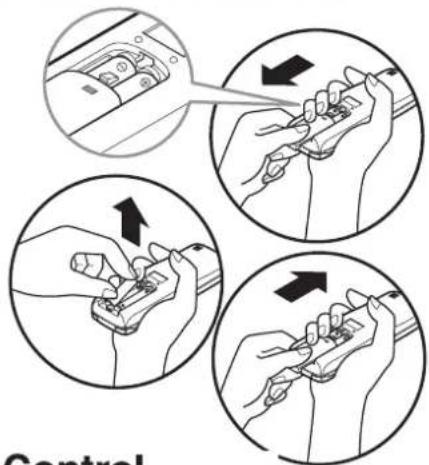
Remove the battery cover by pulling it according to the arrow direction.
2 Insert new batteries making sure that the (+) and (-) of battery are installed correctly.
3 Reattach the cover by sliding it back into position.
NOTICE Use 2 AAA(1.5volt) batteries. Do not use rechargeable batteries.
text_image
ControlStorage and Tips For Using the Remote Control
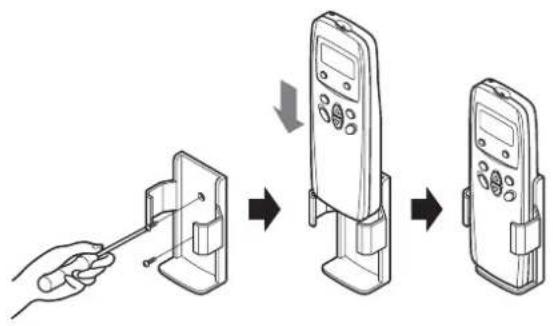
- The remote control may be stored mounted on a wall.
- To operate the room air conditioner, aim the remote control at the signal receptor.
text_image
Diagram showing a hand holding a device to switch from a mobile phone to a handheld device, with three steps of change indicated by arrows.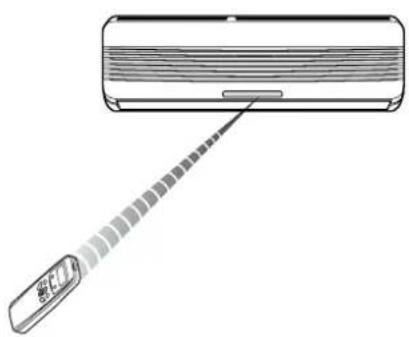
natural_image
Illustration of a wall-mounted air conditioner unit with a pointer and a digital display (no text or symbols)Signal Receptor
Receives the signals from the remote controller.
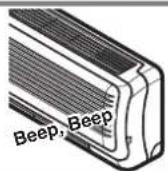
(Signal receiving sound:two short beeps or one long beep.)
Operation Indication Lamps
① On/Off : Lights up during the system operation.
* Defrost Mode: Lights up during Defrost Mode or *Hot Start operation. (Heat pump model only)
OUT Outdoor Unit : Lights up during outdoor unit operation. DOOR Operation (Cooling model only)
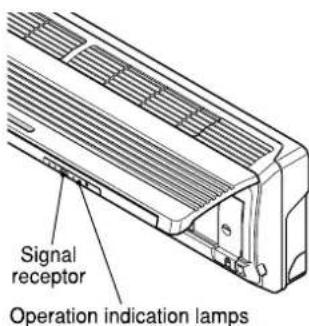
text_image
Signal receptor Operation indication lamps*Hot Start operation: Stops the indoor fan in Heating Operation to prevent cold air from blowing out from unit.

text_image
Scanned text of a document with vertical columns of Chinese characters, likely from a form or table header.The remote control transmits the signals to the system.

text_image
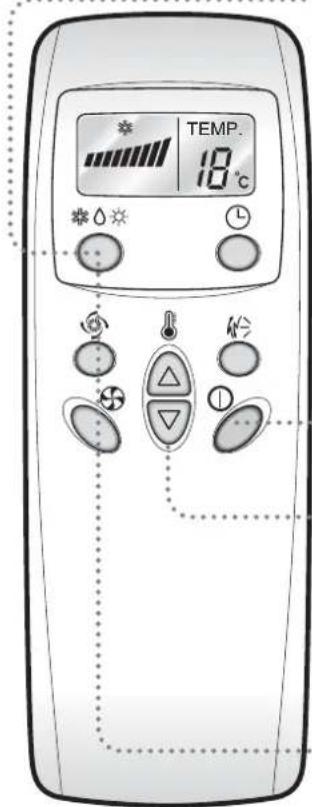
TEMP. 80℃ OFF TIME 8h 1 2 3 4 5 6 7 8(1) Operation Mode
OPERATION DISPLAY
Displays the operation conditions.
CHAOS SWING BUTTON
Used to stop or start louver movement and set the desired up/down airflow direction.
3 OPERATION MODE SELECTION BUTTON
Used to select the operation mode.
4 OFF TIMER BUTTON
Used to set the time of stopping operation.
5 START/STOP BUTTON
Operation starts when this button is pressed, and stops when the button is pressed again.
6 ROOM TEMPERATURE SETTING BUTTONS
INDOOR FAN SPEED SELECTION BUTTON
JET COOL
Used to start or stop the speed cooling.
(Speed cooling operates super high fan
speed in cooling mode.)

flowchart
graph TD
    A["Cooling Operation"] --> B["Healthy Dehumidification Operation"]
    B --> C["(Cooling Model)"]
(2) Operation Procedure
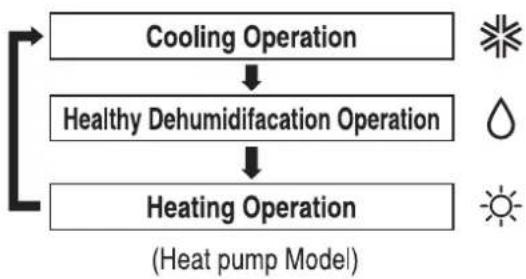
flowchart
graph TD
    A["Cooling Operation"] --> B["Healthy Dehumidification Operation"]
    B --> C["Heating Operation"]
    style A fill:#f9f,stroke:#333
    style B fill:#f9f,stroke:#333
    style C fill:#f9f,stroke:#333
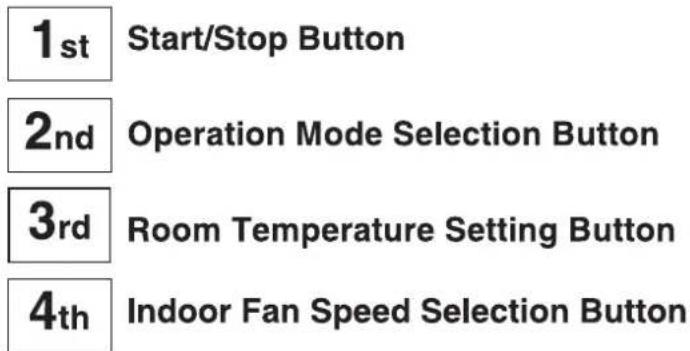
text_image
1st Start/Stop Button 2nd Operation Mode Selection Button 3rd Room Temperature Setting Button 4th Indoor Fan Speed Selection Button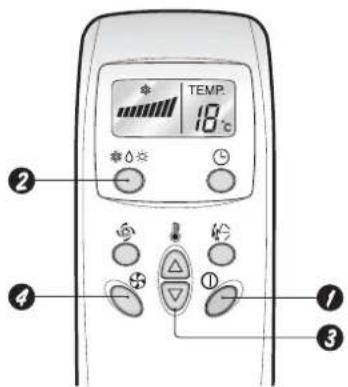
text_image
TEMP. 18℃ ② ④ ① ③
Cooling Operation
Healthy Dehumidification Operation Mode
This mode dehumidifies without overcooling.

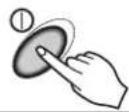
Press the Start/Stop Button.

Select Cooling Operation.
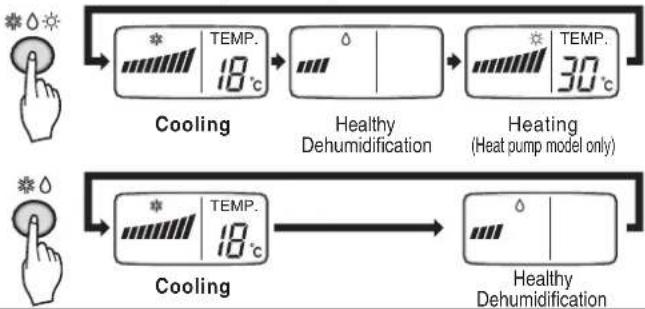
Press the Operation Mode Selection Button.
Each time the button is pressed, the operation mode is shifted in the arrow direction.
flowchart
graph LR
    A["Hand icon: Temperature scale"] --> B["Cooling"]
    B --> C["Healthy Dehumidification"]
    C --> D["Heating (Heat pump model only)"]
    D --> E["Healthy Dehumidification"]
    E --> F["Cooling"]
    F --> G["Healthy Dehumidification"]
text_image
TEMP. 18°C
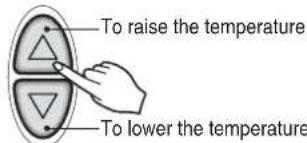
Set the temperature lower than the room temperature.
- The temperature can be set within a range of 18^ 30^ by 1^ .

text_image
To raise the temperature To lower the temperature
Set the fan speed.
- Select the fan speed in four steps-low, medium, high or CHAOS.
• Each time the button is pressed, the fan speed mode is shifted.
• The display shows high fan speed.

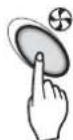
Natural wind by the CHAOS logic
☐ For more fresh feeling than other fan speed, press the Indoor Fan Speed Selector and set to CHAOS mode. In this mode, the wind blows like natural breeze by automatically changing fan speed according to the CHAOS logic.
During Healthy Dehumidification Operation:
☐ If you select the dehumidification mode on the operation selection button, the airconditioner starts to run the dehumidification function, automatically setting the room temp. and airflow volume to the best condition for dehumidification based on the sensed current room temp.
In this case, however, the setting temp. is not displayed in the remote control and you are not able to control the room temp. either.
During the healthy dehumidification function, the airflow volume is automatically set according to the optimization algorithm responding to the current room temp. status and makes the room condition healthy and comfortable even in the high humidity season.

Heating Operation(Heat pump model only)
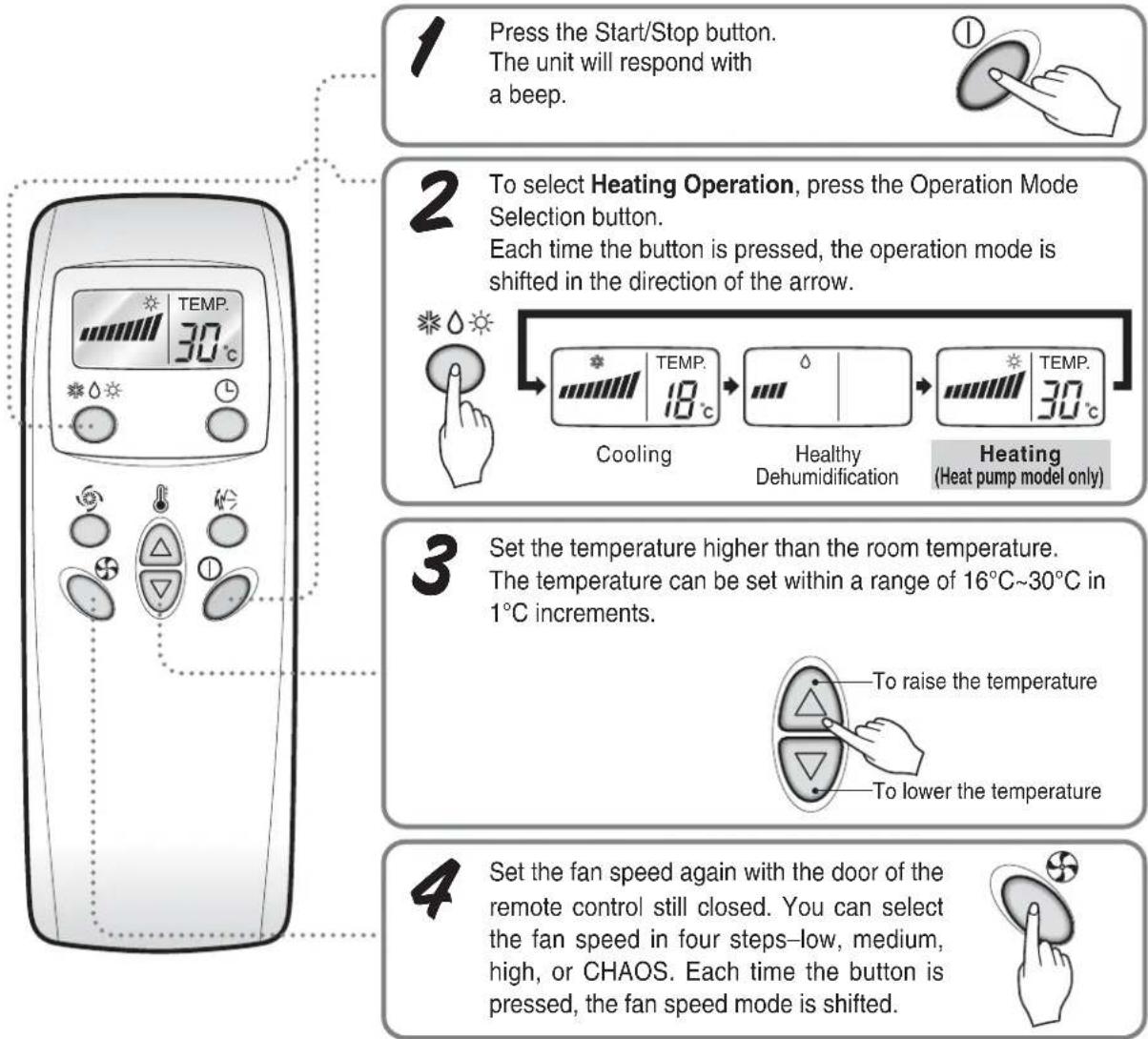
flowchart
graph TD
    A["1 Press the Start/Stop button.<br>The unit will respond with a beep."] --> B["2 To select Heating Operation, press the Operation Mode Selection button.<br>Each time the button is pressed, the operation mode is shifted in the direction of the arrow."]
    B --> C["3 Set the temperature higher than the room temperature.<br>The temperature can be set within a range of 16°C~30°C in 1°C increments."]
    C --> D["4 Set the fan speed again with the door of the remote control still closed. You can select the fan speed in four steps-low, medium, high, or CHAOS. Each time the button is pressed, the fan speed mode is shifted."]

Timer control Setting
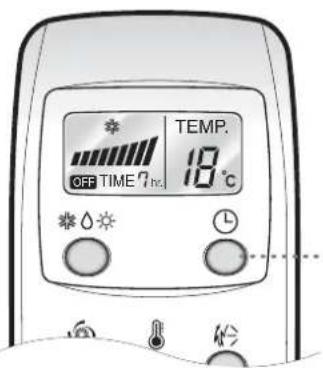
OFF TIMER CONTROL SETTING
text_image
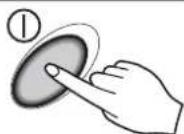
OFF TIME 7h TEMP. 18 °C1 Press the Start/Stop button. The unit will respond with a beep.
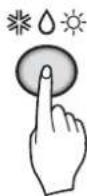
2 To select Heating Operation, press the Operation Mode Selection button. Each time the button is pressed, the operation mode is shifted in the direction of the arrow.
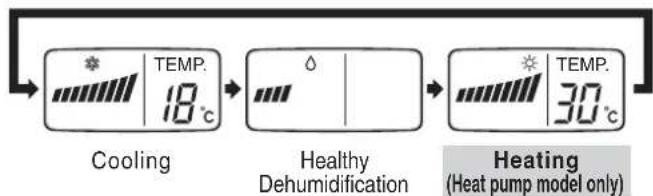
flowchart
graph LR
    A["Start"] --> B["Cooling"]
    B --> C["Healthy Dehumidification"]
    C --> D["Heating (Heat pump model only)"]
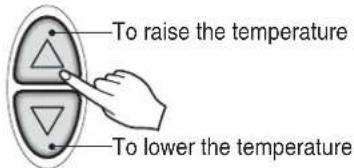
3 Set the temperature higher than the room temperature. The temperature can be set within a range of 16°C\~30°C in 1°C increments.
text_image
To raise the temperature To lower the temperature4 Set the fan speed again with the door of the remote control still closed. You can select the fan speed in four steps—low, medium, high, or CHAOS. Each time the button is pressed, the fan speed mode is shifted.

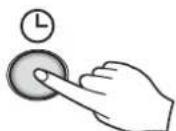
Press the OFF Time Button.

text_image
Beep, Beep- Press the OFF Time Button.
- Check the OFF Time LED of the room air conditioner.
- The Timer is programmed by 1 hour each pressing the OFF Time button from 1 hour to 7 hours.

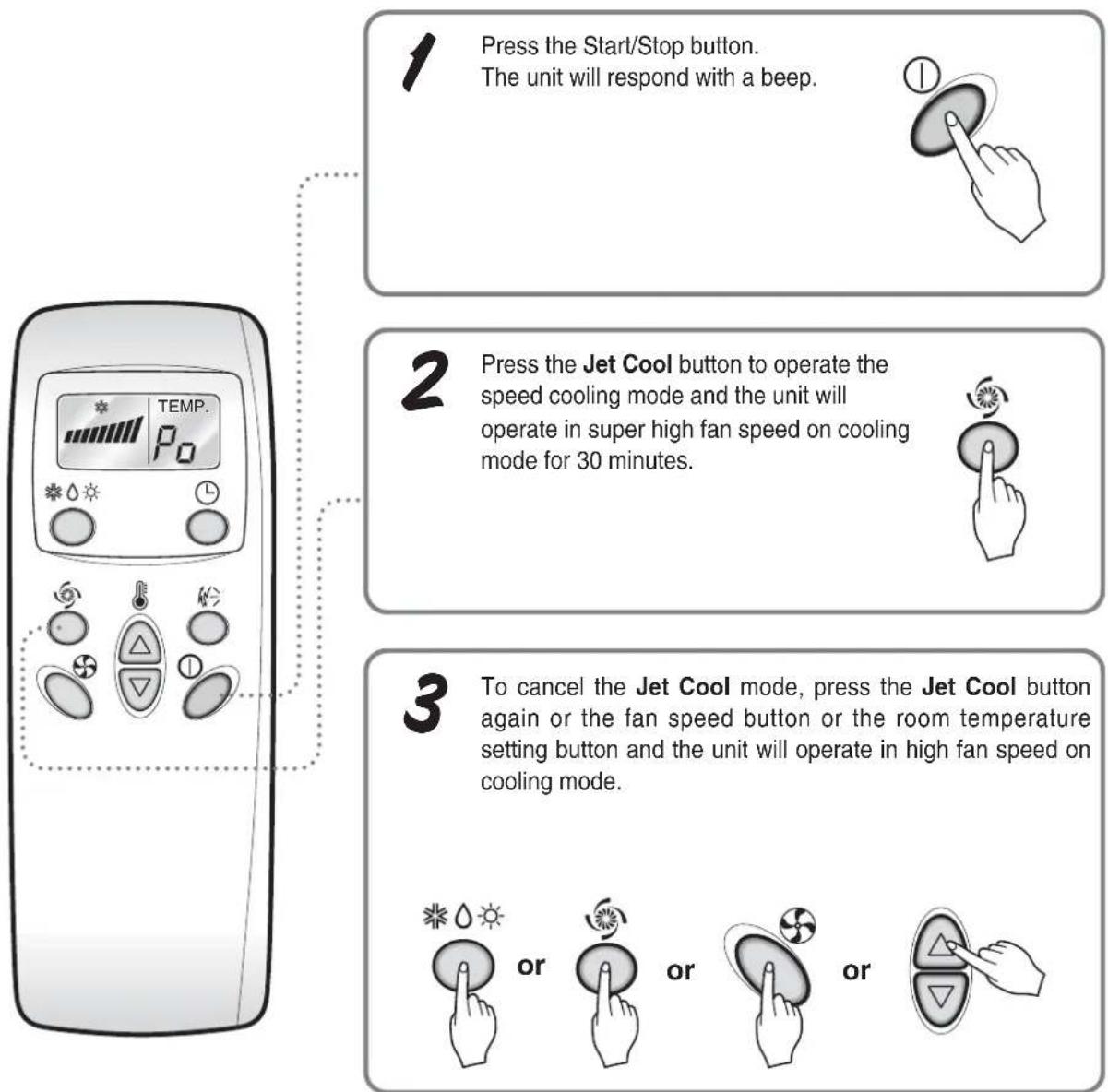
Jet Cool Operation
flowchart
graph TD
    A["1 Press the Start/Stop button.<br>The unit will respond with a beep."] --> B["2 Press the Jet Cool button to operate the speed cooling mode and the unit will operate in super high fan speed on cooling mode for 30 minutes."]
    B --> C["3 To cancel the Jet Cool mode, press the Jet Cool button again or the fan speed button or the room temperature setting button and the unit will operate in high fan speed on cooling mode."]
NOTICE
☐ During the JET COOL function at any moment, the A/C starts to blow the cool air at extremely high speed for 30 minutes setting the room temp. automatically to 18^ C. It is especially used to cool the room temp. in the shortest time in a hot summer.
In heat pump mode the JET COOL function is not available.
☐ In order to return to the normal cooling mode from the JET COOL mode, you just press either the operation mode selection button, airflow volume selection or temp. setting button or the JET COOL button again.

Vertical Airflow Direction Control
The up/down airflow (Vertical Airflow) can be adjusted by using the remote control.

- Press the Start/Stop button to start the unit.
- Press Chaos Swing button and the louvers will swing up and down. Press the Chaos Swing button again to set the vertical louver at the desired airflow direction.
NOTICE
☐ If you press the CHAOS swing button, the horizontal airflow direction is changed automatically based on the CHAOS algorithm to distribute the air in the room evenly and at the same time to make the human body feel most comfortable, as if enjoying a natural breeze.
□ Always use the remote control to adjust the up/down airflow direction. Manually moving the vertical airflow direction louver by hand, could damage the air conditioner.
☐ When the unit is shut off, the up/down airflow direction louver will close the air outlet vent of the system.

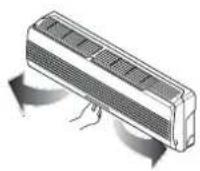
Horizontal Airflow Direction Control
- Adjust the horizontal airflow direction by manually moving the horizontal airflow direction louver by hand.

Forced Operation
Operation procedures when the remote control can't be used. The operation will be started if the power button is pressed. If you want to stop operation, re-press the button.
| Cooling Model | Heat pump Model | |||
| Room Temp. ≥ 24°C | 21°C ≤ Room Temp. < 24°C | Room Temp. < 21°C | ||
| Operating mode | Cooling | Cooling | Healthy Dehumidification | Heating |
| Indoor FAN Speed | High | High | High High | |
| Setting Temperature | 22°C | 22°C | 23°C | 24°C |

text_image
Power button Open the front panel-upwardTest operation
During the TEST OPERATION, the unit operates in cooling mode at high speed fan, regardless of room temperature and resets in 18 minutes.
During test operation, if remote controller signal is received, the unit operates as remote controller sets. If you want to use this operation, open the front panel upward and Press the power button let it be pressed for about 3 seconds.
If you want to stop the operation, re-press the button.
Maintenance and Service
CAUTION: Before performing any maintenance, turn off the main power to the system.
Indoor Unit
Grille, Case, and Remote Control
☐ Turn the system off before cleaning. To clean, wipe with a soft, dry cloth. Do not use bleach or abrasives.
NOTICE
Supply power must be disconnected before cleaning the indoor unit.
text_image
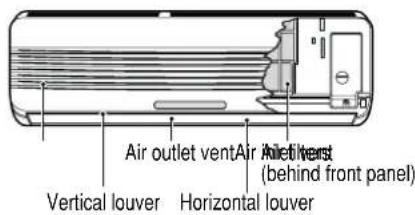
Air outlet vent Air filter vest (behind front panel) Vertical louver Horizontal louverAIR FILTERS
The air filters behind the front grille should be checked and cleaned once every 2 weeks or more often if necessary.

natural_image
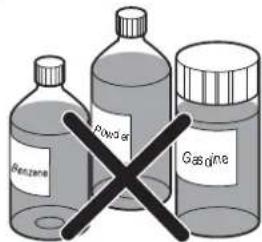
Illustration of a car air conditioner unit with cooling fins and airflow direction indicated (no text or symbols)□ Never use any of the followings:
• Water hotter than 40^ C Could cause deformation and/or discoloration.
• Volatile substances
Could damage the surfaces of the air conditioner.
text_image
Benzene Powder GasineLift the front access panel and pull the filter tab slightly forward to remove the filter.
Clean the filter with a vacuum or warm, soapy water.
- If dirt is conspicuous, wash with a solution of detergent in lukewarm water.
- If hot water (40°C or more) is used, it may be deformed.
After washing with water, dry well in the shade. Re-install the air filter.
Outdoor Unit
The heat exchanger coils and panel vents of the outdoor unit should be checked regularly. If clogged with dirt or soot, the heat exchanger and panel vents may be professionally steam cleaned.
NOTICE
Dirty or clogged coils will reduce the operating efficiency of the system and cause higher operating costs.

text_image
Air intake vents (Side) (Air outlet vents) (Rear) Piping DrainHoseWhen the air conditioner is not going to be used for a long time.
When air conditioner is not going to be used for a long time.

Turn off the circuit breaker, and disconnect the plug.

CAUTION
Turn off the circuit breaker when the air conditioner is not going to be used for a long time.
Dirt may collect and may cause a fire.

Remove the batteries from the remote control.
When the air conditioner is to be used again.

Clean the air filter and install it in the indoor unit.
(Refer to page 12 for cleaning filters.)

Check that the air inlet and outlet of the indoor/outdoor unit are not blocked.
Operation Tips
Do not overcool the room.
This is not good for the health and wastes electricity.
Keep blinds or curtains closed.
Do not let direct sunshine enter the room when the air conditioner is in operation.
Keep the room temperature uniform.
Adjust the vertical and horizontal airflow direction to ensure a uniform temperature in the room.
Make sure that the doors and windows are shut tight.
Avoid opening doors and windows as much as possible to keep the cool air in the room.
Clean the air filter regularly.
Blockages in the air filter reduce the airflow and lower cooling and dehumidifying effects. Clean at least once every two weeks.
Ventilate the room occasionally.
Since windows are kept closed, it is a good idea to open them and ventilate the room now and then.
Troubleshooting
Check the following points before requesting repairs or service.... If the fault persists, please contact your dealer or service center.
| Case Explanation See page | ||
| The air conditioner does not operate. | Have you made a mistake in timer operation? | |
| Has the fuse blown or has the circuit breaker been tripped? | - | |
| The room has a peculiar odor. | Check that this is not a damp smell exuded by the walls, carpet, furniture, or cloth items in the room. | - |
| It seems that condensation is leaking from the air conditioner. | Condensation occurs when the airflow from the air conditioner cools the warm room air. | - |
| Air conditioner does not operate for about 3 minutes when restarted. | This is the protector of the mechanism.Wait about three minutes and operation will begin. | - |
| Does not cool or heat effectively. | Is the air filter dirty? See air filter cleaning instructions. | 12 |
| Has the temperature been set incorrectly? | 8, 9 | |
| Are the indoor unit's air inlet or outlet vents obstructed? | - | |
| The air conditioner operation is noisy. | For a noise that sounds like water flowing.-This is the sound of freon flowing inside the air conditioner unit.For a noise that sounds like the compressed air releasing into atmosphere.-This is the sound of the dehumidifying water being processed inside the air conditioning unit. | - |
| Remote control display is faint, or no display at all. | Are the batteries depleted?Are the batteries inserted in the opposite (+) and (-) directions? | 6 |
| Crack sound is heard. | This sound is generated by the expansion/constriction of the front panel, etc. due to changes of temperature. | - |
Memo / مذكرة

LG