GW-B469BMFZ - Fridge LG - Free user manual and instructions
Find the device manual for free GW-B469BMFZ LG in PDF.


User questions about GW-B469BMFZ LG
0 question about this device. Answer the ones you know or ask your own.
Ask a new question about this device
Download the instructions for your Fridge in PDF format for free! Find your manual GW-B469BMFZ - LG and take your electronic device back in hand. On this page are published all the documents necessary for the use of your device. GW-B469BMFZ by LG.
USER MANUAL GW-B469BMFZ LG
Please read this owner's manual thoroughly before operating and keep it handy for reference at all times.
Electrical connections (In the UK only)
Important
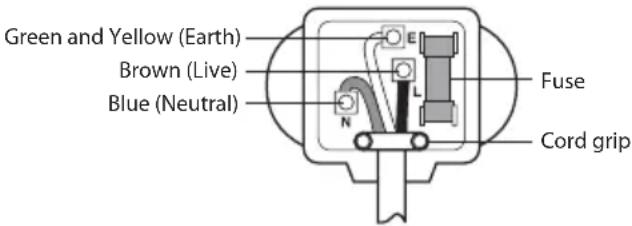
The wires in this mains lead are coloured in accordance with the following code:
GREEN AND YELLOW: EARTH
BLUE: NEUTRAL
BROWN: LIVE
This appliance must be earthed
text_image
Green and Yellow (Earth) Brown (Live) Blue (Neutral) Fuse Cord gripAs the colours of the wires in the mains lead of this apparatus may not correspond with the coloured markings identifying the terminals in your plug, proceed as follows:
The wire which is coloured Green and Yellow must be connected to the terminal in the plug which is marked with the letter E or by the earth symbol( 1= ) or coloured Green or Green and Yellow.
The wire which is coloured Blue must be connected to the terminal which is marked with the letter N or coloured Black.
The wire which is coloured Brown must be connected to the terminal which is marked with the letter L or coloured Red.
If a 13 amp(BS 1363) plug is used, fit a 13 amp BS 1362 fuse.
Table of contents
4 Important safety instructions
4 Basic safety precautions
7 Disposal of your old appliance
8 Installation
8 Appliance usage range
8 Climate class
8 Installation
8 Starting
8 Operation
8 Identifi cation of parts
9 Display panels functions
9 How to adjust the temperature in the refrigerator and freezer compartment
9 Express Frz.
9 Eco Friendly
9 Door alarm
9 High temperature alarm
10 Lock
10 On/Off
10 Self test
10 Freezer compartment
10 Max. freezing capacity
10 Fresh Converter
11 Fresh Balancer
11 Bottle rack
11 Ice making
11 Folding glass shelf
12 Removable glass shelf
12 How to separate the vegetable drawer
12 Features
12 Filling of water tank
12 Drinking
13 Storing food
13 Suggestion for energy saving
14 General information
14 Power failure
14 If you move
14 Anti condensation pipe
14 Defrosting
14 To reverse the doors
14 Cleaning
14 Before cleaning
14 Exterior
14 Interior
14 After cleaning
14 Drip tray
14 Exterior dispenser
14 Water tank
14 Cap assembly tank and cap tank
15 Smart Diagnosis™ (Optional)
16 Tag On function (Optional)
17 Troubleshootnig
Registration
The model and serial number are found on the rear (or side) of this unit. This number is unique to this unit and not available to others. You should record requested information here and retain this guide as a permanent record of your purchase. Staple your receipt here.
Date of Purchase : ____
Dealer Purchased From : ____
Dealer Address : ____
Dealer Phone No.: ____
Model No.: ____
Serial No.: ____
Important safety instructions
Basic safety precautions
This guide contains many important safety messages. Always read and obey all safety messages.
This is the safety alert symbol. It alerts you to safety messages that inform you of hazards that can kill or hurt you or others or cause damage to the product. All safety messages will be preceded by the safety alert symbol and the hazard signal word DANGER, WARNING, or CAUTION. These words mean:.

DANGER
You will be killed or seriously injured if you don't follow instructions.

WARNING
You can be killed or seriously injured if you don't follow instructions.

CAUTION
Indicates an imminently hazardous situation which, if not avoided, may result in minor or moderate injury, or product damage only.
All safety messages will identify the hazard, tell you how to reduce the chance of injury, and tell you what can happen if the instructions are not followed.

WARNING
Before it is used, this refrigerator must be properly installed and located in accordance with the installation instructions in this docu-
ment. This Refrigerator is intended for Domestic indoor use only.
Never unplug your refrigerator by pulling on the power cord. Always grip plug firmly and pull it straight out from the outlet.
When moving your appliance away from the wall, be careful not to roll over the power cord or to damage it in any way.
After your refrigerator is in operation, do not touch the cold surfaces in the freezer compartment, particularly when your hands are damp or wet. Skin could adhere to these extremely cold surfaces.
Unplug the power cord from the power outlet for cleaning or other maintenance. Never touch the appliance with wet hands as you may receive an electric shock or injure yourself.
Never damage, press, severely bend, pull or twist the power cord as damage to the cord may cause a fire or electric shock. Never touch the cord if you are uncertain if the appliance is correctly earthed.
The fuse on the refrigerator must be changed by a qualified technician or service company.
- Failing to do so may result in electric shock or personal injury.
Never place glass items in the
freezer as they may break due to expansion of their contents on freezing.
Never put your hands into the storage bin of the automatic ice maker as you could be injured during its operation.
Never allow anyone to climb, sit, stand or hang on the refreshment centre door. These actions may damage the refrigerator and even tip it over, causing severe personal injury.
It is advised that this appliance should be connected through an independent power socket to prevent it and other appliances from overloading the circuit and causing a power outage.
The appliance should be posi- tioned so that the supply plug is easily accessible for quick discon- nection should an accident occur.
If the supply cord is damaged, it must be replaced by the manufacturer or its service agent or a similarly qualified person in order to avoid a hazard.
WARNING
Do not modify or extend the Power Cord length. It may cause electric shock or fi re.
Connect the power plug in proper position with the cord hanging
down.
- If you connect the power plug upside down, wire can get cut off and cause fire or electric shock.
Make sure that the power plug is not squashed or damaged by the back of the refrigerator.
⚠️ DANGER : Risk of child entrapment.
Before you dispose of your old refrigerator please remove doors but leave the shelves in place so that children cannot climb inside.
This appliance can be used by children aged from 8 years and above and persons with reduced physical, sensory or mental capabilities or lack of experience and knowledge if they have been given supervision or instruction concerning use of the appliance in a safe way and understand the hazards involved.
Children shall not play with the appliance.
Cleaning and user maintenance shall not be made by children without supervision.
Do not store or use gasoline or other fl ammable vapour and liquids in the vicinity of this or any other appliance.
In the event of an electric short circuit, grounding (earthing) reduces the risk of electric shock
by providing an escape wire for the electric current.
In order to prevent possible electric shock this appliance must be earthed. Improper connection of the earthing plug can cause electric shock. Consult a qualified electrician or service engineer if the earthing instructions are not completely understood, or if you have doubts as to whether the appliance is properly earthed.
Do not move refrigerator while the refrigerator is operating. Compressor may occur a temporary rattling noise.
(This is normal and will not impact on the performance or the life of the compressor. The rattling will stop after the refrigerator comes to a rest.)

WARNING
- Keep ventilation openings in the room where the appliance is installed clear of obstruction.
- Do not use mechanical devices or other means to accelerate the defrosting process, other than those recommended by the manufacturer.
- Do not damage the refrigerant circuit.
- Do not use electrical appliances inside the food storage compartments of the appliance, unless they are of the type recommended by the manufacturer.

WARNING
- Disposal procedures. If disposing of this appliance, please consult with a service agent or a similarly qualified person for more details.
- Do not store explosive substances such as aerosol cans with a flammable propellant in this appliance.
- Do not use aerosols near the refrigerator.
- Aerosols used near the refrigerator may cause an explosion or fire.
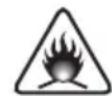
This appliance contains a small amount of isobutane refrigerant (R600a), natural gas with high environmental compatibility, but it is also combustible. When transporting and installing the appliance, care should be taken to ensure that no parts of the refrigerating circuit are damaged. Refrigerant squirting out of the pipes could ignite or cause an eye injury. If a leak is detected, avoid any naked flames or potential sources of ignition and air the room in which the appliance is standing for several minutes.
In order to avoid the creation of a fl ammable gas air mixture if a leak in the refrigerating circuit occurs, the size of the room in which the appliance may be sited depends on the amount of refrigerant used. The room must be 1m² in size for every 8g of R600a refrigerant inside the appliance. The amount of refrigerant in your particular appliance is shown on the identification plate inside the appliance. Never start up an appliance showing any signs of damage. If in doubt, consult your dealer.
Disposal of your old appliance
natural_image
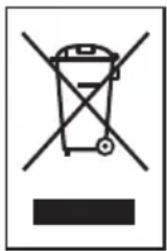
Symbol of a trash bin crossed with no text or numbers, representing waste sorting or disposal (no text present)-
This crossed-out wheeled bin symbol indicates that waste electrical and electronic products (WEEE) should be disposed of separately from the municipal waste stream.
-
Old electrical products can
contain hazardous substances so correct disposal of your old appliance will help prevent potential negative consequences for the environment and human health. Your old appliance may contain reusable parts that could be used to repair other products, and other valuable materials that can be recycled to conserve limited resources.
- You can take your appliance either to the shop where you purchased the product, or contact your local government waste offi ce for details of your nearest authorised WEEE collection point. For the most up to date information for your country please see www.lg.com/global/recycling
Installation
Appliance usage range
This appliance is intended to be used in household and similar applications such as:
• staff kitchen areas in shops, offices and other working environments;
- farm houses and by clients in hotels, motels and other residential type environments;
• bed and breakfast type environments;
• catering and similar non-retail applications
Climate class
The appliance is designed to operate at the limited range of ambient temperature, depending on climate zones. Do not use the appliance at the temperature out of the limit. Climate class of your appliance is indicated on the label with technical description inside the fridge compartment.
| Class Symbol | Ambient temperature range °C | |
| Extended Temperate | SN +10 ~ | +32 |
| Temperate N +16 | ~ +32 | |
| Subtropical ST +16 | ~ +38 | |
| Tropical T +16 | ~ +43 |
Installation
- Select a good location. Place your fridge-freezer where it is easy to use.
- Avoid placing the unit near heat sources, direct sunlight or moisture.
- To ensure proper air circulation around the fridge-freezer, please maintain sufficient space on both the sides as well as top and maintain at least 2 inches (5cm) from the rear wall.
- To avoid vibration, the unit must be leveled. If required, adjust the leveling screws to compensate for the uneven floor. The front should be slightly higher than the rear to aid in door closing. Leveling screws can be turned easily by tipping the cabinet slightly. Turn the leveling screws counterclockwise (→) to raise the unit, clockwise (→) to lower it.
-
Clean your fridge-freezer thoroughly and wipe off all dust accumulated during shipping.
-
Install accessories such as ice cube box, etc., in their proper places. They are packed together to prevent possible damage during shipment.
- Connect the power supply cord (or plug) to the outlet. Don't double up with other appliances on the same outlet.
Starting
When your fridge-freezer is installed, allow it 2-3 hours to stabilize at normal operating temperature prior to filling it with fresh or frozen foods. If power plug is disconnected, allow 5 minutes delay before restarting. Your fridge-freezer is now ready for use.
Operation
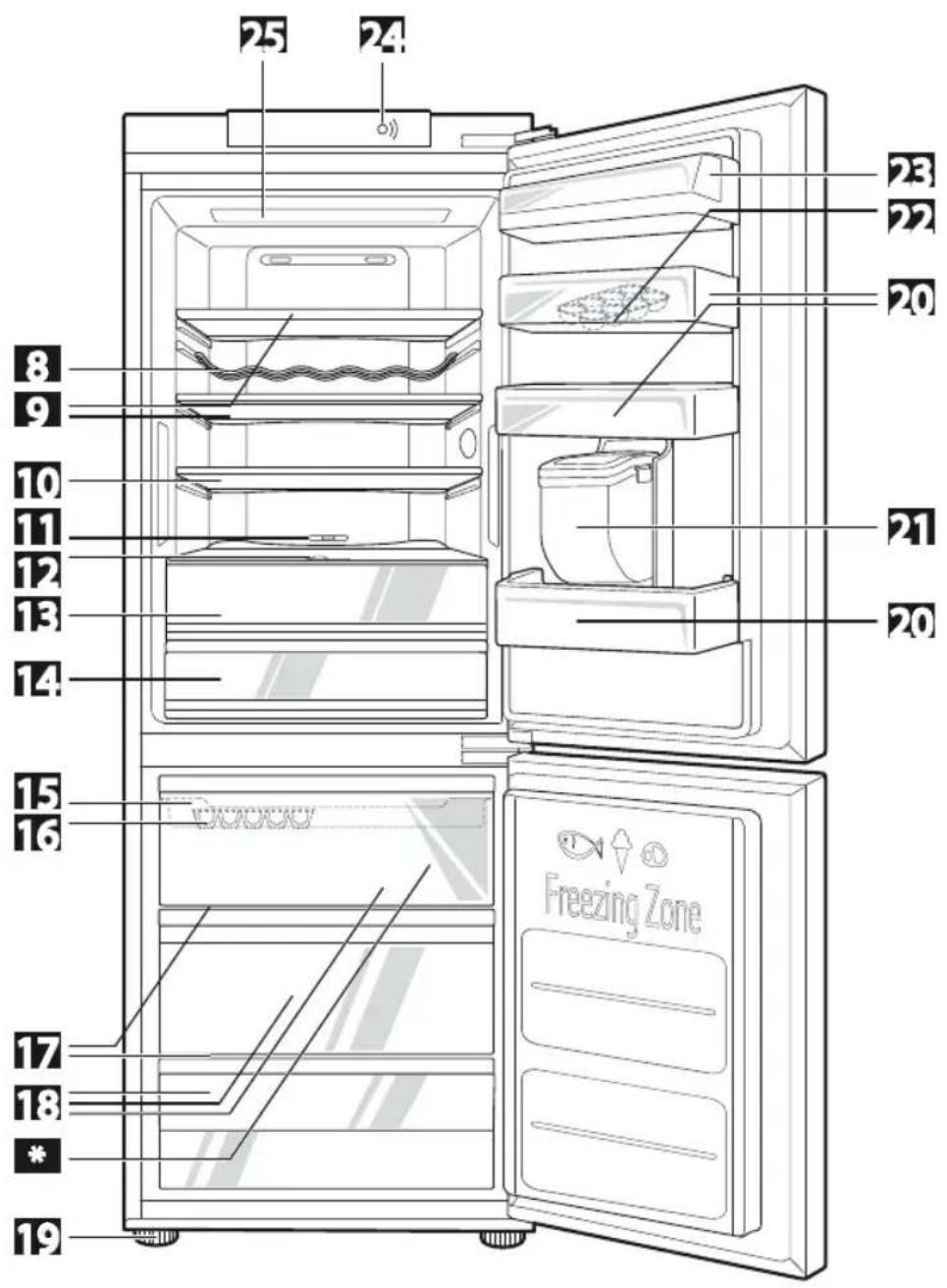
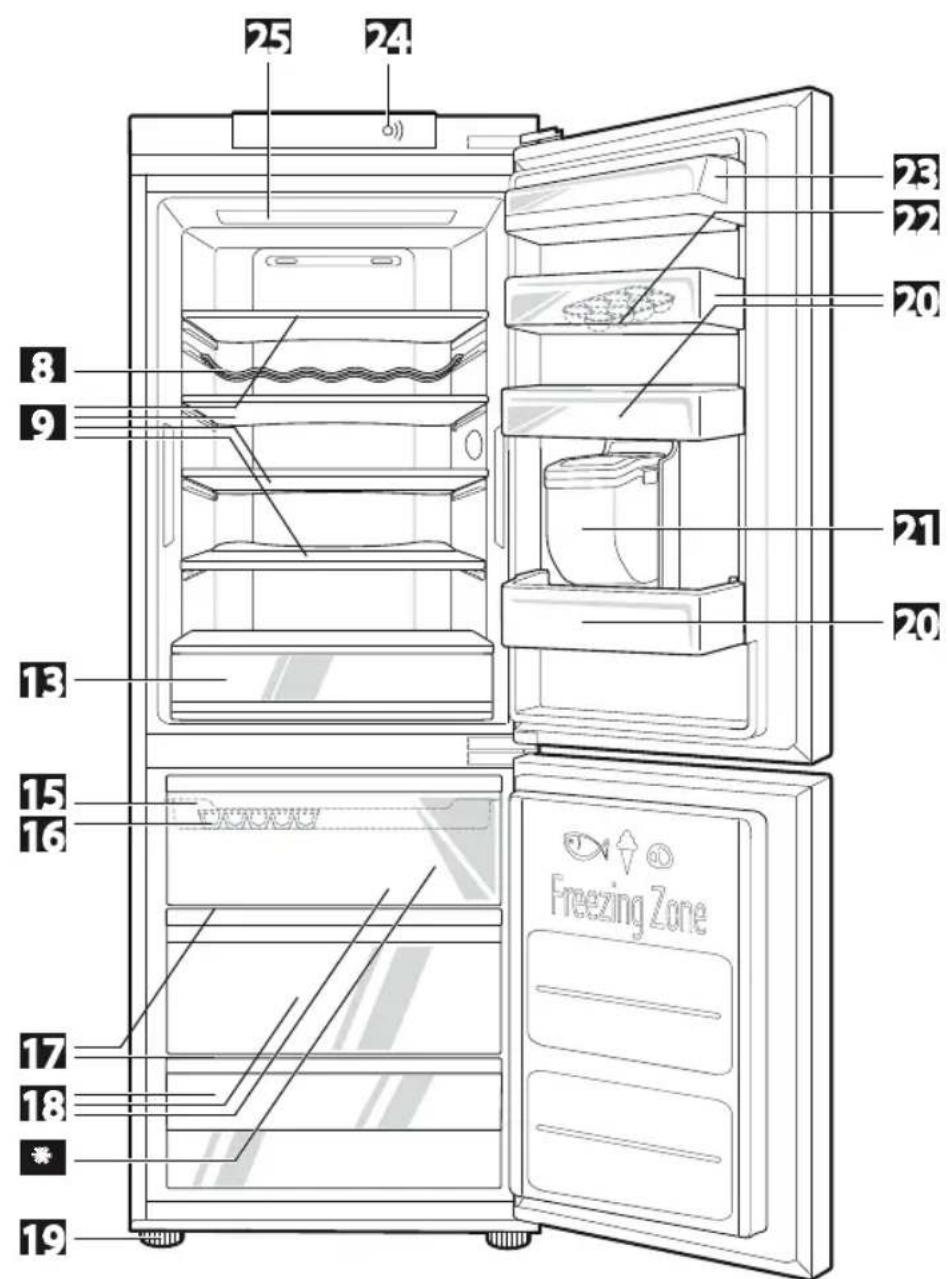
Identification of parts
Refer to Refrigerator drawings at the end of the manual:
If you find some parts missing from your unit, they may be parts only used in other models.
| 8 | Bottle Rack |
| 9 | Removable Glass Shelf |
| 10 | Folding Glass Shelf |
| 11 | Fresh Converter |
| 12 | Fresh Balancer |
| 13 | Vegetable Drawer (Used to store fruits and vegetables etc. fresh and crispy) |
| 14 | Fresh Converter |
| 15 | Ice Tray |
| 16 | Freezer Tray |
| 17 | Wire Shelf |
| 18 | Freezer Drawer |
| * | The process of freezing occurs the fastest on the marked shelf |
| 19 | Leveling Screw |
| 20 | Basket Door |
| 21 | Water Tank |
| 22 | Egg Tray |
| 23 | Diary Corner / Basket Door |
| 24 | Smart DiagnosisTM |
| 25 | LED Lamp |
Display panels functions
Refer to Display Panel drawing at the end of the manual:
1 Temperature Adjustment Button for Fridge Compartment
2 Temperature Adjustment Button for Freezer Compartment
| 3 | Express | Frz |
| 4 | Eco | Friendly |
| 5 | Door | Alarm |
| 6 | Lock | |
| 7 | On/Off Button | |
How to adjust the temperature in the refrigerator and freezer compartment
The initial temperature of the freezer and refrigerator compartment is -20^ and 3^ respectively.
You can now adjust the temperature of the compartments as you want.

text_image
8 °C Fridge 7 - 3 - 1 °C Fridge -80 °C Freezer Freezer -15 -20 -23 °CThe actual inner temperature varies depending on the food status, as the indicated setting temperature is a target temperature, not actual temperature within refrigerator.
Refrigeration function is weak in the initial time. Please adjust temperature as above after using refrigerator for minimum 2\~3 days.
Express Frz.
Please select this function for prompt freezing.
- This function is used when you want to freeze the foods quickly. Press the Express Frz. button once, and then the quick freeze operation starts with the lamp on.
- The Express Frz. operation takes about 24 hours. When its operation ends, it automatically returns to the previous temperature setting. If you want to stop the quick freeze operation, press the Express Frz. button once more, the lamp goes out, and the Express Frz. operation stops and the refrigerator returns to the previous temperature setting.

flowchart
graph LR
    A["Express Freeze"] --> B["B"]
    B --> C["Express Freeze"]
Eco Friendly
This function makes the fridge-freezer work in a power saving mode which is useful for when you are away on holiday, by reducing energy consumption.
Pressing 'ECO FRIENDLY' starts operation with lamp on and pressing it again stops the operation.

flowchart
graph LR
    A["Eco Friendly"] --> B["4"]
    B --> C["Eco Friendly"]
When the Eco Friendly mode is "ON", the other buttons will not operate. When you come back from Eco Friendly, press the Eco Friendly mode off so that other buttons work and the refrigerator returns to previous temperature setting.
Door alarm
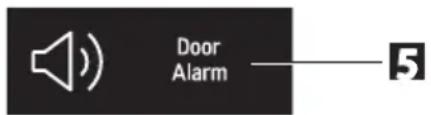
When the door of the fridge is opened for a while, the alarm sounds. Please contact with the local service center if warning continue to sound even after closing the door.
- You can choice door alarm on/off pressing door alarm button shortly.
text_image
Door AlarmHigh temperature alarm
When the freezer temperature is high, because of power failure, the freezer temperature LED blinks and alarm sounds.
- Press "Freezer" button to stop.
- If the temperature is sufficiently cold the blinking and sound will stop automatically.
This function could occur:
- When the refrigerator is turned on.
-
When the freezer compartment is too warm
-
When there is a power outage during long period
- When large amounts of warm food are placed in freezer
- When the freezer door is open too long or too frequently.
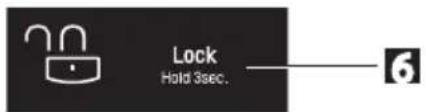
Lock
Pressing this button stops operation of other buttons.
"Locking" or "Un-Locking" is repeated whenever pressing the LOCK button.
For "Locking" press the "LOCK" button for 3 secs. For "Un-Locking" press the "LOCK" button for 3 secs.
When 'LOCK' is activated, pressing the other buttons would not work.
text_image
Lock Hold 3sec.On/Off
- Pressing this button refrigerator power is ON or OFF.
- ON or OFF is repeated whenever pressing the ON/OFF button.
(For "OFF" press the "ON/OFF" button for 3\~7 secs. For "ON" press the "ON/OFF" button for 1 secs.)
Self test
- This function automatically detects failure when failure is found in product during the use of refrigerator.
- If the failure occurs at product and it does not operate by pressing any button and normal indication is not done, do not turn the power off and immediately contact with the local service center.
- A lot of time is needed for service engineer to detect the failed part by turning it off.
Freezer compartment
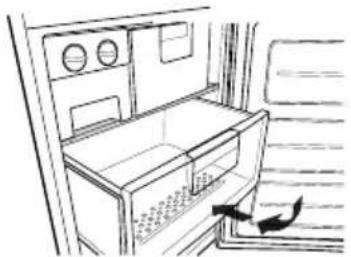
If a large quantity of food is to be placed in the freezer compartment,
- The upper drawer of freezer compartment, twist ice maker kit shall be taken out of the appliance and the food shall be stacked directly on the wire shelf.
- The middle drawer of freezer compartment
shall be taken out of the appliance and food shall be stacked directly on the wire shelf.
Freezer compartment provides wire shelf on default to maximize food storage capacity. And also the drawer is provided to convenient usage for watery meat or half-liquid state food.
natural_image
Line drawing of an open refrigerator with a door, showing airflow direction (no text or symbols)Max. freezing capacity
If there is already food in the compartment, please set freezer to the coldest condition (-23°C) and press on "Express Frz," button several hours before placing fresh produce in the freezer compartment to get maximum capacity.
As a rule 7 hours is adequate.
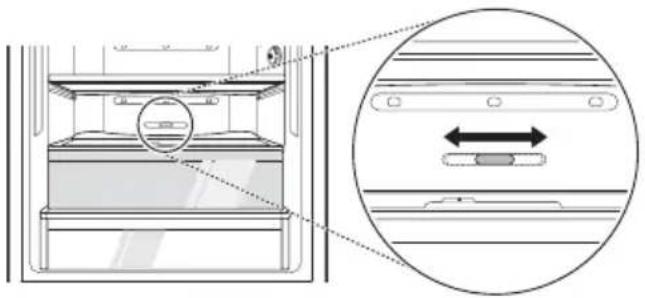
Fresh Converter
Fresh Converter storage compartment can control the temperature by adjusting the position of the temperature knob and generally its temperature is maintained lower than the set-up temperature of the refrigerator.
When keeping vegetables after setting up 'Meat' or 'Fish', the cold injury may occur.
natural_image
Technical diagram of a refrigerator interior with an inset showing a double-headed arrow indicating leftward motion (no text or symbols present)Type 1 Type 2 Type 3

natural_image
Three circular diagrams showing horizontal and vertical lines with shaded rectangular elements, no text or symbols present.Open state : Move knob to the left(type1) Closed state : Move knob to the right(type3) Recommended state : Middle position(type2)
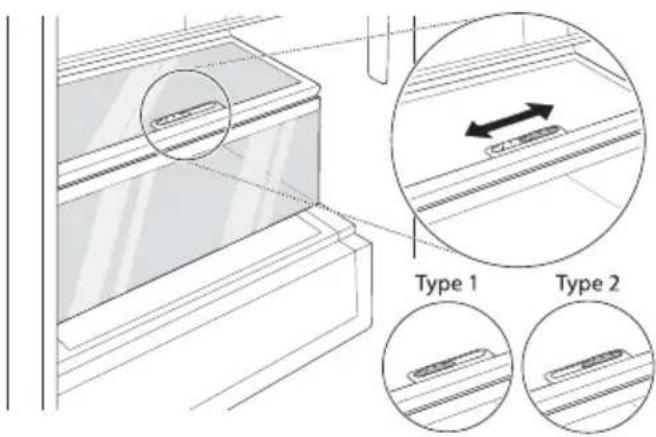
Fresh Balancer
Vegetable compartment can adjust the humidity by moving the knob.
If moved to the left side, cover and tray are opened, and if moved to the right side, cover and tray are closed – therefore, it can maintain the humidity.
Closed state is recommended for keeping vegetables, and open state is recommended for keeping fruits.
text_image
Type 1 Type 2Bottle rack
Bottles can be stored laterally with this wine corner. Then you can invert the wine rack and place it on the shelf. This will enable more shelf-place.

natural_image
Pure technical diagram of a mechanical or structural assembly with no visible text, numbers, or symbols.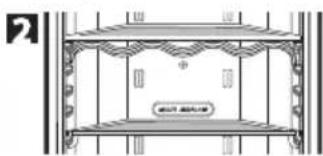
natural_image
Architectural elevation drawing of a two-story building facade with decorative eaves and structural beams (no text or symbols)Ice making

natural_image
Illustration of a hand holding a keyboard and a tray with a leaf, showing a mechanical process (no text or symbols)Take out container with ice tray. Fill the ice tray to the water level and put it back.
You can place container with ice tray in upper or middle drawer of freezing compartment.
- If ice cubes are required fast, press the «EXPRESS FRZ.» button.
• To remove ice cubes, hold the tray at its ends and
twist gently.
To remove ice cubes easily, run water on the tray before twisting.
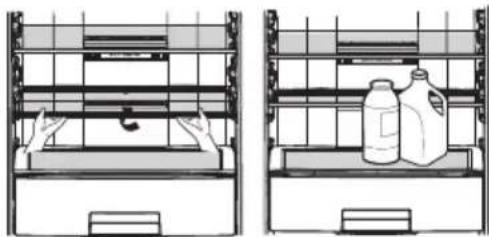
Folding glass shelf
For putting high items into the fridge, it is necessary:
Type 1:
Lift the front side of the shelf and shift it on its back side. To restore the shelf to its initial position, pull it to yourselves.
natural_image
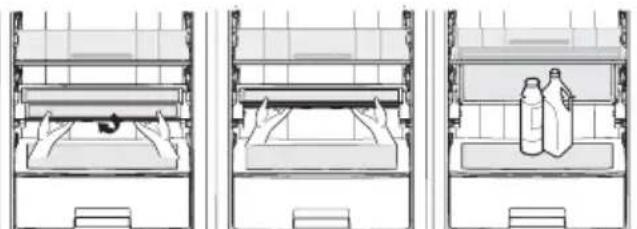
Two technical line drawings of storage racks with shelves and containers, no text or symbols present.Type 2:
Lift the front side of the shelf and shift it under its back side.
natural_image
Three-panel diagram showing a bed with bedding and a bottle on the back, no text or symbols present.From this position, both sides of the shelf can be lifted up to free more space.
To restore the shelf to its initial position, draw down two sides and pull the lower side to yourselves.
How to remove shelf from fridge:
- Lift the front side of the shelf and shift it under its back side;
- Remove both sides from the frame by lifting them up;
- Lift up the shelf frame and pull it to yourselves.

natural_image
Two-panel diagram showing hand positioning inside a storage or filing cabinet, with no visible text or symbols.For installing the shelf into the fridge, carry out the same actions in the reverse order.
Removable glass shelf
- Lift the front of the removable glass shelf.
- Pull the removable glass shelf toward door direction about 11 cm \~ 14 cm.
- Lean the glass shelf slightly to one side.
- Separate the glass shelf to designated place.

natural_image
Line drawing of a hand holding a tablet with a screen, no text or symbols present
natural_image
Line drawing of a hand cleaning a window with tools (no text or symbols)
natural_image
Line drawing of a hand holding a tablet device, with no visible text or symbols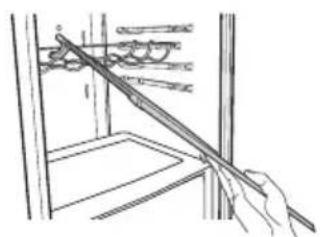
natural_image
Line drawing of a hand holding a tool interacting with a mechanical device (no text or symbols)How to separate the vegetable drawer
Remove the lower basket from the door by lifting it up. Pull the drawer until it stops and slightly lifting it up pull it to take it out.

text_image
Diagram showing hand positioning of a device inside an oven with labeled parts and directional arrowsWater dispenser (Optional)
Features
natural_image
Simple line drawing of a container with a suspended object and a hanging top (no text or symbols)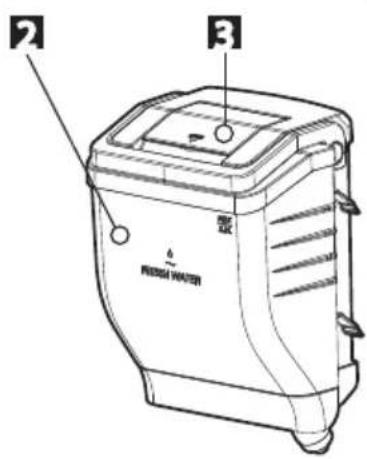
text_image
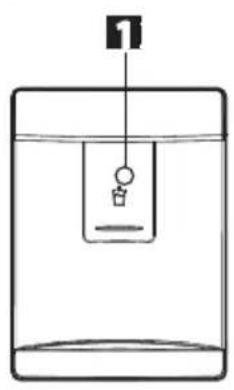
Technical diagram of a water heater with labeled components and Chinese text- Dispenser Pad
- Water Tank
- Cap Cover.
Filling of water tank
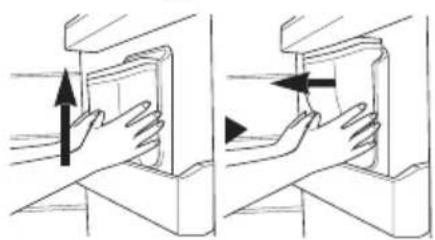
How to Remove the Water Tank:
- Pull out the water tank. Then open the cap cover.
- Water can be filled up to 2.3 liter.
- After filling potable water. Close the Cap Cover.
natural_image
Two-panel illustration showing hands holding a device, with arrows indicating motion (no text or symbols)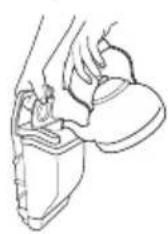
natural_image
Line drawing of a hand holding a small object, possibly a device or tool, with no visible text or symbols.The assembly is the reverse of removal.
- Be careful not to press on with valve.
- When you assemble water tank on the door, be careful to install certainly.
Drinking
- Press the dispenser pad with a cup.
- If pressing the pad, water inside of the dispenser is supplied.
- If slowly removing a cup from the pad, water will not fall down.
- Some noise after dispensing is the sound to absorb water remained in the tube, which is for the purpose of sanitation.

WARNING
Fill with the potable water only.

CAUTION
- Do not use other beverage (milk, juice, carbonated beverage etc) than potable water. Especially beverage including grain must not be used (may result in failure)
- Please use bottled water currently circulated.
- If you fill soft drinks, milk and fruit juices or ground water(included Ca, Mg, Si etc.) or no fill iterated water, it may cause malfunctioning.
- When you fill water tank with water, please let hot water cool before putting water tank in refrigerator. Hot water cause malfunctioning..
Storing food
- Do not store food which goes bad easily at low temperature, such as banana, and melon.
- Allow hot food to cool prior to storing. Placing hot food in the fridge-freezer could spoil other food, and lead to higher electric bills.
- When storing the food, use a container with a lid. This prevents moisture from evaporating, and helps food to keep its taste and nutrients.
- Do not block air vents with food. Smooth circulation of cold air keeps fridge-freezer temperature even.
- Do not open the door frequently. Opening the door lets warm air enter the fridge-freezer, and cause temperature to rise.
- Never keep too many foods in door rack, as this may stop the door from fully closing.
- Do not store bottles in the freezer compartment—they may break when frozen.
- Do not refreeze food that has been thawed. This causes loss of taste and nutrition.
- Do not store pharmaceutical products, scientific materials or other temperature sensitive products in the refrigerator.
Products that require strict temperature controls must not be stored in the refrigerator.
- If you want to quick freeze new food, you put it middle drawer of freezer compartment, and then press the Express Frz. button.
- To ensure good air circulation in the appliance, insert the freezer drawers all the way.
Suggestion for energy saving
- Please do not keep the door open for a long time, close door in the shortest time.
- Too much food are not advised to be put in. Enough space should be kept for cool air circulating freely.
- Do not set the temperature of fridge-freezer lower than needed. Do not put the food near the temperature sensor. Keep the distance of at least 5mm from the sensors.
- Allow hot food to cool prior to storing. Placing hot food in the fridge-freezer could spoil other food, and lead to higher electric bills.
- Do not block air vents with food. Smooth circulation of cold air keeps fridge-freezer temperature even.
- Do not open the door frequently. Opening the door lets warm air enter the fridge-freezer, and cause temperature to rise.
- To keep a position of inner parts like as baskets, drawers (Fridge), shelves and wire shelves supplied by manufacturer is the most efficient usage for energy saving.
General information
Power failure
1\~2 hour power failure does no harm to the foods stores. Try to avoid opening and closing the door too frequently.
If you move
- Take out foods from the fridge-freezer and firmly fix the loose items with tape.
- Turn the leveling screws until they stop before moving the fridge-freezer. Otherwise the screw may scratch the floor or the fridge-freezer cannot move.
Anti condensation pipe
natural_image
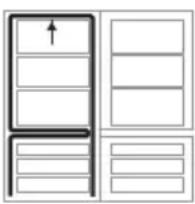
Simple line drawing of a refrigerator with doors and drawers (no text or symbols)The Anti-Condensation pipe is installed around the front side of fridge and freezer, only freezer as well as on the partition between fridge compartment and freezer compartment to prevent dewing.
Especially after installation or when ambient temperature is high, the fridge-freezer may feel hot, which is quite normal.
Defrosting
Defrosting takes place automatically.
The defrosting water flows down to the evaporating tray and is evaporated automatically.
To reverse the doors
Your fridge-freezer is designed with reversible doors, do that they may open from either the left of right hand side to suit your kitchen design.

CAUTION
However, when you want to reverse the doors, you must call to service agent. Reversing the doors is not covered by the warranty.
Cleaning
Before cleaning
Be sure to unplug the power.
Exterior
Clean the outside of the fridge-freezer with a soft cloth soaked with hot water or liquid detergent. If you use a detergent, be sure to wipe it with a clean wet cloth.
Interior
Same as above.
After cleaning
Check that the power cord is not damaged, power plug has not overheated, and that the power plug is tightly inserted into the outlet.

WARNING
Be sure to dry the appliance with a cloth after washing it with water.
Do not use abrasive, petroleum, benzene, thinner, hydrochloride acid, boiling water, rough brush, etc, as they may damage parts of the fridge-freezer.
Drip tray
Wipe moisture out around the door part and the drip tray using a clean cloth.
Exterior dispenser
Wipe moisture out of dispenser and on the dispenser pad using a cloth.
Water tank
- Turn the knob shutter to open. And pull out the water tank assembly.
- After unlocking the clamp and remove it, clean and fully rinse the inside/outside part of the water tank by using neutral cleansing agent.
Cap assembly tank and cap tank
Clean and fully rinse the cap assembly tank & cap tank by using neutral cleansing agent.
Especially for the groove part of the cap tank, it is convenient to cleanse it by using a small brush.
Smart Diagnosis™ (Optional)
Should you experience any problems with your refrigerator, it has the capability of transmitting data via your telephone to the LG service center. This gives you the capability of speaking directly to our trained specialists. The specialist records the data transmitted from your machine and uses it to analyze the issue, providing a fast and effective diagnosis.
Only use the Smart Diagnosis feature when instructed to do so by the LG call center agent. The transmission sounds that you will hear are normal and sound similar to a fax machine.
Smart Diagnosis cannot be activated unless your refrigerator is connected to power. If your refrigerator is unable to turn on, then troubleshooting must be done without using Smart Diagnosis.
- Call to the LG service center. Only use the Smart Diagnosis feature when instructed to do so by the LG call center agent.
NOTE
Follow step 2A if your refrigerator has display panel on the door. If your appliance has display panel inside, follow 2B.
2A. Display panel on refrigerator door:
- Lock the display. To lock the display, press and hold the Lock button
3 sec.
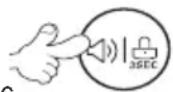
for three seconds. (If the display has been locked
for over fi ve minutes, you must deactivate the lock and then reactivate it.)
- Press and Hold the 'Freezer' button for 3 seconds.
- Open the refrigerator door.
3 sec.

2B. Display panel inside refi gerator:
- Open the refrigerator door.
- Press and Hold the 'Freezer' button for 3 seconds.
3 sec.

NOTE
If the door has been opened for over one minute, you must close the door and start again No.2
text_image
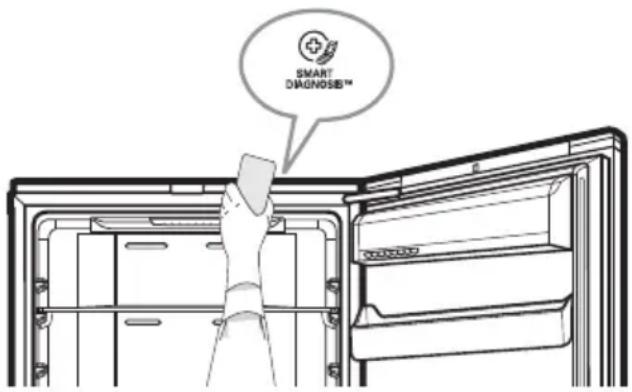
SMART DIAGNOSIS™- Following the instructions of the operator, hold the phone's microphone close to the icon «Smart Diagnosis».
- Hold the phone in the position until the end of the sound data transfer.
- Keep the phone in place until the tone transmission has finished. This takes about 3 second. Resume your conversation with the specialist, who will then be able to assist you in using the information transmitted for analysis.
NOTE
- For best results, do not move the phone while the tones are being transmitted.
- If the call center agent is not able to get an accurate recording of the data, you may be asked to try again.
- Call quality differences by region may affect the function.
- Use the home telephone for better communication performance, resulting in better service.
- Bad call quality may result in poor data transmission from your phone to the machine, which could cause Smart Diagnosis to not work properly.
Tag On function (Optional)
Using the Tag On function(Optional)

text_image
Tag OnConveniently use the LG Smart Diagnosis™ and Cycle Download features to communicate with the appliance right from a smart phone.
The Tag On function can only be used with most smart phones equipped with the NFC (Near Field Communication) function and based on the Android OS (operating system).
Installation of the application
Search for the LG Smart ThinQ application from the Google Play Store on a smart phone.
Product registration
- Run the LG Smart ThinQ application on a smart phone.
- Create an account and sign in.
- Select Register.
- Select Refrigerator.
- Follow the instruction on the smart phone. If you see a pop-up message about NFC, turn on the NFC function in the smart phone.
- Firmly attach the smartphone to the Tag On logo. If you can not make a connection, then move the smart phone up and down slowly.
EU conformity notice

Hereby, LG Electronics European Shared Service Center B.V., declares that this Refrigerator-Freezer is compliant with the essential
requirements and other relevant provisions of Directive 1999/5/EC. The complete Declaration of Conformity may be requested through the following postal address:
LG Electronics European Shared Service Center B.V. Krijgsman 1
1186 DM Amstelveen
The Netherlands
or can be requested at our dedicated DoC website: http://www.lg.com/global/support/cedoc/cedoc#
Troubleshootnig
Before calling for service, check this list. It may save you both time and expense. This list includes common occurrences that are not the result of defective workmanship or materials in this appliance.
| Problem Possible Causes | |
| Fridge-Freezer does not operate | ·Power plug may be unplugged from the electric outlet. Plug it in securely. ·House fuse has blown or circuit breaker has tripped. Check and/or replace fuse and reset circuit breaker. ·Power cut. Check house lights. |
| Fridge or Freezer Compartment Temperature too warm | ·Temperature control not set on proper position. Refer to Temperature Control section. ·Appliance is placed close to heat source. ·Warm weather-frequent door openings. ·Door left open for a long time. ·Package holding door open or blocking air duct in freezer compartment. |
| Vibration or Rattling or Abnormal Noise | ·The floor on which the fridge-freezer is installed may be uneven or the fridge-freezer may be unstable. Make it even by rotating the leveling screw. ·Unnecessary objects placed in the back side of the fridge-freezer. |
| Frost or Ice Crystals on frozen Food | ·Door may have been left ajar or package holding door open. ·Too frequent or too long door openings. ·Frost within package is normal. |
| Moisture forms on Cabinet Surface | ·This phenomenon is likely to occur in a wet space. Wipe it with a dry towel. |
| Moisture collects inside · Too | ·frequent or too long door openings. ·In humid weather, air carries moisture into fridge when doors are opened. |
| Fridge has odor · Foods with strong odors should be tightly covered or wrapped. ·Check for spoiled food. ·Interior needs cleaning. Refer to CLEANING section. | |
| Door not closing properly · Food package is keeping door open. Move packages that keep door from closing. ·Fridge-freezer is not level. Adjust the leveling screws. ·The floor on which the fridge-freezer is installed may be uneven or the fridge-freezer may be unstable. Slightly raise the front side with the leveling screw. | |
| Interior light does not work · No power at outlet. ·When you want to replace the lamp, you must contact service agent. | |
| No water dispensing · To low water level in Water Tank. Fill the Water Tank with over 2.3L water. | |

text_image
LC Inverter Linear 3°C Fridge -20°C Freezer Express Freeze Eco Friendly Door Alarm Lock Hold 3sec. SmartThinQ™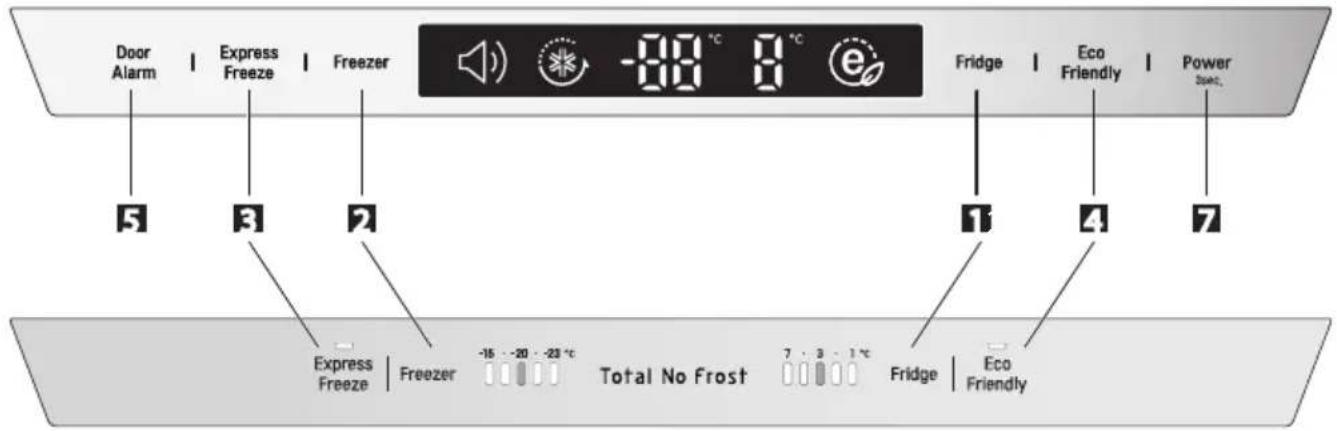
flowchart
graph TD
    A["Door Alarm"] --> B["5"]
    C["Express Freeze"] --> D["3"]
    E["Freezer"] --> F["7"]
    G["Explain"] --> H["Express Freeze"]
    G --> I["Freezer"]
    G --> J["Total No Frost"]
    G --> K["Fridge"]
    G --> L["Eco Friendly"]
    M["-80 °C"] --> N["8 °C"]
    O["Fridge"] --> P["1"]
    Q["Eco Friendly"] --> R["4"]
    S["Power Sound"] --> T["7"]
text_image
25 24 8 9 10 11 12 13 14 15 16 17 18 * 19 20 21 22 23 Freezing ZoneModel:
GB*60**Z**, GB*60**Y**, GB*60**G**, GB*60**F**
GB*59**Z**, GB*59**Y**, GB*59**G**, GB*59**F**
GBD6*8****, GBD6*5****,
GBF6*8****, GBF6*5****
GB6*4****
text_image
25 24 8 9 13 15 16 17 18 * 19 20 21 22 23 Freezing ZoneModel:
GB*60**D**, GB*60**E**, GB*60**J**, GB*60**K**, GB*60**R**
GB*59**D**, GB*59**E**, GB*59**J**, GB*59**K**, GB*59**R**
GBD6*3****, GBD6*2****, GBF6*2****, GBH6*1****,
GB6*3****, GB6*1****, GB6*0****
GB*20**C**, GB*20**Q**
LG Customer Information Centre
For inquiries or comments, visit www.lg.com or call;

LG
| DEUTSCHLAND | 01806 11 54 11 |
| BELGIQUE | 015 200 255 |
| LUXEMBOURG | 0032 15 200 255 |
| NEDERLAND | 0900 543 5454 |
| ITALIA | 199 600 099 |
| ESPAÑA | 963 050 500 |
| ČESKO | 810 555 810 |
| SLOVENSKO | 0850 111 154 |
| PORTUGAL | 808 78 54 54 |
| ROMÂNIA | 031 228 35 42 |
| LIETUVA | 8 8000 8081 |
| LATVIJA | 8 0200 201 |
| EESTI | 800 9990 |
| ΕΛΛΑΔΑ | 801-11-200-900 |
| ΚΥΠΡΟΣ | 8000 0810 |
| POLSKA | 0801 54 54 54 |
| 022 454 54 54 | |
| POCCИЯ | 8-800-200-76-76 |
| ÖSTERREICH | 0 810 144 131 |
| SCHWEIZ | 0848 543 543 |
| SRBIJA | 011 36 30 500 |
| SVERIGE | 0770 54 54 54 |
| NORGE | 815 691 54 |
| DANMARK | 78 79 64 54 |
| SUOMI | 0800 0 54 54 |
| MAGYARORSZÁG | 0 640 54 54 54 |
| HRVATSKA | (01) 553 55 54 |
| BOSNA | (033) 911 811 |
| SLOVENIJA | 080 543 543 |
| БЪЛГАРИЯ | 0 7001 54 54 |
Register your product Online!
www.lg.com
The model and serial number of the refrigerator is located on the back or one side of the refrigerator. Record it below should you ever need service.
MODEL ____
SERIAL
Manufacturer address:
LG Electronics Wrocław Sp. z o. o., ul. LG Electronics 1-2, Biskupice Podgórne, 55-040 Kobierzyce, Poland.