WW10K44G0UX - Washing machine SAMSUNG - Free user manual and instructions
Find the device manual for free WW10K44G0UX SAMSUNG in PDF.


User questions about WW10K44G0UX SAMSUNG
0 question about this device. Answer the ones you know or ask your own.
Ask a new question about this device
Download the instructions for your Washing machine in PDF format for free! Find your manual WW10K44G0UX - SAMSUNG and take your electronic device back in hand. On this page are published all the documents necessary for the use of your device. WW10K44G0UX by SAMSUNG.
USER MANUAL WW10K44G0UX SAMSUNG
What you need to know about the safety instructions 4 Important safety symbols 4 Important safety precautions 5 Critical installation warnings 7 Installation cautions 8 Critical usage warnings 9 Usage cautions 11 Critical cleaning warnings 14
Installation 15
What's included 15 Installation requirements 17 Step-by-step installation 19
Before you start 27
Initial settings 27 Laundry guidelines 27 Detergent drawer guidelines 30
Operations 34 Control panel 34 Simple steps to start 36 Cycle overview 37 Special features 40 Settings 42
Maintenance 43 Eco drum clean 43 Smart Check [+] 44 Emergency drain 45 Cleaning 46 Recovery from freezing 50 Care against an extended time of disuse 50
English2
Troubleshooting 51
Checkpoints
51
Information codes 55
Specifications 58
Fabric care chart 58
Protecting the environment 59
Specification sheet 60
Safety information
Congratulations on your new Samsung washing machine. This manual contains important information on the installation, use and care of your appliance. Please take some time to read this manual to take full advantage of your washing machine's many benefits and features.
What you need to know about the safety instructions
Please read this manual thoroughly to ensure that you know how to safely and efficiently operate the extensive features and functions of your new appliance. Please store the manual in a safe location close to the appliance for future reference. Use this appliance only for its intended purpose as described in this instruction manual.
Warnings and Important Safety Instructions in this manual do not cover all possible conditions and situations that may occur. It is your responsibility to use common sense, caution and care when installing, maintaining and operating your washing machine.
Because the following operating instructions cover various models, the characteristics of your washing machine may differ slightly from those described in this manual and not all warning signs may be applicable. If you have any questions or concerns, contact your nearest service centre or find help and information online at www.samsung.com.
Important safety symbols
What the icons and signs in this user manual mean:

WARNING
Hazards or unsafe practices that may result in severe personal injury, death and/or property damage.

CAUTION
Hazards or unsafe practices that may result in personal injury and/or property damage.

NOTE
Indicates that a risk of personal injury or material damage exists.
English4
These warning signs are here to prevent injury to yourself and others.
Please follow them explicitly.
After reading this manual, store it in a safe place for future reference.
Read all instructions before using the appliance.
As with any equipment that uses electricity and moving parts, potential hazards exist.
To safely operate this appliance, familiarize yourself with its operation and exercise care when using it.
Important safety precautions

WARNING
To reduce the risk of fire, electric shock, or injury to persons when using your appliance, follow basic precautions, including the following:
- This appliance is not to be used by persons (including children) with reduced physical, sensory or mental capabilities, or lack of experience and knowledge, unless they have been given supervision or instruction concerning use of the appliance by a person responsible for their safety.
- For use in Europe: This appliance can be used by children aged from 8 years and above and persons with reduced physical, sensory or mental capabilities or lack of experience and knowledge if they have been given supervision or instruction concerning use of the appliance in a safe way and understand the hazards involved. Children shall not play with the appliance. Cleaning and user maintenance shall not be made by children without supervision.
- Children should be supervised to ensure that they do not play with the appliance.
English 5
Safety information
- If the supply cord is damaged, it must be replaced by the manufacturer, its service agent or similarly qualified persons in order to avoid a hazard.
- The new hose-sets supplied with the appliance are to be used and old hose-sets should not be reused.
- For appliances with ventilation openings in the base, a carpet must not obstruct the openings.
- For use in Europe: Children of less than 3 years should be kept away unless continuously supervised.
-
CAUTION: In order to avoid a hazard due to inadvertent resetting of the thermal cut-out, this appliance must not be supplied through an external switching device, such as a timer, or connected to a circuit that is regularly switched on and off by the utility.
-
This appliance is intended to be used in household only and it is not intended to be used such as:
-
staff kitchen areas in shops, offices and other working environments;
- farm houses;
- by clients in hotels, motels and other residential type environments;
- bed and breakfast type environments;
- areas for communal use in blocks of flats or in launderettes.
English6
Critical installation warnings
WARNING
The installation of this appliance must be performed by a qualified technician or service company.
- Failure to do so may result in electric shock, fire, an explosion, problems with the product, or injury.
The appliance is heavy, therefore take care when lifting it.
Plug the power cord into a wall socket that meets local electrical specifications. Use the socket for this appliance only, and do not use an extension cord.
- Sharing a wall socket with other appliances using a power strip or extending the power cord may result in electric shock or fire.
- Ensure that the power voltage, frequency, and current are the same as those of the product specifications. Failure to do so may result in electric shock or fire. Plug the power plug into the wall socket firmly.
Remove all foreign substances such as dust or water from the power plug terminals and contact points using a dry cloth on a regular basis.
- Unplug the power plug and clean it with a dry cloth.
- Failure to do so may result in electric shock or fire.
Plug the power plug into the wall socket so that the cord is running towards the floor.
- If you plug the power plug into the socket in the opposite direction, the electric wires within the cable may be damaged and this may result in electric shock or fire.
Keep all packaging materials out of the reach of children as these may be dangerous.
- If a child places a bag over its head, it may suffocate.
When the appliance, power plug or power cord is damaged, contact your nearest service centre.
This appliance must be properly grounded.
Do not ground the appliance to a gas pipe, plastic water pipe, or telephone line.
- This may result in electric shock, fire, an explosion, or problems with the product.
- Never plug the power cord into a socket that is not grounded correctly and make sure that it is in accordance with local and national regulations.
Do not install this appliance near a heater or any inflammable material.
Do not install this appliance in a humid, oily or dusty location, or in a location exposed to direct sunlight or water (rain drops).
Do not install this appliance in a location exposed to low temperatures.
English 7
Safety information
- Frost may cause the tubes to burst.
Do not install this appliance in a location where gas may leak.
• This may result in electric shock or fire.
Do not use an electric transformer.
• This may result in electric shock or fire.
Do not use a damaged power plug, damaged power cord, or loose wall socket.
• This may result in electric shock or fire.
Do not pull or excessively bend the power cord.
Do not twist or tie the power cord.
Do not hook the power cord over a metal object, place a heavy object on the power cord, insert the power cord between objects, or push the power cord into the space behind the appliance.
• This may result in electric shock or fire.
Do not pull the power cord when unplugging the power plug.
- Unplug the power plug by holding the plug.
- Failure to do so may result in electric shock or fire.
This appliance should be positioned so that the power plug, the water supply taps, and the drain pipes are accessible.
Installation cautions
CAUTION
This appliance should be positioned in such a way that the power plug is easily accessible.
- Failure to do so may result in electric shock or fire due to electric leakage.
Install your appliance on a solid, level floor that can support its weight.
- Failure to do so may result in abnormal vibrations, movement, noise, or problems with the product.
English8
Critical usage warnings
WARNING
If the appliance is flooded, turn off the water & power supplies immediately and contact your nearest service centre.
- Do not touch the power plug with wet hands.
- Failure to do so may result in electric shock.
If the appliance generates a strange noise, a burning smell, or smoke, unplug the power plug immediately and contact your nearest service centre.
- Failure to do so may result in electric shock or fire.
In the event of a gas leak (such as propane gas, LP gas, etc.), ventilate immediately without touching the power plug. Do not touch the appliance or power cord.
- Do not use a ventilating fan.
- A spark may result in an explosion or fire.
Do not let children play in or on the washing machine. In addition, when disposing of the appliance, remove the washing machine door lever.
- If trapped inside the product, children may suffocate to death.
Make sure to remove the packaging (sponge, styrofoam) attached to the bottom of the washing machine before using it.
Do not wash items contaminated with gasoline, kerosene, benzene, paint thinner, alcohol or other inflammable or explosive substances.
- This may result in electric shock, fire, or an explosion.
Do not open the washing machine door by force while it is operating (high-temperature washing/drying/spinning).
- Water flowing out of the washing machine may result in burns or cause the floor to be slippery. This may result in injury.
- Opening the door by force may result in damage to the product or injury.
Do not insert your hand under the washing machine while an operation is in progress.
• This may result in injury.
Do not touch the power plug with wet hands.
• This may result in electric shock.
Do not turn the appliance off by unplugging the power plug while an operation is in progress.
- Plugging the power plug into the wall socket again may cause a spark and result in electric shock or fire.
English 9
Safety information
Do not let children or the infirm use this washing machine without proper supervision. Do not let children climb in or onto the appliance.
• This may result in electric shock, burns or injury.
Do not insert your hand or a metal object under the washing machine while it is operating.
• This may result in injury.
Do not unplug the appliance by pulling the power cord. Always grip the plug firmly and pull it straight out of the outlet.
- Damage to the power cord may cause a short-circuit, fire and/or electric shock.
Do not attempt to repair, disassemble, or modify the appliance yourself.
- Do not use a fuse (such as copper, steel wire, etc.) other than a standard fuse.
- When the appliance needs to be repaired or reinstalled, contact your nearest service centre.
- Failure to do so may result in electric shock, fire, problems with the product, or injury.
If the water supply hose comes loose from the water tap and floods the appliance, unplug the power plug.
- Failure to do so may result in electric shock or fire.
Unplug the power plug when the appliance is not being used for long periods of time or during a thunder or lightning storm.
- Failure to do so may result in electric shock or fire.
If any foreign substance enters into the appliance, unplug the power plug and contact your nearest Samsung Customer Service.
• This may result in electric shock or fire.
Do not let children (or pets) play in or on your washing machine. The washing machine door does not open easily from the inside and children may be seriously injured if trapped inside.
English10
Usage cautions

CAUTION
When the washing machine is contaminated by a foreign substance such as detergent, dirt, food waste, etc., unplug the power plug and clean the washing machine using a damp, soft cloth.
- Failure to do so may result in discolouration, deformation, damage, or rust.
The front glass may be broken by a strong impact. Take care when using the washing machine.
• If the glass is broken, it may result in injury.
After a water supply failure or when reconnecting the water supply hose, open the water tap slowly.
Open the water tap slowly after a long period of non-use.
- The air pressure in the water supply hose or the water pipe may damage a product part or result in a water leak.
If a draining error occurs during an operation, check if there is a draining problem.
- If the washing machine is used when it is flooded because of a draining problem, it may result in electric shock or fire.
Insert the laundry into the washing machine completely so that the laundry does not get caught in the door.
- If laundry gets caught in the door, it may result in damage to the laundry or the washing machine, or result in a water leak.
Turn the water supply off when the washing machine is not being used.
- Ensure that the screws on the water supply hose connector are properly tightened.
Ensure that the rubber seal and front door glass are not contaminated by a foreign substance (e.g. waste, thread, hair, etc.).
- If a foreign substance is caught in the door or the door is not completely closed, it may cause a water leak.
Open the water tap and check if the water supply hose connector is firmly tightened and that there is no water leak before using the product.
- If the screws on the water supply hose connector are loose, it may result in a water leak.
The product you have purchased is designed for domestic use only.
Safety information
Using the product for business purposes qualifies as a product misuse. In this case, the product will not be covered by the standard warranty provided by Samsung and no responsibility can be attributed to Samsung for malfunctions or damages resulting from such misuse.
Do not stand on the appliance or place objects (such as laundry, lighted candles, lighted cigarettes, dishes, chemicals, metal objects, etc.) on the appliance.
- This may result in electric shock, fire, problems with the product, or injury.
Do not spray volatile material such as insecticide onto the surface of the appliance.
- As well as being harmful to humans, this may result in electric shock, fire or problems with the product.
Do not place objects that generate electromagnetic fields near the washing machine.
• This may result in injury due to a malfunction.
Water drained during a high-temperature wash or drying cycle is hot. Do not touch the water.
• This may result in burns or injury.
If the water temperature is high before drain, it takes time until the temperature goes down, and it can be different depending on internal temperature.
Do not wash, spin, or dry water-proof seats, mats, or clothing (*) unless your appliance has a special cycle for washing these items.
(*): Woollen bedding, rain covers, fishing vests, ski pants, sleeping bags, diaper covers, sweat suits, and bicycle, motor cycle and car covers, etc.
- Do not wash thick or hard mats even if the washing machine mark is on the care label. This may result in injury or damage to the washing machine, walls, floor, or clothing due to abnormal vibrations.
- Do not wash throw rugs or doormats with rubber backing. The rubber backing may come off and stick to inside the drum, and this may result in malfunction such as a drainage error.
Do not operate the washing machine when the detergent drawer is removed.
- This may result in electric shock or injury due to a water leak.
Do not touch the insides of the drum during or just after drying as it is hot.
• This may result in burns.
The door glass becomes hot during washing and drying. Therefore, do not touch the door glass.
Also, do not allow children to play around the washing machine or touch the door glass.
• This may result in burns.
English12
Do not insert your hand into the detergent drawer.
- This may result in injury as your hand may be caught by the detergent input device.
- The liquid detergent guide (applicable models only) is not used for powder detergent. Remove the guide when using powder detergent.
Do not place any objects (such as shoes, food waste, animals) other than laundry into the washing machine.
- This may result in damage to the washing machine, or injury and death in the case of pets due to the abnormal vibrations.
Do not press the buttons using sharp objects such as pins, knives, fingernails, etc.
• This may result in electric shock or injury.
Do not wash laundry contaminated by oils, creams or lotions usually found in skincare shops or massage clinics.
- This may cause the rubber seal to become deformed and result in a water leak.
Do not leave metal objects such as safety pins, hair pins or bleach in the drum for long periods of time.
• This may cause the drum to rust.
- If rust starts appearing on the surface of the drum, apply a (neutral) cleansing agent to the surface and use a sponge to clean it. Never use a metal brush.
Do not use dry cleaning detergent directly and do not wash, rinse, or spin laundry contaminated by dry cleaning detergent.
- This may result in spontaneous combustion or ignition due to the heat from the oxidation of the oil.
Do not use water from water cooling/heating devices.
- This may result in problems with the washing machine.
Do not use natural hand-washing soap for the washing machine.
- If it hardens and accumulates inside the washing machine, it may result in problems with the product, discolouration, rust, or bad odours.
Place socks and brassieres in a washing net and wash them with the other laundry.
Do not wash large laundry items such as bedding in the washing net.
- Failure to do so may result in injury due to abnormal vibrations.
Do not use hardened detergent.
- If it accumulates inside the washing machine, it may result in a water leak.
Make sure that the pockets of all the clothing items to be washed are empty.
Safety information
- Hard, sharp objects such as coins, safety pins, nails, screws, or stones can cause extensive damage to the appliance.
Do not wash clothing with large buckles, buttons or other heavy metal objects.
Sort the laundry by colour on the basis of its colorfastness and select the recommended cycle, water temperature and additional functions.
- This may result in discolouration or fabric damage.
Take care that children's fingers are not caught in the door when you close it.
- Failure to do so may result in injury.
Critical cleaning warnings

WARNING
Do not clean the appliance by spraying water directly onto it.
Do not use a strong acidic cleaning agent.
Do not use benzene, thinner or alcohol to clean the appliance.
- This may result in discolouration, deformation, damage, electric shock or fire.
Before cleaning or performing maintenance, unplug the appliance from the wall socket.
- Failure to do so may result in electric shock or fire.
English14
Installation
Follow these instructions carefully to ensure proper installation of the washing machine and to prevent accidents when doing laundry.
What's included
Make sure all the parts are included in the product package. If you have a problem with the washing machine or the parts, contact a local Samsung customer centre or the retailer.
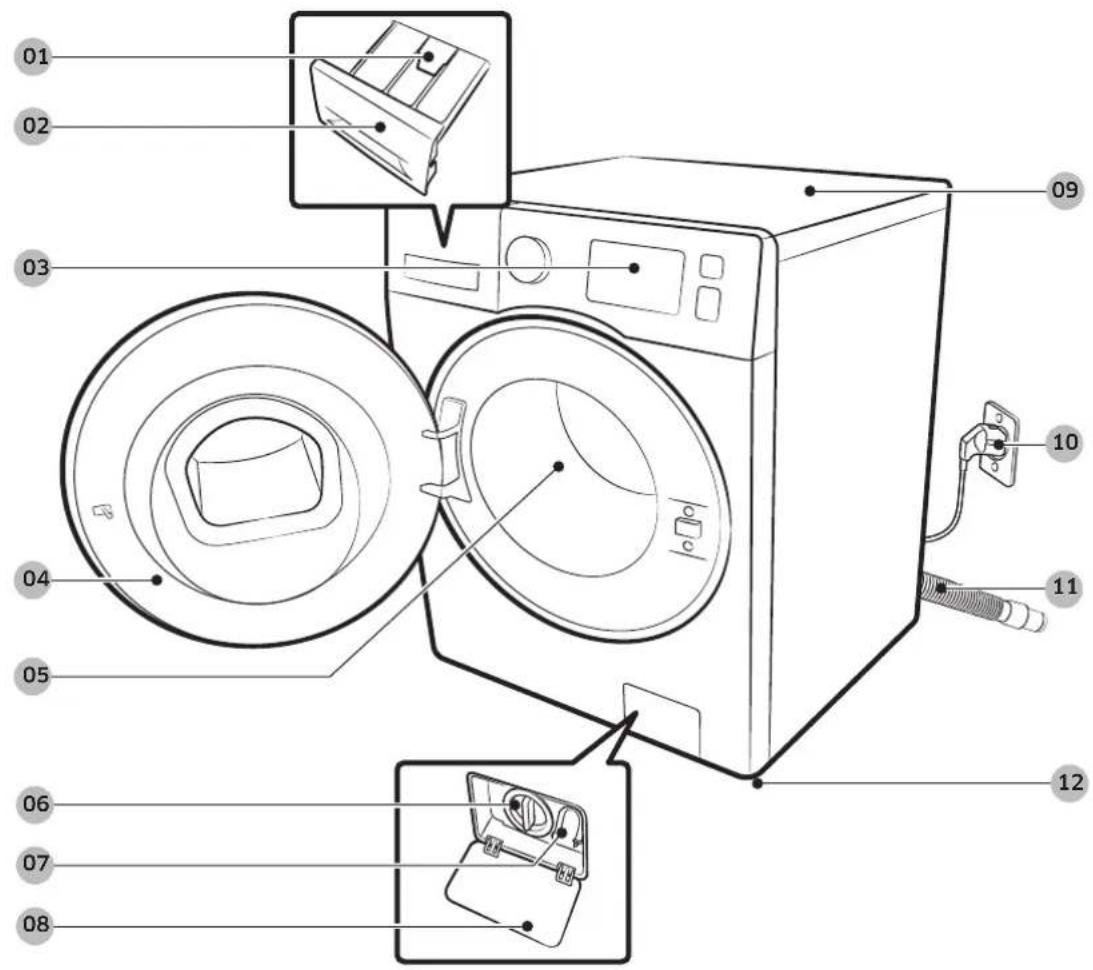
text_image
Diagram of a washing machine with numbered parts for identification and assembly reference.01 Release lever
04 Door
07 Emergency drain tube
10 Power plug
02 Detergent drawer
05 Drum
08 Filter cover
11 Drain hose
03 Control panel
06 Pump filter
09 Worktop
12 Levelling feet
Installation
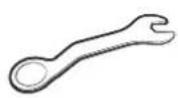
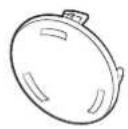

Spanner Bolt caps Hose guide
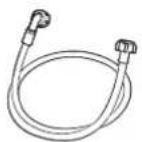
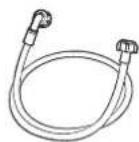

Cold water hose Hot water hose Liquid detergent guide

NOTE
- Bolt caps: The provided number (3 to 6) of bolt caps depends on the model.
• Hot water hose: Applicable models only. - Liquid detergent guide: Applicable models only.
English16
Installation requirements
Electrical supply and grounding
- AC 220-240 V / 50 Hz fuse or circuit breaker is required.
- Use an individual branch circuit specific to the washing machine.
To ensure proper grounding, the washing machine comes with a power cord featuring a three-prong grounding plug for use in a properly installed and grounded outlet.
Check with a qualified electrician or service person if you are not sure about the grounding.
Do not modify the provided plug. If it does not fit the outlet, call a qualified electrician to install a proper outlet.
WARNING
- Do NOT use an extension cord.
- Use only the power cord that comes with the washing machine.
- Do NOT connect the ground wire to plastic plumbing, gas lines, or hot water pipes.
- Improperly connected grounding conductors may cause electric shock.
- Do not remove or modify the grounding pin of power cord to reduce the risk of electric hazard.
- Please use the additional grounding wire provided with this appliance if there is no hole for earth pin in power inlet socket.
Water supply
A proper water pressure for this washing machine is between 50 kPa and 800 kPa. Water pressure less than 50 kPa may cause the water valve not to close completely. Or, it may take longer to fill the drum, causing the washing machine to turn off. Water taps must be within 120 cm from the rear of the washing machine so that the provided inlet hoses reach the washing machine.
To reduce the risk of leaks:
- Make sure water taps are easily accessible.
- Turn off the taps when the washing machine is not in use.
- Check for any leaks at the water inlet hose fittings on a regular basis.
CAUTION
Before using the washing machine for the first time, check all connections at the water valve and taps for any leaks.
Drain
Samsung recommends a standpipe in height of 60-90 cm. The drain hose must be connected through the hose clip to the standpipe, and the standpipe must fully cover the drain hose.
Installation
Flooring
For best performance, the washing machine must be installed on a solid floor. Wood floors may need to be reinforced to minimize vibration and/or unbalanced loads. Carpeting and soft tile surfaces are not a good resistance to vibrations and may cause the washing machine to move slightly during the spin cycle.

CAUTION
Do NOT install the washing machine on a platform or a poorly supported structure.
Water temperature
Do not install the washing machine in areas where water may freeze as the washing machine always retains some water in its water valves, pumps, and/or hoses. Frozen water left in the connection parts may cause damage to belts, the pump, and other components of the washing machine.
Alcove installation
Minimum clearance for stable operation:
| Sides 25 mm | |
| Top 25 mm | |
| Rear 50 mm | |
| Front 550 mm |
If both the washing machine and a dryer are installed in the same location, the front of the alcove must have at least a 550 mm unobstructed air opening. Your washing machine alone does not require a specific air opening.
English18
Step-by-step installation
STEP 1 Select a location
Location requirements:
• Solid, level surface without carpeting or flooring that may obstruct ventilation
• Away from direct sunlight
- Adequate room for ventilation and wiring
- The ambient temperature is always higher than the freezing point (0 °C)
- Away from a heat source
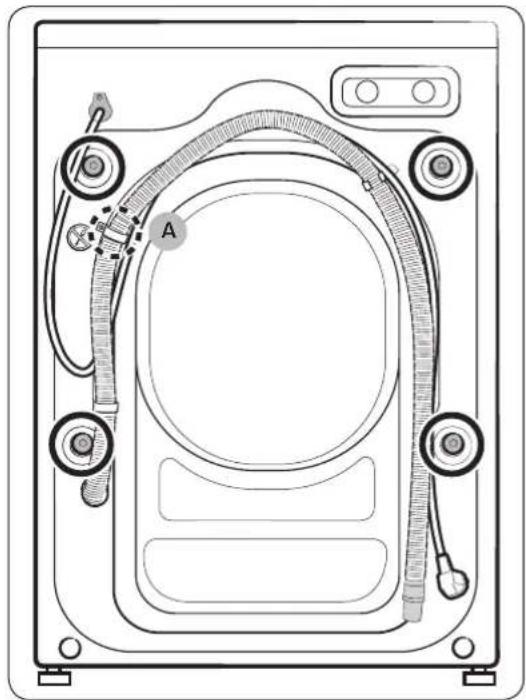
STEP 2 Remove the shipping bolts
Unpack the product package and remove all shipping bolts.

NOTE
Number of shipping bolts may differ depending on the model.

WARNING
Packaging materials can be dangerous to children. Dispose all packaging material (plastic bags, polystyrene, etc.) out of children's reach.
natural_image
Technical line drawing of a device casing with labeled components (no text or symbols)- Locate the shipping bolts (marked with circle in the figure) on the rear side of the washing machine.

CAUTION
Do not remove the screw (A) that fixes the hose clip.
Installation
installation
natural_image
Diagram showing a tool interacting with a car's wheel, with an arrow indicating rotation (no text or symbols present)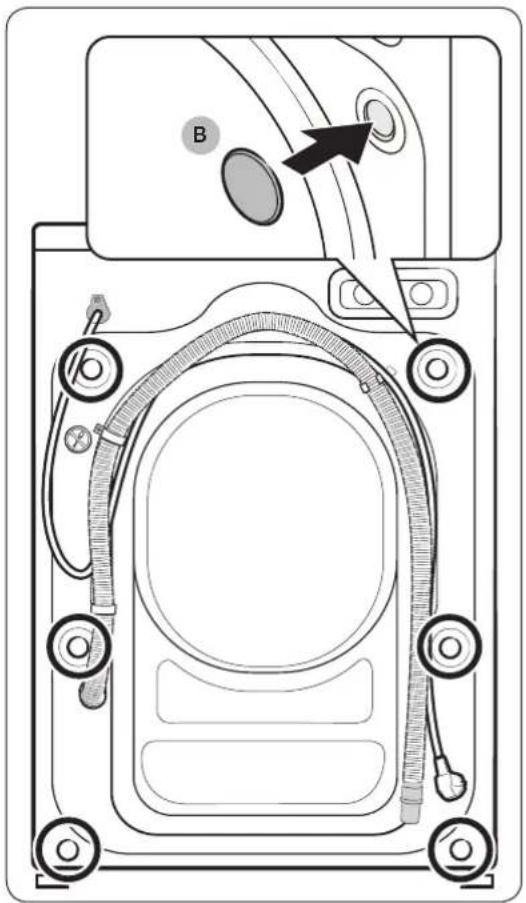
text_image
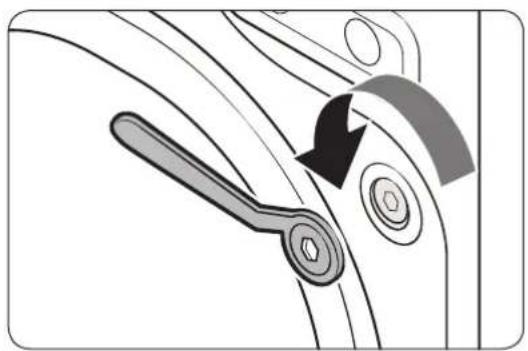
Technical diagram of a device rear panel with labeled components and directional arrow indicating assembly or connection.- Using the supplied spanner, loosen all the shipping bolts by turning them counterclockwise.
NOTE
You must keep the shipping bolts for future use.
- Insert the bolt caps (B) to the holes (marked with circle in the figure).
English20
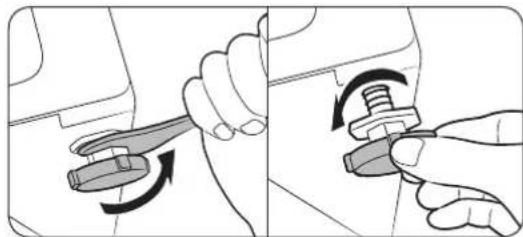
STEP 3 Adjust the levelling feet
natural_image
Illustration showing two-step mechanical assembly: one with a wrench and arrow indicating rotation, the other with a knob and rotating knob (no text or symbols)
natural_image
Line drawing of a hand using a tool to adjust a mechanical component (no text or symbols)-
Gently slide the washing machine into position. Excessive force may damage the levelling feet.
-
Level the washing machine by manually adjusting the levelling feet.
-
When levelling is complete, tighten the nuts using the spanner.
STEP 4 Connect the water hose
The provided water hose may differ depending on the model. Please follow the instruction according to the provided water hose.
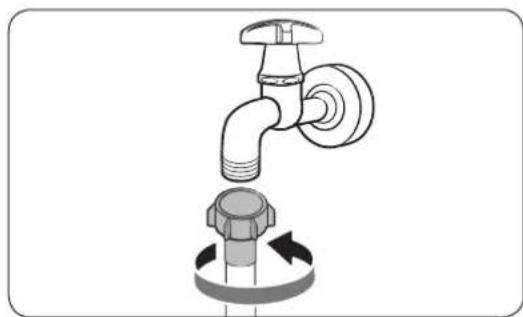
Connecting to a threaded water tap
natural_image
Diagram of a faucet with a valve and a bolt, showing fluid flow direction (no text or labels)
natural_image
Diagram of a car fuel plug being inserted into a valve, showing airflow direction (no text or symbols)-
Connect the water hose to the water tap, and then turn the connector clockwise as shown.
-
Connect the other end of the water hose to the inlet valve on the back of the washing machine. Turn the hose clockwise to tighten.
Installation

natural_image
Diagram of two pipe fittings with circular annotations highlighting their features (no text or symbols present)- Open the water tap and check if there are any leaks around the connection areas. If there are water leaks, repeat the steps above.

WARNING
If there is a water leak, stop operating the washing machine and disconnect from the electrical supply. Then, contact a local Samsung service centre in case of a leak from the water hose, or contact a plumbing technician in case of a leak from the water tap. Otherwise, this may cause electric shock.

CAUTION
Do not stretch the water hose by force. If the hose is too short, replace the hose with a longer, high-pressure hose.
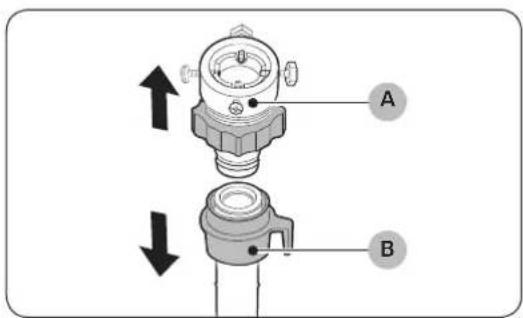
Connecting to a non-threaded water tap
text_image
Technical diagram of a mechanical component with labeled parts A and B, showing directional arrows indicating movement or assembly.- Remove the adaptor (A) from the water hose (B).

natural_image
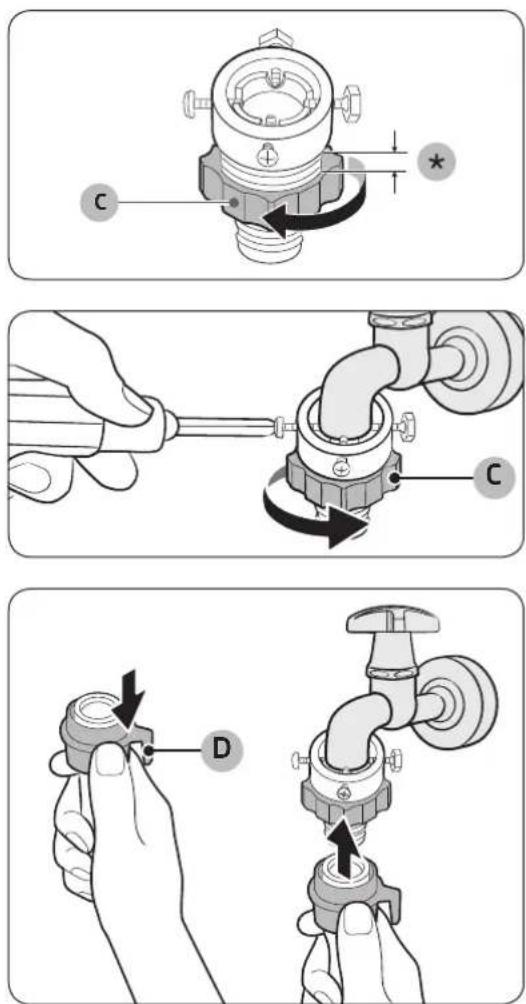
Illustration of a hand using a screwdriver to adjust a mechanical component (no text or symbols visible)- Use a Phillips screwdriver to loosen four screws on the adaptor.
English22
text_image
Diagram illustrating three-step installation of a faucet valve, showing step C, hand-cranking, and disassembly with labeled components D.-
Hold the adaptor and turn part (C) in the arrow direction to loosen it by 5 mm (*).
-
Insert the adaptor onto the water tap, and then tighten the screws while lifting the adaptor.
-
Turn part (C) in the arrow direction to tighten it.
-
While pulling down part (D) on the water hose, connect the water hose to the adaptor. Then, release part (D). The hose fits into the adaptor with a clicking sound.
-
To complete connecting the water hose, see 2 and 3 on the "Connecting to a threaded water tap" section.
NOTE
• After connecting the water hose to the adaptor, check if it is connected properly by pulling the water hose downwards.
- Use a popular type of water taps. If the tap is square-shaped or too big, remove the spacer ring before inserting the tap into the adaptor.
Installation
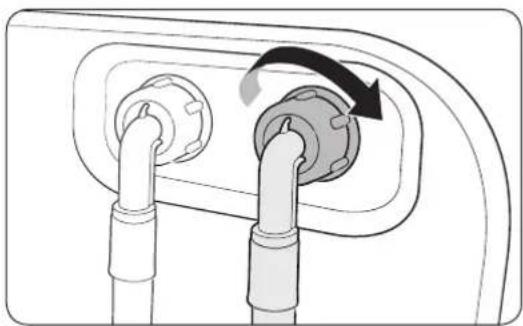
For models with an additional hot water inlet:
natural_image
Diagram of a plug socket with two connectors and a rotating arrow indicating rotation (no text or symbols)Aqua stop hose (applicable models only)
text_image
A- Connect the red end of the hot water hose to the hot water inlet on the back of the machine.
- Connect the other end of the hot water hose to the hot water tap.
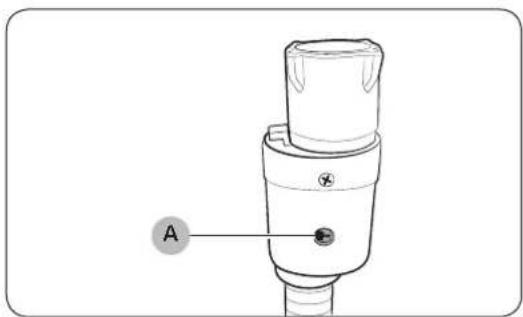
The aqua stop hose alerts users of any water leak risks. It senses the water flow and turns red on the centre indicator (A) in case of a leak.
NOTE
The end of the aqua stop hose must be fitted to the water tap and not the machine.
English24
STEP 5 Position the drain hose
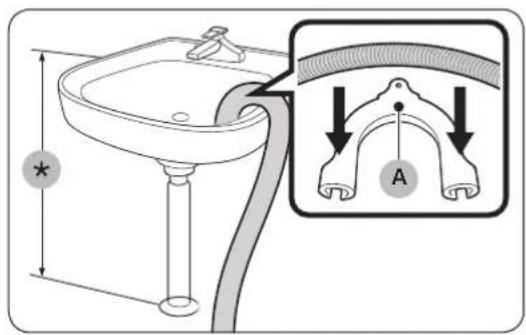
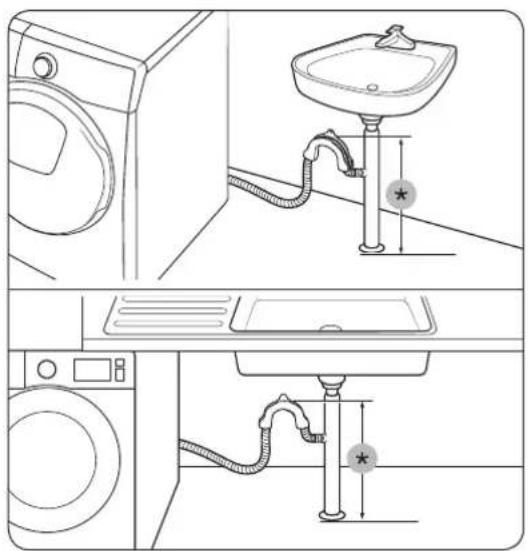
The drain hose can be positioned in three ways:
text_image
Diagram showing a bathroom sink with a tube and labeled parts, including a magnified view of the tube labeled 'A'.
natural_image
Line drawing of a washing machine next to a vertical pipe with a star symbol (no text or labels)Over the edge of a wash basin
The drain hose must be placed at a height of between 60 cm and 90 cm (*) from the floor. To keep the spout of the drain hose bent, use the supplied plastic hose guide (A). Secure the guide to the wall using a hook to ensure stable drainage.
In a drain pipe
The drain pipe should be between 60 cm and 90 cm high (*). It is advisable to use a 65 cm high vertical pipe.
- To ensure the drain hose stays in position, use the plastic hose guide provided (see the figure).
- To prevent the siphoning of water flow during drainage, make sure to insert the drain hose 15 cm in the drain pipe.
- To prevent the drain hose from moving around, secure the hose guide to the wall.
Drain standpipe requirements:
• Minimum diameter of 5 cm
• Minimum carry-away capacity of 60 litres per minute
Installation
text_image
Diagram showing bathroom sink and shower system with labeled fixtures and water level indicatorsIn a sink drain pipe branch
The drain pipe branch mush be above the sink siphone so that the end of the hose is at least 24 in. (60 cm) above the ground.
(*) : 24 in. (60 cm)

text_image
Four-panel diagram showing a sink with a circular valve and a prohibition sign, likely illustrating a hygiene or disinfection scenario.CAUTION
Do not put the drain hose in places of stagnant water or ponding. The water may flow back to the washing machine.
STEP 6 Power on
Plug the power cord into a wall socket featuring an AC 220-240 V / 50 Hz approved electrical outlet protected by a fuse or circuit breaker. Then, press Power to turn on the washing machine.
English26
Before you start
Initial settings
Run Calibration (recommended)
Calibration ensures accurate weight detection by the washing machine. Make sure the drum is empty before running Calibration.
- Power off, and then power on the washing machine.
- Hold down 🔊 Temp. and ⏻ Delay End simultaneously for 3 seconds to enter Calibration mode. The "Cb" message appears.
- Press Start/Pause to run the Calibration cycle.
- The drum will rotate for about 3 minutes. (The direction of the drum rotation may differ depending on the model.)
- When the cycle is complete, "0" appears on the display and the washing machine will turn off automatically.
- The washing machine is now ready for use.
Laundry guidelines
STEP 1 Sort
Sort the laundry according to these criteria:
- Care Label: Sort the laundry into cottons, mixed fibres, synthetics, silks, wools, and rayon.
• Colour: Separate whites from colours. - Size: Mixing different sized items together in the drum improves the washing performance.
- Sensitivity: Wash delicate items separately for pure, new woollen items, curtains, and silk items. Check the labels on the items.
NOTE
Make sure to check the care label on the clothing, and sort them accordingly before starting the wash.
Before you start
STEP 2 Empty pockets
Empty all the pockets of your laundry items
- Metal objects such as coins, pins, and buckles on clothing may damage other laundry items as well as the drum.
Turn clothing with buttons and embroideries inside out
- If trousers or jacket zippers are open while washing, the drum may be damaged. Zippers should be closed and fixed with a string.
- Clothing with long strings may become entangled with other clothes. Make sure to tie the strings before starting the wash.
STEP 3 Use a laundry net
- Brassieres (machine washable) must be placed in a laundry net. Metal parts of the brassieres may break through and tear other laundry items.
- Small, light clothing such as socks, gloves, stockings, and handkerchiefs may become caught around the door. Place them inside a fine laundry net.
- Do not wash the laundry net by itself without other laundry. This may cause abnormal vibrations that could move the washing machine and result in injury.
STEP 4 Prewash (if necessary)
Select the Prewash option for the selected cycle if the laundry is heavily soiled. When selecting the Prewash option, make sure to put powder-type detergent into the main wash compartment.
STEP 5 Determine the load capacity
Do not overload the washing machine. Overloading may cause the washing machine to not wash properly. For the load capacity for the type of clothing, see page 37.

NOTE
When washing bedding or bedding covers, the wash time may be lengthened or the spin efficiency may be reduced. For bedding or bedding covers, the recommended maximum spin cycle speed is 800 rpm, and the load capacity is 2.0 kg or less.

CAUTION
If the laundry is unbalanced and the "Ub" information code is displayed, redistribute the load. Unbalanced laundry may reduce the spinning performance.
English28
STEP 6 Apply a proper detergent type
The type of detergent depends on the type of fabric (cotton, synthetic, delicate items, wool), colour, wash temperature, and degree of soiling. Make sure to use the laundry detergent that is designed for automatic washing machines.

NOTE
- Follow the detergent manufacturer's recommendations based on the weight of the laundry, the degree of soiling, and the hardness of the water in your local area. If you are not sure about the water hardness, contact a local water authority.
- Do not use detergent that tends to be hardened or solidified. This detergent may remain after the rinse cycle, blocking the drain outlet.

CAUTION
When washing wool using the WOOL cycle, use only a neutral liquid detergent. If used with the WOOL cycle, powder detergent may remain on the laundry and discolour the laundry.
Laundry capsules
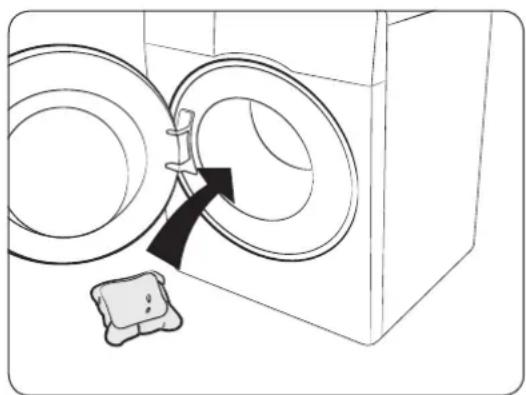
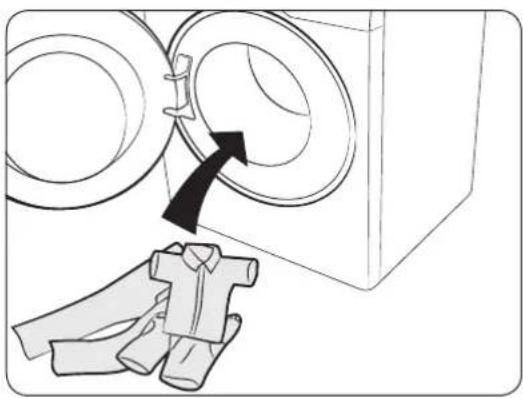
To get the best results from using laundry capsules, please follow these instructions.
natural_image
Line drawing of a washing machine with two circular doors and a small appliance on the floor (no text or symbols)- Put the capsule in the bottom of the empty drum towards the rear.
Before you start
natural_image
Diagram showing a washing machine with two circular components and a close-up of a shirt (no text or symbols)- Put the laundry in the drum on top of the capsule.
CAUTION
For cycles using cold water or cycles that complete in less than one hour, it is recommended to use a liquid detergent. Otherwise, the capsule may not dissolve completely.
Detergent drawer guidelines
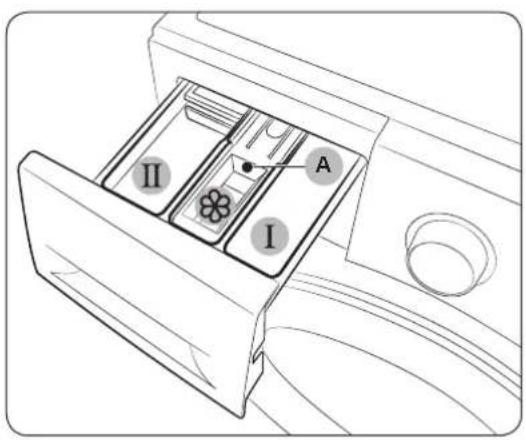
The washing machine provides a three-compartment dispenser: the left compartment for the main wash, the front-right for fabric softeners, and the rear-right for the preliminary wash.
text_image
A I II- Prewash compartment: Apply prewash detergent.
- Ⅱ Main-wash compartment: Apply main-wash detergent, water softener, soaking detergent, bleach, and/or stain removers.
- Softener compartment: Apply additives such as fabric softener. Do not exceed the max line (A).
English30
natural_image
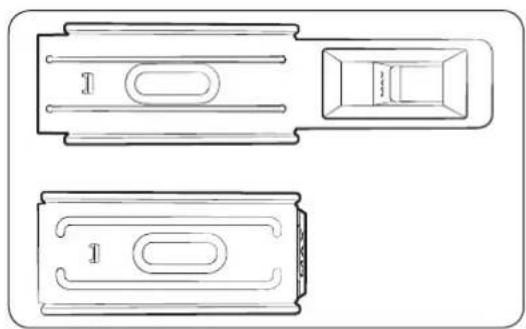
Technical line drawing of two mechanical components with no visible text or symbolsNOTE
The actual appearance of the softener guide may differ with the model.

CAUTION
- Do not open the detergent drawer while the washing machine is operating.
-
Do not use the following types of detergent in the drawer:
-
Tablet or capsule types
- Ball or net types
• To prevent the compartment from clogging, concentrated or highly-enriched agents (fabric softener or detergent) must be diluted with water before being applied.
- When Delay End is selected, do not apply detergent directly into the drum. Otherwise, this may discolour the laundry. Use the detergent drawer when Delay End is selected.
To apply washing agents to the detergent drawer
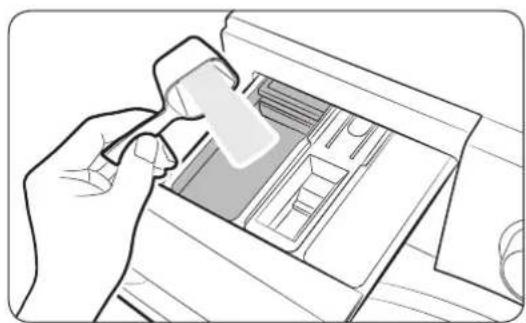
natural_image
Line drawing of a hand using a tool to press or install a device into a drawer (no text or symbols visible)- Slide open the detergent drawer.
- Apply laundry detergent to the Ⅱ main-wash compartment as instructed or recommended by the manufacturer. To use liquid detergent, see page 33.
Before you start
Before you start
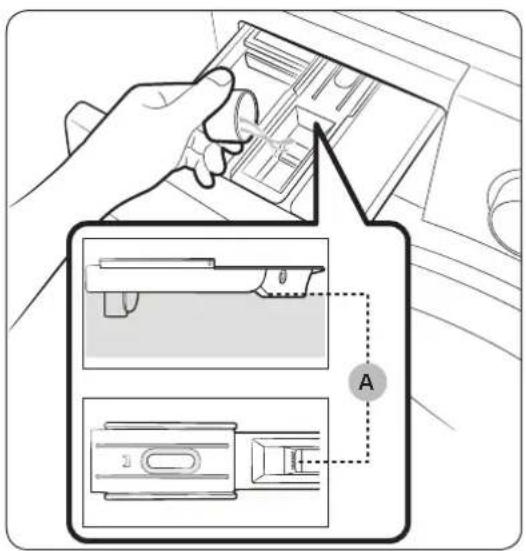
text_image
Diagram illustrating a hand inserting a card into a device, with labeled parts and a dashed line indicating section A.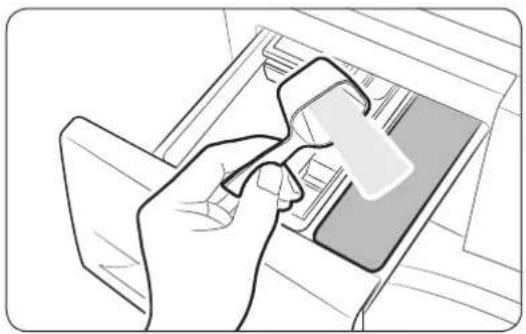
natural_image
Line drawing of a hand inserting a card into a device (no text or symbols)
natural_image
Line drawing of a hand holding a device with a prohibition symbol (no text or labels)- Apply fabric softener to the ⚙ softener compartment. Do not exceed the max line (A).
Softener is dispensed into the wash during the final rinse.
-
If you want to prewash, apply prewash detergent to the 1prewash compartment as instructed or recommended by the manufacturer.
-
Close the detergent drawer.
CAUTION
- Do not apply powder detergent to the liquid detergent guide.
- Concentrated fabric softener must be diluted with water before applied.
- Do not apply main-wash detergent to the softener compartment.
English32
To use liquid detergent (applicable models only)
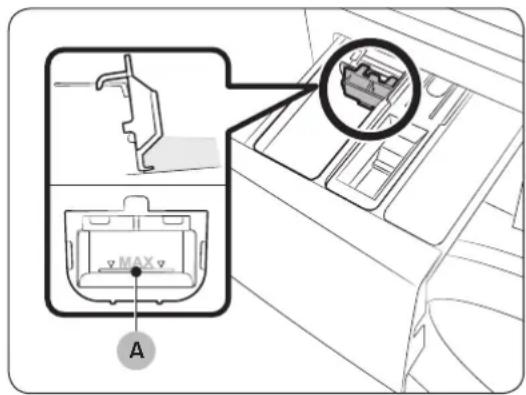
text_image
Diagram showing car interior components with labeled parts and a magnified inset highlighting a device component.First insert the provided liquid detergent guide in the 1main-wash compartment.
Then, apply liquid detergent to the guide below the marked max line (A).

NOTE
- Insert the liquid detergent guide only after you remove the detergent drawer from the washing machine by pressing release lever (A).
• After a wash, some liquid detergent may remain in the detergent drawer.
CAUTION
- Do not use the Prewash function when you use liquid detergent.
- Remove the liquid detergent guide when you use powder detergent.
Operations
Control panel

text_image
GIẮT NHANH 15 PHỦT 15' Quick Wash GIẮT HÀNG NGÀY Daily Wash BỒ TỔI MÀU Dark Garment BỒ LEN ⚫ Wool BỒ TRÊ EM Baby Care CHẦN, GA Bedding Giặt hdí nước Steam Cycles 01 GIẮT CỔ-TỔNG Cotton Cẻ GIẮT CỔ-TỔNG TIẾT KIỂM e-Cotton SỢI TỔNG HỢP Synthetics XẢ + VẮT Rinse+Spin VẮT Spin LÀM SACH LỔNG GIẮT Eco Drum Clean 02 (3 sec) 18:88 90°C 1400 60 1200 40 800 20 °C Temp. Spin Options Delay End Soak 0304050607 *| 01 Cycle Selector | Turn the dial to select a cycle. |
| 02 Display | The display shows current cycle information and estimated time remaining, or an information code when a problem occurs. |
| 03 Temp. | Press to change the water temperature for the current cycle. |
| 04 Spin | Press to change the spinning speed for the current cycle. The revolutions per minute (RPM) differs with the model.Rinse Hold: The final rinse process is suspended so that the laundry remains in the water. To unload the laundry, run a drain or spin process.- To use the Rinse Hold option, press Spin repeatedly until all the Spin option indicators turn off.No Spin: The drum does not rotate after the final drain process.- To use the No Spin option, press Spin repeatedly until the No Spin indicator ( turns on.Spin Only: To run the Spin Only cycle, press Spin for 3 seconds. When the cycle time and spinning speed appear, press Spin repeatedly until a desired spinning speed is selected. Then, press Start/Pause to start the cycle. The spinning time depends on the selected cycle. |
| 05 Options | Press to select an option from Intensive, and Pre Wash. Press again to deselect.Availability of the options depends on the cycle. |
English34
| 06 Delay End | Delay End lets you set the end time of the current cycle. Based on your settings, the start time of the cycle will be determined by the machine's internal logic. For example, this setting is useful for programming your machine to finish a wash at the time you normally return home from work.• Press to choose a preset unit of hours. |
| 07 Soak | Press to activate/deactivate the Soak function. This function helps remove a wide variety of stubborn stains. |
| 08 Power Press to turn on/off the washing machine. | |
| 09 Start/Pause Press to start or stop operation. | |
For more information on the options, see the "Special features" section.
*(3 sec) : Press and hold for 3 seconds.
Operations
Simple steps to start

text_image
GIÁT NHANH 15 PHÚT 15° Quick Wash GIÁT HÀNG NGÀY Daily Wash BỔ TỔI MẦU Dark Garment BỔ LEN Wool BỔ TRÊ EM Baby Care CHẦN, GA Bedding GIÁT hơi nước Steam Cycles 2 GIÁT CÔ-TÔNG Cotton GIÁT CÔ-TÔNG TIẾT KIỂM e-Cotton SỐI TÔNG HỢP Synthetics XÁ + VĂT Rinse+Spin VĂT Spin LÀM SACH LÔNG GIÁT Eco Drum Clean * (3 sec) 18:88 90°C 1400 60 1200 40 800 20 ° Temp. Spin Options DelayEnd Soak 3 4 5- Press Power to turn on the washing machine.
- Turn the Cycle Selector to select a cycle.
- Change the cycle settings ( 🔊 Temp., and Ⓞ Spin) as necessary.
- To add an option, press ⏻ Options. Use the button again to choose a preferred item.
- The machine provides 2 respective buttons for ⏻ Delay End, and ☑ Soak for easy access. If you want to use one of these options, press the corresponding button.
- Press Start/Pause.
To change the cycle during operation
- Press Start/Pause to stop operation.
- Select a different cycle.
- Press Start/Pause again to start the new cycle.
English36
Cycle overview
Standard cycles
| Cycle Description & Max load (kg) | ||
| COTTON | · For cottons, bed linens, table linens, underwear, towels, or shirts. The washing time and the rinse count are automatically adjusted according to the load. | Max |
| Ce COTTON | · Optimal performance with lower energy for cotton fabrics, bed linens, table linens, underwear, towels, or shirts. For energy saving, the actual washing temperature may be lower than specified. | Max |
| SYNTHETICS | · For blouses or shirts that are made of polyester (diolen, trevira), polyamide (perlon, nylon), or the like. | 4 |
| RINSE+SPIN | · Featuring an additional rinse process after applying fabric softener to the laundry. | - |
| SPIN | · Featuring an additional spin process to effectively remove moisture from laundry. | - |
| ECO DRUM CLEAN | · Cleans the drum by removing dirt and bacteria from the drum.· Perform once every 40 washes with no detergent or bleach applied.· Make sure the drum is empty.· Do not use any cleaning agents for cleaning the drum. | - |
| 15' QUICK WASH | · For lightly soiled garments that you want to wash quickly.· Use less than 20 g of detergent. Using more than 20 g of detergent may leave detergent residue. | 2 |
| DAILY WASH · For everyday items such as underwear and shirts. 4 | ||
| DARK GARMENT | · Featuring additional rinses and reduced spinning to ensure that the laundry is washed gently and rinsed thoroughly. | 4 |
Operations
| Cycle Description | on & Max load (kg) | |
| WOOL 🌐 | ·Specific for machine-washable wool for loads less than 2.0 kg.·The WOOL 🌐 cycle features gentle cradling and soaking to protect the wool fibres from shrinkage/distortion.·A neutral detergent is recommended. | 2 |
Steam Cycles
Steam may not be visible or present during the cycle. This is normal.
| BABY CARE | • Featuring a high-temperature wash and extra rinses to help remove the remaining detergent effectively. | 4 |
| BEDDING | • For bed spreads, bed sheets, bedding covers, etc.• For best results, wash only 1 type of bedding and make sure the load weighs less than 2.0 kg. | 2 |
Options
| Option Description | |
| Pre WashThis will add a preliminary washing cycle before the main wash cycle. | |
| IntensiveFor badly soiled laundry. The operation time for each cycle is longer than normal. | |
| Rinse+Press this button to add additional rinse cycles. | |
English38
Delay End
You can set the washing machine to finish your wash automatically at a later time, choosing a delay of between 1 to 24 hours (in 1 hour increments). The hour displayed indicates the time the wash will finish.
- Select a cycle. Then change the cycle settings if necessary.
- Press ⏻ Delay End repeatedly until a desired end time is set.
- Press Start/Pause.
The Delay End indicator blinks and the washing machine tumbles the drum to sense the weight of the load if you have selected the COTTON or Ce COTTON cycle. Load sensing is preset and enabled only in these 2 cycles. When complete, the machine displays your set time and the timer starts ticking.
- To cancel the Ⓐ Delay End, restart the washing machine by pressing Power.
Real-life case
You want to finish a two-hour cycle 3 hours later from now. For this, you add the Delay End option to the current cycle with the 3-hour setting, and press Start/Pause at 2:00 p.m. Then, what happens? The washing machine starts operating at 3:00 p.m., and ends at 5:00 p.m. Provided below is the time line for this example.

text_image
2:00 pm Set Delay End to 3 hours 3:00 pm Start 5:00 pm EndOperations
Special features
AddWash
When the AddWash indicator 📋s on, you can stop operation of the machine and put additional laundry or softener into the drum. The Add Door opens by more than 130° for easy access.

natural_image
Hand placing a small object into a circular component (no text or symbols visible)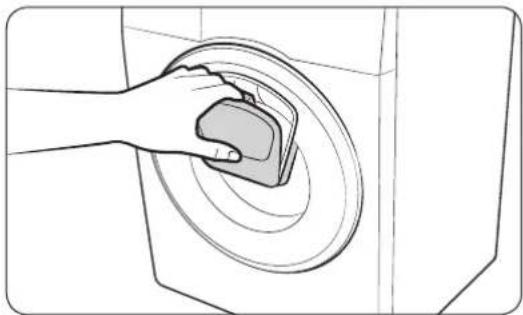
natural_image
Diagram of a hand pressing a circular component with concentric rings (no text or symbols)- Press Start/Pause to stop operation.
-
Press the upper area of the Add Door until you hear a clicking sound to unlock. Pull the handle of the Add Door to open.
-
Open the Add Door and put additional laundry or softener into the drum.
- Push the Add Door until you hear a clicking sound to close.
- Press Start/Pause to resume operation.
CAUTION
Do not put excessive force on the Add Door. It may break.
NOTE
The water inside the drum will not leak if the Add Door is closed properly. Water drops may form around the door, but they will not leak from inside the drum.
CAUTION
- Do not open the Add Door if suds have formed inside the drum that rise above the level of the Add Door.
- Do not attempt to open the Add Door while the machine is operating without first pressing Start/Pause. Please note that the Add Door can be opened unintentionally (without pressing Start/Pause) when the wash is complete.
- Do not add an excessive load through the Add Door. Performance may be degraded.
- Do not use the lower area of the Add Door as a handle. Your fingers may be caught.
• Make sure that no laundry is caught in the Add Door. - Keep your pets out of the washing machine, especially the Add Door.
English40
- When using hot water for the wash, the Add Door may appear to leak water after opening and closing the Add Door. This is normal, simply because steam emerging from the open Add Door has cooled and formed water drops on the surface.
- When the Add Door closes, the door seals up and no water can leak. However, you may encounter what appears to be water leak around the door - some residual water remaining around the Add Door may form water drops. This is normal.
- Neither the main door or the Add Door can be opened when the water temperature is over 50 °C. If the water level inside the drum is over a certain point, the main door cannot be opened.
- If an information code of ddC appears on the display, see the "Information codes" section for further actions.
- Keep the Add Door and its surroundings clean at all times. Debris or detergents on or around the seals of the Add Door may cause a leak.
Operations
Settings
Child Lock
To prevent accidents by children, Child Lock locks all buttons except for Power.
- To set the Child Lock function, hold down 🔊 Temp. and Ⓞ Spin simultaneously for 3 seconds.
- To release the Child Lock function, hold down 🔊 Temp. and ⓞ Spin simultaneously for 3 seconds.
NOTE
- In the Child Lock state, you must first release the Child Lock if you want to add detergent or laundry.
- Your setting will be kept even after restarting the machine.
Alarm Off
You can turn on or off the sound from the washing machine. When this function is set to Off, the AddWash alarm, the melody of cycle completion, and the power-off beep will not sound. However, the other sounds stay active.
- To mute the sound, press and hold Spin and Options for 3 seconds.
- To unmute the sound, press and hold again for 3 seconds.
- Your setting will be kept even after restarting the machine.
English42
Maintenance
Keep the washing machine clean to prevent deteriorated performance and to preserve its life cycle.
Eco drum clean
Perform this cycle regularly to clean the drum and to remove bacteria from it.
- Press Power to turn on the washing machine.
- Turn the Cycle Selector to select ECO DRUM CLEAN.
- Press Start/Pause.
NOTE
• The water temperature for ECO DRUM CLEAN is set to 70 °C, which cannot be changed.
- It is recommended to run the ECO DRUM CLEAN cycle once every 40 washes.
CAUTION
Do not use any cleaning agents for cleaning the drum. Chemical residue in the drum deteriorates the washing performance.
ECO DRUM CLEAN reminder
- The ECO DRUM CLEAN reminder appears on the main screen once every 40 washes. It is advisable to perform the ECO DRUM CLEAN regularly.
- When you first see this reminder, you can ignore the reminder for 6 consecutive washes. From the 7^th wash, the reminder no longer appears. However, it appears again on the next 40^th wash.
Maintenance
Smart Check
To enable this function, you must first download the Samsung Smart Washer app at the Play Store or the App Store, and install it on a mobile device featuring a camera function.
The Smart Check function has been optimized for Galaxy & iPhone series (applicable models only).
- When the washing machine detects an issue to check, an information code appears on the display. To enter Smart Check mode, press and hold ⏻ Options and ⏻ Delay End simultaneously for 3 seconds.
- The washing machine starts the self-diagnosis procedure and displays an information code if a problem is detected.
- Run the Samsung Smart Washer app on your mobile device, and tap Smart Check.
- Put the mobile device close to the washing machine's display so that the smartphone camera and the washing machine face each other. Then, the information code will be recognized automatically by the app.
- When the information code is recognized correctly, the app provides detailed information about the problem with applicable solutions.
NOTE
- The function name, Smart Check, may differ depending on the language.
- If there is strong reflected light on the washing machine display, the app may fail to recognize the information code.
- If the app fails to recognize the Smart Check code consecutively, enter the information code manually onto the app screen.
English44
Emergency drain
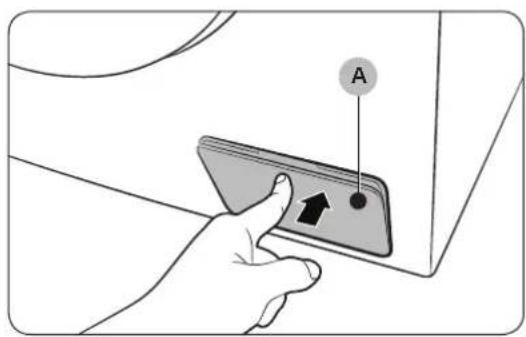
In case of a power failure, drain the water inside the drum before taking out the laundry.
text_image
A-
Power off and unplug the washing machine from the electrical outlet.
-
Gently press the top area of the filter cover (A) to open.

text_image
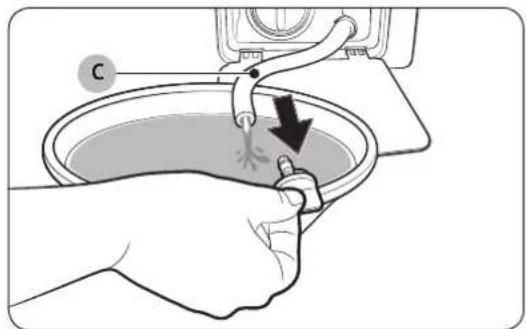
Diagram showing a hand operating a mechanical device with a labeled component 'B' and an arrow indicating direction.- Put an empty, spacious container around the cover, and stretch the emergency drain tube to the container while holding the tube cap (B).
text_image
Diagram showing hands cleaning a basin with a valve and directional arrow, labeled 'C'-
Open the tube cap and let water in the emergency drain tube (C) flow into the container.
-
When done, close the tube cap, and reinsert the tube. Then, close the filter cover.
NOTE
Use a spacious container because the water in the drum may be more than expected.
Maintenance
Cleaning
Surface of the washing machine
Use a soft cloth with a nonabrasive household detergent. Do not spray water onto the washing machine.
Add Door

natural_image
Illustration of a hand placing a component into a washing machine (no text or symbols visible)- Open the Add Door.
- Use a wet cloth to clean the Add Door.
- Do not use cleaning agents. Discolouration may occur.
- Use caution when cleaning the rubber packing and the locking mechanism (A).
-
Dust off the door area regularly.
-
Wipe up and close the Add Door until you hear a clicking sound.
CAUTION
- Do not apply force on the Add Door. It may break.
- Do not leave the Add Door open while the machine is operating.
- Do not put heavy objects on the Add Door at any time.
• To prevent physical injury, do not touch the Add Door while the drum is rotating. - Do not open the Add Door while the machine is operating. This may cause physical injury.
- Do not manipulate the feature panel while the Add Door is open. This may cause physical injury or system failure.
- Do not input objects other than laundry.
- Do not input bulky items to the drum through the Add Door.
- Do not pull out the rubber packing of the Add Door when cleaning. This may cause damage.
English46
Mesh filter
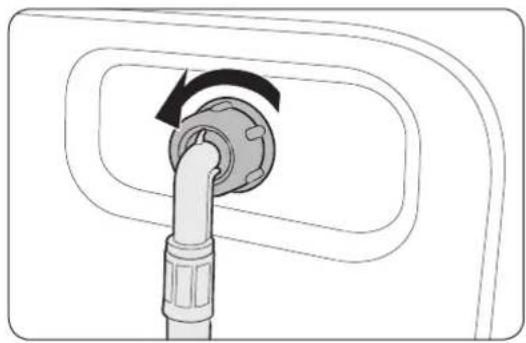
Clean the mesh filter of the water hose once or twice a year.
natural_image
Diagram of a plug inserted into a device, showing a circular arrow indicating rotation (no text or symbols present)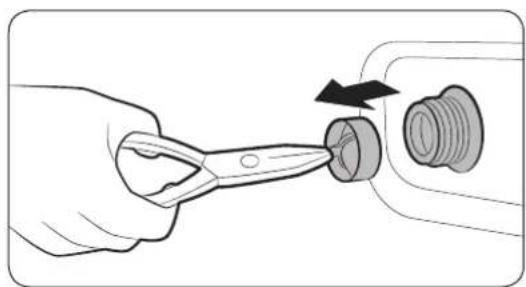
natural_image
Illustration of a hand using a power tool to adjust a mechanical component (no text or symbols visible)-
Turn off the washing machine, and unplug the power cord.
-
Close the water tap.
-
Loosen and disconnect the water hose from the back of the washing machine. Cover the hose with a cloth to prevent water from gushing out.
-
Use pliers to pull out the mesh filter from the inlet valve.
-
Submerge the mesh filter deeply in water so that the threaded connector is also submerged.
-
Dry the mesh filter completely in the shade.
-
Reinsert the mesh filter into the inlet valve, and reconnect the water hose to the inlet valve.
-
Open the water tap.
NOTE
If the mesh filter is clogged, an information code of "4C" appears on the screen.
Maintenance
Pump filter
It is advisable to clean the pump filter 5 or 6 times a year to prevent its clogging. A clogged pump filter may reduce the bubble effect.

natural_image
Hand inserting a plug into a socket (no text or symbols visible)
natural_image
Illustration of hands using a tool to clean or wash the sink surface (no text or symbols visible)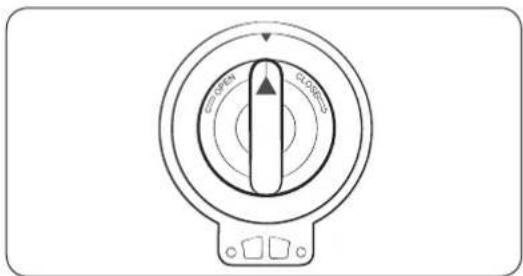
text_image
Open Close Pull- Turn off the washing machine, and unplug the power cord.
- Drain the remaining water inside the drum. See the "Emergency drain" section.
- Gently press the top area of the filter cover to open.
- Turn the pump filter knob to the left, and drain off the remaining water.
- Clean the pump filter using soft brushes. Make sure the drain pump propeller inside the filter is unclogged.
- Reinsert the pump filter, and turn the filter knob to the right.
NOTE
If the pump filter is clogged, an information code of "5C" appears on the screen.
CAUTION
- Make sure the filter knob is closed properly after cleaning the filter. Otherwise, this may cause a leak.
- Make sure the filter is inserted properly after cleaning it. Otherwise, this may cause an operational failure or a leak.
English48
Detergent drawer

text_image
Diagram illustrating a mechanical or electrical component being processed, with labeled parts A and B and directional arrows indicating movement.-
While holding down the release lever (A) inside the drawer, slide open the drawer.
-
Remove the release lever and the liquid detergent guide from the drawer.
natural_image
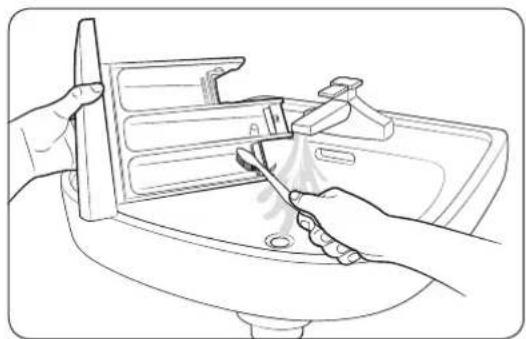
Line drawing of hands using a tool to clean or wash the sink (no text or symbols)- Clean the drawer components in flowing water using a soft brush.
natural_image
Hand inserting a plastic component into a housing (no text or symbols visible)-
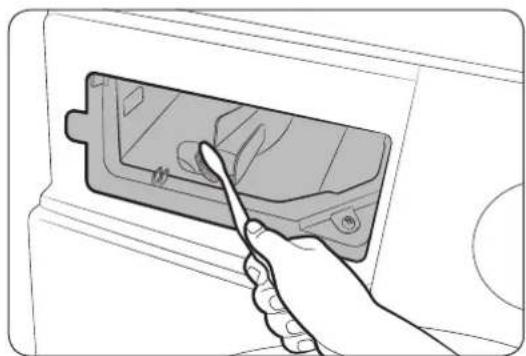
Clean the drawer recess using a soft brush.
-
Reinsert the release lever and the liquid detergent guide to the drawer.
-
Slide the drawer inward to close it.
NOTE
To remove remaining detergent, perform the RINSE+SPIN cycle with the drum being empty.
Maintenance
Recovery from freezing
The washing machine may freeze when it drops below 0 °C.
- Turn off the washing machine, and unplug the power cord.
- Pour warm water over the water tap to loosen the water hose.
- Disconnect the water hose, and soak it in warm water.
- Pour warm water into the drum and leave it for about 10 minutes.
- Reconnect the water hose to the water tap.
NOTE
If the washing machine still doesn't operate normally, repeat the above steps until it operates normally.
Care against an extended time of disuse
Avoid leaving the washing machine unused for an extended time. If this is the case, drain the washing machine and unplug the power cord.
- Turn the Cycle Selector to select RINSE+SPIN.
- Empty the drum, and press Start/Pause.
- When the cycle is complete, close the water tap and disconnect the water hose.
- Turn off the washing machine, and unplug the power cord.
- Open the door to let air circulate through the drum.
English50
Troubleshooting
Checkpoints
If you encounter a problem with the washing machine, first check the table below and try the suggestions.
| Problem Action | |
| Does not start. | Make sure the washing machine is plugged in.Make sure the door is properly closed.Make sure the water taps are open.Press or tap Start/Pause to start the washing machine.Make sure Child Lock ☑ not activated.Before the washing machine starts to fill, it will make a series of clicking noises to check the door lock and does a quick drain.Check the fuse or reset the circuit breaker. |
| Water supply is insufficient, or no water is supplied. | Fully open the water tap.Make sure the door is properly closed.Make sure the water supply hose is not frozen.Make sure the water supply hose is not kinked or clogged.Make sure there is sufficient water pressure. |
| After a cycle, detergent remains in the detergent drawer. | Make sure the washing machine is running with sufficient water pressure.Make sure the detergent is added to the centre of the detergent drawer.Make sure the rinse cap is inserted properly.If using granular detergent, make sure the detergent selector is in the upper position.Remove the rinse cap and clean the detergent drawer. |
| Excessive vibrations or makes noise. | Make sure the washing machine is installed on a level, solid floor that is not slippery. If the floor is not level, use the levelling feet to adjust the height of the washing machine.Make sure the shipping bolts are removed.Make sure the washing machine is not contacting any other object.Make sure the laundry load is balanced.The motor can cause noise during normal operation.Overalls or metal-decorated clothes can cause noise while being washed. This is normal.Metal objects such as coins can cause noise. After washing, remove these objects from the drum or filter case. |
English 51
Troubleshooting
| Problem Action | |
| Does not drain and/or spin. | Make sure the drain hose is straightened all the way to the drain system. If you encounter a drain restriction, call for service.Make sure the debris filter is not clogged.Close the door and press or tap Start/Pause. For your safety, the washing machine will not tumble or spin unless the door is closed.Make sure the drain hose is not frozen or clogged.Make sure the drain hose is connected to a drain system that is not clogged.If the washing machine is not supplied with sufficient power, the washing machine temporarily will not drain or spin. As soon as the washing machine regains sufficient power, it will operate normally. |
| The door does not open. | Press or tap Start/Pause to stop the washing machine.It may take a few moments for the door lock mechanism to disengage.The door will not open until 3 minutes after the washing machine has stopped or the power turned off.Make sure all the water in the drum is drained.The door may not open if water remains in the drum. Drain the drum and open the door manually.Make sure the door lock light is off. The door lock light turns off after the washing machine has drained. |
| Excessive suds. | Make sure you use the recommended types of detergent as appropriate.Use high efficiency (HE) detergent to prevent oversuding.Reduce the detergent amount for soft water, small loads, or lightly soiled loads.Non-HE detergent is not recommended. |
| Cannot apply additional detergent. | Make sure the remaining amount of detergent and fabric softener is not over the limit. |
English52
| Problem Action | |
| Stops. | Plug the power cord into a live electrical outlet.Check the fuse or reset the circuit breaker.Close the door and press Start/Pause to start the washing machine. For your safety, the washing machine will not tumble or spin unless the door is closed.Before the washing machine starts to fill, it will make a series of clicking noises to check the door lock and does a quick drain.There may be a pause or soak period in the cycle. Wait briefly and the washing machine may start.Make sure the mesh filter of the water supply hose at the water taps is not clogged. Periodically clean the mesh filter.If the washing machine is not supplied with sufficient power, the washing machine temporarily will not drain or spin. As soon as the washing machine regains sufficient power, it will operate normally. |
| Fills with the wrong water temperature. | Fully open both taps.Make sure the temperature selection is correct.Make sure the hoses are connected to the correct taps. Flush water lines.Make sure the water heater is set to supply a minimum 120 °F (49 °C) hot water at the tap. Also, check the water heater capacity and recovery rate.Disconnect the hoses and clean the mesh filter. The mesh filter may be clogged.While the washing machine fills, the water temperature may change as the automatic temperature control feature checks incoming water temperature. This is normal.While the washing machine fills, you may notice just hot and/or just cold water going through the dispenser when cold or warm temperatures are selected. This is a normal function of the automatic temperature control feature as the washing machine determines the water temperature. |
| Load is wet at the end of a cycle. | Use the High or Extra High spin speed.Use high efficiency (HE) detergent to reduce oversuding.Load is too small. Small loads (one or two items) may become unbalanced and not spin completely.Make sure the drain hose is not kinked or clogged. |
English 53
Troubleshooting
| Problem Action | |
| Leaks water. | Make sure the door is properly closed.Make sure all hose connections are tight.Make sure the end of the drain hose is correctly inserted and secured to the drain system.Avoid overloading.Use high efficiency (HE) detergent to prevent oversudsing. |
| Has odours. | Excessive suds collect in recesses and can cause foul odours.Run cleansing cycles to sanitize periodically.Clean the door seal (diaphragm).Dry the washing machine interior after a cycle has finished. |
| No bubbles are seen (Bubbleshot models only). | Overloading may screen bubbles.Severely contaminated laundry may not generate bubbles. |
| Can I open the Add Door at any time? | The Add Door can be opened only when the indicator appears. However, it does not open in the following cases: - When the boiling or drying process is running and the internal temperature becomes high.- If you set the Child Lock for safety reasons.- When the drum wash or drum drying cycle is running that does not involve additional laundry. |
If a problem persists, contact a local Samsung service centre.
English54
Information codes
If the washing machine fails to operate, you may see an information code on the screen. Check the table below and try the suggestions.
| Code Action | |
| 4C | Water is not supplied.Make sure the water taps are open.Make sure the water hoses are not clogged.Make sure the water taps are not frozen.Make sure the washing machine is operating with sufficient water pressure.Make sure that the cold water tap and the hot water tap are properly connected.Clean the mesh filter as it may be clogged. |
| 4C2 | Make sure the cold water supply hose is firmly connected to the cold water tap. If it is connected to the hot water tap, the laundry may be deformed with some cycles. |
| 5C | Water is not draining.Make sure the drain hose is not frozen or clogged.Make sure the drain hose is positioned correctly, depending on the connection type.Clean the debris filter as it may be clogged.Make sure the drain hose is straightened all the way to the drain system.If the information code remains, contact a customer service centre. |
| dC | Operating the washer with the door open.Make sure the door is properly closed.Make sure laundry is not caught in the door. |
| OC | Water has overflowed.Restart after spinning.If the information code remains on the display, contact a local Samsung service centre. |
| LC, LC1 | Check the drain hose.Make sure the end of the drain hose is not placed on the floor.Make sure the drain hose is not clogged.If the information code remains, contact a customer service centre. |
Troubleshooting
| Code Action | |
| Ub | Spinning does not work.Make sure laundry is spread out evenly.Make sure the washing machine is on a flat, stable surface.Redistribute the load. If only one item of clothing needs washing, such as a bathrobe or pair of jeans, the final spin result might be unsatisfactory, and an "Ub" check message will be shown in the display. |
| 3C | Check the motor for operation.Try restarting the cycle.If the information code remains, contact a customer service centre. |
| UC | The electronic control needs to be checked.Check if power is supplied properly.If the information code remains, contact a customer service centre. |
| Low voltage detected.Check if the power cord is plugged in.If the information code remains, contact a customer service centre. | |
| HC | High temperature heating check.If the information code remains, contact a customer service centre. |
| 1C | The Water Level sensor is not working properly.Turn the machine off, and restart the cycle.If the information code remains, contact a customer service centre. |
| AC | Check communications between main and sub PBAs.Turn the machine off, and restart the cycle.If the information code remains, contact a customer service centre. |
English56
| Code Action | |
| DDC, ddC | This message appears when you open the Add Door without pressing Start/Pause. If this happens, do one of the following:Press the Add Door to close properly. Then, press Start/Pause and try again.To add laundry, open the Add Door and input laundry. Close the Add Door properly. Then, press Start/Pause to resume operation. |
| 8C | The MEMS sensor is not working properly.Turn the machine off, and restart the cycle.If the information code remains, contact a local Samsung service centre. |
| AC6 | Check communications between the main and the inverter PBAs.Depending on the state, the machine may automatically returns to normal operation.Turn the machine off, and restart the cycle.If the information code remains, contact a local Samsung service centre. |
| DC1 | The Main Door lock/unlock is not working properly.Turn the machine off, and restart the cycle.If the information code remains, contact a local Samsung service centre. |
| DC3 | The Add Door lock/unlock is not working properly.Turn the machine off, and restart the cycle.If the information code remains, contact a local Samsung service centre. |
If any information code keeps appearing on the screen, contact a local Samsung service centre.
Specifications
Fabric care chart
The following symbols provide garment care directions. The care labels include four symbols in this order: washing, bleaching, drying and ironing (and dry cleaning when necessary). The use of symbols ensures consistency among garment manufacturers of domestic and imported items. Follow the care label directions to maximise garment life and reduce laundry problems.
 | Resistant material Do not iron |  | |
 | Delicate fabric |  | Can be dry cleaned using any solvent |
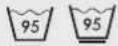 | Item can be washed at 95 °C Dry clear | ||
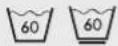 | Item can be washed at 60 °C |  | Dry clean with perchloride, lighter fuel, pure alcohol or R113 only |
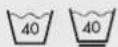 | Item can be washed at 40 °C |  | Dry clean with aviation fuel, pure alcohol or R113 only |
 | Item can be washed at 30 °C Do not c 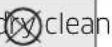 | ||
 | Hand wash only Dry flat |  | |
 | Dry clean only Can be hung to dry  | ||
 | Can be bleached in cold water Dry or  | ||
 | Do not bleach Tumble dry, normal he | ||
 | Can be ironed at 200 °C max Tumble  | ||
 | Can be ironed at 150 °C max Do not t  | ||
 | Can be ironed at 100 °C max | ||
English58
Protecting the environment
- This appliance is manufactured from recyclable materials. If you decide to dispose of this appliance, please observe local waste disposal regulations. Cut off the power cord so that the appliance cannot be connected to a power source. Remove the door so that animals and small children cannot get trapped inside the appliance.
- Do not exceed the detergent quantities recommended in the detergent manufacturer's instructions.
- Use stain removal products and bleaches before the wash cycle only when strictly necessary.
- Save water and electricity by only washing full loads (the exact amount depends upon the cycle used).
Specifications
Specification sheet
"*" Asterisk(s) means variant model and can be varied (0-9) or (A-Z).
| Type Front loading washing machine | |||
| Model name WW10K4**** | |||
| Dimensions W 600 x D 550 x H | 850 (mm) | ||
| Water pressure 50-800 kPa | |||
| Net weight 63.0 kg | |||
| Wash and spin capacity 10.0 kg | |||
| Power consumption | Washing and heating | AC 220-240 V / 50 Hz | 2000-2400 W |
| Spin revolutions 1400 rpm | |||
| Type Front loading washing machine | |||
| Model name WW9*K4**** | |||
| Dimensions W 600 x D 550 x H | 850 (mm) | ||
| Water pressure 50-800 kPa | |||
| Net weight 63.0 kg | |||
| Wash and spin capacity 9.0 kg | |||
| Power consumption | Washing and heating | AC 220-240 V / 50 Hz | 2000-2400 W |
| Spin revolutions 1400 rpm | |||
English60
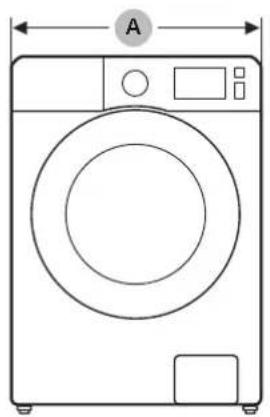
natural_image
Line drawing of a washing machine with labeled dimensions (no text or symbols beyond 'A' and measurement indicators)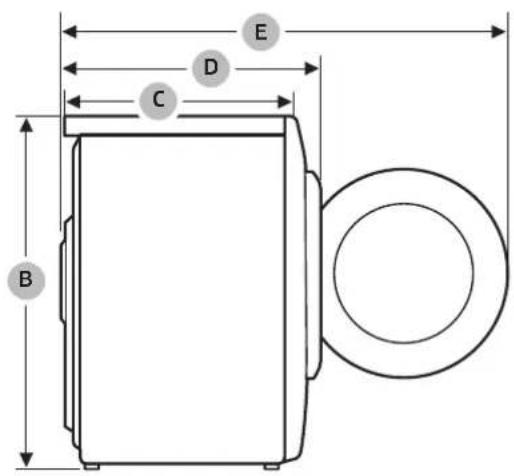
text_image
B C D E| A 600 mm | |
| B 850 mm | |
| C 550 mm | |
| D 635 mm | |
| E 1075 mm |

NOTE
The design and specifications are subject to change without notice for quality improvement purposes.
Memo


Memo


SAMSUNG
QUESTIONS OR COMMENTS?
| COUNTRY CALL OR VISIT US ONLINE AT | |
| VIETNAM 1800 588 889 www.samsung.com/vn/support | |
Máy giặt
Hướng dẫn sử dụng
WW10K4****/WW9*K4****
text_image
SAMSUNGNội dung
text_image
Diagram of a washing machine with numbered parts for identification and assembly reference.01 Chốt mở
04 Cửa
natural_image
Technical line drawing of a device casing with labeled components (no text or symbols)natural_image
Diagram showing a tool interacting with a car's wheel, with an arrow indicating rotation (no text or symbols present)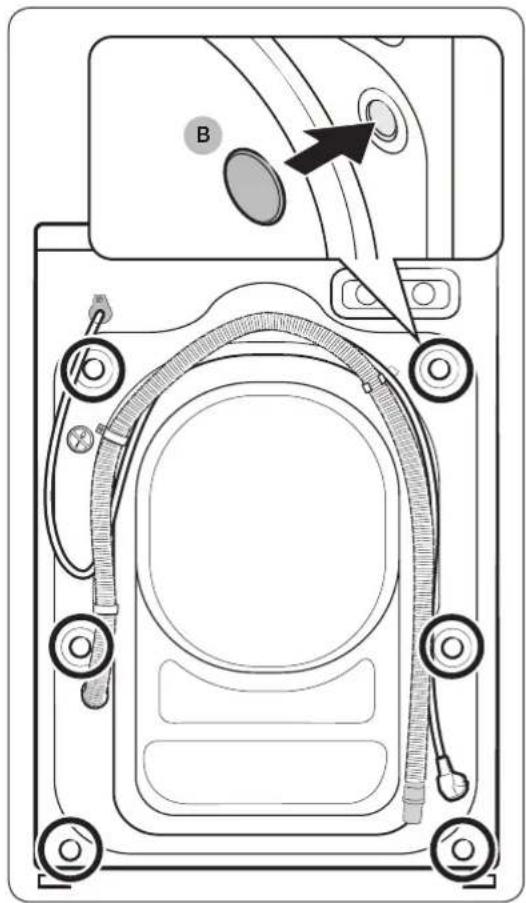
text_image
Technical diagram of a device rear panel with labeled components and directional arrow indicating movement or flow.natural_image
Illustration showing a hand using a tool to adjust a mechanical component, with no visible text or symbols.
natural_image
Line drawing of a hand using a tool to adjust or install a mechanical component (no text or symbols present)natural_image
Diagram of a faucet with a valve and a bolt, showing fluid flow direction (no text or labels)natural_image
Diagram of a car fuel plug being inserted into a valve, showing airflow direction (no text or symbols)natural_image
Diagram of two pipe fittings with circular annotations highlighting their features (no text or symbols present)natural_image
Illustration of a hand using a screwdriver to adjust a mechanical component (no text or symbols present)text_image
Diagram illustrating three-step installation of a water tap wrench, showing step C, hand-cranking, and disassembly with labeled components D.natural_image
Diagram of two connected electrical plug connectors with a curved arrow indicating rotation (no text or symbols)text_image
Diagram of a bathroom sink with labeled anatomical features and a magnified view showing a tooth structure labeled A.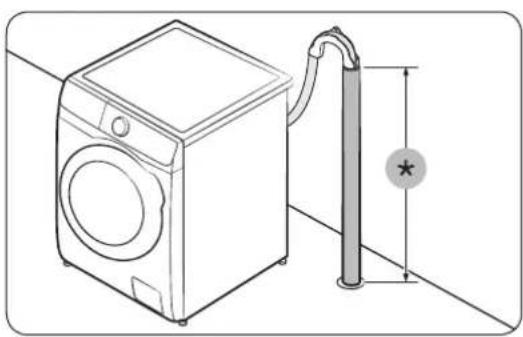
natural_image
Line drawing of a washing machine next to a vertical pipe with a star symbol (no text or labels)text_image
Diagram showing bathroom sink and laundry system with labeled fixtures and piping connections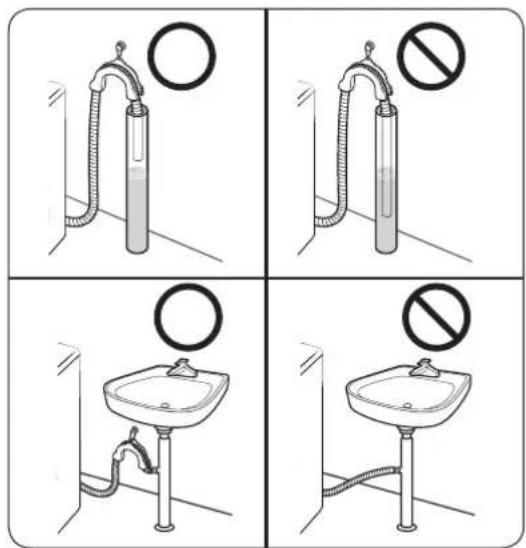
text_image
Four-panel diagram showing a sink with a circular valve and a prohibition sign, likely illustrating a hygiene or disinfection scenario.natural_image
Line drawing of a washing machine with two circular components and a small device nearby (no text or symbols)natural_image
Diagram showing a mechanical assembly with two circular components and a separate view of a shirt (no text or symbols)natural_image
Technical line drawing of two mechanical components with no visible text or symbolsnatural_image
Line drawing of a hand using a tool to clean or store items in a storage bin (no text or symbols visible)text_image
Diagram illustrating a hand inserting a card into a device, with labeled components and a dashed arrow indicating direction.natural_image
Line drawing of a hand inserting a card into a device (no text or symbols)natural_image
Illustration of a hand holding a magnifying glass over a document with a prohibition symbol (no text or labels)natural_image
Hand placing a small object into a circular device (no text or symbols visible)natural_image
Diagram of a hand holding a circular object with concentric rings, no text or symbols presenttext_image
Diagram showing a hand holding a tool with a labeled component 'B' and an arrow indicating direction or movement.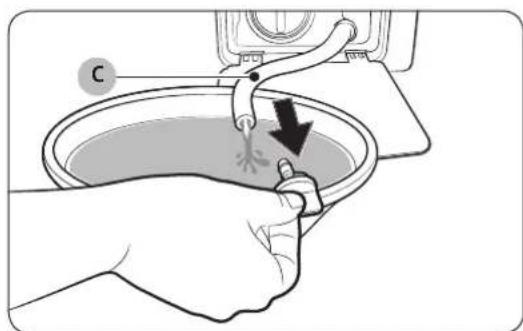
text_image
Diagram showing hands cleaning a sink with a tool, labeled with 'C' and directional arrow indicating process flownatural_image
Illustration of a hand placing a device into a washing machine (no text or symbols visible)natural_image
Diagram of a plug inserted into a device, showing a circular arrow indicating rotation (no text or symbols present)
natural_image
Illustration of a hand using a tool to adjust a mechanical component (no text or symbols visible)natural_image
Line drawing of a hand inserting a plug into a socket (no text or symbols)
natural_image
Illustration of hands using a tool to clean or wash a sink (no text or symbols visible)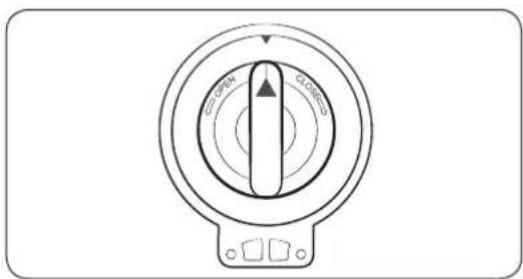
text_image
OPEN CLOSEDtext_image
Diagram illustrating a mechanical or electrical component being processed, with labeled component A and directional arrows indicating movement.natural_image
Line drawing of hands cleaning a sink with a tool, no text or symbols presentnatural_image
Hand inserting a plastic component into a housing (no text or symbols visible)natural_image
Line drawing of a washing machine with labeled dimensions (A and B) and control panel (no text or symbols on the device itself)
text_image
B C D E| A 600 mm | |
| B850 mm | |
| C550 mm | |
| D635 mm | |
| E 1075 mm |
