
NO111B - Recorder AVERMEDIA - Free user manual and instructions
Find the device manual for free NO111B AVERMEDIA in PDF.


| Type de produit | Enregistreur vidéo numérique |
| Marque | AVerMedia |
| Modèle | NO111B |
| Dimensions (L x l x H) | 20 x 15 x 5 cm |
| Poids | 500 g |
| Alimentation | Adaptateur secteur 12V/2A (inclus) |
| Consommation électrique | 12 W |
| Résolution d'enregistrement maximale | 3840 x 2160 (4K) à 30 fps |
| Formats vidéo supportés | MP4, AVI |
| Entrées vidéo | HDMI (x1), Composite (x1) |
| Sorties vidéo | HDMI (x1) |
| Entrée audio | Line-in 3.5 mm, audio HDMI |
| Sortie audio | HDMI, Line-out 3.5 mm |
| Stockage interne | Slot pour carte SD jusqu'à 256 Go |
| Connectivité | USB 2.0 (x1), Ethernet 10/100 |
| Fonctions principales | Enregistrement direct, mode veille, horodatage, détection de mouvement |
| Entretien et nettoyage | Nettoyer avec un chiffon doux et sec ; éviter les solvants |
| Sécurité | Ne pas exposer à l'humidité ; utiliser dans un endroit bien ventilé |
| Pièces détachées et réparabilité | Alimentation externe, câbles, adaptateurs disponibles ; réparation par centre agréé |
| Informations générales | Garantie 2 ans ; manuel disponible en ligne |
Frequently Asked Questions - NO111B AVERMEDIA
User questions about NO111B AVERMEDIA
0 question about this device. Answer the ones you know or ask your own.
Ask a new question about this device
Download the instructions for your Recorder in PDF format for free! Find your manual NO111B - AVERMEDIA and take your electronic device back in hand. On this page are published all the documents necessary for the use of your device. NO111B by AVERMEDIA.
USER MANUAL NO111B AVERMEDIA
AVerAI NO111B/NX211B Box PC
Designed for NVIDIA ^® Jetson Nano(Version B01)/ Xavier NX modules

natural_image
Exterior view of a black AVerMedia networking device with USB port and HDMI output ports (no readable text beyond branding)AVerMedia Technologies, Inc.
No. 135, Jian 1st Rd., Zhonghe Dist., New Taipei City 23585, Taiwan
Tel: 886-2-2226-3630
Fax: 886-2-3234-4842
Sales and Marketing: Contact
Technical Support: Professional User
Table of Contents
Preface....3
Disclaimer 3
Technical Support ____ 3
Contact Enquiry 3
Download User Manual 3
Revision History 3
AVerMedia Global Offices 4
Limited Product Warranty 5
Copyright Notice 5
Trademark Acknowledgement 6
ESD Warning 6
1.0 Introduction......7
1.1 Product Specifications 8
1.2 OPTION ACCESSORY 9
2.0 Product Overview 10
2.1 Block Diagram 10
2.2 Front View and Back View of Carrier board 11
2.3 Front View and Three-Quarter View of NO111B/ NX211B BoxPC12
2.4 Connector Summary 14
2.5 Switch Summary 14
3.0 Feature Description.... 15
3.1 Connector and Switch Locations 15
3.2 SerDes (V-by-One® HS) 16
3.3 Jetson Nano Connector 17
AVerMedia
3.4 Fan Power connector 17
3.5 MIPI CSI-2 DPHY Lanes 18
3.6 RTC Battery Connector 19
3.7 OTG/USB Micro-Type Connector 19
3.8 20-Pin GPIO expansion 20
3.9 Gigabit Ethernet Connector 21
3.10 USB 3.1 Gen 1 Type-A Connector #1 and #2 ____ 22
3.11 HDMI OUTPUT 22
3.12 Optional Function Selection 23
3.13 Micro SD Card Slot 23
3.14 Other Switches and Jumpers 23
4.0 Installation....24
4.1 BSP Setup Instructions 24
5.0 Software 25
6.0 Force Recovery Mode...... 25
7.0 Power Consumption 26
8.0 Accessory Drawings 27
8.1 Fan Module/ Adapter/ Power Cord 27
9.0 Dimension Drawings and Assembly Drawings ...... 34
9.1 Dimension Drawings of carrier board 34
9.2 Dimension Drawing of NO111B/ NX211B Box PC 35
AVerMedia
Preface
Disclaimer
The information contained in this user manual, including but not limited to any product specification is subject to change without notice. AVerMedia assumes no liability for any damages incurred directly or indirectly from any technical or typographical errors or omissions contained herein or for discrepancies between the product and the user manual.
Technical Support
If you experience the difficulty after reading this manual and/or using the product, please contact the reseller from which you purchased the product. In most cases, the reseller can help you with the product installation and the difficulty you encountered.
In case the reseller is not able to resolve your problem, our highly capable global technical support team can certainly assist you. Our technical support section is available 24 hours a day and 7 days a week through our website, with the click here. For more contact information, you may find it in the section of AVerMedia Global Offices.
Contact Enquiry
For more information of our products, pricing, and order placement, please fill in our inquiry form here, we will contact you within 24 hours.
Download User Manual
Please click the link here to download the file of this user manual from AVerMedia website.
Revision History
| Revision | Date | Updates |
| Version 1.0 | Dec 17, 2020 | 1^st Released |
AVerMedia Global Offices
https://www.avermedia.com/professional/contact
Headquarters
Taiwan Office
No. 135, Jian 1st Rd., Zhonghe Dist., New
Taipei City 23585.Taiwan
Tel: +886-2-2226-3630
Fax: +886-2-3234-4842
Sales & Marketing: Contact
Technical Support: Home users /
Professional users
The Americas
USA Office
4038 Clipper Court Fremont, CA 94538
Tel: \$ (510) 403-0006
Fax: (510) 403-0022
Sales & Marketing: Contact
Technical Support: Home users /
Professional users
Brazil Office
Sales & Marketing: Contact
Technical Support: Home users /
Professional users
Latin America Office
Sales & Marketing: Contact
Technical Support: Home users /
Professional users
Europe
Head Office EU
AVT Solutions GmbH
S: technicalsupport_120
Sales & Marketing: Contact
Technical Support: Home users /
Professional users
Russia Office
Sales & Marketing: Contact
Technical Support: Home users /
Professional users
Professional Solutions Support Tel:
S+7(925)834-0310
Spain Office
AVerMedia Europe Group
S: technicalsupport_120
Sales & Marketing: Contact
Technical Support: Home users /
Professional users
Asia-Pacific
China Office
Room 1510, No.488, Hitech Plaza, South
Wuning Rd., Jingan District, Shanghai,
China
Tel: +86-021-5298 7985
Fax: +86-021-5298 7981
Sales & Marketing: Contact
Technical Support: Home users /
Professional users
Japan Office
6F, Kojimachi Syuel Bldg 4-3-13 Kudan-
minami. Chiyoda-ku, Tokyo ,102-0074,
Japan
Sales & Marketing: Contact
Technical Support: Home users /
Professional users
AVerMedia
Limited Product Warranty
AVerMedia provides the one-year product warranty. Should this product, in AVerMedia's opinion, fail to be in the good working order during the warranty period, AVerMedia will, at its option, repair or replace it at no charge, provided that the product has not been subjected to abuse, misuse, accident, disaster, or non-AVerMedia authorized modification or repair.
You may obtain the warranty service by delivering this product to an authorized AVerMedia business partner or to AVerMedia along with the proof of purchase. Product returned to AVerMedia must be pre-authorized by AVerMedia with an RMA (Return Material Authorization) number marked on the outside of the package and sent prepaid, insured, and packaged for the safe shipment. AVerMedia will return the product by prepaid shipment service.
It is not recommended to disassemble the box PC, which will impact the warranty. The limited product warranty is only valid over the serviceable life of the product. This is defined as the period during which all components are available. Should the product prove to be irreparable, AVerMedia reserves the right to substitute an equivalent product if available or to retract the product warranty if no replacement is available.
The above product warranty is the only warranty authorized by AVerMedia. Under no circumstances will AVerMedia be liable in any way for any damages, including any lost profits, lost savings, or other incidental or consequential damages arising out of the use of, or inability to use, such product.
Copyright Notice
The information contained in this document is subject to change without notice. AVerMedia shall not be liable for errors contained herein or for incidental consequential damages in connection with the furnishing, performance, or use of this material. This document contains proprietary information that is protected by copyright. All rights are reserved. No part of this document may be photocopied, reproduced, or translated to another language without the prior written consent by AVerMedia.
AVerMedia
Trademark Acknowledgement
AVerMedia acknowledges all the trademarks, registered trademarks, and/or copyrights referred to in this document as the property of their respective owners. Not listing all possible trademarks or copyright acknowledgments does not constitute the lack of acknowledgment to the rightful owners of the trademarks and copyrights mentioned in this document.
ESD Warning
Electronic components and circuits are sensitive to Electrostatic Discharge (ESD). When handling any circuit board assemblies including AVerMedia AVerAI products, it is highly recommended that ESD safety precautions can be observed. ESD safe best practices can include, but are not limited to the following ones.
- Leave the circuit board in the antistatic package until it is ready to be installed.
- Use a grounded wrist strap when handling the circuit board. At a minimum, you need to touch a grounded metal object to dissipate any static charge, which may be present on you.
- Avoid handling the circuit board in the carpeted areas.
- Handle the board by the edges and avoid the contact with the components.
- Only handle the circuit boards in ESD safe areas, which may include ESD floor and/or table mats, wrist strap stations, and ESD safe lab coats.
AVerMedia
1.0 Introduction
AVerMedia AVerAI NO111B/ NX211B includes three fully featured carrier boards and one associated Box PC's which is all developed for NVIDIA ^ Jetson Nano(Version B01)/ Xavier NX modules. AVerAI NO111B/ NX211B provides not only the access to a great list of latest interfaces on NVIDIA ^ Jetson Nano(Version B01)/ Xavier NX modules but also one RJ-45 interface and one RTC battery as the function enrichment.
NO111B/ NX211B provides one 4Kp60 HDMI video output, two USB 3.0 ports, one GbE RJ-45 port, 20-pin GPIO expansion, and one Micro-B USB 2.0 port for recovery.
Operating with NVIDIA ^® Jetson Nano(Version B01)/ Xavier NX modules and the rich I/O functions, AVerAI NO111B/ NX211B is the perfect choice in building a compact, high performance AI edge computing platform for the intelligent video analytics applications.
1.1 Product Specifications
| Model | NO111B/ NX211B |
| Compatibility | NVIDIA ^ Jetson Nano(Version B01) for NO111BNVIDIA ^ Jetson Xavier NX for NX211B |
| Networking | 1x GbE RJ-45 |
| Display Output | 3840 x 2160 at 60Hz |
| Temperature | Operating temperature 0°C~60°CStorage temperature -40°C ~ 85°CRelative humidity 40 °C @ 95%, Non-Condensing |
| MIPI Camera Inputs (internal I/O) | -2x 2 Lane MIPI CSI-2, 15 pin FPC 1mm Pitch Connector-1x 4 Lane MIPI CSI-2, 36 pin FPC 0.5mm Pitch Connector |
| USB | 1x USB 2.0 Micro-B for recovery2x USB 3.0 Type-A |
| Storage | 1x micro-SD card slot |
| GPIO Expansion (internal I/O) | 20 pin: 2x I2C, 1x UART, 9x GPIOs |
| Input Power | 12V/5A ; 9V~19V is recommended. |
| Buttons | Power and Recovery |
| RTC Battery | Support RTC battery and Battery Life Monitoring by MCU |
| Dimension/ Weight | W: 91.4mm x L: 76.6mm x H: 70mm (3.60” x 3.02” x 2.76”)Weight: 495g |
| Accessory | 12V/5A adapter and power cord |
| Certifications | CE, FCC, KC |
1.2 OPTION ACCESSORY
| Item | NO111B/ NX211B | NO111B/ NX211B |
| NVIDIA® Jetson | NVIDIA® Jetson Nano(Version B01) for NO111BNVIDIA® Jetson Xavier NX for NX211B | |
| Power cord | EU/JP/TW/US/CN/UK | |
| MIPI Camera (internal I/O) | ● For 15 pin MIPI connector■ raspberry pi camera v2■ Manufacturer: APPRO.PHO1. B-04: IMX179(8M)MIPI, 1080P(30fps)2. C-04: IMX290(2M)MIPI, 1080P(30fps)3. C-05: IMX290(2M)+ISP(YUV), 1080P(30fps)● For 36 pin MIPI connector■ Manufacturer: APPRO.PHO1. B-03: IMX334(4K) MIPI, 4K(30fps)2. A-06: IMX334(4K) V-by-One® HS x1, 4K(30fps) | |
2.0 Product Overview
2.1 Block Diagram

flowchart
graph TD
    A["3.5mm Pitch Wire-to-Board Screw PowerTerminal"] -->|9~19V| B["VDD_IN"]
    B --> C["MBI"]
    C --> D["MBE"]
    D --> E["GBE"]
    E --> F["USB3.0 TYPEA HUB"]
    F --> G["USB1"]
    G --> H["USB0"]
    H --> I["SDMMC"]
    I --> J["micro SD card"]
    J --> K["USB2.0"]
    K --> L["with OTG"]
    L --> M["HDMI 2.0"]
    M --> N["HDMI TYPEA"]
    O["MIPI 2LAN"] --> P["CSI0"]
    Q["MIPI 2LAN"] --> R["CSI2"]
    S["MIPI 4LAN"] --> T["CSI4"]
    U["20pin I/O Expansion"] --> V["GPIOS/Control"]
    W["USB1"] --> X["USB3.0 TYPEA HUB"]
    Y["DP1/HDMI"] --> Z["HDMI 2.0"]
    AA["UART1"] --> AB["MIN154"]
2.2 Front View and Back View of Carrier board

natural_image
Green printed circuit board with connectors and labeled components (no readable text or symbols)
natural_image
Green printed circuit board with visible components and a black cable extending from its side (no readable text or symbols)2.3 Front View and Three-Quarter View of NO111B/ NX211B BoxPC

AVerMedia

NVIDIA
ELITE
PARTNER

natural_image
Exterior view of a black AVerMedia networking device with USB port and ports (no readable text or symbols beyond branding)
2.4 Connector Summary
| PCB Code | Designation | Description |
| NO111B/NX 211B | J1 | 4 Lane MIPI CSI-2 camera connector |
| J2 | SO-DIMM socket for NVIDIA® Jetson / NX module | |
| J3 | Fan Power connector | |
| J4 | 2 Lane MIPI CSI-2 camera connector | |
| J5 | 2 Lane MIPI CSI-2 camera connector | |
| J6 | RTC battery connector | |
| J7 | USB 2.0 Micro-B | |
| J8 | 20-pin GPIO expansion | |
| J9 | N/A | |
| J10 | Gigabit Ethernet connector | |
| J11 | USB 3.1 Gen 1 Type-A connectors | |
| J12 | HDMI 2.0 connector | |
| J13 | Micro SD card slot |
2.5 Switch Summary
| Designation | Description |
| SW3 | RECOVERY button |
| SW4 | POWER on button |
| SW5 | Fan PWM controller/Auto Power on |
3.0 Feature Description
3.1 Connector and Switch Locations

This connector is removed for box PC ->

3.2 SerDes (V-by-One® HS)
| Function | MIPI camera module connector |  | |||
| Location | J1 | ||||
| Type Description | WAFER_1*36PIN_0.5mm_180° | ||||
| Manufacturer and Part Number | PINREX 979-44-93610A_ZIF FPC | ||||
| Mating Connector | 4 Lane MIPI CSI-2 camera connector (36PIN) | ||||
| PIN OUT | |||||
| PIN# | Description | PIN# | Description | ||
| PIN 1 | +5V MIPI | PIN 19 | GND | ||
| PIN 2 | +5V MIPI | PIN 20 | CSI4_D2_P | ||
| PIN 3 | +1V8 | PIN 21 | CSI4_D3_N | ||
| PIN 4 | +3.3V MIPI | PIN 22 | GND | ||
| PIN 5 | +3.3V MIPI | PIN 23 | N/A | ||
| PIN 6 | +3.3V MIPI | PIN 24 | N/A | ||
| PIN 7 | GND | PIN 25 | N/A | ||
| PIN 8 | CSI4_D0_P | PIN 26 | MIPI4_PWDN | ||
| PIN 9 | CSI4_D0_N | PIN 27 | CSI4_I2C_SDA | ||
| PIN 10 | GND | PIN 28 | CSI4_I2C_SCL | ||
| PIN 11 | CSI_4_CLK_P | PIN 29 | GND | ||
| PIN 12 | CSI_CLK_N | PIN 30 | N/A | ||
| PIN 13 | GND | PIN 31 | N/A | ||
| PIN 14 | GND | PIN 32 | N/A | ||
| PIN 15 | CSI4_D1_N | PIN 33 | N/A | ||
| PIN 16 | GND | PIN 34 | GND | ||
| PIN 17 | CSI4_D2_P | PIN 35 | CAM4_MCLK | ||
| PIN 18 | CSI4_D3_P | PIN 36 | GND | ||
3.3 Jetson Nano Connector
| Function | Provide connection with NVIDIA® Jetson Nano /Xavier NX modules | 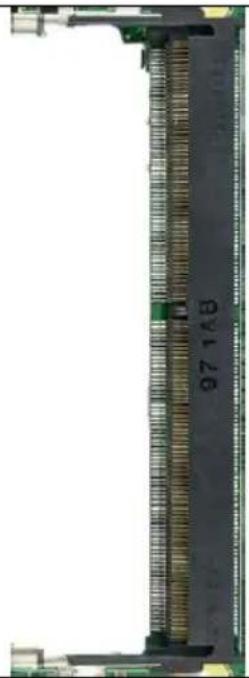 | |
| Location | J2 | ||
| Type Description | SOCKET_DDR4SO-DIMM_260PIN_90° | ||
| Manufacturer and Part Number | Foxconn ASAA826-EASB0-7H | ||
| Mating Connector | NVIDIA® Jetson Nano(Version B01) / | ||
| Pinout | Please refer to NVIDIA Jetson Nano System-on-Module datasheet for pinout details. | ||
| Remarks | https://developer.nvidia.com/ embedded/downloads | ||
3.4 Fan Power connector
| Function | Fan Power Connector |  | ||
| Location | J3 | |||
| Type Description | WAFER_1*4PIN_1.25mm_90° | |||
| Manufacturer and Part Number | ACES 50271-0040N-001_BLACK | |||
| Pinout | Pin # | Description | ||
| PIN 1 | GND | |||
| PIN 2 | Power +5V | |||
| PIN 3 | FAN_TACH | |||
| PIN 4 | FAN_PWM | |||
| Remarks | None | |||
3.5 MIPI CSI-2 DPHY Lanes
| Function | MIPI camera module connector | 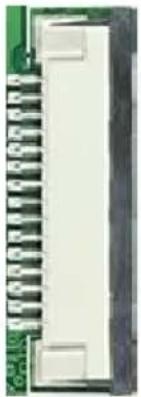 | ||
| Location | J4 , J5 | |||
| Type Description | WAFER_15PIN_1mm_90° | |||
| Manufacturer and Part Number | CHAMPWAY AFA07-S15FCA-HF_FPC ZIF-LOWER | |||
| Mating Connector | 2 Lane MIPI CSI-2 camera connector (15Pin) | |||
| Pinout | PIN# | Description | PIN# | Description |
| PIN 1 | GND | PIN 9 | CSI2_CLK_P | |
| PIN 2 | CSI2_D0_N | PIN 10 | GND | |
| PIN 3 | CSI2_D0_P | PIN 11 | MIPI2_PWDN | |
| PIN 4 | GND | PIN 12 | CAM2_MCLK | |
| PIN 5 | CSI2_D1_N | PIN 13 | CSI2_I2C_SCL | |
| PIN 6 | CSI2_D1_P | PIN 14 | CSI2_I2C_SDA | |
| PIN 7 | GND | PIN 15 | +3V3_MIPI | |
| PIN 8 | CSI2_CLK_N | |||
3.6 RTC Battery Connector
| Function | RTC battery for module |  | ||
| Location | J6 | |||
| Type Description | 2.0mm wire-to-board header 02P type | |||
| Manufacturer and Part Number | Pinrex, 721-94-02TWR9 | |||
| Mating Connector | Tyu, TU2001HNO-02 | |||
| Pinout | Pin # | Description | ||
| PIN1 | 3V Power | |||
| PIN2 | GND | |||
| Remarks | RTC Battery: MITSUBISHI, CR2032 3V | |||
3.7 OTG/USB Micro-Type Connector
| Function | OTG programming recovery |  |
| Location | J7 | |
| Type Description | USB micro-type B female connector | |
| Manufacturer and Part Number | Fullglory, FG-MCB-111440 | |
| Mating Connector | Any USB standard Micro-type interface cable or device. | |
| Pinout | Please refer to USB Micro-type standard. | |
| Remarks | None | |
3.8 20-Pin GPIO expansion
| Function | General-purpose input/output) |  | ||||
| Location | J8 | |||||
| Type Description | 2x I2C, 1x UART, 9x GPIOs | |||||
| Manufacturer and Part Number | 光桀_PHPME006-100ARRH | |||||
| Mating Connector | 20-Pin GPIO expansion | |||||
| Pinout | NO111B | |||||
| Address | Pin Name | 20-Pin Index | Pin Name | Address | ||
| +3V3 | 1 | 2 | +5V | |||
| GND | 3 | 4 | GND | |||
| /dev/i2c-1 | I2C1_SDA | 5 | 6 | UART2_TXD_3V3 | Debug Console /dev/ttyS0 | |
| I2C1_SCL | 7 | 8 | UART2_RXD_3V3 | |||
| /dev/i2c-0 | I2C0_SDA | 9 | 10 | GND | ||
| I2C0_SCL | 11 | 12 | SPI1_SCK | gpio14 | ||
| gpio79 | I2S0_SCLK | 13 | 14 | SPI1_MISO | gpio13 | |
| gpio78 | I2S0_DOUT | 15 | 16 | SPI1_MOSI | gpio12 | |
| gpio77 | I2S0_DIN | 17 | 18 | SPI1_CS0 | gpio15 | |
| gpio76 | I2S0_FS | 19 | 20 | SPI1_CS1 | gpio232 | |
| NX211B | ||||||
| Address | Pin Name | 20-pin index | Pin Name | Address | ||
| +3V3 | 1 | 2 | +5V | |||
| GND | 3 | 4 | GND | |||
| /dev/i2c-8 | I2C1_SDA | 5 | 6 | UART2_TXD | /dev/ttyTCU0 Debug Console | |
| I2C1_SCL | 7 | 8 | UART2_RXD | |||
| /dev/i2c-1 | I2C0_SDA | 9 | 10 | GND | ||
| I2C0_SCL | 11 | 12 | SPI1_SCK | gpio480 Bidirection | ||
| gpio445 Bidirection | I2S0_SCLK | 13 | 14 | SPI1_MISO | gpio481 Bidirection | |
| gpio446 Bidirection | I2S0_DOUT | 15 | 16 | SPI1_MOSI | gpio482 Bidirection | |
| gpio447 Bidirection | I2S0_DIN | 17 | 18 | SPI1_CS0 | gpio483 Bidirection | |
| gpio448 Bidirection | I2S0_FS | 19 | 20 | SPI1_CS1 | gpio484 Bidirection | |
NO111B
| Address | Pin Name | 20-Pin Index | Pin Name | Address | |
| +3V3 | 1 | 2 | +5V | ||
| GND | 3 | 4 | GND | ||
| /dev/i2c-1 | I2C1_SDA | 5 | 6 | UART2_TXD_3V3 | Debug Console /dev/tty50 |
| I2C1_SCL | 7 | 8 | UART2_RXD_3V3 | ||
| /dev/i2c-0 | I2C0_SDA | 9 | 10 | GND | |
| I2C0_SCL | 11 | 12 | SPI1_SCK | gpio14 | |
| gpio79 | I2S0_SCLK | 13 | 14 | SPI1_MISO | gpio13 |
| gpio78 | I2S0_DOUT | 15 | 16 | SPI1_MOSI | gpio12 |
| gpio77 | I2S0_DIN | 17 | 18 | SPI1_CS0 | gpio15 |
| gpio76 | I2S0_FS | 19 | 20 | SPI1_CS1 | gpio232 |
NX211B
| Address | Pin Name | 20-pin Index | Pin Name | Address | |
| +3V3 | 1 | 2 | +5V | ||
| GND | 3 | 4 | GND | ||
| /dev/i2c-8 | I2C1_SDA | 5 | 6 | UART2_TXD | /dev/ttyTCU0 Debug Console |
| I2C1_SCL | 7 | 8 | UART2_RXD | ||
| /dev/i2c-1 | I2C0_SDA | 9 | 10 | GND | |
| I2C0_SCL | 11 | 12 | SPI1_SCK | gpio480 Bidirection | |
| gpio445 Bidirection | I2S0_SCLK | 13 | 14 | SPI1_MISO | gpio481 Bidirection |
| gpio446 Bidirection | I2S0_DOUT | 15 | 16 | SPI1_MOSI | gpio482 Bidirection |
| gpio447 Bidirection | I2S0_DIN | 17 | 18 | SPI1_CS0 | gpio483 Bidirection |
| gpio448 Bidirection | I2S0_FS | 19 | 20 | SPI1_CS1 | gpio484 Bidirection |
3.9 Gigabit Ethernet Connector
| Function | 1Gb Ethernet connector, used to connect to the host system. |  |
| Location | J10 | |
| Type Description | RJ45 8P8C single-port with LED | |
| Manufacturer and Part Number | Champway, 8188D-B514-00200 | |
| Mating Connector | Any RJ45 plug with Cat5, Cat5e, Cat6 type cabling. | |
| Pinout | Comply with Ethernet standards. | |
| Remarks | None | |
3.10 USB 3.1 Gen 1 Type-A Connector #1 and #2
| Function | USB 3.1 Gen 1 Type-A connector #1 & #2 |  | |
| Location | J11 | ||
| Type Description | Dual-port USB 3.1 Gen 1 Type-A female connector | ||
| Manufacturer and Part Number | Foxconn, UEA1112C-4HK1-4H | ||
| Mating Connector | Any USB 3.1 standard Type-A interface cable or device. | ||
| Pinout | Please refer to USB 3.1 Gen 1 standard. | ||
| Remarks | None | ||
3.11 HDMI OUTPUT
| Function | HDMI output connector |  |
| Location | J12: HDMI | |
| Type Description | HDMI Type-A female connector | |
| Manufacturer and Part Number | Compupack, ACNHM220028-001 |  |
| Mating Connector | Any HDMI standard Type-A interface cable or device. | |
| Pinout | Please refer to HDMI standard. | |
| Remarks | None | |
3.12 Optional Function Selection
| Function | Fan PWM controller/Auto Power on |  | ||
| Location | SW5 | |||
| Type Description | 4 SPST DIP switch | |||
| Manufacturer and Part Number | DIPTRONICS IN OFF-SWITCHING 0.025A/24VDC | |||
| Pinout | ||||
| SW | Description | ON | ||
| S1 | Fan PWM controller | Fan always on | ||
| S2 | N/A | N/A | ||
| S3 | Auto power on | Auto power on disabled | ||
| S4 | Test mode off | Test mode on (for factory use) | ||
| Remark | Default S1 on | |||
3.13 Micro SD Card Slot
| Function | Micro SD Card | 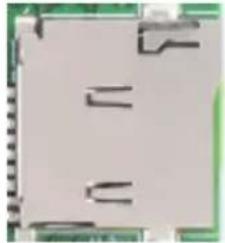 |
| Location | J13 | |
| Type Description | SOCKET_MICRO SDCARD_9PIN_90°_SMD | |
| Manufacturer and Part Number | Fullglory, FG-0011BAAS09A | |
| Pinout | Refer to MicroSD card standard | |
| Remark | None | |
3.14 Other Switches and Jumpers
Other switches and jumpers listed on the boards but not mentioned in this manual are reserved for the internal use by AVerMedia. They are not open to the client application.
AVerMedia
4.0 Installation
- Check and ensure all the external system power supplies are turned off.
- Install the Micro USB2.0 cable to OTG connector.
- Press and hold on the Recover button.
- Connect the power cord to the box PC.
4.1 BSP Setup Instructions
BSP (board support package) file: EN715-R1.0.*.tar.gz for NO111B
BSP (board support package) file: EN715-NX-R1.0.*.tar.gz for NX211B
https://www.avermedia.com/professional/download/en715#parentHorizontalTab2
Default login username/password of the BSP is nvidia/nvidia
If you have difficulties to access the BSP download link, please visit AVerMedia website at https://www.avermedia.com/professional/download, or contact technical support at https://www.avermedia.com/professional/technical_support or e-mail us at eusupport@avermedia.com for further assistance.
BSP Installation steps for NVIDIA Jetson board: (Important Note: Please backup your personal files before re-flashing BSP)
After you download the BSP file and put the file in a Linux PC, please refer to the steps below to re-flash BSP.
1. Let the JETSON Nano/Xavier NX initiate recovery mode.
You have to keep pressing “Recovery” button and then power on the NVIDIA Jetson board to initiate recovery mode.
When connecting a NVIDIA Jetson board to a Linux PC via a MicroUSB to USB cable, you can check kernel messages with `dmesg` command in the Linux PC.
Once you see these messages in the kernel messages, this means that the NVIDIA Jetson board is in the recovery mode.
[24685.229129] usb 1-7: Product: APX
[24685.229132] usb 1-7: Manufacturer: NVIDIA Corp
2. Using the commands below in the Linux PC to start re-flashing BSP.
\$ sudo tar zxvf EN715-R1.0.*.tar.gz
(file: EN715-R1.0.*.tar.gz for NO111B/ file: EN715-NX-R1.0.*.tar.gz for NX211B)
\$ cd JetPack_*.**/Linux_for_Tegra
\$ sudo ./flash.sh Jetson-nano-emmc mmcblk0p1
(For the Xavier NX module:
\$ sudo ./flash.sh Jetson-xavier-nx-devkit-emmc mmcblk0p1)
Note: sudo is required to re-flash the BSP.
5.0 Software
For L4T (Linux for Tegra) BSP support and the other software support associated with NVIDIA® Jetson Nano / Xavier NX , please visit AVerMedia website to contact our technical support function. (https://www.avermedia.com/tw/support/contact)
6.0 Force Recovery Mode
USB 3.1/OTG port of NO111B/NX211B can be used to re-program NVIDIA ^® Jetson NANO/Xavier NX by using the other host system running NVIDIA Jetpack, as the procedure described below.
-
Power off the system. Ensure the system power must be completely OFF, instead of staying in the suspend mode or the sleep mode.
-
Connect a USB cable from OTG USB port to the other host system which will be used to re-program the new system file into NVIDIA ^® Jetson Nano/ Xavier NX.
-
Press and hold down Force Recovery Button and then power on the carrier board.
-
After three seconds, release Force Recovery Button.
-
NVIDIA ^® Jetson Nano/Xavier NX will show up on the USB list of the host system as a new NVIDIA target device.
-
After the system software is updated successfully, please ensure to power off the system. A clean power-on will then revert OTG port back to the host mode.
7.0 Power Consumption
| Item Description | Power Consumption |
| TheoreticalMaximum SystemPower Consumption | ● Maximum power consumption of NO111B is about 14W● Maximum power consumption of NX211B is about 18.5WThe condition is connected to HDMI and RJ45 with CPU/ GPU full loading.(maximum power consumption up to 60W based on adapter) |
| Typical SystemPower Consumption | The power consumption under the normal operating mode is depending on the application software running with NVIDIA® Jetson Nano /Xavier NX. |
8.0 Accessory Drawings
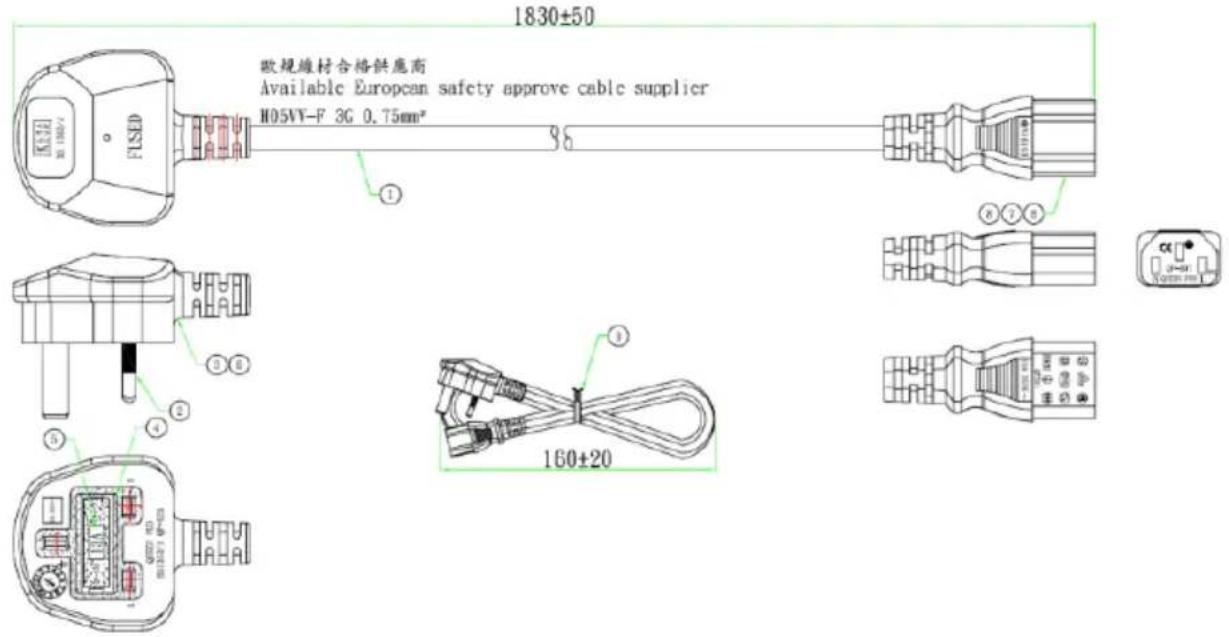
8.1 Fan Module/ Adapter/ Power Cord
Fan Module for NANO
Vendor A :
■ Rated Voltage: 5V
■ Operating Voltage Range: 4V\~5.5V
■ Rated Speed: 6000RPM±10%
(Testing Speed After Continuous 3 Minute Operation At Ambient Temperature Of 25°C)
■ Life Expectancy: 70,000 hours at 40°C (WITH 15\~65% RH)
■ Bearing Type: Two Ball

(Testing Speed After Continuous 3 Minute Operation At Ambient Temperature Of 25°C)
■ Life Expectancy: 70,000 hours at 40°C (WITH 15\~65% RH)
■ Bearing Type: Two Ball

| ITEM | DESCRIPTION | QUANTITY | SPEC. |
| 1 | SINK | 1 | ALG003 COLOR BLACK |
| 2 | FAN | 1 | 4010-6000rpm-SV LIFE EXPECTANCY: 70000 HOURS AT 45°C |
| 3 | SCREW | 4 | T2.6 L12 |
| 4 | 相形单PAE | 1 | TIC TM 805A, R=2.0 15*15*0.13 |
| 5 | SPRING SCREW | 4 |
| 是否需要 | Cable Documented Reference | Label | Type | Description | Date | Time | Description | Name | Maturity | |||||
| DATE | ORDER | |||||||||||||
| 8 October 1st, 2014 | 4th May 30, 2014 | 2015 | 19 March 19 | 19 March 19 | 2015 | 2014 | ||||||||
| 10 November 1st, 2014 | 4th May 30, 2014 | |||||||||||||
| 10 December 1st, 2014 | 4th May 30, 2014 | |||||||||||||
| 11 January 1st, 2014 | 4th May 30, 2014 | |||||||||||||
| Total Data Table | 4th May 30, 2014 | |||||||||||||
| Total Data Table | 4th May 30, 2014 | |||||||||||||
| SHEET OF PAUL NO. | PAAUL NO. | PAAUL NO. | ||||||||||||
Fan Module for NX
■ Rated Voltage: 5V
■ Operating Voltage Range: 4V\~5.5V
■ Rated Speed: 6000RPM±10%
(Testing Speed After Continuous 3 Minute Operation At Ambient Temperature Of 25°C)
■ Life Expectancy: 70,000hours at 40°C (WITH 15\~65% RH)
■ Bearing Type: Two Ball

064APOWERBRW-IPD (UK version)
AVerMedia

NVIDIA
ELITE
PARTNER
064APOWERBR5-IPD (EU version)

AVerMedia

NVIDIA
ELITE
PARTNER
064APOWERBSL (JP version)

064APOWERBR4-IPD (CN version)

9.0 Dimension Drawings and Assembly Drawings
9.1 Dimension Drawings of carrier board
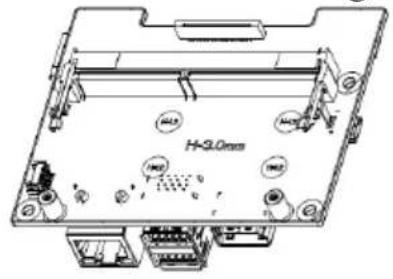
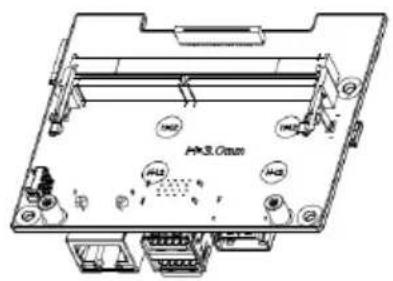


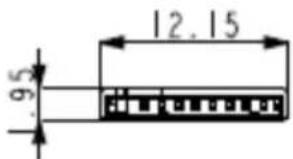
9.2 Dimension Drawing of NO111B/ NX211B Box PC

natural_image
Technical line drawing of a mechanical housing with a grid pattern on top and side panels (no text or symbols)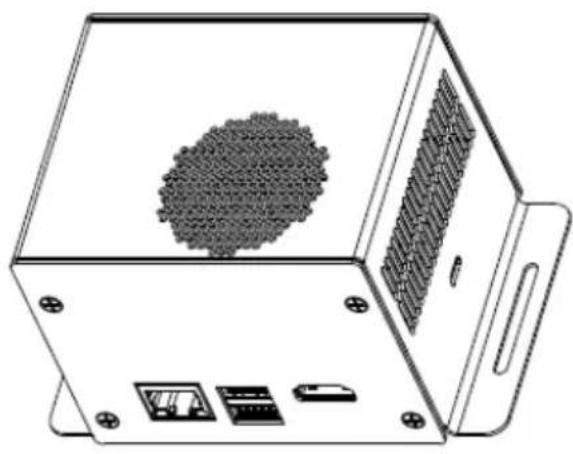
natural_image
Technical line drawing of a device casing with internal components and a central textured sphere (no text or symbols)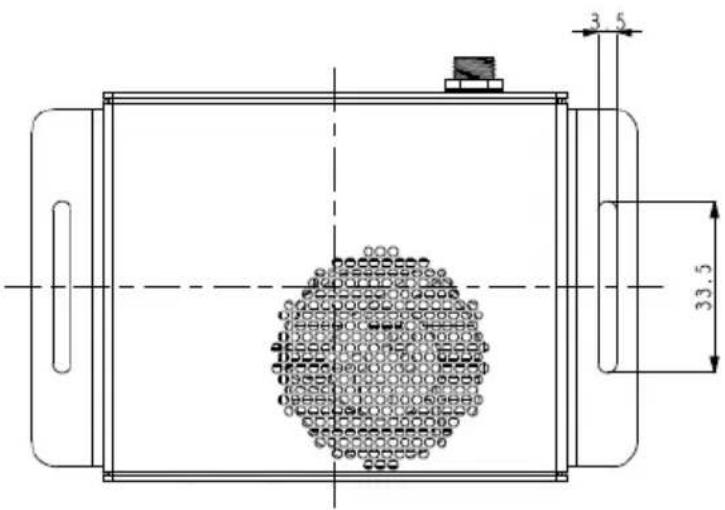

natural_image
Technical line drawing of a device casing with two connectors and a central rectangular component (no text or symbols)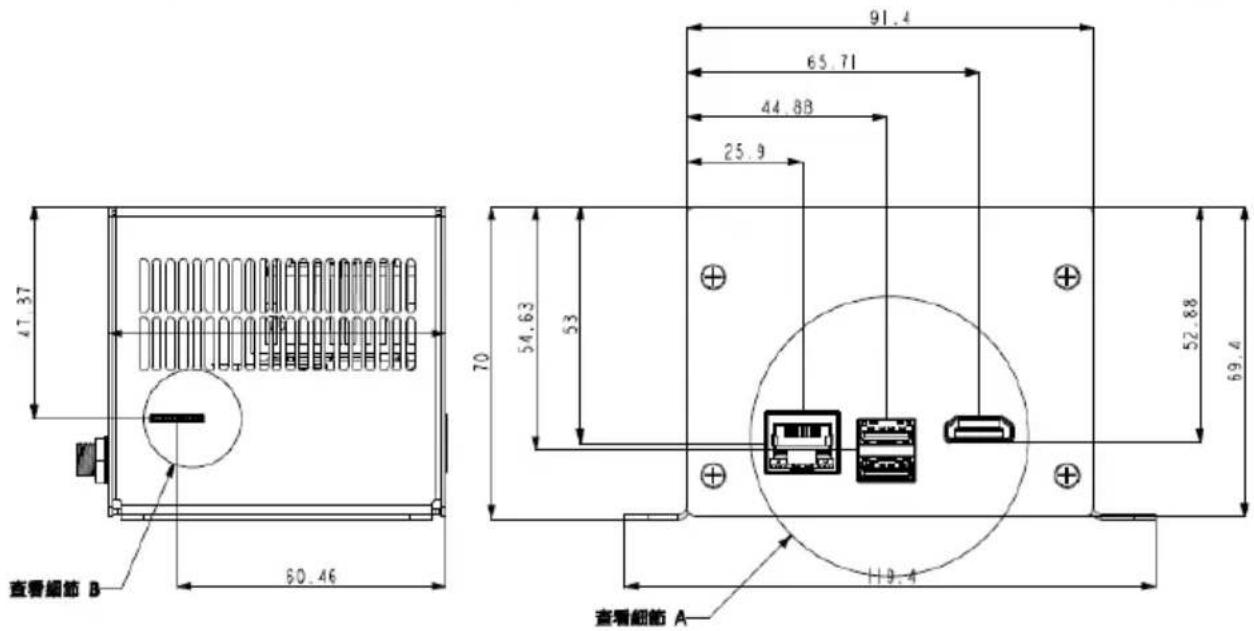


- AVerAI NO111B/NX211B Box PC
- Table of Contents
- Preface....3
- Introduction......7
- Product Overview 10
- Feature Description.... 15
- AVerMedia
- Preface
- Disclaimer
- Technical Support
- Contact Enquiry
- Download User Manual
- AVerMedia Global Offices
- https://www.avermedia.com/professional/contact
- Headquarters
- The Americas
- USA Office
- Brazil Office
- Latin America Office
- Europe
- Head Office EU
- Russia Office
- Spain Office
- Asia-Pacific
- China Office
- Japan Office
- Limited Product Warranty
- Copyright Notice
- Trademark Acknowledgement
- ESD Warning
- Introduction
- OPTION ACCESSORY
- Product Overview
- Block Diagram
- Front View and Back View of Carrier board
- Front View and Three-Quarter View of NO111B/ NX211B BoxPC
- Feature Description
- Connector and Switch Locations
- Other Switches and Jumpers
- Installation
- BSP Setup Instructions
- Let the JETSON Nano/Xavier NX initiate recovery mode.
- Using the commands below in the Linux PC to start re-flashing BSP.
- Software
- Force Recovery Mode
- Accessory Drawings
- Fan Module/ Adapter/ Power Cord
- Fan Module for NX
- Dimension Drawing of NO111B/ NX211B Box PC
Brand : AVERMEDIA
Model : NO111B
Category : Recorder